
Techeligible

Menu
  • HOME
  • SELECT FRP BRAND
    • SAMSUNG
    • HUAWEI
    • NOKIA
    • ZTE
    • LG
    • MOTO
    • ASUS
    • XIAOMI
    • OTHER PHONE
  • DOWNLOAD FRP TOOLS
  • OTHER FREE TOOLS
    • SAMSUNG TOOLS
    • Z3X Samsung Tool Pro [FREE]
    • Octopus | Octoplus (With Loader)
    • Miracle 2.93 (With Loader)
    • Miracle Thunder 2.82 (With Loader)
    • Miracle 2.58 (With Loader)
    • Miracle 2.54 (With Loader)
    • Miracle Xiaomi 1.56 (With Loader)
    • Unlock Tools with Loader
    • COMBINATION FIRMWARE
    • Other FRP Tools
  • FIX ANDROID ISSUES
  • HARD RESET

Home » Huawei FRP Bypass » Bypass FRP Huawei Mate 9 by running into the Safe Mode

Bypass FRP Huawei Mate 9 by running into the Safe Mode

Bypass frp hauwei mate 9 by new method
Last Updated on: November 25, 2024

Have you lost your access to your Huawei device? To get your device, follow up up our easy guideline for Bypass frp Huawei Mate 9 without using any paid services. We will put our device into the (Recovery Mode), from there, we will factory reset our device and use device back into the (Safe Mode).

Warning: This Article is only for educational purpose, try this frp method only to bypass frp your Own Phone.


Let’s Start to Bypass frp Huawei Mate 9:

Step 1: Turn off phone, While holding a (Volume UP) key, just connect a USB charging cable, keep holding (Volume UP) key until you enter into “Recovery Mode”.

Step 2: Go to > Download Latest version and recovery > Download and Recovery > Connect to your WiFi network.

Step 3: This will start downloading package from server, the downloading time depends on your internet speed, as the file is big large, this may take several minutes to be finished, and after that, the Huawei mate 9 will auto reboot.
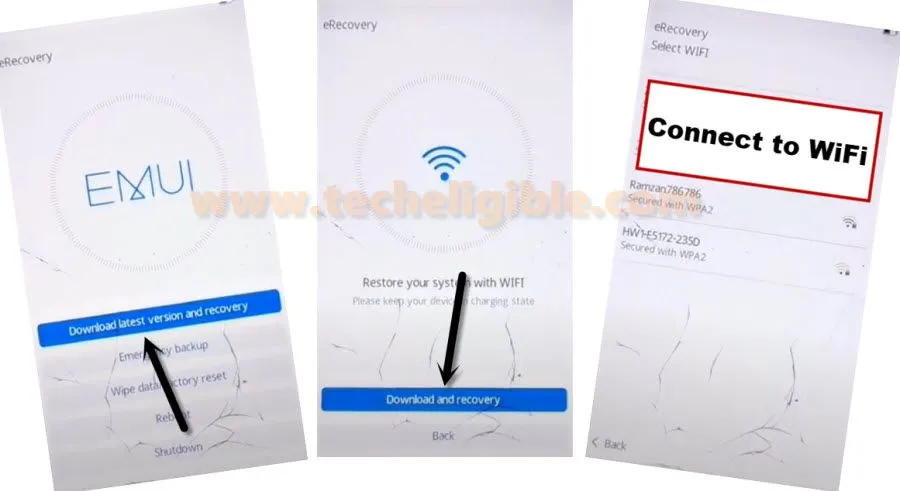
Download Latest version and recovery huawei mate 9


Step 4: Turn off your device, and again put your phone into Recovery Mode by holding “Volume UP” key, and connect USB cable.

Step 5: Go to > Wipe data/factory reset > Factory Reset > Yes > Factory Reset > Wipe Data/Factory Reset.
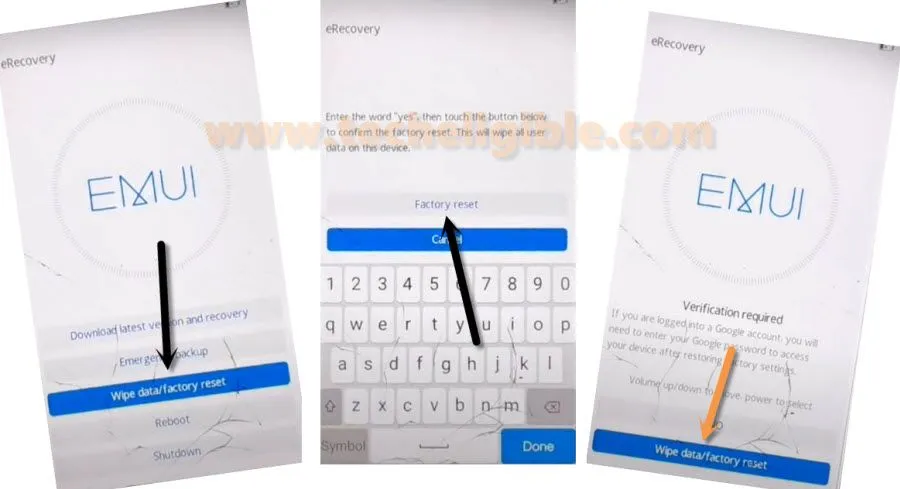
wipe data factory reset


Step 6: Select “Safe Mode”, and this will reboot your phone into safe mode, from there we will be able to Bypass frp Huawei Mate 9 easily just by soft reset the device.
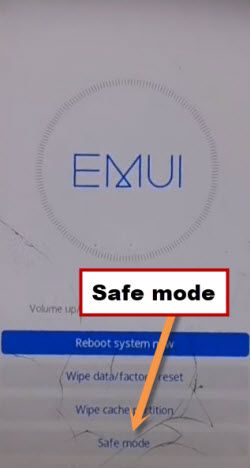
Run in Safemode huawei mate 9 to bypass frp


Step 7: Tap to “Settings” gear icon from homepage, and then tap to > System > Reset > Reset Phone > Reset Phone > Reset Phone.
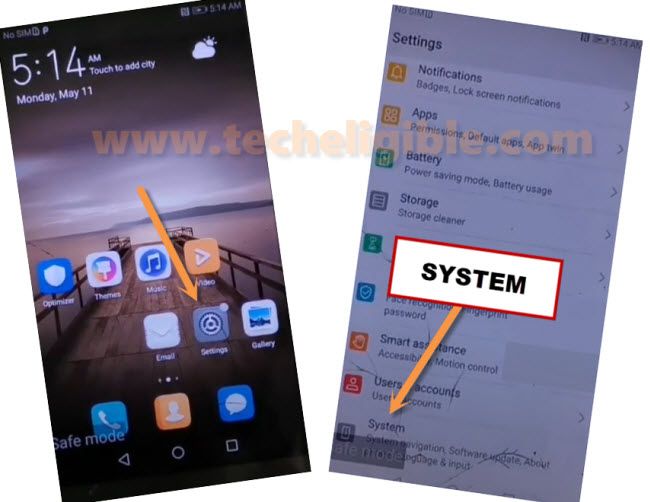
go to system of huawei mate 9 to bypass frp


Final Step: Now just finish your initial setup to access your device normally without having any frp locked, and later on you can add your new Google account in your phone manually to setup new frp lock feature.

Related posts:


  1. Bypass frp Huawei Y9s/Y9 Prime Android 10 STK-L21M without PC and Safe Mode

  2. Bypass frp Huawei Nova 2 Plus Without Talkback [Updated]

  3. Bypass FRP Huawei Mate 20 Lite Android 10 [NO PC]

  4. Bypass FRP Account Huawei Y6 Android 6 Without PC
December 14, 2020
No Comments

Post navigation

Bypass FRP Samsung Galaxy ON8 (Android 7) – Without PC
How to Bypass Google Account Huawei P9 Without PC
Subscribe
Login
Notify of
guest

guest

This site uses Akismet to reduce spam. Learn how your comment data is processed.

0 Comments
Newest
Oldest Most Voted

Subscribe Yourself

Get new posts by email

Download Center

  • Download FRP Tools
  • SAMSUNG Tools
  • Other PC Tools
  • Combination ROM | FIRMWARE
  • Miracle V3.28 (With Loader)
  • Miracle Xiaomi 1.56 (With Loader)
  • Download Miracle 2.93 (With Loader)
  • Miracle Thunder 2.82 (With Loader)
  • Octopus All Version (With Loader)
  • Samfirm Tool V3.1

Contact US

  • Home
  • About US
  • Contact US
  • Privacy Policy
  • Advertise

Techeligible. All Rights Reserved

Theme by TheClassicTemplate

TECHELIGIBLE
  • HOME
  • SELECT FRP BRAND
    • SAMSUNG
    • HUAWEI
    • NOKIA
    • ZTE
    • LG
    • MOTO
    • ASUS
    • XIAOMI
    • OTHER PHONE
  • DOWNLOAD FRP TOOLS
  • OTHER FREE TOOLS
    • SAMSUNG TOOLS
    • Z3X Samsung Tool Pro [FREE]
    • Octopus | Octoplus (With Loader)
    • Miracle 2.93 (With Loader)
    • Miracle Thunder 2.82 (With Loader)
    • Miracle 2.58 (With Loader)
    • Miracle 2.54 (With Loader)
    • Miracle Xiaomi 1.56 (With Loader)
    • Unlock Tools with Loader
    • COMBINATION FIRMWARE
    • Other FRP Tools
  • FIX ANDROID ISSUES
  • HARD RESET
wpDiscuz