
Have you lost access to your infinix device right after hard reset the device. That happens just because of forgetting google account. You have 2 options to regain control of your device, 1 is to recover your Gmail account and 2nd one is to follow up this way to Bypass FRP Infinix Hot 50 Pro Plus (Android 15/14 versions).
Check our your phone android version first, after that, choose the right method from below and apply on your phone. This method has been applied successfully on a model (Infinix x6880).
Disclaimer: Do not attempt this frp method on a device that has been stolen, as it is a severe offense. Engaging in frp bypass procedures on stolen phones may result in imprisonment. This process is intended solely for the device’s rightful owner and for educational purposes.
Method 1: Bypass FRP Infinix Hot 50 Pro Plus (Android 15)
-Switch on phone and have a proper WiFi connection. Afterwards, go on (Verify your account) page. On that screen, long hold with two fingers.
-Afterwards, you need to tap on a link “Privacy Policy”.

-Once you reach on the privacy policy screen, simply, long hold any text, then from popup options list, tap on “Next arrow” icon. Go to > Translate > Agree.
-Another popup window will appear up, just tap to > Related Translations Tools > Agree.

-Simply, go to “Camera” option from bottom search bar.
-Afterwards, from the popup screen, give permission by tapping at “While using the app”.
-From the next camera screen, tap to “Image” icon.

-We need to long tap at the “Photos” application, then, tap on “Open”.

-Cancel the popup window of (Get Started with google photos) by tapping anywhere on screen.
-Then, from the (Google Photos) screen, take any screen shot by long holding (Power + Volume Down) and then, tap on your “Screen Shot taken image”.
-Go to “3 dots” icon.

-Lets over the “Search” from next page.
-From the next (Google Lens) page, just go down and tap at any image that is from the (Youtube) source.

-To reach on the youtube webpage, just tap at “Visit” button.
-From the popup window, tap to “Allow” option. After reaching on the youtube black screen, just hit on “Home” icon.

-Tap on the “Profile” icon from top corner. Afterwards, tap “Settings” option.

-We have to tap on > About > Youtube terms of services.
Turn on USB Debug Mode
-You will see top search bar on the youtube page, just type there “Techeligible“.
-Go to 1st searched result to access our site. After that, tap to “Menu” icon from top corner and then, go to “Download FRP Tools”.
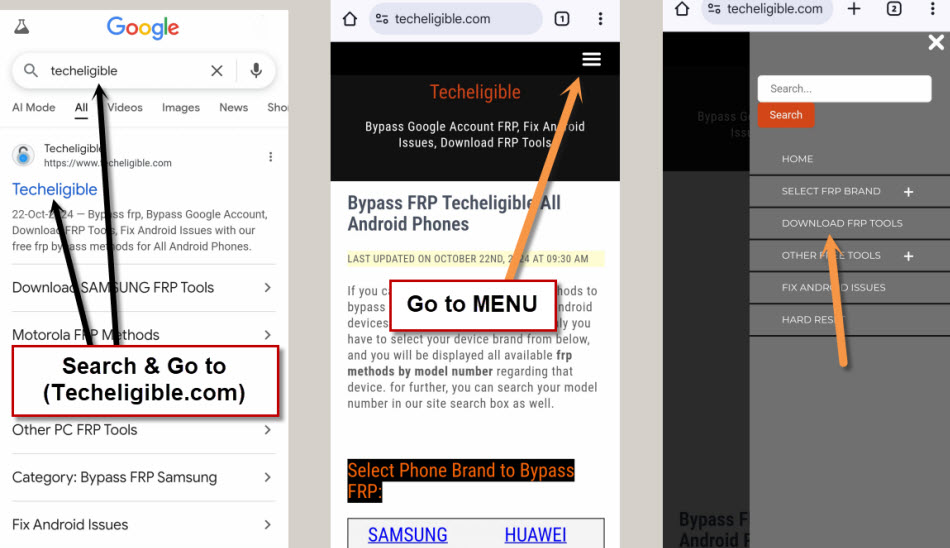
-Scroll down from the frp tools screen, tap to “Open Dialer Code” option.
Note: If you see popup window, just choose the “Call number” option.

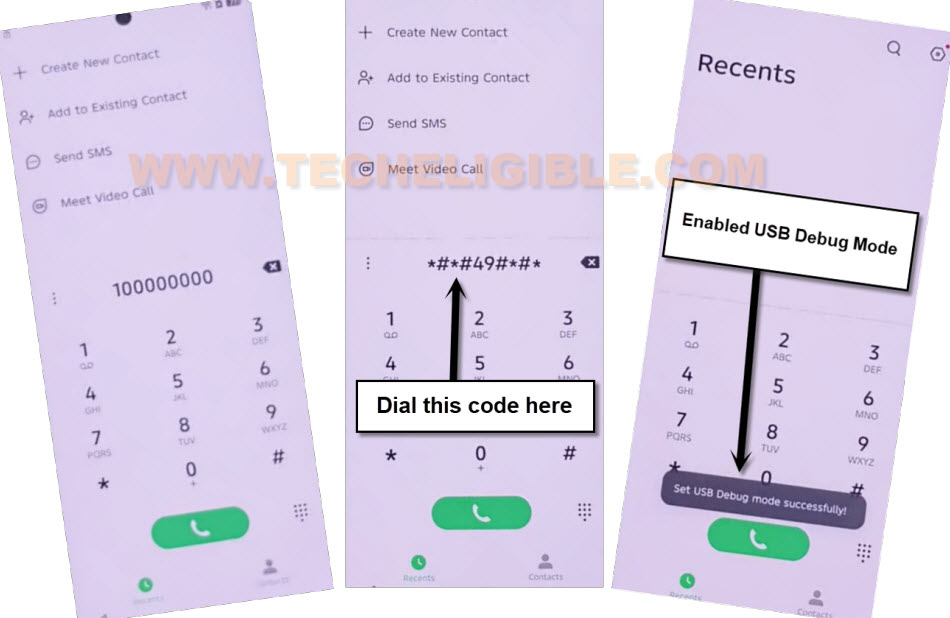
-To enable the USB debug mode, you have to dial this code on screen *#*#49#*#*.
Use the PC (Samfirm) Tool
-We are going to get help with the free (Samfirm) tool. For this, download any one version of the Samfirm tool on your PC.
Note: Try with downloading the (Samfirm 1.4.3), if you see any error page, just tap to “Details”. After that, click on the (Only Visit this Site).
| ⇒ Samfirm Tool 1.4.3 | Samfirm V3.1 |
-After downloading is done, extract the downloaded tool and open on your PC.
-Connect your phone with PC using proper USB Cable. Do make sure, you also have installed proper Infinix USB driver on PC.
-From the tool interface, go to > Android Tools > Read Device info.
Note: On Samfirm V3.1 tool, you will see different options, all you have to do is, first go to (Read device info) option. After that, go to (Reset FRP) option.

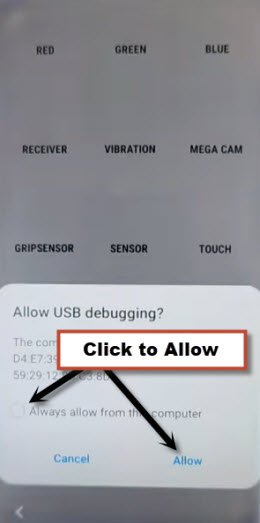
-A popup window will appear up on your Infinix Hot 50 Pro Plus phone screen. Just check mark the “Always Allow from this computer”, then, tap to “Allow”.
-Finally, click on “Reset FRP” option from the samfirm tool. This will start bypassing the frp lock from the phone and within few seconds, your device will be free from frp.

-It’s all done from bypass frp Infinix Hot 50 Pro Plus. We can disconnect the phone from PC and complete startup steps now.
Method 2: Bypass FRP Infinix Hot 50 Pro Plus (Android 14)
-You have to switch on infinix device & Connect WiFi. After that, go all the way back to (Select Language) screen.
-Tap 3-4 times quickly on (Select Language) screen, by doing this, you will be redirected to the (Verify pattern) screen. If the pattern lock is not setup, then you may reach to another screen.

-From there, long hold with your 2 fingers together for 20-30 seconds, after that, you will be redirected on other screen same as shown in below image.
-Go to “Privacy Link” from there.

-You will be on a (Smart touch privacy policy) article page. From there, long hold on text and tap to “Share”.
-Go to > Quick Share > Continue.

-We have to tap few links to go to chrome browser screen. Just tap on > Learn more > Next > Settings.

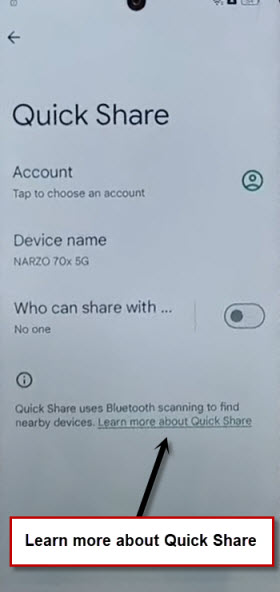
-After that, you have to tap on a “Learn more about Quick Share” same as shown below.
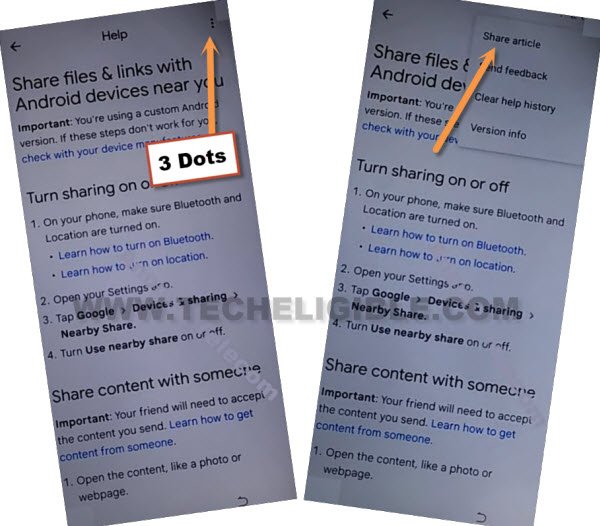
-Let’s hit over “3 dots kebab menu” icon from top right corner.
-Afterwards, tap to “Share Article” option.
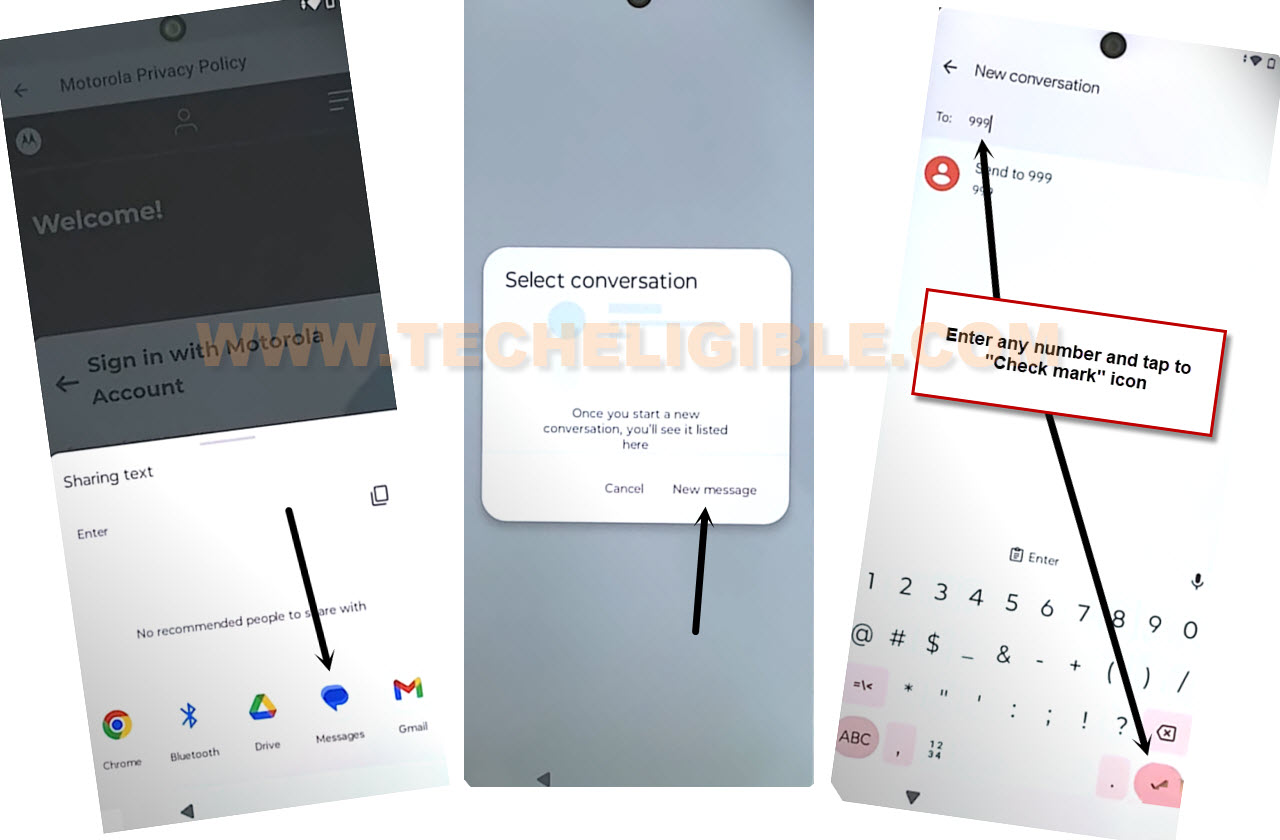
-You will displayed a popup window of sharing applications. From there, go to > Message > New Message.
-Type any number (TO) field tab and tap to “send to” option. You can also tap on “Check mark” option. We just have to open up new message inbox screen.
-From message inbox screen, just tap on a “Camera” icon. Afterwards, you have to take any random pic using your device camera.
-From image page, just hit over a “Attach” option.

-Tap on your recently taken image from inbox screen and hit on “Share” option.
-After that, go to “Google search image” app.

-You are now on a Google lens page. Let’s hit over a > 3 dots > Terms of service.
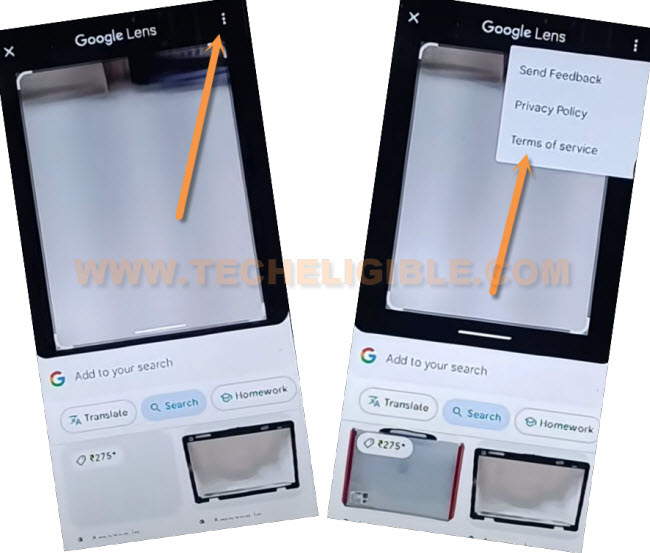
-We can easily access to google chrome browser just by tapping on “Use without an account”. After that, go to “Got it” option from bottom to Remove FRP Infinix Hot 50 Pro Plus.
-Let’s long tap at any text and go to “>” this next arrow option.
-You will be shown further options there, just choose “Web search”.

Reach on Settings Screen
-Search in chrome browser search bar with “Techeligible“. After that, visit same searched result as shown in below screen shot to access our official site.
-After accessing there, just go to “Menu” icon from upright corner. After that, tap on “Download FRP Tools” option.

-From there, go to “Access Device Settings” option. Within few seconds, you will be inside your infinix hot 50 main settings page.
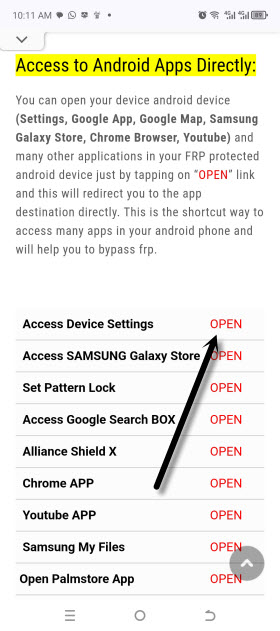
-We can easily turn on (Accessibility function) just by tapping at > Special Function > Accessibility > Accessibility MENU.
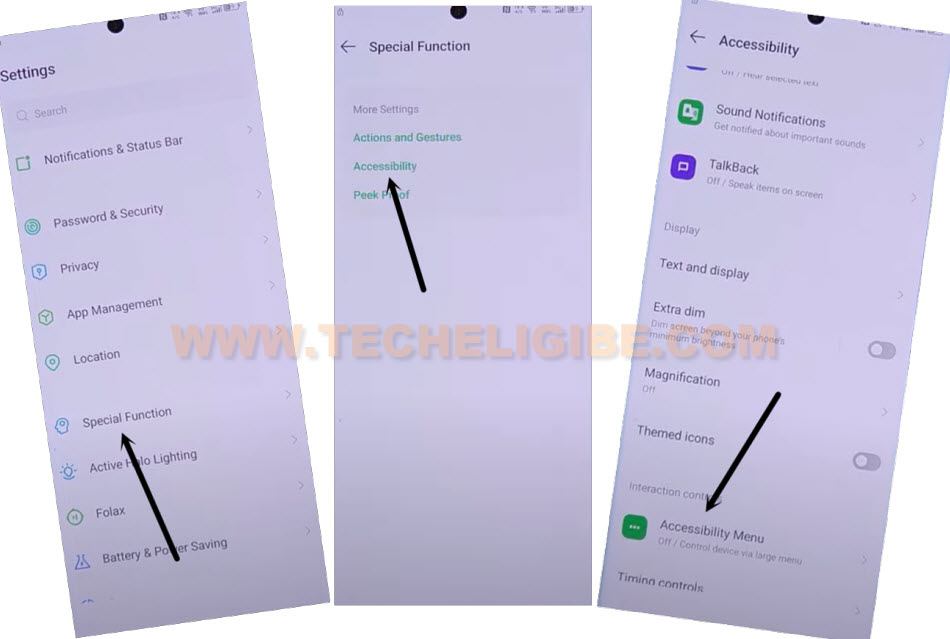
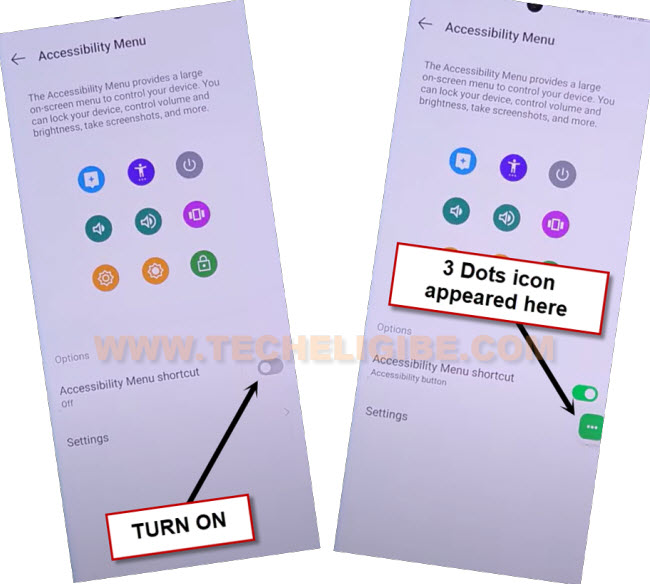
-Let’s turn on now “Accessibility Menu Shortcut” option. Afterwards, from popup screen, go to > Allow > Got it.
-After turning on accessibility successfully, you will see there a (3 dots) icon.
Time to Reach back on main “Settings” Page
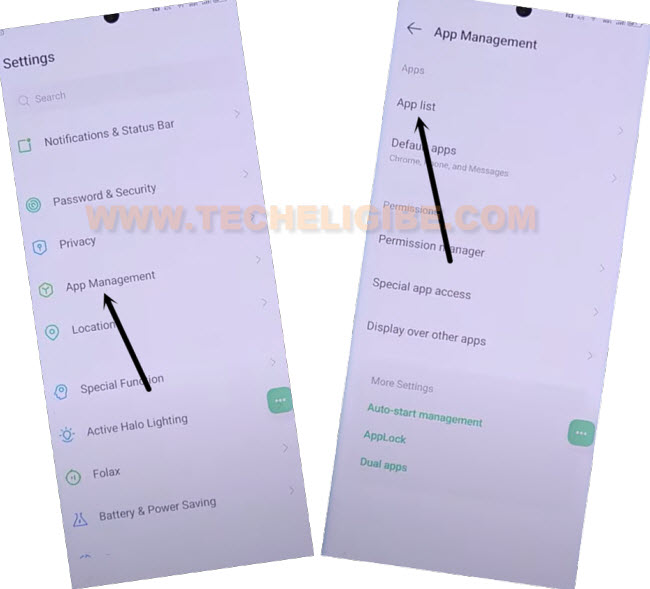
-Tap few times on back arrow icon to go back to main (Settings) page. From there, tap over a > App Management > App list.
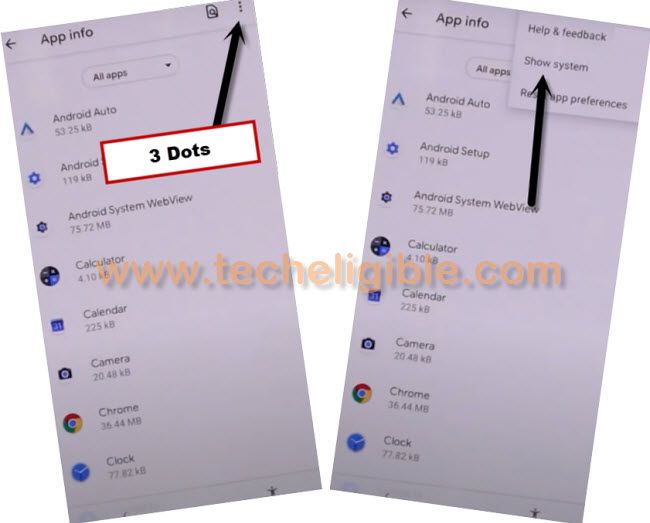
-Tap also on “3 dots” kebab menu from top corner and go to “Show system” option.
-Let’s enable show system option to display all hidden apps. Just hit on a > 3 dots > Show system.
Disable Few Apps
-We’re going to disable some apps now. Just tap to first app named “Android Setup”.
-Go to > Force Stop > Ok.
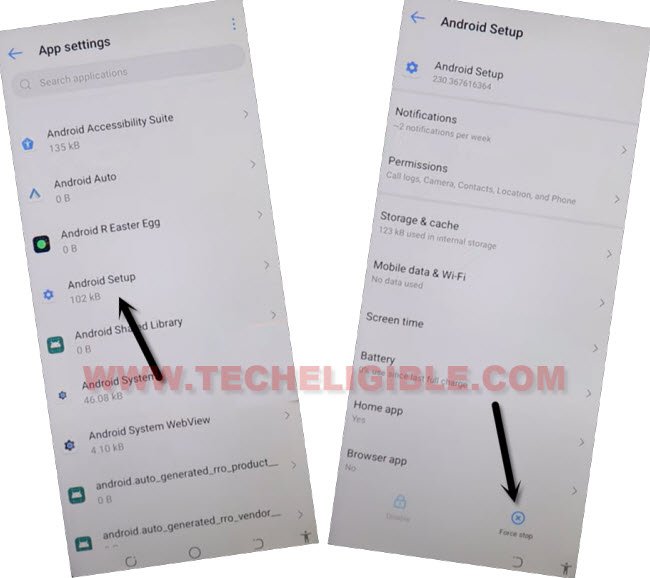
-We have reach back to (App list) page again by tapping once on the back arrow icon.
-Lets find and tap to “Android Auto” app from app list screen.
-Hit on > Force Stop > Ok.
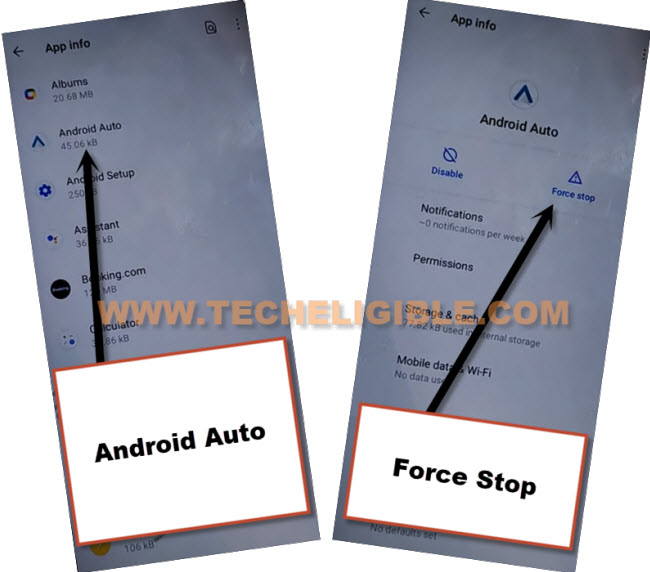
-Go back to app list page again.
-This is the main final app that we are going to disable now to successfully Remove FRP Infinix Hot 50 Pro Plus.
-Tap on > Google Play Services > Disable > Disable this app. After that, tap also on > Force Stop > Ok.
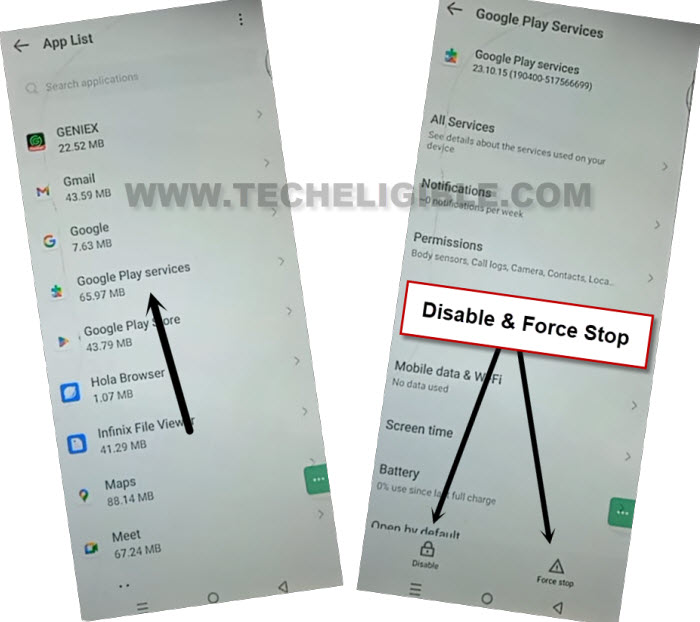
Go back to startup (Select Language) Screen
-By hitting on back arrow icon several times, you will access back to first (Select Language) screen.
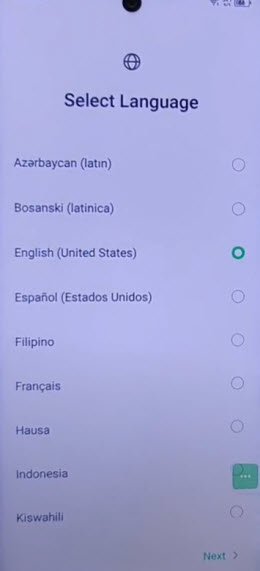
-After that, hit on a > Next > Skip > Next > Next.
-Wait on a loading screen after that, tap on “Don’t Copy” option.
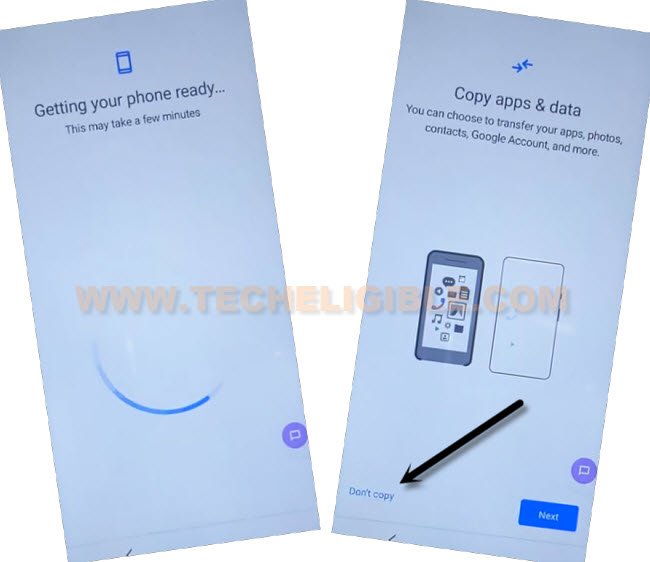
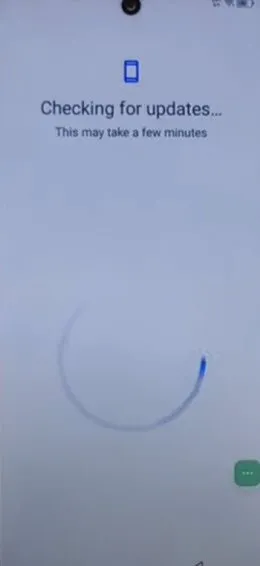
-Finally, we’re on a (Checking for updates..) page. But, this will continue loading until we turn on back google play services app by repeating steps from below.
-Tap on “3 dots” icon. Go to “Accessibility Settings” option.
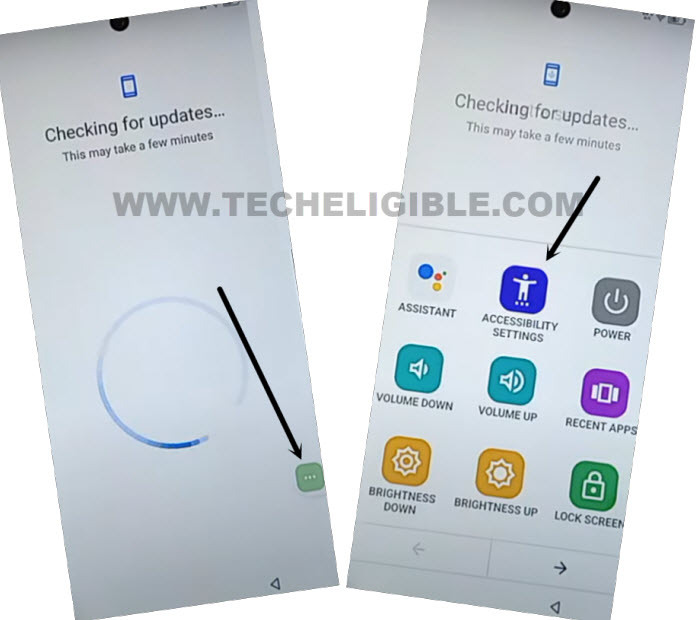
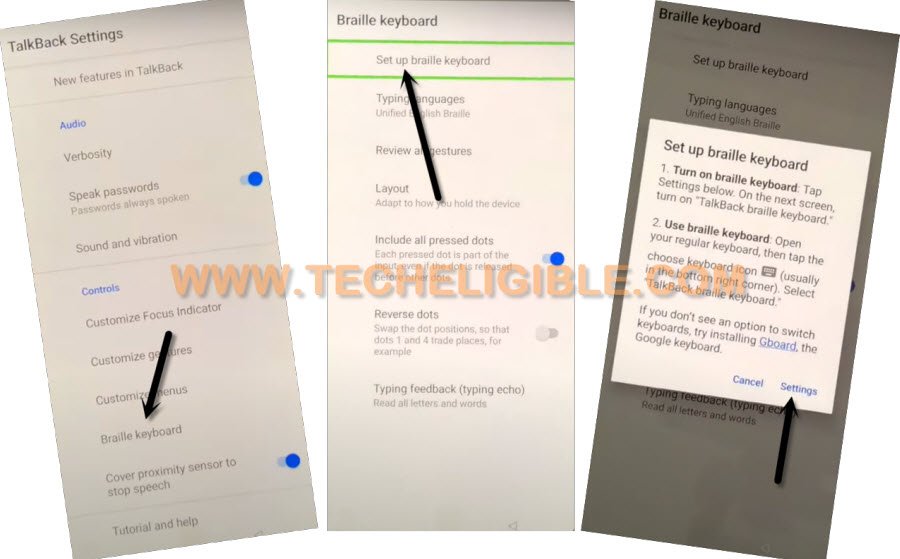
-Once you reach inside the (Accessibility) page. From there, scroll down and tap on “Talkback” option. After that, tap to “Settings” option.
-From next talkback setting screen, go to > Braille keyboard > Setup braille keyboard > Settings.
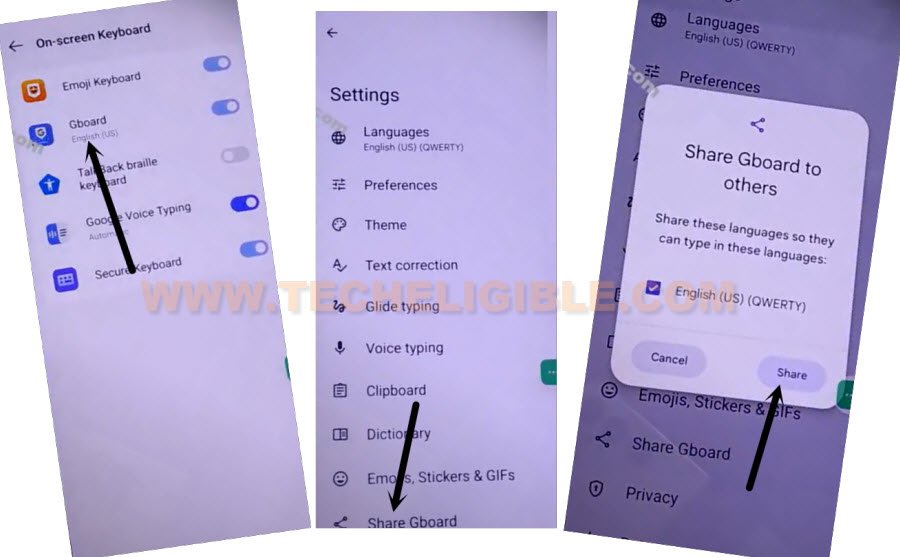
-We have to open up message inbox screen again by tapping at “Gboard”. After that, tap to “Share Gboard”.
-From popup window, go to “Share”.
Go to Settings App Management to Enable Google App
-We are gonna repeat steps now to access to main settings screen again.
-From popup window, tap over a “Message” app.
-Tap on “Recently added number” from popup window (See below image).

-From message inbox screen, just tap on a “Camera” icon. Afterwards, you have to take any random pic using your device camera.
-From image page, just hit over a “Attach” option to Remove FRP Infinix Hot 50 Pro Plus.
-Tap on your recently taken image from inbox screen and hit on “Share” option.
-After that, go to “Google search image” app.
-You are now on a Google lens page. Let’s hit over a > 3 dots > Terms of service.
-We can easily access to google chrome browser just by tapping on “Use without an account”. After that, go to “Got it” option from bottom.
-Let’s long tap at any text and go to “>” this next arrow option.
-You will be shown further options there, just choose “Web search”.
Let’s Reach on Settings Screen
-Type in chrome browser search bar “Techeligible”.
-Tap to same searched result as shown in below image to access to frp tools page. After that, hit on “Menu” option and go to “Download FRP Tools”.
-From there, go to “Access Device Settings” option. Within few seconds, you will be inside your infinix hot 50 main settings page.
-Tap few times on back arrow icon to go back to main (Settings) page. From there, tap over a > App Management > App list.
-Tap also on “3 dots” kebab menu from top corner and go to “Show system” option.
-Let’s enable show system option to display all hidden apps. Just hit on a > 3 dots > Show system.
Enable Google Play Services
-We can easily enable back google app to Remove FRP Infinix Hot 50 Pro Plus.
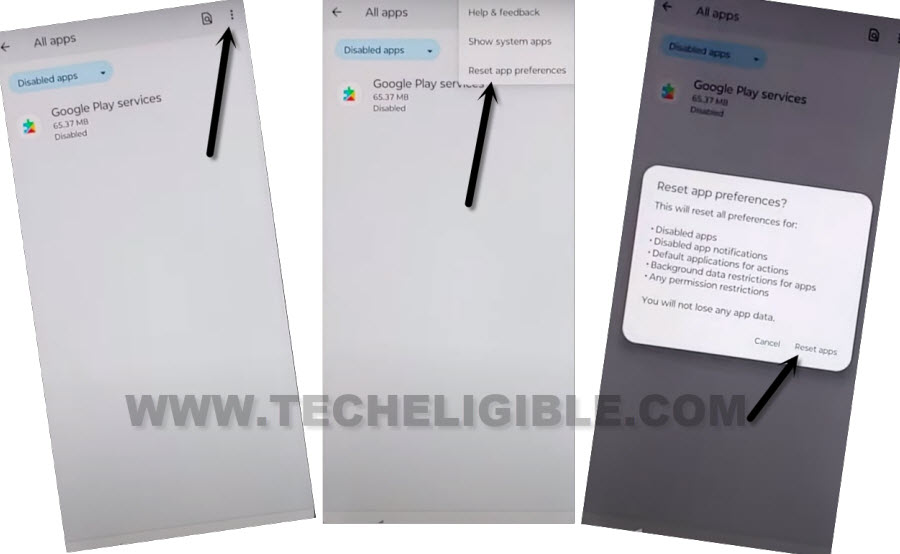
-Hit again on a “3 dots” icon from top corner. After that, tap to “Reset app preferences > Reset apps”. This option will reset your all your recently changes from app list pages. All recently disabled and forced stop apps will be enabled back.
-Keep hitting on back arrow icon from bottom to reach back to (Checking for update) page.
-This loading page will be finished with few seconds and you will be on a (Google services) page.
-From (Google Services) screen, tap to > More > More > Accept.
-Let’s finish up all remaining startup steps on your own.
-After accessing to your infinix device main home-screen. Just go to “Settings”.
-Tap to > Reset phone > erase all data > Got it.
-Its all done now from frp bypass on this phone.
The Conclusion:
In first method of (Infinix hot 50 pro plus Android 15), we used a PC tool (Samfirm). With the help of this tool, we successfully bypassed frp account. We just enabled the USB debug mode using the screen shot capture method. After that, connected phone to PC and reset the frp lock protection successfully.
In 2nd method, we hold screen with 2 fingers and accessed to privacy policy page. From there, long tap text and opened with (Quick Share) app. After that, we just hit on (Camera) option and took random image. Shared the image with (Google Search image). Accessed to main (Settings) and disabled some applications. Then, we completed setup wizard steps.