
You can access to your device main home-screen after hard reset and forgetting google account through Bypass FRP Account ZTE Nubia RedMagic 6, Redmagic 6s (Android 12). If you are unable to recover back your google account, then, you don’t need to be worried here. We will show you easy steps to resolve your device issue. We will enable talkback from vision settings and go to further steps. Follow steps from below.
Disclaimer: We highly recommend you to apply this method only on your own device, if you are not owner of this device, or you found this from some where, you must return to its real owner. This method is for educational purpose only.
Let’s Start to Bypass FRP Account ZTE Nubia RedMagic 6, 6s:
-Turn on ZTE phone & Connect to WiFi network. After that, return back to (Hi there) home-screen.
-From there, go to “Vision Settings” option to enable talkback function.
-Tap on last option “Screen reader primarily for people with business and low vision”.
-After that, tap to turn on option for “Use Talkback” from top.

-You will be taken on (Welcome to talkback) screen. Just swipe right and swipe up from that screen.
-After that, you will have a popup window, just double tap on > While using the app > Use voice commands.

-Once you see (listening) window, just say loudly there “Google Assistant”.

-After reaching to google assistant screen, we don’t need talkback function anymore. Let’s turn off this function now by long holding both (Volume up + down) keys simultaneously to Bypass FRP Account ZTE Nubia RedMagic 6.
-After holding both buttons, you will have a (Talkback turn on shortcut?) popup. Just double tap to “Turn on”.
-Long hold again both (Volume up + down) keys simultaneously. After that, you will see another flash message of (Held volume keys, talkback turned off).

-Let’s reach to youtube website by tapping at “Keyboard” icon and search there “Open youtube”. After that, hit on “Send” button.

-Open with (Chrome) browser. Go to > Accept & Continue > No Thanks.
-You’re now inside chrome browser and there is also a search bar at the top.
Go to ZTE Nubia Settings:
-Search in chrome browser search bar with “Techeligible“. After that, visit same searched result as shown in below screen shot to access our official site.
-After accessing there, just go to “Menu” icon from upright corner. After that, tap on “Download FRP Tools” option.

-Once you reach on official frp tools page, just scroll down little bit and hit on “Access Device Settings” option to reach inside ZTE settings page.
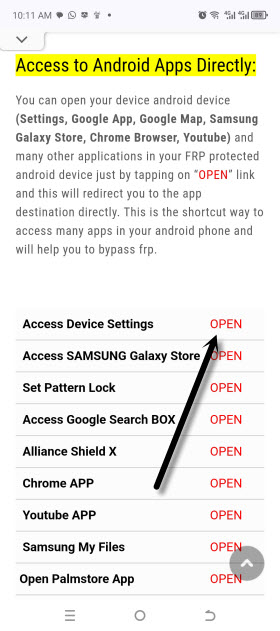
-From settings page, go to > Advanced settings > Reset options >Reset phone > Ok.

-After that, your device will be reset completely to Bypass FRP Account ZTE Nubia RedMagic 6, 6s. Old google account will also be removed. Wait until manual reset process is done. After that, you can complete setup wizard steps on your own.