
Z3X Tool is the compact sized application that work perfectly on Samsung android devices to fixup multiple issues such as (FRP, Screen, Network) locks. You can also fix IMEI problems with few clicks. Download Z3X Samsung Tool Pro with loader in free without spending a single penny.
There are multiple versions available of this tool, you can download from below and learn how to use Z3X on your Samsung devices to bypass frp account. All Z3X free Versions have been collected on this single page for your ease.
You don’t need any activation or box to Samsung Tool Pro V24.4, V27.2, V28.2 and V29.5. We will show you complete method from downloading to running and bypass frp on Samsung Galaxy devices.
Read Also: FRP Bypass APK Tools Download [FREE]
Download & Use Z3X Samsung Tool Pro (Without Activation)
As you know, Z3X tool is available in paid version. You have to make payment to activate the tool with license key. But, in some Z3X Version, you don’t to purchase license key or subscription. Such as on Z3X V29.5 / Z3X V28.8 / Z3X V27.2 & Z3X V24.4 Samsung Tool. In all of these, you just have to download the tool with keygen and loader file and run these tools in free.
| ⇒ Samsung Tool Pro V29.5 |
| ⇒ Samsung Tool Pro V28.8 |
| ⇒ Samsung Tool Pro V27.2 |
| ⇒ Samsung Tool Pro V24.4 |
Z3X 29.5 Samsung Tool Pro (Without Activation)
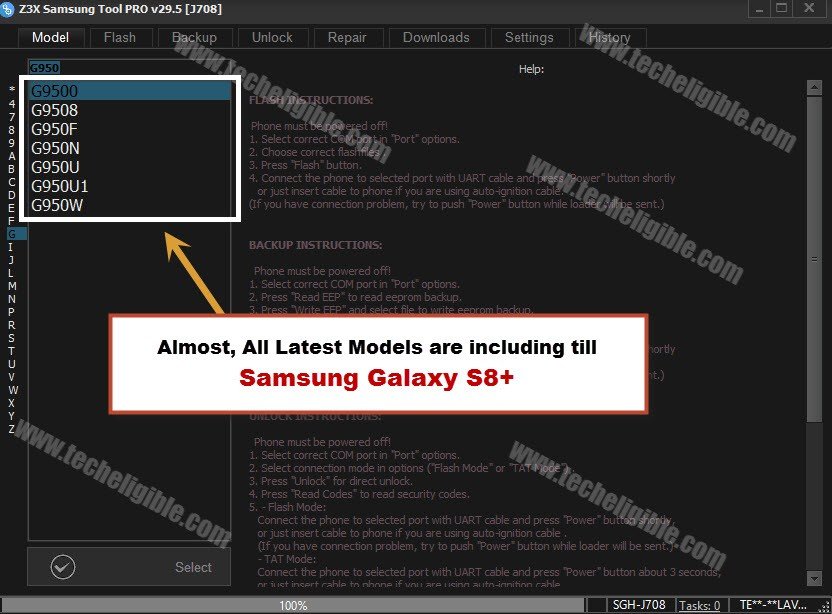
Good news is that, almost all latest model of Samsung Devices are including except galaxy s9+, and Galaxy S9. Until Samsung Galaxy S8+, all latest models are including. If some models are missing, so we can’t say anything for that. But, Samsung Galaxy S8+ Models, and J7 Pro along with J7 2017 models are included as well.
Through this latest version tool, you can perform multiple task, the list of task can be performed is given below, you can avail lots of benefit with this free tool, if you know how to use this Samsun Tool Pro 29.5
Note: After using this tool, don’t forget to scan your PC or Laptop with @ntivirus software.
Features:
- ♦ Read/Write Flash
- ♦ Bypass FRP Samsung.
- ♦ Update Software Samsung
- ♦ Remove/Read Samsung Code.
- ♦ Restart to Download/Fastboot mode.
- ♦ Cleaning and Removing Viruses
- ♦ Repair IMEI, SN, DRK.
- ♦ Samsung Factory Reset.
- ♦Patching Samsung certificate.
- ♦Put device into Recovery Mode.
- ♦ Root Samsung Phones.
-Follow up below steps to learn how to download and RUN Z3X 29.5.
| ⇒ Z3X Samsung Tool V29.5 + Loader + Keygen | [DOWNLOAD] |
-Turn off your any active “@ntivirus” software, otherwise you wont be able to run this tool.
-Extract downloaded z3x software & Loader and Keygen.
-Install Samsung Tool Pro software in your PC.
-Copy and Past “Z3X 29.5 Loader” in your z3x installation folder, normally installation folder can be found in C: Drive (Program File).
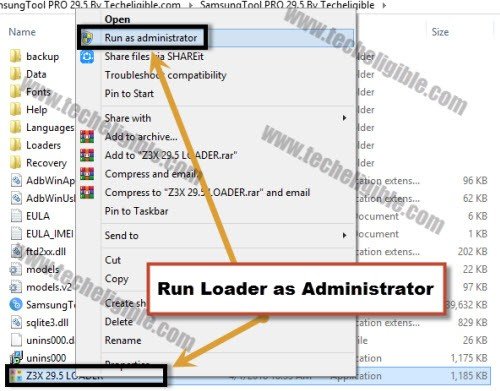
-Right click on “Z3X 29.5 Loader” & run as administrator.
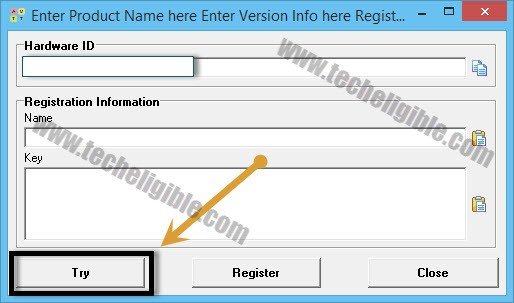
-After that, you will get a popup window, just click on “TRY”.
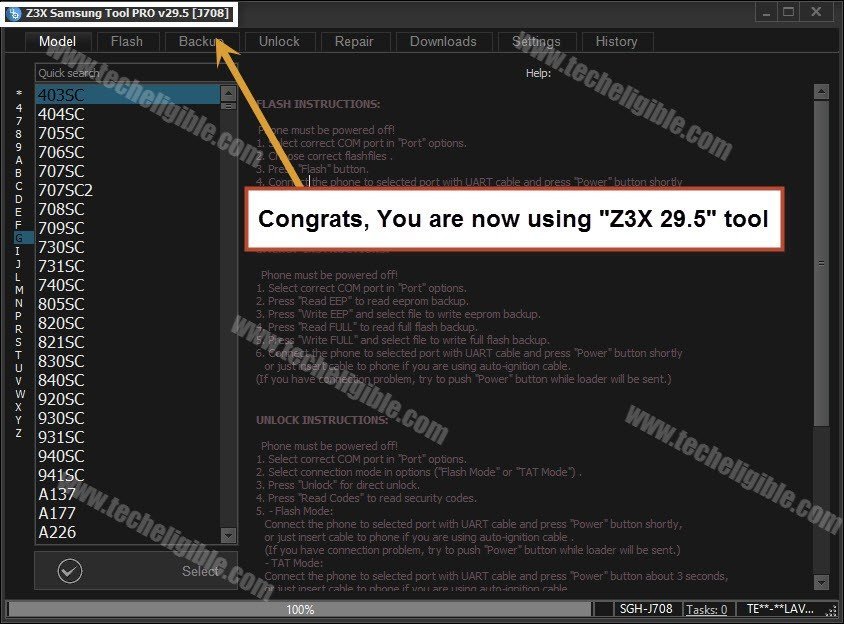
-Now wait for 1-2 minutes, until you Z3X 29.5 Samsung Tool Pro launch.
-Before running the software, you may be asked some question, regarding selecting “SKIN, and Model Name & Style”, so after selecting this, the software will be launched.
Note: If the software do not run, and you see an error there, so you will have to run “Keygen” as well.
-Run (Keygen), and then type any in name in name filed tab, and then generate key and verify it, after that copy that key, and past into the key area of the popup window, and then hit on “TRY” or “Register” button.
-After that Z3X 29.5 software is launched successfully, you can easily unlock frp, unlock network and solve multiple issues from your latest Samsung android devices.
-All Available Samsung android devices models can be seen on your Z3X tool software (Model) tab..
Z3X 28.2 without Key Activation and BOX:
-We have complete details below about how you can download and run this (Z3X 28.2) on your PC and fix up frp bypass, repairing, unlocking issues on Samsung devices easily.
Note: You will not get any “Retry, Card not found” error in this version, just download and install, and then run as administrator.
| Z3X Samsung Tool V28.2 | [DOWNLOAD] |
-Turn off @ntivirus Software to avoid .exe file deleting.
-You have to to extract software from winrar archive, if the setup file is password protected. You will be able to find out password in (Password.txt) file.
-Right click on “Z3X 28.2 Icon” and run as administrator.
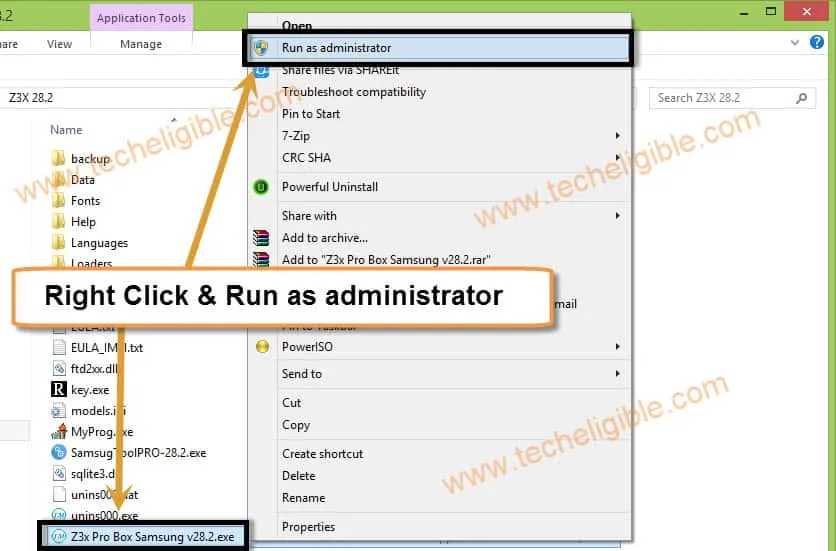
-You will get “CMD Prompt” window, just click on that cmd window, and then press any key to continue.
-After that, you will get popup of “Loader”, just click on “TRY”.
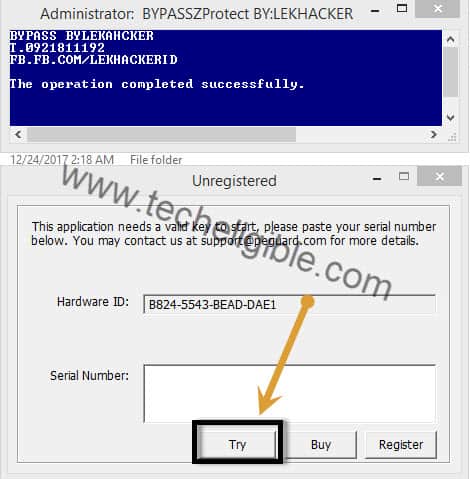
-Congrats, you’ve successfully installed and opened After Download Z3X Samsung Tool Pro.
Bypass FRP on Samsung Devices Via Z3X 28.2:
-Switch Off Samsung Galaxy Device.
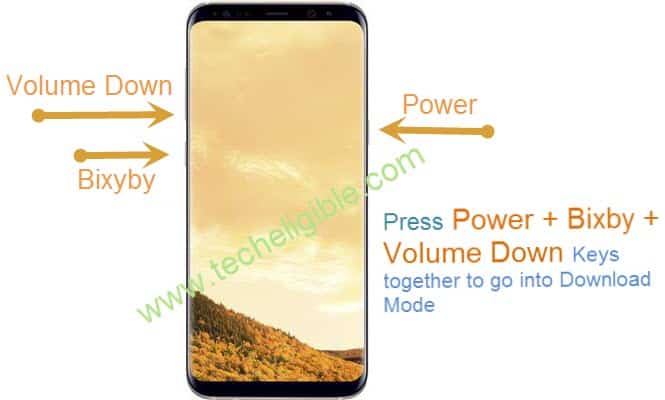
-Put device in “Download Mode”, Press & Hold (Volume Down + Bixby + Power Key), once you get “Warning Window”, just press “Volume UP” key to continue.
Note: If your device does not have “Bixby” key, then Press & Hold (Volume Down + HOME + Power) together.
-Connect Samsung galaxy device to computer via micro USB Cable.
-To make sure, device has connected successfully, right click on “My Computer” icon, then click on “Manage”, after that click on “Device Manager”.
-There you can see your device port, or device detail.
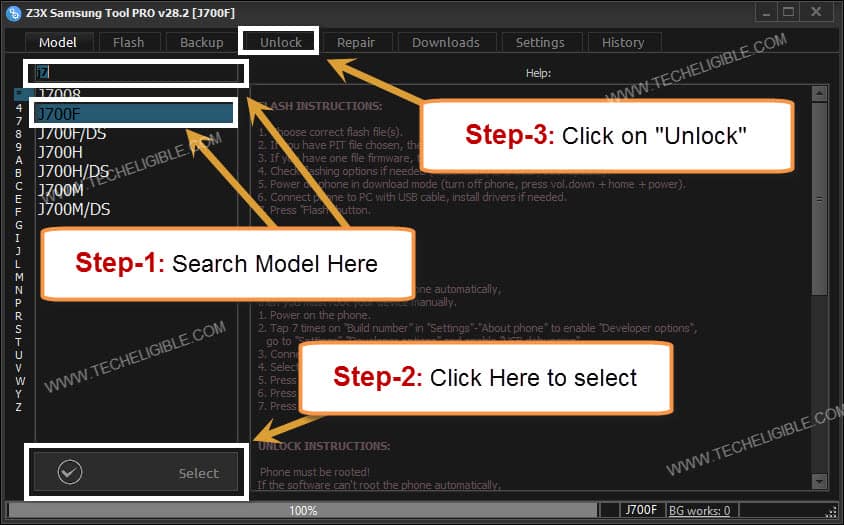
-Go to “Z3X Samsung Tool Pro” Software, then type your device model in search box, and then click on “Select Button”.
-Now click on “Unlock” tab.
-Once device connected successfully to computer, it will appear in “ADB” box.
-Click on “Reset FRP/React/EE” Button.
Note: If device is unable to connected to computer, that means you need to enable “ADB Mode”, for that click below link and follow some steps from there until “ADB Mode” enabled.
-Enable ADB Mode on Samsung Galaxy device. [Click here]
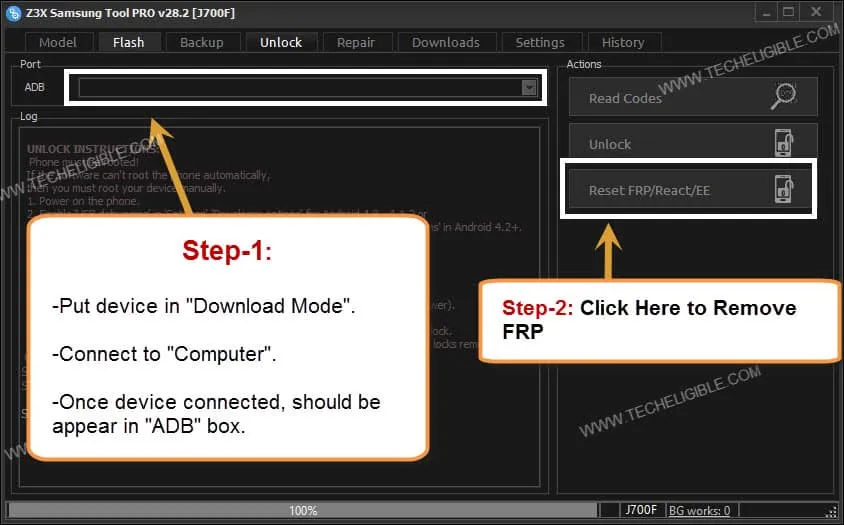
-Once frp unlocking process finish, you will get successful, or done notification in your Z3X Software. After that disconnect your device, and complete initial setup.
Z3X 27.2 without Key Activation and BOX Free:
-Before downloading, turn off your any active @ntivirus. Download the tool with below given link on your PC.
| Z3X Samsung Tool 27.2 | [DOWNLOAD] |
Password: techeligible.com
| Note: If you face any trouble in downloading tool, just tap over > Detail > Visit this site. Then downloading will continue, use internet download manager to easily download this file. You can also use (Microsoft Edge) browser to easily download Z3X tool directly. |
-Turn off @ntivirus software before extracting the file from winrar.
-Extract the downloaded file by using already given password (techeligible.com).
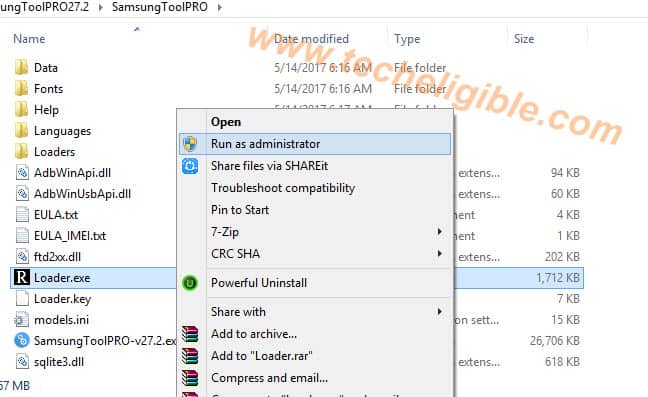
-Let’s right click on a “Loader.exe” and run this tool as administrator.
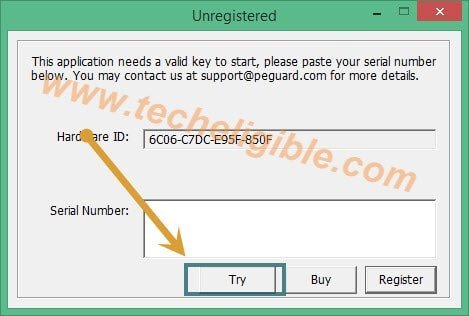
– Now you will get a popup window of “Unregistered”, just click on “TRY”.
-After that, wait for 2-3 minutes until Samsung tool pro start.
Note: If you have make sure that Samsung tool pro is in process, you can check in your “Task Manager”.
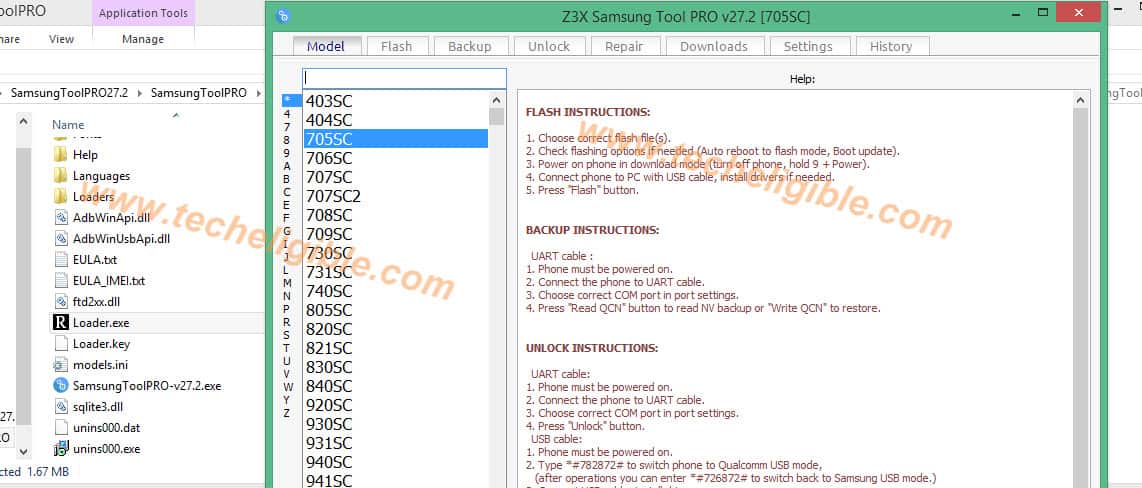
Remember: If “Samsung tool pro” does not start after waiting 2-3 minutes, then repeat procedure again, right click on “Loader.exe” and run it as administrator again, and then again wait for few minutes.
– Now go to “Settings” from Samsung tool pro
– Click on “Folder” from left side.
– Add location there of “Samsung Tool Pro extracted folder”.
– Click on “APPLY” to save.
| Remember: Do not open and close z3x software many times, otherwise the license will expire, and you won’t be able to open it again. Use only when you need after Download Z3X Samsung Tool Pro. |
How to Fix “Card Not Found” or “Unpack error”:
-If you are getting error like “Card not found” or “Unpack” error, this is because you are not running your Z3X Tool as administrator, for that make sure, you are doing right click on “LOADER.EXE” file and then click on “RUN AS ADMINISTRATOR”.
LOADER.EXE File Missing in Folder:
-Loader.exe file disappear because of antivirus is turned on, make sure your all antivirus software are disabled, and then extract Z3X Tool software from winrar and then you will be able to find “Loader.exe” file there.
Z3X V24.4 Samsung Tool Free Without Purchasing License Key:
You can fix lots of issues relevant Samsung android devices with this one simple Z3X software. Don’t need to pay anything for this tool, with single click, you can download and install in your PC. This is a multi purpose tool, that can help in flashing, bypassing frp and writing firmware etc.
Note: Before downloading this tool, do make sure, you have turned off your @ntivirus, otherwise you won’t be able to use this tool, this will automatically be deleted with your active @ntivirus.
| Z3X Samsung Tool 24.4 With Loader | [DOWNLOAD] |
-Extract the downloaded file & go to extracted folder, and install setup first “Samsung Tool Pro 24.4.exe”.
-While installing setup, make sure, check mark “Create a Desktop Shortcut”.
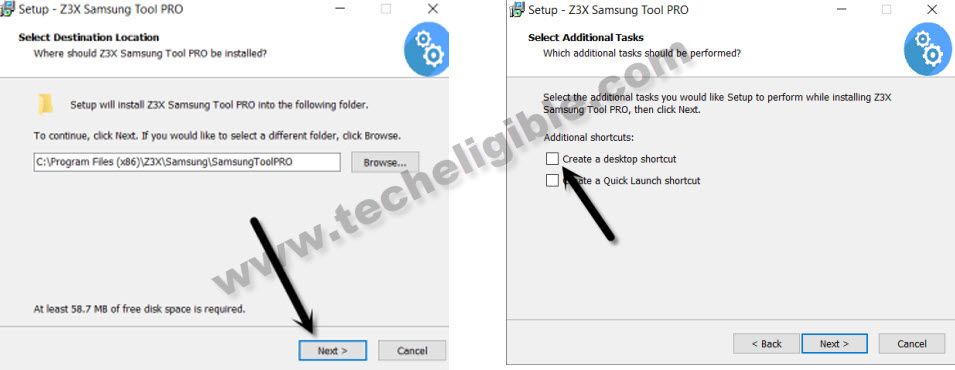
-Go to “Z3X Loader” folder, from there, you have to copy “Z3X Samsung tool Pro 24.4.exe” loader.
-Paste this loader into the installation folder of your Samsung Tool pro setup. Normally you will find your Samsung tool pro installation folder in your C Drive (Program File).
Note: If you are unable to find file location of your installed tool, for that follow below 3 steps.
Step 1: Go to Desktop, and right click on your installed Samsung Tool Pro icon.
Step 2: Click on “Properties”.
Step 3: Click on “Open File location”.
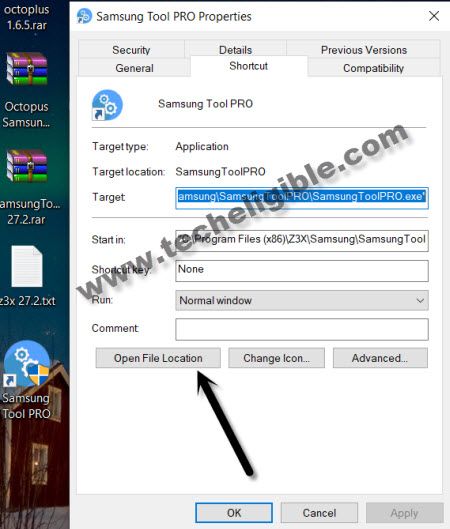
-Now paste your copied “Z3X Samsung tool pro 24.4.exe” loader in the file location folder.
-Right click on “”Z3X Tool” and then run as administrator.
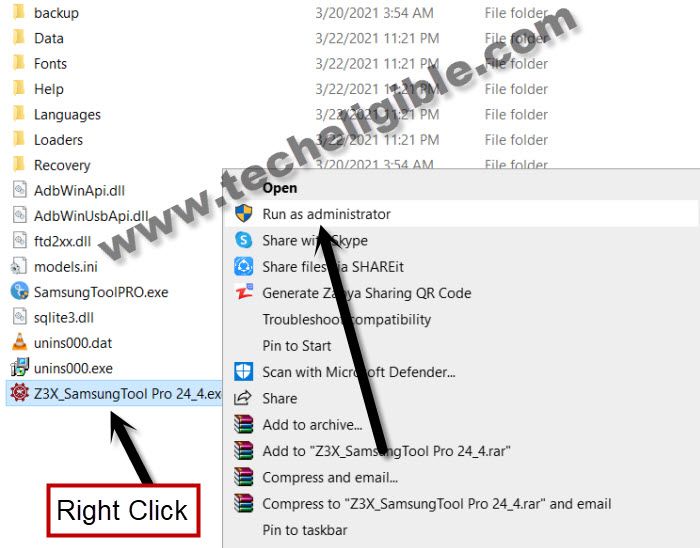
-You will be asked to your name, you can give any name there, and then click on “START” button from popup box.
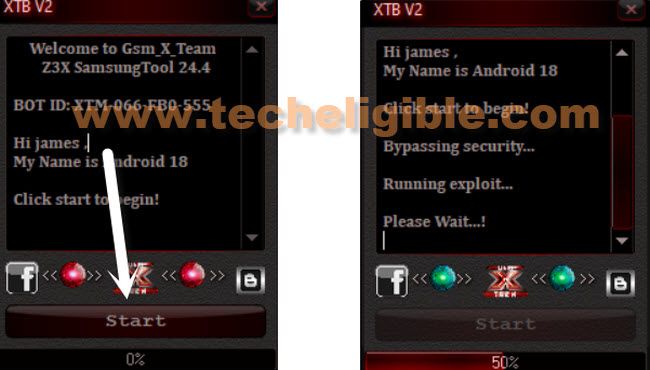
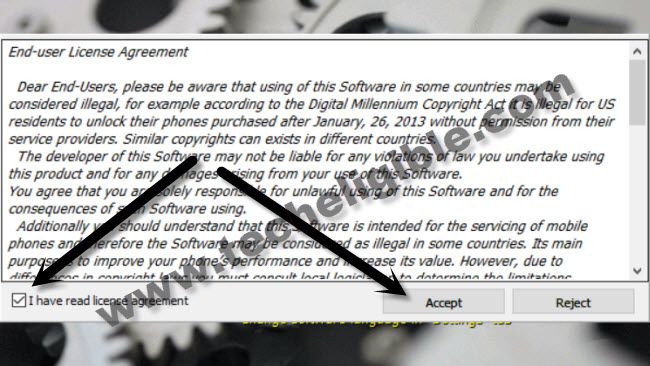
-Check mark “i have read license agreement”, and then click on “Accept”.
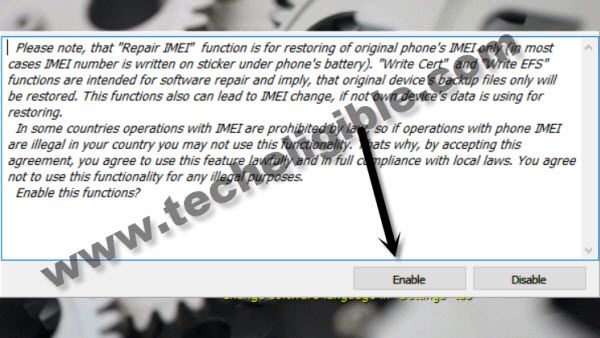
-Click on “Enable” button, wait, after few seconds or minute, Z3X 24.4 will be launched.
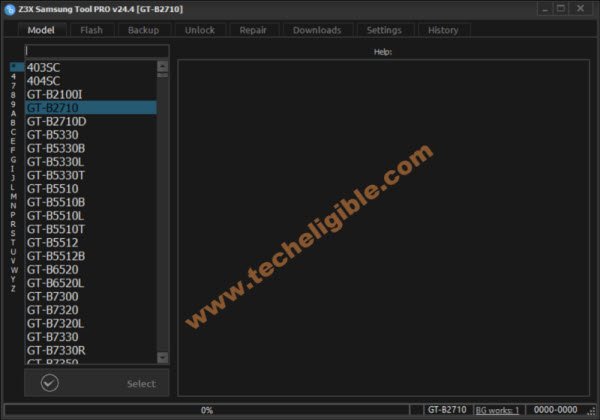
-Congrats, you have successfully download and Run Z3X 24.4 in your PC or Laptop, and get your task done easily to make your customer happy.
FAQ’s About Z3X Tool:
Can i download & install Z3X Tool 29.5 without registration?
Yeah, you can use Z3X 29.5 version without any subscription and registration. No payment is required. Download & Run this tool with loader free
Is Z3X Samsung Tool 27.2 Paid or Free?
This tool is also available in paid version. If you don't have money and looking for bypass frp Samsung, then, you can also use free version of Z3X 27.2 by downloading from this post.
Is there any Free Version Available of Z3X V41 updated Tool?
No, So far, there is no working paid Z3X V41 updated tool available with loader in free on this post.
How to bypass frp on Samsung by Z3X Samsung Tool Pro?
Download & install any free version of Z3X Samsung Tool pro, like (Z3X 29.5 or Z3X 27.2 or Z3X 24.4) etc. Install Proper Samsung USB Drivers on PC. Connect Samsung phone with PC and bypass frp with single click from Z3X interface. Note: You can also search on site with your device model frp bypass method.