Facing the FRP lock protection on your phone? You may have done a hard reset on the device and forgot the google account details to login back for the verification. If you can’t remember your google account, then apply this process to Bypass FRP All ZTE Android 13. In this guide, we will simply bypass the security lock.
Disclaimer: We highly recommend you to apply this method only on your own device, if you are not owner of this device, or you found this from some where, you must return to its real owner. This method is for educational purpose only.
Let’s Start to Bypass FRP All ZTE Android 13:
-Arrange any SIM card and setup 4 digits PIN lock code.
Note: Don’t know, how to setup 4 digits code? Check here.
-Start up step by connecting WiFi to the phone first.
-Go back to first startup screen. Insert PIN locked SIM card.
-Go all the way back to (Hello) page. After that, insert SIM card, on which, you have already setup 4 digits PIN locked code.

Insert & Remove PIN locked SIM
-After inserting the SIM card, you will be displayed a locked screen.
-Let’s remove sim card and without a second delay, just press the “Power” button. For doing action very fast and simultaneously, just use your 2 fingers together, as soon as, you eject the sim card, just quickly press “Power” button.
-Once doing this correctly, just press once the “Power” button. This will awake the device screen and show a (Not signed in) popup.
Note: Are you not having a (Not Signed in) message same as displayed below? that means, you did not perform (eject sim card & pressing power button) action correctly. Restart your device and try again. After few tries, you will succeed.

Place Screen Record on 3rd Number in Top Notification Bar
-Once you go the (Not signed in) message, just hit on “Down Arrow” icon and go to “Edit” option.
-From top menu, just set up the (Screen Recording) icon at the 3rd number by dragging it to top.

Turn on Screen Recording
-Go back by tapping once the on “Back Arrow” icon from the top left.
-You will reach back to (Not signed in) screen.
Note: Here is the most tricky step to be done correctly, and off course, this may take time and some tries. We have to turn on (Screen Recording) function. Let’s do that now.
-Tap both options at the very same time (Down Arrow) + (Record Screen) Area.
| Tip: We have to bring up the top menu options, because, after hitting on (Down Arrow) from not signed-in message, the top menu bar will come up and disappear very quickly. To get this, you just have to start tapping at the point, where the (Screen Record) icon is displayed, this area might be on the left side. To get this done easily, keep both fingers standby, as soon as, you hit on “Down Arrow”, just quickly start tapping on “left side screen record” area. By doing this, the top menu bar will appear up and stir. |

-Finally, we have top menu bar. From there, we have to tap two options at the same time again (Record Screen) + (Top Corner Area mentioned in below image).
-You have got your screen recording options turned on. That means, you are going very well.
| Note: If you are failed, then screen record will not come up. You have to restart your device and repeat all step from the beginning. |

-Get back on (Hello) startup page. Tap to “Red” option to turn on screen recording process.
-Wait for 4-5 sec to record it, then, pause the recording by tapping “Pause” option.

-Tap on the “Share” option from bottom.
-Some sharing apps will be displayed, just go to > Message > New Message.

Take Screen Shot
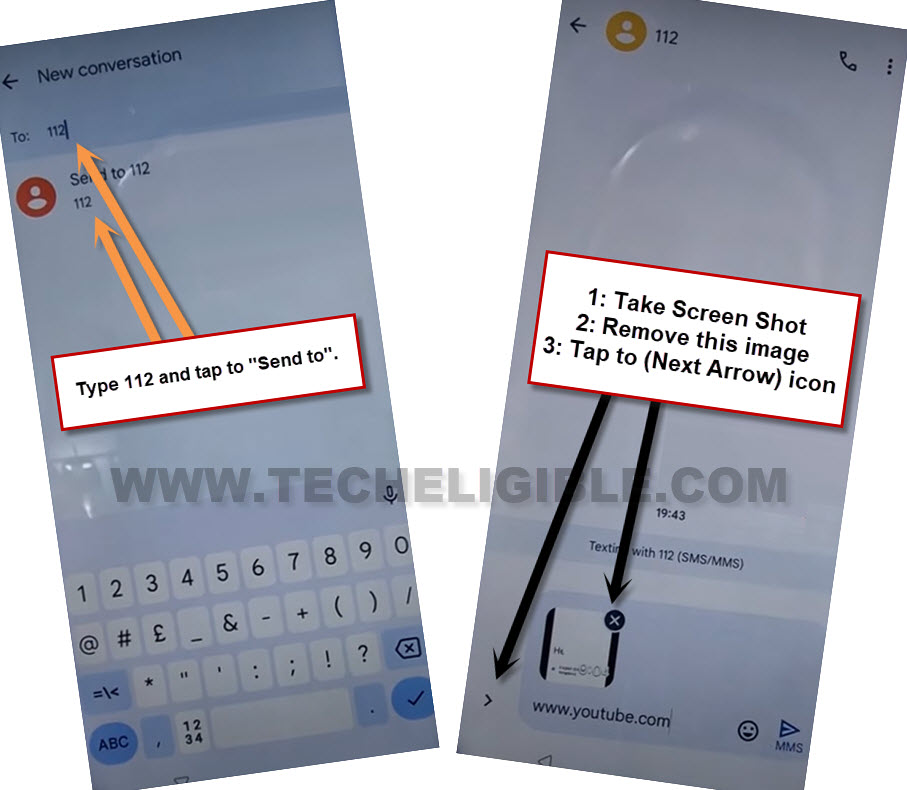
-Enter any number in (To) field and go to “Send to”.
-Capture the screen shot by long holding (Volume down + power). The screen shot will be displayed in the bottom, just close this by hitting on “Cross” icon.
-Tap at “Next” icon.
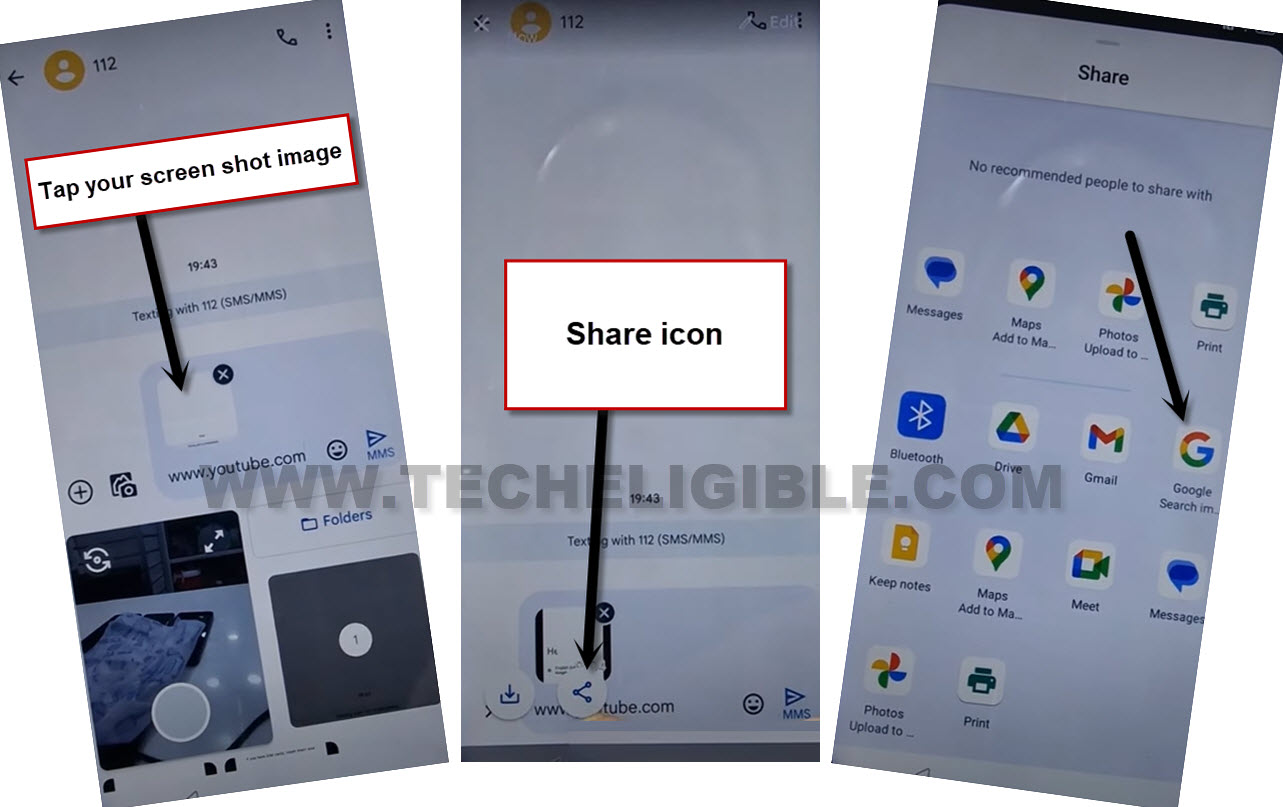
-Open up the phone gallery from there and you will be shown your recently taken screen shot image there.
-Tap on that screen shot image for attaching it as text message..
-Let’s share this image with google search image, for this, tap on the “Image” and hit on “Share” option. After that, select “Google Search image”. (See below image).
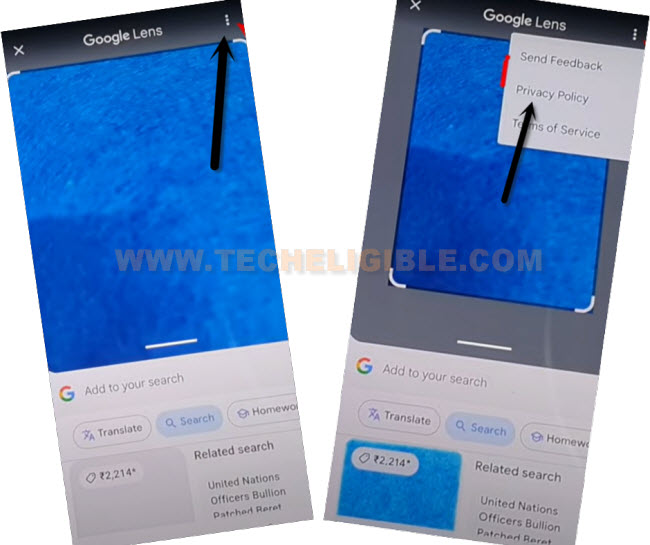
-After reaching at the (Google Lens) page, go to “3 dots” icon. Tap at “Privacy Policy”.
-You will be shown a welcome screen, simply, tap on “Use without an account”.
-From the (Privacy Policy) page, hit on “Menu” option and tap “Google Search” icon.

Access to ZTE Settings
-Type in search box with “Techeligible“.
-Visit 1st searched result to access our official site. From there, open up the site “Menu” and go to “Download FRP Tools” page.

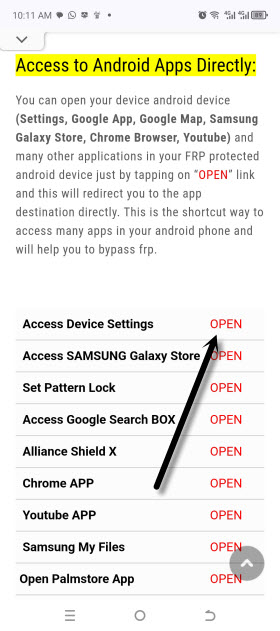
-Scroll down little bit and hit on “Access device settings” option. This will take you inside the phone main settings page.
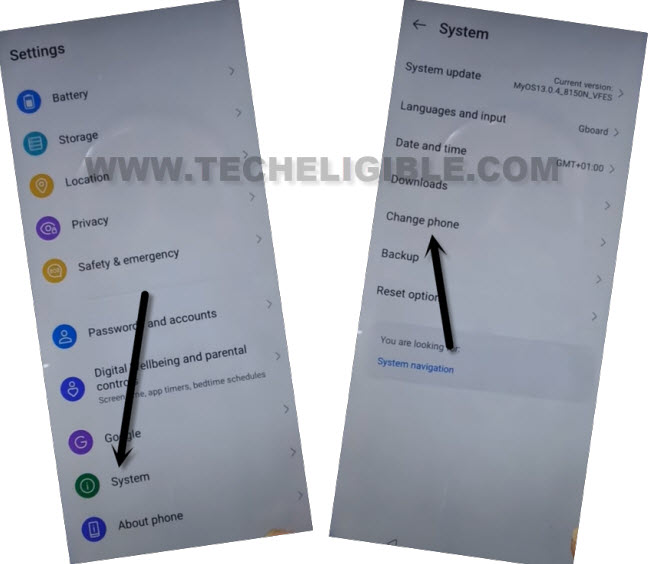
-From the main settings page, hit over the “System”.
-After that, tap at > Change Phone > Accept.
-From the popup screen, hit “Allow” for few times
.
Transfer ZTE Clone Phone App to Other Phone
-Let’s share the (ZTE Clone Phone) app on other android phone. For this, tap at “Share Phone Switch” blue link. After that, tap to > Share > Turn on (Bluetooth).
-Keep another android phone nearby your ZTE phone and turn on “Bluetooth” option.
-Within few seconds, on your ZTE device screen, you will be displayed the other android phone name there. Just select that device and the (Clone Phone) app will be transferred to other android phone.

-Let’s install the received (ZTE Clone Phone) app on other android phone.
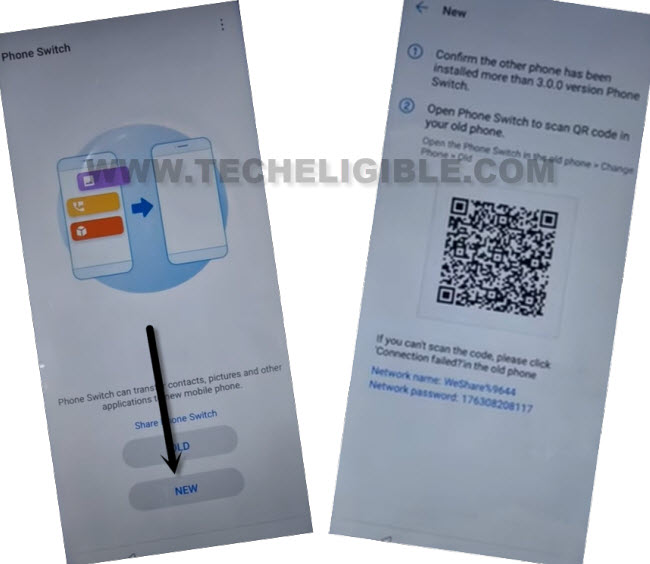
-From (ZTE) phone screen, just go back to main (Phone Switch) page. From there, hit on “New” option.
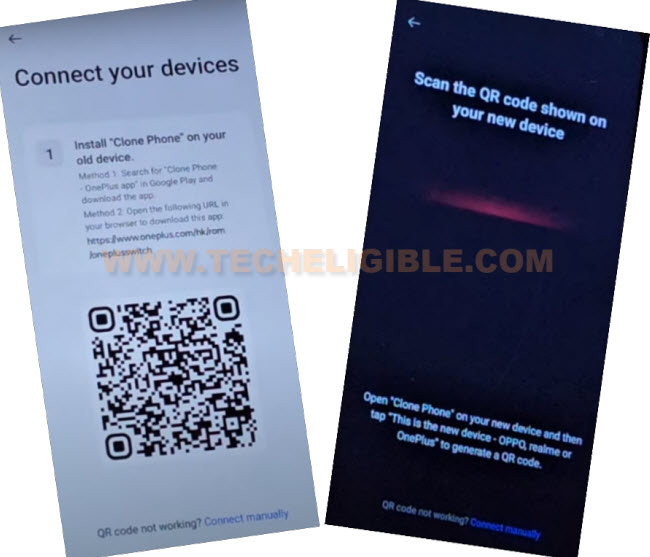
-Tap several times on “While using the app & Allow” from the popup screen. Finally, you will have a (QR Code) on screen. (See below image).
Follow Steps on Other Android Phone
-Open chrome browser and search there “Techeligible“.
-Visit our site and go to > Menu > Download FRP Tools.
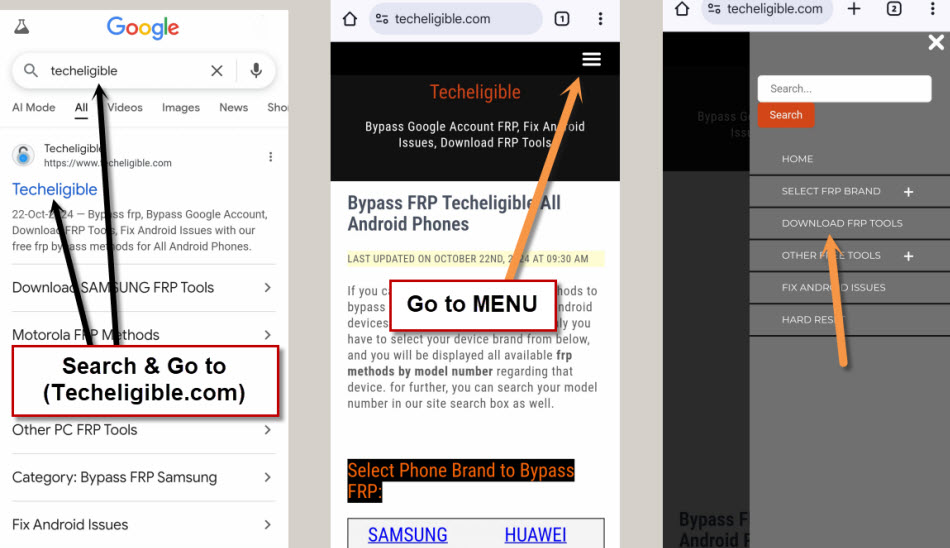
-From that page, find and download the “Activity Launcher” application.
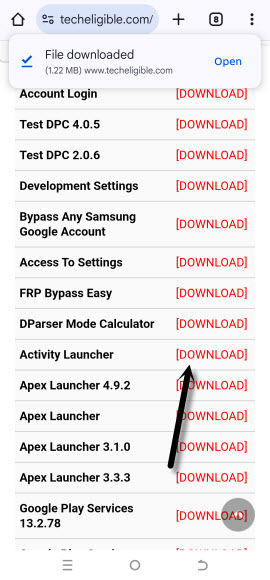
-Once the downloading is completed, just install this app on your other android device.
-Let’s launch the (ZTE Clone Phone) application on other android phone, which we received through Bluetooth from ZTE phone.
-Choose this phone as “Old Phone” from there. After giving some permissions, you will have a (QR Code) scanner screen.
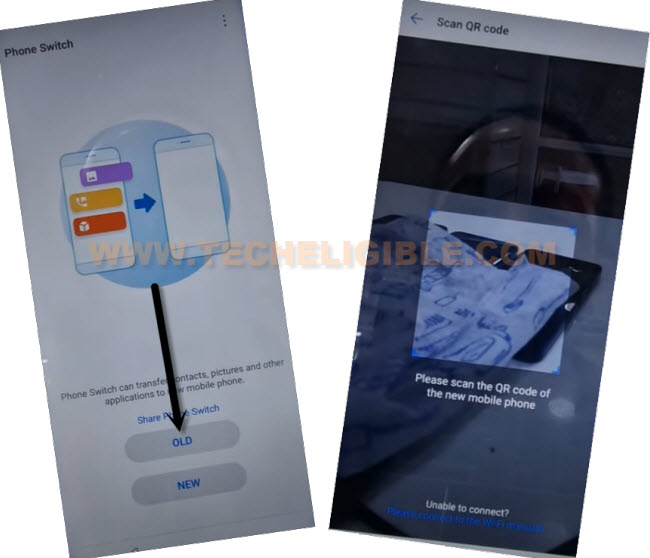
-Scan the QR Code from ZTE phone to connect both devices together.
-After the both phone connected through clone phone app, from other phone screen, go to “App” and select only recently downloaded the “Activity Launcher” application. After that, send this app to ZTE phone by tapping on “Start Cloning/Changing” option.
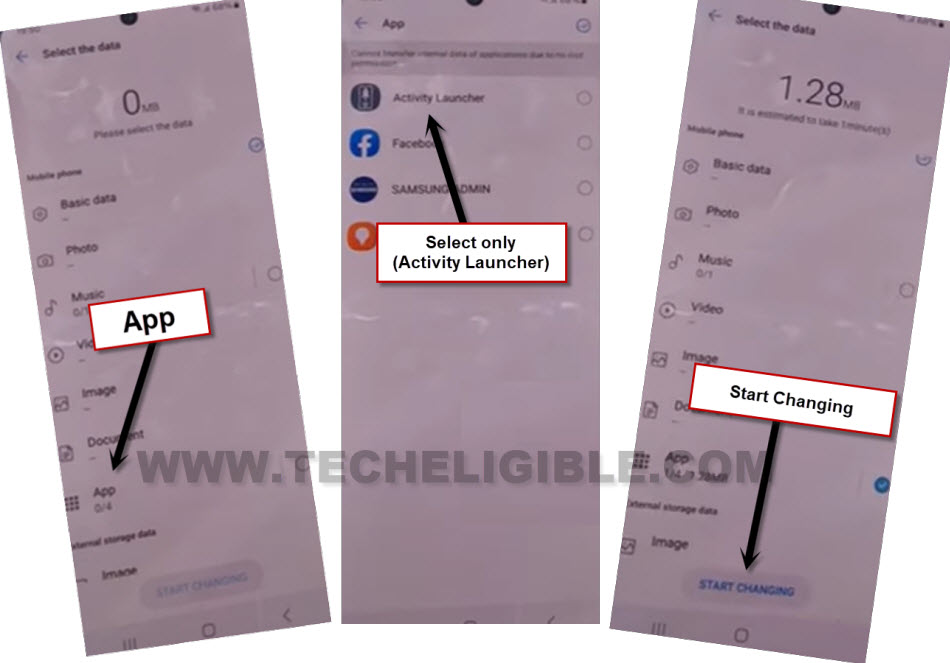
-Wait until you receive this application successfully on ZTE frp locked device.
Go back on FRP Tools Page from ZTE Phone
-To install the (Activity Launcher) app, we need to go back to frp tools page. Just, tap few times on back arrow until you reach back on the (FRP tools) page.
-Let’s tap on the “Open Activity Launcher” option. This will start running this app.
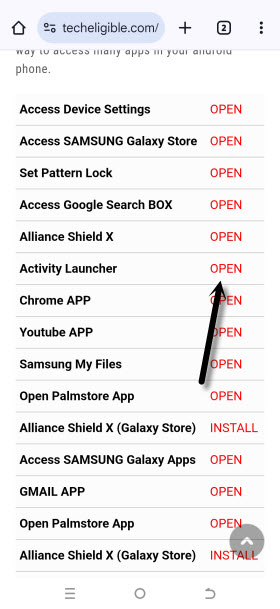
-Wait on (Loading….) screen and then, go to “Ok”.
-From the app, find and go to “Android Setup”.
-This will show you list (com.google.android…). From there, choose the one with (com.google.android.setupwizard.deferred.DeferredTrampolineActivity).
-Finally, you will reach at the finish setup wizard page, just tap at “Start”.
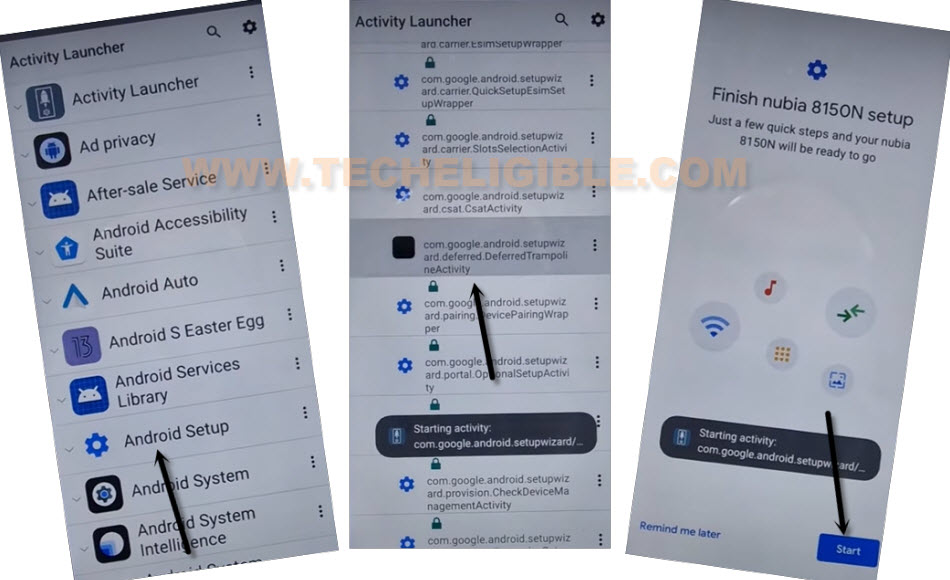
-After that, from the (Use another device) screen. Just, tap these options > Next > No Cable > Copy without cable.
-On pattern lock page, tap on a link “Use my google account instead”.
-After that, go to > Next > Next.
-You will be displayed a (Verify your device) screen.
Follow Steps in other android device
Note: Do make sure, your both android devices are on same WiFi network.
-Launch the “Google App”. After that, go to “Mic” option from the search box.
-Say loudly “Setup my device”.
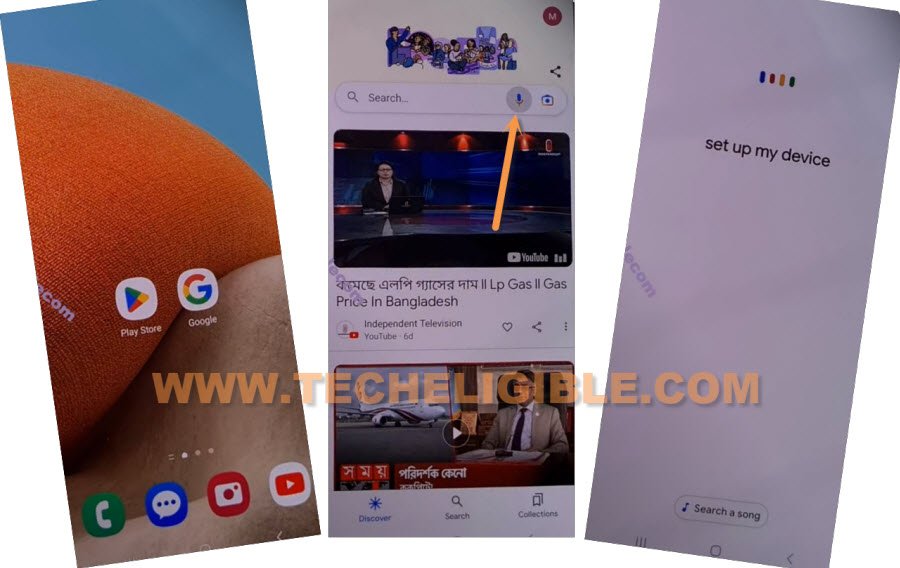
-From the (Getting Started) page, just tap on “Next” option.
-Within few seconds, on both of device screen, you will have (Shape Verification) icons.
-From (Other Android device), just tap tap to > Next > Copy.
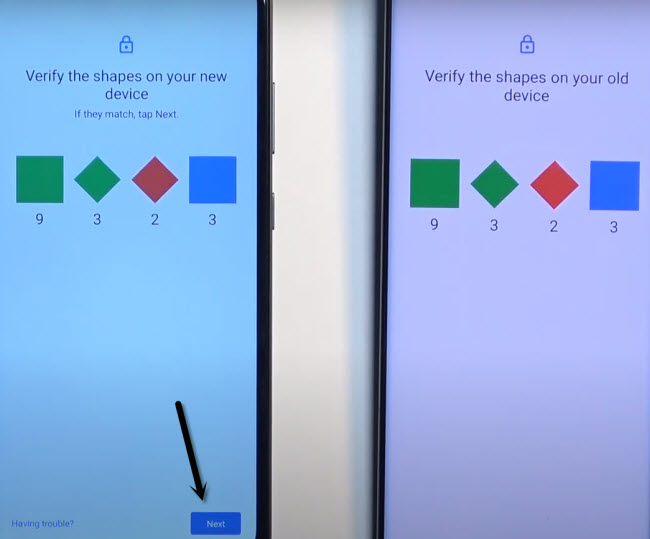
-Wait until the copying process is completed on your (ZTE Android 13) device.
-Finally, you may get a (Verify its you) page. Login there with the same Gmail account, that is logged in already on other android phone.
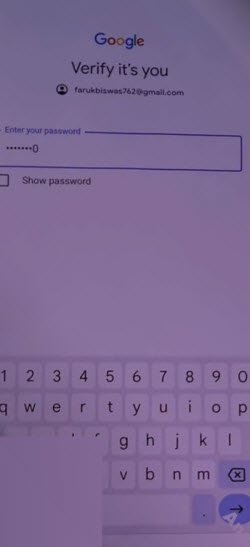
-After login is done, from next page, hit on > Don’t Copy > Don’t Copy > Next.
-You are all done from bypass FRP ZTE Android 13.
The Bottom Line:
In the first guide, we used a pin locked setup sim card, after that, we got (Not Signed-in) popup message. Through this, we just accessed top notification bar and turned on screen recording to get the sharing options. After that, accessed to main (Settings) page through chrome browser. Finally, we used the (ZTE Clone Phone) application and then using another android device, successfully bypassed frp on ZTE Phone.