
Are you searching for a genuine method to resolve the issue of accessing your device that is affected by FRP security? This problem typically arises when you initiate the reset procedure on your device through recovery mode. However, if you cannot remember the account you logged into, you will be unable to access your cubot device because of the FRP lock protection. To resolve this matter, please follow our guide on Bypass FRP Cubot Cheetah 2 using free functioning frp applications.
Disclaimer: We highly recommend you to apply this method only on your own device, if you are not owner of this device, or you found this from some where, you must return to its real owner.
Bypass FRP Cubot Cheetah 2 By Trusted Guide
-Turn on the device and connect it with WiFi network.
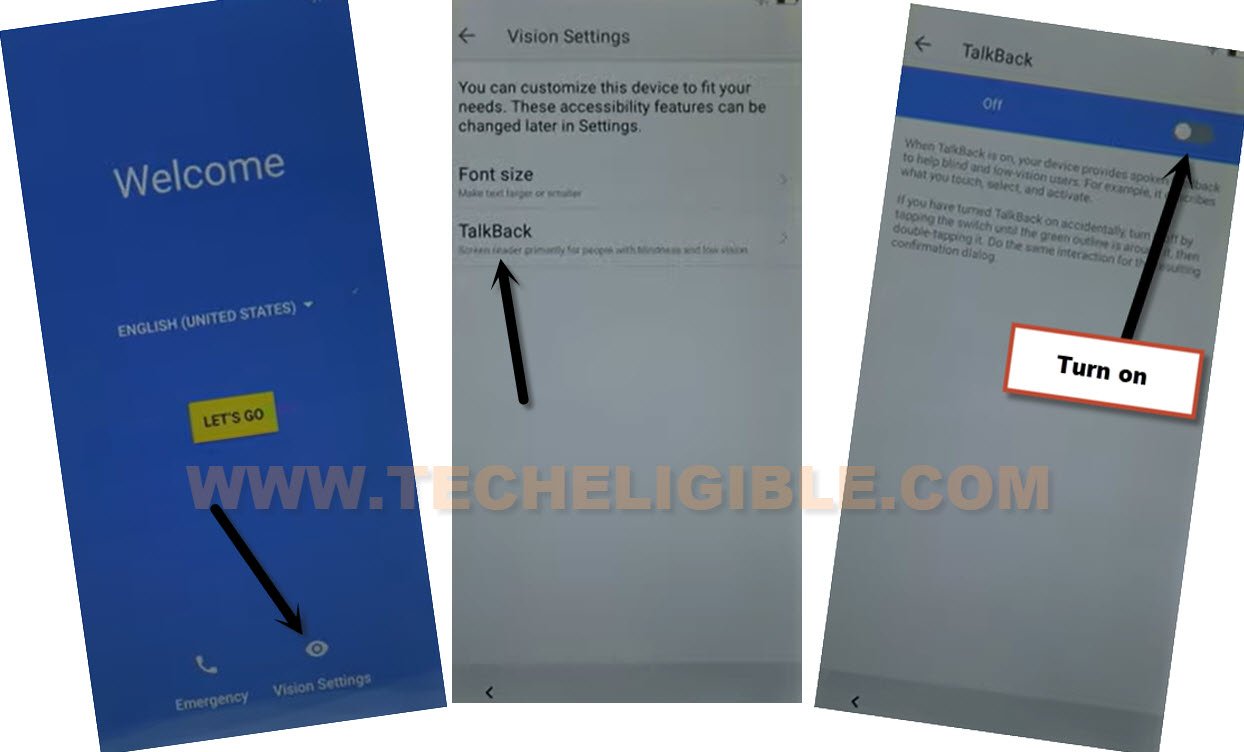
-This process is quite simple, go back to first (Welcome) screen. After that, you just have to enable talkback function first.
-For turning on the talkback, from the first startup page, go to > Vision Settings > Talkback > Turn on.
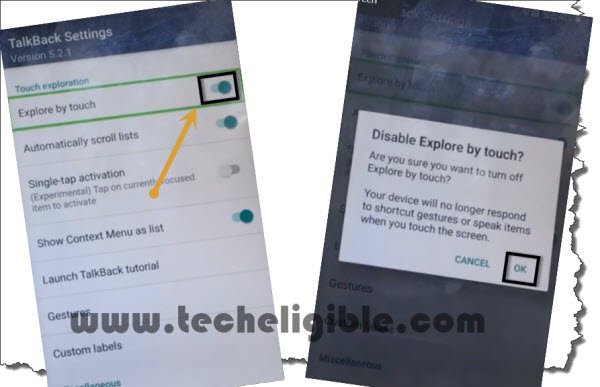
-From the talkback tutorial page, just swipe down to right and then, double tap to “Talkback Settings” option.

-Scroll down the next screen using two fingers together, after that, double tap on “Explore by touch” to turn it off.
Go to Youtube Settings Page
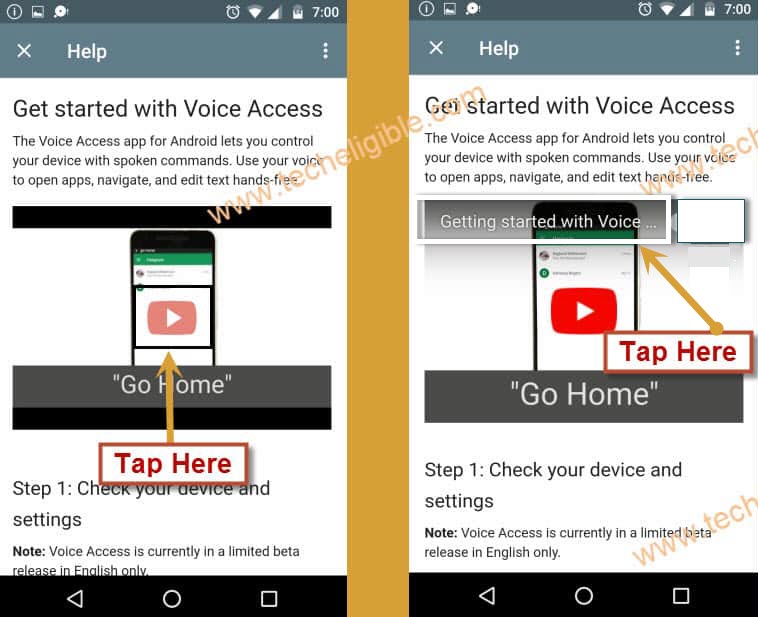
-From the same screen, go to “Help & Feedback”. Then, go to “Get Started with voice access”.

-Tap over the “Play icon” on video screen. After that, tap on the video title (Get started with voice…).
-If you see the (Youtube Update) page, choose the 2nd option “Not Now”.

-After reaching at the youtube webpage, just drag down the playing youtube video.
-Then, go to “Profile icon/3 dots” from upper right corner of the youtube screen, then, tap at “Settings” option.

-After that, go to > About > Google Privacy Policy.
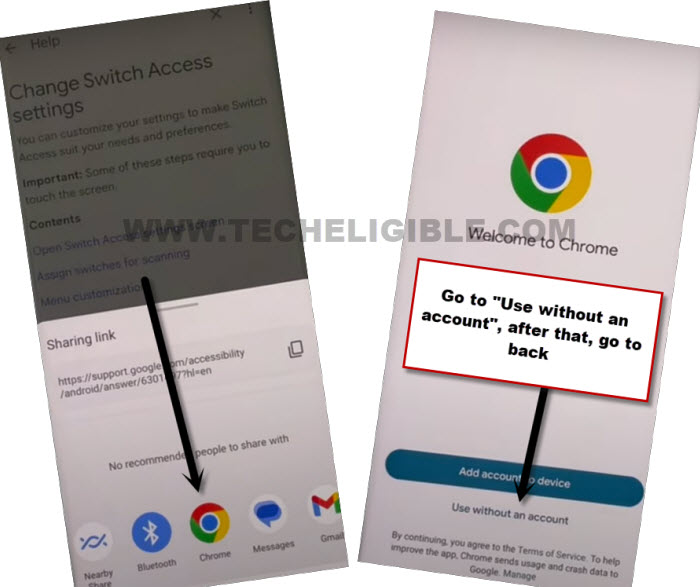
-You will be displayed a popup window, just double tap to “Chrome” browser to launch with.
-To gain full access on chrome browser webpage, just tap to > Accept & Continue > No Thanks.
Install Launcher & Google Play Services App
-Type the text “Techeligible” on top search bar of the browser. After that, go to 1st searched result same as displayed in below illustrated screen.
-After accessing on the techeligible site homepage. Tap to “Menu” icon and go on the “Download FRP Tools”.

-Download the app from there named “Google Play Services“.
-Wait for a minute until downloading is completed.
-Let’s go to for the next app, just download the app “Apex Launcher 4.9.2“.
| Note: If this version is not working for you, you can try by downloading other version. Well, apex launcher 4.0.2 also working. |
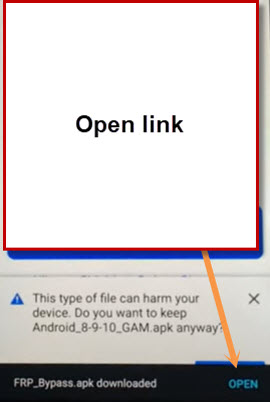
-After downloading is completed, you must see the notification bar at the bottom of the browser, just go to “Open” option from there.
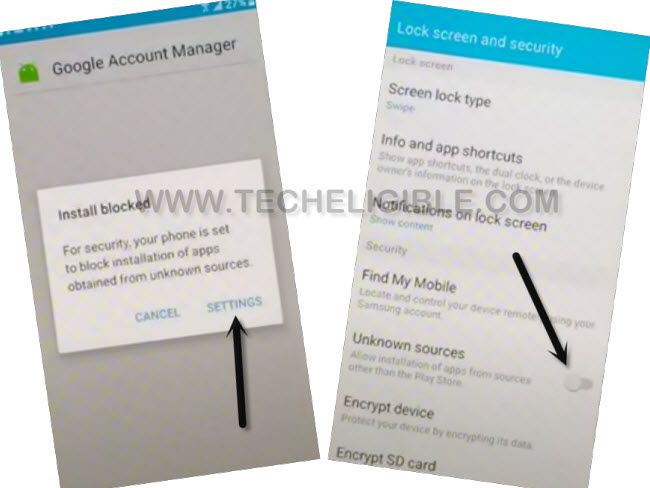
-From the popup of the installation blocked, hit over the “Settings” and enable the “Unknown Sources” option. This will permit you to install this app easily without facing any trouble.
-Get back to frp tools page, download again the app “Apex Launcher 4.0”.
-On the completion of the downloading process, you will get the notification, just hit over the “Open” link again.
-After that, install and open this app on your device, just tap to > Install > Open.
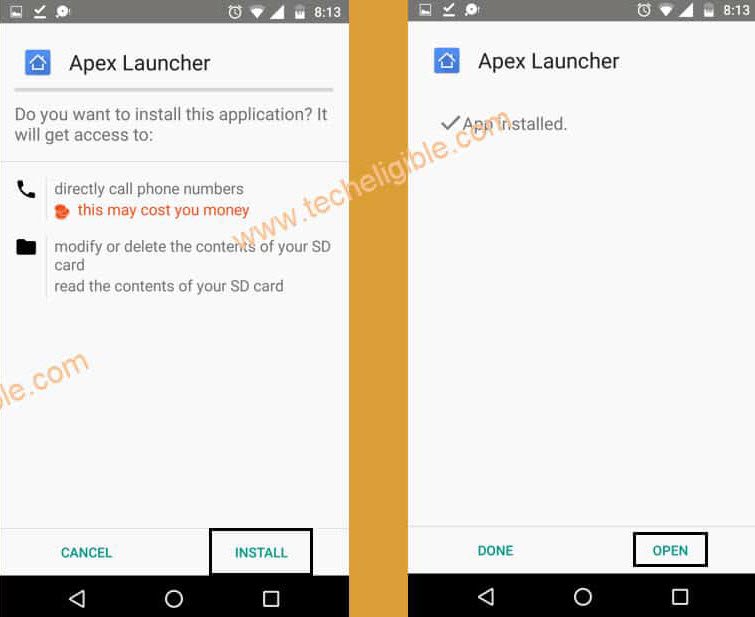
-After hitting on the (Open) option from the apex launcher app, this launcher will be installed and give you full access to your phone main home-screen.
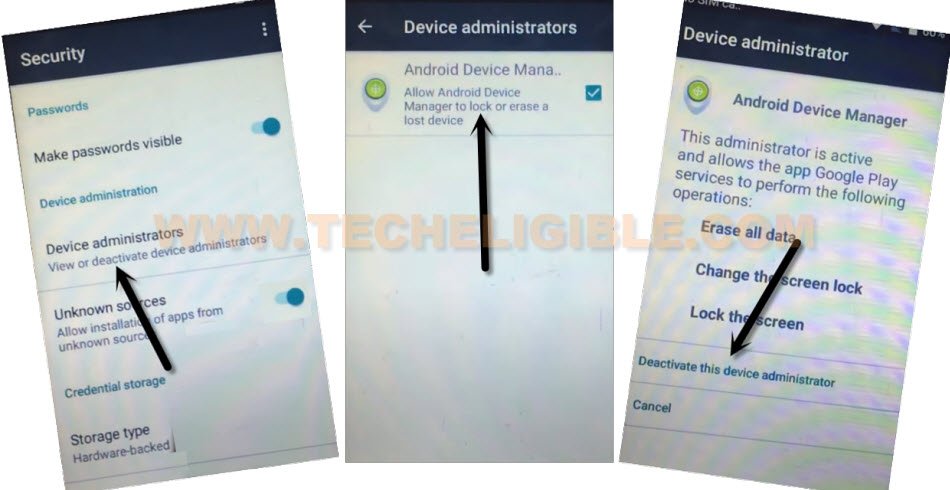
-Go to primary “Settings” page of your phone from main menu. After that, scroll down and tap to “Security” option.

-Tap on the “Device Administrator”.
-From the next screen, go to “Android Device Manager”, and then, hit on a “Deactivates this device administrator”.
Disable Apps Manually
-Go back over the primary settings page. From there, tap to “Apps”.
-You may have some hidden app as well, to make these app shown on the list, just go over the > 3 dots > Show system.
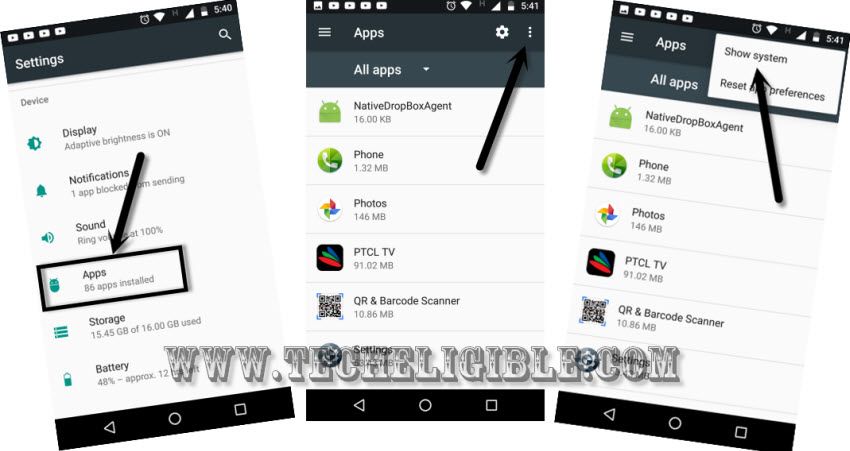
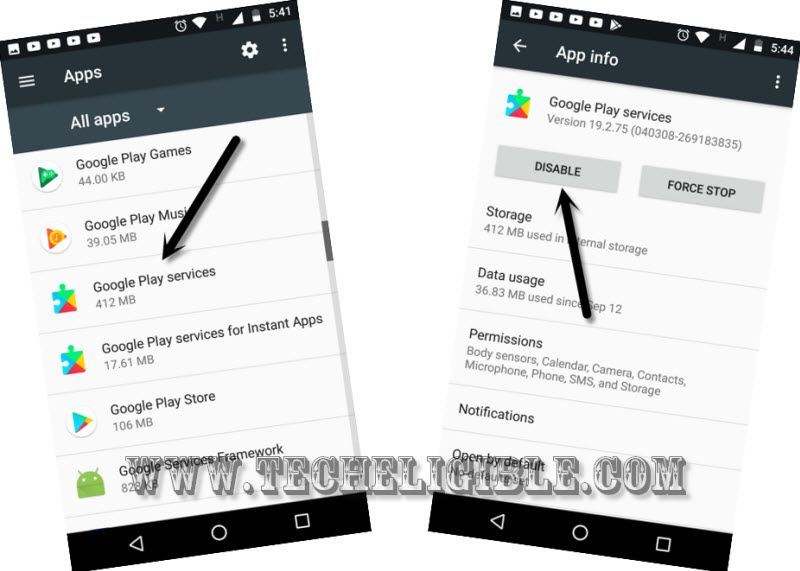
-From the app list page, go down, find and tap to > Google Play Services > Disable > Disable app.
-Go back on app list page, from there, find and go to > Google Account Manager > Disable > Disable App.
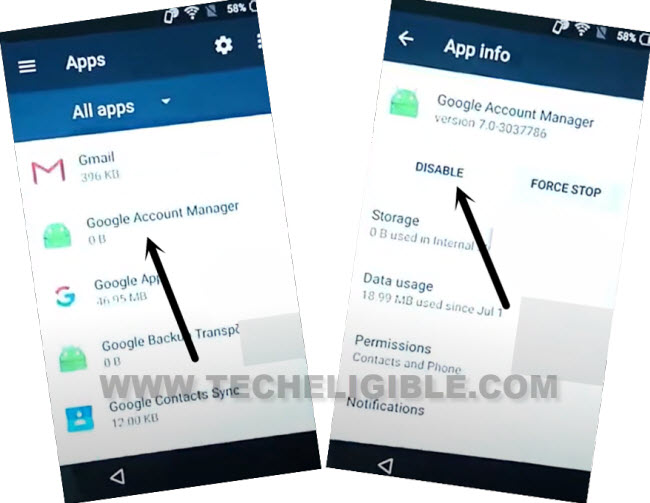
-Go back again on app list.
-After that, go to > Google Services Framework > Disable > Disable App.
-We are gonna install another app, so that, we could setup fresh gmail account on this device.
Install Google Play Services & Setup Google Account
-Go all the way back to (Main Menu) screen of your phone. From there, tap on “File Manager”.
-Go to > Internal Storage > Download. There, you will be able to see both downloaded apps.
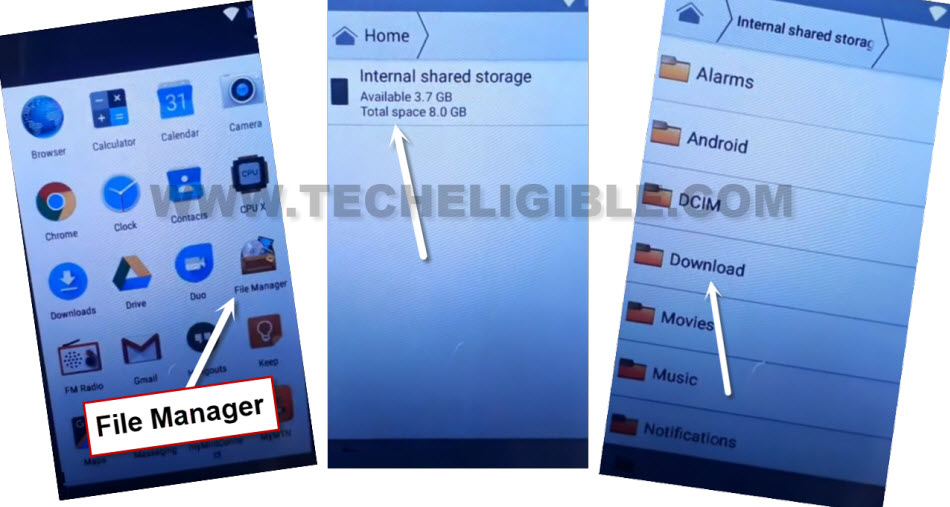
-Tap on the > Google Play Services > Next > Install > Done.
-We can easily setup fresh gmail account on the Cubot Cheetah 2 phone. For this, go back on the (Settings) screen of the phone.
-From there, scroll down and tap to “Accounts”.
-Hit over the > Add Account > Google.
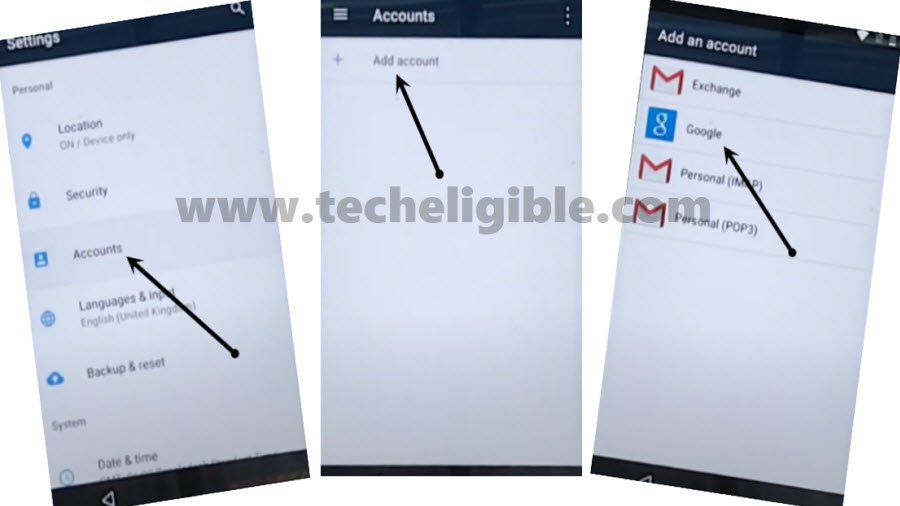
-The login screen will be launched there, just, login with your another remembered google account to bypass frp.
-After successfully setup new google account, you can restart the phone and complete startup steps easily.
Conclusion
After enabling the (Talkback Function), we reached on youtube main settings page. From there, successfully downloaded and installed the (Apex Launcher) application and with this launcher, we reached on the main home-screen of the cubot phone without setup the phone. Finally, we disabled some apps manually and add fresh google account on this device to finish the frp verification process.