Sitting worried after not getting access to the phone because of login information incorrect on google verification page? You don’t to be worried now, you can get back the phone just by using free tool (Android Utility V200). We will get this tool and run on PC, after that, with one click, we can Bypass FRP Infinix HOT 60 Pro (Android 15).
Disclaimer: Attempting this frp removal method on a phone that is not yours, is not allowed. This post is only for the device owner or follow up with the consent of the owner. This is an educational guide.
Start the Process to Bypass FRP Infinix HOT 60 Pro
-First of all, you have to get the tool on your PC and drivers. For this, you don’t need to go anywhere.
-Visit the below given link to download and launch the (Android Utility Tool) on your computer and also install required drivers. So that, we do not get any interruption while bypassing the frp and connecting the device with PC.
| ⇒ Android Utility Tool V200 [Download] ⇒ Mediatek + UsbDK Drivers [Download] Unzip Password: gsmprime |
Select Options from the Tool
-After launching the Android Utility tool, just click over the “Mediatek” tab.
-Then, click on the > META Mode > Main.

-Let’s switch off the phone completely and wait for 10 seconds, so that, our phone is switched off.
-Just, click on the option “Meta:: Wipe FRP (Infinix-Tecno-Itel)”.

-After that, you will be displayed message of (Wait for MTK USB Device….).

Turn Off Phone & Connect to PC
-Connect the phone to PC only without pressing any button. That’s it. Do make sure, the phone is fully turned off while you connecting to PC.
Note: If your phone is not being recognized, there could be 2 main reason, firstly, check your USB cable and input, output. If its working fine, then, look for drivers are not installed properly. Or, you can give another try just after restarting the PC.
-Within few seconds or a minute, your device will restart and FRP will be bypassed. You will be able to see the progress on going on the tool interface.

-Once, you have a welcome display after phone restart completed. You can disconnect the device from computer and close the running tool safely.

Disconnect & Complete Setup Wizard Steps
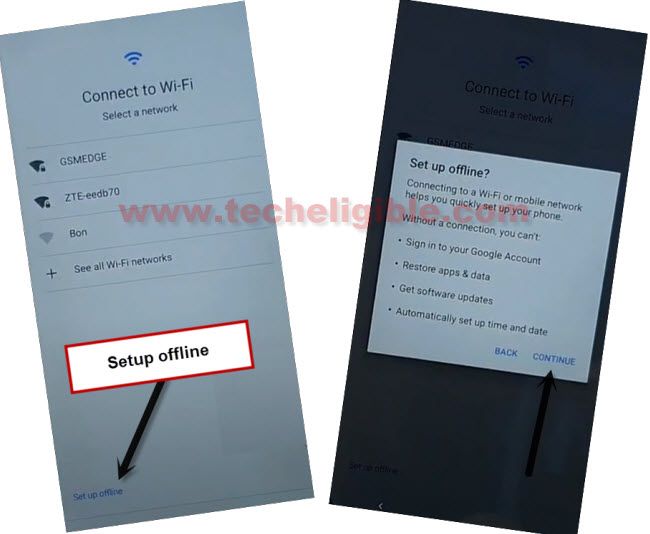
-Go to (Connect to WiFi) screen, from there, choose the option > Setup offline > Continue.
Note: If you don’t get the (Setup offline) or a (Skip) option, you just connect WiFi to your device, after that, you will get either option.
-It’s all done, complete all the startup steps on your own.
Final Words
We used a simple & free tool (Android Utility V200). After installing the reuiqred drivers, we just launched the tool and chose the (Mediatek) tab. Then, we clicked over the “Meta:: Wipe FRP (Infinix-Tecno-Itel)” button from the tool interface. Finally, we switched off our phone completely and connected to PC. Afterwards, within a minute, the FRP was bypassed successfully.