Facing an issue on the Google verification screen because you can’t recall the Gmail account connected to your phone? Your device is secured with the Factory Reset Protection feature. This is the reason you’re unable to finish the setup process. To start, attempt to get back your forgotten account and utilize the recovery methods available. If you still can’t find a way to retrieve your ID, we have a method to bypass FRP Infinix Hot 60i (Android 15).
Keep in mind: Do not attempt this FRP technique on a device that has been unlawfully taken. Engaging in efforts to remove FRP from a stolen device constitutes a grave offense. You could face imprisonment, as this approach is intended solely for the legitimate owner of the device and for learning purposes. It is designed to help the rightful owner understand how to regain access to their phone and establish a new account.
Note: You may not be able to setup google account and screen lock. This is the temporary frp bypass solution. We don’t have any method right now to bypass frp completely and setup another google account easily. After accessing to your phone, you can try to setup screen lock on your own from settings.
Bypass FRP Infinix Hot 60i (Android 15) With PC
Note: Firstly, you are required to prepare any sim card with 4 digits PIN lock code. This can be done easily on your own at home. Use any other android phone, and insert that sim card on that phone, after that, go to > Settings > Security & Privacy > Turn on SIM lock. Then, setup any 4 digits pin lock code there. For more help, click here.
Insert & Eject SIM
-Let’s get back to infinix phone, just connect WIFI first to the device.
-Go back on the (Select Language) screen. Insert your already setup PIN locked SIM card.
-Once you have a (Enter SIM PIN) screen, simply, eject the SIM tray.
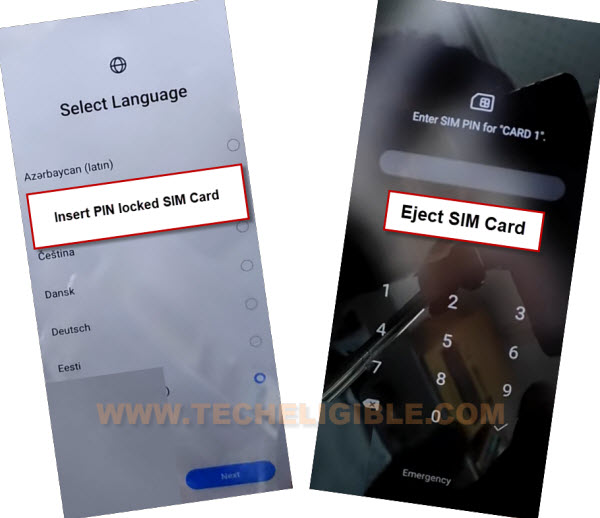
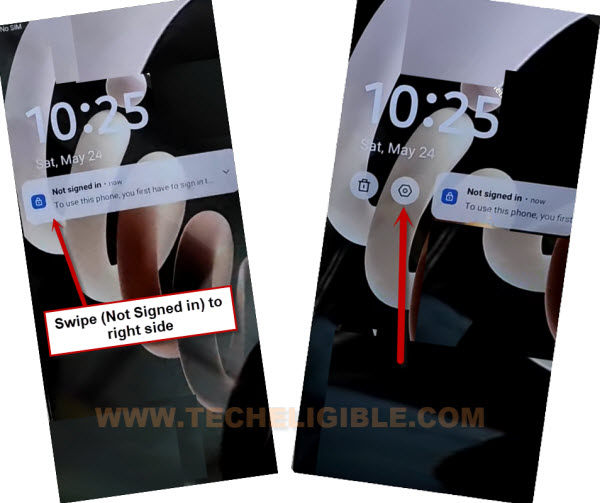
-After ejecting sim card, press once the “Power key”, and you will have a (Not signed in) message on display.
-Simply, you need to swipe this message to right or left, then, tap on “Settings” option.
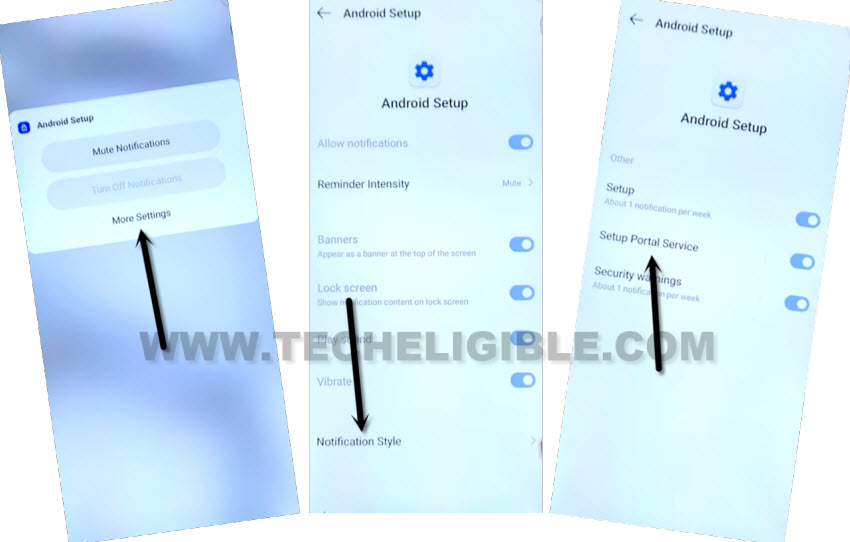
-From there, we have to hit over the “More Settings” option.
-Afterwards, tap further on “Notification Style”.
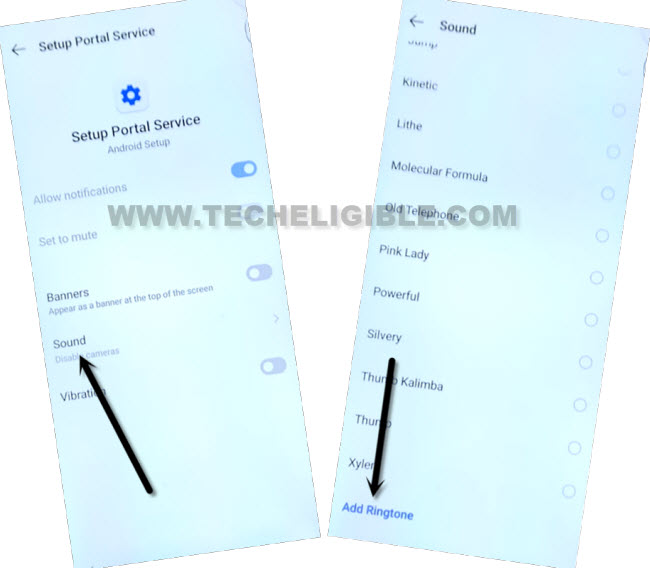
-Hit on the 2nd number “Setup Portal Service” option.
-From next screen, go to > Sound > Add ringtone.
Note: If you don’t see (Add ringtone) on bottom, look for this option at the top.
-Open up the menu list by tapping on “Menu” icon from extreme top left corner. Then, long hold at the “File Manager / Drive” option.
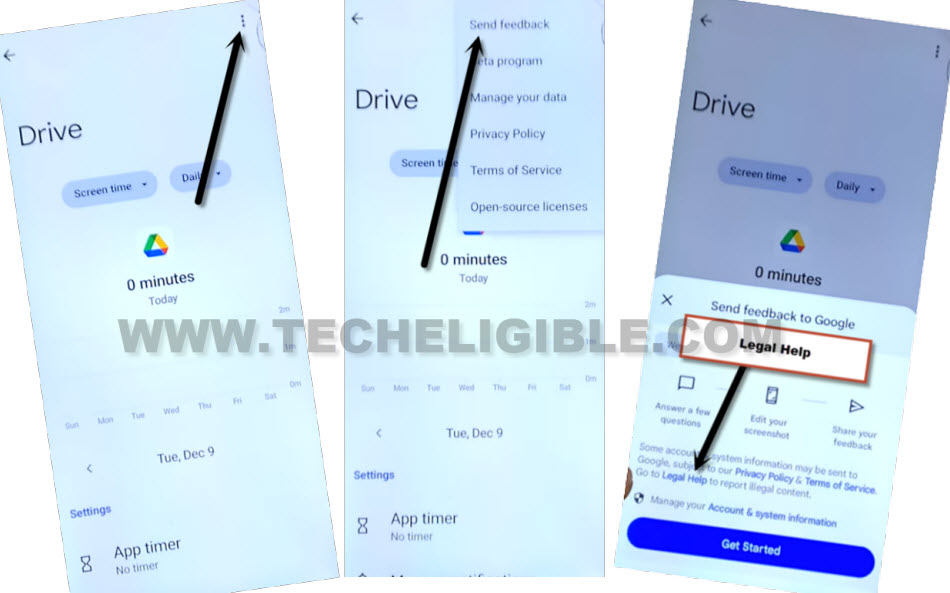
-Go to “Screen Time” option.
Access Youtube & Open FRP Tools Page
-From the next page, we have to hit on “3 dots” option from top corner.
-Afterwards, tap “Send feedback” option.
-Finally, hit on a link named “Legal help” to reach over the youtube video page.
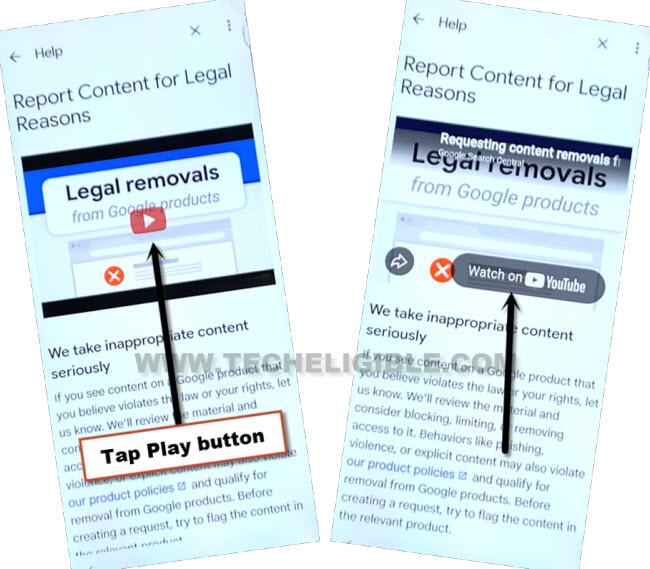
-Hit on a “Play button” from video and go to “Watch on Youtube” option to access youtube site directly.
-You may get a popup screen, just tap to “Allow”. After that, hit on the “Google Search Central” channel name.
-Go on the “3 dots” option and choose “Terms & Privacy Policy”.

-You will be taken over the “Chrome Browser” screen. From there, tap on > Use without an account > No Thanks.
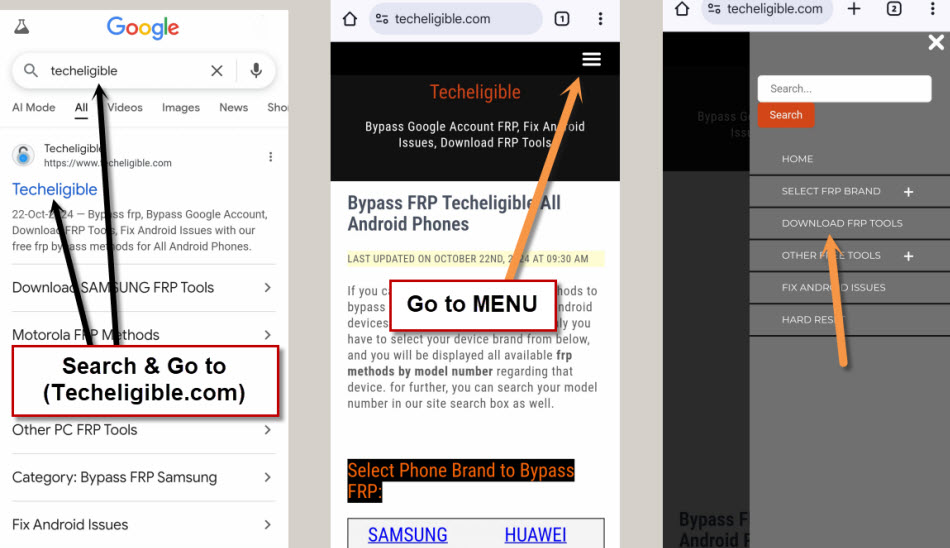
-We’ve to reach on the official site of techeligible, for this, search with “Techeligible” and go to 1st searched result.
-After that, go to “Menu” icon and tap on “Download FRP Tools” option.
Open Dialer to Dial Code
-Let’s open up the dialer on your FRP locked device with single tap, just tap on the “Open Dialer code” option

-Use a proper USB cable and connect your phone with PC.
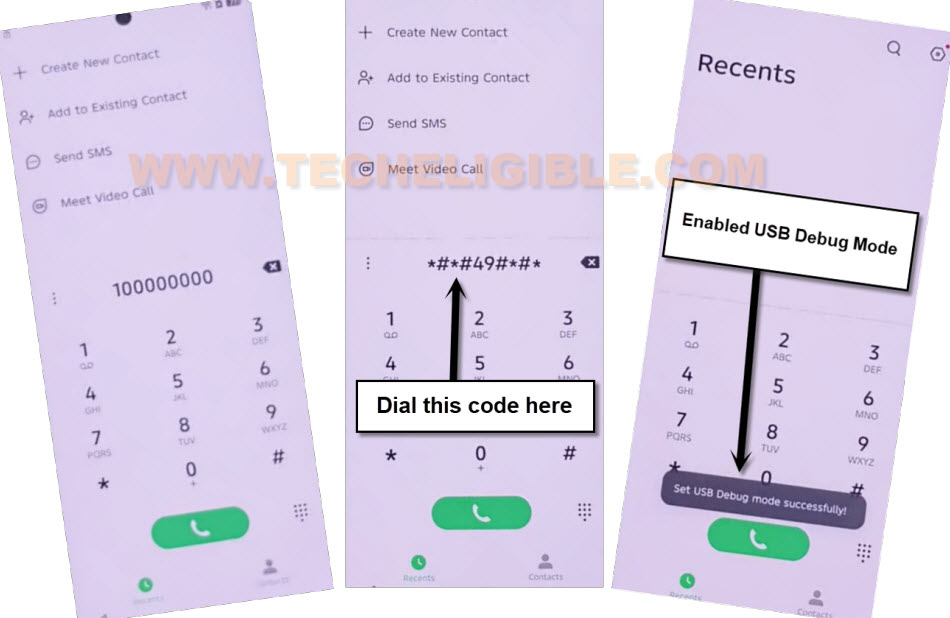
-As dialer screen has already been opened on the phone, just dial this code on screen *#*#49#*#*.
| Note: If your phone is not being detected by the PC, you just have to install proper Meditake and ADB drivers on your PC first for your (Tecno pova slim 5G). Google it or check out another post to install drivers on PC using free chimera installer. |
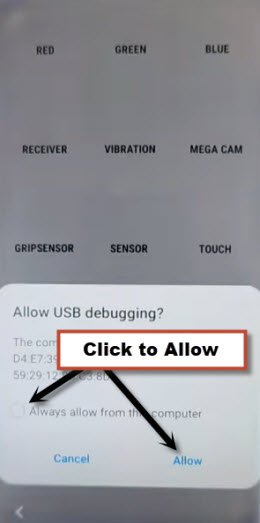
-You will also have a notification of asking you enable USB debugging option, just, check mark option “Always allow form this computer”. After that, tap over the “Allow” option.
Bypass FRP By Samfw PC Software [FREE]
-We have to download now free and simple tool named (Samfw Tool) on the computer.
Note: Don’t forget to turn off your PC @ntivirus software, you don’t need to be worried, as this tool is reliable and we have checked it alreayd on our PC.
| ⇒ Samfw Tool V5.4 [DOWNLOAD] Pass: techeligible |
-After downloading is done, extract this tool by using already given password.
-Go to extracted folder and install it on your PC.
-After that, double click on the Samfw icon from desktop to run it.
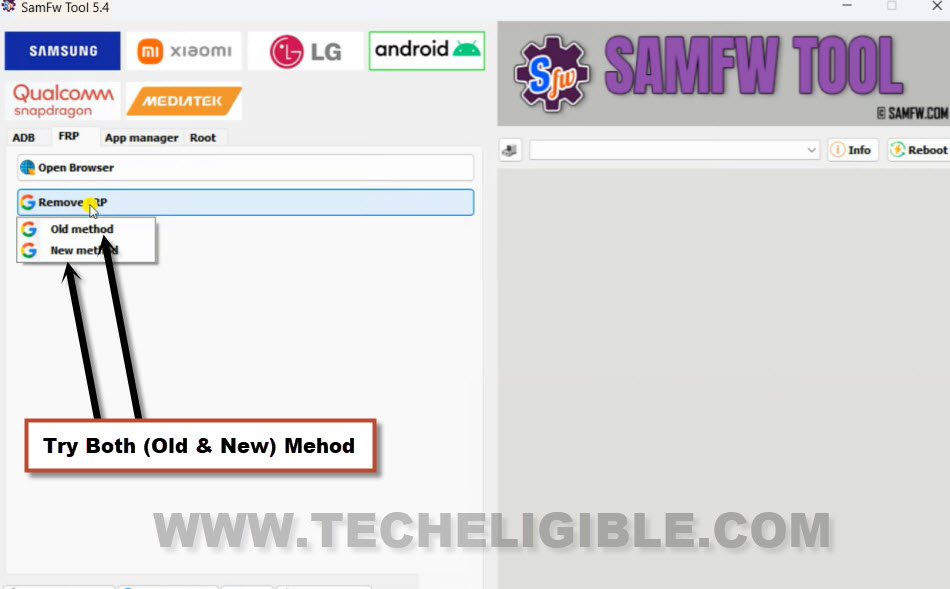
-Let’s bypass frp now by tapping on > Android > FRP.
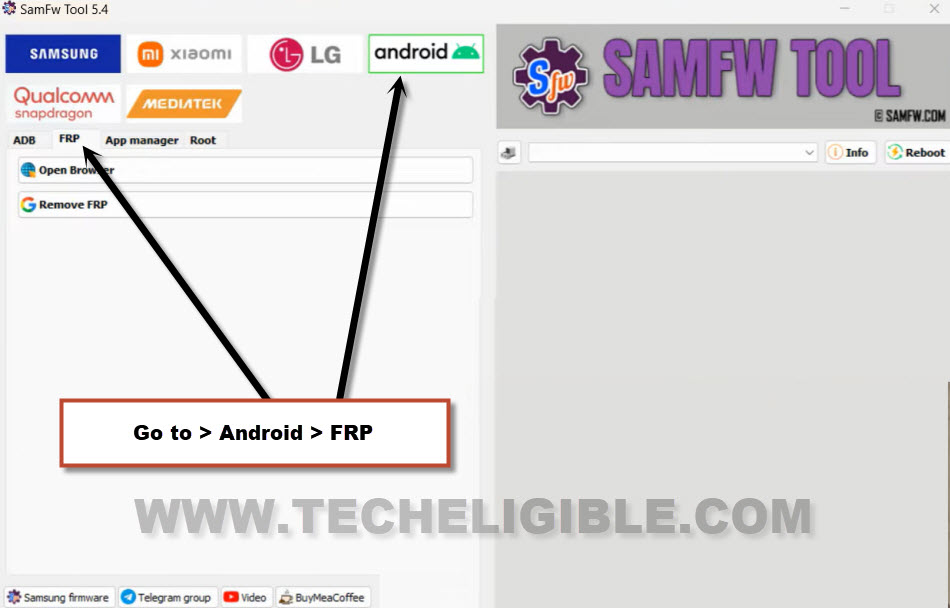
-Hit n “Remove FRP” button.
-After that, click to “Old Method”.
Note: If the FRP bypassing is failed? click again on “Remove FRP” option and try again for 2-3 times, eve then, not working?, let’s choose the “New Method” option.
-Finally, the FRP has been bypassed successfully, and you will have a message of (FRP Removed Successfully) on your Samfw tool interface.
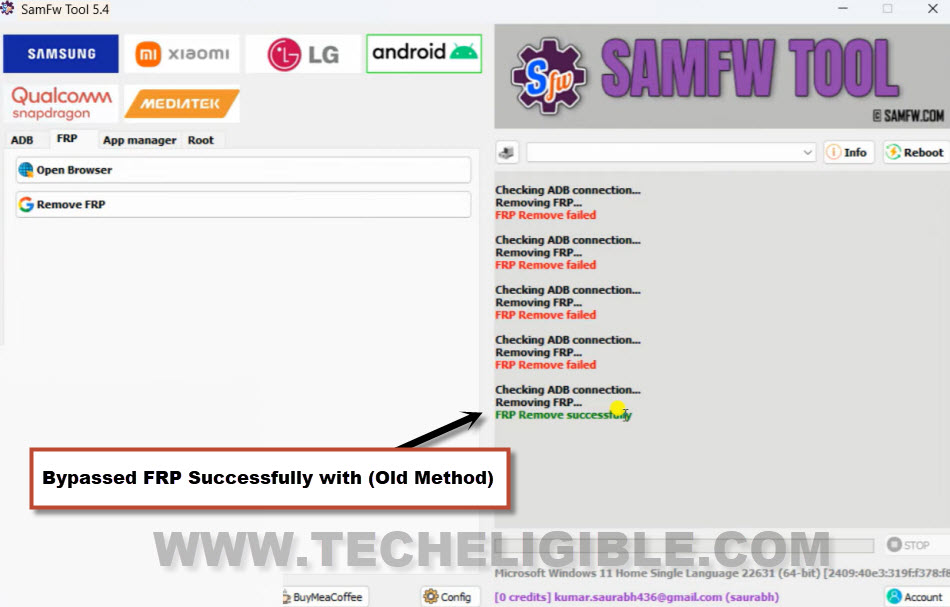
-Your phone will auto restart and show you main home-screen.
The Key Points
Initially, we linked our phone to WiFi, and then, we navigated to the (File Manager) screen using the (PIN-protected SIM) card. Following this, we went to the official YouTube website from that location and opened the (Google Search Central) channel. Next, we just got the Google Chrome browser and accessed the FRP tools page. From there, we launched dialer screen and enabled usb debugging mode using the code. Finally, we downloaded & used the (Samfw Software) for bypassing frp.