Have you hard reset your own Mintt Phone because of some reasons? Now, you must be stuck on a google verification page. You can’t bypass this verification process either you sign in again with same Gmail ID or follow up this guideline to Remove FRP Account Mintt Z6 (Android 13). We will use a simple method to access the device main settings page and disable google play services application.
Warning: This method is only for a real device owner, who has lost his/her Gmail account after hard reset. If you are unknown to this phone & trying to gain access, you will be jailed once the device is traced. This is a serious crime & Sin. You must return this phone to its real owner.
Let’s Start to Remove FRP Account Mintt Z6:
Note: Before starting this process, you are required any other (Android Phone) and a (Data Cable) to connect both devices together.
-Switch on & Connect WiFi to your device. After that, go back to first (Hello) screen.
-Tap to > Start > Skip > Next.

-Tap again on > Next > Next. after that, you will be asked to (Insert cable in your old device).
-Arrange any other (Android Device & Type C to Type C data cable). Both sides should be type-c or as per your other device charging port.

-Let’s connect both devices using data cable.
-Tap to “Files by Google”. After that, tap on “Just once” option.
-Go to 3 parallel lines from top left corner, after that, tap on “Mintt Z6”.

-Get into your “Picture” folder. After that, take screen shot by long press “Volume Down + Power button”.
-Go to “ScreenShots” folder.

-Tap on your screenshot image.
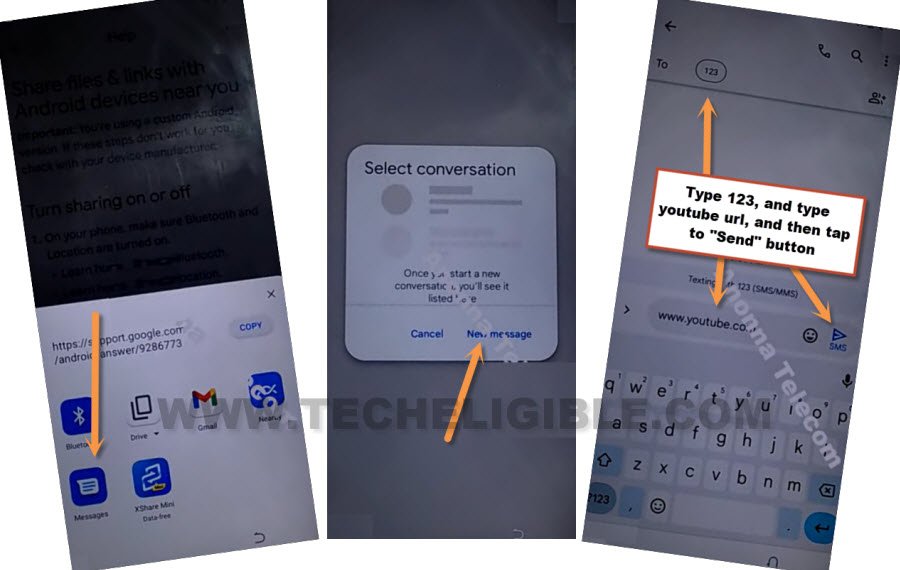
-Hit on “Share” icon from bottom. After that, you will have a popup window of sharing apps.

-Go to > Message > New Message.
-Type any random number on “TO” filed tab. After that, type this url in message “www.youtube.com”. After that, tap to “Send” button from your device to send this url as a text message.
-Tap on your sent url “www.youtube.com” from message box screen.
-If you get a (Update) page, just tap on “Back Arrow” from bottom. You will be taken to (Welcome to Chrome) page, just tap on > Accept & Continue > No Thanks > No Thanks.
Access to Mintt Z6 Settings Page:
-We’re gonna search in browser with “Techeligible” text.
-From searched result, go to techeligible official site. After that, tap to “Menu” option from top corner and go to “Download FRP Tools” option to be redirected to the frp tools page to Remove FRP Account Mintt Z6.

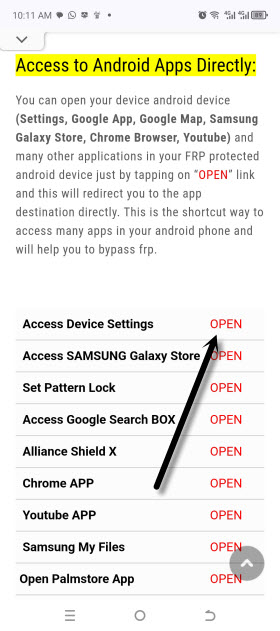
-Scroll down from frp tools page, and go to “Access device settings” option. This option will get you inside the device main settings page directly.
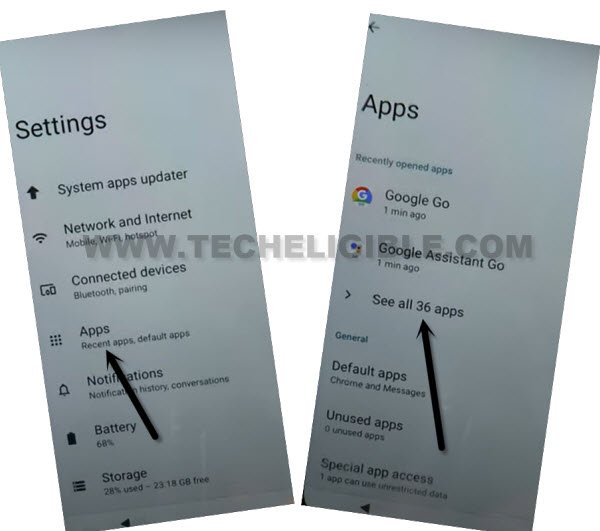
-From there, tap to > Apps > See all apps.
-Hit on > 3 dots > Show system.
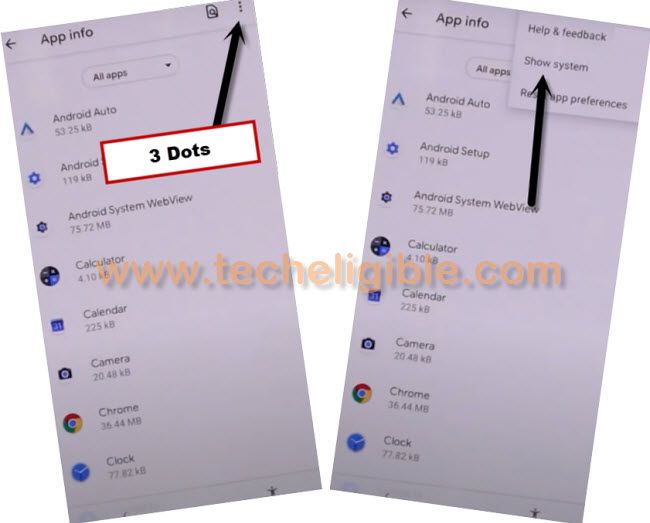
-Find and tap to “Android Setup” gear icon app. But nothing will happen. Don’t worry, just tap at least 20 times on this android setup app.
-After that, scroll down and find and tap on “Google Play Services” app. This app will also not respond. But, keep tapping for about 20-30 times on this app.
| Note: Spend at least 2-3 minutes on tapping (Google Play Services) app. We are doing this just to get this app appeared in our (Battery percentage) option. |

-Go back to main settings page by hitting back arrow from bottom penal of your device.
-Go to > Battery > Battery Usage.
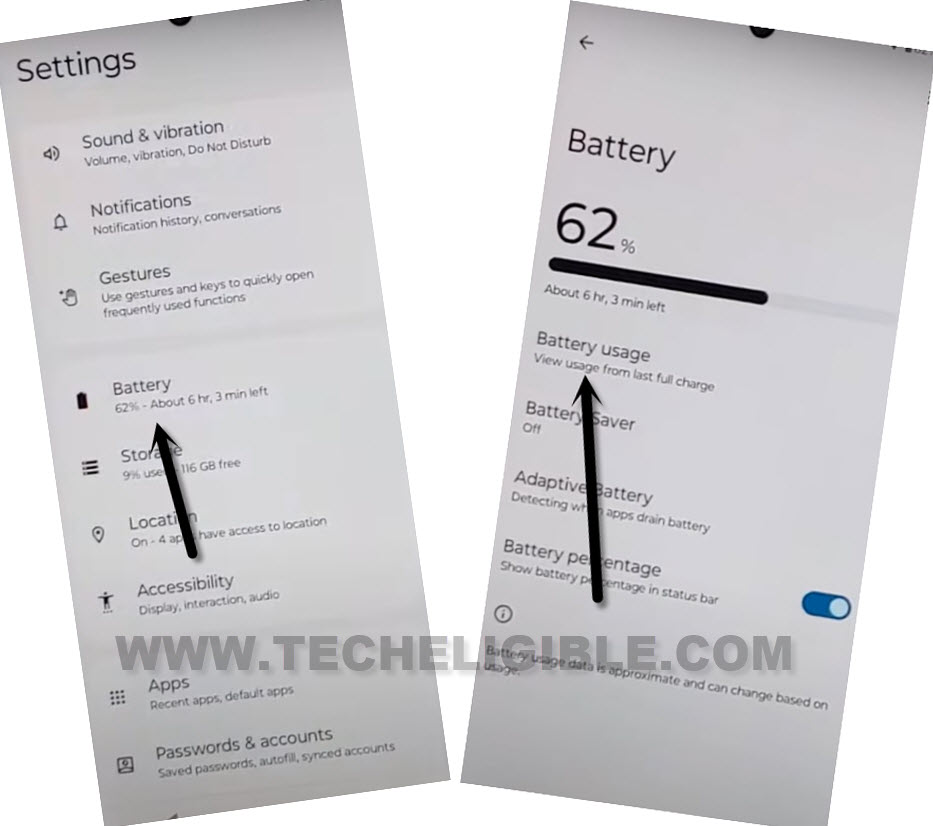
-There you will have a (Android Setup & Google Play Services) app in list. Simply, tap to > Android Setup > Force Stop > Ok.

-After that, tap to > Google Play Services > Force Stop > Ok.
-We have to disable this app as well by tapping on > Disable > Disable App.

-After disabling google app successfully, just go al the way back to first (Hello) homepage. From there, tap to > Start > Skip.

-From loading page, just hit on “Back Arrow” from bottom to get back to (Connect to WiFi) page. From there, tap over > Setup offline > Continue. But you will stuck again on loading page. We have to get back to (Battery Usage) option to enable back google play services application.
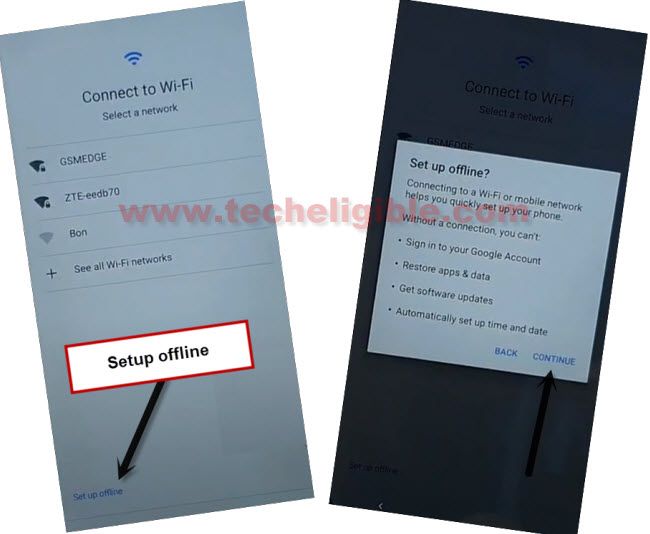
-Let’s get back to (Hello) page again and repeat steps to access (Battery Usage) option.
Enable Google App to Finish Up Setup Wizard:
-Tap to > Start > Skip > Next.
-Tap again on > Next > Next. after that, you will be asked to (Insert cable in your old device).
-Arrange any other (Android Device & Type C to Type C data cable). Both sides should be type-c or as per your other device charging port to Remove FRP Account Mintt Z6.
-Let’s connect both devices using data cable.
-Tap to “Files by Google”. After that, tap on “Just once” option.
-Go to 3 parallel lines from top left corner, after that, tap on “Mintt Z6”.
-Get into your “Picture” folder. After that, take screen shot by long press “Volume Down + Power button”.
-Go to “ScreenShots” folder.
-Tap on your screenshot image.
-Hit on “Share” icon from bottom. After that, you will have a popup window of sharing apps.
-Go to > Message > New Message.
-Type any random number on “TO” filed tab. After that, type this url in message “www.youtube.com”. After that, tap to “Send” button from your device to send this url as a text message.
-Tap on your sent url “www.youtube.com” from message box screen.
-If you get a (Update) page, just tap on “Back Arrow” from bottom. You will be taken to (Welcome to Chrome) page, just tap on > Accept & Continue > No Thanks > No Thanks.
Access to Mintt Z6 Settings Page:
-You must have a google chrome search bar at the top. Search with “Download FRP Tools” text. Visit our website 1st searched result.
-Scroll down from frp tools page, and go to “Access device settings” option. This option will get you inside the device main settings page directly.
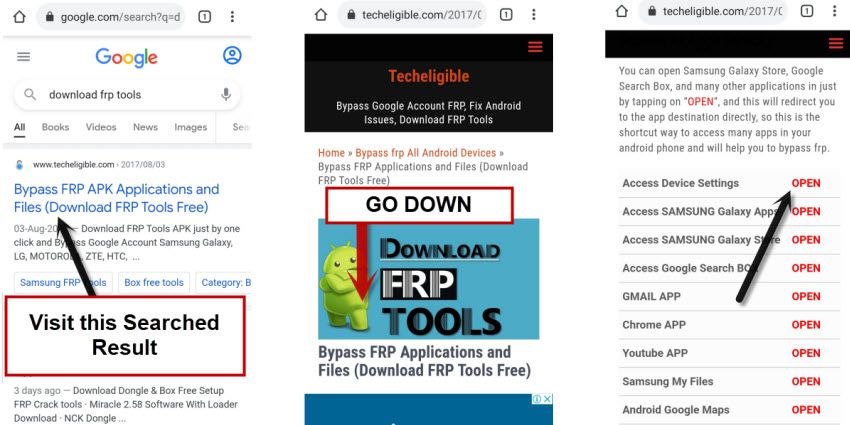
-Go to > Battery > Battery Usage.
-Tap on > Google Play Services > Enable. Once this app is enabled successfully, you are all done now from Remove FRP Account Mintt Z6.
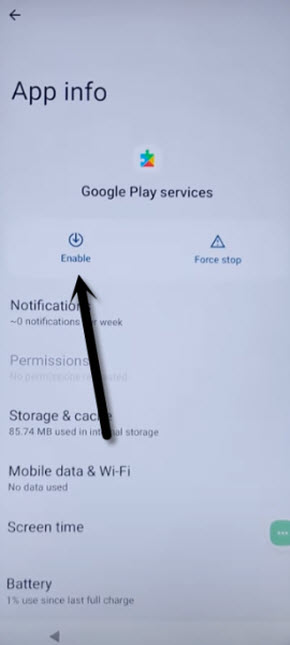
-Let’s reach back to (Hello) page. Finish up setup wizard now just by tapping at > Start > Next.
-After that, tap to > Setup offline > Continue.
-You can now easily complete all remaining setup wizard steps. Thanks for visiting us.