Are you worried about losing access to your device after performing hard reset. We will show you easy steps to resolve your this issue. You can follow up steps from here to Bypass FRP All Huawei Android 7 just by using (Quick Shortcut Maker) app. Firstly, we will turn on talkback feature, after that, we will access to chrome browser using youtube webpage. Follow up guideline from below.
Users Removed FRP By This Method On: Huawei P10 Lite, Huawei Nova 2i
Remember: Do not try this frp method on a stolen phone. This is a serious crime, if you are trying to bypass frp on a stolen phone. You may also be jailed, because this process is for device owner and for educational purpose only. Just to assist device owner, how they can recover back their phone and setup new account.
Let’s Start to Bypass FRP All Huawei Android 7:
• From very first screen, select your desire language and then tap on “NEXT”.

• After that, Tap on > SKIP > AGREE > AGREE > NEXT.
• Connect “Wi-Fi” to your device.
Enable Talkback to Open Chrome:
• Press “Power Key” and “RESTART” Huaiwe device.
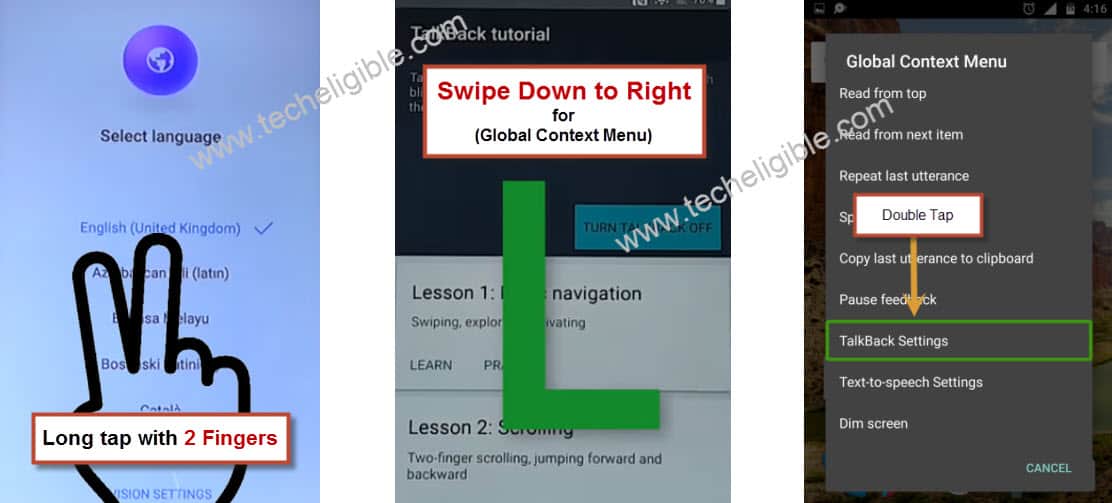
• Long tap for 10-15 sec with your “TWO FINGER” until you see “Talkback Screen”. (Try Again, if nothing happens)
• Swipe Down to Right on Talkback tutorial screen to get “Global Context Menu”.
• Double Tap on “Talkback Settings”.
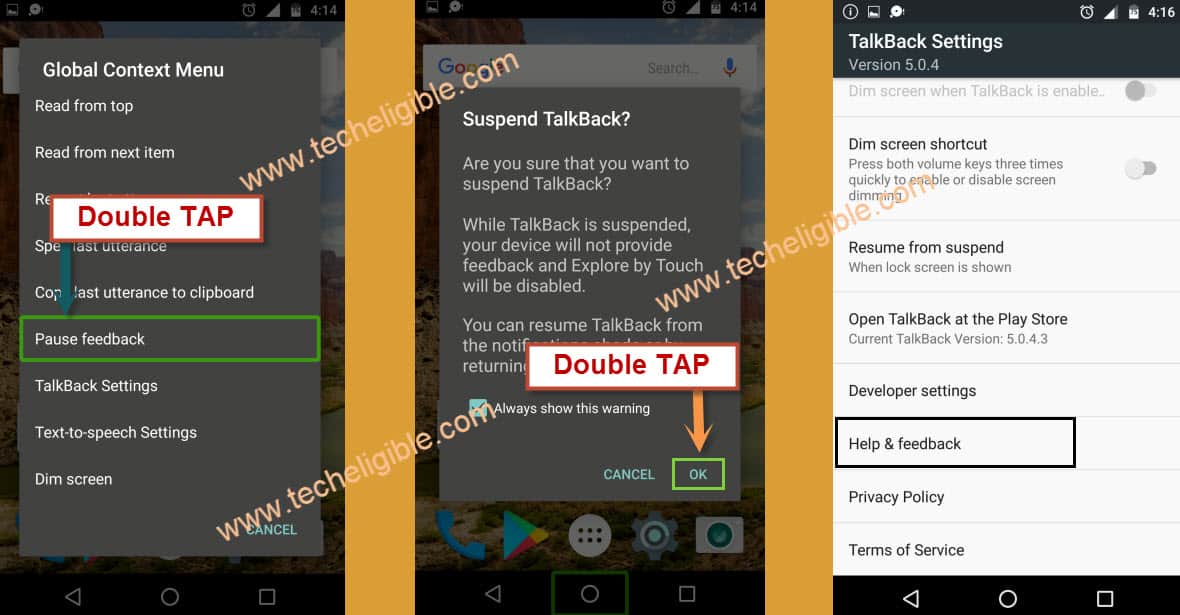
• Now again “Swipe Down to Right”.
• Double tap on “Pause Talkback”, after that double tap on “OK”.
• Tap on “Help & feedback”.
• Tap on “Search icon” from top right corner, and type there “V”.
• After that tap on “Get started with voice access”.

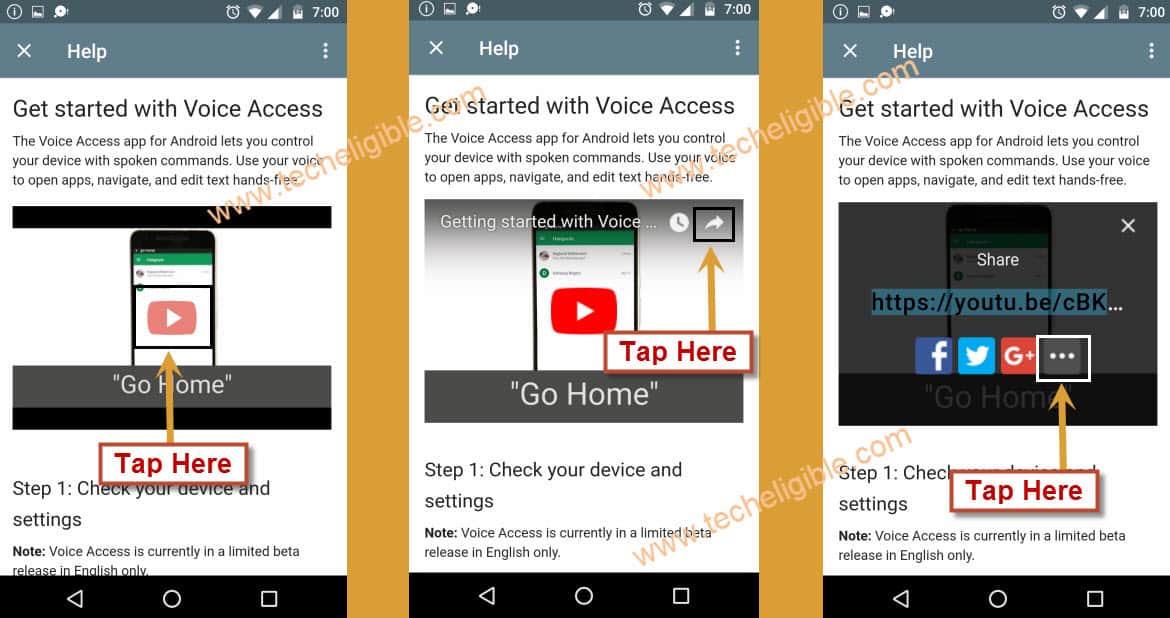
• Tap on “Play button” to play youtube video.
• After that tap on ‘Share arrow” to get share options.
• From share options, just tap on “3 dots” to open youtube.
Open Google Chrome from Youtube:
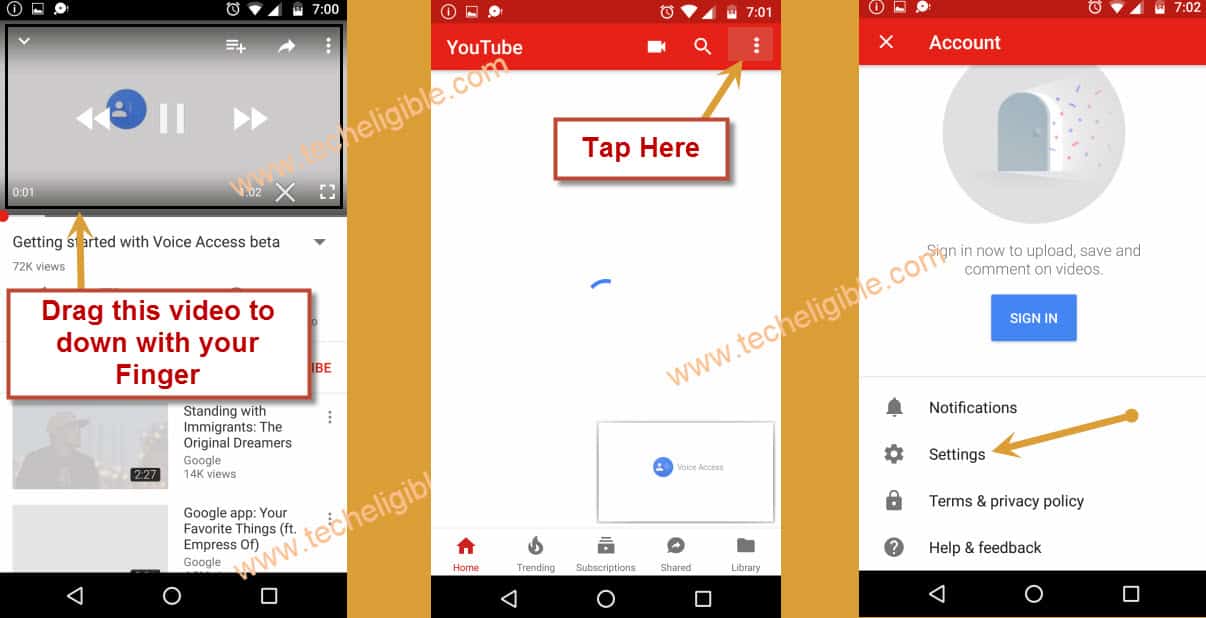
• Drag down youtube video and tap on “3 dots” icon from top corner.
• After that tap on “Settings”.
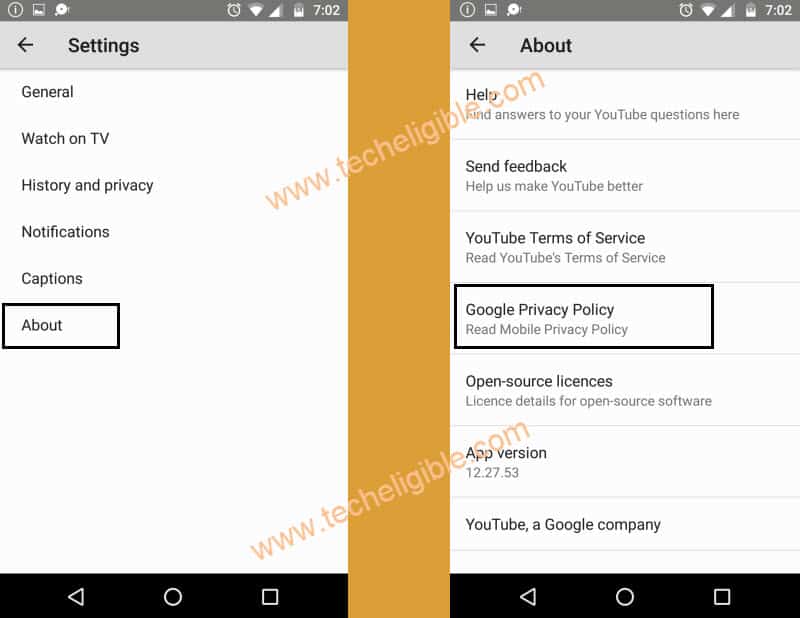
• Tap on “About”, then tap on “Google Privacy Policy” to Bypass google account.
• Now “Deselect” from “Help make chrome……”
• After tap on “Accept & Continue”.
• Deselect “Data Saver is on”, then tap on “NEXT”.
• Tap on “No Thanks”.

Download FRP Tools:
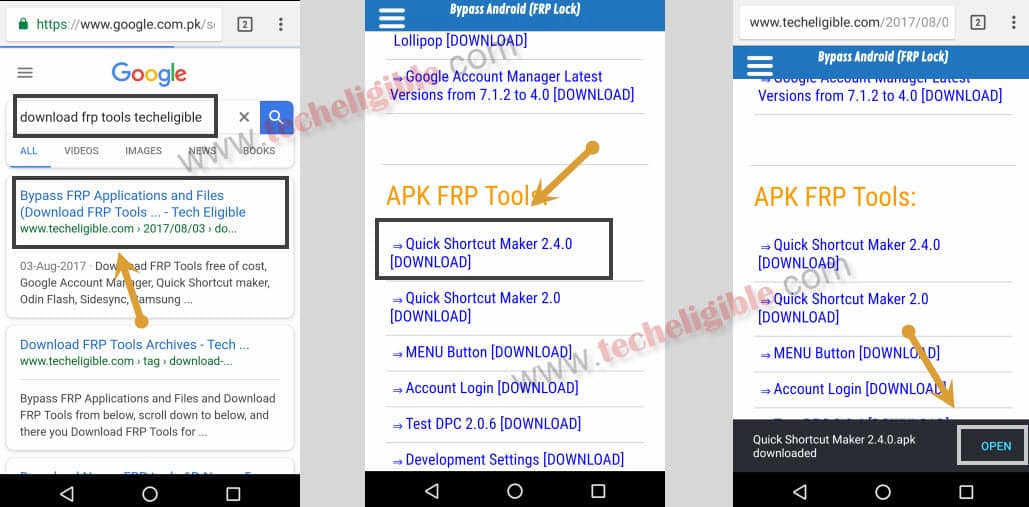
-Let’s go to techeligible site by searching in browser with “Techeligible“. After that, visit first searched result same as shown in below image.
-Afterwards, you have to hit over the “Menu” icon from top corner. Tap to “Download FRP Tools”.

• Download “Quick Shortcut Maker 2.4.0” from there to Bypass FRP All Huawei Android 7.
• Once downloading finish, popup will appear bottom of your screen, just tap on “OPEN”.
Enable Unknown Sources:
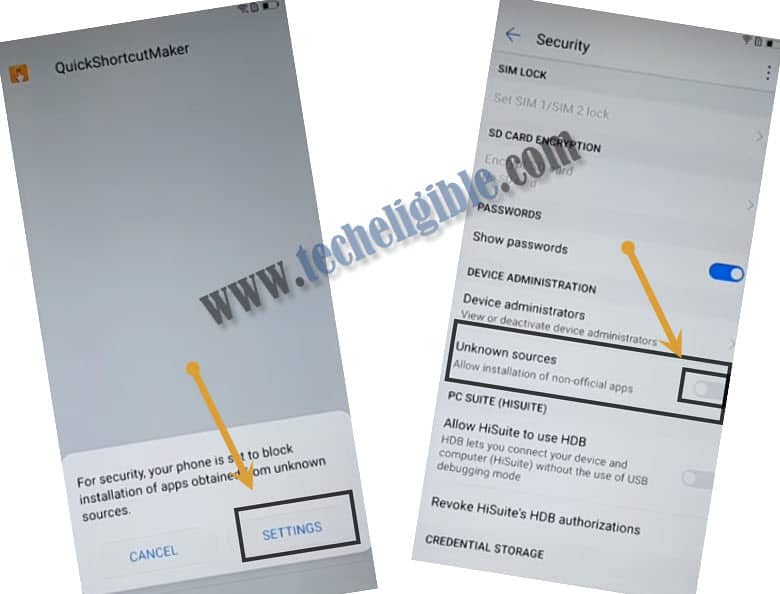
• Now you will get “Installation Blocked” popup, just tap on “Settings” from popup.
• Enable “Unknown Sources” from there.
• Tap on “Back Key” to back to “Download Page” and again download “Quick Shortcut maker 2.4.0” and again open it.
Install & Open Quick Shortcut Maker 2.4:
• Tap on “Install”, after that tap on “OPEN”.
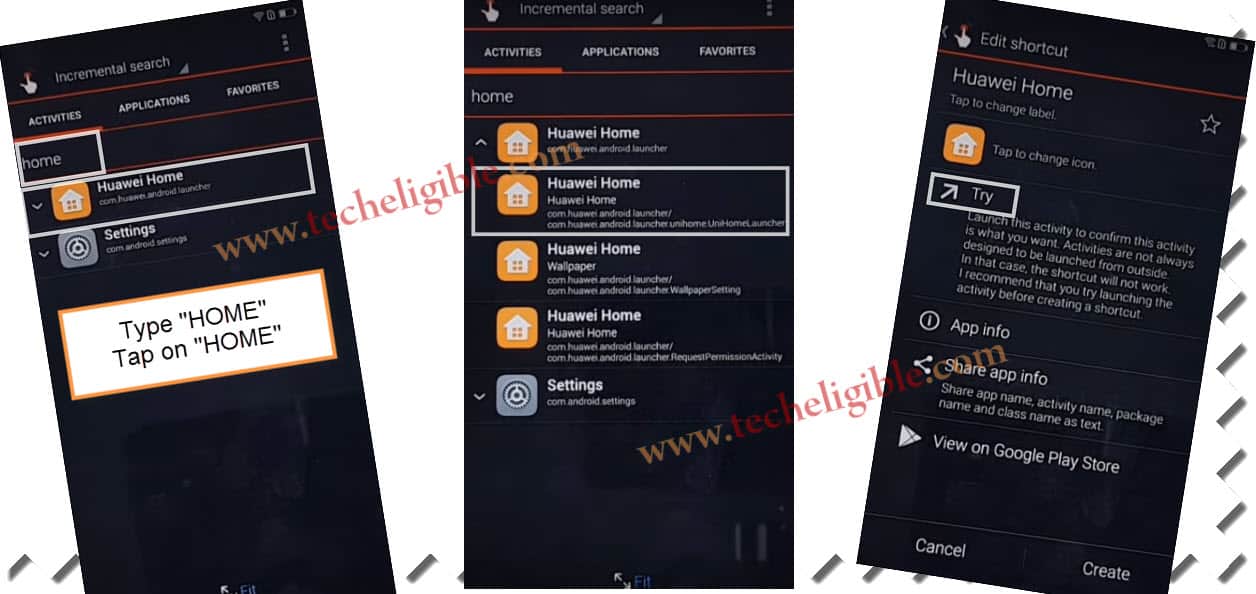
• Now type there “HOME”, and tap on that.
• Tap on very first “HOME” as shown in below image.
• After that, tap on “TRY”.
Add New Gmail Account:
• Tap on “Settings”.
• After that tap on “Accounts”.
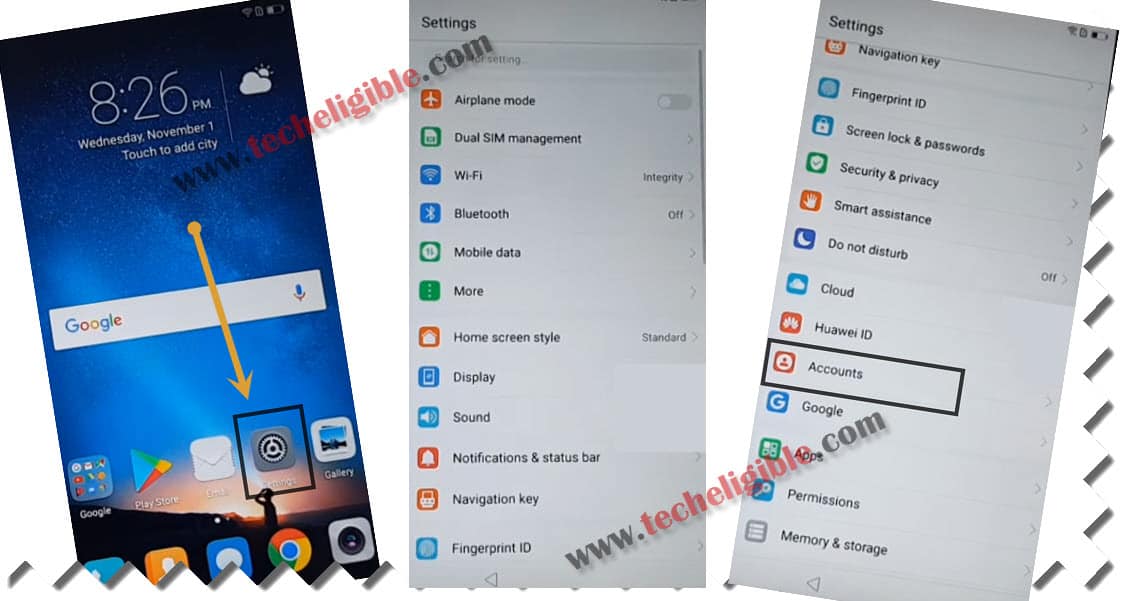
• Add your Latest gmail account there to Bypass FRP All Huawei Android 7.
• Once gmail account added, tap on “Accept”, and then tap on “NEXT”.
• Go back to “HOME SCREEN”, by tapping on “Back Key” from “Accounts” screen.

• Tap on “Play Store”, and then tap on “Get Started”.
• Go back to “Home Screen” again.
Soft Reset Huawei Device:
• Tap on “Settings” from home screen.
• Go to “Advance Settings”, and then tap on > Backup & Reset > Factory Data Reset > Reset Phone > Reset Phone to successfully Bypass Gmail Account Verification Huawei.
• It will take several minutes in erasing data, after that complete initial setup.