Techeligible

Menu
  • HOME
  • SELECT FRP BRAND
    • SAMSUNG
    • HUAWEI
    • NOKIA
    • ZTE
    • LG
    • MOTO
    • ASUS
    • XIAOMI
    • OTHER PHONE
  • DOWNLOAD FRP TOOLS
  • OTHER FREE TOOLS
    • SAMSUNG TOOLS
    • Z3X Samsung Tool Pro [FREE]
    • Octopus | Octoplus (With Loader)
    • Miracle 2.93 (With Loader)
    • Miracle Thunder 2.82 (With Loader)
    • Miracle 2.58 (With Loader)
    • Miracle 2.54 (With Loader)
    • Miracle Xiaomi 1.56 (With Loader)
    • Unlock Tools with Loader
    • COMBINATION FIRMWARE
    • Other FRP Tools
  • FIX ANDROID ISSUES
  • HARD RESET

Home » Samsung FRP Bypass » Enable ADB Mode By Codes or Diag Mode on Samsung Galaxy, LG, ZTE

Enable ADB Mode By Codes or Diag Mode on Samsung Galaxy, LG, ZTE

Enable ADB Mode By Codes, Enable ADB Mode Samsung Galaxy, Enable ADB Mode on LG, Enable ADB Mode By Codes on ZTE Device
Last Updated on: September 7, 2025

Enable ADB Mode By Codes or Diagnostic Port in Samsung Galaxy, LG, and ZTE Smartphones to sort out and resolve bundle of problems from your device by connecting to computer.

ADM or Diagnostics M are very essential for any device to be connected to computer and to be detected by flashing tools, because once Samsung, LG, or ZTE devices is detected by the flasher tool, then you can fix too many issues from your device, such as (FRP Lock, Unlocking Pattern, Flashing with firmware, Unlock Network Lock) and many other problems can easily be resolved.


Let’s Enable ADB Through Codes on SAMSUNG GALAXY:

⇒ Open Calculator Samsung Device

⇒ Type in Calculator ” (+30012012732+ “

⇒  Now DRParser Mode will open, type there ” *#0808# “

⇒ USB Setting will open, tap on “DM + ACM + ADB“, after that tap on “Reboot“
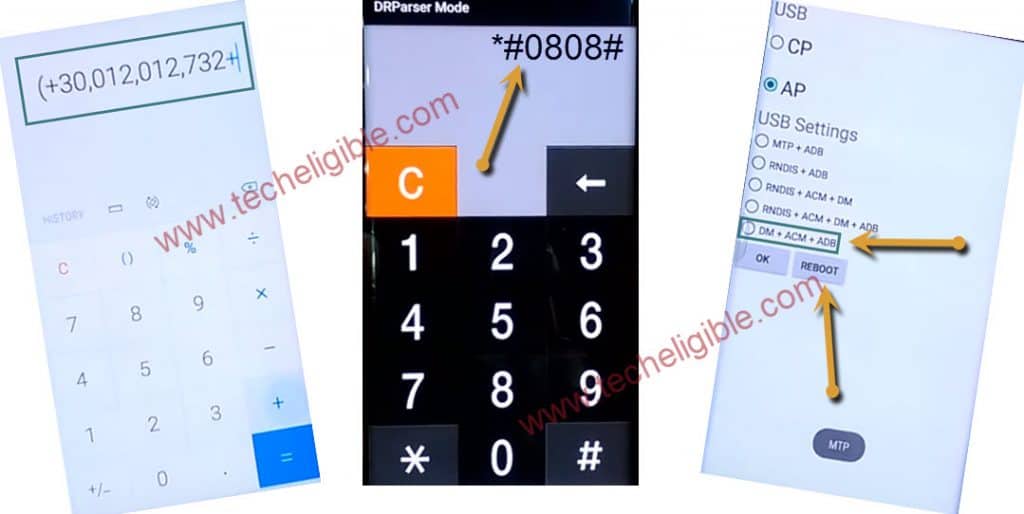
Enable ADB Mode By Codes, Enable ADB Mode Samsung Galaxy


If your device is locked, you can open this from “Emergency Call” as well.

⇒  Tap on “Emergency Call”.

⇒  Dial Code *#0808# 

⇒  USB Setting will open, tap on “DM + ACM + ADB“, after that tap on “Reboot“
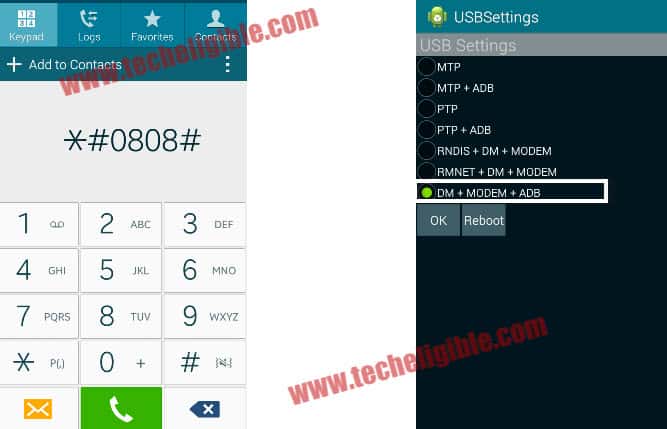
adb mode


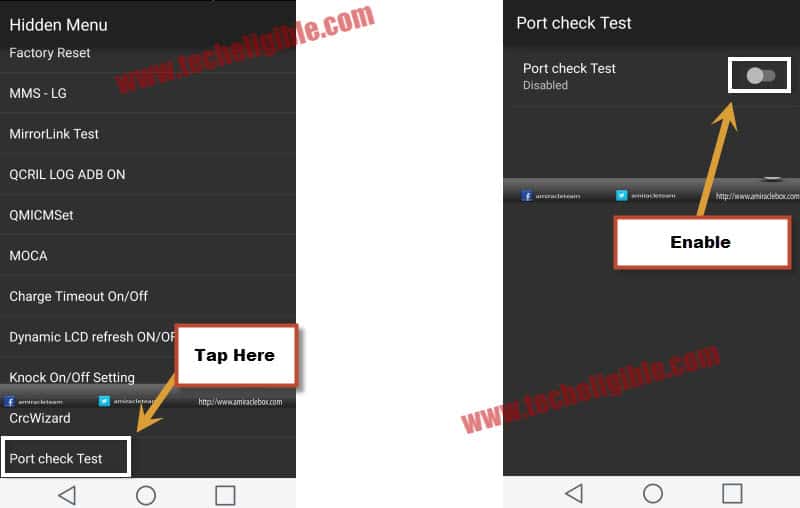
How to Enable ADB on LG:

-Tap on “Emergency Call” or open “Dialer”.

-Type CODE 277634#*#
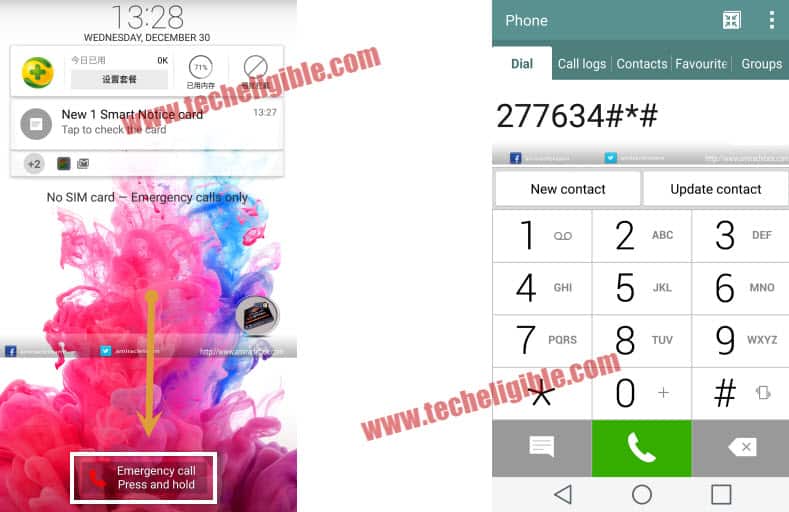
 

-Select “Port Check Test”.

-After that, enable “Port Check Test”.

-This would enable Diagnostic Port in your LG Device.

-Your device can easily be detected by computer using Micro USB Cable.
 

ZTE Enable ADB or Diagnostic Mode Open:

-Before, enabling Diagnostic Mode, you need enable Hidden menu.

-Type Code in Dialer: *983*673636#.

-After typing this code, you will have a quick popup on your screen, that means you’ve enabled “Hidden Menu” successfully.

-Now enable “ADB Mode or Diagnostic Mode”.

-Type Code: *983*87274#

-Now you’ve successfully enabled “Diagnostic Port”, and this would help your device to be connected to computer, and you can check your device COM Port by going to your computer device manager.

Note: If you are facing FRP Lock Issue on ZTE BLADE ZMAX Device, and you’ve successfully enabled “ADB Mode” then i would recommend you to click here to remove frp lock from ZTE ZMAX Pro Z981, Z982.

Related posts:


  1. Unlock FRP Samsung Galaxy By Bluetooth Keyboard (Old Samsung Models)

  2. Bypass FRP Samsung Galaxy J2 (Android 6/5)

  3. Bypass FRP Account LG K7 Without any PC [2 Methods]

  4. Remove FRP Galaxy Express 3, Galaxy J1, Galaxy J3 by Realterm Software
January 24, 2018
8 Comments

Post navigation

Download Miracle 2.54 Tool With Loader Free (Powerful Tool)
Bypass FRP ASUS Zenfone MAX Plus M1 By Talkback Method
Subscribe
Login
Notify of
guest

guest

This site uses Akismet to reduce spam. Learn how your comment data is processed.

8 Comments
Newest
Oldest Most Voted

Subscribe Yourself

Get new posts by email

Download Center

  • Download FRP Tools
  • SAMSUNG Tools
  • Other PC Tools
  • Combination ROM | FIRMWARE
  • Miracle V3.28 (With Loader)
  • Miracle Xiaomi 1.56 (With Loader)
  • Download Miracle 2.93 (With Loader)
  • Miracle Thunder 2.82 (With Loader)
  • Octopus All Version (With Loader)
  • Samfirm Tool V3.1

Contact US

  • Home
  • About US
  • Contact US
  • Privacy Policy
  • Advertise

Advertisements

Techeligible. All Rights Reserved

Theme by TheClassicTemplate

TECHELIGIBLE
  • HOME
  • SELECT FRP BRAND
    • SAMSUNG
    • HUAWEI
    • NOKIA
    • ZTE
    • LG
    • MOTO
    • ASUS
    • XIAOMI
    • OTHER PHONE
  • DOWNLOAD FRP TOOLS
  • OTHER FREE TOOLS
    • SAMSUNG TOOLS
    • Z3X Samsung Tool Pro [FREE]
    • Octopus | Octoplus (With Loader)
    • Miracle 2.93 (With Loader)
    • Miracle Thunder 2.82 (With Loader)
    • Miracle 2.58 (With Loader)
    • Miracle 2.54 (With Loader)
    • Miracle Xiaomi 1.56 (With Loader)
    • Unlock Tools with Loader
    • COMBINATION FIRMWARE
    • Other FRP Tools
  • FIX ANDROID ISSUES
  • HARD RESET
wpDiscuz