Stuck on the google sign in page? You might have locked out yourself with FRP lock protection because of forgetting the frp linked google id. That happens with the phone, on which, you perform a factory reset. FRP security lock feature is pre-activated on all Samsung J2 Pro phone with already synced google account. If you forget your that account, then, accessing back to your own device will become complicated right after you perform hard reset or factory process. To sort out this complications, you can get help with 2 methods on Bypass FRP Samsung Galaxy J2 Pro (Android 7 versions).
Disclaimer: We are creating this post to educate people about how to get back their lost device due to forgetting Google account. This method is only for device owner and for educational purpose only.
| 1st FRP Unlock Method on Samsung J2 Pro |
| 2nd FRP Unlock Method on Samsung J2 Pro |
Method 1: Bypass FRP Samsung Galaxy J2 Pro By Galaxy Store
-Turn on the phone and connect to WiFi network. After that, put your Samsung phone back to first (Welcome!) page. From there, turn on talkback function by pressing 3 times (Home Button) very quickly.
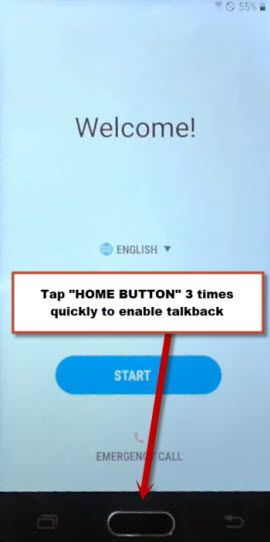
-From talkback screen, swipe down and swipe right same as shown in below image. After that, double tap to “Talkback Settings”.

-From next page, go down using your 2 fingers together, after that, turn on both options from there (Focus Speech Audio & Single-Tap Activation).

-After turning on both options successfully, go to top of the page using 2 fingers together. From there, double tap to “Text-to-speech settings” option.
-Double hit on “Settings gear icon”. Afterwards, double tap to “Settings for Samsung text-to-speech”.

-You will be shown a version number of your phone at the top of the next screen of (Samsung TTS Settings). Just, double tap on that numbers. After that, within few seconds, galaxy store will be launched.
-Select (I AGREE) option and tap to “Start”.
-Double tap on “Update” button to update your galaxy store app. After updating process is completed, you will reach back to (Samsung TTS Settings) screen.

-From there, double tap again on (Version Number) to reach back to galaxy store app.
-Let’s disable the talkback function by quickly pressing 3 times (Home Button). You will have a notification of (Talkback Disabled). That means, we have successfully disabled talkback function.

Download & Install Samsung Internet Browser:
-Go to “Search” option from top corner, search “Samsung internet browser”.
-Hit on the searched result of (Samsung internet browser).
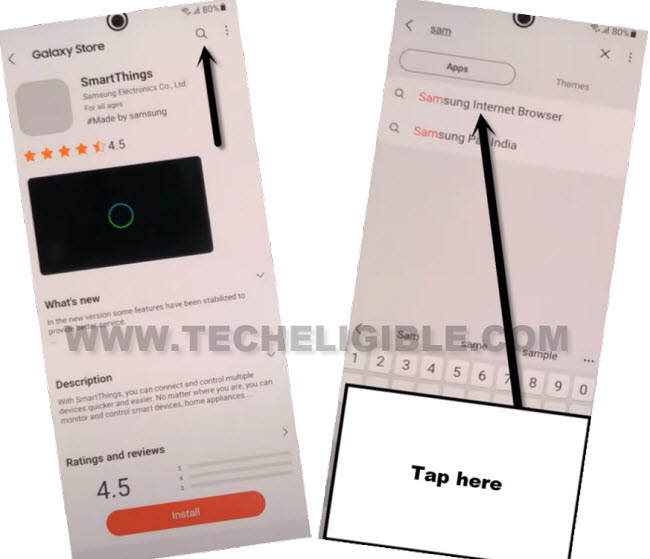
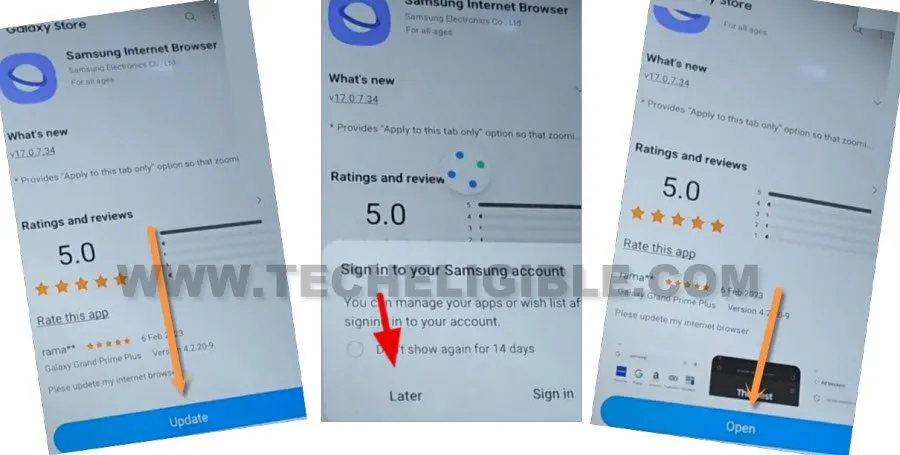
-Tap on “Update” button to update (Samsung internet browser). From popup message, just choose the “Later” option.
-After updating and downloading process is done, you will be displayed an (Open) button there, Just open this browser to Bypass FRP Samsung Galaxy J2 Pro.
Note: If you face any trouble while updating or downloading Samsung internet browser, so create your free (Samsung Account) using any valid Gmail account, after that sign in with that Samsung ID to start downloading process.
-From Samsung browser, tap to > More > Continue. After accessing to browser successfully, we are gonna search and download frp bypass apps.
Download FRP Bypass App:
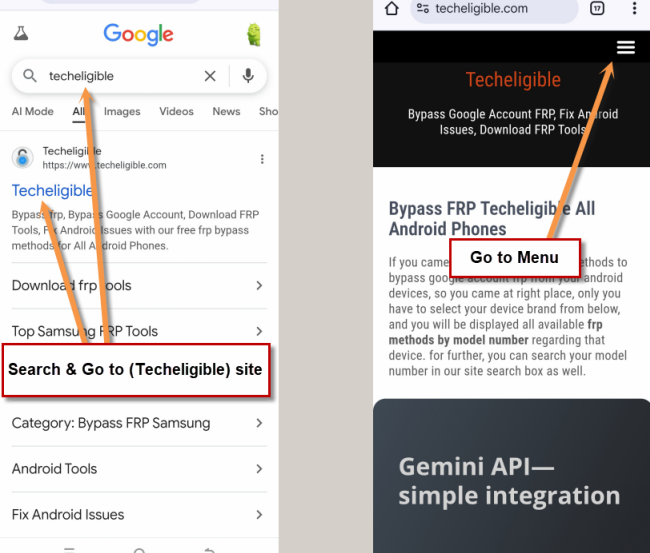
-Search in chrome search bar with “Techeligible“. After that, go to 1st searched result to reach to techeligible site.
-Let’s tap over the “Menu” option from there.
-Navigate to Samsung frp tools screen by going to > Other Free Tools > Samsung FRP Tools.
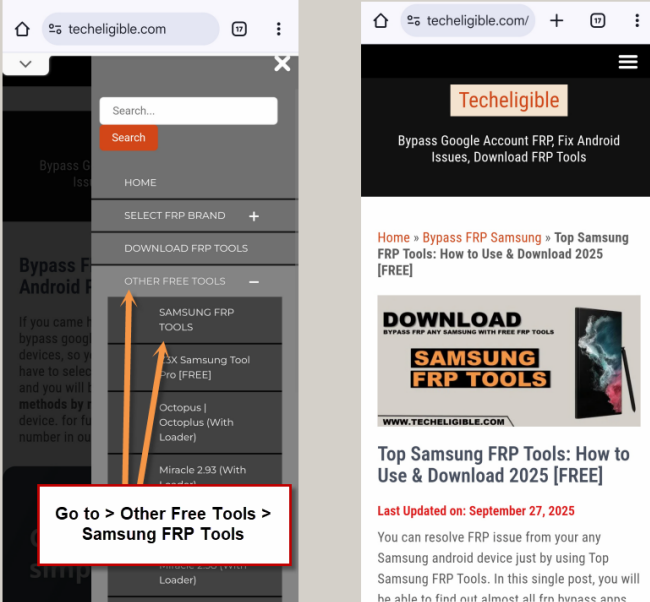
-Download from there 2 applications.
1/ Google Account Manager 6
2/ Account Login.
-After downloading both apps, just hit over the “Menu” icon from bottom right corner of the Samsung browser and go to “Downloads” option. You will be taken on a download folder page, where both downloaded apps can bee seen.
Install Both Apps on Samsung J2 Pro:
-Firstly, tap on “Google Account Manager 6” application.
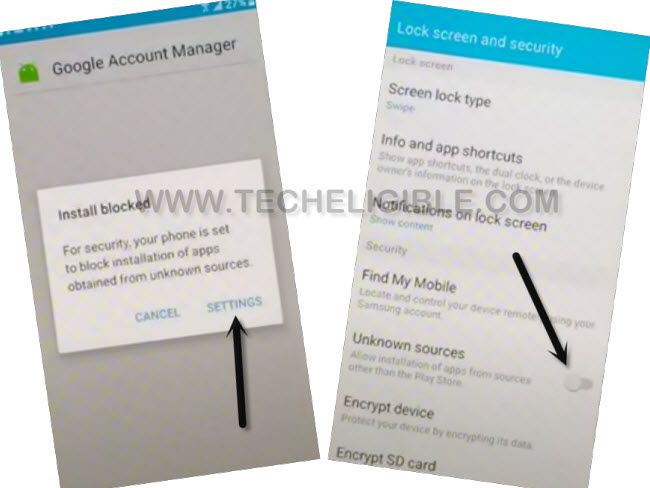
-You will have a installation blocked window, just hit on “Settings” and turn on “Unknown Sources” option.
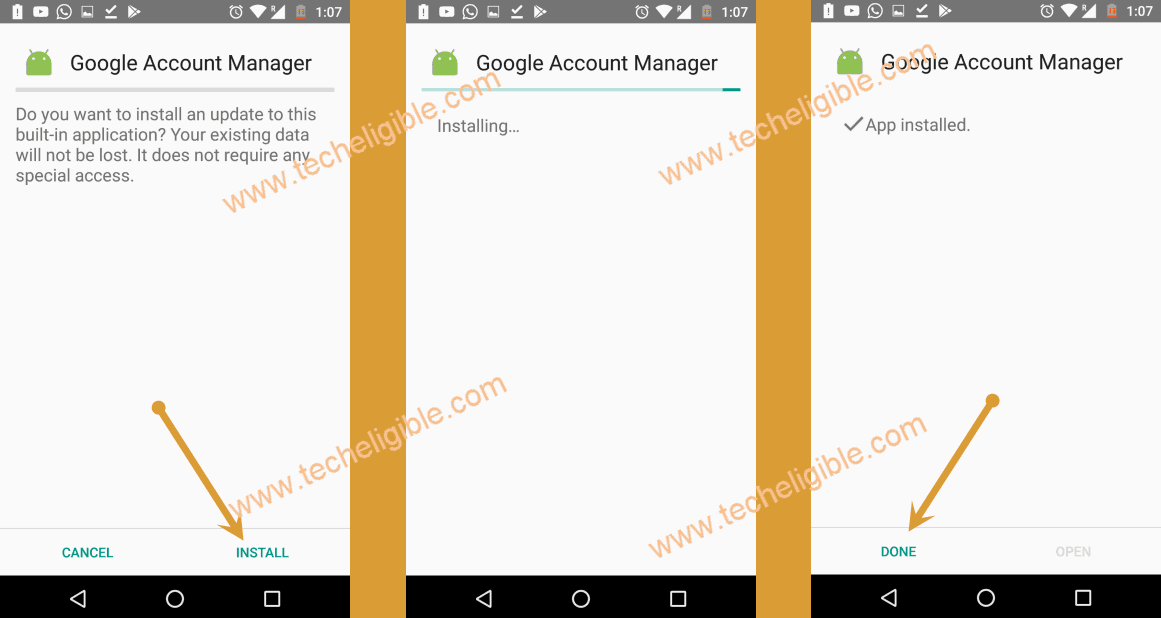
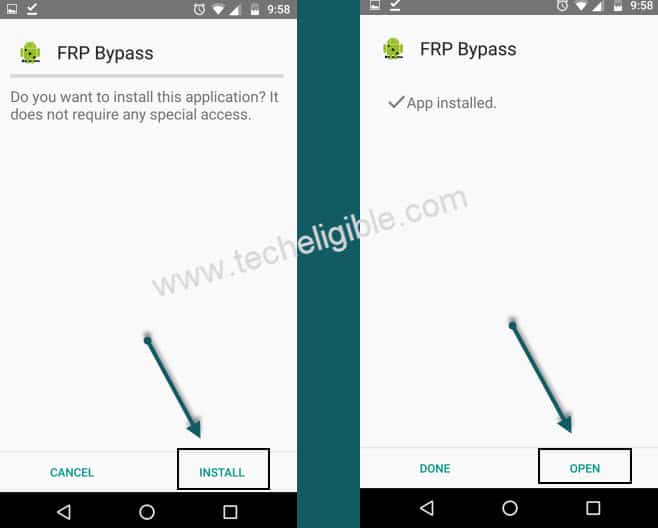
-After that, you will be redirected back on the installation screen, just tap to > Install > Done.
-Install 2nd downloaded app now, through this app, we will be able to configure another Gmail account to Bypass FRP Galaxy J2 Pro.
-Tap on > Account Login > Install > Open.
Configure Gmail Account:
-From the (Retype Password) page, hit on “3 dots” icon and tap to “Browser Sign-in” option.
-Let’s login with your any valid google account id to bypass frp account.
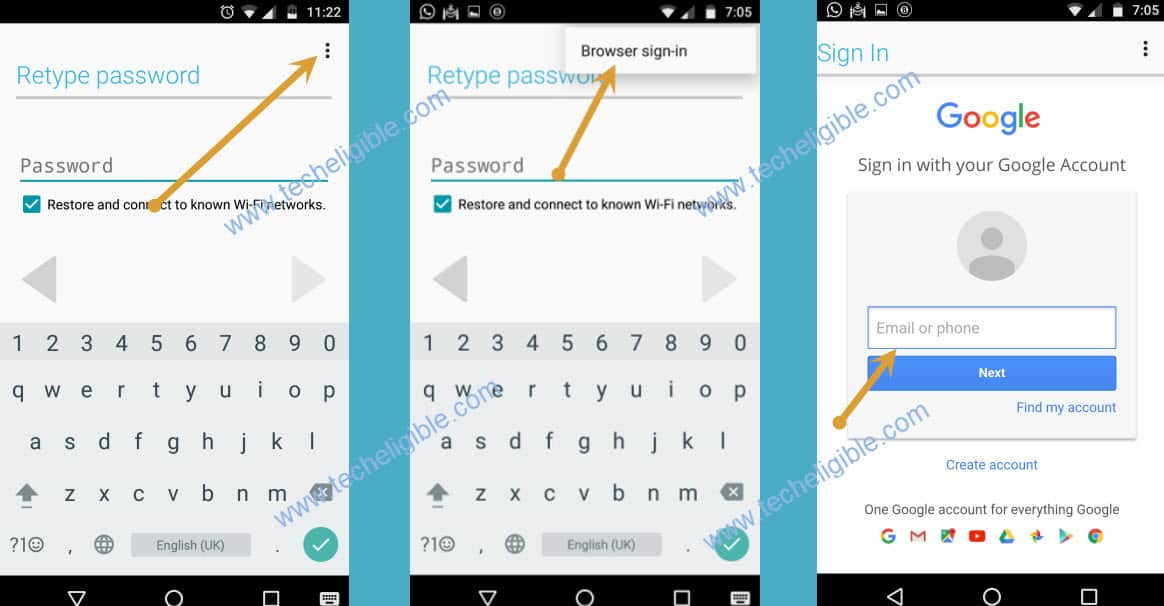
-After signing-in process is completed, you can restart the device and complete setup wizard steps easily without facing the google verification screen again.
Method 2: Bypass FRP Samsung Galaxy J2 Pro (By Go Launcher Z)
In this frp bypass guideline, we will use talkback function, enabling this function on FRP locked Samsung J2 pro is very simple, after that, we will be able to launch the google chrome browser easily. From the chrome browser, we will download (Go Launcher Z), this launched will assist in launching the main home-screen of the FRP locked phone to follow up further frp bypass steps.
Begin with FRP Unlock Steps:
-Connect “Wi-Fi” to your device first
-Go back to “Welcome Screen”.
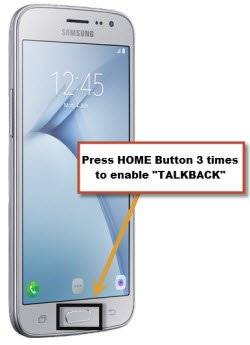
-Press 3 times (Home Button) rapidly to enable “Talkback”.
-Once you see a screen of “Talkback Tutorial”, that means you’ve successfully enabled talkback.
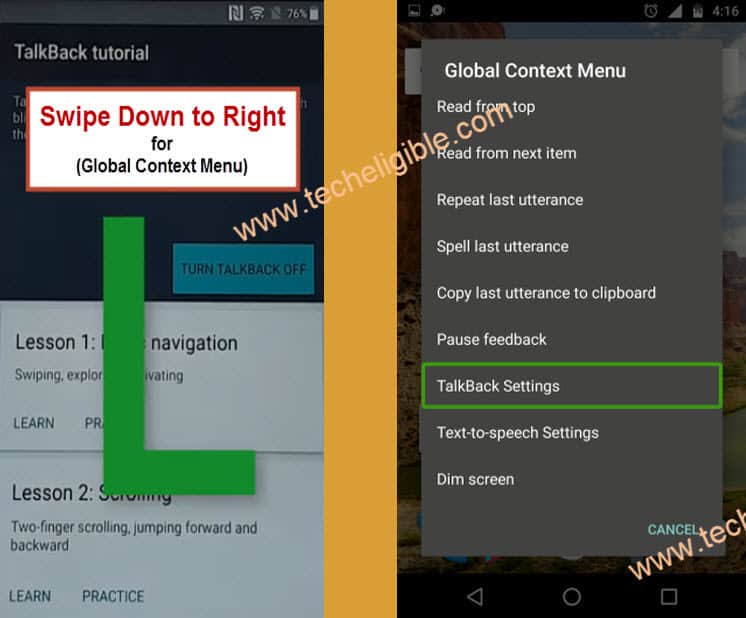
-Now draw “L” on your talkback tutorial screen.
-You will have popup screen of “Global Context Menu” right after you draw “L”.
-Double tap on “Talkback Settings” (See Below Image).
-Using your “Two Finger” go down, and then double tap on “Talkback Tutorial”.
-Now double on “Turn Talkback Off”.
-Go down, and tap on “Help & Feedback”.
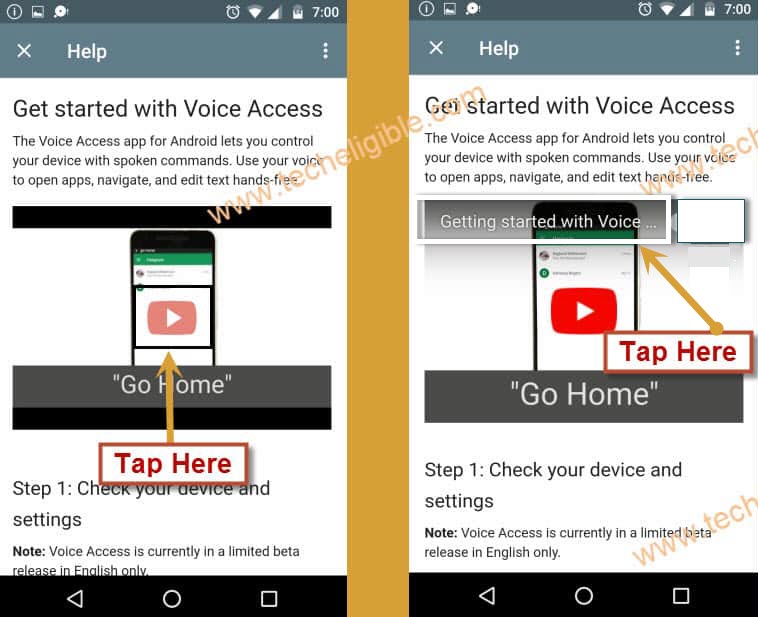
-Tap on “Get Started with voice access”.
-Now you will have “Youtube Video” on your screen, just tap on “Youtube Video Play icon”.
-Wait until you get youtube video title, after that, tap on “Get Started with voice access” video title (See Below Image).
Note: If you see “Youtube Update” screen, and you are unable to bypass this screen, for that you should follow this method to bypass youtube update screen.
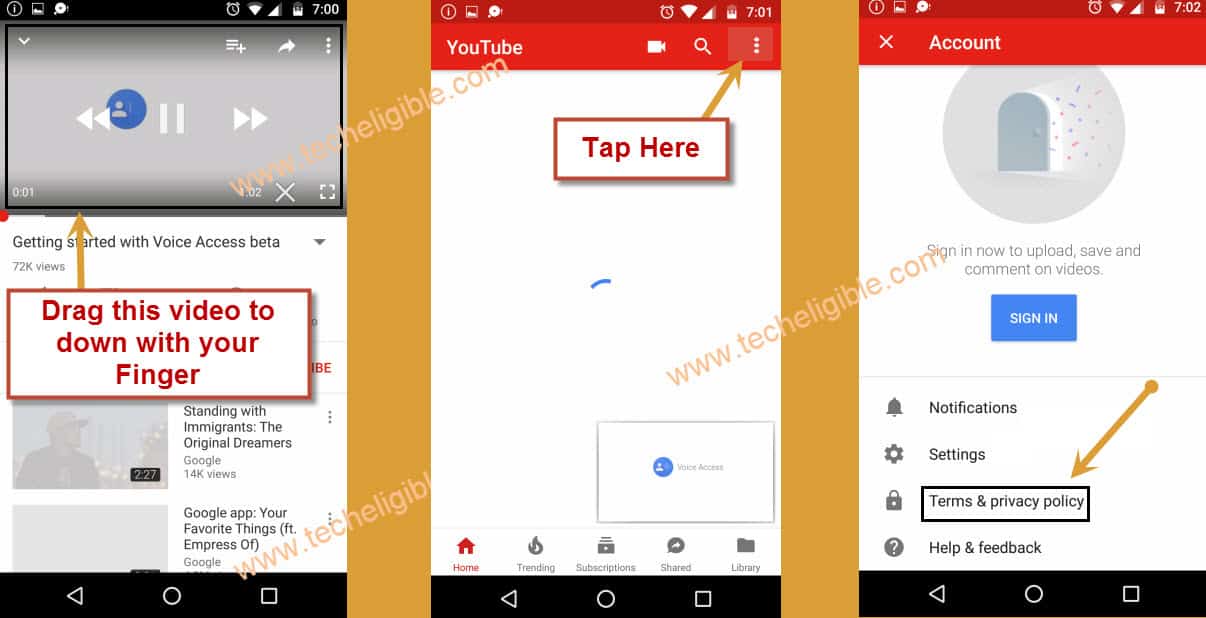
-You will be redirected to the “Youtube website”.
-Drag down “Youtube Video”, and then tap on “3 Dots” from top right corner.
-Tap on “Terms & Privacy Policy”.
-If you see a message of “Update Samsung Internet”, just tap on “Cancel”.
-Now you have accessed to your device “Google Search Bar”.
Download the Tools for Bypassing FRP:
-We have to download frp bypass applications on our android device.
-Search in chrome browser “Techeligible“. Visit same searched result as mentioned in below screen shot.
-Tap to “Menu” option from upright corner of the site.
-Simply, go to “Other Free Tools” option from there. After that, tap to “Samsung FRP Tools”.
-Go down, and download from there 2 below applications to bypass frp Samsung Galaxy J2 Pro.
1/ Go Launcher Z.
2/ Google Play Services.
-Wait until downloading finish.
-Now tap on “Book mark” from bottom of your Samsung internet browser.
-After that tap on “History, and then go to “Download History”.
-There you will be able to see your both downloaded frp tools.
Install Go Launcher Z:
-Tap on “Go Launcher Z”.
-Now you will get a popup message regarding “installation blocked”, just tap on “Settings” from that popup.
-Afterwards enable “Unknown Sources” from settings.
-Afterwards tap on > Next > Install > Open.
-Now tap on > Enjoy > Skip > Enjoy Go Launcher.
-Congrats, you have accessed to your J3 Pro device home screen.
-Go to your device “Settings > Lock Screen and Security > Other Security Settings.
-After that tap on > Device Administrator > Find My Device > Deactivate.

Disable Google Account Manager:
-We have to disable two applications from our device app.
-Go back to “Settings”.
-Tap on “Apps”, after that tap on “3 dots” from top right corner & select “Show Systems”.
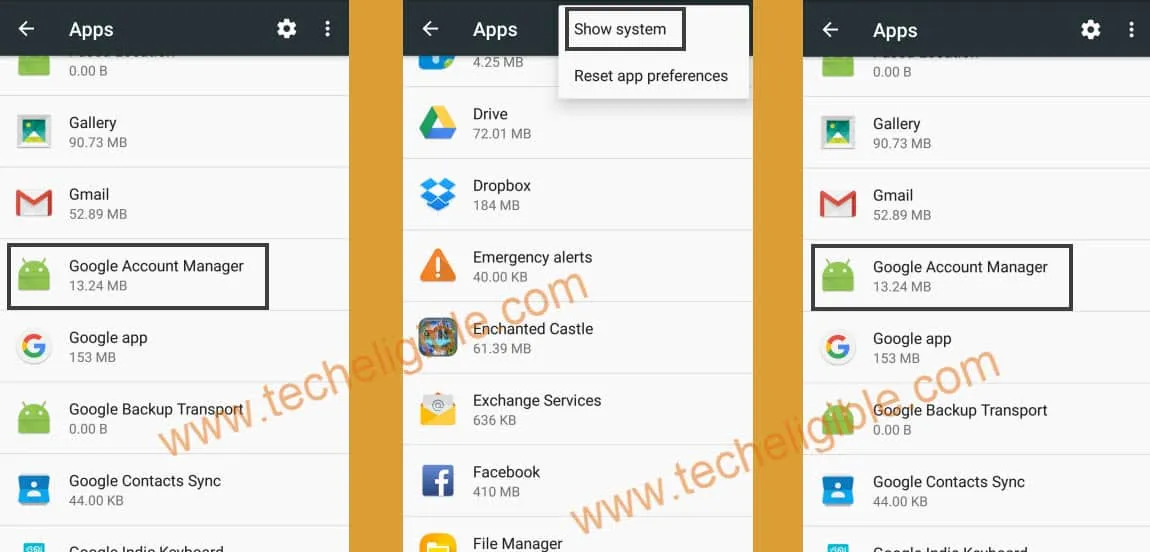
-From app list, go to “Google Account Manager > Storage > Clear Data > Delete.
-Tap on “Back Arrow” top left corner, and then tap on “Disable > Disable” to disable google account manager.
-Now we have successfully disabled “Google Account Manager”.
Disable Google Play Services:
-Go back to “App list”.
-Go to > Google Play Services > Storage > Manager Storage > Clear All Data > OK.
-Tap on “Back Arrow” from top left corner.
-Now tap on “Disable > Disable”.
-We have disabled “Google Play Services” app as well.
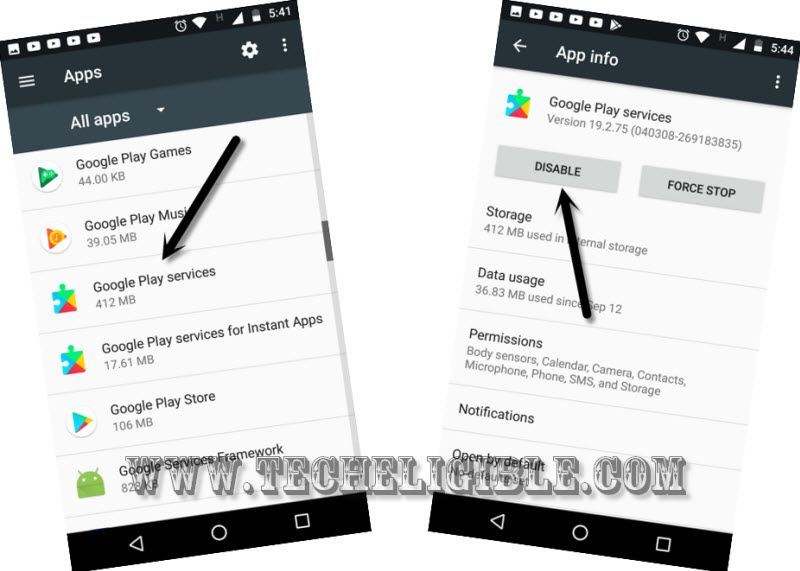
-Now we can easily bypass google account and add new Gmail account just by installing “Google Play Services” application from download folder. Follow below steps for that.
Install Google Play Services App:
-Go back to “Home Screen”.
-Go to device “MENU”.
-Afterward, tap on “My Files”, and then tap on “DOWNLOADS”.
-Now there you will be able to see your downloaded “Google Play Services” application.
-Tap on “Google Play Services” app, and then tap on “Install”, after that tap on “DONE”.
Login with another Google Account on J2 Pro:
-Go to “Settings”.
-Tap on “Cloud & Accounts”.
-And then tap on > Account > Add Account > Google.
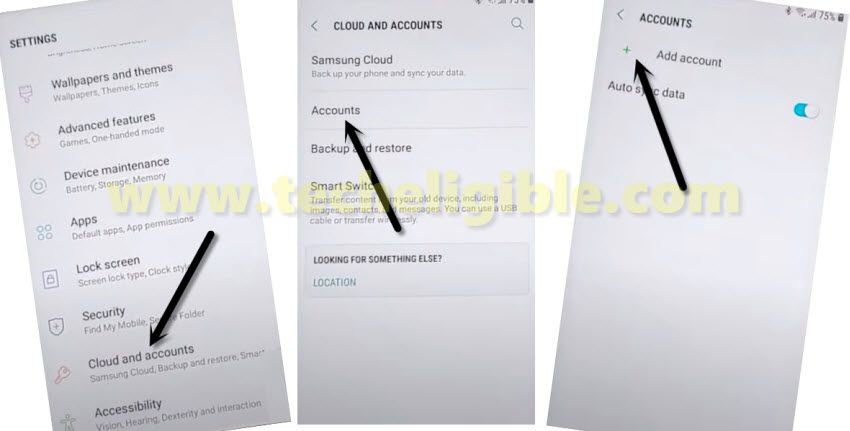
-Now sign in with your any valid Gmail id there for bypass frp Samsung Galaxy J2 Pro.
-Enable “Google Play Services + Google Account Manager” application. After that, reboot J2 Pro device.
-Complete initial setup to access your device home screen.
FAQs About FRP Bypass:
Why do i need to turn on talkback on a FRP Locked Samsung J2 Pro?
Talkback is the function, that can be enabled easily even on a inaccessible frp locked device, that is why, we will get help with talkback function to bypass frp account.
What is the purpose of disabling the google play services on J2 Pro phone?
Your old forgotten Gmail account is actually stored on a google play services application, that is why, to setup another google account, we disable google play services app from the frp locked Samsung j2 pro.
How to prevent facing FRP lock protection on our own Samsung j2 Pro?
Do remember your already synced Gmail account on Samsung J2 Pro to avoid facing FRP lock protection after doing a factory reset.
Why FRP lock is activated right after doing a factory Reset on Samsung J2 Pro?
Because, you forget your logged in Gmail account. This is the function of FRP lock security feature to stop accessing to the factory reset phone and ask for the google verification with already signed in google account.
Conclusion:
We followed up above frp unlocking method on Samsung J2 Pro. Steps are quite simple and easy to follow up just through enabling the talkback function. After that, accessed to youtube webpage. From there, launch the chrome browser and download frp unlocking tools in free from our techeligible site. After that, we just disabled (Google Play Services) from our J2 Pro settings and sign in with another google account to bypass frp and removing the old forgotten google id.