
Techeligible

Menu
  • HOME
  • SELECT FRP BRAND
    • SAMSUNG
    • HUAWEI
    • NOKIA
    • ZTE
    • LG
    • MOTO
    • ASUS
    • XIAOMI
    • OTHER PHONE
  • DOWNLOAD FRP TOOLS
  • OTHER FREE TOOLS
    • SAMSUNG TOOLS
    • Z3X Samsung Tool Pro [FREE]
    • Octopus | Octoplus (With Loader)
    • Miracle 2.93 (With Loader)
    • Miracle Thunder 2.82 (With Loader)
    • Miracle 2.58 (With Loader)
    • Miracle 2.54 (With Loader)
    • Miracle Xiaomi 1.56 (With Loader)
    • Unlock Tools with Loader
    • COMBINATION FIRMWARE
    • Other FRP Tools
  • FIX ANDROID ISSUES
  • HARD RESET

Home » XIAOMI FRP Bypass » Bypass FRP Xiaomi Redmi 12C Android 13 By SIM Card

Bypass FRP Xiaomi Redmi 12C Android 13 By SIM Card

Bypass FRP Redmi 12C

You can still access to your device even, if you have hard reset your device because of any reason, and forgot already signed in google account. We will share with you some easy steps to Bypass FRP Xiaomi Redmi 12C (Android 13, MIUI 14) without using any PC and paid tool. With the help of 1 PIN locked SIM card, we can access to our device main settings page, from there, we can easily skip setup wizard steps and reach to device main home-screen. Follow steps from below.

Remember: Do not try this frp method on a stolen phone, this is a serious crime, if you are trying to bypass frp on a stolen phone, you may also be jailed, this process is for device owner and for educational purpose only.


Let’s Start to Bypass FRP Xiaomi Redmi 12C:

-Switch on Phone & Connect WiFi. After that, go all the way back over first (MIUI 14) screen.

-Use PIN locked sim card to bypass frp account easily. You can easily setup 4 digits PIN lock code on your any SIM using any android device. Learn here to setup SIM PIN.

-Insert PIN locked SIM card, after that, you will have lock screen there same as shown in below image.

-After that, remove SIM card and press “Power key” button to just keep your device on a Sleep mode.
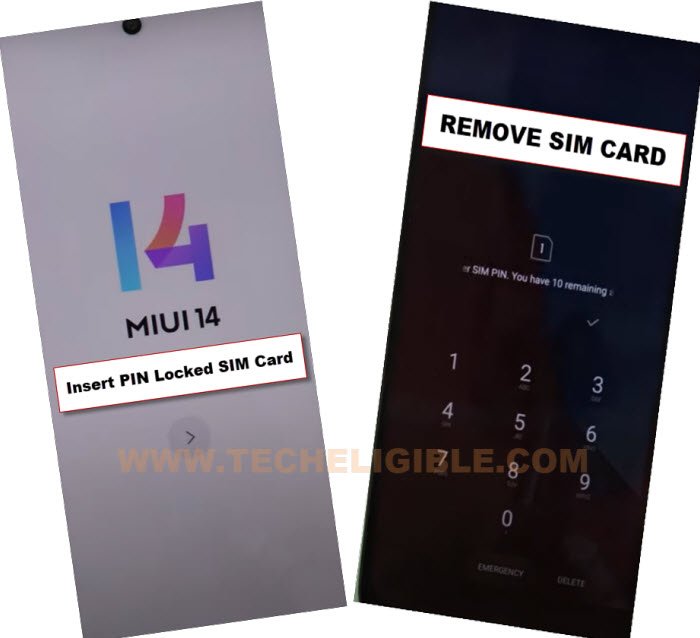
Insert PIN locked sim card to bypass frp Redmi 12


-Press “Power key” again to wake up the device, and there, you will have same “Lock Screen” page.

-Get top notification bar by just swiping down from top. After that, tap to “Settings” icon from top right corner to get into your device main settings. After that, we can easily Bypass FRP Xiaomi Redmi 12C.
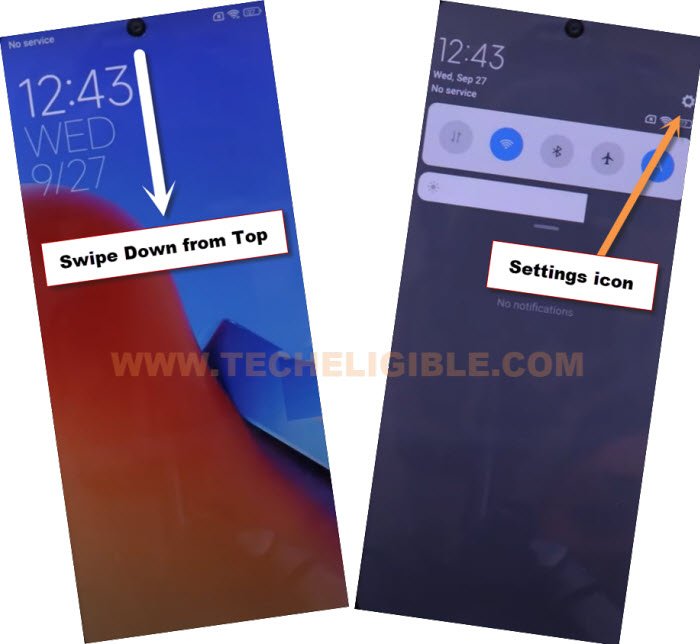
Go to settings icon from top notification to bypass frp Redmi 12


-From settings page, find and tap to > Apps > Manage Apps.
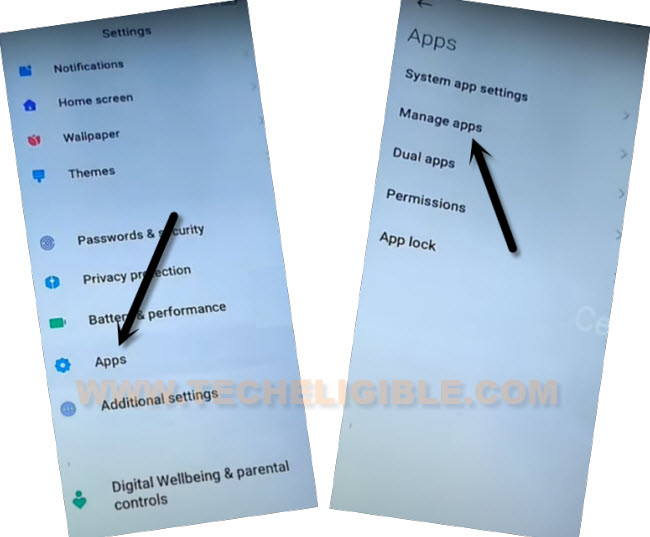
go to manage apps from app to delete frp Xiaomi Redmi 9C


-Afterwards, go to “Find Apps” option from the top.
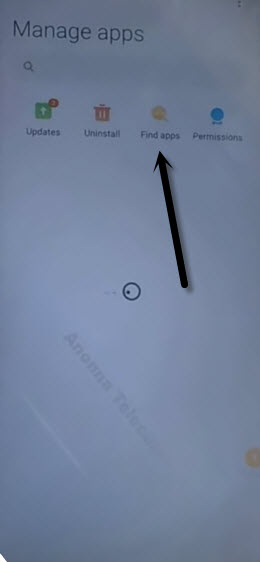
Tap to find apps to bypass frp Redmi 10A

-Hit on “Skip” option from the top corner.

-Type in top search box “Activity Launcher”.

-Install & Open “Activity Launcher” app from there.
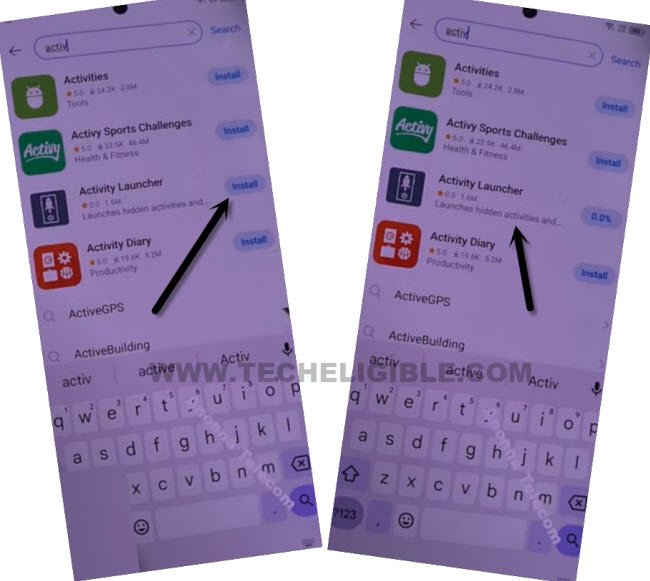
install and open activity launcher app to bypass frp tecno camon 20 Pro


-Tap on “Ok” from popup, and wait on “Loading..” screen. After that, this application will fully launched.

-Go to “Search” icon from top corner.

-Type in top search box “second space”. After that, tap to “Down Arrow” from bottom corner to just close the keyboard.

-From there, choose “Second Space fingerprint” option same as mentioned in below image.

Go to second space fingerprint to bypass frp redmi 12C


-Tap to “Skip” from (Set fingerprint) page. After that, hit on “Next icon” from MIUI 14 screen to access the device main home-screen without completing setup wizard steps. You are all done from Bypass FRP Xiaomi Redmi 12C. Thanks for visiting us.


Related posts:


  1. How to Unlock All Xiaomi Mobiles and Tablets Easily

  2. How to Fix All Xiaomi Stuck Mi Logo, Redmi Note 4 Stuck Mi Logo Issue

  3. Bypass Redmi Mi Account and Unlock Pattern on All Redmi Phones

  4. Xiaomi Mi A1 Bypass Google Account, Remove FRP Protection Android 7.1.2
June 23, 2024
No Comments

Post navigation

Bypass FRP Account Xiaomi POCO C55 Android 14, 13, 12
Bypass FRP Samsung Galaxy A05 By VG and Prime Tool
Subscribe
Login
Notify of
guest

guest

This site uses Akismet to reduce spam. Learn how your comment data is processed.

0 Comments
Newest
Oldest Most Voted

Subscribe Yourself

Get new posts by email

Download Center

  • Download FRP Tools
  • SAMSUNG Tools
  • Other PC Tools
  • Combination ROM | FIRMWARE
  • Miracle V3.28 (With Loader)
  • Miracle Xiaomi 1.56 (With Loader)
  • Download Miracle 2.93 (With Loader)
  • Miracle Thunder 2.82 (With Loader)
  • Octopus All Version (With Loader)
  • Samfirm Tool V3.1

Contact US

  • Home
  • About US
  • Contact US
  • Privacy Policy
  • Advertise

Advertisements

Techeligible. All Rights Reserved

Theme by TheClassicTemplate

TECHELIGIBLE
  • HOME
  • SELECT FRP BRAND
    • SAMSUNG
    • HUAWEI
    • NOKIA
    • ZTE
    • LG
    • MOTO
    • ASUS
    • XIAOMI
    • OTHER PHONE
  • DOWNLOAD FRP TOOLS
  • OTHER FREE TOOLS
    • SAMSUNG TOOLS
    • Z3X Samsung Tool Pro [FREE]
    • Octopus | Octoplus (With Loader)
    • Miracle 2.93 (With Loader)
    • Miracle Thunder 2.82 (With Loader)
    • Miracle 2.58 (With Loader)
    • Miracle 2.54 (With Loader)
    • Miracle Xiaomi 1.56 (With Loader)
    • Unlock Tools with Loader
    • COMBINATION FIRMWARE
    • Other FRP Tools
  • FIX ANDROID ISSUES
  • HARD RESET
wpDiscuz