We have 2 ways here in this single post to help you to Bypass FRP Account Xiaomi Redmi A3X without using any paid service. You must follow up (Method 1) first, because this method is the latest one and we hope, you will be able to fix up FRP problem from your device using (Shareme & Activity Launcher) application. Follow up guideline from below.
Warning: Do not try this frp method on a stolen phone, this is a serious crime. If you are trying to bypass frp on a stolen phone, you may also be jailed, this process is for device owner and for educational purpose only.
| Method 1: FRP Bypass Xiaomi Redmi A3X New |
| Method 2: FRP Bypass Xiaomi Redmi A3X (Old) |
Method 1: Bypass FRP Account Xiaomi Redmi A3X [Updated]
-Switch on Redmi A3X phone & Connect WiFi. Afterwards, go back to (Connect to Network) page.
-Tap to “Add network” option from there. Hit on a (Network name) field tab to bring up keyboard. From there, tap to “Share”‘ icon same as shown in below image.
-Afterwards, hit on “More”.

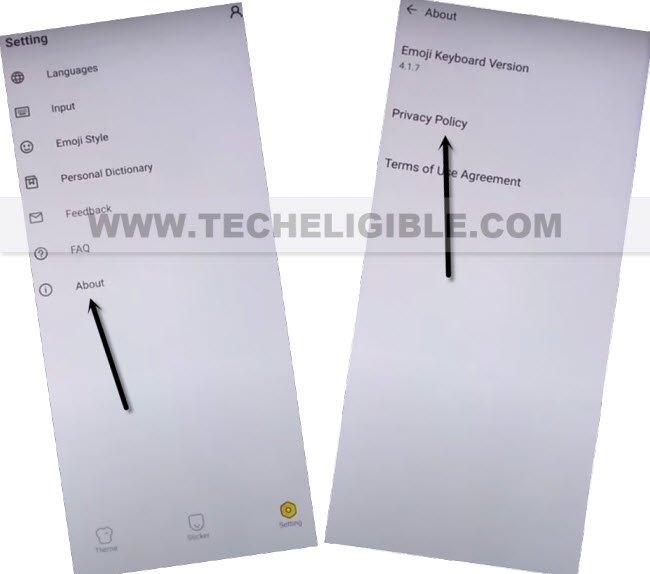
-Afterwards, tap on > About > Privacy Policy.
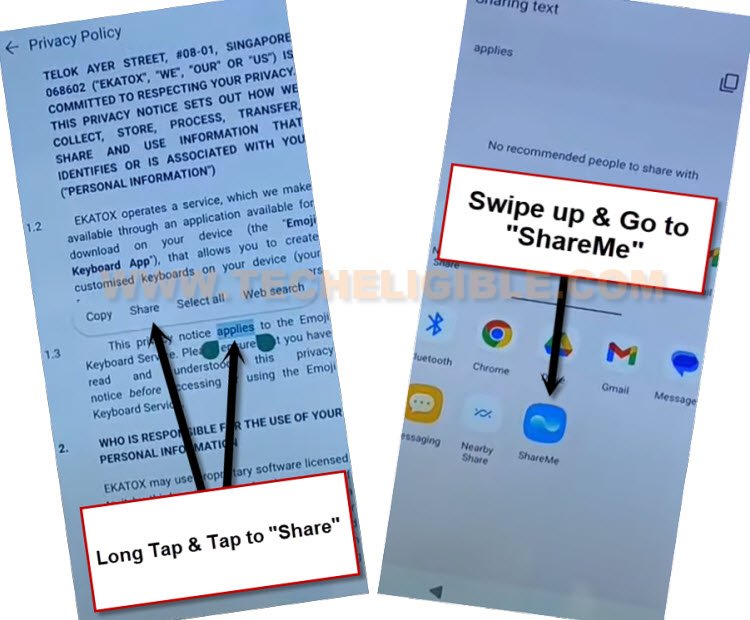
-You will be taken on (Privacy Policy) page, from there, long hold at any text, after that, go to “Share” option to get sharing applications.
-Swipe up “Sharing popup window”. After that, tap to “ShareMe” application.
-Go to > Agree > Next > While using the app > Next > While using the app > Allow.
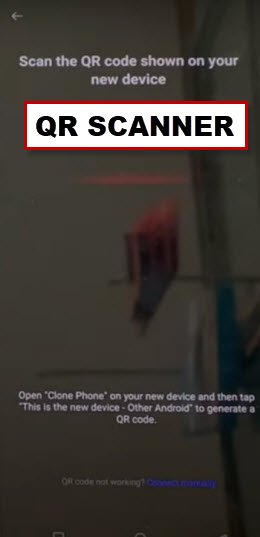
-Tap few more times on “Allow & Next”. After that, you will be displayed a (QR Scanner) screen. We have to use here another android device to connect both devices together in order to successfully bypass frp account.
Let’s Follow up Step in Android Device:
-First of all, we will open “Googel Play Store” application. From there, we will install “Activity Launcher” application.
-After that, we will download and install “ShareMe” application.
-Once you installed both apps successfully, just go back to your device menu, from there, tap to “ShareMe” app icon to run this app.

-You have to give some permission to run this app successfully by tapping at > Agree > Join > Next. Turn on “Allow access to manage all files”.
-Go back by hitting back arrow from bottom. You have to hit over > While using the app > While using the app > Allow.
-Finally, you are inside your ShareMe app, just tap to “Receive” option. After that, hit on “Change System settings”, and turn on “Allow modifying system settings”.
-Go back and go to “Turn on” option to to turn on Bluetooth option as well. Afterwards, tap to > Allow > Next > Allow.

-You will see (QR Code) on your device.
| Note: Whenever you see a popup window asking you to allow something, you just have choose “Allow” option each time. |
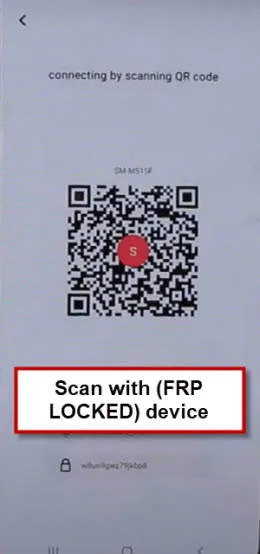
-We are gonna connect both devices just through scanning QR code from (Redmi A3X) device.
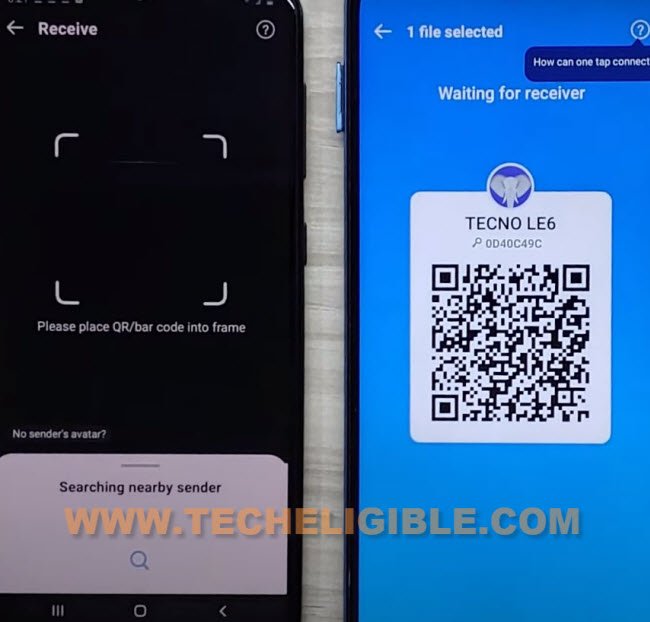
-You will have a popup window in your Redmi A3X device screen, just tap to “Connect” option.
-From other android device, > Share Files > Apps. After that, choose “‘Activity Launcher” application, and tap to “Send”.

-Within few seconds, you will have (Activity Launcher) app in your Redmi A3X device. After that, tap to “Run” option from Redm A3x device to start this app and easily bypass frp account.

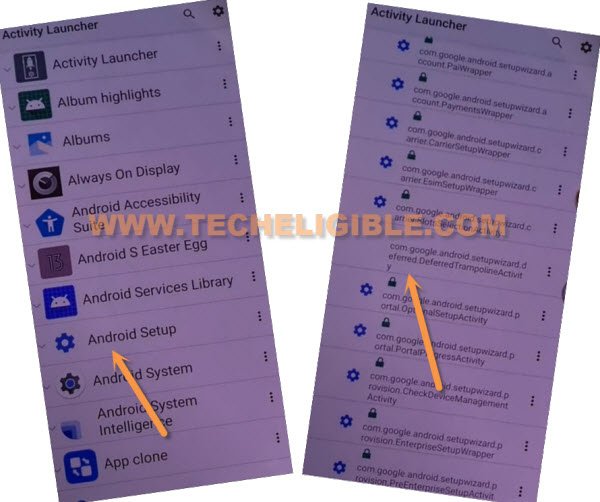
-Tap over > Ok > Android Setup. There is a list of (Android Setup). You have to choose (Without Settings icon) android setup option named with “com.googel.android.setupwizard.deferredTramplineactivity“. See below screen shot for better understanding.
-Its time to finish up setup wizard by tapping on > Start > Skip.
-From WiFi page, just connect to proper WiFi network. Afterwards, go to > Next > Next > No Cable > Copy Without Cable > Next > Use my google account instead > Next > Next.
You’ve to Follow Up Below Guidelines in Other Android Phone:
-From other device menu, just launch “Google App”. After that, tap over “Mic icon” from google search. Say loudly “Set up my device”.
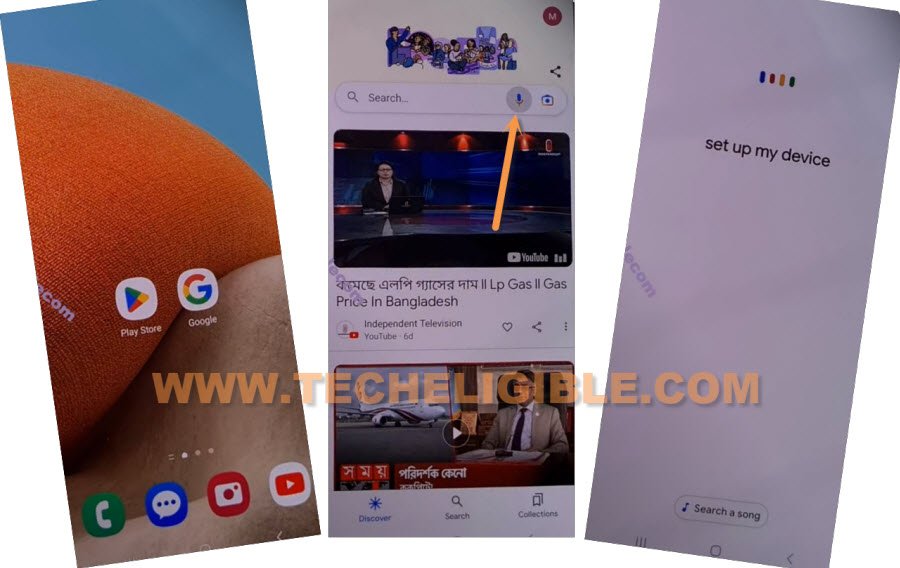
-Tap to “Next”. And verify shape from both devices. Just tap to > Next > Copy.
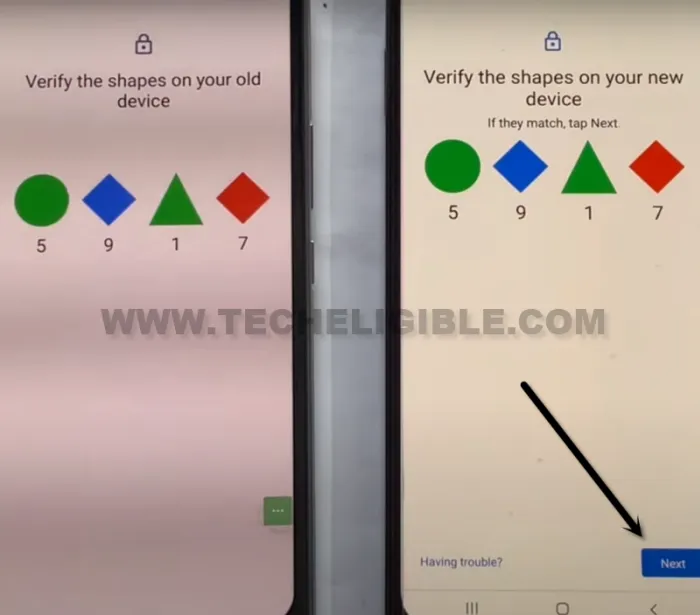
-After that, you will see (Copying your account) screen on both devices screen.
-Let’s setup same Gmail account in your Redmi A3X device, the one is already setup in your other android device.
-After entering Gmail ID and pass, and hitting on “Next” option, you will see again (Copying your account) page.
-After that, tap to “Copy another way” from Redmi A3X.
-From (Redmi A3X), just check mark only “Device Settings” option. After that, hit on “Restore” option.
-Just wait on (Restoring loading) page, once its done, you will be taken to (Google Services) screen.
-Its all done from bypassing frp account, you can now easily complete setup wizard on your own. Thanks for visiting us.
Method 2: Bypass FRP Account Xiaomi Redmi A3X [Android 14]
If you have a device with FRP protection ON. And, you are unable to access your device main home-screen because of forgetting already signed in google account. So, you can follow up this new way to fix up this issue easily Bypass FRP Account Xiaomi Redmi A3X without using any paid service. Talkback and app disable method is not working on this new android version redmi device. We will use (PIN Locked SIM) card to get back our redmi device.
Let’s Begin FRP Bypass Method
-Insert PIN locked SIM card.
Note: If you don’t know how setup PIN locked code on SIM card, you can Click here and follow steps from there to setup new PIN lock code on a SIM card using any android device.
-After inserting PIN locked SIM card, you will be asked to enter PIN lock code.
–Here is the tricky part, we have to eject SIM & Press “Power off” key at the same time.
-Keep sim removal pin in the hole of SIM tray.
-Press “PIN” to eject SIM tray and at the same time, press & release “Power key” to turn of the screen only.
-You have to do this very quickly, there should not be mini seconds gap right after ejecting sim tray. As soon as, you eject SIM, quickly press “Power button” without any delay.
-After that, press “Power” button again to wake up the device screen, and, there you will have a (LOCK SCREEN).

Note: If you see (Not Signed in) message on screen, just press “power key” to turn off screen, after that, press again “Power key” to wake up the screen.
-On lock screen, there is a (Camera icon) at the bottom right corner, just drag that (Camera icon) at the top by long press and swipe up.
-Capture any random image, open your captured image by hitting on image from bottom left corner.

-Afterwards, tap to “Share” icon. After that, tap to “Google Search image” icon from there.

-Hit over “3 dots” icon from top corner, and go to “Privacy Policy”.

-You will be redirected on a (Welcome to Chrome) screen, from there, tap over “Use without an account”.

-Tap on “MENU” icon from top same as shown in below image, after that, hit on “Google Search” icon to Bypass FRP Account Xiaomi Redmi A3X.
Disable Google Play Services From Settings:
-Search in top search bar of the browser with “Techeligible“. Go to our website 1st searched result same shown in below screen shot.
-From there, you need to go to “Menu” icon and tap on “Download FRP Tools” option to access frp tools page directly.

-Scroll down, and tap to “Access Device Settings“.
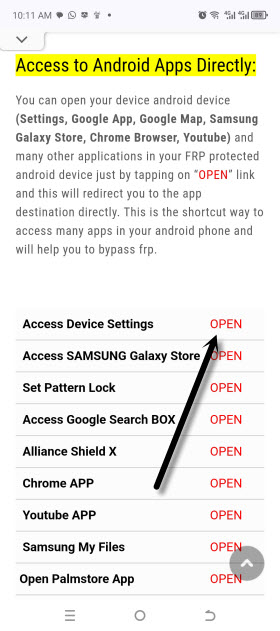
-After accessing the device main settings page, from there, firstly enable (Accessibility Shortcut Menu) by going to an option > Accessibility > Accessibility MENU. Turn on from there “Accessibility Menu Shortcut”.
-Hit over > Allow > Ok from popup window.
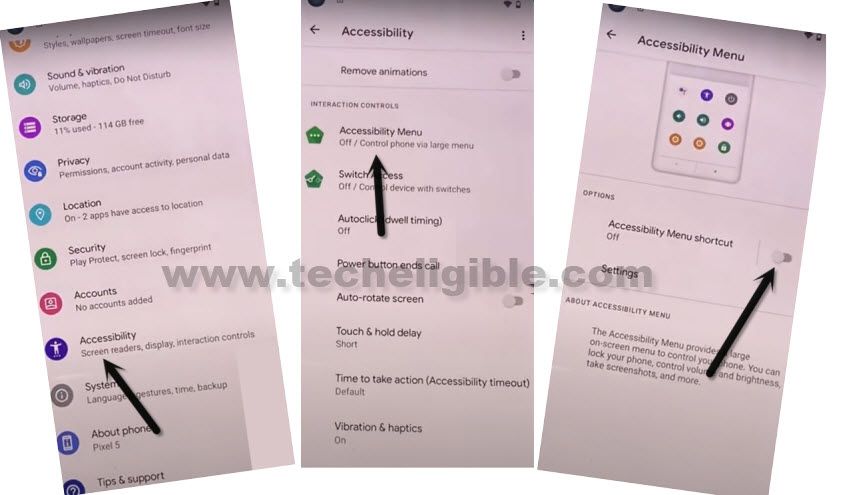
-After turning on menu shortcut option, you will start having (3 dots icon) at the right edge of the screen.
-After that, go back to main “Settings” page again.
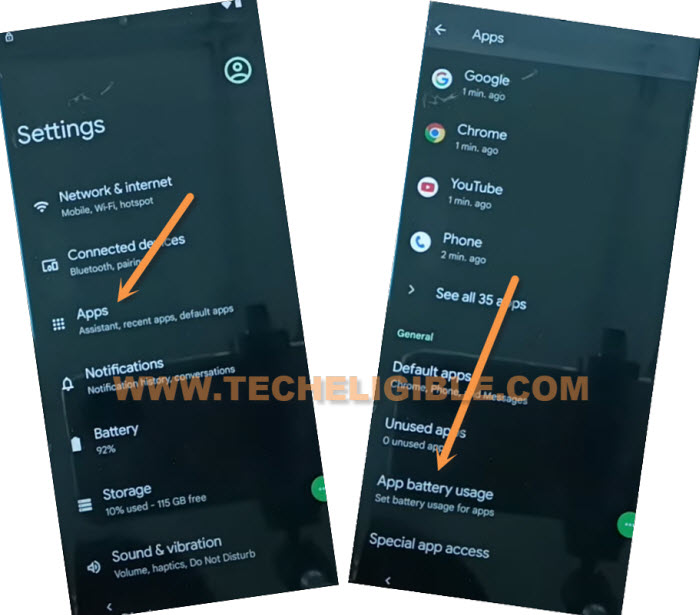
-From there, tap to > Apps > See All Apps.
-Hit over > 3 dots > Show system. After that, entire app list will be displayed. We will try to disable google play services app from here, but, we may not able to get inside (Google PLAY Services) app.
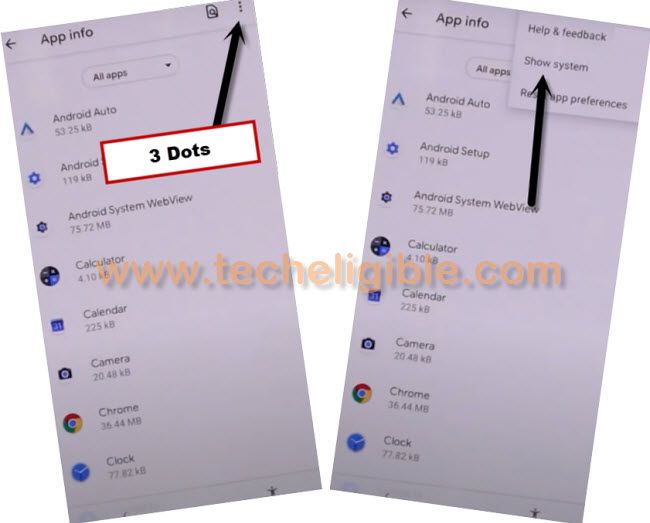
-Find and hit 10-20 times on “Google Play Services” app from the list, but, you may not able to get inside this application. Keep trying for about 1-2 minutes.
-But, after lots of tries, you won’t be able to get inside google play services, don’t worry, just tap on “Back Arrow” once from bottom to get back to (Apps) page.
-Got to “Apps battery usage”.
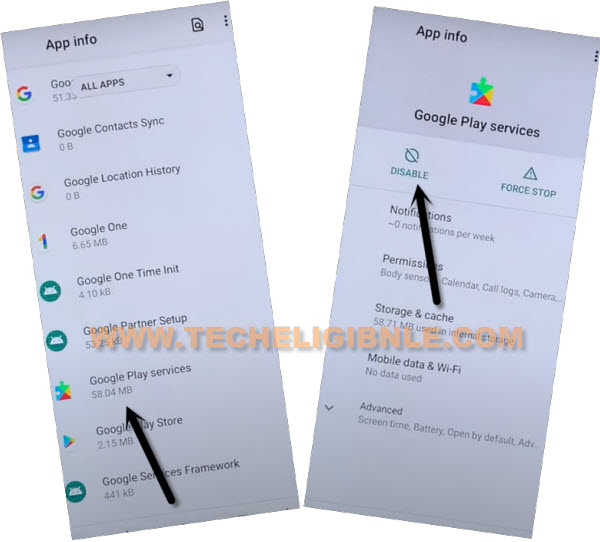
-From the app list, find and tap to > Google Play Services > Disable > Disable App to Bypass FRP Account Xiaomi Redmi A3X.
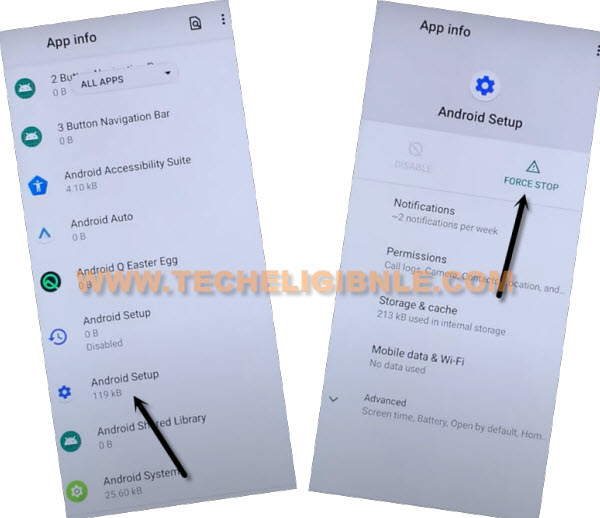
-Go back to app list page, from there, tap to > Android Setup > Force Stop > Ok.
-Go all the way back to (Choose language) screen by hitting back arrow from bottom multiple times.
Note: If you stuck on any screen while going to main initial start up screen, you can restart your device in that condition.
-After that, from first start up screen, tap to “Next” icon, check mark option (i have read and agree…), and hit on “Next” icon.
-Tap to “Skip” form connect your mobile network screen.
-After that, you will be on a (Connect to WiiFi) page, if you see (Getting your phone ready) screen, just tap to go back by hitting “Back Arrow” from bottom.
-You will get back on (Connect to WiFi) screen. From there, tap on > 3 dots icon > Assistant > Settings.
-Enable google play services app from there.
-If you are unable to reach on (Google Play Services) app, and no response after hitting on a “Settings” option. Don’t worry, we can still enable google play services just by repeating some steps and access back to settings page.

Repeat Steps to Enable Google Play Services:
-Turn on redmi device & Connect WiFi first.
-Insert PIN locked SIM card.
Note: If you don’t know how setup PIN locked code on SIM card, you can Click here and follow steps from there to setup new PIN lock code on a SIM card using any android device.
-After inserting PIN locked SIM card, you will be asked to enter PIN lock code.
–Here is the tricky part, we have to eject SIM & Press “Power off” key at the same time.
-Keep sim removal pin in the hole of SIM tray.
-Press “PIN” to eject SIM tray and at the same time, press & release “Power key” to turn of the screen only.
-You have to do this very quickly, there should not be mini seconds gap right after ejecting sim tray. As soon as, you eject SIM, quickly press “Power button” without any delay.
-After that, press “Power” button again to wake up the device screen, and, there you will have a (LOCK SCREEN).
Note: If you see (Not Signed in) message on screen, just press “power key” to turn off screen, after that, press again “Power key” to wake up the screen.
-On lock screen, there is a (Camera icon) at the bottom right corner, just drag that (Camera icon) at the top by long press and swipe up.
-Capture any random image, open your captured image by hitting on image from bottom left corner.
-Afterwards, tap to “Share” icon. After that, tap to “Google Search image” icon from there.
-Hit over “3 dots” icon from top corner, and go to “Privacy Policy”.
-You will be redirected on a (Welcome to Chrome) screen, from there, tap over “Use without an account”.
-Tap on “MENU” icon from top same as shown in below image, after that, hit on “Google Search” icon.

Disable Google Play Services From Settings:
-Search in browser with “Download FRP Tools“, and visit our website searched result.
-Scroll down, and tap to “Access Device Settings“.
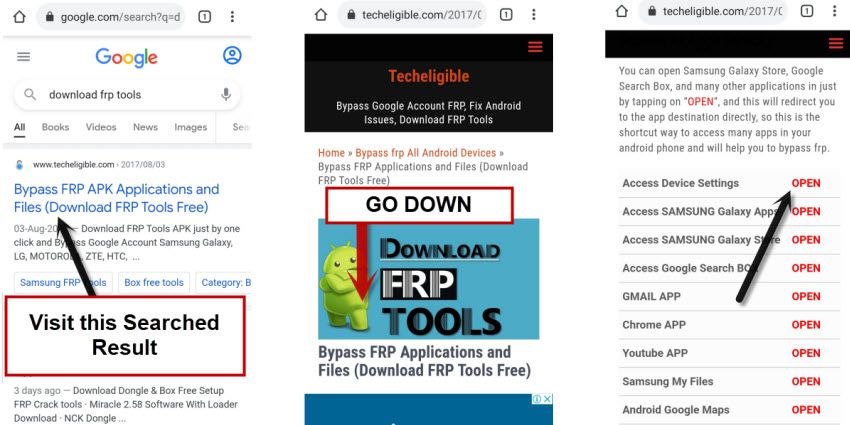
-Find and tap over > Apps > App battery usage.
-Lets go to > Google Play service > Enable.
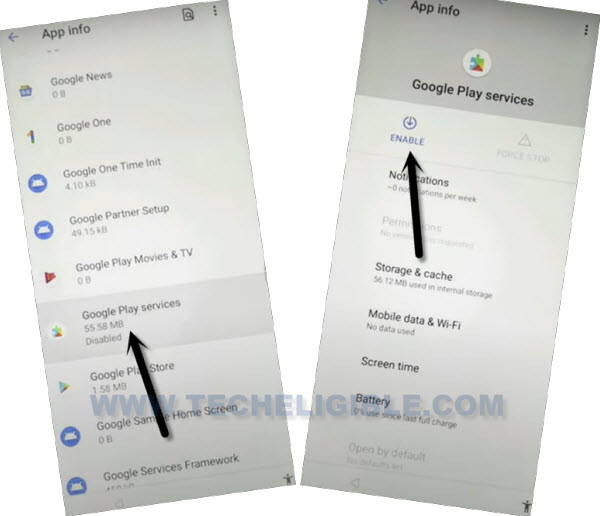
-After enabling above app successfully, just all the way back to first home-screen, and complete setup wizard on your own. You are all done from Bypass FRP Account Xiaomi Redmi A3X. Thanks for visiting us.