
Itel S25/S25 Ultra was released on Nov-2024 with Android version 14. This device will auto upgrade up to 2 major android updates. FRP is built in feature and auto activated when a device owner login with his/her Gmail account. But, if you have lost your itel S25/S25 Ultra signed in google account after factory reset. In this case, you will not be permitted to use this device back. That is why, this article published for you to get your device through Bypass FRP Itel S25/S25 Ultra without using any paid service and FRP Tools.
Importance of FRP on Itel S25/S25 Ultra:
Factory Reset Protection (FRP) is the feature of google that was launched on Android 5.1 to Android 15 and all upcoming android versions. This is used to keep your smartphone data in safeguard from unwanted access by unknown people. Before android 5.1 version smartphones was being accessed easily just by factory reset device. After that, all device safety locks get removed easily within a minute. As you know, itel S25/S25 Ultra was being launched with the latest android version 14. This FRP (Factory Reset Protection) feature is there already, and activated after google account setup.
How to Bypass FRP Itel S25/S25 Ultra:
If you have forgotten your itel S25 google account after hard reset the device. Then, you will not be allowed to access back to your device main home-screen until you login back with the same account that was logged before hard reset. If you’re still unable to recover back your google account, then, follow up this way to Bypass FRP Itel S25 (Android 14) without using any PC and frp bypass application.
Disclaimer: We highly recommend you to apply this method only on your own device. If you are not owner of this device, or you found this from some where, you must return to its real owner.
Let’s Start FRP Bypass Steps here:
-Turn on your Itel S25 device and connect WiFi first.
-After that, from (Connect to Wi-Fi) screen, just tap on “Next” button.
-You will be redirected on (User agreement and services) page. From there, swipe up the page little bit and hit on a link “User Agreement”. Through this link, google chrome browser will be launched.

-Tap on > Use without an account > No Thanks.

Search & Go to Settings Screen on Itel S25/S25 Ultra:
-Search in chrome browser search bar with “Techeligible“. After that, visit same searched result as shown in below screen shot to access our official site.
-After accessing there, just go to “Menu” icon from upright corner. After that, tap on “Download FRP Tools” option.

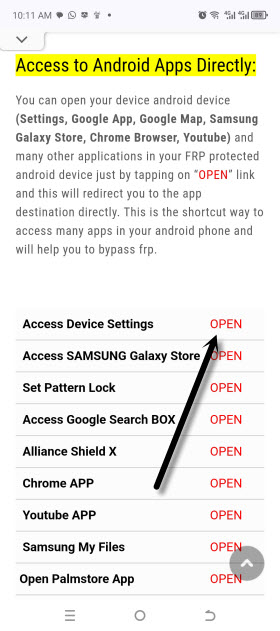
-From there, tap to “Access Device Settings” option to reach your device main settings page with single tap.
Apps to Disable for Successfully Bypass FRP on Itel S25/S25 ultra:
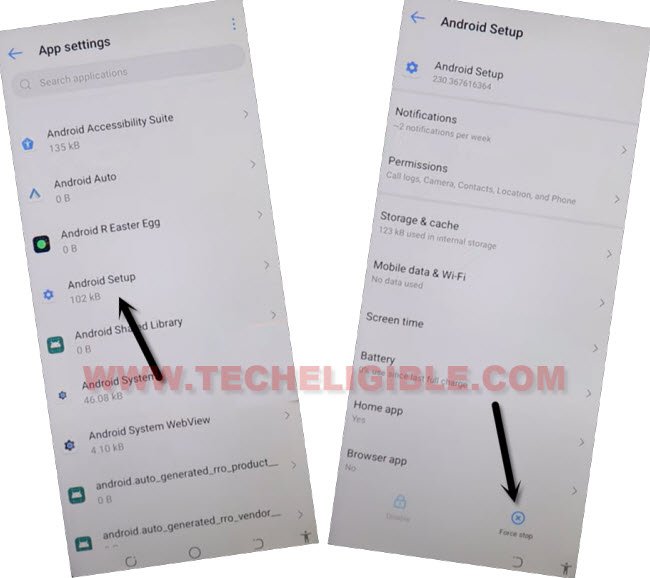
-We have to disable google play services app and android setup app. Let’s tap to > Apps Management > App list.

-Go to > Android Setup > Force Stop > Ok.
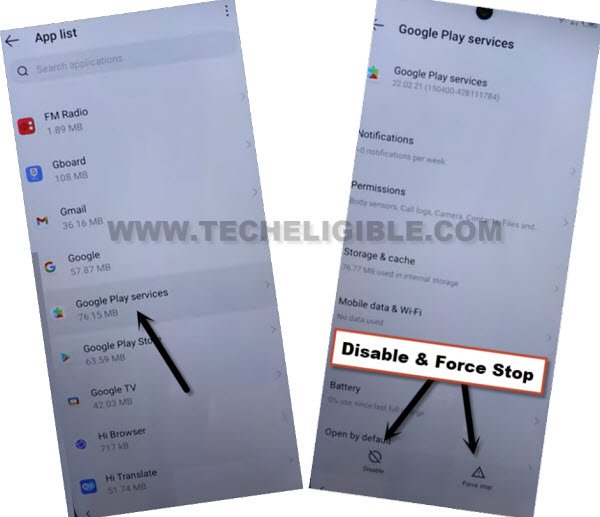
-Go back to app list screen. After that, you have to go to > Google Play Services > Storage & Cache > Clear Cache.

-Tap once on the back arrow from bottom to reach back to main google paly service screen. From there, tap to > Force Stop > Ok.
-After that, tap on > Disable > Disable App.
-Return back to (User Agreement & Services) screen. From there, tap on “Next”. After that, wait on a “Just a few moment…” loading screen until its done.
-We have to restart our device by long holding (Power button) and tap to “Restart” option to bypass google frp security feature.

-From first (Select Language) screen, tap to > Next > Next > Skip > Next.

-You will reach back to (User Agreement & Services) screen. Tap again on a link “User Agreement”.
-We have to repeat steps to access our device main settings page again.
Go to main Settings page by repeating Bypass FRP Steps:
-Tap on > Use without an account > No Thanks.
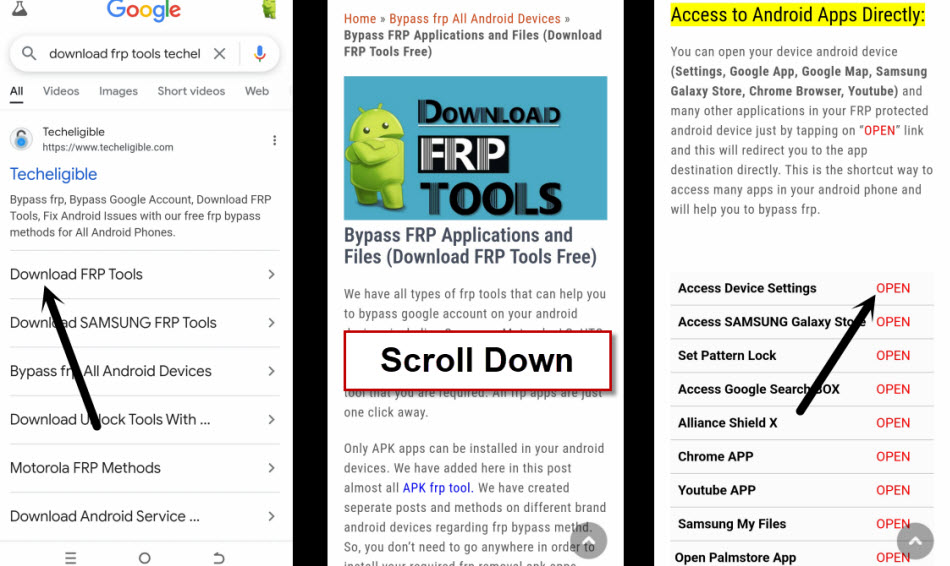
-Search in chrome browser search bar with “Download FRP Tools Techeligible“. After that, visit same searched result as shown in below screen shot to access our official frp tools page.
-From there, tap to “Access Device Settings” option to reach your device main settings page with single tap to bypass frp on Itel S25 Ultra and S25.
-Go to “Wi-Fi” option and long tap on your connected WiFi. After that, tap to “Disconnect” option.

-Once the WiFi is disconnected successfully, simply, go all the way back again on (User Agreement & Services) screen and tap to “Next” option from there.

-You will see there a (Google Services) page. Just hit on > More > More > Accept.

-Finish setup wizard step now by tapping on > Skip > Skip.
-Choose “Button” and tap to “Next”.
-From (Itel) page, hit on a “Next Arrow” icon. After that, you will be on main home-screen. You are all done now from Bypass FRP Itel S25 without using any frp bypass tool and PC.
Manually Reset Itel S25/S25 Ultra After FRP Bypass is Done:
-You may have to manually reset your device as well. Because, touch may not be working properly.
-Drag down top notification bar and tap on “Settings” gear icon.
-Go all the way down from settings screen and tap on “System”.

-Tap to > Reset Phone > Erase all data > Erase all data > Erase all data.
-Allow some time to complete reset phone process. After that, you can easily complete setup wizard steps again without facing any issue, because frp has been bypassed successfully from itel S25 and Itel S25 Ultra.