
Forgetting the login detail of Samsung phone after performing factory reset from recovery mode has been common now. That happens with people, they just got their device hard reset by someone in hurry to remove bugs or forgotten security locks, later on, they invite another big trouble of (FRP locking) because of not knowing already logged in google account information. In such cases, you can get help with this guide to Bypass and Unlock FRP Samsung Galaxy A17 5G with the help of free PC tools.
This method will work on: BIT: 5/4/3/2/1 | Model: SM-176 | Android Version: 16 | Android Security Update: April 1, 2026 or lower. You can check your device bit and model number easily by going to (Android Recovery Mode).
Arrange Tools First
-Firstly, you need to download & install the MOBILedit Forensic Ultra software on PC. For there is complete detailed post available with the screen shot, you have to follow up the below link to get this tool on your PC free and activate it free with easy tip.
| ⇒ MOBILedit Forensic Ultra V9.8 [Download & Install] |
-Once the installation is done and you are able to use the forensic ultra tool easily on your computer. Let’s move on to next step.
-We’ve to download another tool on our computer. For that, click the below link to download this tool on your PC directly.
| ⇒ ASC Support [Download] Password: gsmprime |
Note: You may have to disable @ntivirus software temporarily until you are done using both tools on your device and completed the frp bypass process. Otherwise, the (ASC Support) tool may not be able to use.
Check Samsung A17 bit Number & Model No
Note: This step is very important, because, if your device is 4G or not 5G or you bit number is higher than (5), or security patch level is higher than the (April 2026), then, you will have to downgrade it security patch and bit number in order get this method work.
-You just connect one end to your PC of the USB Cable.
-After that, while holding the (Volume UP + Power) button, connect the cable to your Samsung device at the same time. You have to this 3 actions at the same time, otherwise, the device will go on (Charging).

-Once the (Samsung Logo) appears. 3 seconds later, just release the (Power) button, while keep holding the (Volume Up) button.
-Release also the (Volume UP) key, once you get into the (Android Recovery) screen.
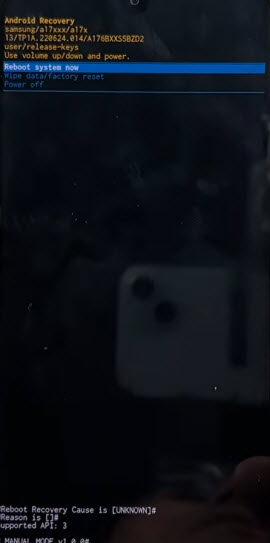
-Let’s check out the model number & bit number of the phone through the given firmware number.
-In below example of the android recovery screen, you can see the firmware code is: A176BXXS5BZD2. In this code, the first 4 digits, tell you the model number. As this is A176, means, it is the Samsung A17 5G Model. And, the end 5 digit of the code tell you the bit number, as you can see the, counting from the end till 5 digit is (5). That means, it has bit 5.

-If in your case, the first starting digit is (A175), means, your device is Samsung A17 4G.
-If in your case, the end 5th number digit is 6,7,8 etc. That means, your phone bit is higher and your device is on latest security match above the the april 2026. Then, you need to downgrade your device to the April 2026 security patch.
-This method will work only on the (Samsung A17 5G & Bit 5,4,3,2,1 & security patch April 2026 or lower).
Lets Start to Bypass FRP Samsung Galaxy A17 5G
-Firstly, disconnect the device from computer and do make sure, the phone is completely turned off.
-We have to enable the adb mode on the phone first in order to bypass frp. For this, we will use the (MOBILedit Forensic) software.
Use MOBILedit Forensic Ultra Tool to enable ADB Mode
-Open the software by double click on “MOBILedit Forensic”.

-Click to “Start/Iniciar” option from bottom corner to continue.

-Wait for a few seconds until loading process is finish, then, click on “Bypass Security / Bypass de Seguridad”.

-Double click on “Bypass Chipset / Por Chipset” 2nd number option.

-Type number “1330”, then, choose the searched result “Samsung Exynos 1330” processor. Because, our device (Samsung A17 5G) has this processor.

-After that, click on “Descifrado Exynos / Decrypted Exynos”.

-Select the option “Samsung with Bixby button / Samsung con boton bixby”.
-Then, click over the “Next” option from bottom to continue the process.

-You will be displayed a popup window of (Odin), waiting for the device to connect with PC in Odin mode.

-Let’s connect the phone to PC in Odin mode, for this, while holding both buttons (Volume UP + Down), just connect the USB cable to the phone.
-Release both holding keys once you see the (Exclamation) screen.

-Then, press the “Volume UP” button once to enter into the Download mode.
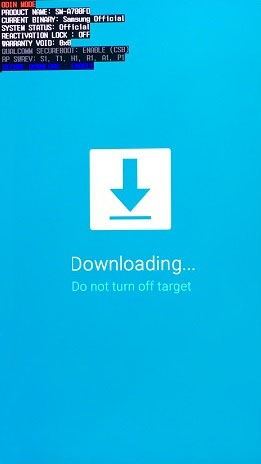
-After that, the software will detect your device automatically within few seconds and you will have a your device detail on software screen.

-The software may take a minute in completing the enabling adb process. Once its done, you will see the (Processing complete) message on the tool interface.
Note: Binary refers to security patch, do make sure, your phone has binary bit 5 number or lower. If, the phone bit is higher than 5, that means, your device on more latest security patch and this software may not enable adb on the phone.

-Your device will restart. That means, we’ve successfully got enabled the ADB mode on this phone through the MOBILedit Forensic Ultra software.
Use the Samsung ASC Support Tool to Unlock FRP
-Let’s get back to PC and extract the (Samsung ASC Support) software from winrar archive by giving password (gsmprime).
Note: Do make sure, the @ntvirus software is disabled temporarily.

-Once you unzip it, double click on the unzip folder (Samsung ASC Support Files) folder.
-Go to the exe files by going into the folder further.
-Run the tool by double click on the “ASC Support Samsung FRP Remove” exe file.

-From popup window, click on the “More information” and then, run it anyway.
-Finally, the tool will run and show you its interface.
-Press the “4 key” from your keyboard to choose the “Unlock FRP Remove (Method 2)” option.
Note: Do make sure, the phone is turned on and connected to PC correctly.

-You will receive the (Allow USB Debugging) popup on your phone screen, just quickly tap on “Allow” option without a delaying a second. After that, the ASC tool will detect your phone and continue frp bypassing process.
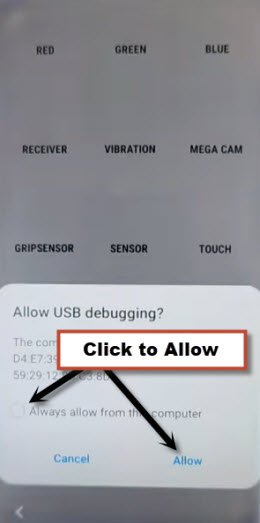
-The ASC Support tool will reboot your device after bypassing frp completely.
| Remember: If, after restart the phone, you still has a little “Lock icon” on top corner of the phone, that means, the FRP is not bypassed yet. Try again all steps. For this, use first the “MOBILedit Forensic” software to enable the ADB Mode, after that, use 2nd tool (ASC Support) to remove the FRP. |
Conclusion
Firstly, we downloaded and installed the (MOBILedit Forensic Ultra) software on PC with the help of another post. After that, we downloaded another small mbs files (ASC Support). After that, we just enabled the ADB on Samsung A17 5G phone and then, finally, we launched the (ASC Support) software and bypassed frp with one click.