
I have got my phone stuck on google verification screen. My phone is not accepting my google account right after i performed the factory reset from recovery mode. The answer is, your phone is locked with FRP protection and you are thoroughly failed in login back with already logged in Gmail account. The one was setup earlier before performing hard reset. If you legit owner of the phone, you can just recover your lost account and login back, if its not possible, then check out steps here to Bypass frp Huawei P Smart FIG-LX1, LX2, LX3 Android 8.
Disclaimer: This process is only for device owner and for the education purpose only to educate the phone owner, how to come out from like this situation, where, you have lost access to your android phone because of forgetting the google account.
Method 1: Bypass frp HUAWEI P Smart By Dialing 112
-Turn on phone and connect to WiFi network. Then, go all the way back over the first (Welcome) page. From there, tap over the “Emergency Call” option.
-Then, dial the code 112. After dialing this code, quickly start tapping on the (4) number digits until you see the (Calendar) page.
Note: If failed, don’t worry, dial again the 112 and then, quickly start tapping several times on (4) number digit from the dialing pad.

-Tap to “New Event” option from bottom, then, enter any name in the (Location) field tab. After that, save this event by tapping the “Check Mark” icon from upper right corner.
-Tap to your already created event name, that is with (No Title).

Go to Gmail App Info Page
-Then, hit on the “Share” icon. You will be shown sharing apps in the popup screen, just choose the “Gmail” application.

-Go over the > Notifications > More Settings.

-Tap to “3 dots” icon from the upper corner, and, select the “Manage Accounts” option.
-Go to “Accounts” option from the new popup screen. After that, you will be redirected on the primary settings interface of the phone.

Reset the Phone Settings & Enable Developer Option
-Let’s reset this phone completely. Go to > System > Reset.
-Tap 3 times on the “Reset All Settings” option.

-Go back on the main primary settings page. From there, you just have to go to > Display > Home Screen Style.
-From there, choose the “Drawer” option.

-You will be redirected on the main home-screen of the phone.
-Go to main settings page again by tapping on > Menu > Settings > About Phone.

-Tap 7 times on the (Build Number) to enable the developer mode.
-Once its enabled, just tap once on the “Back Arrow” icon from bottom to go back to (System) screen. From there, go to > Developer option > Turn on (OEM Unlocking).

-This is last step, we are going to perform factory reset the phone from settings now. Let’s tap once on the “Back Arrow” icon from bottom to go back to (System) screen again.
Factory Reset from Settings & Setup Phone Again
-After that, tap to > Reset > Factory Data Reset. Tap 2 times on the (Reset Phone) button. This will restart the phone to perform factory reset to unlock frp and delete the old forgotten Gmail account.

-Once the restarting process is completed, you can easily setup the phone again without facing any verification screen.
Method 2: Bypass frp HUAWEI P Smart By Recovery Mode Reset
You don’t need any PC or frp tools to Bypass frp HUAWEI P Smart FIG-LX1, LX2, LX3. We will put our device on recovery mode and from there we will just factory reset our phone and after that restart phone with safe mode. That’s it, you don’t need to do anything, because you have successfully bypassed google frp, lets follow all steps from below to accomplish this process.
Let’s Begin the Process
-Turn off your phone.
-Long press both (Volume UP + Power keys).
-Release only “Power key” after you see HUAWEI Logo.
-Once you entered in recovery mode, release also “Volume Key“.
-Tap on “Wipe data/factory reset” option, and then type “Yes”, and after that, again tap on “Wipe data/factory reset” option.
-It may take several minutes in completing this process, so keep patient.
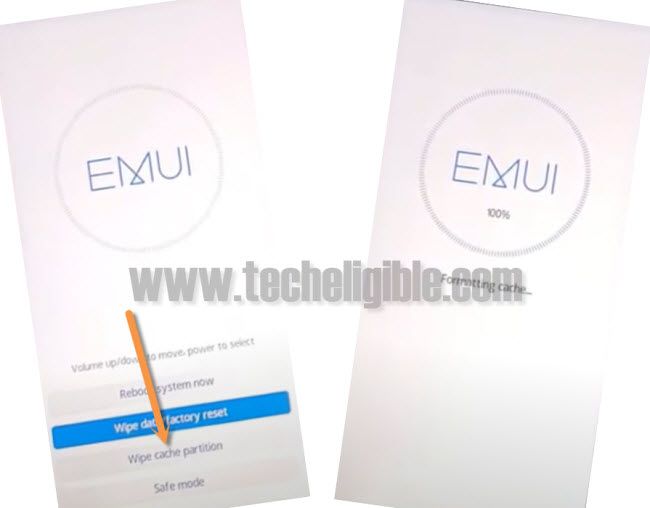
Perform Wipe Cache
-After that, tap on “Wipe Cache Partition”, and wait until this process finish also.
-Finally tap “Safe Mode” option to restart Huawei phone with safe mode.
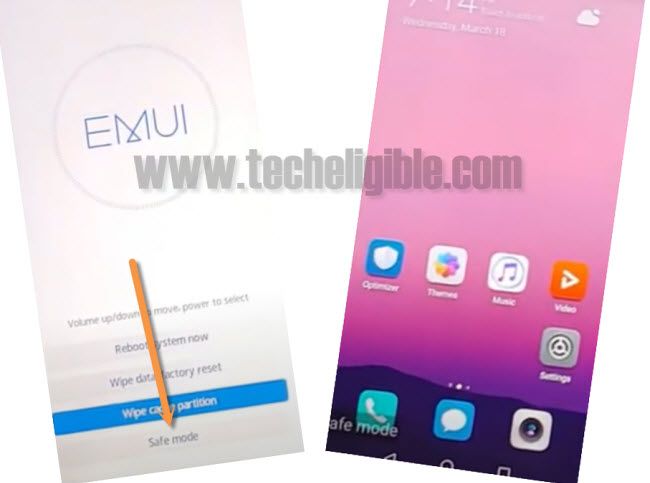
Reset All Settings
-We have to reset settings once we get access into our device.
-Go to “Settings”.
-From there, just go to > System > Reset.
-Now tap on > Reset All Settings > Reset All Settings.
-It may take 4-5 minutes in resetting Huawei phone settings.
-Once the process finish, just complete phone setup wizard, and enjoy your device again.
To Sum It Up
Without using any app, we just used the dialing method. Dialed the 112 number and quickly start tapping at the (4) number. By doing this trick, we successfully accessed to the (Calendar) app, from there, we just created new event and shared with Gmail app. After that, accessed over the main settings page of the phone and performed factory reset from there to easily bypass google account.
Common Questions
Why i faced the google locked screen after performing hard reset
Because, you have forgotten your already synced gmail account
Is it safe to perform factory reset from settigns?
Yeah, its totally safe
Dialing 112 code can make call?
You just have to quickly start tapping on 4 digits number after dialing this 112 code. So that, you could access to the calendar app.