
These are 3 frp bypass methods for Samsung Galaxy M11 FRP Remove (Android 12/11/10). If you are stuck on google verification screen because of forgetting your own linked Gmail account. Then, you can get help with 3 methods to get back your device and setup new PIN lock protection and FRP. You need to remove your old forgotten google account, for this, some steps are required to be followed up.
FRP lock protection can cause you a headache, if you factory reset the phone without knowing with what google account your device was setup. This has been a very common issue, that is why, device owner is required not to forget signed in google account.
Note: We highly recommend you to apply this method only on your own device, if you are not owner of Galaxy M11, or you found this from some where, you must return this device to its real owner.
Read Also: Samsung Galaxy M31 FRP Bypass
Method 1: Samsung Galaxy M11 FRP Remove through Talkback Function (Android 12, 11)
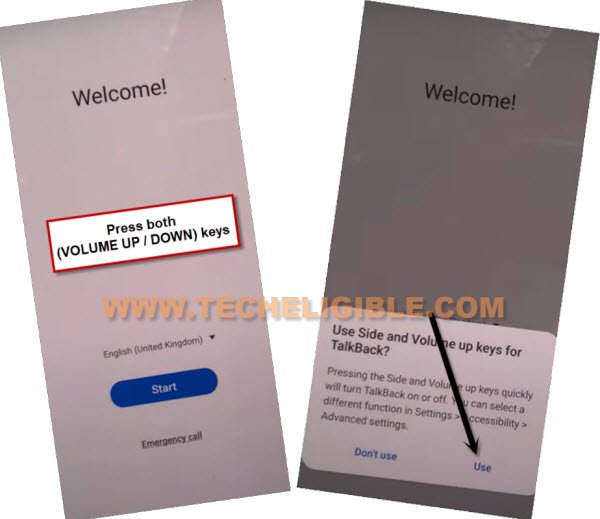
-To successfully bypass google frp, you need to connect WiFi first, after that, we have to turn on talkback just by long hit on both (Volume UP + Down), and then double hit on “Use”.
Note: If you are unable to turn on talkback using (Volume UP + Down), then press (Volume UP + Power) keys.
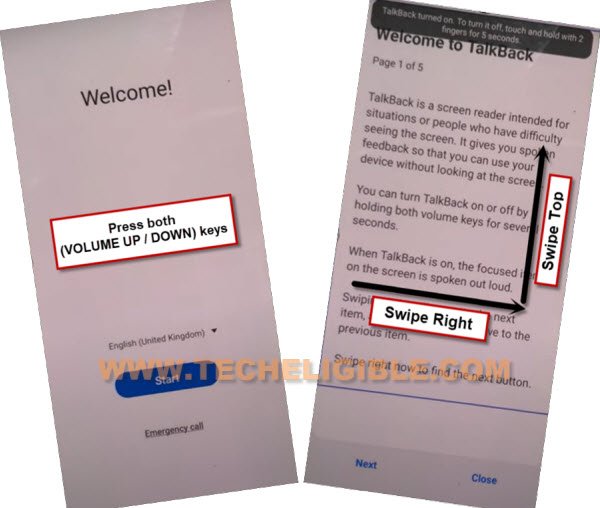
-Let’s hold again both (Volume UP + Down) or (Volume UP + Power) keys, and then draw a reverse “L” same as shown in below screen shot.
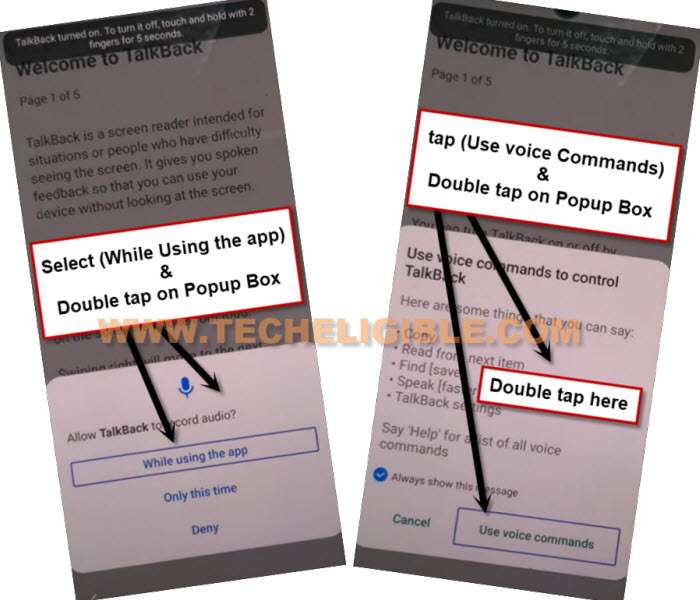
-There you will have a popup window, just double tap to “while using the app”, and then double tap on “Use voice Command”.
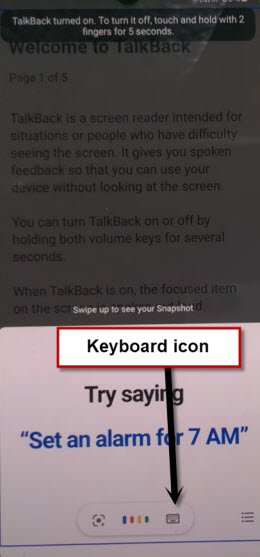
-Now you need to say loudly “Open Google Assistant” as soon as you see green border.
-Go to “Keyboard icon” same ass shown in below image.
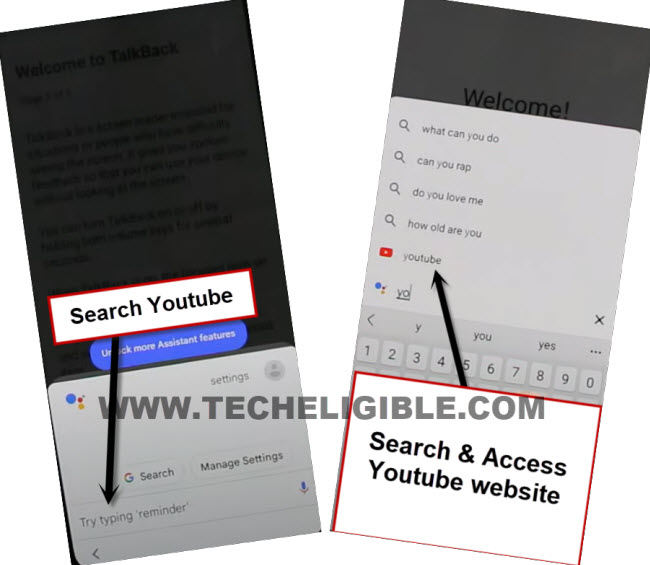
-Lets just turn off talkback by long press (Volume UP/DOWN) or (Volume UP + Power) keys, after that search there “Youtube”, and tap on “Youtube” from searched result.
Note: If you don’t see (Youtube) icon, just type “Youtube”, and tap to “Send” button from bottom right corner, you may see google search window again, repeat same process, tyupe “Youtbe”, and tap to “Send” button again.
-The youtube website will be launched successfully, from this point, we will reach inside chrome browser to download frp tools.
-Tap “Profile icon” from top corner, and go to “Settings”.

-Go to > About > Google Privacy Policy, once you see chrome window, go to > Accept & Continue > Next > No Thanks.
Download 3 FRP Apps on Galaxy M11:
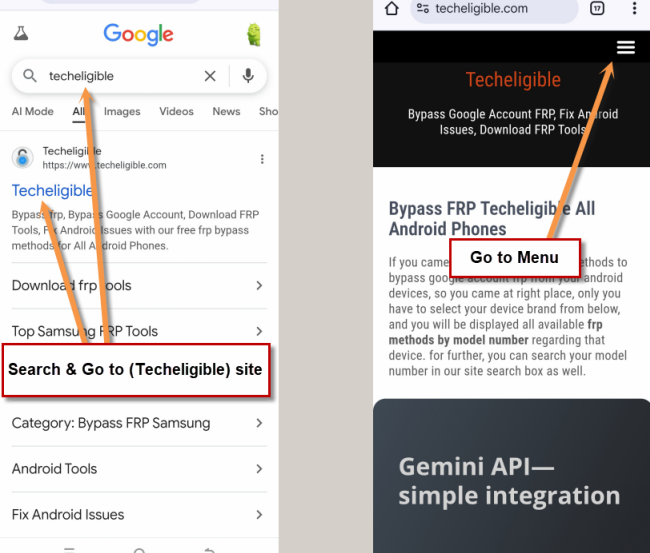
-Make search there with “Techeligible“. After that, go to techeligible site.
-Navigate to “Menu” option from top corner.
-After that, simply, hit on > Other Free Tools > Samsung FRP Tools.
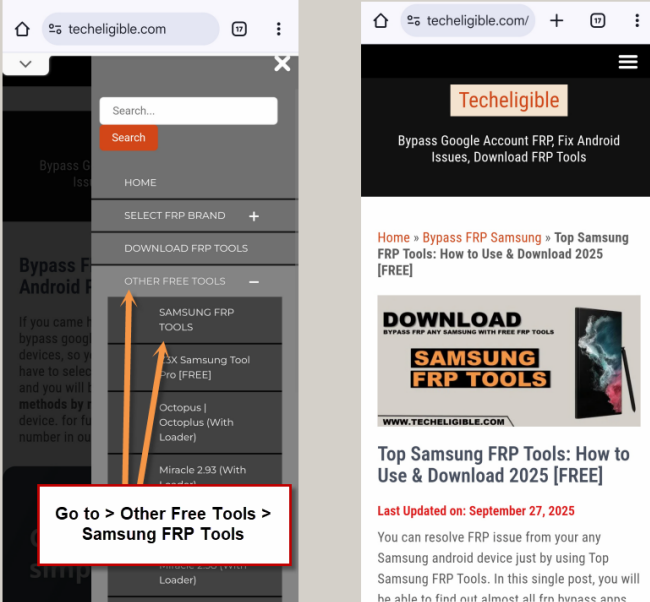
-Let’s download frp tools same as shown in below.
1/ Package Disabler Pro.
2/ Notification Bar.
-Now, we have download & install another app directly from galaxy store, this is very essential app to Bypass FRP Samsung Galaxy A23.
-Tap to “Open File Shortcut App” from same frp tools page, and you will be redirected inside galaxy store.
-From there tap to “Install” button.
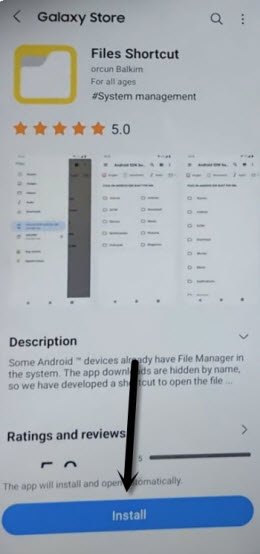
-But you are supposed to sign in with Samsung Account. (You can create your free Samsung Acc directly from Samsung website).
-Sign in with your Samsung account while installing an app.
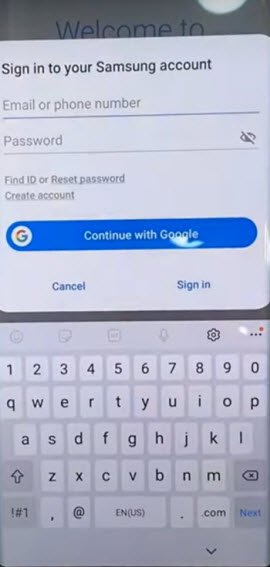
-After installing successfully “Files Shortcut” app from galaxy store, just tap to “Back Arrow” from bottom left corner to get back to Samsung frp tools page.
-Hit on “3 dots” from top right corner, and go to “Downloads” to reach inside download folder, where you will be able to see both downloaded apps.
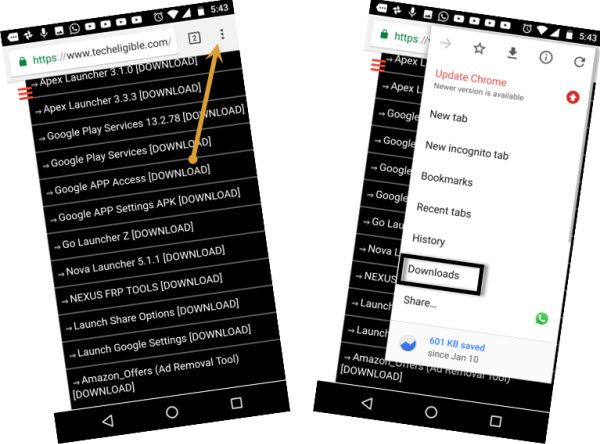
-But you won’t be able to install these apps from here because of new security patch updated.
-Tap to “Notification Bar”, and you will have a chrome popup window, just tap to “Settings”, and then hit on “Close App”.
-You have to do this 5 times, means tap again on > Notification Bar > Settings > Close Apps, keep repeating this 5 times.
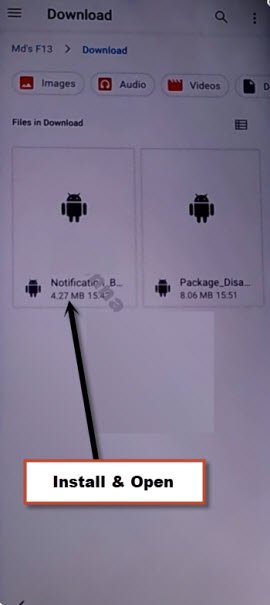
-Go back to (Samsung FRP Tools) page again, and from there, tap to “Open Galaxy Store” to reach inside galaxy store.
-Search in galaxy store “File Shortcut”, and the tap to “Open” icon to launch this app.
-Tap to “Downloads” option to reach inside the downloaded app folder, from there tap to > Notification Bar > Continue > Install > Open.
-Hit on > Accessibility > Installed apps.
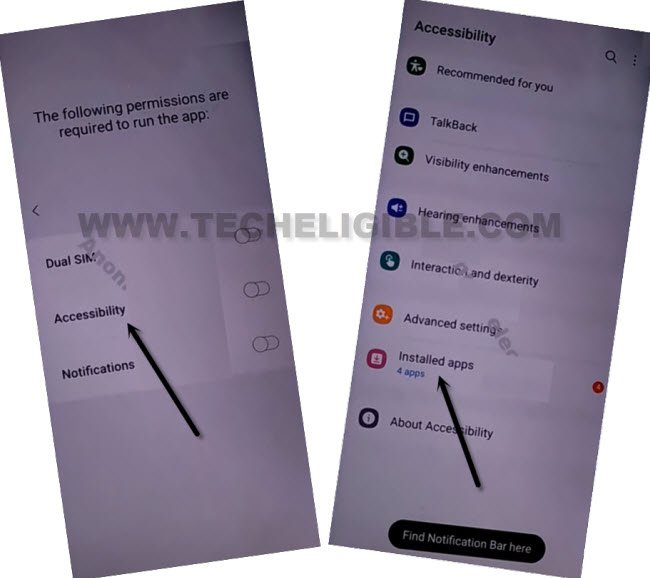
-Now hit on > Notification bar> Turn on > Allow.
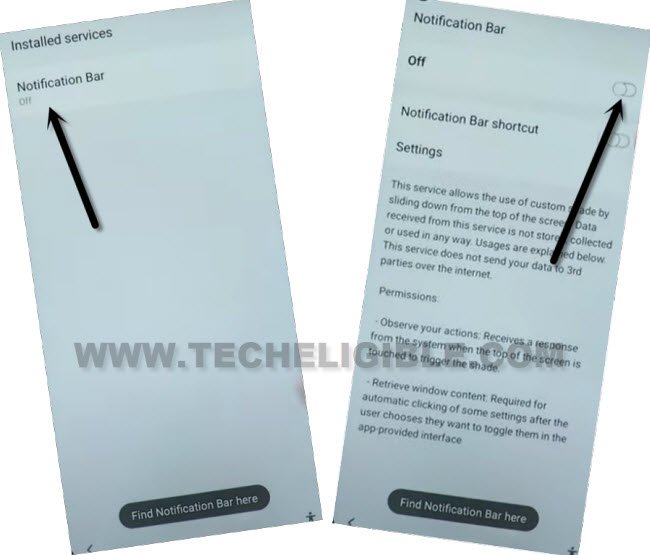
-Swipe down from top to get notification bar, and you will see there the Notification bar will appear up, that means this app is working perfectly, and now we can easily bypass frp.
-Tap 4-5 times on back arrow from bottom left corner to get back to download folder, where from we installed (Notification bar) app.
-Now tap to > Package Disabler Pro > Continue > Install, but do not tap on “OPEN” right now.
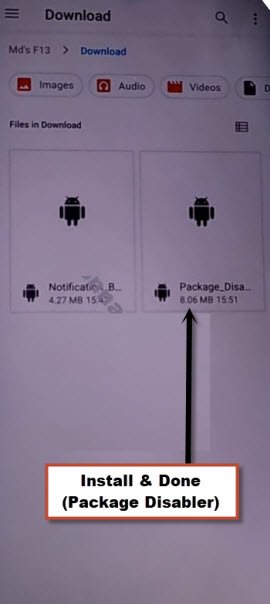
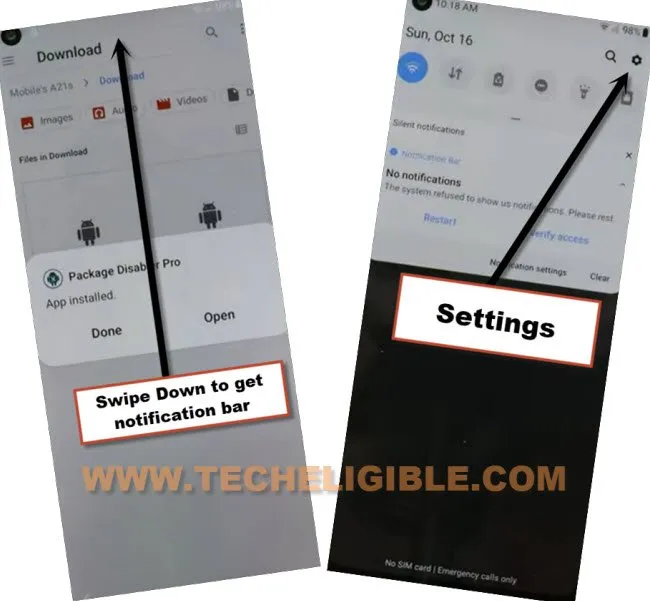
-Bring Notification bar from top by swiping down, and hit on “Settings” icon from top right corner.
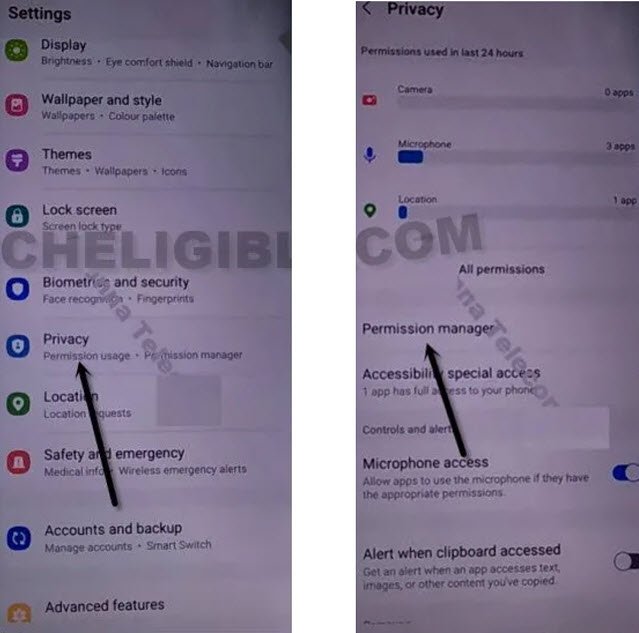
-Go to > Privacy > Permission Manager > Files and Media.
-Just go to “3 dots” from top corner, and tap to “Show system”, from the app list, just go to “Package Disabler Pro”
-There you will see again a huge app list, from there go to > Package Disabler Pro > Allow management of all files > Allow.
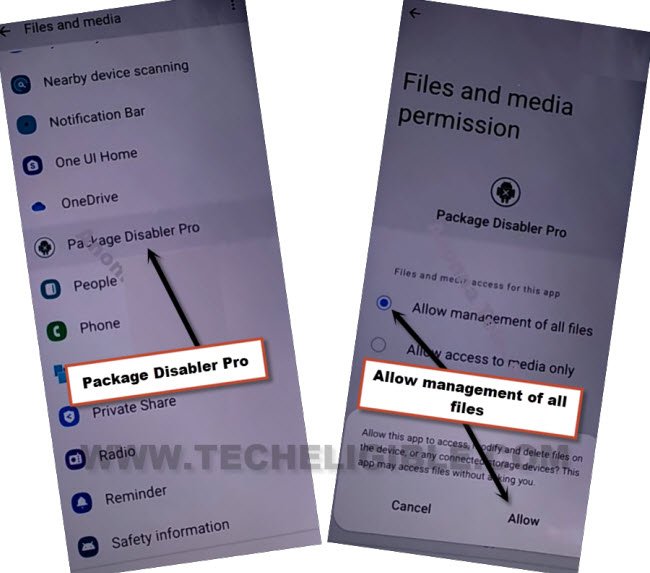
-Tap to back arrow 5-6 times to reach back to “Download” folder, where you have a popup window, just hit on “Done” from there.

-Hit again on > Package Disabler Pro > Continue > Update.
-Swipe down from top to bring notification bar, and turn off “WiFi”, after that tap to “Open”.
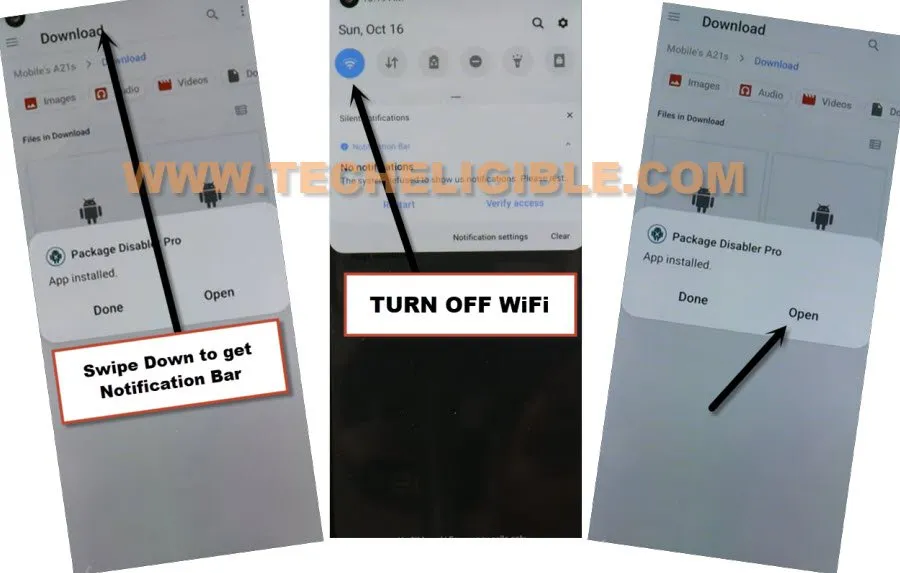
-Tap to “i agree”, now swipe down to bring notification bar, and re-enable WiFi.
-Now hit on > Enable > Activate.
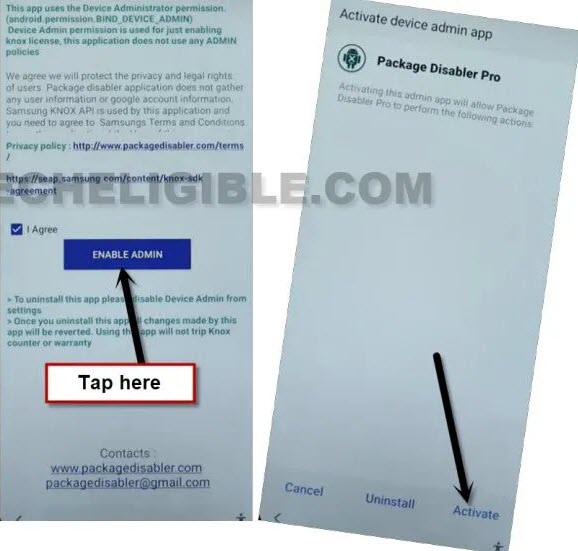
-After that, tap to “Agree” button, wait over there, the new popup window will appear automatically saying “Knox license validation completed successfully”.

Final Step to Access Device HomeScreen:
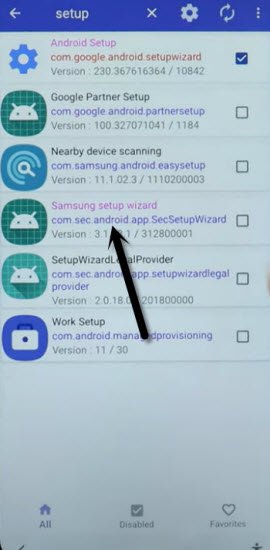
-Hit on “Search icon” from All packages screen, and Type “Setup”, and go to “Android Setup” from there, check mark top “Disable” option (Follow below image).
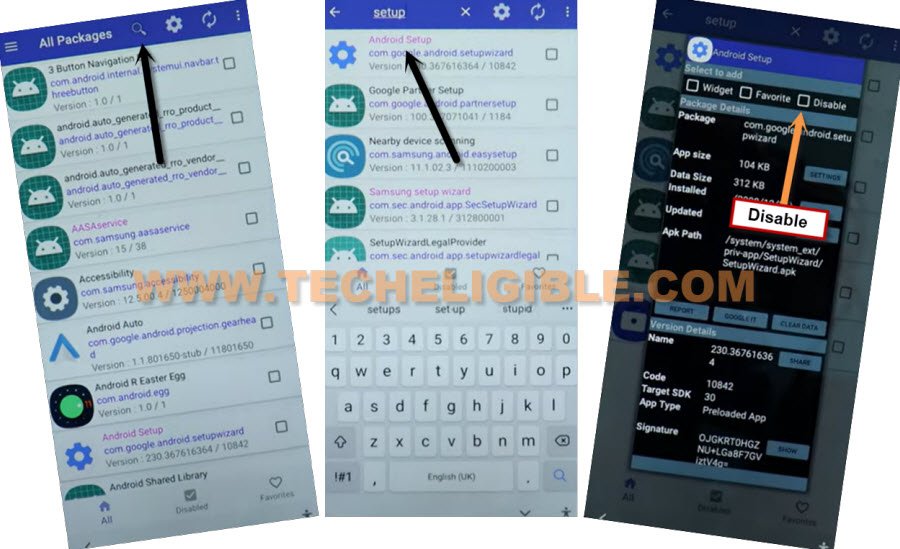
-type “Setup”, and go to “Samsung Setup Wizard“.
-Just tap on “Clear Data” button, and the time will start appearing up at top bar.
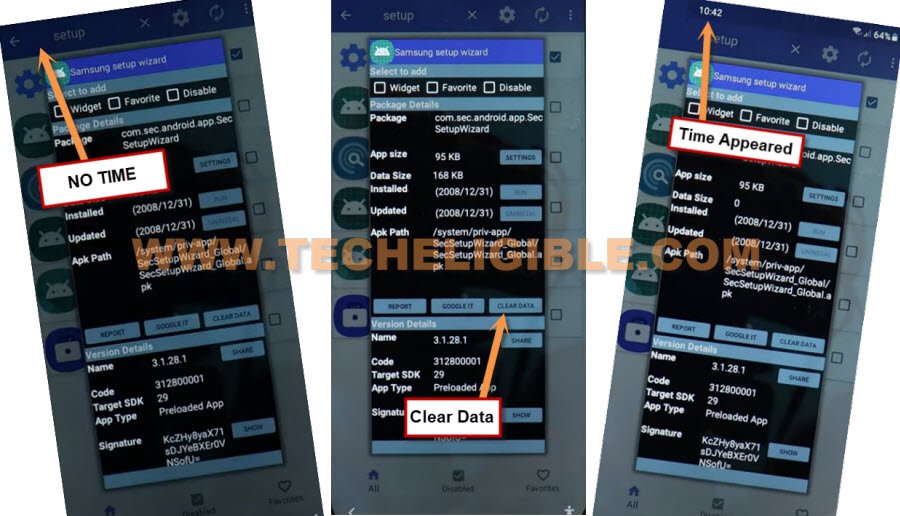
-Tap on back arrow 2 times, and wait, you will see a popup box, just select “Samsung Setup Wizard”, and tap to “Always”.
-Now tap to > Next > Skip > Finish.
Method 2: Samsung Galaxy M11 FRP Remove By Odin Tool (Android 11)
This is the latest method of 2022, and you can easily remove google account on Samsung M11 Android 11 without using smart switch or alliance shield, well on latest security devices, these methods are no longer working, specially with this Galaxy M11 device, so you will have to go for alternate method, and that can be followed from here.
First of all prepare required tool to accomplish this process easily without any trouble.
⇒ Computer + USB Cable.
⇒ Odin Tool 3.14 [DOWNLOAD]
⇒ USB Driver [DOWNLOAD]
⇒ SAMSUNG 300K Tool [DOWNLOAD]
Let’s Start frp bypass Steps:
-We will flash this Samsung M11 with android 10 version firmware.
-Put your device into a (Android Recovery Mode) by turning off device first.
-Long press both (Volume UP + Power key) together.
-Release only (Power Key) when you have Samsung Logo on screen.
-Once you enter into recovery mode, release (Volume UP) key as well.
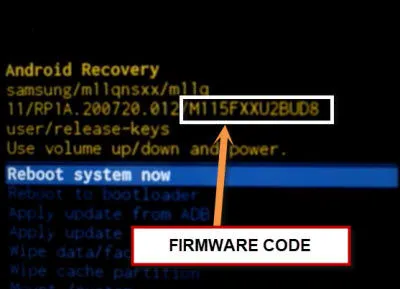
-Note down your device (Firmware Code), at up-right you will be able to see your firmware code like this (M115FXXU2BUD8), but remember, last 4 alphabets or digits of this code can be ignored, you do have to match firmware till (M115FXXU2).
Download Firmware of Samsung Galaxy M11:
-Open website (Samfw.com).
-Search there your device model, type in search area (SM-M115F), and you will get search hint there, just tap on that.
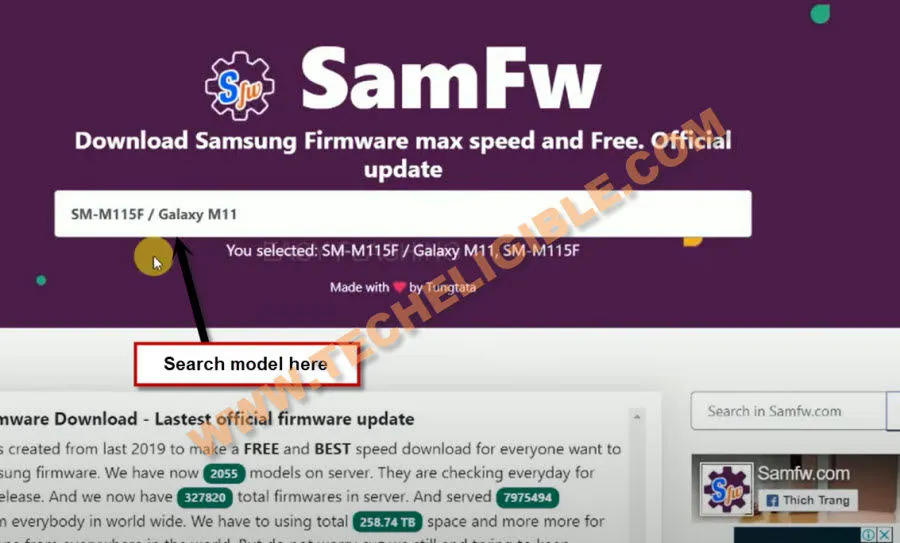
-Select your device firmware country, and then find out (Android 10) firmware by matching with your device (Firmware Code).
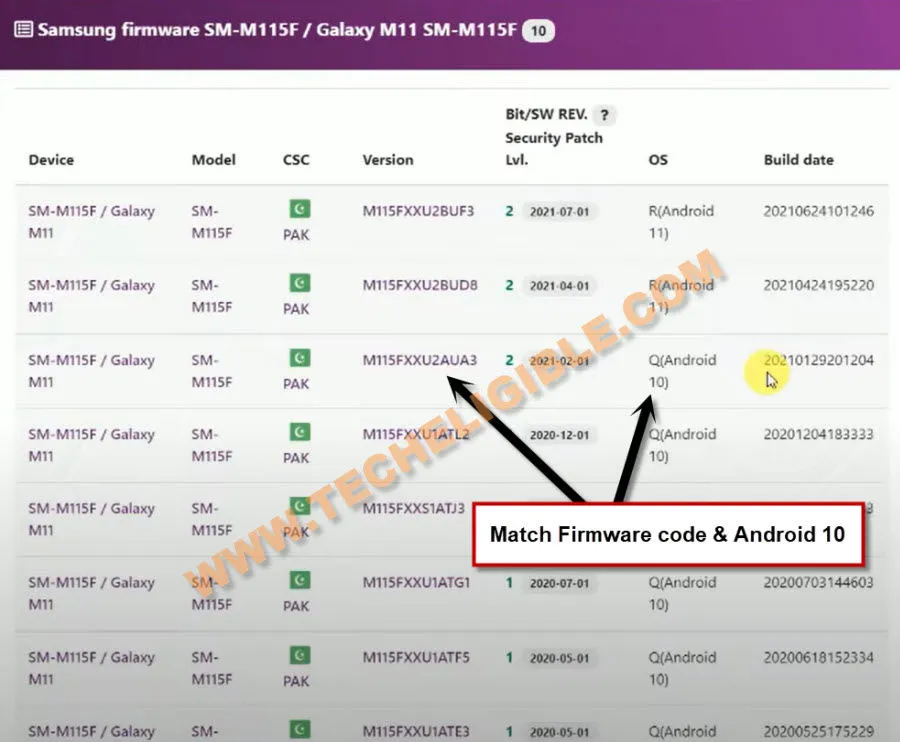
-Go down and tap to (Download on Website) button.
-Once downloading process done, extract the firmware from winrar archive.
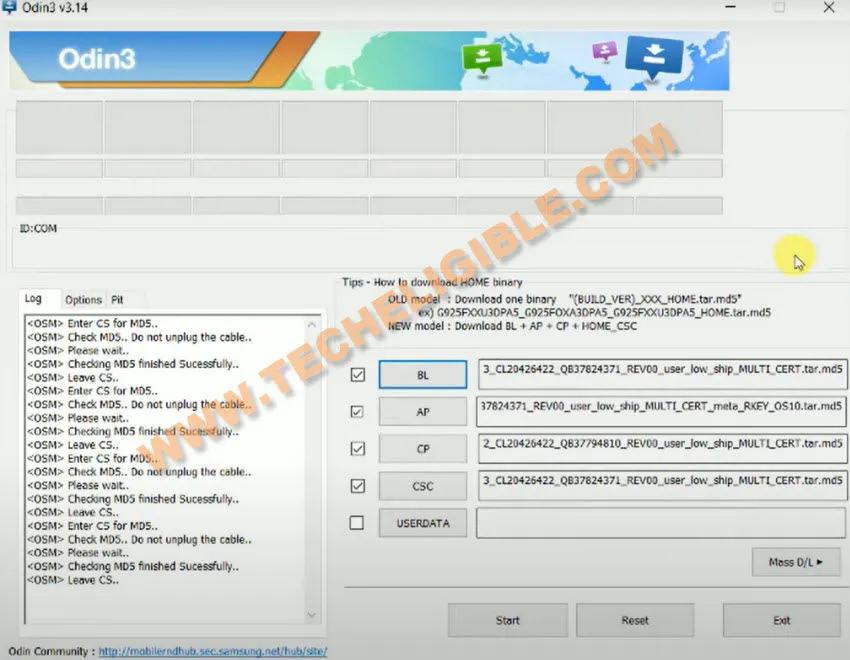
-Open “Odin tool”, and give file path respectively from your downloaded firmware.
-Install (Samsung USB Driver) in your pc, so that you may not face any difficulty in connecting device with PC.
Use Samsung 300K Tool for FRP Bypass
-Open (Samsung 300k tool), now connect device with PC.
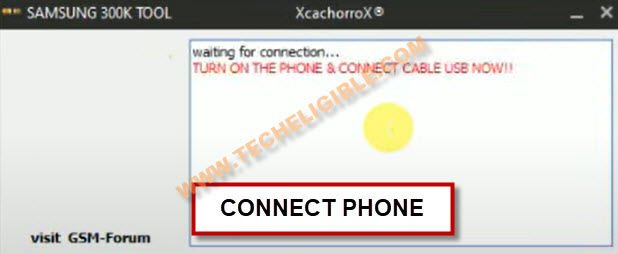
-Tap to (Resistor) icon from the Samsung 300k tool.
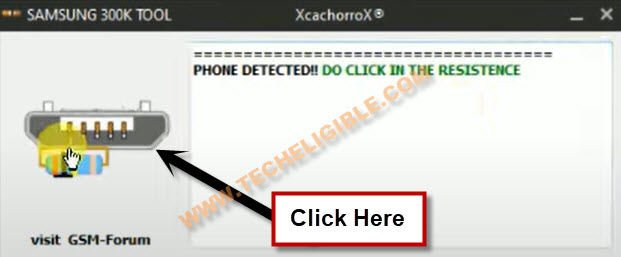
-Your device will be put into a (Download Mode) with the help of this tool.
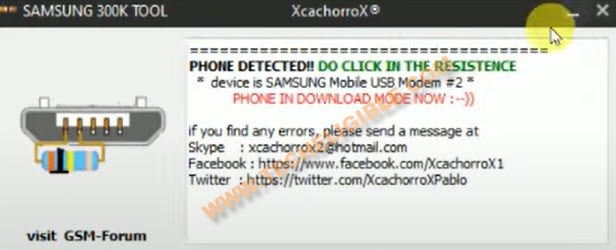
-Go to (ODIN) tool, and from there, click to “Start” button, and wait until this process done.
-The device will be restart, just disconnect Galaxy M11 from PC.
-Now finish initial setup wizard, that’s it.
Method 3: Google FRP Bypass on Samsung M11 (Android 10)
This is the New Samsung Galaxy M11 device has been released on 4th May 2020, and this device has android version 10, so as you know it has latest security patch level, if you’ve got frp protection on this phone, so you can apply below method to bypass frp now without any PC or App.
This Method has successfully been tested with Samsung Galaxy M11 Android 10, Model Number (SM-M115F/DS).
Continue FRP Bypass Steps Here:
-First of all, Connect WiFi to start the process.
-Now you just have to go back to the first “Let’s Go” screen.
-Tap to “Next Arrow” button.
-Check mark the option “i have read and agree all of the above“, and tap to “Next” from there.
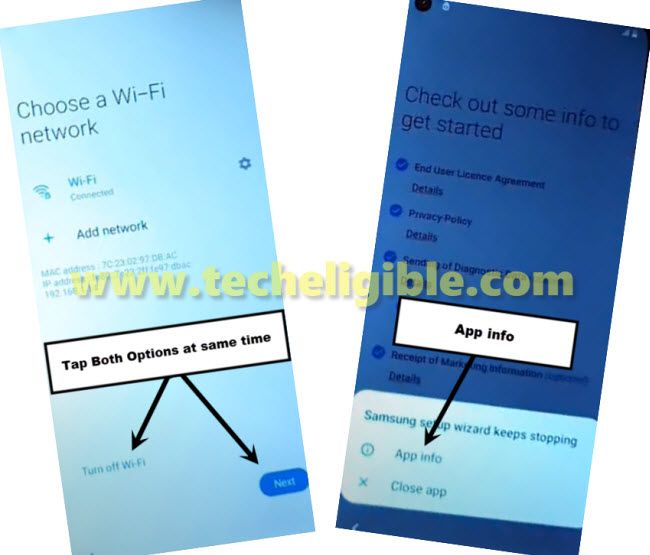
-You will have a screen of “Choose a WiFi Network” same as shown in below image.
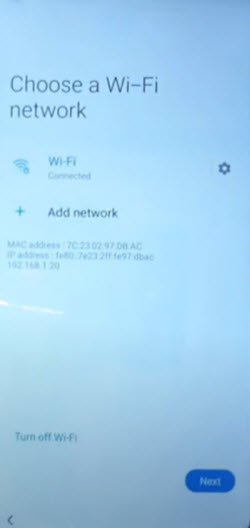
-Tap both options at very same time “Turn off WiFi” & “Next“.
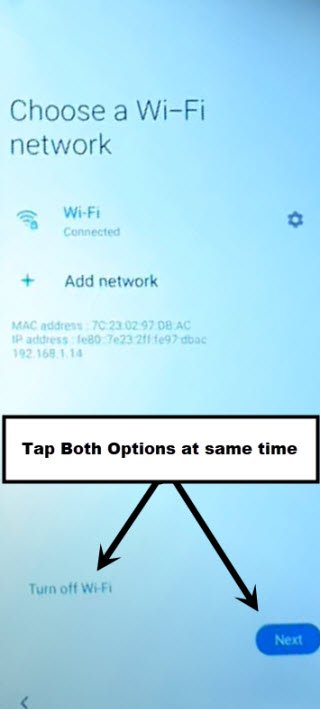
-If you got the popup window of “Samsung setup wizard keeps stopping”, that means you hit both options at same time perfectly, you have succeeded, and you leave below 3 steps, and continue by tapping on “APP info” from the popup window.
Note: If you did not receive that popup window, so don’t worry about that, you may have to try that 4-5 times, then you will be able to get that popup window easily.
Repeat FRP Steps to Get Popup Window:
-Sometimes, you will be redirected back to 1st “Let’s Go” screen, or Sometimes you will see “Checking for Updates…”.
-If you see “Checking for updates…”, just tap to back arrow to go back to the same screen.
-Turn on WiFi first, and then retry to tap both option at same times to get the popup window. (Do it 4-5 times or may be more) but that popup window will appear somehow.
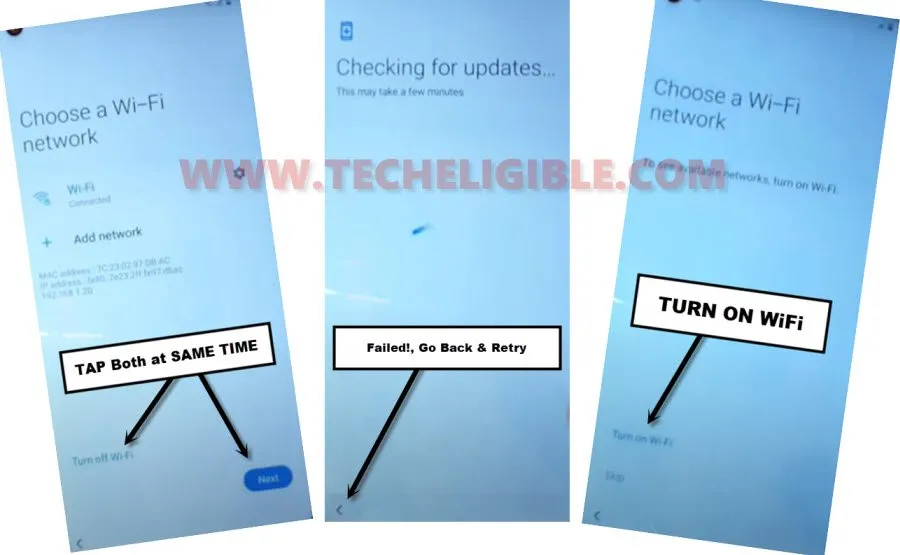
-Once you got the popup window (Samsung Setup Wizard Keeps Stopping), just tap on “APP Info” from there for FRP Bypass Galaxy M11.
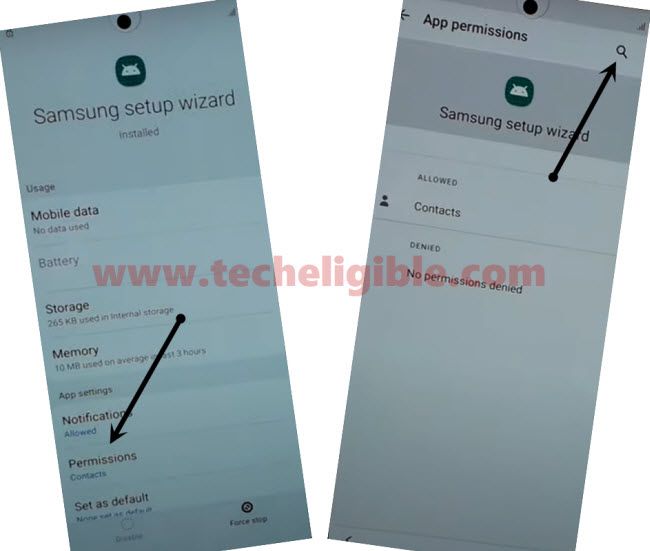
-Tap on “Permission“, and then tap “search icon” from top right corner.
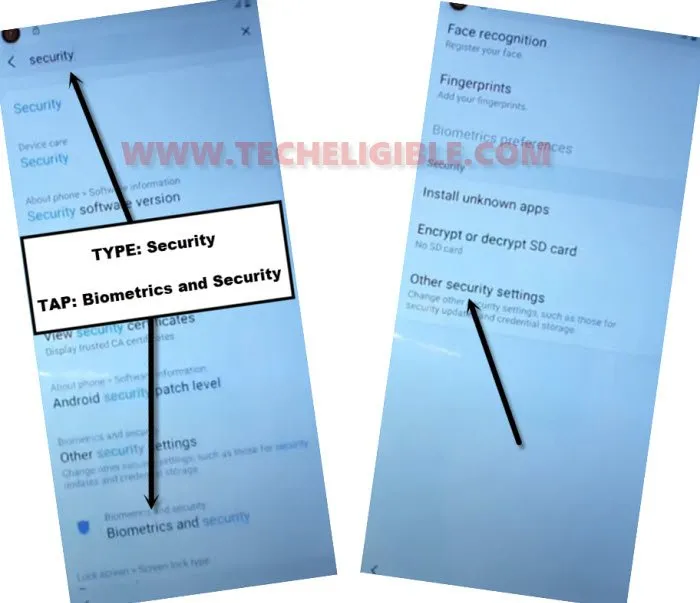
-There you will have a search box top of the screen, just type there “Security“, and then tap on “Biometrics and Security” from searched result.
-After that, tap on “Other Security Settings“.
Setup PIN on FRP Locked Samsung Galaxy M11:
-We are going to setup any 4 digits pin code.
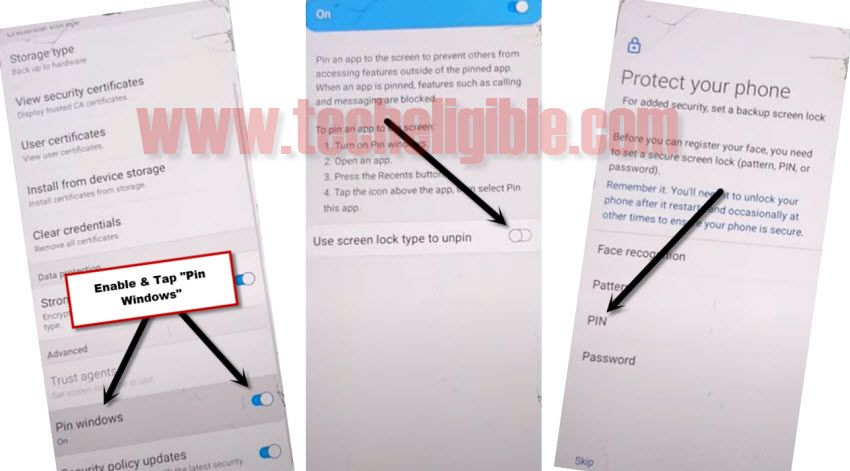
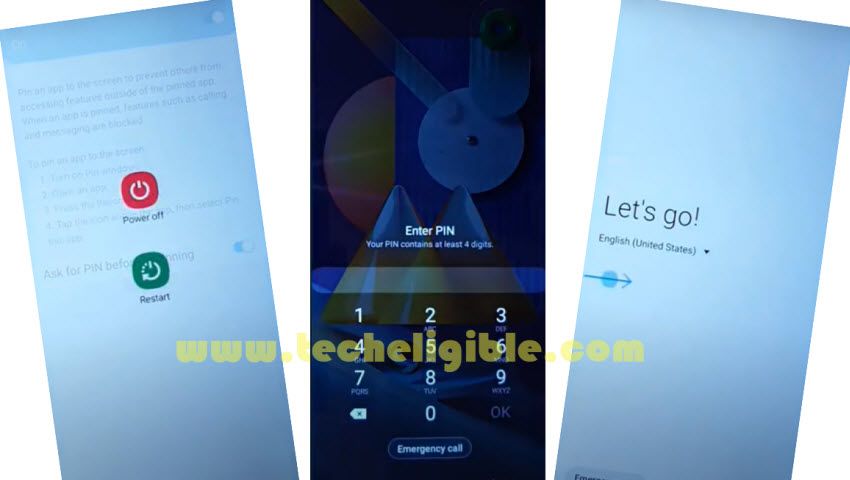
-Enable “PIN Window”, and then tap on “Pin Windows”.
-After that, tap to “Use screen lock type to unpin“, and then select “PIN“.
-Setup any 4 digit pin code there, and do not forget that PIN code. We will use this PIN code later on for Galaxy M11 FRP Remove.
-After that, just restart Phone.
-You will be asked to enter pin code, just give same pin code that we have already setup.
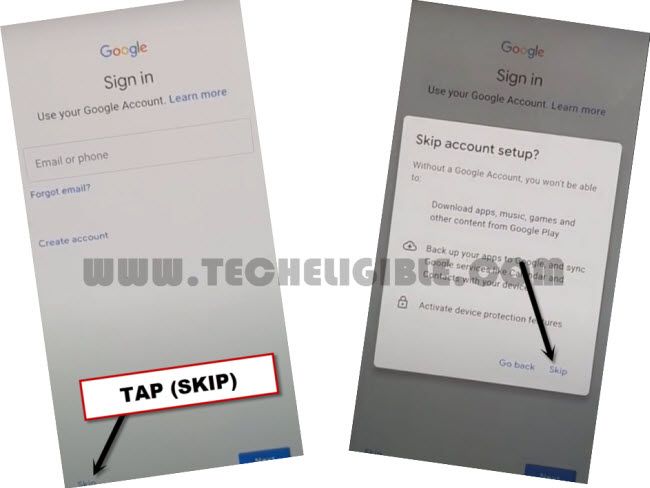
-Now you will be able to skip the “verify your google account” screen and complete all remaining setup wizard steps on your own.
FAQs About Samsung Galaxy M11 FRP Bypass
How to enable talkback on FRP locked Galaxy M11 Phone?
Talkback is the function, that can be used even on your FRP locked Galaxy M11 without completing setup wizard steps. You only need to press (HOME Button) 3 times quickly to enable talkback function.
Can i bypass frp from Samsung Galaxy M11 after enabling talkback?
Sure, with the help of talkback function, you can reach to google chrome browser. Download and install frp apps to bypass frp. Detailed steps already mentioned in above frp method-1.
How to Setup new PIN lock Code on FRP Locked Samsung M11?
For setup PIN code, firstly, you need gain access to main settings page. For this, just connect WiFi and from same (Connect to WiFi) page. Tap simultaneously both option (Turn off WiFi + Next). After few tries, you will succeed in having a popup window. From there, go to (App info) option. After that, you will be able to reach to main settings screen and setup new PIN lock code from (Security) option.
Conclusion:
We applied 3 frp bypass methods on Samsung Galaxy M11 (Android 12/11/10).
Used Talkback: In method (Method-1), we enabled talkback and reach to chrome browser. Downloaded frp bypass apps and installed on our device to bypass frp account.
Flashed with Firmware: For Samsung Galaxy M11 Android 11 frp bypass, we just downloaded firmware of our device. After that, flashed the with firmware using Odin tool. After that, we used a PC free tool (Samsung 300k) to bypass frp.
Setup PIN Code: In 3rd frp bypass method, we just setup PIN lock code. Firstly, tap at the same time on both options (Turn off wifi + Next) from the WiFi page. After multiple attempts, we got a popup window, from there, tapped at (App info) option. After that, we just reach to (Security) option and setup PIN lock protection to bypass frp from Galaxy M11.