
We have top 2 method here on single device to easily Bypass FRP Redmi Note 8 Pro, Redmi Note 8 (MIUI 12.5, MIUI 11) without using any 3rd party paid service. If you wanna fix this problem on your own, and wanna setup new google account to bypass frp protection completely. So, follow this easy guideline from below.
Note: We highly recommend you to apply this method only on your own device, if you are not owner of this Redmi device, or you found this from somewhere, you must return this device to its real owner.
| Method 1: Remove Google FRP Redmi Note 8 Pro | Note 8 [MIUI 12.5] New |
| Method 2: Remove Google FRP Redmi Note 8 Pro | Note 8 [MIUI 11] |
Method 1: Bypass frp Redmi Note 8 Pro, Redmi Note 8 (MIUI 12.5)
-First of all, connect WiFi. After that, long press both buttons (Volume UP + Down) simultaneously. You will have a result of Talkback (Turn on Talkback). Hit on “Turn on” option.

-Long press again both buttons (Volume UP + Down), you will see there (Welcome to Talkback) screen.
-Make “L” shape on screen by swipe down, and then, swipe right.
-After making this “L” shape on screen, you will have a result of (Welcome to Talkback). From that popup window, double tap on “Talkback Settings”.

-Double tap on option > Braille Keyboard > Set up Braille Keyboard > Settings.
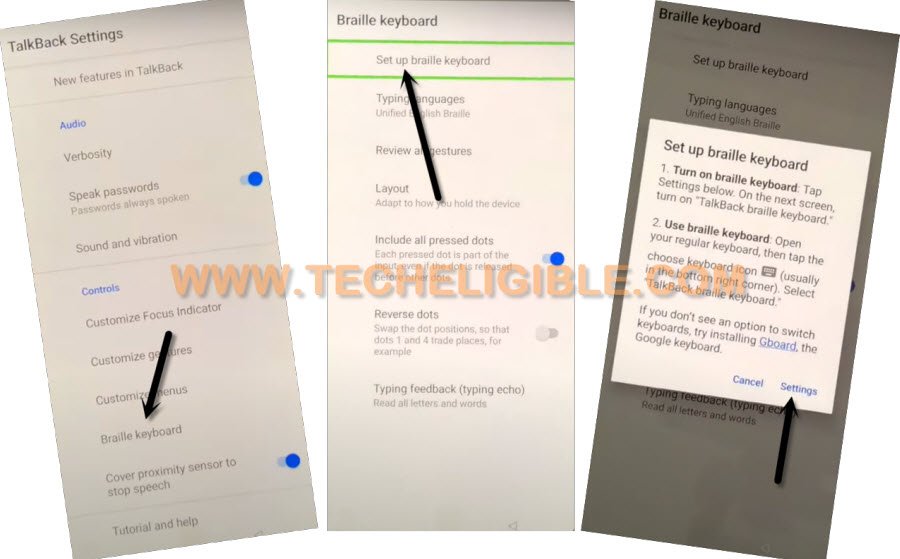
-Turn on “Talkback Braille Keyboard”‘ option, and hit on “Ok” from popup.

-Go back on (Talkback Settings) page by hitting on “Back Arrow” from bottom.
-Let’s turn off talkback feature just through long press both (Volume UP + Down) buttons to Bypass FRP Redmi Note 8 Pro, Redmi Note 8.

-Go back on (Connect to Network) page, from there, hit on “Add Network” option.
-Afterwards, tap over “SSID” field tab to get keyboard option. From keyboard, just long hold on (Space) button.

-By doing this, you will be displayed a popup, tap on “Turn on in Accessibility Settings”.
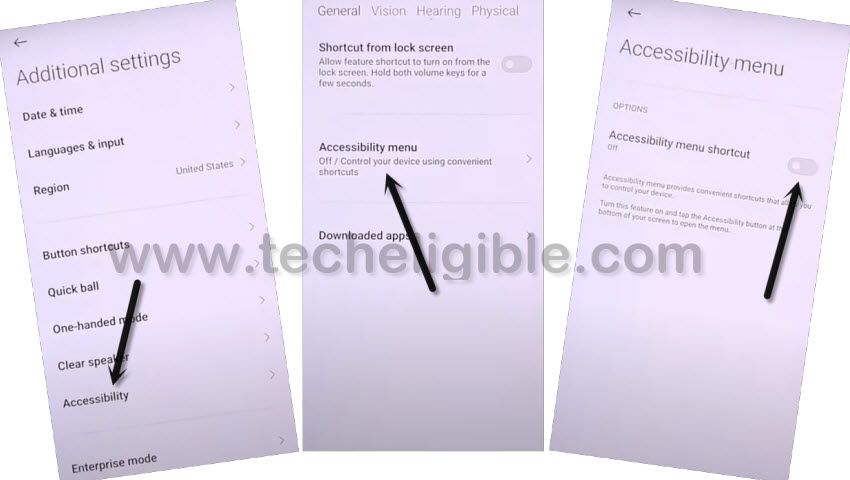
-We’ve to turn on accessibility MENU icon here by going to > Accessibility Menu > turn on “Accessibility Menu Shortcut”, after that, tap to “Allow” from popup, and then hit on “Got it”.
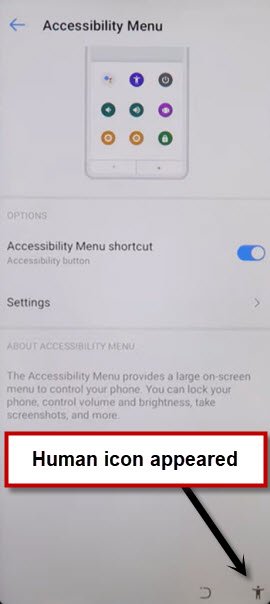
-After turning on accessibility option, you will have a “Human icon” at the bottom right corner of screen.
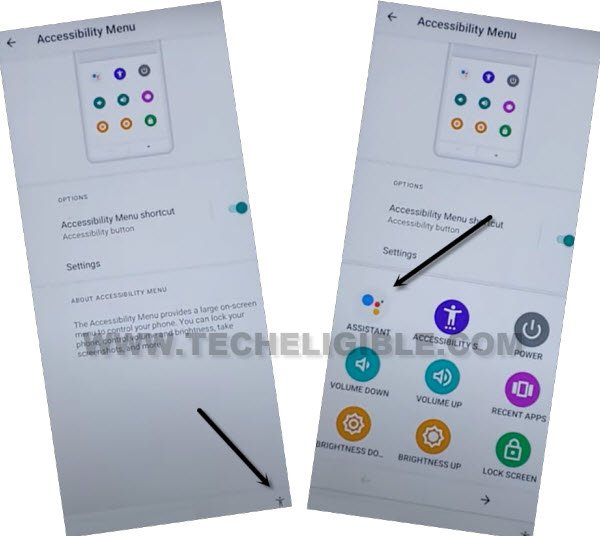
-Hit on > Human icon > Google Assistant.
-After that, tap to > Keyboard icon > Next Keyboard.
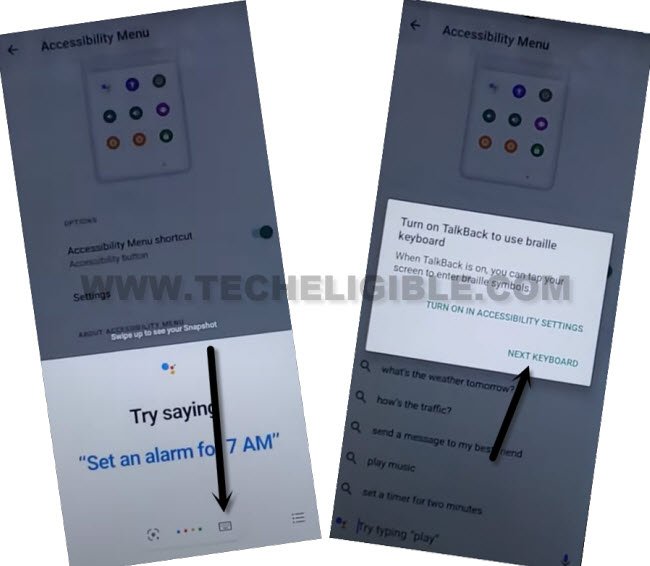
-Search and access to youtube website from there same as displayed in below screen shot.
-Once you reach inside youtube website, just hit on “Profile icon” from top right corner, and then, go to “Settings”.

-Go to > About > Youtube terms of services.
-Tap on > Skip > More > Agree & Continue.
-You will have a popup of (Set Mi browser as your default browser), just tap anywhere on screen to close that popup.
-You have successfully reached to google chrome browser.
Open Device Settings from FRP Tools Page:
-We can now easily reach to our device main settings to Bypass FRP Redmi Note 8 Pro, Redmi Note 8.
–Check out screen shot to reach the official techeligible site from your browser search bar.
-Tap on a “Menu” icon upright corner to bring up the sidebar menu. From there, hit on “Download FRP Tools“.

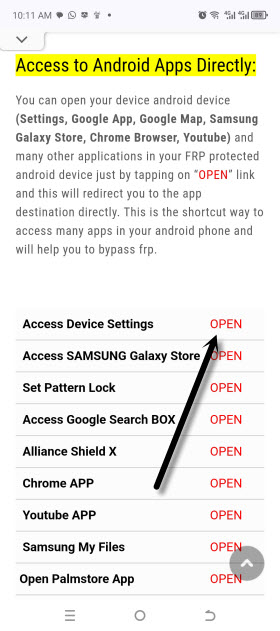
-After that, tap to “Access Device Settings” to reach directly inside the device settings.
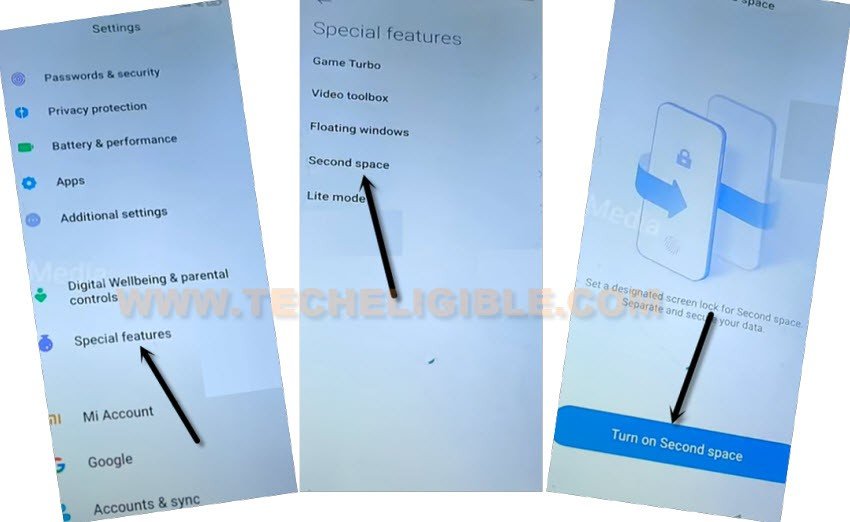
-Go to > Special Feature > Second Space > Turn on Second Space.
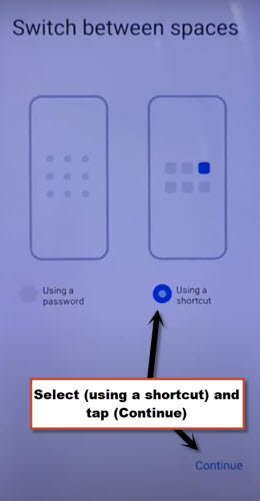
-Once it created successfully, just hit over > Continue > Using a shortcut > Continue > Skip.
-Tap to “Skip” from set password screen. Its all done. You don’t need to remember previously signed in google account. Because, the FRP has been bypassed completely.
Method 2: Bypass frp Redmi Note 8 Pro, Redmi Note 8 (MIUI 11)
This method has successfully been applied on Redmi Note 8 Pro (M1906G7G), so you can easily Bypass frp Redmi Note 8 Pro, and Redmi Note 8 MIUI 11 without any PC.
In this method, we will just type youtube url in add network screen SSID field, and from there we will get access into youtube, and after that we will download and install 2 frp removal apps in this phone to bypass frp.
Let’s Start to Bypass frp:
-Turn on Phone and Connect WiFi.
-Go back to first “EMUI 11” screen.
-Tap to > Next Arrow > Next Arrow > Next Arrow.
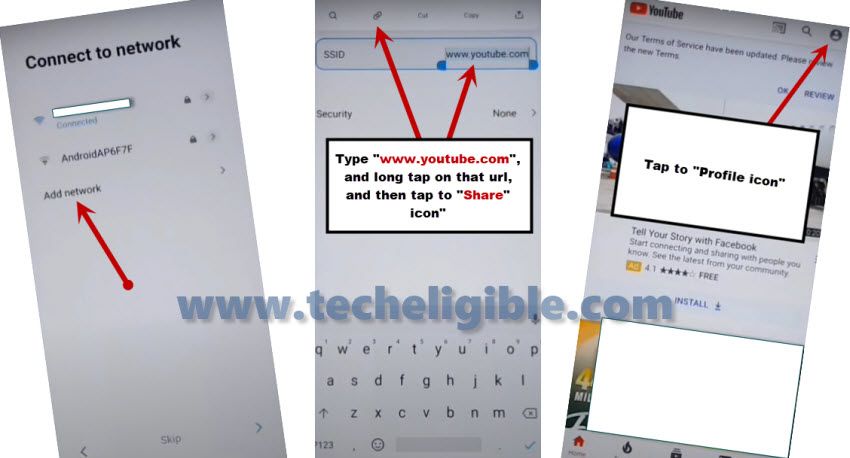
-Now tap on “Add Network”, and then type in SSID Field “www.youtube.com”.
-Long tap on your typed url, and then tap to “Share icon” from there (See Below image).
-After accessing to youtube website, just tap to “Profile icon” from top right corner.
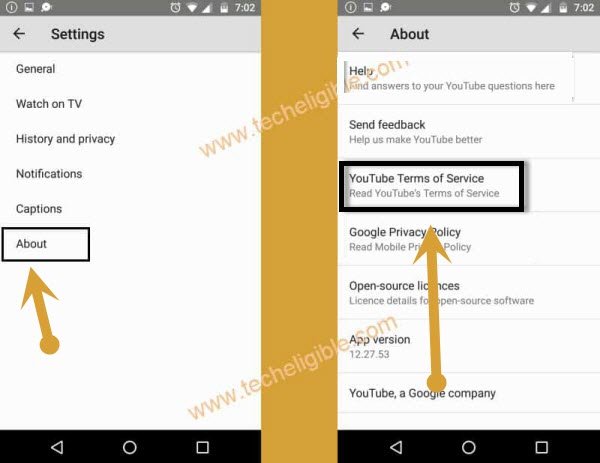
-Now go to > Settings > About > Youtube Terms of Service.
Note: If you see “Scree Ration Issue” popup window, just hit on “OK”.
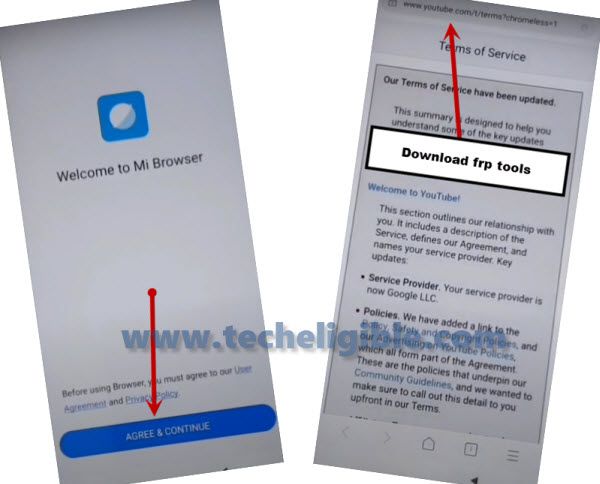
-Tap on “Accept & Continue”, and here we go, we have got address bar, now we can search and download frp tools in our phone to bypass frp.
Download Frp Tools Redmi Note 8 Pro:
-Now we are going to download frp tools to Bypass frp Redmi Note 8 Pro.
-Type in address bar “Download Google Account Manager“.
-Visit same searched result of our site techeligible.com as shown in below image.
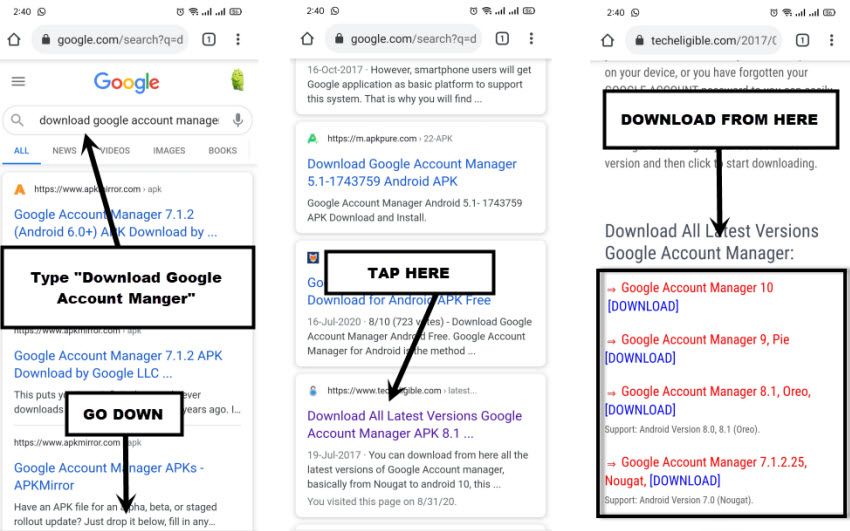
-Just download from there “Google Account Manager 9“.
-Go to top of the page, and tap on “MENU” icon from top right corner, and then tap on “DOWNLOAD FRP TOOLS“.
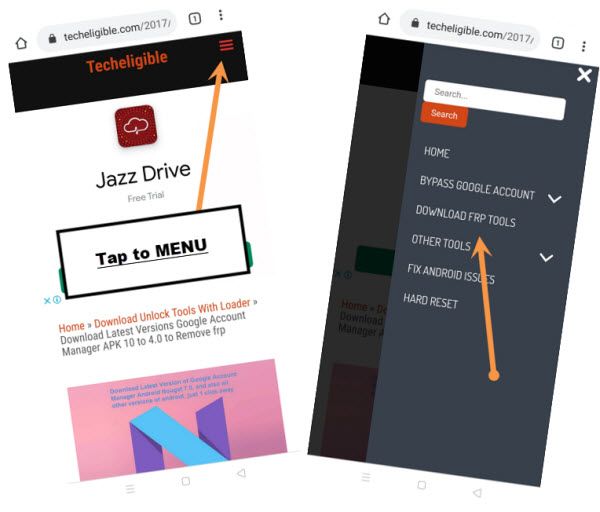
-Download from there one more app “Account Login“.
-Wait until downloading process finish of both apps.
-Let’s install apps to Bypass frp Redmi Note 8 Pro.
-Tap on “MENU” icon from bottom right corner, and tap on “Manage Downloads”.
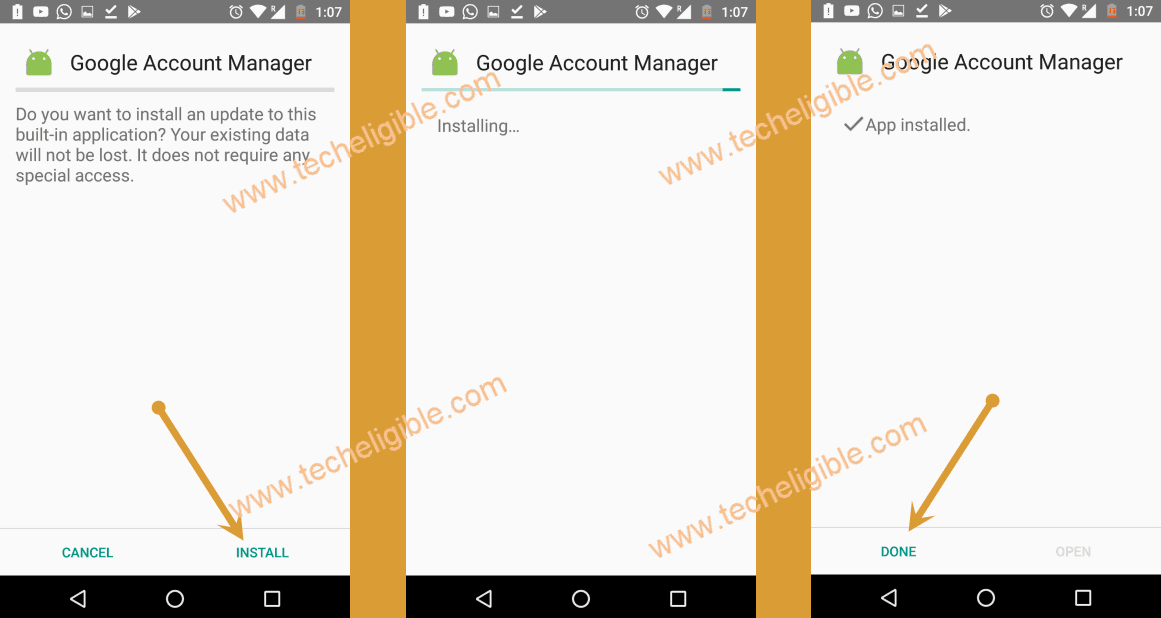
-Tap on > Google Account Manager 9.
-After that, hit on “Settings” from popup window, and then turn on the option of “Allow from this source”.
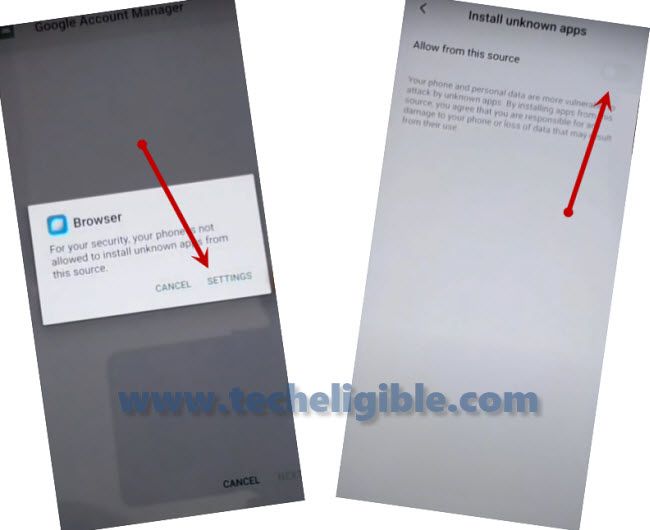
-Tap on “Back Arrow” to back, and then tap on > Install > Done.
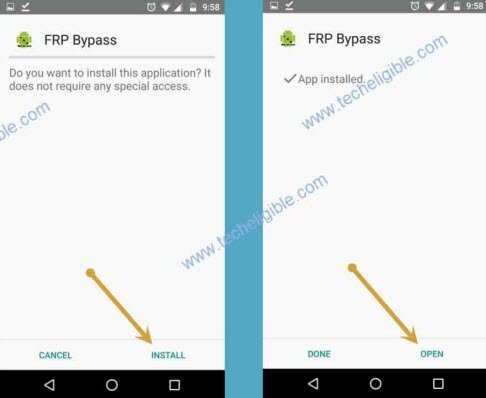
-Tap to > Account Login > Install > Open.
-Tap to “3 Dots” from top right corner, and then tap on “Browser Sign-in”.
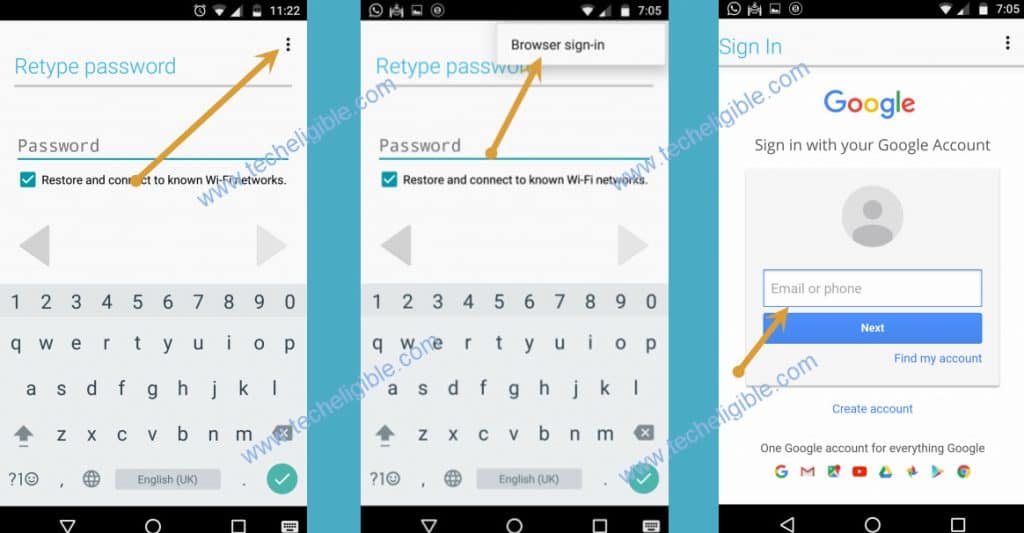
-Sign in using your any gmail account to Bypass frp Redmi Note 8 Pro.
-Once you signed in successfully, just restart your phone & complete initial setup, because you are all done to bypass frp.
-You will get “SKIP” bottom of the verification screen, just tap on that to bypass the screen.