
Have you forgotten your ZTE google account and you have performed hard reset function as well. Don’t worry, you can setup another google account on your device to Bypass FRP ZTE NUBIA NEO 5G (Android 13) with the help of another android phone. We will access to (Activity Launcher) app. After that, we will use (Setup my device) feature to login with another Gmail ID. Follow steps from below.
Disclaimer: We highly recommend you to apply this method only on your own device, if you are not owner of this device, or you found this from some where, you must return to its real owner. This method is for educational purpose only.
Let’s Start to Bypass FRP ZTE NUBIA NEO 5G:
-Prepare PIN lock setup SIM card. You can setup 4 digits PIN lock code on your sim card using any other android phone. To learn how to setup PIN code, just click here.
-Turn on your ZTE NUBIA device and connect to WiFi network.
-Go back to first startup screen. Insert PIN locked SIM card.

-You will have black screen of (Enter SIM PIN).
-Eject SIM card and without a second delay, quickly press “Power” key. Do this as fast as possible. Keep your both fingers on standby. As soon as, you eject sim card just quickly press “Power” button once with your other finger.
-Press “Power” key again to wake up the screen. There, you will see (Not signed in) message. That means, you are going very well.
Note: If you don’t see (Not Signed in) message, that means, you are failed. Remove sim card and restart your device. Try again.

-Tap on “Down Arrow” icon from not signed in popup.
-Tap to “Edit” icon from top corner.
-Bring up (Record Screen) icon at the 3rd number same as shown in below image.

-After that, tap on “Back Arrow” icon from top left corner to reach back to (Not signed in) screen.
-Below step is the most important one, you have to do this very quickly and repeatedly until we got turned on screen recording option on top bar menu.
-Tap simultaneously (Down Arrow) + (Record Screen) Area.
-Once you get the menu options, tap simultaneously again on (Record Screen) + (Top Corner Area mentioned in below image).
| Tips to do: Keep your both fingers on standby, Keep one finger on (Down Arrow), keep other finger at the left side screen where (Record Screen) option will appear up. Tap both these areas at the same time, means, tap (Down Arrow + Record Screen) area at the same time. Once the (Record screen) icon appears up. After that, tap (Record Screen) & (Edit icon) side area at the same time. If you are failed, you may reach to (WiFi) screen. Then, you have to restart your device and repeat steps again. You may have to repeat steps 5-6 times by restarting device. |
-Once you get the (Screen Record) on top sidebar. That means, you have successfully applied these steps.

| Note: If you are failed, then screen record will not come up. You have to restart your device and repeat all step from the beginning. |
-Go back to first (Hello) screen. After that, hit on “Red” button to start screen recording.
-After 3-4 sec of record, just tap to “White pause button” from top of the screen recoding options.

-After that, you will see “Share” option at the bottom left corner, just tap on “Share” from there.
-Tap to > Message > New Message.

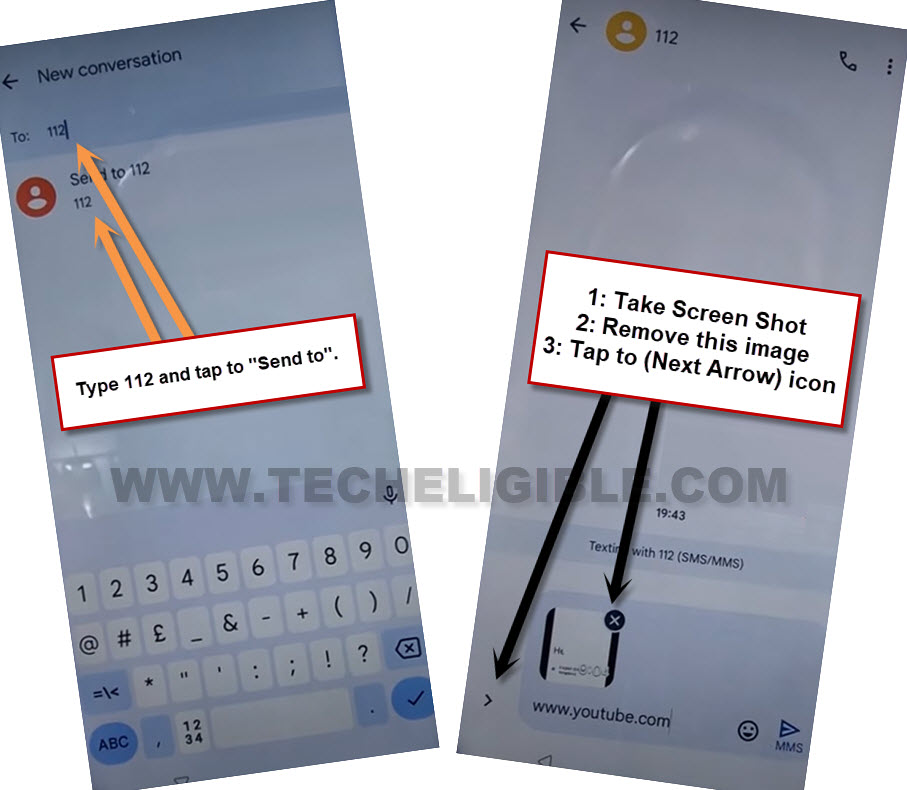
-Type 112 number in (To) field tab and tap to “Send to” option to Bypass FRP ZTE NUBIA NEO 5G.
-Take screen shot by long pressing (Volume down + power) buttons at the same time.
-Once the screen shot is taken successfully, tap on “Cross icon” from inbox attached image same as shown in below image.
-After that, tap on “Next Arrow” icon.
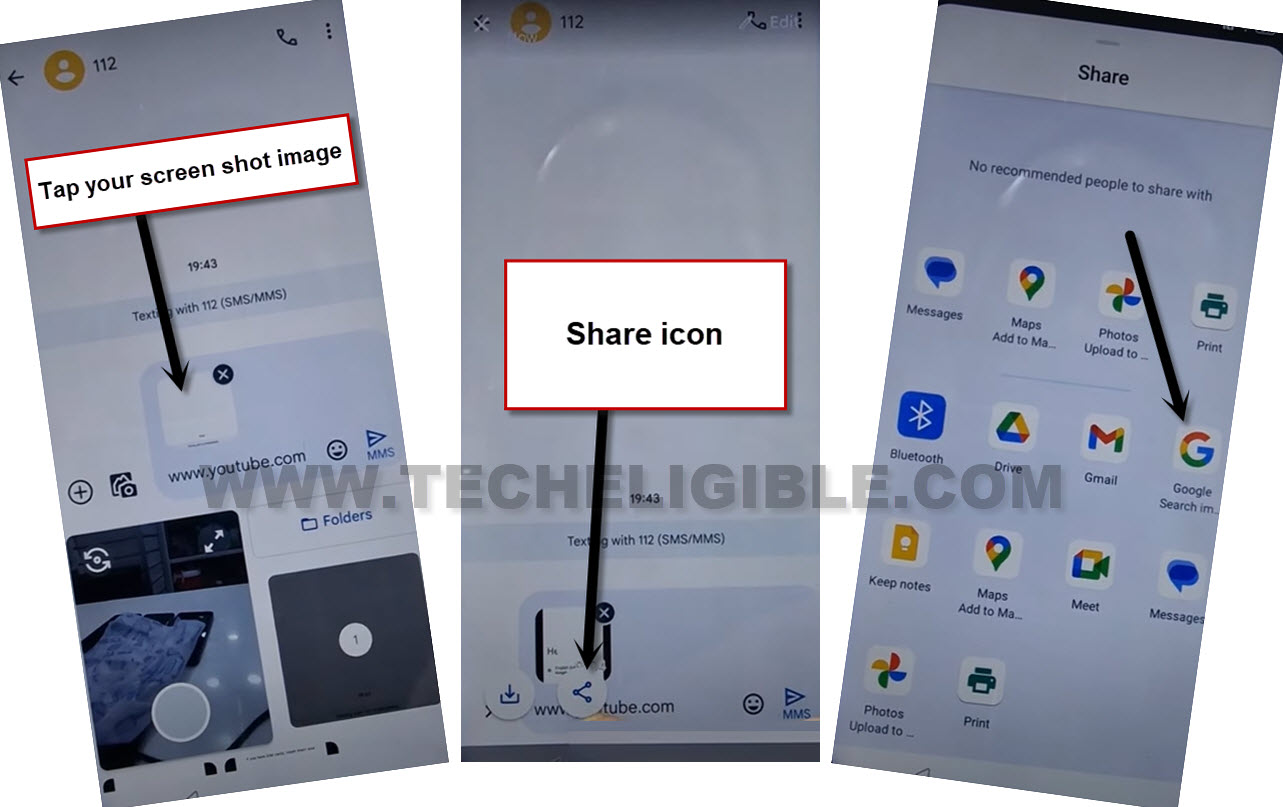
-Go to “Gallery” and hit on recently taken screen shot image to attach in message.
-After that, tap on your attached image from message inbox screen.
-Hit on a “Share” option. Swipe up bottom popup notification and go to “Google Search image”.
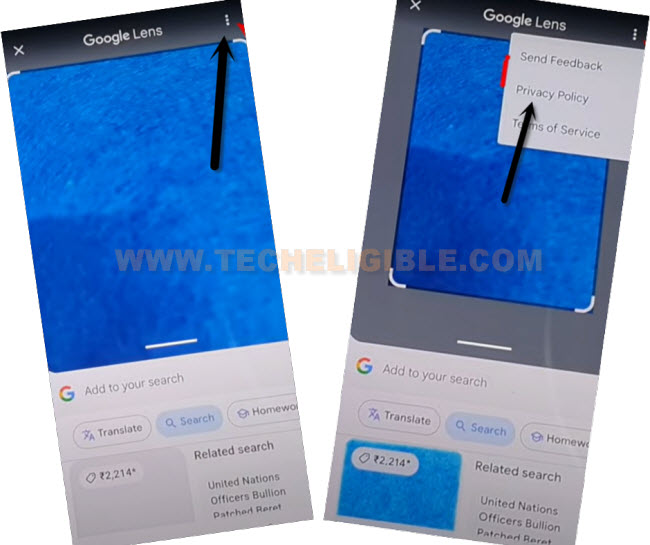
-Go to > 3 dots > Privacy Policy.
-From chrome welcome page, go to “Use without an account”.
-We have to access to google search bar by hitting on a “Menu” icon from top bar. Go to “Google Search”.

Use Clone Phone App from Settings:
-Search in chrome browser search bar with “Techeligible“. After that, visit same searched result as shown in below screen shot to access our official site.
-After accessing there, just go to “Menu” icon from upright corner. After that, tap on “Download FRP Tools” option.

-Go to “Access device settings” option from there.
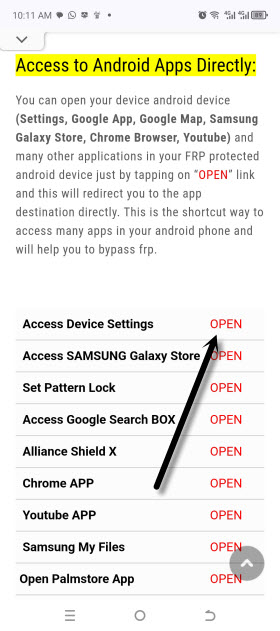
-After that, go to > System > Change Phone > Accept.
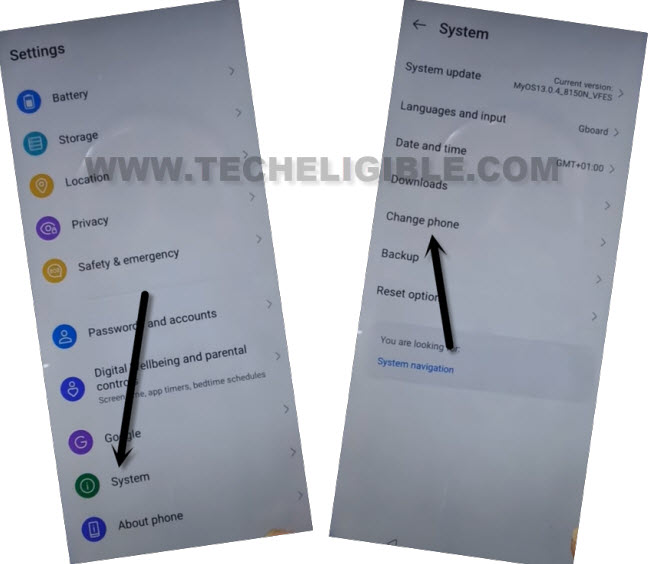
-Tap few times on “Allow” option from popup screen.
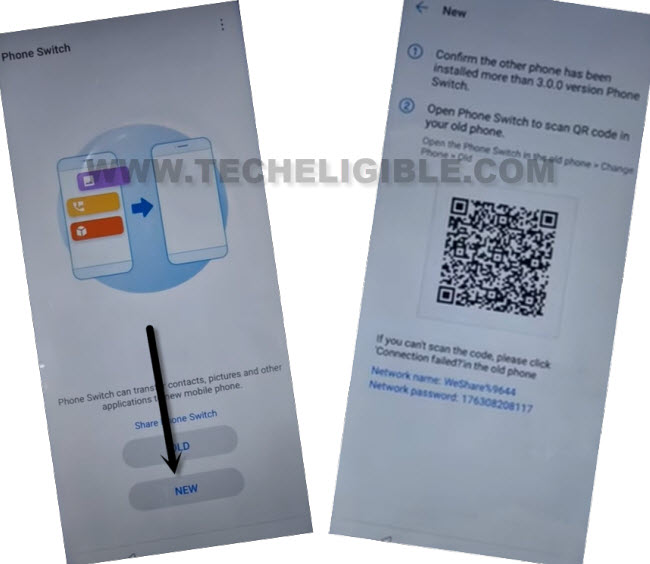
-From clone phone application, choose “New” option. Tap sometimes on “While using the app & Allow” option from popup screen.
-After that, you will have a (QR Code) on your ZTE device screen. We have to get scanned this code using any other android phone with clone phone app help.
Use Another ZTE Android Phone:
-You need any other same brand ZTE Android phone.
-In your other ZTE device, just open google chrome browser. Search there “Download FRP Tools Techeligible“.
-Go to same searched result as shown in below image.

-Download from there “Activity Launcher” app in your zte phone.
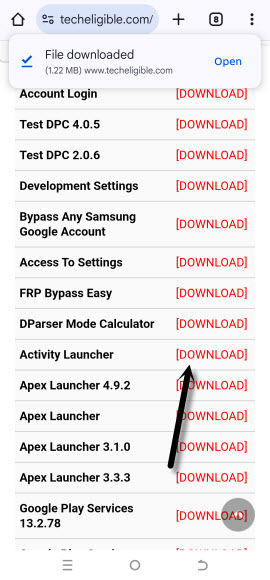
-After that, install this app as well. Once the installing process is completed. Now, we can transfer this app to our FRP protected (ZTE Nubia 5G) phone using phone switch application. This app is already installed in your ZTE device.
-Go to > Settings > System > Change Phone > Old.
-Give some permissions and you will be displayed (QR Scanner) screen.
-Scan QR Code from ZTE NUBIA 5G device using your other android device.
| Note: If you don’t have another ZTE Android device, then, you can also try this another manual method to install (Activity Launcher) app. This manual method is not tried yet. Click here to apply manual method. Or, you can also give a try by using any other brand device clone phone app. |
-Once both devices connected successfully. You will have same screen on your other zte android phone as shown in below image. From there, go to “App” and uncheck all apps from there. Choose only “Activity Launcher” app.
-Go back by tapping on “Back Arrow” icon from top left corner. After that, tap on “Start Changing / Cloning” option to Bypass FRP ZTE NUBIA NEO 5G.
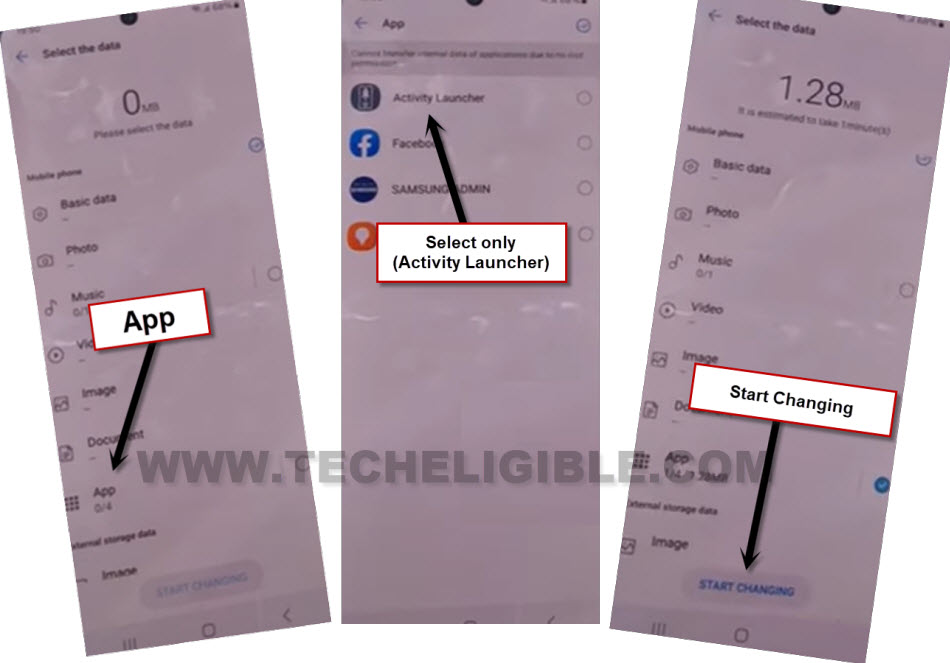
-After that, activity launcher app will be installed automatically on your ZTE Nubia device. But, you may not be able to run this app. To do this, we have to access frp tools page.
Access FRP Tools Page to Run Activity Launcher:
Search in top search bar with “Download FRP Tools Techeligible“.
-After that, go to 1st searched result same as shown in below image to access frp tools page.
-From there, scroll down little bit and hit on “Open Activity Launcher” option. This will show run directly your already installed activity launcher app.
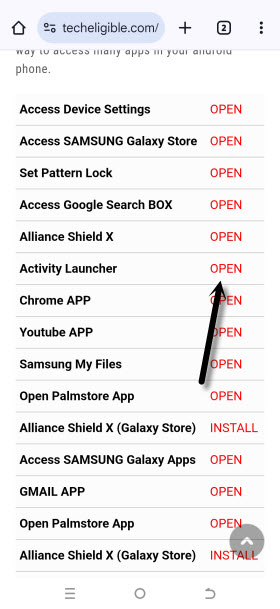
-You will be redirected to the (Loading….) page. Wait over there, and hit on “Ok” option.
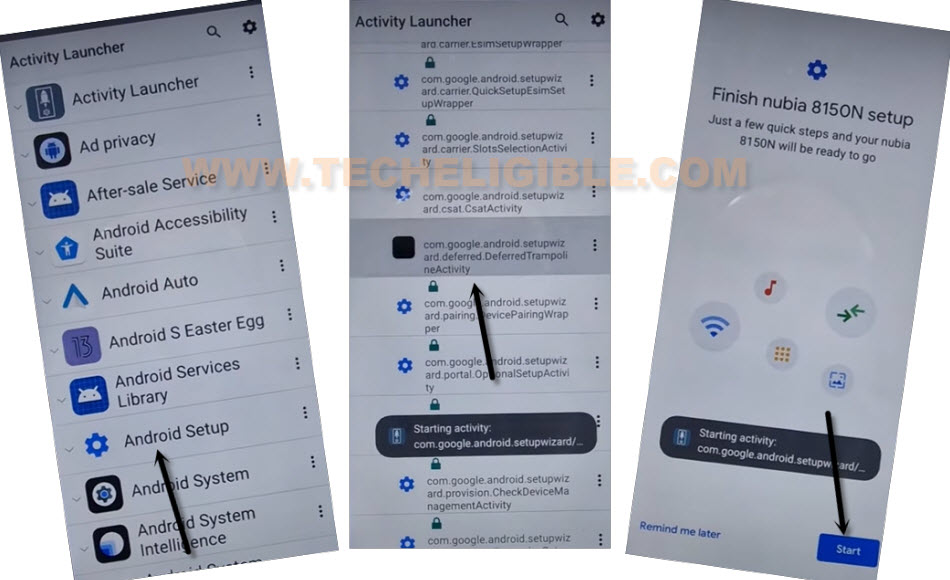
-You are now inside activity launcher app list page. From there, find and tap to “Android Setup”. This option will collapse down further more and will show you huge list of (Android setup).
-From that list, tap to same “Android Setup” option as shown in below image.
-You will be redirected to the (Finish Nubia Setup) page. From there, hit on > Start > Skip > Next.
-You will be on a (Use another device) page. From that page, tap to > Next > No Cable > Copy without cable.
-You will see (Pattern lock) screen. Just choose “Use my google account instead” option to Bypass FRP ZTE NUBIA NEO 5G.
-Tap to > Next > Next.
-Finally, you’re on a (Verify your device) page. We need here another android device and you must know the signed in google account detail of that other android device.
Follow Steps in other android device:
-Open google in other android device and tap to “Mic icon”. Speak loudly “Setup my device”.
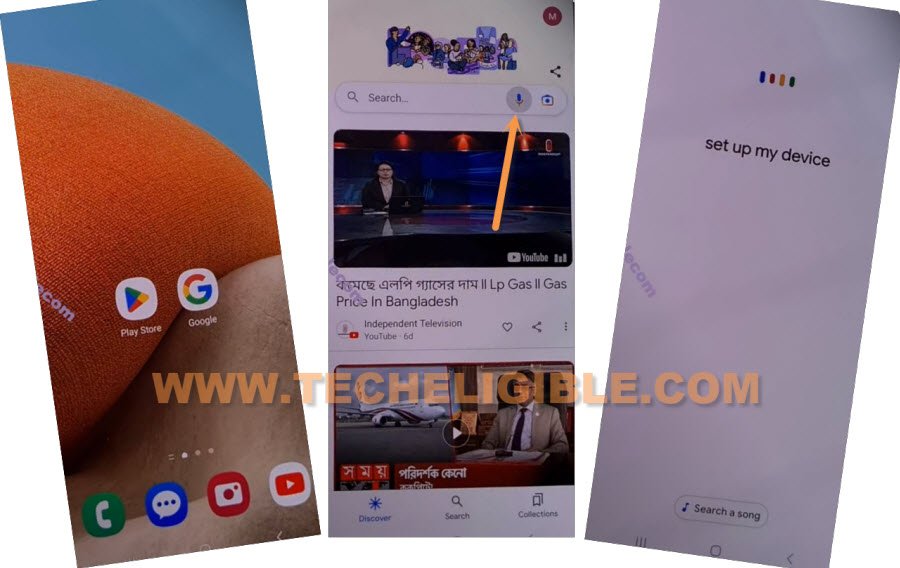
-After that, you will be taken to the (Getting started) screen. From there, tap on “Next”.
-This will search for other android device to be connected and you will be displayed verify shape on both devices screen.
-From (Other Android device), just tap tap to > Next > Copy.
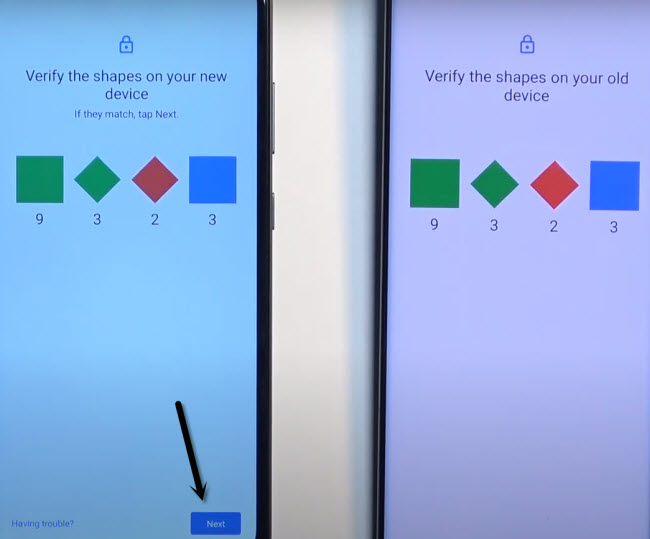
-On your (ZTE NUBIA NEO) device, the copying process will also continue. After that, you will have a (Verify your account) page on ZTE Nubia screen.
-Login there in (ZTE Nubia) with the same account, that was already logged on your other android device.
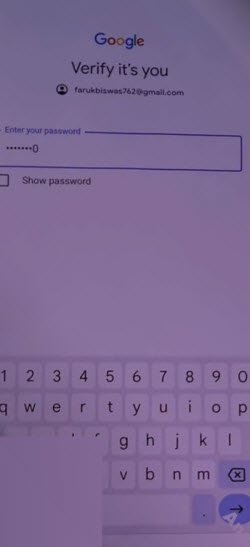
-Once the logging process is completed, you will see (Getting ready to copy…) screen on zte phone. Just tap to > Don’t Copy > Don’t Copy > Next.
-Its all done now. You can complete other remaining steps on your own to access to your device main home-screen easily.