Manual Way to Install Activity Launcher:
-Search in chrome browser search bar with “Techeligible“. After that, visit same searched result as shown in below screen shot to access our official site.
-After accessing there, just go to “Menu” icon from upright corner. After that, tap on “Download FRP Tools” option.

-Scroll down from there, find and tap on “Activity Launcher” app to start downloading process.
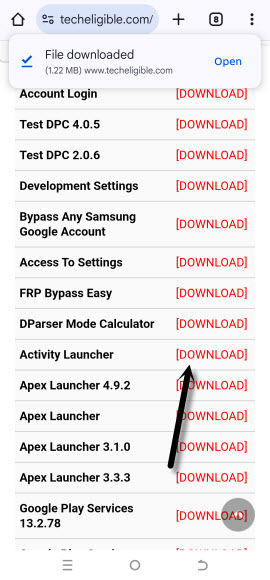
-Once the downloading process is done, you will be notified, just tap to “Open” link from notification message.
-You may face chrome installation blocked popup, just tap to “Settings” and turn on “Allow from this sources” option.
-Go back to frp tools page again. Tap again on “Activity Launcher” app. Once the downloading process is done, tap on “Open” link from notification popup.
-After that, tap to > Install > Open.
-You will be redirected to the (Loading….) page. Wait over there, and hit on “Ok” option.
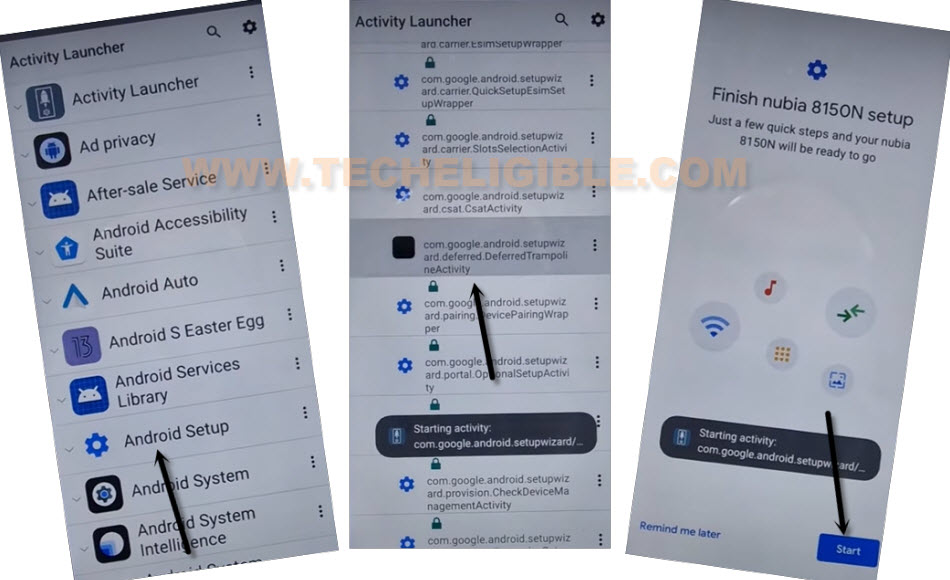
-You are now inside activity launcher app list page. From there, find and tap to “Android Setup”. This option will collapse down further more and will show you huge list of (Android setup).
-From that list, tap to same “Android Setup” option as shown in below image.
-You will be redirected to the (Finish Nubia Setup) page. From there, hit on > Start > Skip > Next.
-You will be on a (Use another device) page. From that page, tap to > Next > No Cable > Copy without cable.
-Go back to main frp bypass method on ZTE Nubia Neo 5G and start after this line (> Next > No Cable > Copy without cable).