
If you can’t recover your forgotten xiaomi signed in google account. Then, you will not be allowed to go through google verification screen. You will have to follow up alternate to fix this problem and that is through a Bypass FRP Xiaomi Redmi Note 14 (Android 14). You just need to connect to WiFi to your device and start following up below steps.
Disclaimer: We highly recommend you to apply this method only on your own device, if you are not owner of this device, or you found this from some where, you must return to its real owner. This method is for educational purpose only.
Let’s Start to Bypass FRP Xiaomi Redmi Note 14:
-Start this process by turning on your device and connect to proper WiFi network. Once the WiFi is connected successfully, you just have to return back to (Terms and Conditions) page. From there, tap on “Privacy Policy” option.
-Once you reach to next page, just scroll down little bit and hit on a link from there “account.xiaomi.com”.

-After that, you will be redirected to the (Sign in to your Xiaomi Account) page. From there, tap on “Sign in with google” button.
-Hit on a “Help” option from bottom corner.

-There is a search bar (Describe your issue), jus type there “Delete” and tap to “Search” option from keyboard.
-Tap at any article that has (Youtube Video) embedded.

-Let’s play youtube video now by tapping at play button.
-After that, go to > 3 dots > Share.

-Tap again on “3 dots”. After that, you will have a (Copy share Select all) bar there. Just choose “Share” option.
| Note: If you don’t get same top bar as being shown in below screen shot, don’t worry, you might not have tap correctly on (3 dots). Try again. This may require 5-6 tries. |

-After that, you will have share popup window at the bottom. Just tap to “Shareme” icon from there.
-To run this (Shareme) app successfully, you will have to give some permissions by tapping at (Next, While using the app and allow) options.
-Once the shareme is launched completely, you will have a (QR Scanner) on your device screen.

Use Another Android device to Connect with Redmi Note 14:
-Open google play store in your other android phone.
-Search and install “Shareme” app from there.
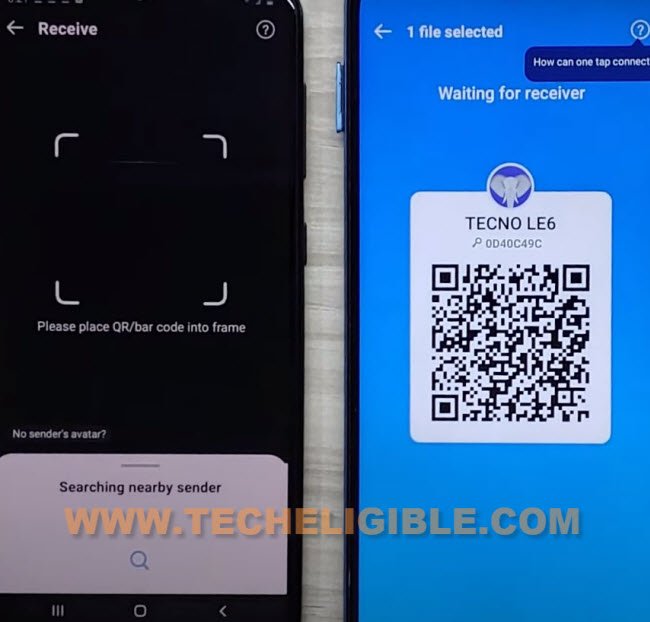
-After that, open your installed app (Shareme). Tap to “Receive” option from that app.

-You will have a (QR Code) on your other android device screen.
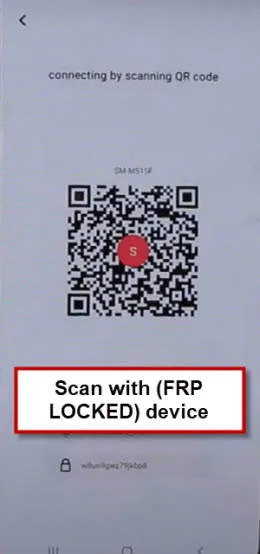
-Let’s scan QR code now using your Xiaomi Redmi Note 14.
-Tap to “Connect” option from your redmi note 14 device. After that, within few seconds, your both devices will be connected together and you will receive youtube link on your xiaomi device.
Follow Up Steps in Xiaomi Redmi Note 14:
-Tap on your received youtube link from shareme app to Bypass FRP Xiaomi Redmi Note 14.
-After that, open your that link using (Mi Browser).

-You will have google search bar at the top of your mi browser. Just search there with “Se”. After that, you will be displayed your device apps. From there, tap to “Security”.
-Once you reach inside the device security, just scroll down to show more options there.
-Under (Tools) section, you will see there a (Second Space) app. Just tap on “Second Space” app from there.

-Let’s tap to “Turn on Second Space” button. this will start creating second space for your device.
| Note: If your device screen goes black and nothing is shown up there. You just restart your device and repeat all steps from the beginning. |
| Note: If, after repeating steps, you are back on a (Second Space) screen. Just tap to “Delete” icon first from top corner to delete your recently created second space. After that, tap on “Turn on second space” button again. |

-If, after repeating steps, you are back on a (Second Space) screen. Just tap to “Delete” icon first from top corner to delete your recently created second space. After that, tap on “Turn on second space” button again.
-Once the second space is created successfully, just choose “using a shortcut” option and tap to “Continue” button.
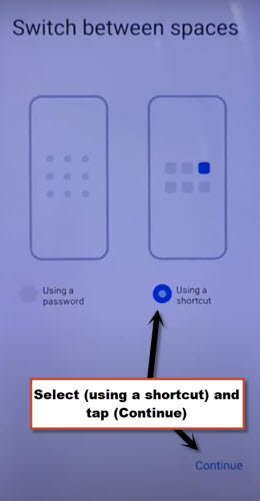
-Hit on “Skip” option. You are now inside your device main home-screen.
-Once you reach successfully inside your device main home-screen. You just have to restart your device now.
-After that, we are going to manual reset our device now by going to > About Phone > Factory Reset > Erase all data > Factory Reset.
-Wait until count down time done and tap to > next > ok. After that, your device will auto restart. Now, you are all done from Bypass FRP Xiaomi Redmi Note 14 without using any paid tool. Thanks for visiting us.