
As you know, FRP is the by default feature of google, which is added in Xiaomi devices with the last logged in google account after hard reset Xiaomi HyperOS 2.0 Android 15. If you know your device last logged-in google account, completing setup wizard is very easy and simple. No guideline needed at all. But, if you forget the last logged in account, then, this could be big challenge for you. Follow up this method to Bypass FRP Xiaomi HyperOS 2.0 Android 15.
Disclaimer: We highly recommend you to apply this method only on your own device. If you are not owner of this device, or you found this from some where, you must return to its real owner. This FRP bypass process is just for educational purpose.
Let’s Start to Bypass FRP Xiaomi HyperOS 2.0 Android 15:
-Setup 4 digits PIN lock code on your SIM using any other android phone.
-Get back to xiaomi frp protected device and Connect WiFi.
-You have to go all the way back on first startup page (Xiaomi HyperOS).
-Insert PIN locked sim card. After that, you will be displayed a (PIN Lock Screen) same as shown in below image.
-Let’s remove sim card by popping up the sim tray.

-After that, you will see a (Not Signed in) message on your Xiaomi device. Swipe down top notification bar and tap on “Date and Month” from there to reach to your device calendar screen.

-Tap to “3 dots” icon from calendar page and go to “Settings”.

-Go to > About this app > check for updates.

-Open with “Get Apps” application same as shown in below image.
-Let’s go to “Search” icon from top corner.

-After that, search and go to “Activity Launcher” app.
-Tap to “Install” option, once the installing process is completed, just tap to “Open” from there to launch this app and Bypass FRP Xiaomi HyperOS 2.0 Android 15.
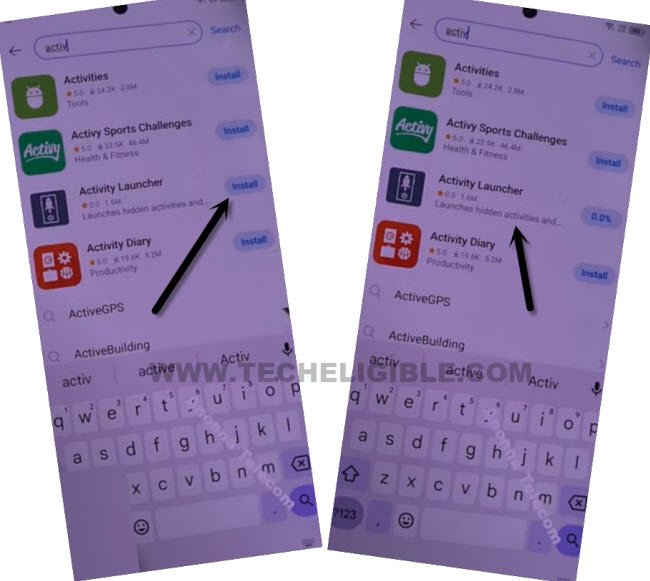
-Tap to “Search” icon from top corner. Type “Sh” in top search bar. After that, go to “Shareme”.
-From the list of (share), open only one shareme app from there, that is with (com.xiaomi.midrop.SplashScreen).

-You have to hit on these options respectively > Agree > Join > Next.
-Let’s turn on “Allow access to manage all files” and tap on a “Back Arrow” icon from top left corner to go to back.
-From popup window, let’s hit over the > While using the app > While using the app > Allow > Allow.
-Hit over the “Receive” button. After that, you will be taken on a (QR Code) page.

-We need here one more (Any Android device) in order to connect with your Xiaomi device to easily bypass frp.
You’ve to Apply below steps in other Android Phone:
-In your other android device, open “Google Play Store”.
-Install “Shareme” application from google play store.
-Install also “Activity Launcher” application from same platform.
-After installing both apps, launch “Shareme” application from your other android device to Bypass FRP Xiaomi HyperOS 2.0 Android 15.

-You have to hit on these options respectively > Agree > Join > Next.
-Let’s turn on “Allow access to manage all files” and tap on a “Back Arrow” icon from top left corner to go to back.
-From popup window, let’s hit over the > While using the app > While using the app > Allow > Allow.
Send Activity Launcher to Xiaomi Android 15:
-Once the shareme app is fully launched, from there, tap on “Send” button.
-Go to “APKs” from top and select “Activity Launcher” application. After that, tap to “Send” button.

-You will be redirected back on a (Before you receive items) page. From there, go to first “Settings” option (See below image).
-Turn on “Allow modifying system settings”. Once its done, just go back.
-Tap on “Settings” icon, that is right next to the (Bluetooth).
-Turn on “Bluetooth” from there. tap to “Allow” from popup window.

-Hit on a “Next” option. You will have a “QR Code scanner” page.
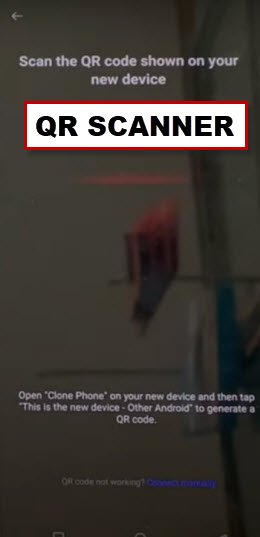
-Connect both devices together by scanning the qr code from (Xiaomi HyperOS 2.0 Android 15).
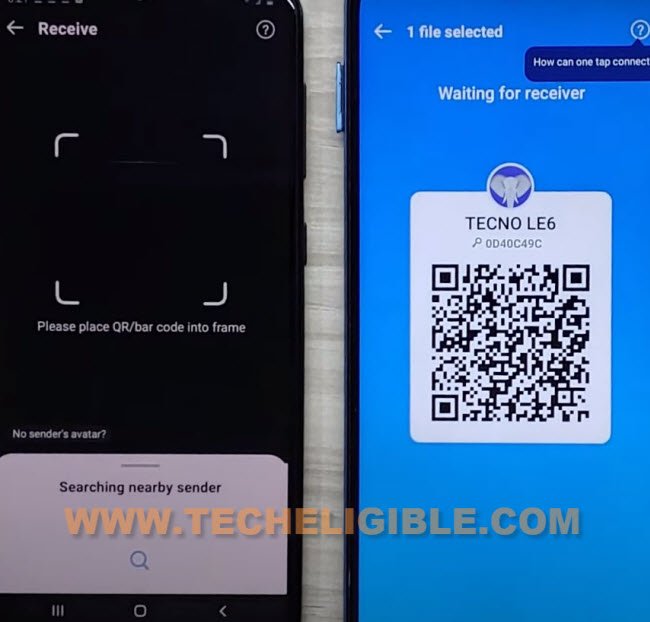
-After that, you will receive (Activity Launcher) app on Xiaomi HyperOS 2.0 device.
Install & Run Activity Launcher from Xiaomi Android 15:
-Let’s install and run this app by tapping at > Install > Run.

-Hit on “Ok” from popup window. Wait on a loading screen, you will be taken inside the activity launcher app.
-Tap to “Search” icon from top corner. Search there “Second”.
-Go to “Second Space com.miui.securityspace.settings.SecondSpaceSettingsActivity” same as shown in below screen shot to Bypass FRP Xiaomi HyperOS 2.0 Android 15.

-After that, you will be redirected on a second space page. From there, hit on a “Turn on Second” button.

-Once the second space is created successfully, just choose “Using a shortcut” option and hit on “Continue” option.
-Tap to “Skip” from set a password screen.

-The second space will be created successfully and you will access back to your device main home-screen.
-Don’t forget to setup new pattern lock and google account on your device from settings.