
You can easily get fixed your device accessing issue in case of forgetting previously signed in google account after factory reset. As you know, FRP is the ultimate feature to keep your device data secure and safe from reaching to unknown person. But, this could turn into a big trouble when you lost your signed in account after hard reset. To get out of this situation, follow up steps here for Bypass FRP Samsung Galaxy M21 (Android 12).
Disclaimer: We highly recommend you to apply this method only on your own device. If you are not owner of this device, or you found this from some where, you must return to its real owner. This FRP bypass process is just for educational purpose.
2 FRP Methods Available on Samsung Galaxy M21:
| 1st frp Method: Samsung Galaxy M21 [By Talkback & SIM Card] |
| 2nd frp Method: Samsung Galaxy M21 [By Samfw Tool] |
Method 1: How to Bypass FRP Samsung Galaxy M21 [By Talkback]
Do not worry if you are unable to use your Samsung M21 because you are stopped on the startup screen that requests Google authentication; we are here to help! Our helpful tips will assist you to bypass frp Samsung Galaxy M21 in the most effective and authentic way. We will download & install 2 free FRP bypass apk apps on this Samsung M21. After that, you can easily reach back to your device again. Follow-up frp removal guideline now.
Let’s Begin Samsung M21 FRP Bypass Steps:
-Firstly, connect WiFi to your Galaxy M21. After that, go back to first (Welcome) screen.
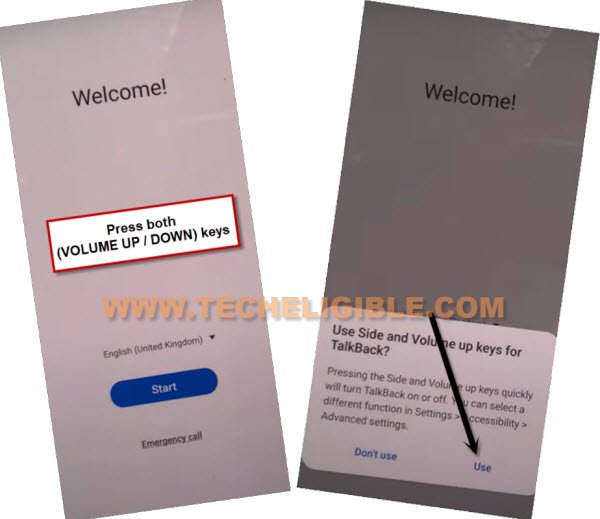
-Enable talkback feature by long pressing the keys (Volume UP + Down). From popup window, double tap to “Use” option.
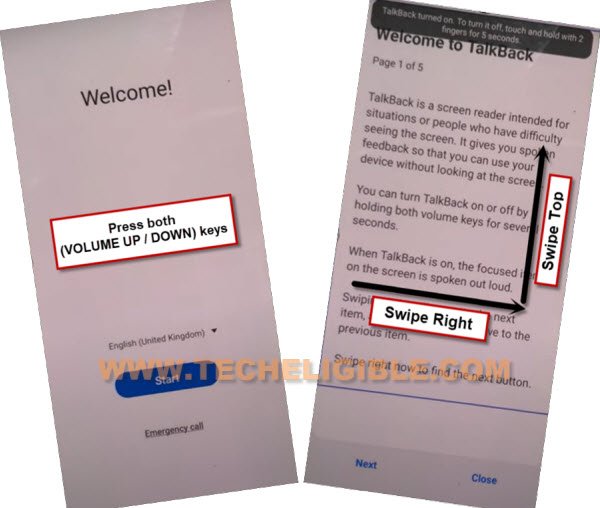
-Do same thing again by long holding again both buttons (Volume UP + Down). This time, talkback will be fully enabled and you will access to (welcome to talkback) screen.
-From that page, just swipe right and swipe up on the screen.
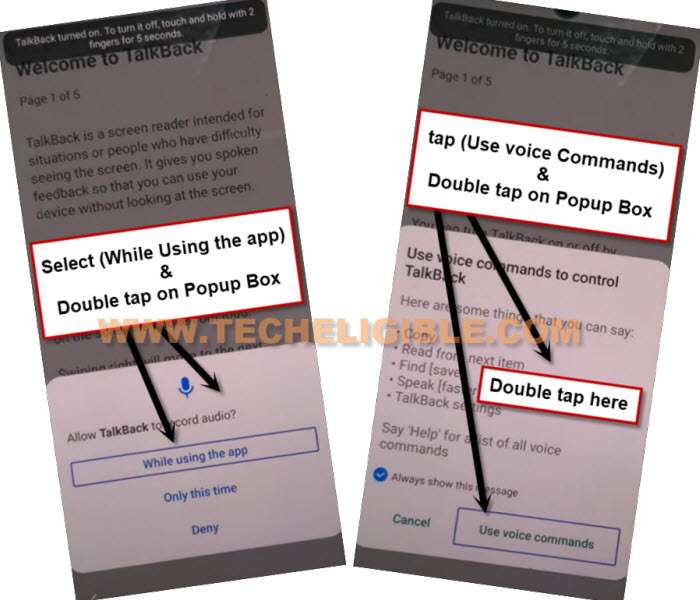
-Double tap to > While using the app > Use voice command.
-Once you have a green boarder on page, just say loudly “Open Google Assistant”.
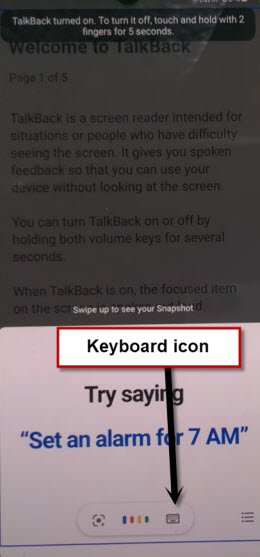
-Afterwards, go to “Keyboard” icon by double hit on from google assistant window (See below image).
 `
`
-We don’t need talkback anymore. Long hold both keys again (Volume UP/DOWN). From popup screen. You will see a popup window of (Talkback turned on….).
-Long hold again both keys (Volume UP/DOWN). This time, the talkback function will be turned off completely.
-Search there “Youtube” and tap to “Youtube” searched result. You will be redirected on youtube official webpage.
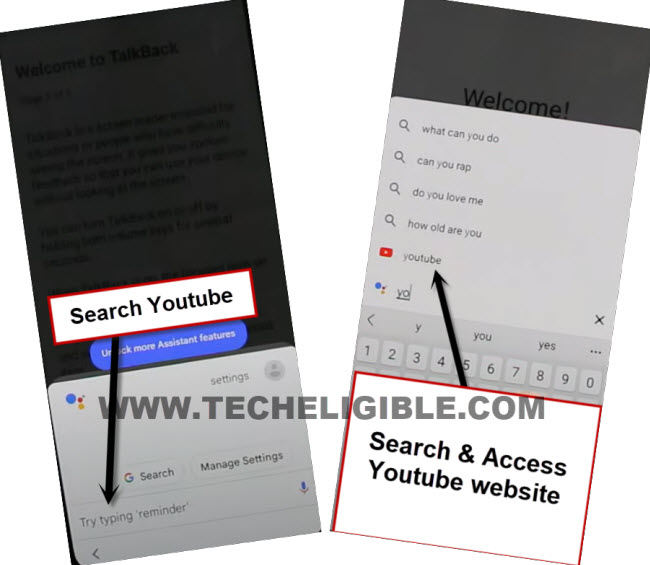
-From youtube page, just go to “Account” icon from top corner. After that, hit on “Settings”.

-Tap to > About > Youtube terms of services.
-From chrome popup screen, go to >Accept & Continue > No Thanks.
Download FRP APK Applications on Galaxy M21:
-Search in google chrome browser “Techeligible” and visit techeligible official site. Go to “Menu” option from top corner to bypass frp.
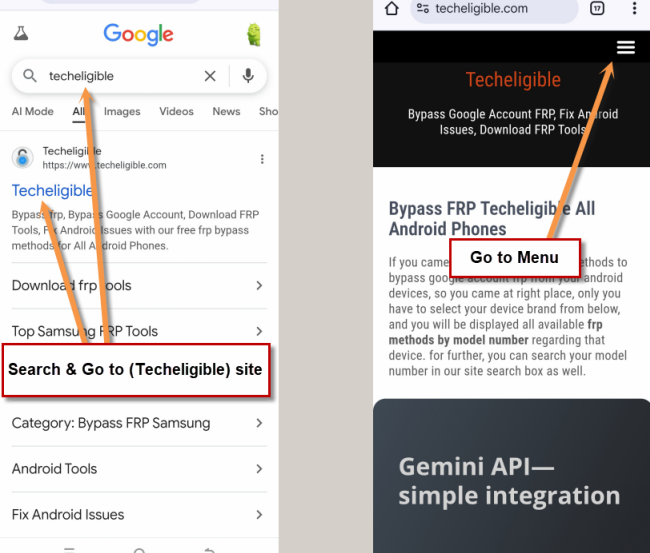
-Tap on > Other Free Tools > Samsung FRP Tools.
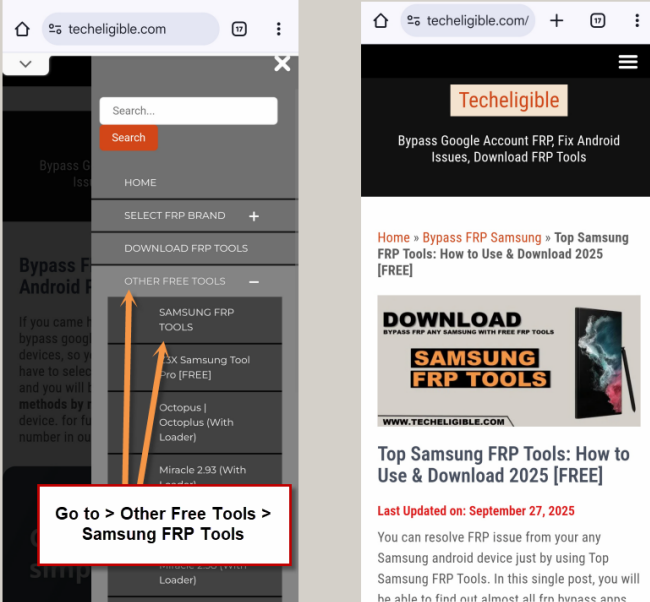
-Download from there below applications for Bypass FRP Samsung Galaxy M21.
1/ Package Disabler Pro.
2/ Notification Bar.
-After downloading both above apps successfully. Just go to top of the Samsung frp tools page, from there, tap on “File Shortcut App“. This will redirect you on a (Welcome to the Galaxy Store) app.
-From there, check mark “i agree” option and tap to “Continue” button.
-After that, hit on a “Install” button to install file shortcut application.
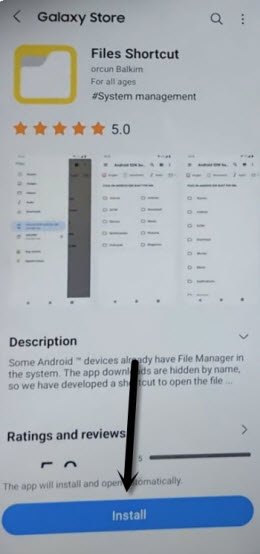
-Before installation process starts, you have to login with Samsung account.
| Note: If you don’t own any Samsung account, just visit official Samsung website, and register your Samsung account there. After that, login with the same registered account here. |
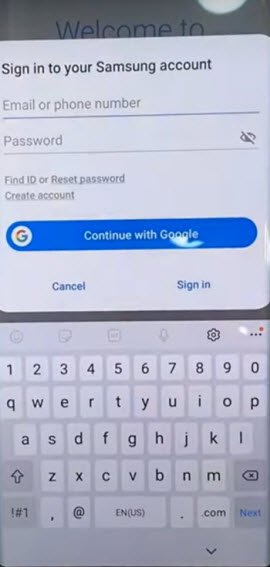
-After signing-in successfully, the installation process will continue automatically. Once its done, just tap to “Open” option to open up file shortcut app.
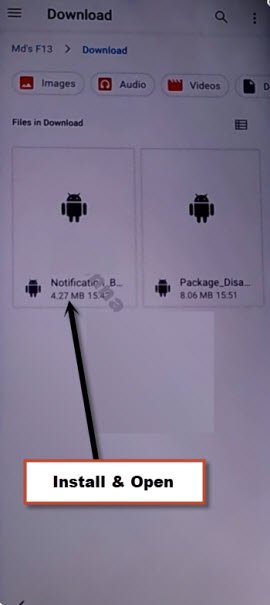
-Go to “Download” folder. You will be shown both recently frp bypass downloaded apps there.
-Tap on > Notification Bar > Continue > Install. But nothing will happen. You will not be able to install app from here.
-Go back to (Top Samsung frp tools) page. From there, hit on “3 dots” icon from top corner and tap to “Downloads”.
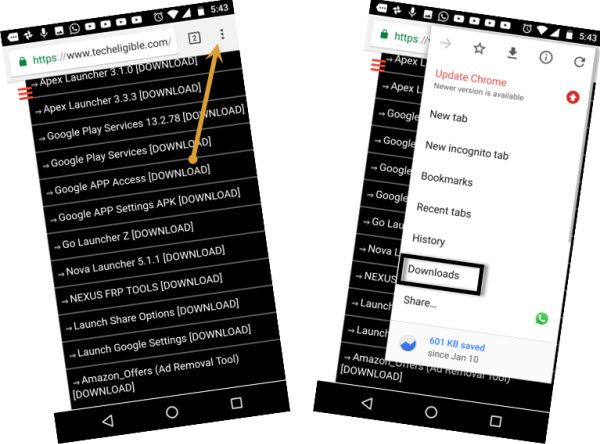
-We have to try to install (Notification bar) app 5 times here.
-Tap on “Notification bar” app. After that, tap on “Settings” from popup window. This will be counted as (1).
-Tap again on “Notification bar” app. After that, tap again on “Settings” from popup window. This will be counted as (2). Keep on doing this 3 more times. Like this, you have completed 5 installation attempts of this app.
-Hit on “Back Arrow” icon from bottom to go back to Samsung frp tools page. From there, tap on “File Shortcut App”
-After that, tap to “Open” button from there.

-Go again on “Download” folder. From there, try to install notification bar app again by tapping on > Notification bar > Continue > Install > Open.
-Turn on “Accessibility” option. After that, go to “Installed apps”.
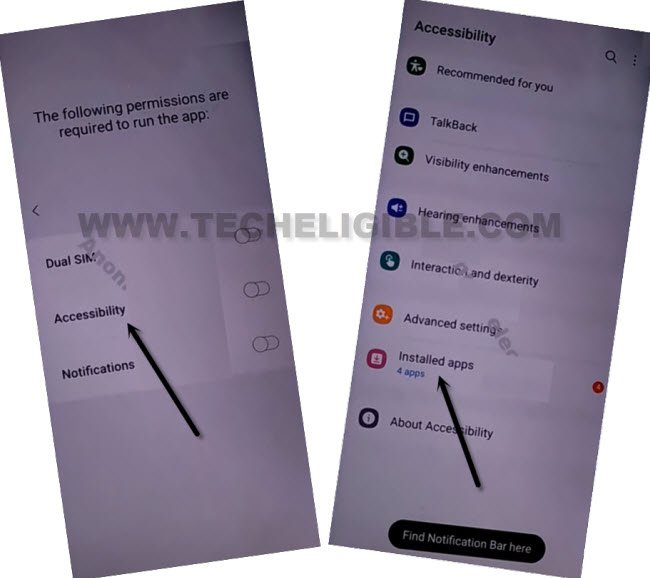
-You have to tap on “Notification bar” option. After that, turn on option from very top.
-Hit on “Allow” option form popup window.
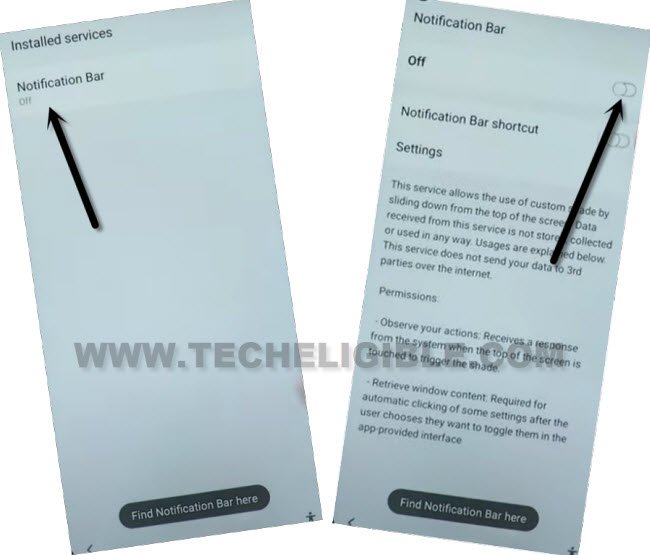
-Go back to “Download” folder screen by tapping on “Back Arrow” from bottom 3-4 times.
-Let’s install one more app from there by tapping on > Package Disabler Pro > Continue > Install > Open.
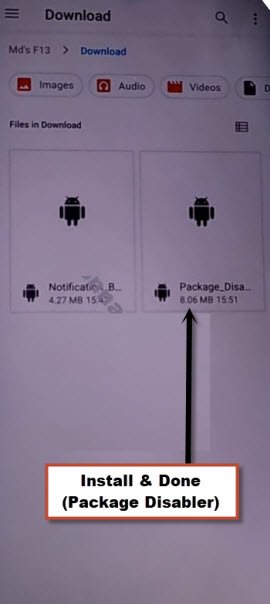
-Tap few more times on back arrow icon to go back to (Galaxy Store) screen same as shown in below image. From there, we will launch OS Launcher for bypassing FRP.
Search & Launch OS Launcher on Samsung M21:
-From there, hit on “Search icon” from top corner.
-Search there “OS14” and go to searched result “OS14 Launcher, Control Center….”

-Let’s download app by tapping on “Download” button. The downloading & installation process will continue on its own.
-After installation process is done, just tap on “Open” icon from there to launch this app and bypass frp on Galaxy M21.

-Tap to “Enter” button. After that, you will reach on your Samsung Galaxy M21 device main home-screen.

-Swipe the screen to the right side and then, hit on “Start” button.
-You will reach to main home-screen. Just hit on “Cross” icon from top corner, after that, tap on > Allow > Allow.
-After reaching to main home-screen. Just put up “Package disabler pro” app on your main home-screen.
-Go to the folder, where package disable app is available, form there, long hold on “Package disabler pro” app and tap to “Send to Desktop”. After that, this app will be shown on main home-screen.
-Open up “Settings” in your Galaxy M21.
-Go to > Privacy > Permission Manager > Files and Media.
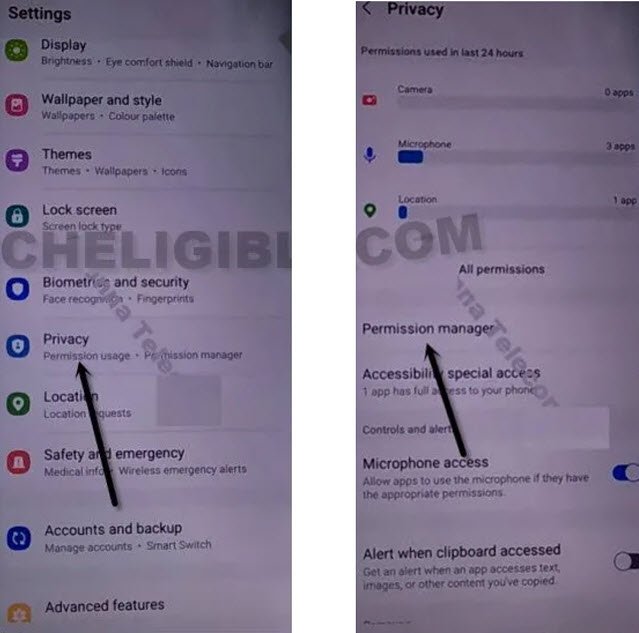
-Let’s hit over the “3 dots” kebab menu and tap on “Show system” option from there.
-Scroll down from (Files & Media) screen, from there, tap on “Package disabler pro” app.
-Select “Allow management of all files”, and then tap to “Allow”.
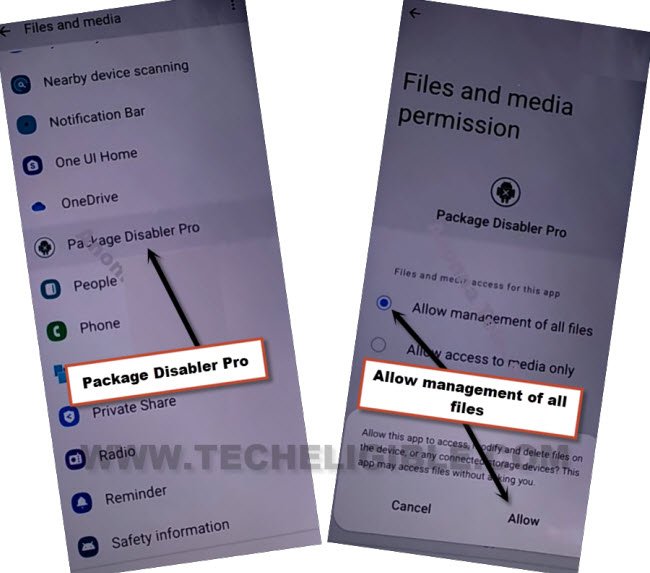
-Go back to main home-screen. Bring up top notification bar by swiping down from top. This notification bar will help you in bypassing google account.
-Tap to “Got it” from popup window.
-Swipe down again from top. This time, top bar will be displayed. From there, turn off “WiFi”.

Open Package Disabler Pro for FRP Remove:
-After that, open up “Package Disabler” app. which was recently installed on Samsung M21.

-From there, tick mark on (I agree) option and then, tap on “Enable Admin” button.
-From next page, just hit over the > Activate > Agree.
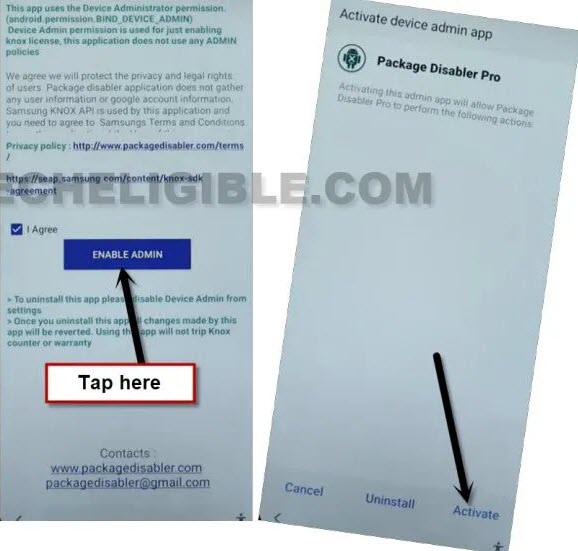
-Tap to “Agree” button from next page.

-You will see a popup window of (FialKLM….). That is happening because, the WiFi is turned off. Bring up top notification bar and turn on “WiFi” from there.
-After that, tap to “Retry” button from popup window to bypass frp.

-You will be returned on a main home-screen. Tap again on “Package disabler” application for Bypass FRP Samsung Galaxy M21.
-Tap to “Retry” from popup window. This time, you will see a popup screen of (Please enter the code you received). Just tap on “Cancel” option.
-After tapping on (Cancel) option, you will reach back to main home-screen. Swipe down from top to bring up top notification bar again. You may see a (Notice) popup screen, just tap on “Got it”.
-Swipe down again from top bar, turn off WiFi from top bar menu.

-Go again to “Package disabler pro” app. This time, the app will be fully launched.
-Go to “Search icon” and search there “Setup” and go to “Android Setup” same as shown in below image.
-Let’s check the box “Disable” from there to disable this app. After that, hit over the “Clear Data” button from there.

Search & Open Samsung Setup Wizard:
-Search there “Setup” again. This time, tap on “Samsung Setup Wizard“.
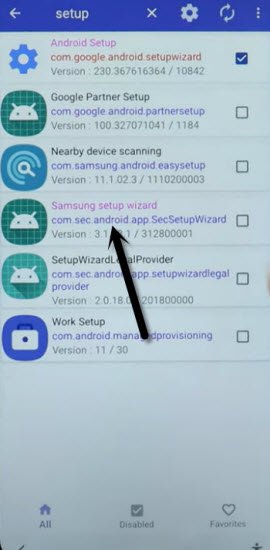
-Hit on a “Clear Data” option from there.
-Just tap on “Clear Data” button, and the time will start appearing up at top bar.
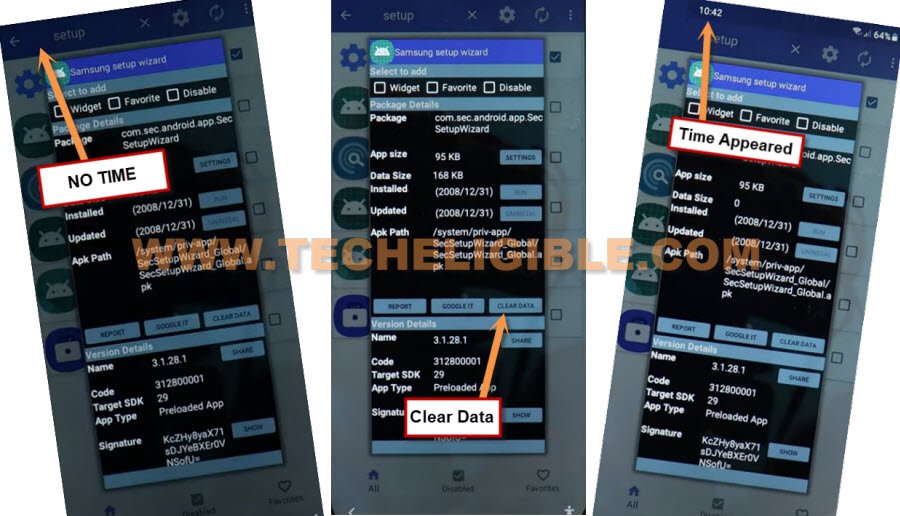
-Let’s go back by tapping on “Back Arrow” button 2 times from bottom.
-You will have a popup at the bottom, just tap on “Samsung Setup Wizard” app. After that, tap on “Just once”.

-Wait on a (Please Wait) page. Finally, you will access to (Get Recommended apps) page. Just, go to > Next > Skip > Finish.
-Finally, you are on your Samsung Galaxy M21 main home-screen and the setup wizard steps has been finished successfully.
-Turn on WiFi again from settings. Its all done from frp bypass steps.
Method 2: Bypass FRP Samsung Galaxy M21 [By Samfw Tool]
If you did never try SamFw tool, then you must follow this method to bypass frp account on Samsung M21 Android 12 without using any other frp tool, and this is a very short method, with a simple light weight tool (Samfw), you can fix frp locking problem your Galaxy M21 with one click, do make sure, your computer or laptop has proper driver installed, by the way the tool will itself display you a USB driver.
Step 1: The process is very simple, just open this link again in your PC browser, and download below tool.
| ⇒ SamFW V5.4 Tool [DOWNLOAD] Password: techeligible.com |
Step 2: After downloading this tool successfully, extract from winrar archive using above password.
Step 3: Open “SamFwFRPTool.exe” file name same as shown in below image

Step 4: If your PC or laptop do not have a proper (Samsung USB Driver), then you will be asked to install Samsung USB drive, just click to “Yes” from popup window, once the driver installation process completes, just go back to your Samsung Galaxy M21 device.
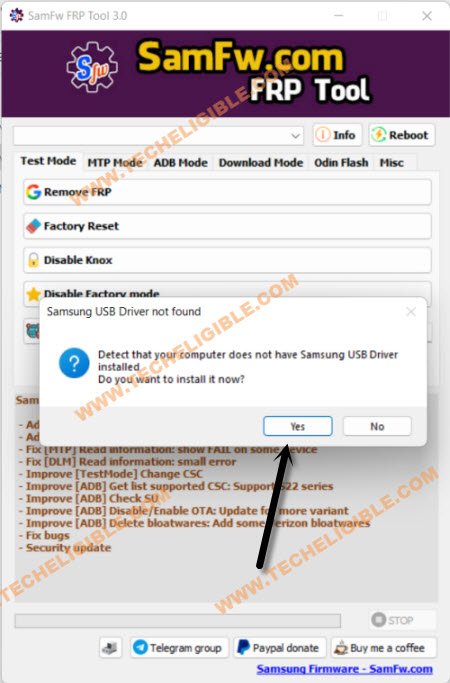
-Connect your Samsung Galaxy M21 with PC using a proper USB Cable, do make sure the device has successfully been detected from your PC and from your Samfw tool.
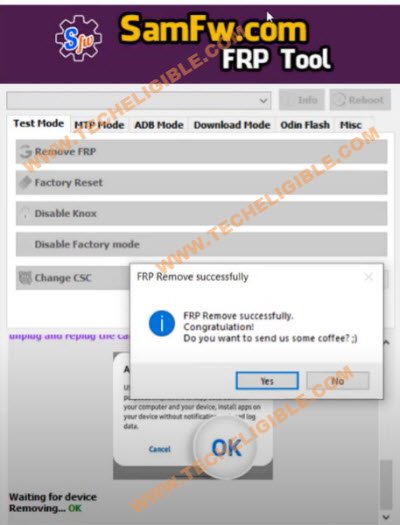
-Click to “Remove FRP” button from the Samfw tool, and after the tool will start detecting your Galaxy M21.
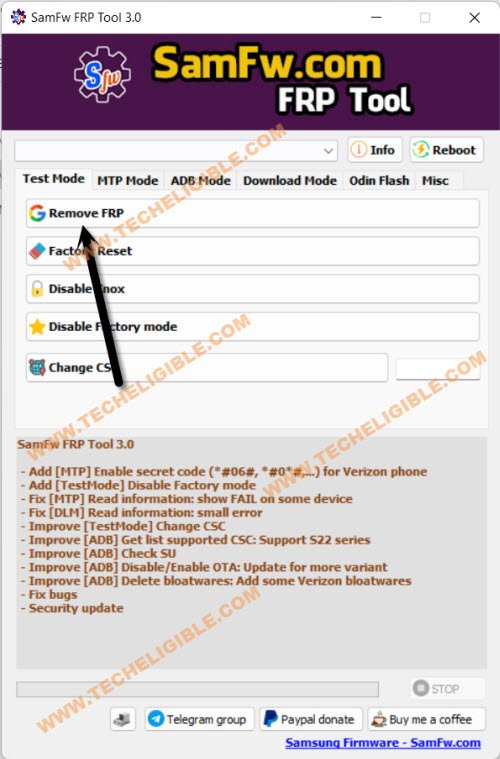
-Now you will have a popup message in your Software of dialing code.
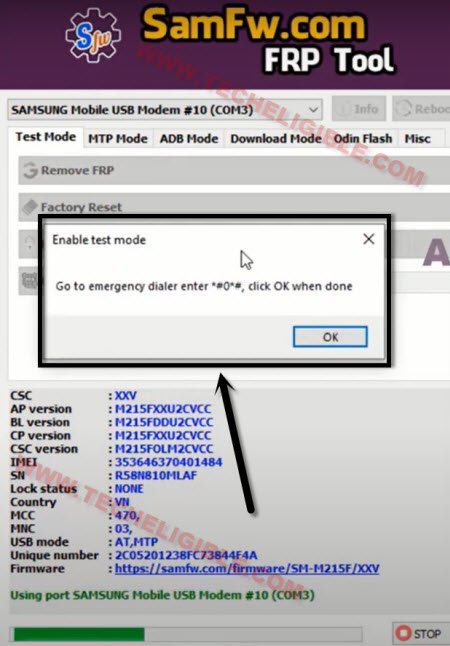
-Go back to Samsung M21 (Hommescreen), and click to “Emergency Call” option.
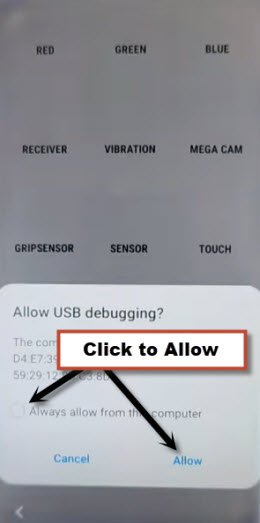
-Dial this code *#0*# in your device, as soon as you dial this code, the blank boxes screen will appear, that means the code is working perfectly.
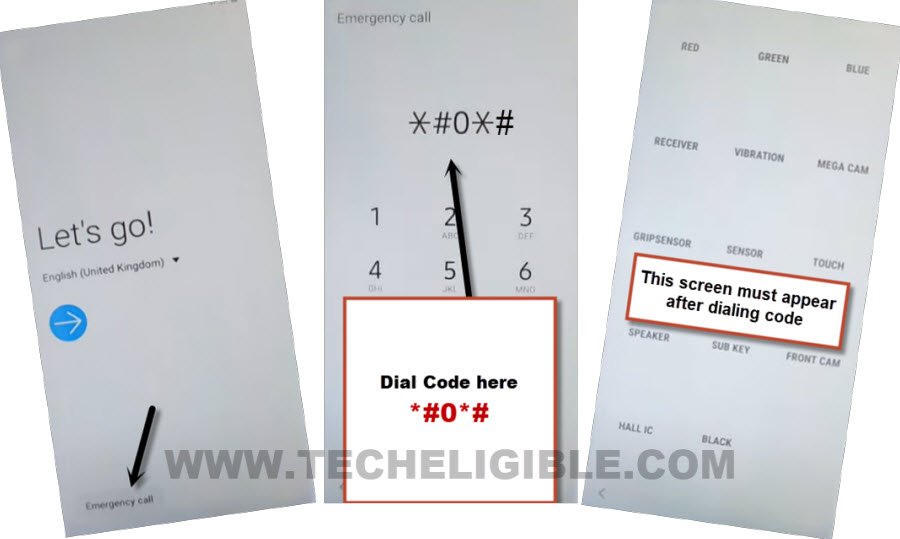
Use Samfw Tool to Bypass FRP on Samsung M21:
-Click on “OK” from the popup message of dialing code from PC for Bypass FRP Samsung Galaxy M21.
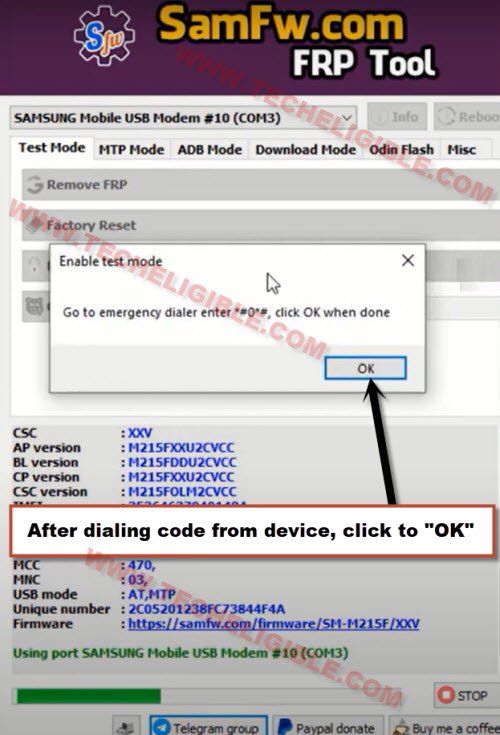
-You will be sent a popup message in your device of (Allow USB Debugging ?), just Select “Always Option”, and tap on “Allow” from the popup message in your Galaxy M21.
-The device will be restart once the frp removing process completes, and now you can easily use your device with new google account, you are all done. Restart your device and complete setup wizard steps.
Conclusion & Final Words:
We described how to go around Google verification on Samsung Galaxy M21 running Android 12 in this post. We also talked about the 2 best free methods for avoiding the Samsung M21 FRP. To make this difficult work as simple and straightforward as feasible for you, each approach is presented with comprehensive frp bypass guides.
Read More: