
There are 5 solutions available to assist you, how you can Bypass FRP Samsung Galaxy Note 9 on android version (10/9/8) without purchasing any tool or online services? For latest android version 10 (Samsung Note 9), you need to check out [Method -1/2/3]. In some other guidelines, you are asked download big volume Combination ROM and Official Stock Firmware. But, in these methods you don’t need any Firmware and Combination ROM to Bypass FRP. Follow up 2 easy solution from below.
Disclaimer: We highly recommend you to apply this method only on your own device. If you are not owner of this device, or you found this from some where, you must return to its real owner. This FRP bypass process is just for educational purpose.
Method 1: Bypass FRP Samsung Galaxy Note 9 [Updated Android 10/9/8]
We will free PC tool to bypass frp account easily. Simply, download below tool on PC and connect your Samsung Note 9 to PC. After that, click on (Remove frp) button from the tool. The tool will send you notification, asking you to allow UBS debugging option. You just have to permit this option and allow USB debugging. After that, FRP will be removed, that was set up with forgotten Google account. Check step by step guide from below.
-Start FRP Bypass steps by downloading below downloadable files on your PC Windows.
| Samfw Tool V3.31 [DOWNLOAD] Samsung USB Driver [DOWNLOAD] All in One USB Driver Installer [DOWNLOAD] Pass: techeligible.com |
-Install both downloaded Samsung USB drivers. These drivers are very important to make your device connectivity smooth with the PC and FRP Bypass tool.
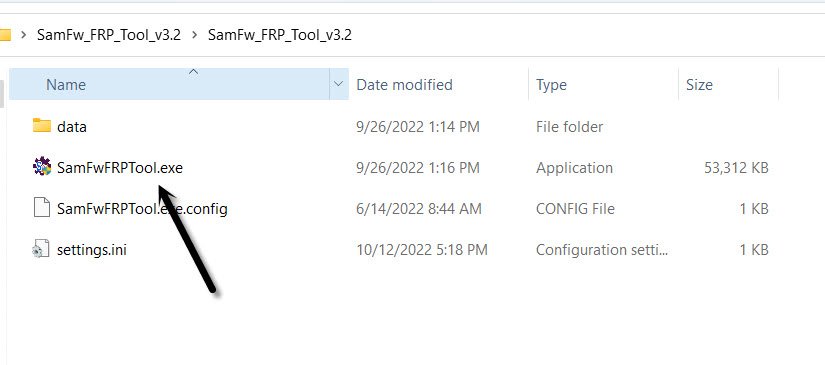
-Unzip and run (Samfw Tool) on PC Windows by double clicking on (Samfwfrptool.exe) file.
-Turn on Samsung Galaxy note 9 and connect WiFi on this phone first.
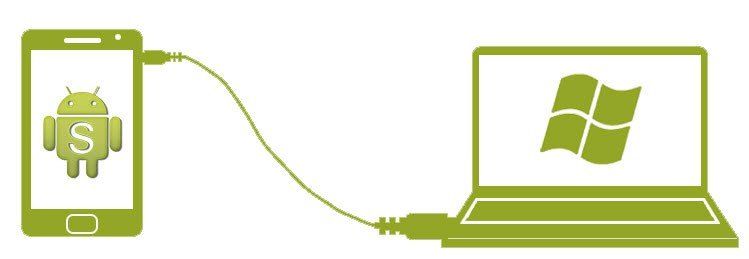
-Afterwards, connect your device with PC.
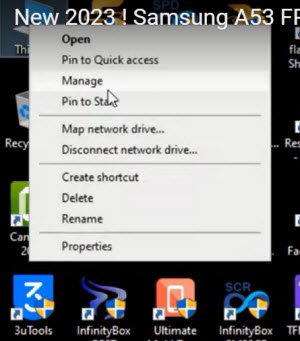
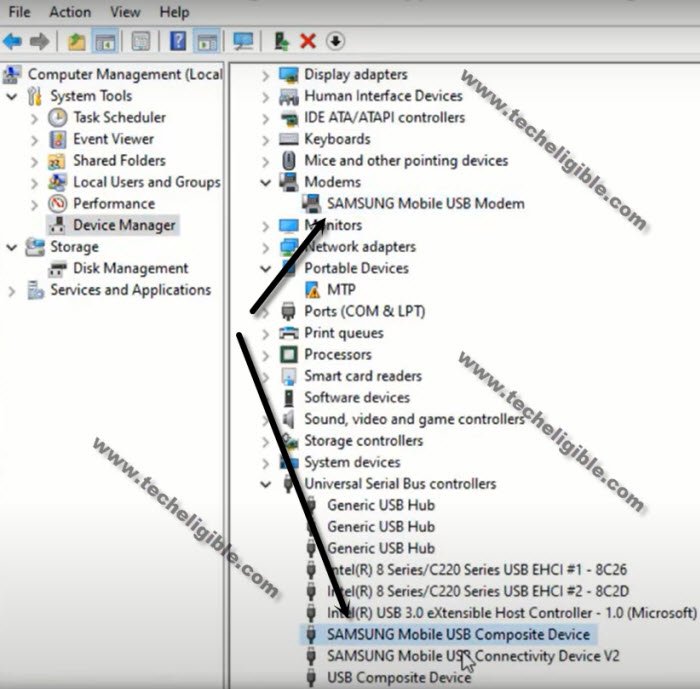
-Go to your PC Windows screen, right click on “My Computer or This PC” icon after that, tap on “Manage” option to go computer device manager.
-From left panel of the screen, just tap on “Device Manager” option. This will show you driver listed and connectivity details with your PC input on a single page.
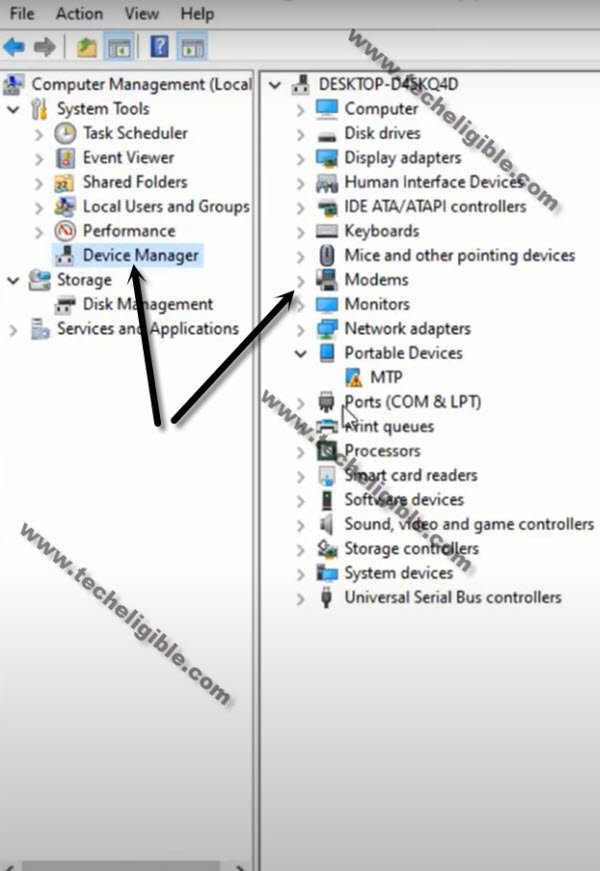
-You will be able to see your connected (Samsung Galaxy Note 9) details there. That means, our device has been detected by the PC successfully. We use (Samfw Tool) easily for Bypass FRP Samsung Galaxy Note 9.
Use Samfw Tool to Bypass FRP:
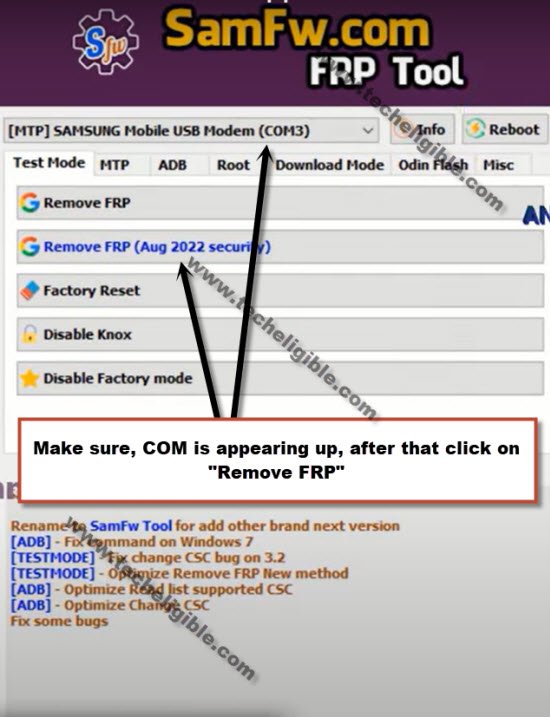
-Go to Samfw Tool screen and select your Samsung Note 9 device (COM) port.
-After that, click to button (Remove FRP) from the tool screen (See below image).
Note: If your Samsung USB modem hardware has an exclamation point (SamFw), it indicates that your computer needs to install the correct Samsung USB drivers. You can quickly install the Samsung USB drivers from the popup message that appears when you use the SamFw tool.
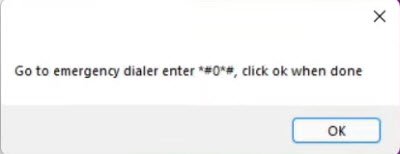
-You will be shown some instruction in popup window to dial a code from Galaxy note 9 to enable the testing mode. You don’t need hit on “Ok” option right now. Firstly, we follow up given instruction from our FRP locked phone. After that, we will click to “Ok” option.
Enable Testing Mode on Samsung Galaxy Note 9:
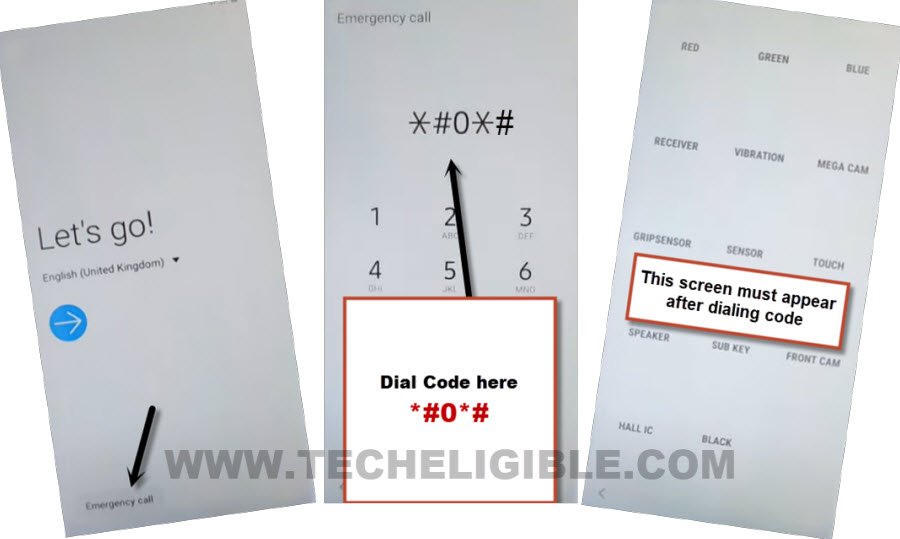
-From the first (Let’s Go) screen of the galaxy note 9, just tap to “Emergency Call” from bottom left corner. This will open up dialer screen. From there, dial this code *#0*#. You will be redirected on a (Blank Box) page. That means, testing mode enabled successfully.
-You can click on “Ok” option from popup window.
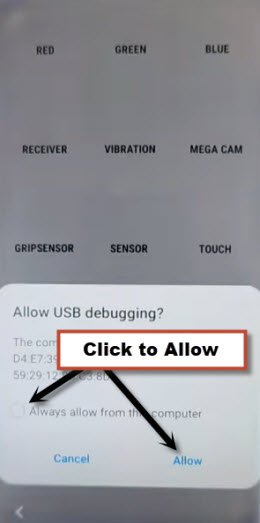
-Another popup window will popup up on Samsung note 9 screen. We have to allow usb debugging option from there. Just check mark “Always allow from this computer” option and then, tap to “Allow”.
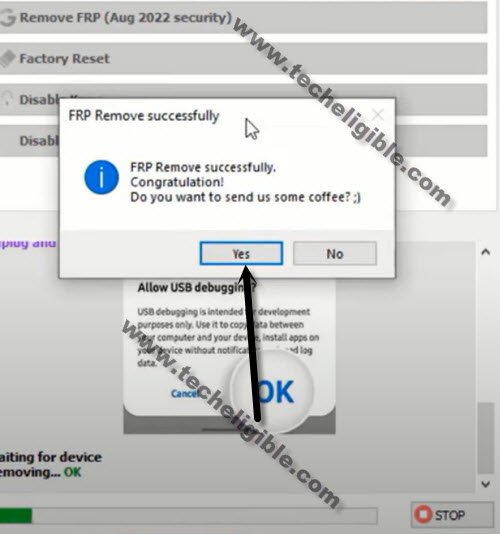
-FRP will be removed completely from Samsung Galaxy Note 9. Once the FRP is removed successfully, you will see a popup window, just tap to “Yes” option.
-Disconnect your Samsung Note 9 phone from PC. Close Samfw tool. Its all done from frp bypass on Samsung note 9 using Samfw free frp bypass tool.
Method 2: Bypass FRP Samsung Galaxy Note 9 By SIM Card [Android 10]
-Firstly, you have to prepare PIN locked sim card. Setup PIN code on your sim using any other android device.
-Turn on Samsung Galaxy Note 9. Connect to WiFi.
-Go back on first (Let’s Go!) screen same as shown in below image.
-Tap on a “Next Arrow” icon from first startup screen.
-Check mark all option and go to “Next”.
-You will reach on a (Choose a WiFi network) screen. From there, hit on “Add network” option.
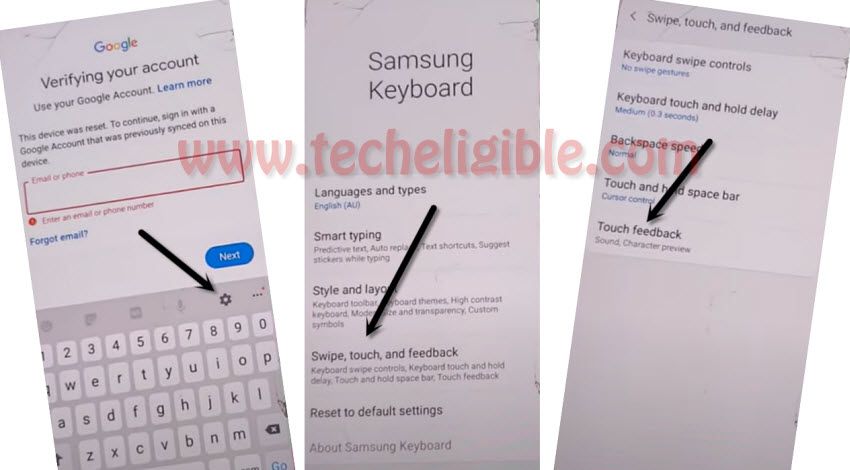
-From keyboard, tap to “Settings” gear icon.
-Tap to > Swipe, touch, and feedback > Touch feedback.
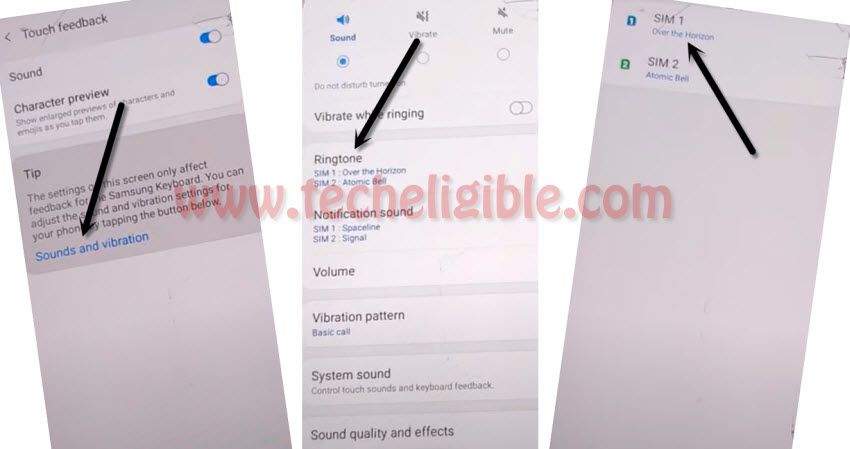
-Hit over the blue option “Sound and vibration”.
-After that, you have to tap on “Ringtone”. Choose “SIM 1” from next page.
-Let’s hit on the “+” icon from top corner. After that, hit on “Search”.
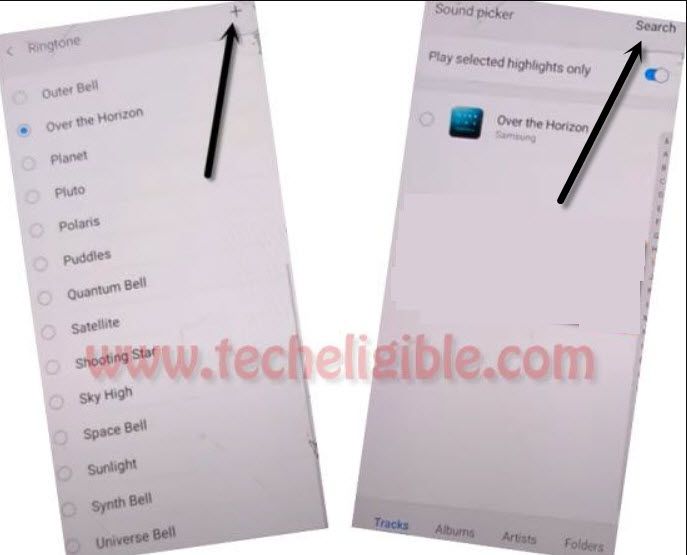
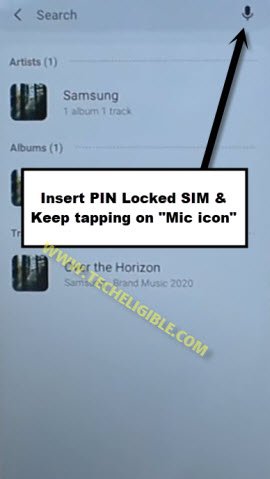
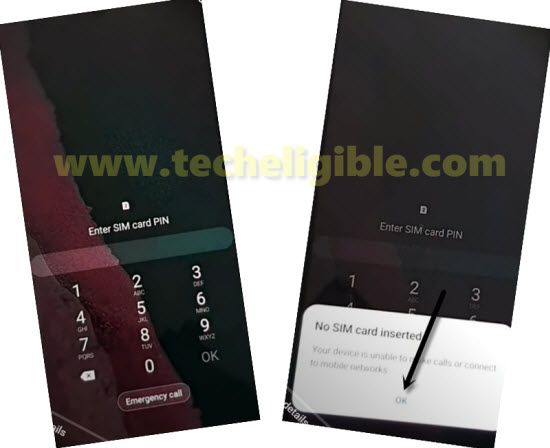
-Let’s insert the PIN locked SIM card. Wait for 1-2 seconds, after that, quickly start tapping on “Mic” icon from top corner. Keep tapping on (Mic icon) option until you see a (Enter SIM Card PIN) page same as shown in below image.
-Let’s remove the sim card. If you see again same previous screen as shown in below image, that means, the method did not work. You will have to restart the device and repeat steps.
| Note: After some tries, you will be able to see (PIN Locked SIM Cards) screen. |

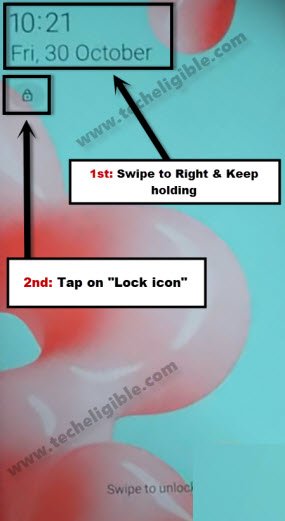
-After removing the SIM card, you must see (Lock Screen) same as shown in below image.
-With one of your finger, swipe and hold the (Date) widget to the right side, and with your second finger, tap on “Lock icon”.
-The (Not signed in) message will appear up on screen. Swipe down the (Not signed in) message, this will bring up top notification bar. From there, tap 4-5 times on (Settings) icon from top corner.
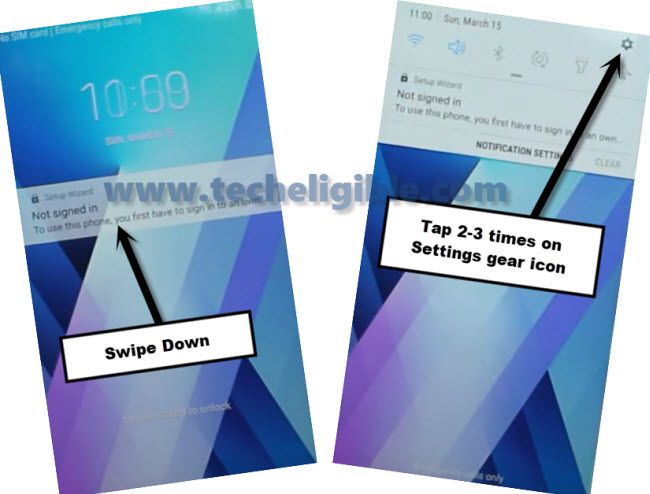
-After that, hit on “Device” from top bar. Tap to “Done”.
-You will be redirected on a (Devices) page. From right side of the screen, just tap to > 3 dots > Settings.

-Go to “About Media and devices”.
-Now, hit on a “Exclamation icon” from top corner.
-Tap on “Permissions”.
-Let’s go to “Search icon” from top corner

-Search there with “Youtube”.
-From searched result, go to (Youtube app info) option. Tap on “Open” from bottom corner. You will be redirected on a youtube video screen.

-Let’s launch the google chrome browser just by tapping on “Account” icon and go to “Terms of service” same as shown in below image.

-We can access on google chrome browser from FRP locked Samsung Galaxy Note 9.
-Tap on > Accept & Continue > Next > No Thanks.
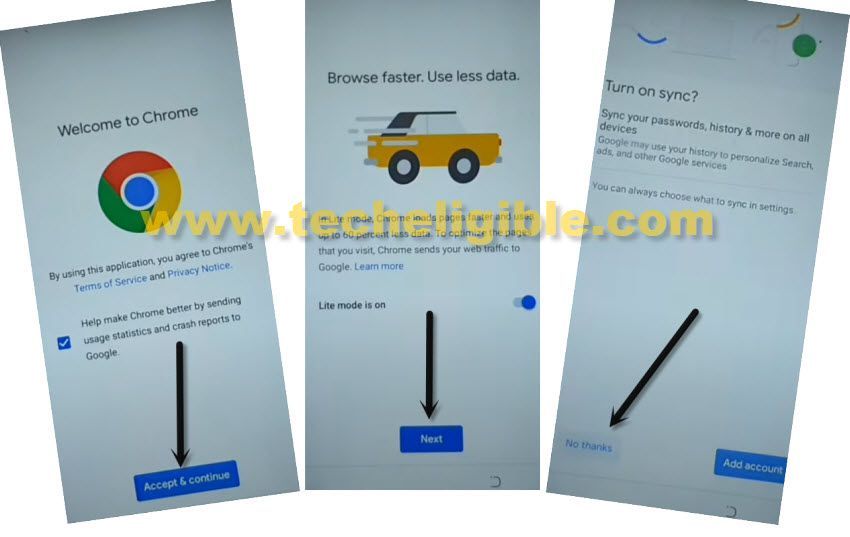
Search & Go to Official FRP Tools Page:
-Search in browser with “Download frp tools techeligible“. Go to same searched result as shown in below image.

-Once you reach on a official frp tools page of techeligible. Just, download from there below 2 apps for FRP Bypass.
1st: Google Play Services.
2nd: Apex Launcher.
-Wait until the downloading process is done. After that, go to top of the browser page. Hit on “3 dots” icon from top corner and tap on “Downloads”.
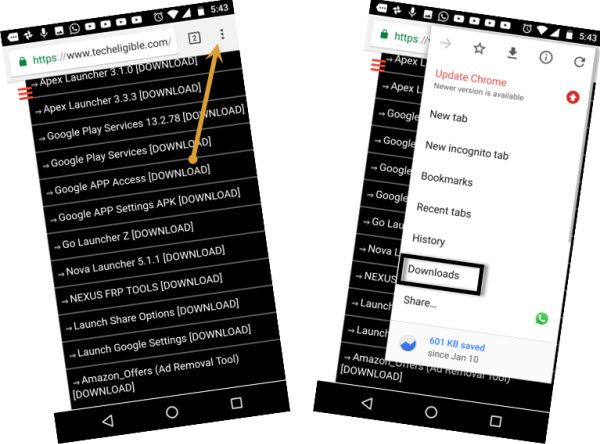
-After you reach over the download folder, you will have both recently downloaded applications.
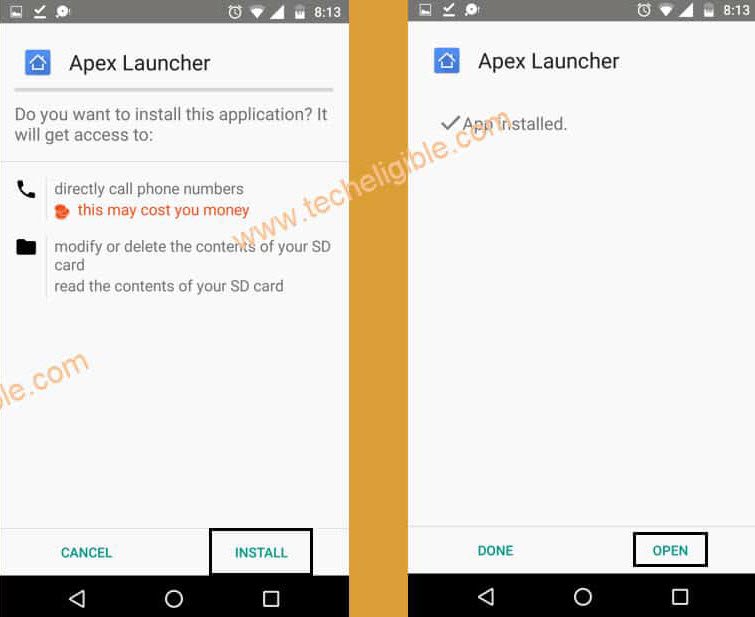
-Let’s install apex launcher application to reach your Samsung device main home-screen.
-Tap over the “Apex Launcher” app. From popup window, hit on “Settings” and turn on “Allow from this sources” option.
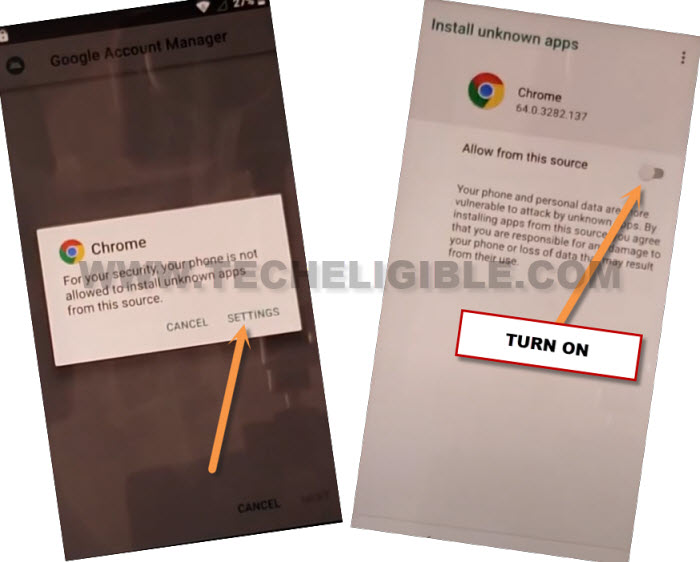
-Go back to apex launcher screen by tapping at “Back Arrow” icon from bottom.
-Tap to > Install > Open > Continue.
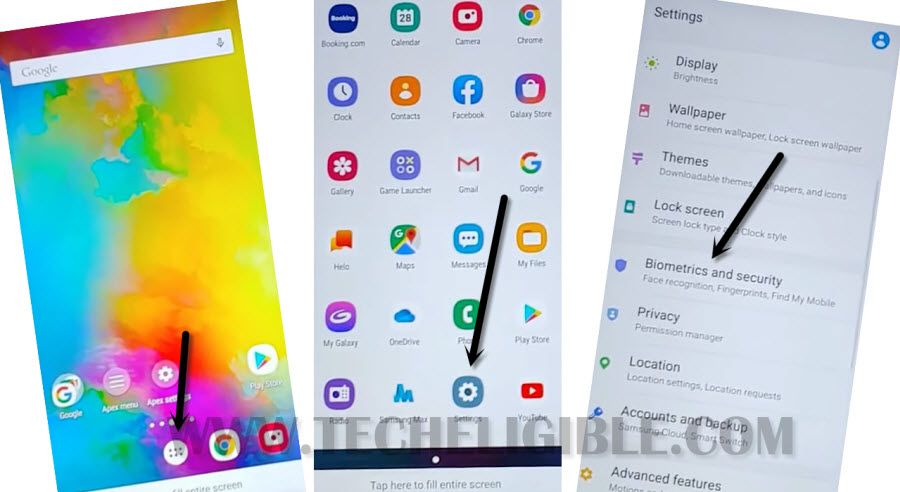
-After accessing to the main home-screen of your Samsung device. Just go to > Settings > Biometrics & Security.
-From there, tap on “Other security settings”.
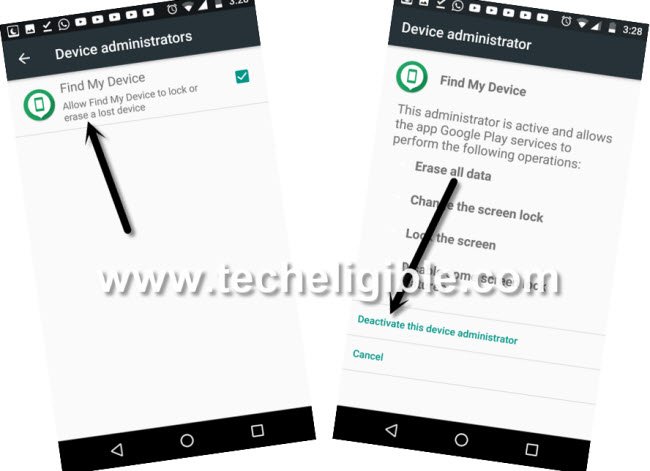
-We have to deactivate find my device app. For that, just go to “Device Admin App”.
-Tap on “Find my device” and hit on a “Deactivate” button for easily FRP Bypass Samsung Note 9.
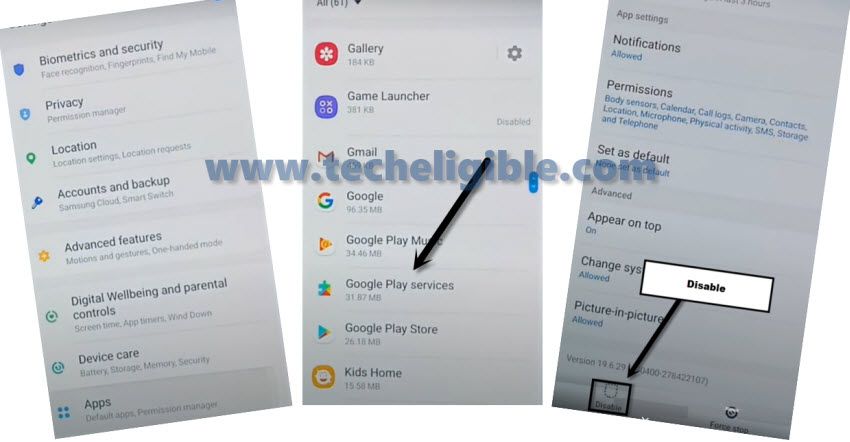
-Go back to main settings page. From there, hit over the “Apps”.

-After that, tap to “Google Play Services”. Hit on the “Disable” button from bottom to Bypass FRP Samsung Galaxy Note 9.
-Tap also on “Disable App” from popup window.
Access to Files Folder to Install Google Play App:
-Tap on a > Device Care > Storage > Advanced > Files.

-Afterwards, tap to “Download” folder.
-You will be shown your downloaded apps there.
-From there, tap on a “Google Play Services”. After that, from popup window, tap on a “Settings” and turn on “Allow from this sources”.

-After that, hit on “Back Arrow” icon from bottom.
-Let’s install this app by tapping on > Install > Done.
Setup new Account on Galaxy Note 9:
-Go back to “Settings” page. From there, tap over the “Accounts and backup”.
-Go to > Accounts > Add account.
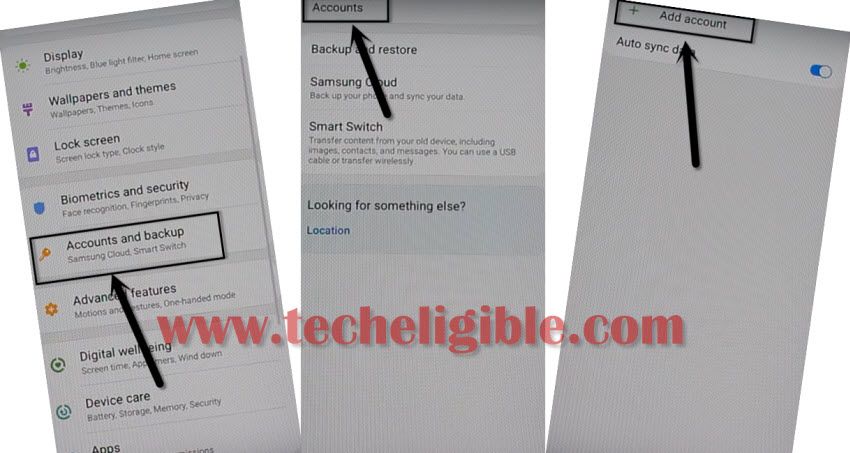
-Tap on “Google” from app list page.
-Hit on a “Continue” from bottom right corner.
-Tap to > Ok > Close app from popup window.
-Sign in there with your valid google account to Bypass FRP Samsung Galaxy Note 9.
-Let’s get back to main “Settings” page. From there, go to “Apps”.
-Tap on “3 dots” from top corner and choose “Show system apps”.
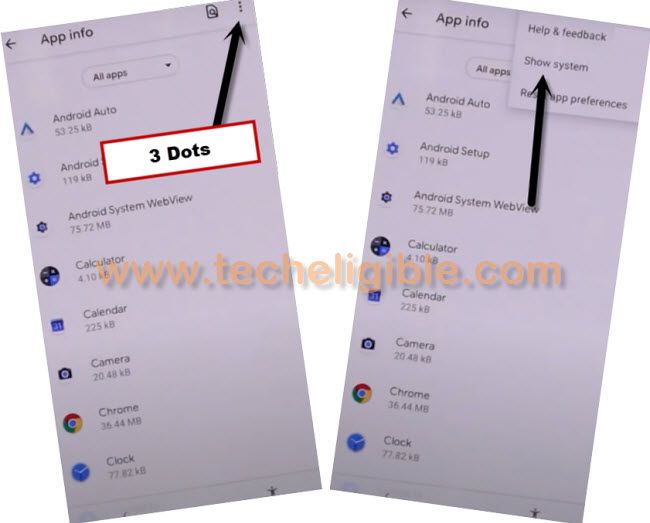
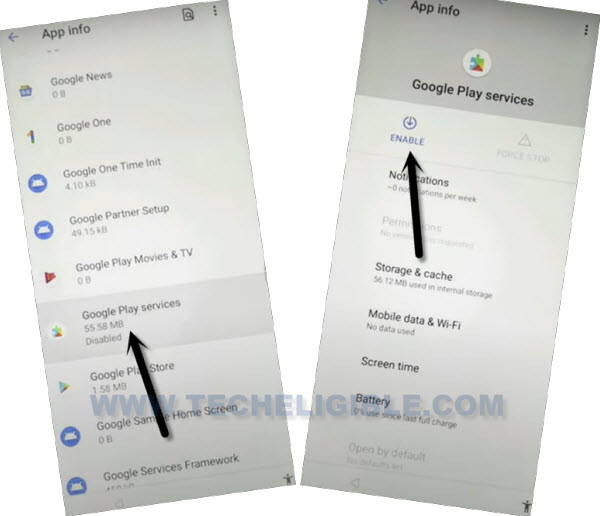
-Find and go to “Google Play Services” app. After that, tap to “Enable” button to enable this app which we recently disabled apps.
-Go back again on “Settings” screen. From there, activate back (Find my device).
-Just go to > Other security settings > Device Admin app > Find my device > Activate.
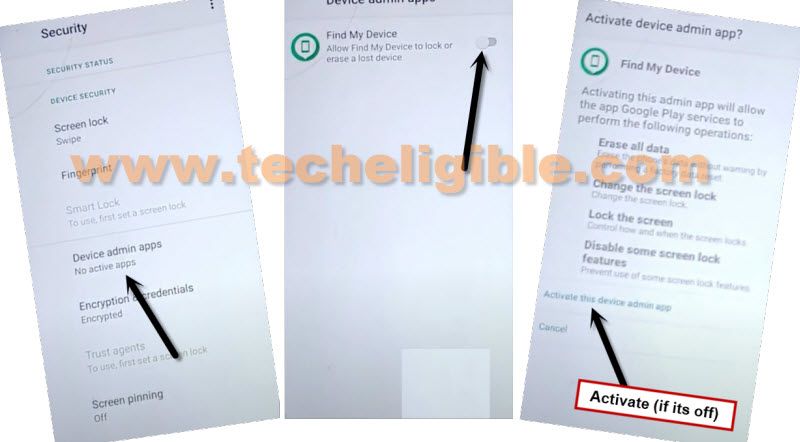
-If you see (Android Device Manager) too. Just go to this app as well and tap on “Activate”.

-FRP bypass process is completed. Restart your Samsung galaxy note 9 and complete setup wizard steps.
Method 3: Bypass FRP Samsung Note 9 Using a Samfirm Software [Android 10]
| Download & Install SamFirm V1.4.3 Software in PC [Download] Download & Install SAMSUNG USB Drivers in PC [Download] |
-Connect WiFi in your Samsung Note 9 device.
-Connect Samsung Note 9 with PC using a USB cable.
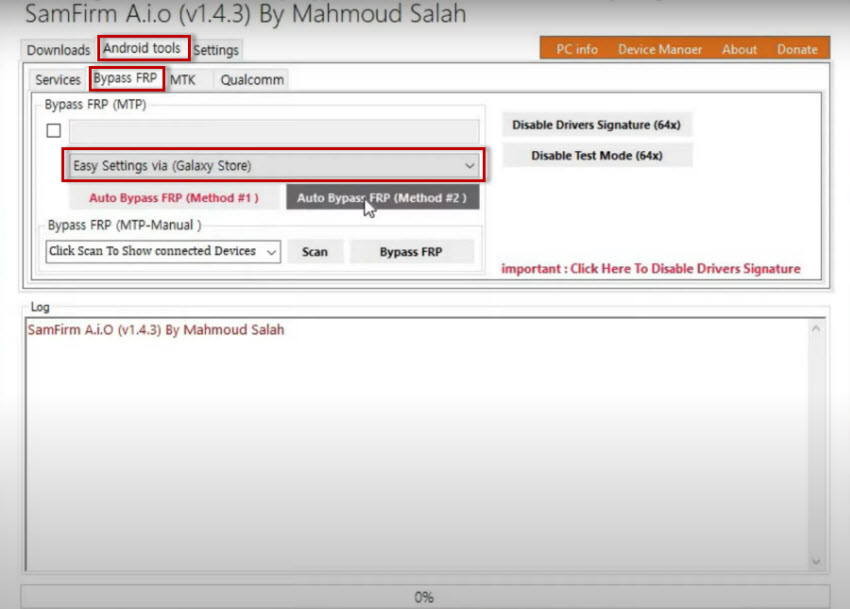
–Lets open a “SameFirm” software in your PC, and go to > Android Tools > Bypass FRP.
–Set option “Easy Settings via (Galaxy Store)”, and click on “Auto Bypass FRP (Method #2)” button.
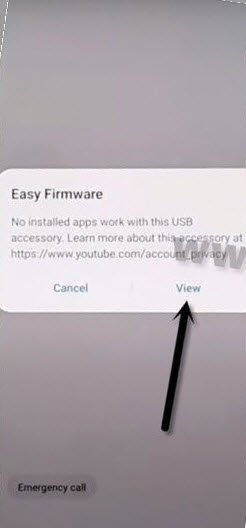
–Tap to “View” option from popup window, that will appear in your Samsung screen.
Note: If you don’t get “View” popup message on Samsung Note 9, so try few more times by connecting and disconnecting the device, also try by hitting on “Disabling Driver Signature” from (SamFirm Tool), if even then you don’t receive this popup message, so click here to fix this issue.
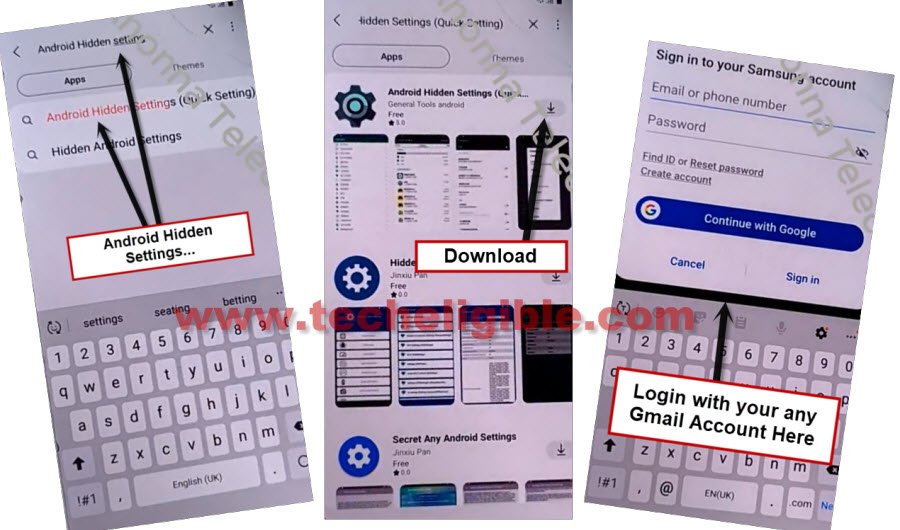
–Tap to “Agree” from galaxy store screen, and hit on “Search icon” from top right corner.
Note: If you see (Update) option, just update your galaxy store app, and try again to open this app.
–Search “Android Hidden Settings”, and hit on from the search result “Android Hidden Settings (Quick Setting).
–Download & Open (Android Hidden Settings).
Note: You will be asked to sign in first, so sign in with your any active Gmail Account there.
–You have may have popup window of (Want a faster way), just hit on “Cancel”.
–Tap on “Open” icon from there after installing process done.
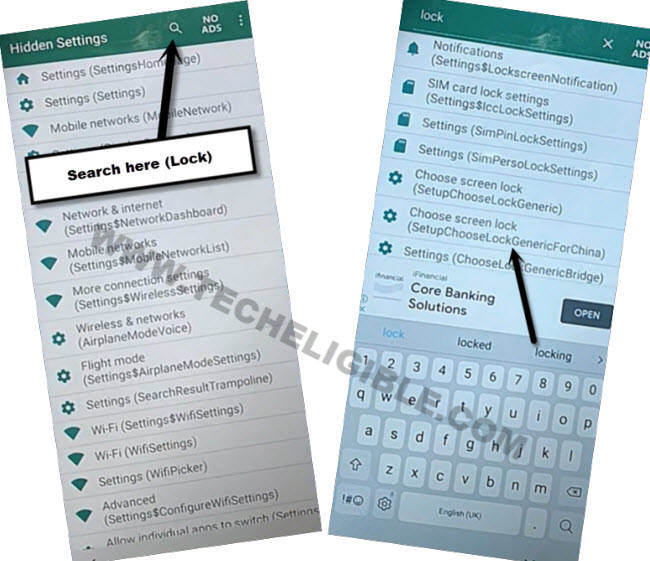
-Hit “Search” icon from up-right & type “Lock” text there, afterwards, from searched result, go to “Choose Screen Lock Setupchooselockgenericforchina”
Create New Screen Lock on Samsung Note 9:
–You will be redirected to the (Protect Your Phone) screen, from there tap to > Pattern > Continue.
–Set up your latest “Pattern Lock” there to bypass google frp.
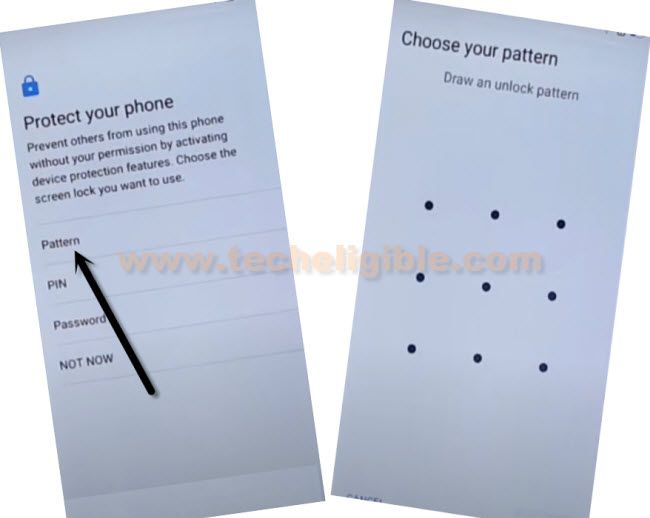
-Restart Samsung Galaxy Note 9 and complete setup wizard, you are all done from bypass google account.
Method 4: Bypass Google Account on Samsung Galaxy Note 9 By Screen Shot Taking Method (Android 10)
-Let’s being with Connecting Wi-Fi network in your phone, and then get back to “Let’s Go” screen.
-Hold both (Power + Volume Down) for taking screen shot.
-Hit on “Deny” from popup window, that will appear right after taking screen shot.
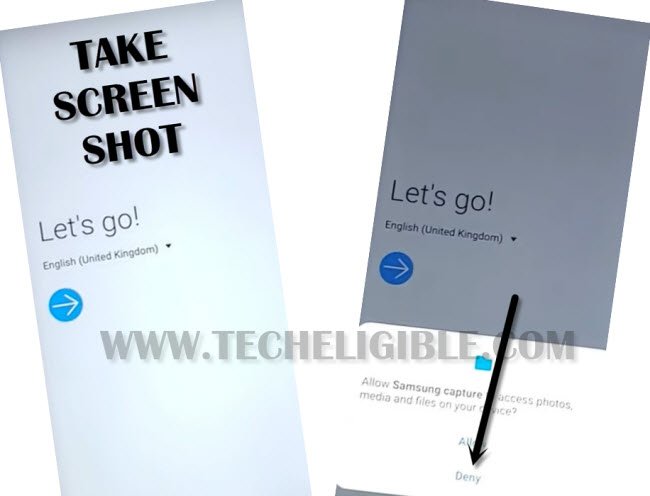
-Take screen shot again & hit on “Deny & Don’t ask again”.
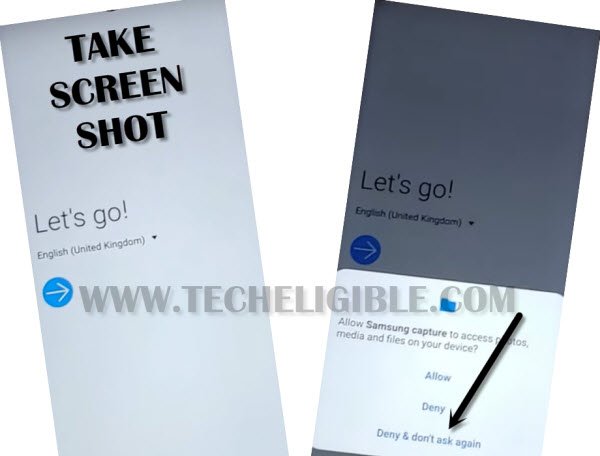
-You need to take screen shot one last time & hit on “Allow Permission”.
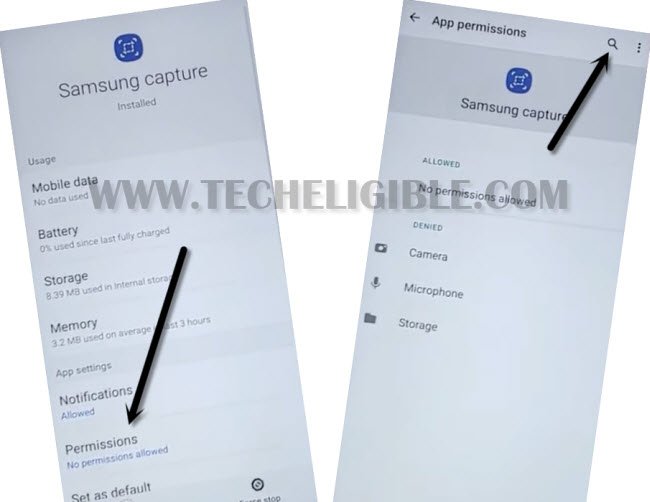
-Afterwards, go to “Settings”.
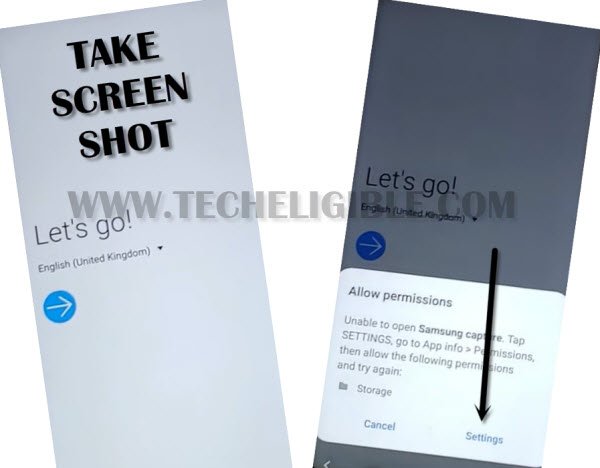
-Hit on “Permission”.
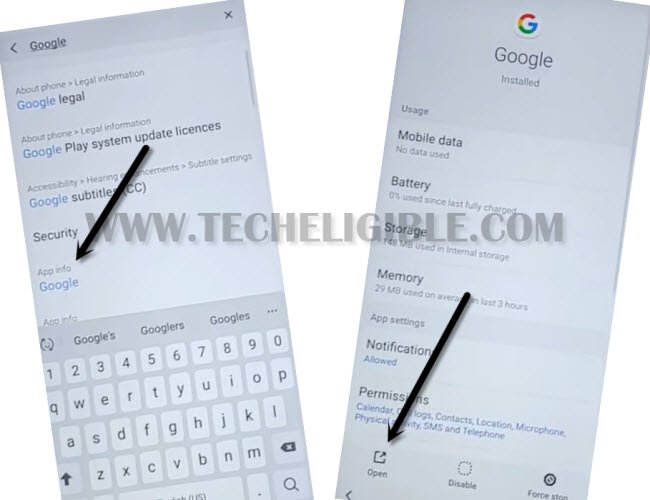
-Afterwards, tap “Search icon” from top right corner of galaxy note 9 screen & type “Google” in search area.
-Scroll down, and tap on “Google App info“, and the tap to “OPEN”.
-From popup screen, just hit “No Thanks”.
-Type “Chrome” in search area, and then tap on “Chrome icon” from the searched result to access chrome browser app.
-Tap on > Accept & Continue > Next > No Thanks.
Download FRP Apps in Galaxy Note 9 for FRP Remove:
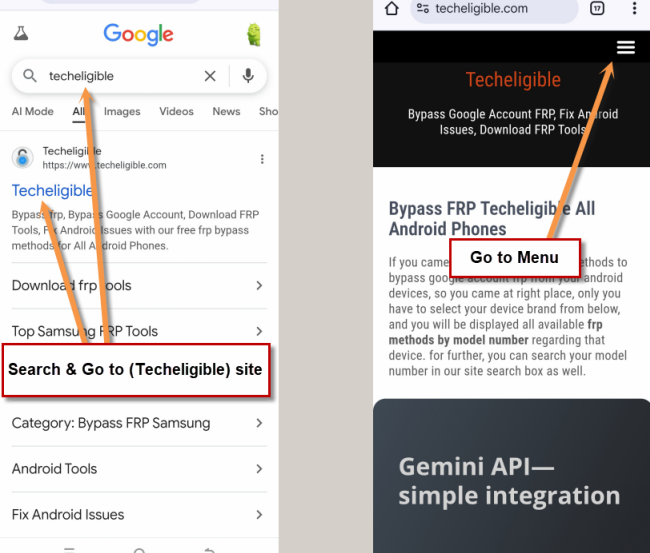
-Make search there with “Techeligible“. After that, go to techeligible site.
-Navigate to “Menu” option from top corner.
-After that, simply, hit on > Other Free Tools > Samsung FRP Tools.
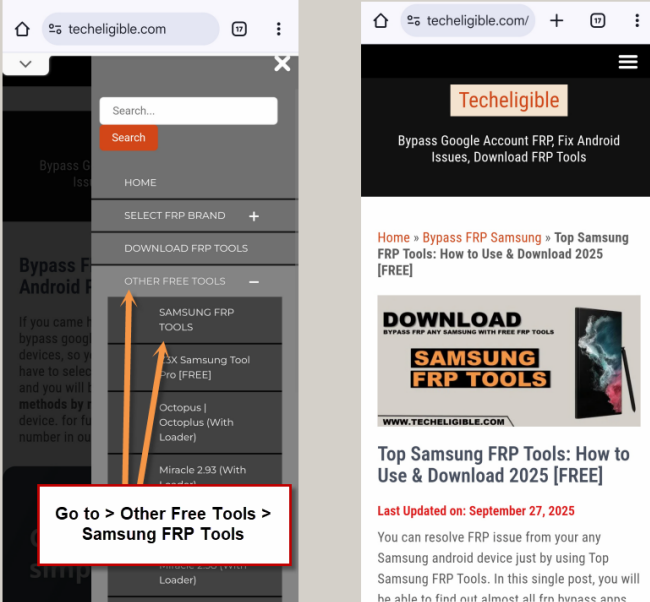
-Download below apps.
1/ Apex Launcher.
2/ Google Play Services.
-Go to top, tap “3 dots” from right corner, and tap “Downloads”.
-To install app, hit on “Apex Launcher”.
-From popup screen, hit at “Settings”, and enable “Allow from this sources” option, this will allow to install apps in Samsung Galaxy Note 9 device.
-Go back by hitting on “Back Arrow”.
-From the Apex launcher popup window, just Tap on > Install > Open > Continue, by doing this we will be inside our galaxy note 9.
Note: If you auto get back to download folder after installing apex launcher, just reinstall and open apex launcher to access in your Samsung Note 9 home screen easily.
-Tap “MENU icon”, and tap on “Chrome” to launch chrome browser.
-Tap “3 dots” from top right corner, and tap “Downloads”
-Now tap on > Google Play Services > Install > Done.
-After installing both apps, we can now Bypass FRP Verification Samsung Note 9 just by disabling google play services app from app list, and afterwards, we will add new google account, that will be used for factory reset protection.
Disable Device Admin App & Google Play Services:
-Go to > Settings > Biometrics & Security.
-From there, hit > Other Security Settings > Device Admin App > Find My Device > Deactivate.
-Go back to “Settings”.
-From there go to > Apps > Google Play Services > Disable > Disable App.
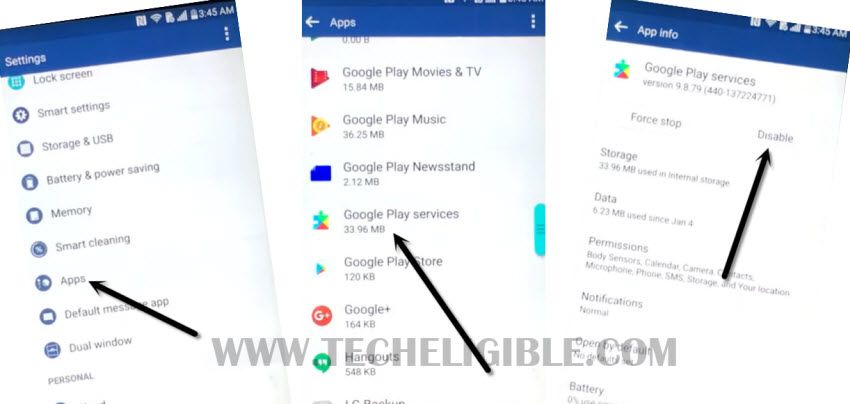
-Now get back to “Settings” again, and from there hit on > Accounts and Backup > Account > Add Account > Google > Sign in with your any google account.
Note: If you see error popup screen, just select “Close App”.
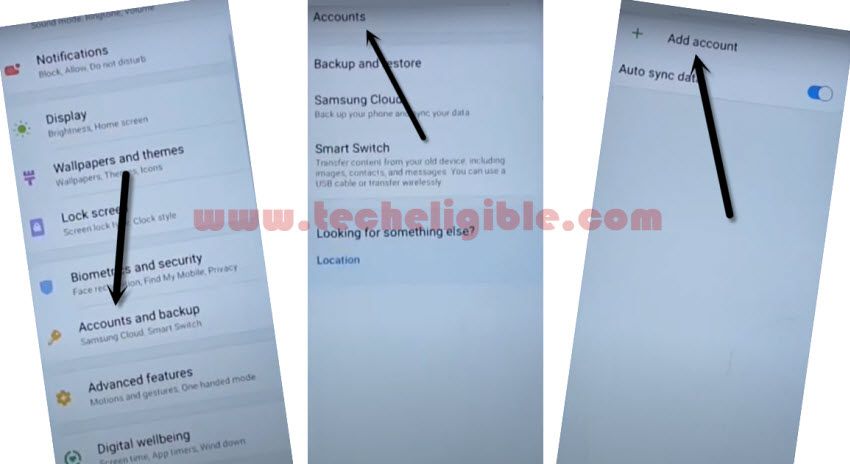
-After adding account successfully, go back to “Settings”.
-From there, go to “Apps“, and then “Google Play Services”, after that hit on “Turn on”. (This is very important to enable back your disabled google play services app, otherwise, you will lose your all effort).
-Restart Galaxy Note 9, and complete setup wizard to access the phone normally, you are all done from there, thanks for visiting us.
Method 5: Bypass Google Account Samsung Galaxy Note 9 By HushSMS Apk App (Android 8-9)
You need to have 1 more extra android device near by you, and that’s not a big deal you can use your brother or father android device to accomplish this new frp bypass galaxy note 9 method.
-First arrange any other Android device, because in your other android device we have to install “Hushsms apk” app, with the help of this app, we will be able to Bypass FRP.
-Open “Chrome Browser” in your Other Android device.
-Now type in search box “Techeligible”. Go to 1st searched result same shown in below image.
-Go to > Menu > Download FRP Tools.

-Download from there “Hushsms APK” app in your other android device.
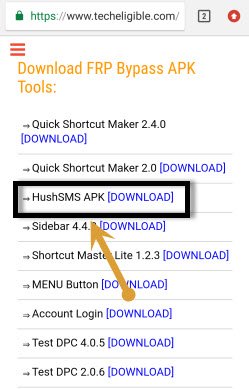
-Open “Hushsms” app.
-Connect “Wi-Fi” in your Galaxy Note 9 frp locked device.
-Put your Galaxy Note 9 device on “Verify Your Account” screen.
-Insert working “SIM CARD” in your Galaxy Note 9 device.
Note: Make sure, your both android device has working SIM CARD.
-From HushSMS app, tap on “WAP PUSH SL”.
-Type phone number of your Samsung Galaxy Note 9 device in first field of “enter the phone number of the recipient”.
-Type “www.youtube.com” in the 2nd field of “url”.
-Now tap on “SEND WAP PUSH SL” button. (See Below Image)
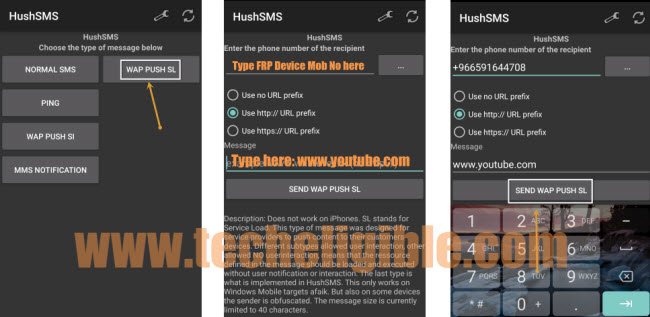
-After few seconds, you will get “Push Message” popup on your Galaxy Note 9 device.
-Just tap on “OK”.
-Tap on “Not Now” if you see YouTube update message.
-Perfect, now we have accessed to you-tube website.
Let’s Access to Chrome Browser to Bypass FRP:
-Drag down YouTube video.
-Tap on “3 dots” from top right corner of the YouTube & select “Terms & Privacy Policy”.
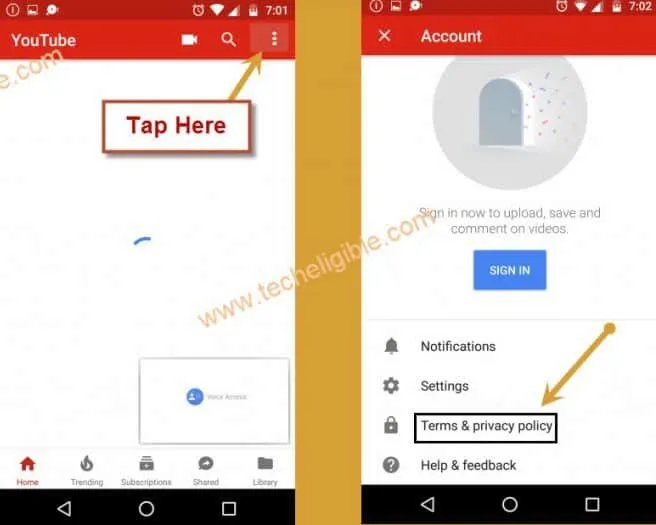
-Tap on “Accept & Continue”, and then “Next”, after that tap on “No Thanks”.
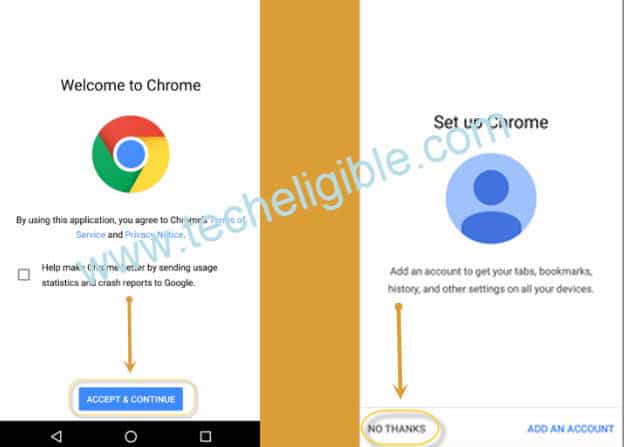
-Congrats, now we have reached to google chrome browser, so that means we are very near to Bypass FRP Samsung Galaxy Note 9.
Download Google Account Manager App:
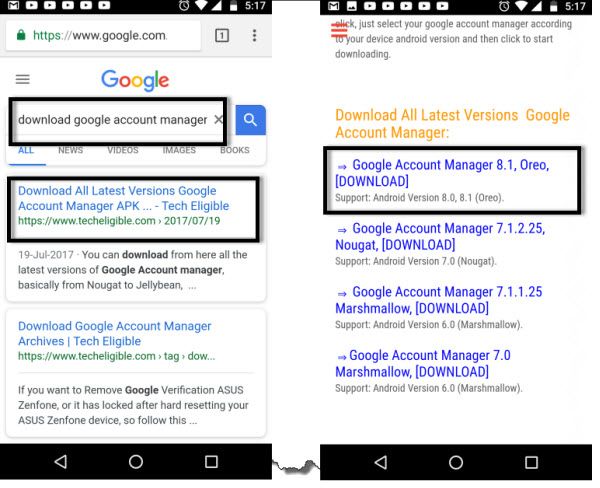
-Type in search box “Download Google Account Manager Techeligible“.
-Visit 1st search result from there.
-Download “Google Account Manager 8.1” from there.
-Once downloading finish, you will get popup bottom of your screen, just tap on “OPEN”.
-After that, you will get “Chrome” popup window, just tap on “Settings”, and enable the option of “Allow from this sources”.
-Now tap on “Back key”.
-After that, tap on > Next > Install > Done.
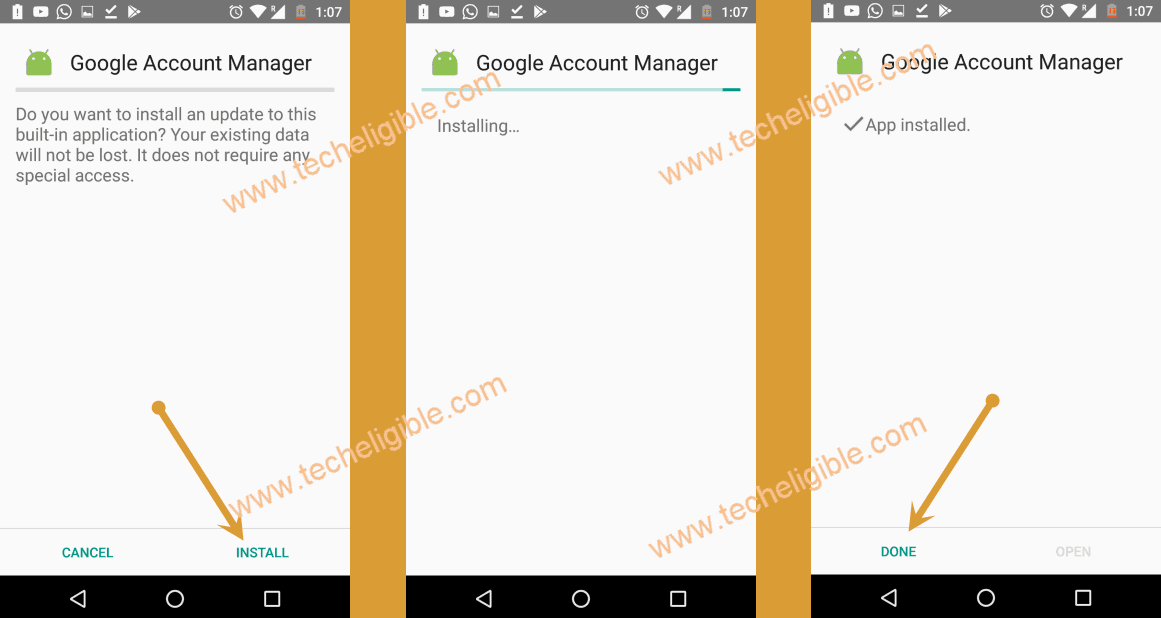
-Now you have successfully installed Google Account Manager 8.0.
-Type in search box “Download FRP Tools Techeligible“.
-Tap on “Download FRP Tools” from the searched result.
-Go down, and download from there “Account Login” app.
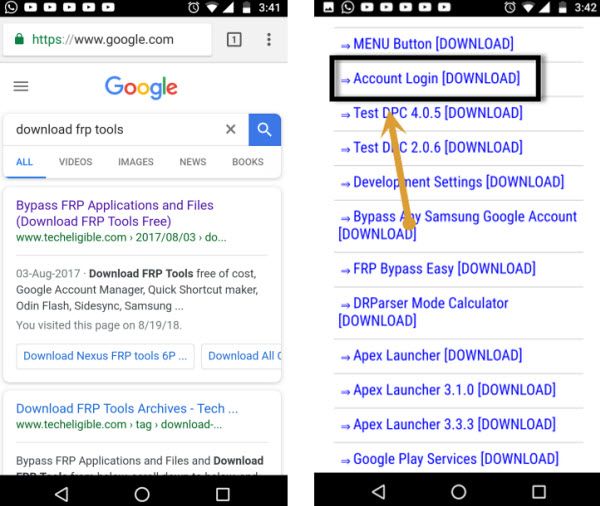
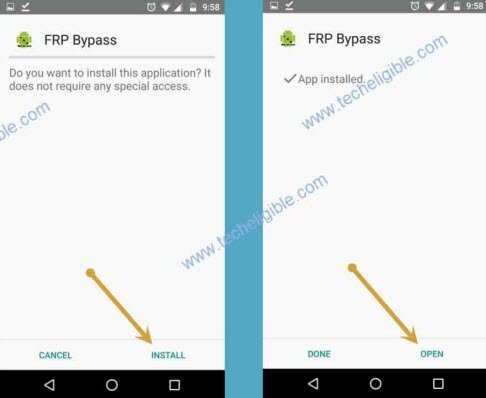
-Once downloading finish, you will surely get a bottom popup, just tap on “OPEN”.
-Now tap on “Install”, and once installation finish, just tap on “OPEN”.
Add New Gmail Account on Samsung Note 9:
-You will see “Retype Password” screen.
-Tap on “3 dots” from top right corner & select “Browser Sign-in”.
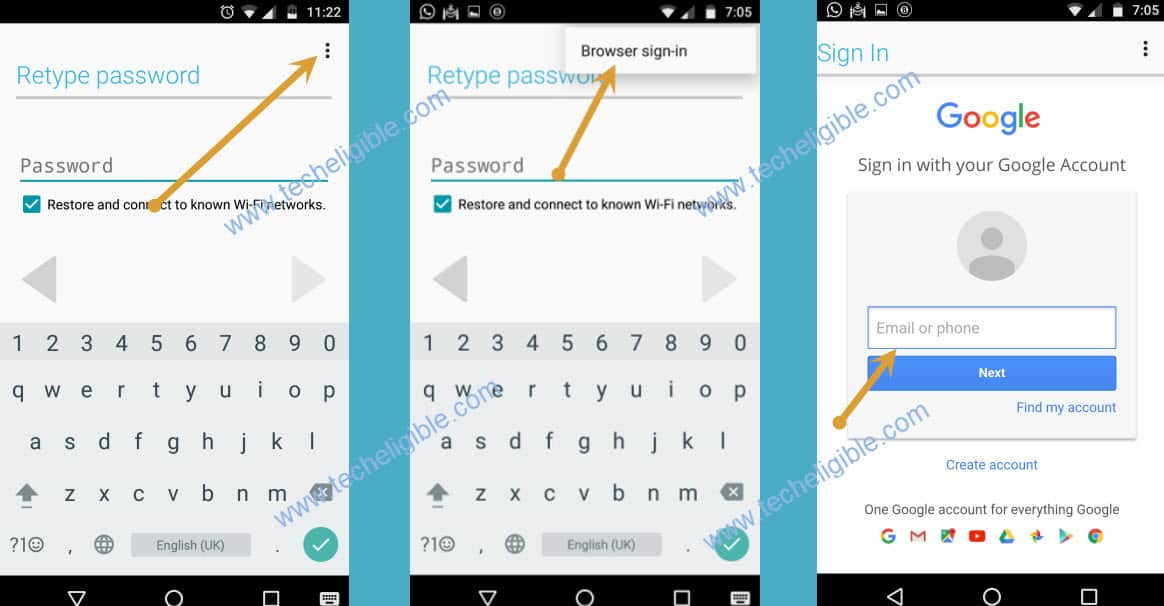
-Enter your any valid Gmail Account to Bypass FRP Samsung Galaxy Note 9.
-Restart Samsung Galaxy Note 9 device by pressing (Power Key), and select “Restart”.
-After that, complete initial setup to access your the main HOME SCREEN.
Relevant Methods to Bypass frp Galaxy Note Series:
♦ Galaxy NOTE 5 G920 Android 9.
♦ Galaxy Note 8 Android 8.0
♦ Galaxy Note 10 Plus N975F, N970F.