If you are facing a frp issue, then you can Bypass FRP Galaxy A9/A9 Pro easily just using 1 free tools. Which is (SamFirm Tool), with this free latest version software, we can resolve our issue and will login with our new Gmail ID. The Samfirm tool is the best tool to launch google chrome browser easily on a FRP protected device screen. Because, you have to access to chrome browser anyhow, from there, we can follow up further frp removal steps. Check out steps from here to fixup your device accessing issue on your own.
Disclaimer: We highly recommend you to apply this method only on your own device, if you are not owner of this device, or you found this from some where, you must return to its real owner.
Two FRP Bypass Guideline Available here:
| Method 1: Samsung Galaxy A9 2018 By Samfirm Software [Android 10] |
| Method 2: Samsung Galaxy A9 Pro By Realterm Software [Android 6] |
Method 1: Bypass FRP Galaxy A9 (2018) By Samfirm Tool
If you can’t remember your lost google account and facing google FRP on your Samsujng Galaxy A9. No worries! You can reach back to your device through FRP Remove Guideline on Samsung A9 using Samfirm PC software. With the help of this tool, launch google chrome browser. After that, you can easily setup pattern lock on this device to bypass frp account.
Before starting this process, you are required below list of tools.
⇒ SamFirm Tool V1.4.3 [Download]
⇒ Latest Samsung USB Driver [Download]
⇒ Other Android Device.
⇒ OTG + USB Cable.
Note: Above 2 tools (Driver + Samsung FRP Tools) will be used for PC.
Let’s Start Stepwise Guide to Bypass FRP on Samsung A9:
1. Download & install (Samsung USB Driver) in your computer.
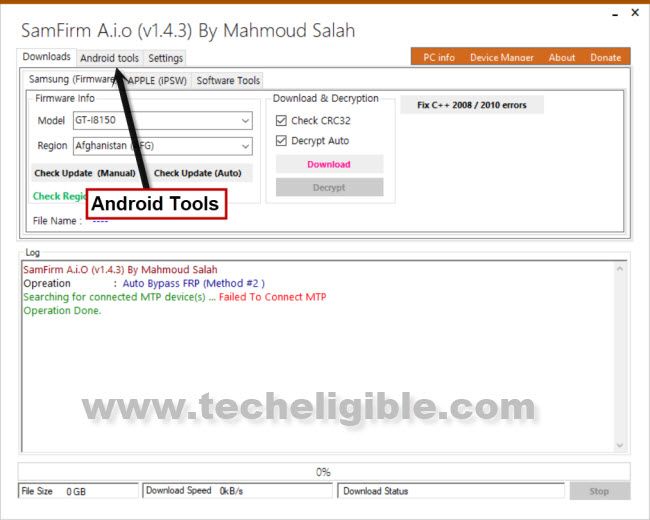
2. Open (Samfirm Tool) & go to “Android Tools” (See below image).
3. You have to connect WiFi first in Galaxy A9, otherwise you won’t be able to complete this process.
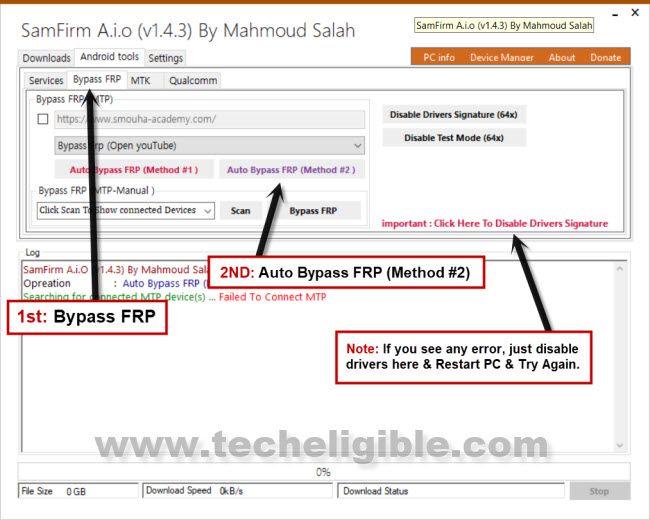
4. Now from SamFirm tool, just tap to > Bypass FRP > Auto Bypass FRP (Method #2).
Note: In case of any error, please click to “Disable Driver Signature” button, and then restart PC, and try again.
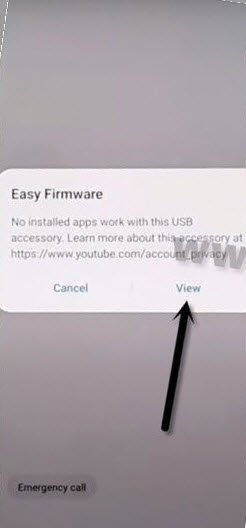
5. Tap on “View” to access YouTube website.
6. Hit on > Accept & Continue > Next > No Thanks.
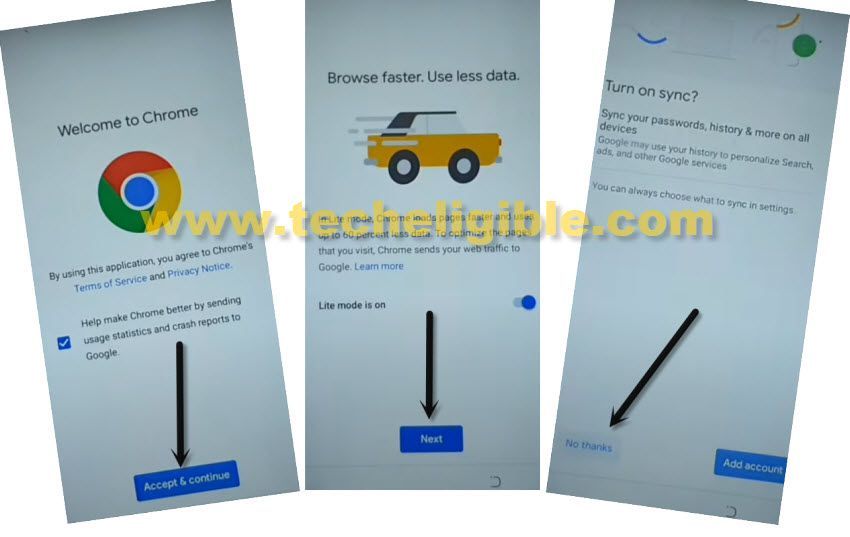
Open Google App on Samsung A9:
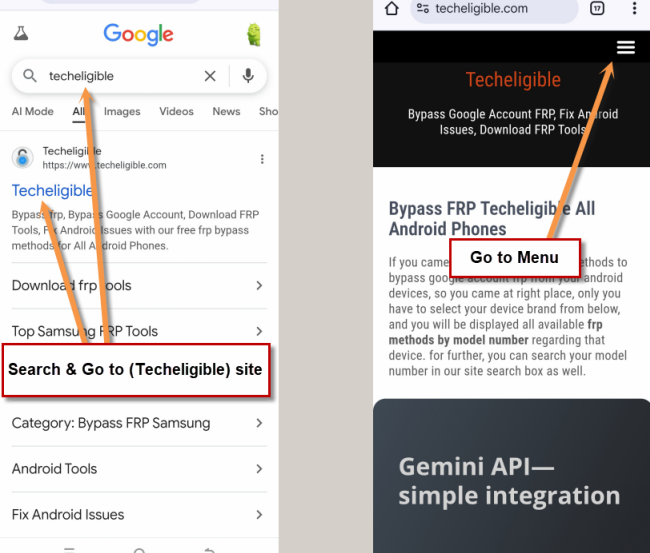
-Search in google chrome browser “Techeligible” and visit techeligible official site. Go to “Menu” option from top corner.
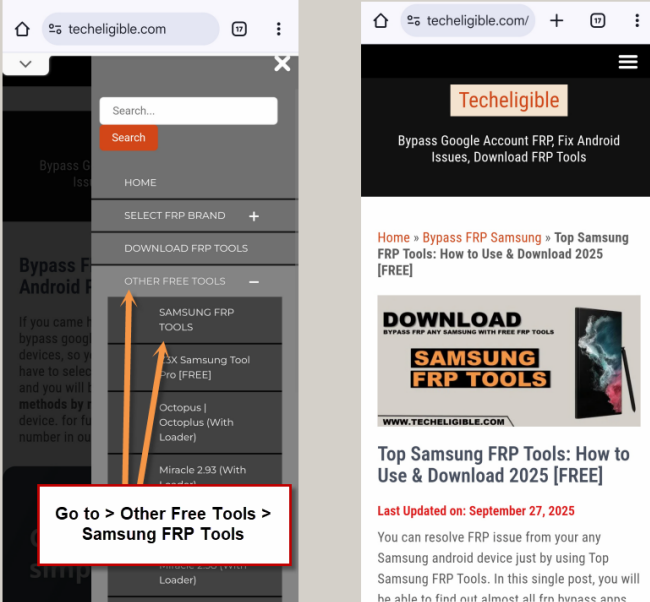
-Tap on > Other Free Tools > Samsung FRP Tools.
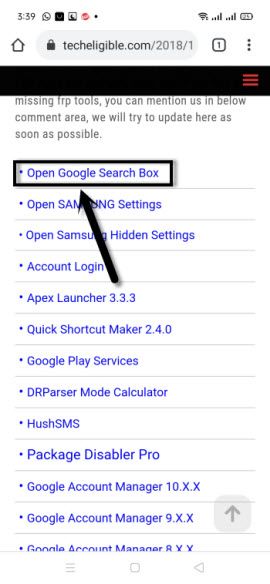
8. Scroll down and tap on “Open Google Search Box”.
9. Search in google search box “Galaxy St”, and tap on “Galaxy Store” icon from the searched result.
10. select “i have read and agree….”, and then tap to “Agree” option.
11. Tap to > Update > OK.
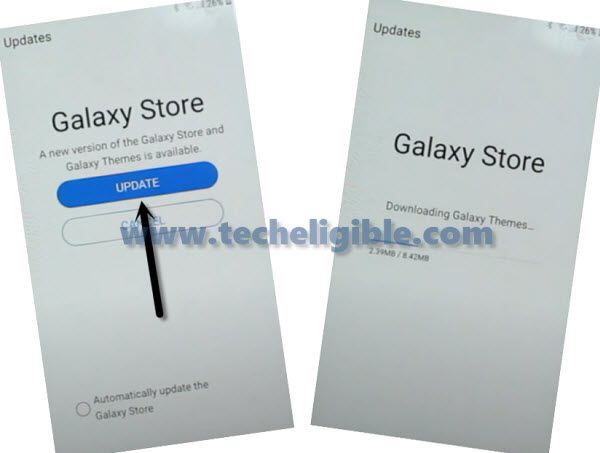
12. Once updating process completes, you will get back to first (Let’s Go) screen.
Access Back to Google Search BOX on Samsung A9:
13. We have to go back to google search box, and will open again (Galaxy Store), we are going to repeat all above steps.
14. Connect phone with PC, and Open “SmpFirm” tool, and using above lines, just receive the msg “View”.
15. Tap to > View > Accept > Next > No Thanks.
-We’re gonna search in browser with “Techeligible“. After that, go to 1st searched result from there.
-Tap on “Menu” option from top corner.
-Let’s hit over the > Other Free Tools > Samsung FRP Tools.
17. Hit on “Open Google Search box“.
18. Search & Open “Galaxy Store”, this time you wont face any updating screen.
19. In Galaxy Store, search there “Hidd Settings”, and then tap on the searched result “Android Hidden Settings (Quick Settings)”
20. Tap on “Download icon”, and then you will see Google Sign in screen there, just enter your any valid Gmail Account to sign in and for Bypass FRP Galaxy A9.
21. After entering Gmail ID and Pass, just hit on “Sign in” button.
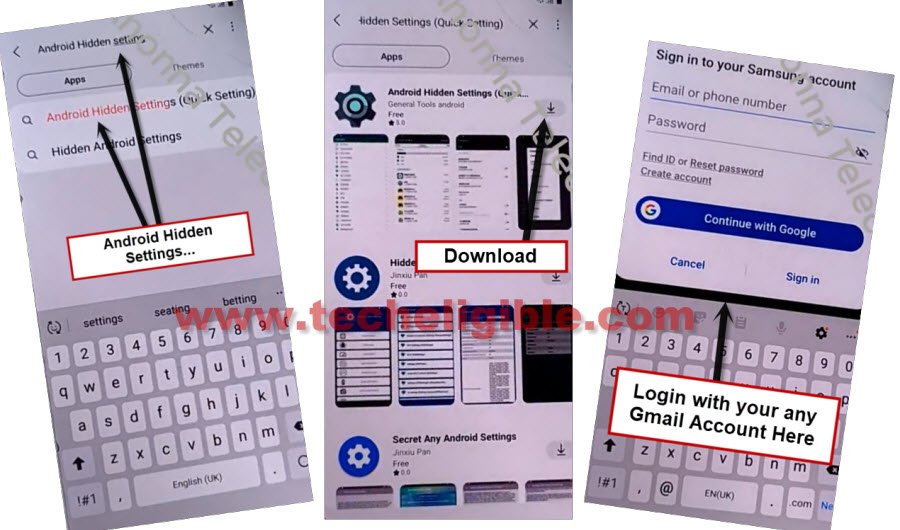
22. Wait until downloading process done, after that, open “Android Hidden Settings (Quick Settings)”.
22. Tap “search icon” from top right corner, and search there “Screen Lock”, and then tap on “Choose Screen Lock” from searched result.
23. Setup new pattern by hitting on > Pattern > Continue > Set new pattern lock.
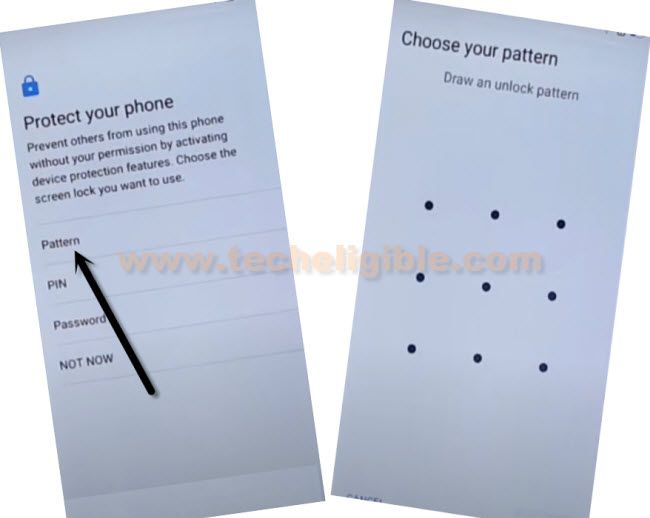
24. Get back to new “Let’s Go” screen by hitting at back arrow several times.
25. Finish initial setup, and you will not receive any previously synched Gmail account, because you have already added new google account for Bypass FRP Galaxy A9 (2018) Android 10.
Method 2: Bypass FRP Galaxy A9 Pro Using Realterm Software (Android 6)
This method is for Galaxy A9 Pro version 6.0.1 and also for Samsung Galaxy A8. In this frp bypas guideline, we will use (Realterm software). Through this software, you can make call to any emergency number from your device and reach to (Message box) directly. After that, open google chrome browser and download Samsung free frp apk apps. Follow steps by sptep guide from below.
-Insert an Activated “SIM Card” in your device, restart your device after inserting SIM card.
-Firstly, you have to download frp removal applications in your PC.
-Open google chrome browser in your PC. After that, search there with “Top Samsung FRP Tools Techeligible“.
-Go to first searched result same as shown in below image.

-Now open web browser and type there on google search, and hit 1st search result from there as shown in below image, and download these some below files into your Computer/Laptop.
⇒Samsung USB Driver [DOWNLOAD]
(Extract from winrar, and install USB Driver)
⇒RealTerm: Serial/TCP [DOWNLOAD]
(Extract and Install realterm into your PC, uncheck both option “Read me, register” will appear at the end of installation of this software.)
-Once your downloading finish, you have to install these both software into your PC.
-Open “Realterm” tool as an administrator, you have to right click on “Realterm” icon and open with as an administrator.
-Right click on “My Computer” icon from your desktop, and then click on “Manage”, after that, click on “Device Manager” from left side bar as shown in below.
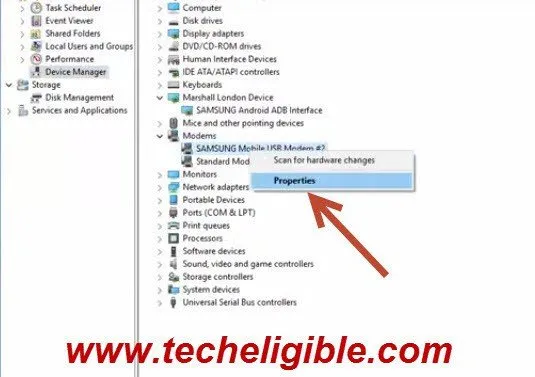
-Connect your Samsung Galaxy A9/A9 Pro device via Data Cable with your computer. After that, you will have a your Samsung Port will appear under (Modem).
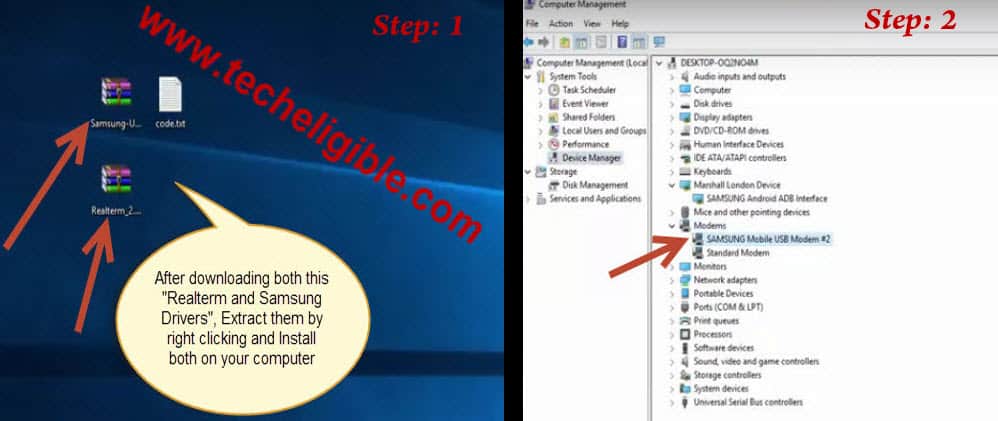
-Once you got this same “Samsung Mobile USB Modem”, make right click on that and go to “Properties”.
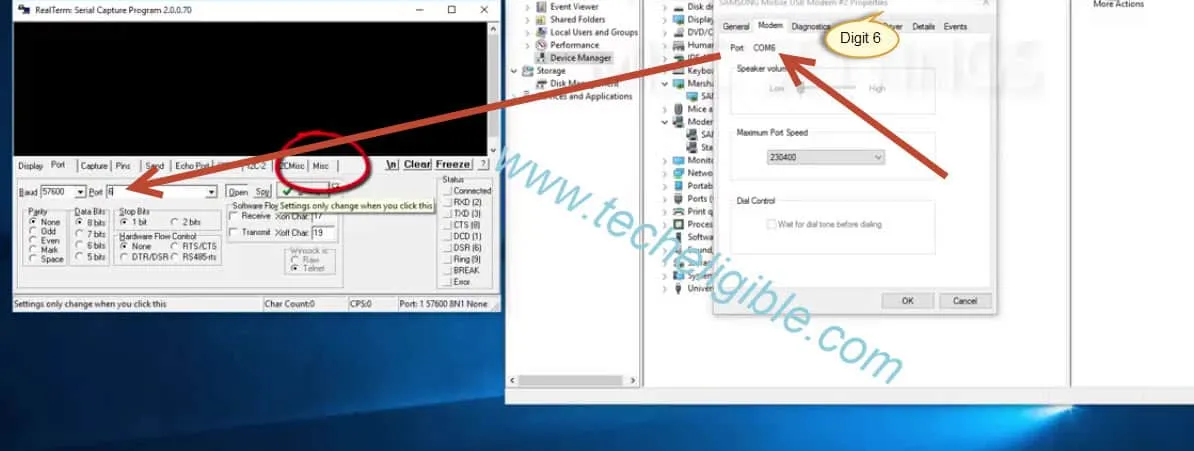
-Once the properties screen appears up, just go to “Modem” tab from and not down, what digit is being shown there. In below image, there is a (COM 6), means, we have to put “6” digit in realterm tool (Port). See below image.
-After that, go to “Misc” tab from realterm window.
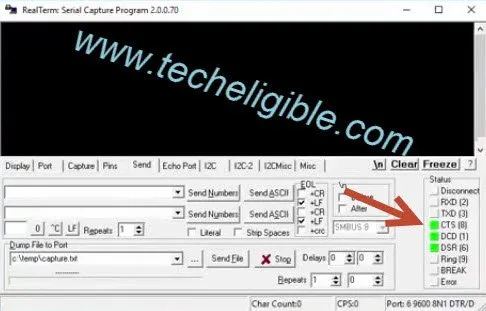
-Go to “Setup” from left side in realterm, and three “3 Green lights must be ON”.
-You have to copy this command at+creg?\r\n and past into realterm and click to “SEND ACSII” button from the realterm software.
-Now do same process again, copy this command also atd198;\r\n and past into same place where you pasted 1st command before and click to “SEND ASCII“.
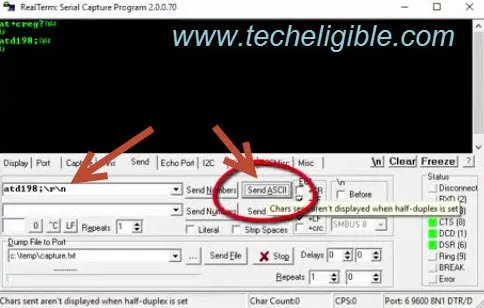
Remember: 198 is the customer number in this command, you can replace this customer number with your own country SIM “Customer Number”, this command is being used because it will make auto call from your mobile to the given customer number, and then we will be able to bypass frp Galaxy A9/A9 Pro.
-Once the dialed call is picked up, you will get some extra options on your mobile screen. You just have to hit on a “Message icon”.

-After reaching to message app, just type there “www.google.com” url and send this as text message to your dialed customer number.
-Tap on your sending link googel.com, this will launch google.com for you in browser.
-Search there in browser with “Techeligible” and go to first searched result of our site to reach to site directly.
-From there, hit over the “Menu” icon and go to “Download FRP Tools”.
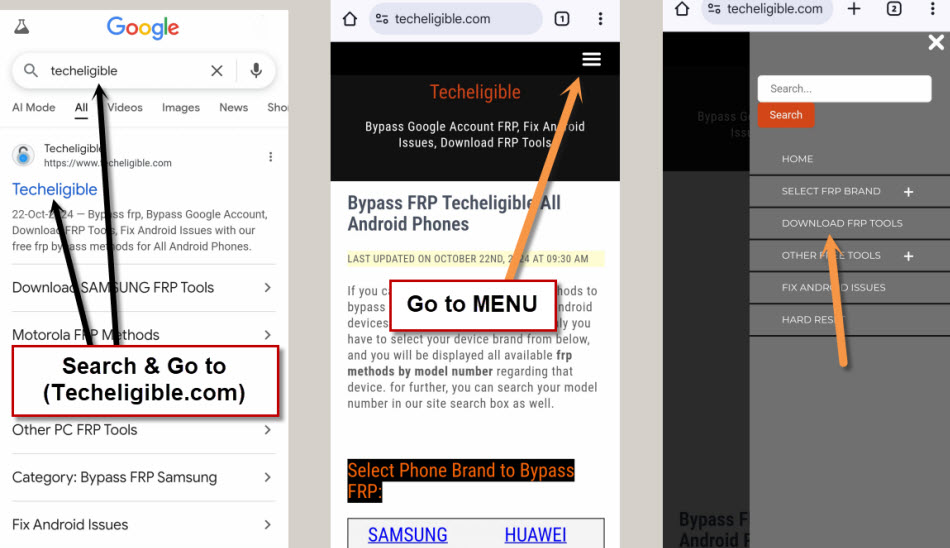
-Download below apps from there.
⇒Quick Shortcut Maker V2.0.0.0
⇒Google Account Manager 6.X.X
⇒Google Account Manager 5.X.X
⇒Google Account Manager 7.x.x
-After downloading all these files into your mobile to bypass FRP lock Samsung Galaxy A9 Pro, you have to open these downloading files, for that , you need hit “Back ‹” button on your mobile till reach the same option from where you sent message to “Customer Number”.
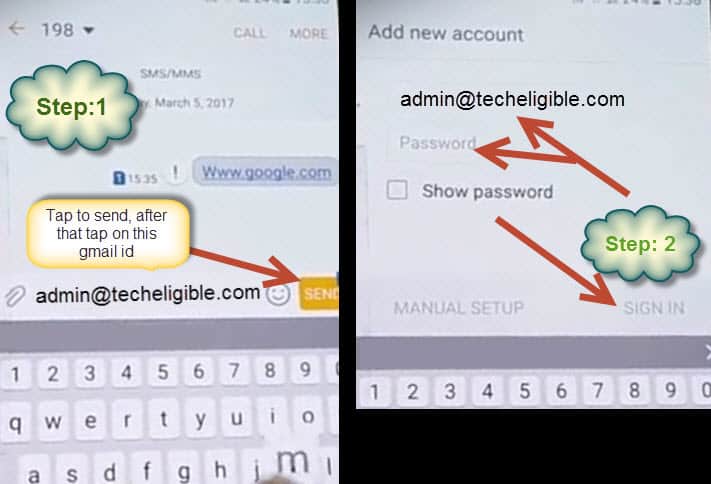
-Now there you have to type any gmail account like “[email protected]” and send this gmail to same customer number again, and then from message screen, tap on this gmail, and then you will be redirected to another window, where you will be asked to “Add new account”, there you can enter your any “Activated Gmail account”, and tap to “Sign in” from bottom right corner, then so on…
-Once you have successfully logged in to your gmail account, there you will be asked to send email on that given gmail id which we typed in message box, so on that screen, top of the screen, there will be one option of “ATTACH”, just tap on that and then you will several “Apps”, bottom of your mob screen, just choose “My Files” app from them, and then tap on “Download” folder, there you will be able to see all of your “Downloaded files”, now simple select those all files and tap to “Attach”.

-Once “Attachment Done”, you have to tap on each file from there one by one install into your mobile.
Help: If you get any “Block Installation” pop up there, tap on “Settings”, and turn on “Unknown sources” from there as shown in below image.

-Install Google Accounts manager, try with all versions those you installed (5.X.X, 6.X.X, 7.X.X), may be 6.0.0 version will be accepted.
-After installing the google account manager successfully, let’s install 2nd another app named “Quick Shortcut Maker”.
-Tap on > Quick Shortcut Maker > Install > Open.
-After reaching to quick shortcut maker app, just search there with “Google Account Manager”. Tap to down arrow icon from searched google account manager option. This will collapse down further and will show you huge list of google account managers.
-From there, choose one (Google Account Manager) that is appearing with (Type Emails and Password). After that, tap to “Try” option.
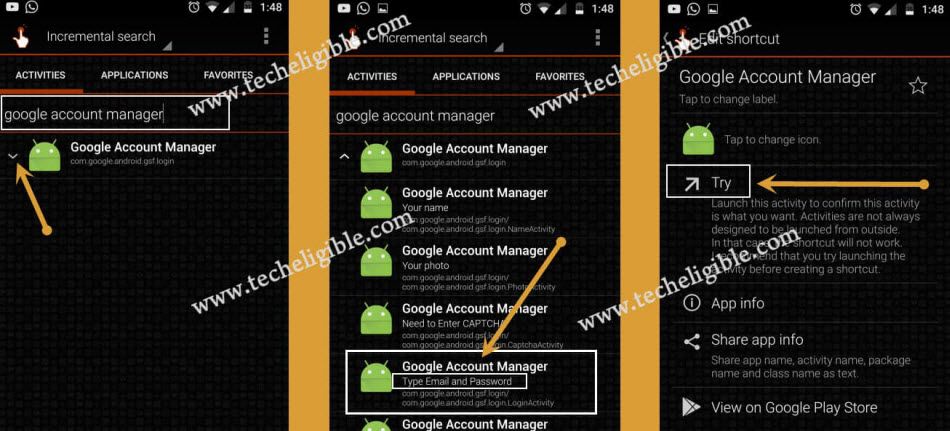
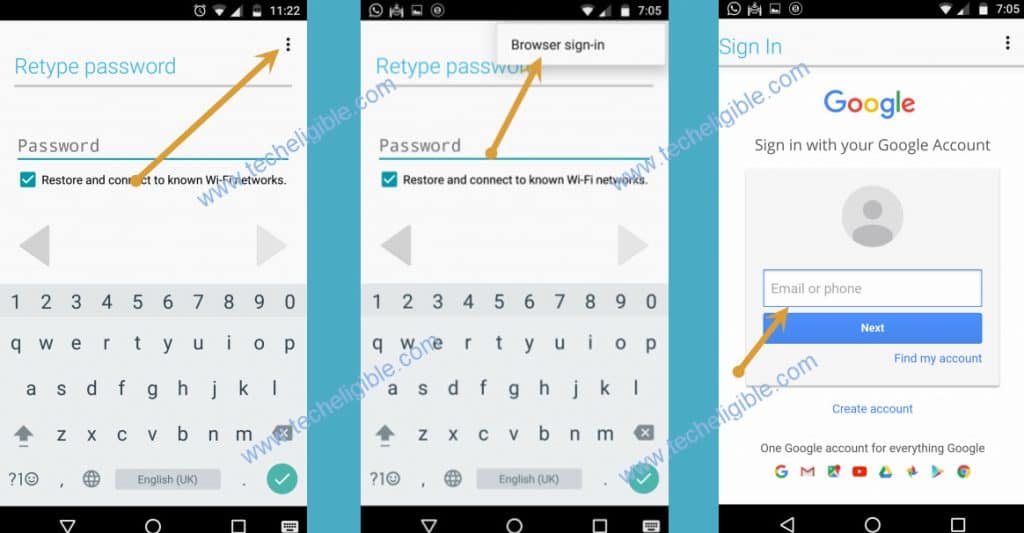
-Let’s setup new google account now by going to > 3 dots > Browser Sign in.
-Sign in there with any valid Google account to bypass frp Galaxy A9/A9 Pro.