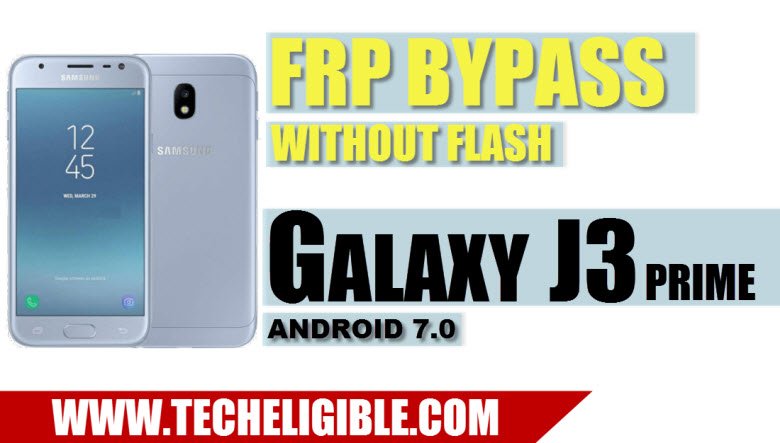
Experiencing issues on the Google sign-in screen? It’s possible you have inadvertently activated the FRP lock due to forgetting the Google ID associated with your FRP security lock. This can occur on the device when you carry out a factory reset. The FRP security lock feature is automatically enabled on all Samsung J3 prime devices that have a Google account already linked.
If you cannot recall that account, regaining access to your device will become challenging immediately after you execute a hard reset or factory reset. To resolve these challenges, you can utilize the method for bypass frp Galaxy J3 Prime (Android 7 versions).
Disclaimer: We are creating this post to educate people about how to get back their lost device due to forgetting Google account. This method is only for device owner and for educational purpose only.
Method 1: Bypass FRP Galaxy J3 Prime (Without PC)
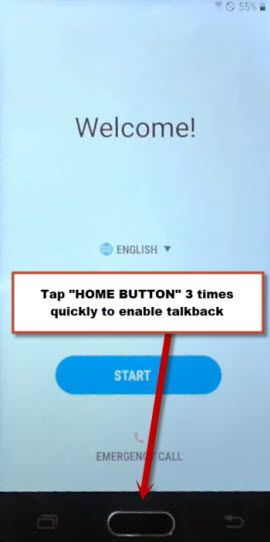
-Firstly, turn on the phone and connect to WiFi network. After that, go all the way back on the first (Welcome) page. From there, enable the talkback option just by quickly pressing 3 times the (Home Key).
-Once the talkback is enabled, you will surely have a (Talkback tutorial) page, from there, just swipe down and swipe right, this will bring up another popup screen. From there, double tap on “Talkback Settings”.

-Afterwards, from the next screen, turn on the “Single Tap activation” by double tap.

-Let’s swipe down and swipe right again. From the global context menu popup, simply, double tap “Text-to-Speech Settings”.
-On next page, double tap on “Settings icon”.
-After that, double hit on the “Settings for Samsung Text to speech….”.

Launch Samsung internet browser
-You will be taken on the (Samsung TTS Settings) page. On this page, double tap on “Version” number.
-Then, tap 3 times very quickly the “Home key” to disable talkback option.
-Simply, check mark the option (i have read and agree…..). The, tap on “Start”.

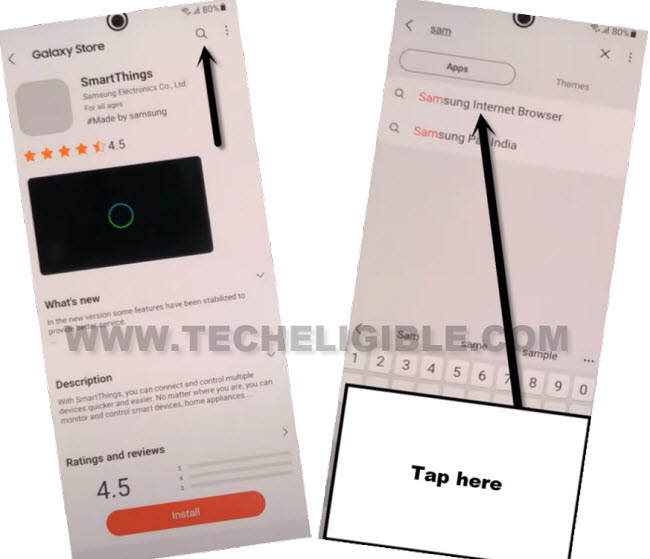
-You will reach at the Samsung store application. Just, tap to “Search” icon from upper corner and make search there with “Browser”. Then, from the searched result, tap on “Samsung internet browser”.
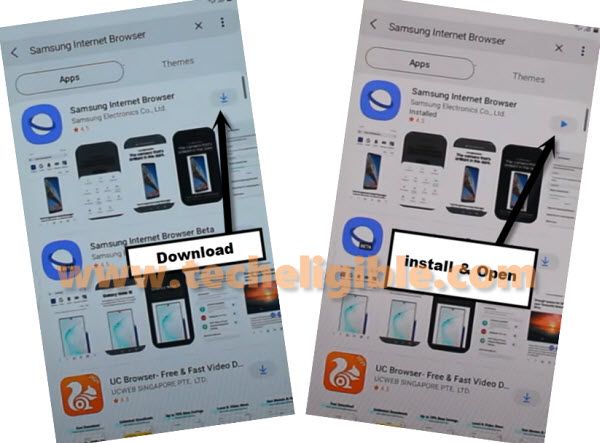
-Download & Install the (Samsung internet browser) on your phone.
-After installation is done, just open this app directly by hitting on open icon or option.
Download FRP Apps
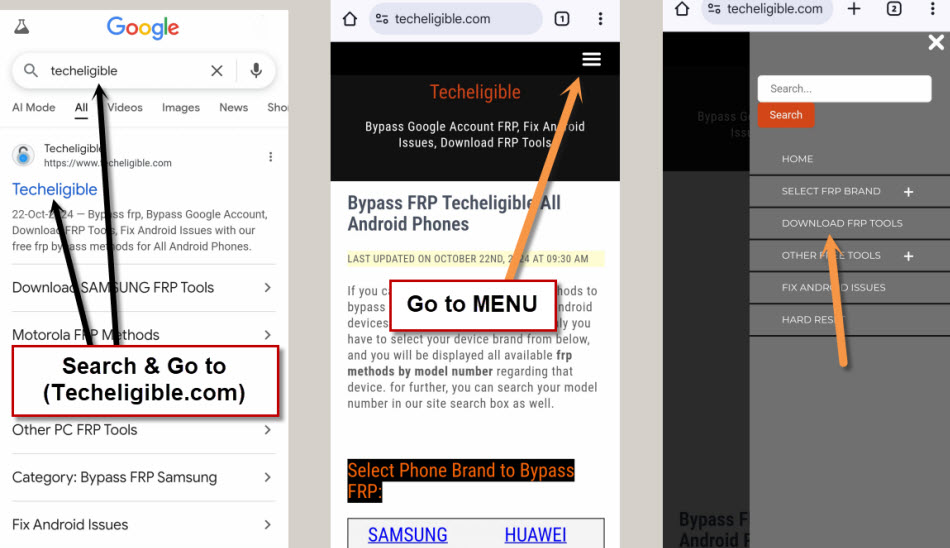
-You will be able to have a top search bar, just search there with “Techeligible“.
-Go on the 1st searched result of our official site.
-After accessing on the site, tap on “Menu” icon and go on the “Download FRP Tools” option.
-Scroll down from the frp tools screen and tap to option “Access device settings“.
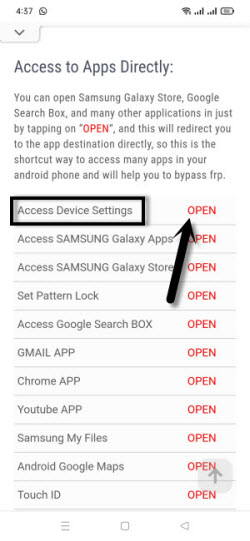
Access to Security Options from Settings
-We’ve to disable (Find my device) app from this phone. For this, go to security page by tapping at the > Lock Screen and Security > Other Security Settings.

-Then, tap at the “Find my device”. After that, just hi on “Deactivate”.

-Let’s get back to (Settings) screen. Afterwards, tap at the “Apps” option to reach inside the phone already installed app list page.

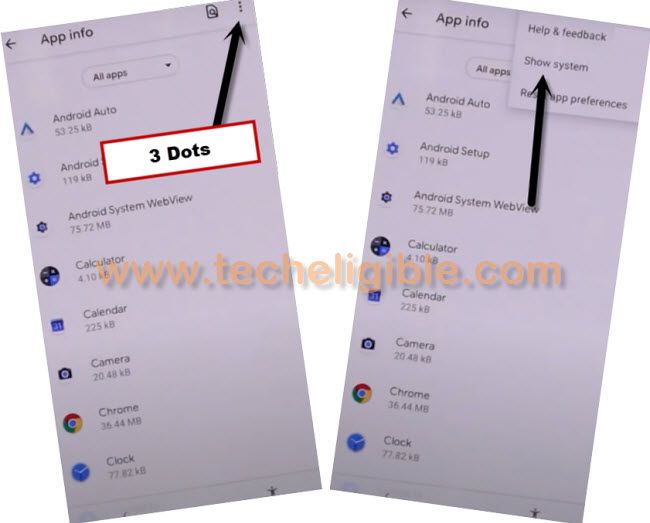
-Hit over the “3 dots” icon and choose “Show system” option.
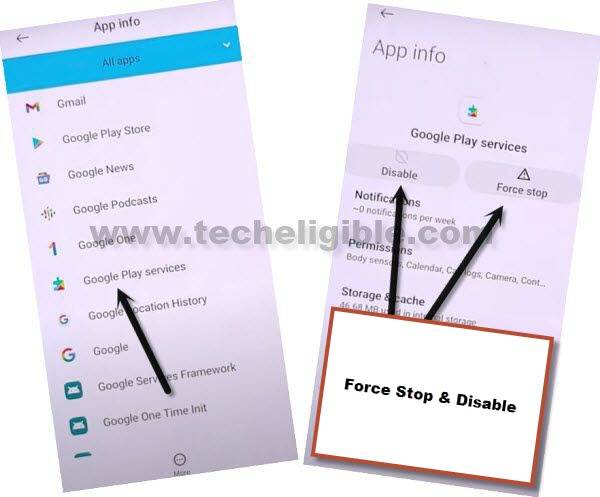
-From app list page, find and tap on “Google Play Services” application.
-You just need to hit on > Force Stop > Ok.
-Then, hit also on the > Disable > Disable App.
-We’re gonna download (Google Play Services) application manually. For this, tap 1-2 times on back arrow icon from bottom to reach back to techeligible official frp tools sceen.
-Then, download from there an application “Google Play Services”
-After you download this app, simply, hit on “Menu” option from Samsung browser bottom bar. After that, tap at the “Downloads”.

-Let’s hit on the downloaded app “Google Play Services”.
-You will be shown a installation blocked popup window, from there, hit on “Settings”. Then, turn on the “Unknown Sources”.
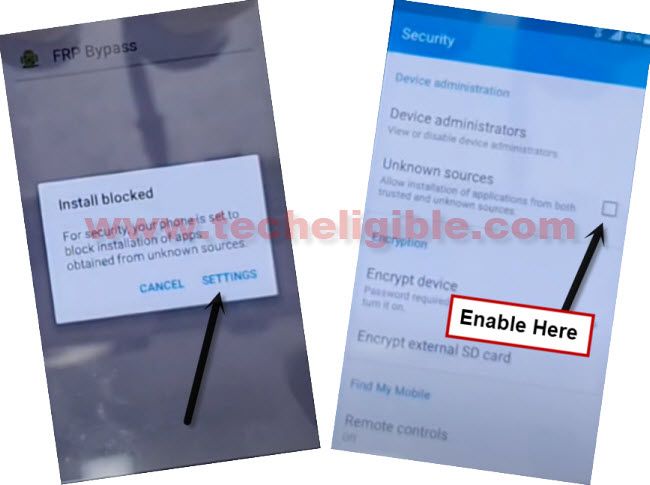
-Let’s get back to app installation page, and tap to > Install > Next > Done.
-Go back on the frp tools page. From there, hit again on the “Access device settings” to reach to your phone primary settings screen.
Login another Google Account
-We can setup another Gmail id now on this device. Once the new account is setup, you are all done from frp unlocking critical process.
-Let’s tap to > Clouds and accounts > Accounts > Add accounts.

-From the list of social icons, tap at the “Google” icon.
-Then, sign in with your valid google account credential.

-Get back on main (Settings) page again. After that, tap on the “Apps”.
-We are gonna enable again the google play services application. For this, hit on “All Apps” and tap to “Disabled” option. This will show you your recently disabled app.
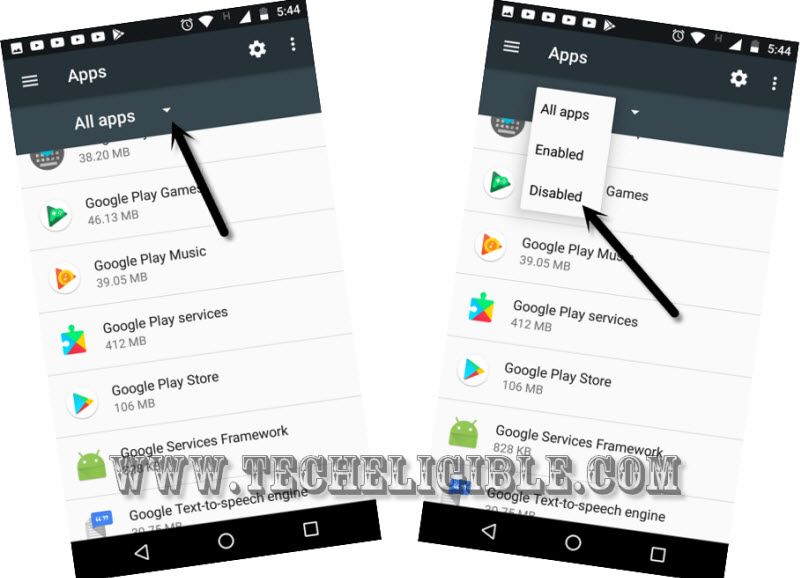
-You just need to enable back the (Google Play Services) application.
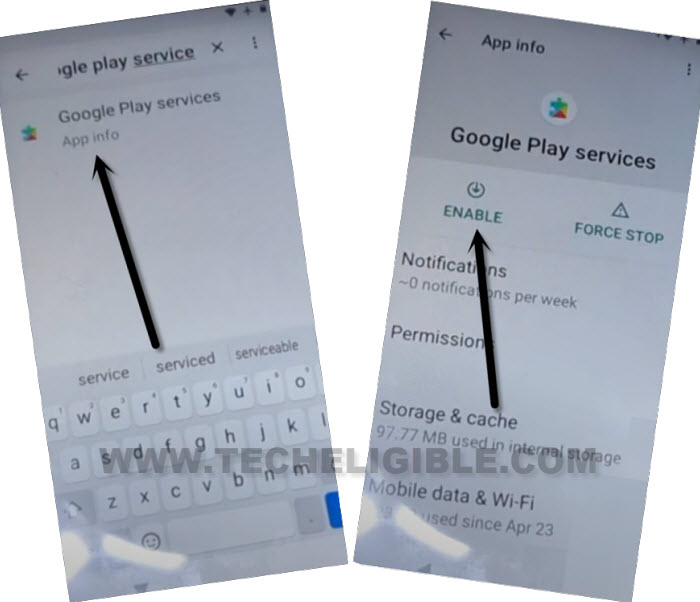
-Return to the phone primary settings screen, from there, tap again on the “Lock Screen and Security”.
-Then, go to “Other Security Settings” option.
-Then, simply, tap over the “Device Administrator”.
-Afterwards, hit on the > Find my device > Activate.
-Let’s return on the main (Welcome) screen by tapping on the (Back Arrow) icon several times. From there, you can easily finish up the setup wizard steps on your own. Only, you may face several minutes waiting period on the (Just a sec…) loading screen.
Method 2: Bypass FRP Galaxy J3 Prime (With PC)
On a FRP locked protected phone, we will enable talkback, after that, access to youtube webpage. From there, we will launch chrome browser to download (Go Launcher Z) app. With the help of this launcher, we will access to our device main home-screen. After that, we will enable adb mode and use a PC Unlocking software for the frp unlock.
Follow Up Steps
-Switch on your J3 Prime device.
-Connect “Wi-Fi” first.
-Go back to very first “Welcome Screen”.
-Press 3 times “HOME BUTTON” quickly to enable “Talkback Feature”.
-Now you will have “Talkback Tutorial” screen right after you press “Home Button” 3 times rapidly.
-Draw “L” on your Talkback tutorial screen, this would bring “Global Context MENU” screen.
-Double tap on “Talkback Settings”.
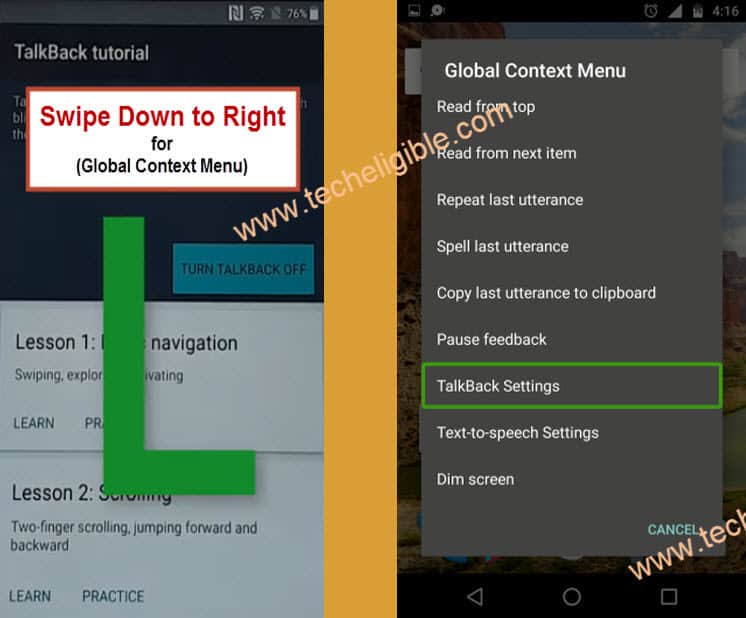
-Now disable “Talkback Feature” simply by pressing 3 times “Home Button” rapidly.
-Now you have “Talkback Settings” on your screen, go down and tap on “Help & Feedback”.
-Tap on “About Switch Access for android”.
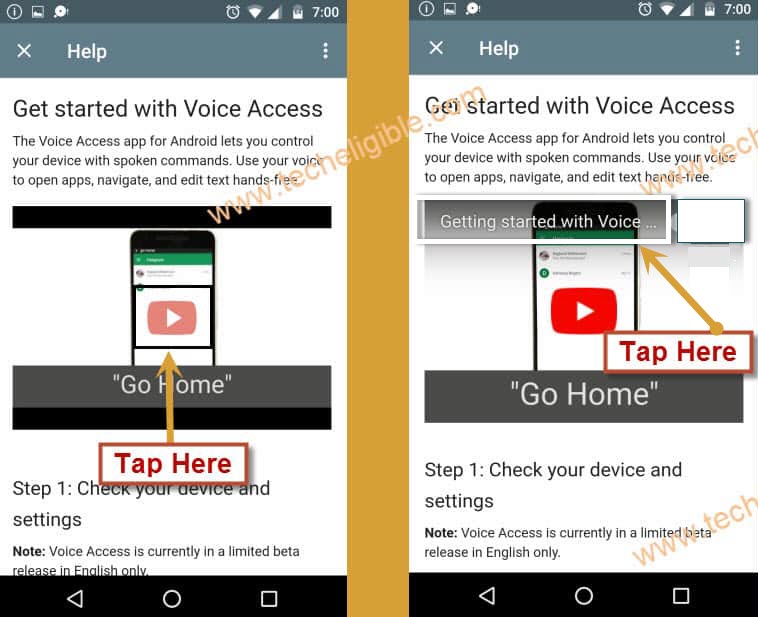
-Now tap on “Youtube Video”, and this will show you youtube video title.
-Just tap on “Video Title”, this would redirect you to the “Youtube Website”.
-Drag down youtube video, and then tap on “3 dots” from top right corner on youtube website.
-Select “Privacy Policy”.
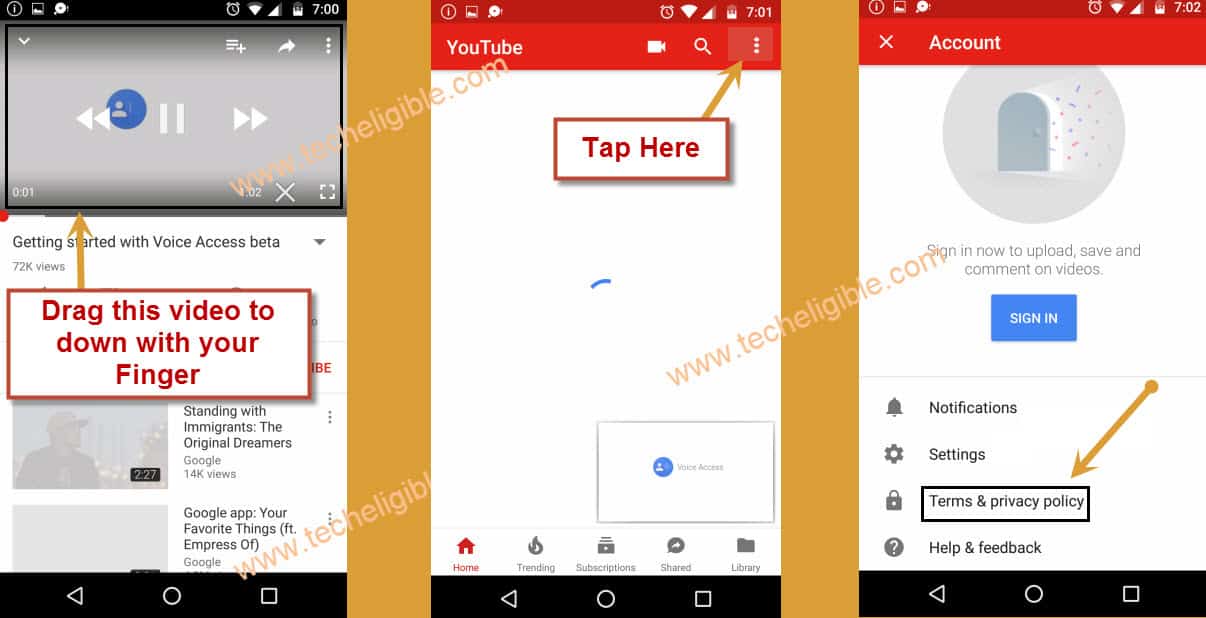
-You will have popup window on bottom of your screen.
-Select “Samsung Internet” from that popup window.
-If you see a popup message regarding “Update Samsung Internet”, just tap on “Cancel”.
Congratulation, we have accessed to “Google Search bar”, now we can easily download application. how to do that?, follow below steps to download Go Launcher App, and then bypass google account just by enabling ADB Mode in your device.
Download Go Launcher & Enable ABD Mode
-Let’s go to techeligible site by searching in browser with “Techeligible“. After that, visit first searched result same as shown in below image.
-Afterwards, you have to hit over the “Menu” icon from top corner. Tap to “Download FRP Tools”.

-Go down, and download “Go Launcher Z” from there, and wait until downloading finish.
-Tap on “BookMark” from bottom bar of Samsung internet browser, and then go to “History”, after that, tap on “Download History”.
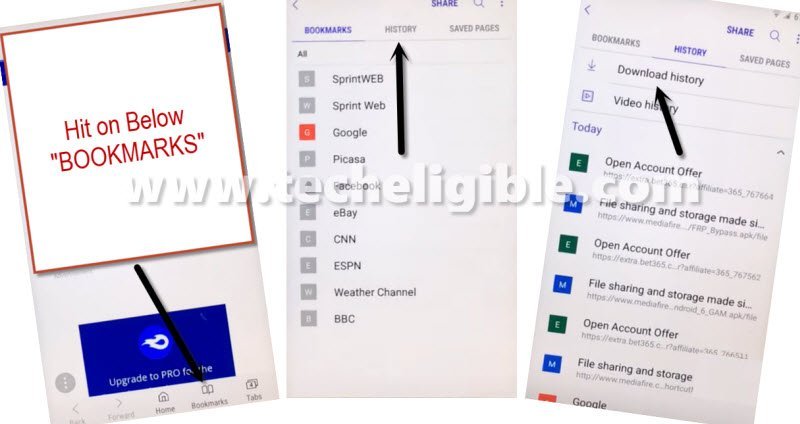
-Now you will be able to see your downloaded app “Go Launcher”.
-Tap on “Go Launcher“, and then select “Package Installer”.
-After that, you will see a popup message about “installation blocked”, just tap on “Settings” from that popup.
-Enable “Unknown Sources” from there.
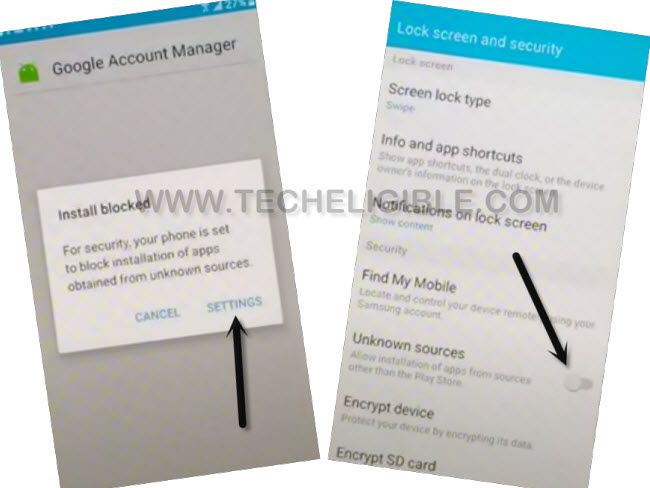
-Now tap on > NEXT > INSTALL > OPEN.
-Congrats, you’ve successfully accessed to phone main home screen, but still your device has frp lock protection. Let’s enable “ADB Mode” in our device to successfully bypass google account.
Enable ADB Mode
-Open Calculator.
-Type code there “(+30012012732+“.
-Now type “*#0808#*“.
-Select “DM+ACP+ADB“.
-Now tap on “REBOOT“.
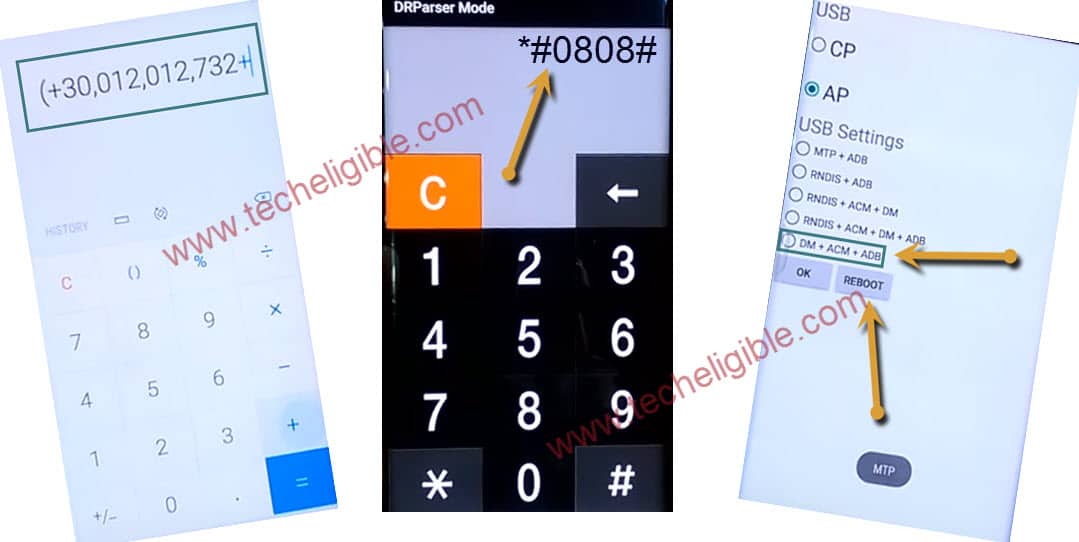
-Once your device reboot successfully, keep your device on “Welcome Screen”, make sure your device is on.
-Now, we need to connect our device to the computer, and then, we will download frp bypass application in the PC.
Download FRP Unlocking Apps
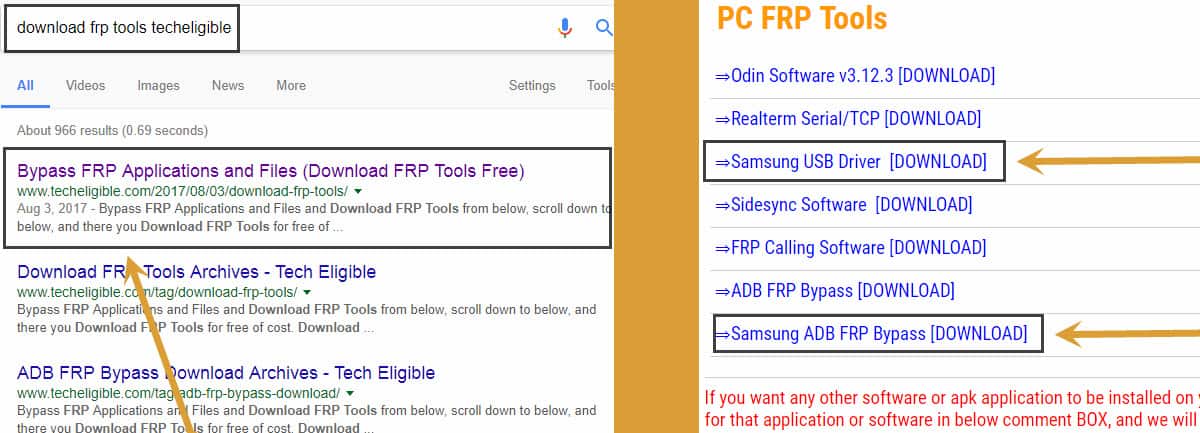
-Open browser in your computer.
-Type there “Download FRP Tools Techeligible“.
-Open first result same as shown in below image or tap to (Download FRP Tools) option directly from our techeligible site top menu.
-Download from there “Samsung ADB FRP Bypass“.
-Download also “Samsung USB Driver“.
-Turn off your computer “Antivirus”, otherwise you won’t be able to run downloaded application.
-Extract the downloaded file.
-Install “Samsung USB Driver” in your computer.
-Go to extracted folder “ADB FRP (Techeligible)”.
-right click on “FRP_Techeligible.bat”, and then run as administrator.

-CMD window will open on your computer screen, now we need to connect our device to computer.

Connect the Phone to Windows PC
-Connect J3 Prime to computer using micro usb cable.
-After that you will get a popup message of “Allow USB Debugging”, just tap on “OK”.
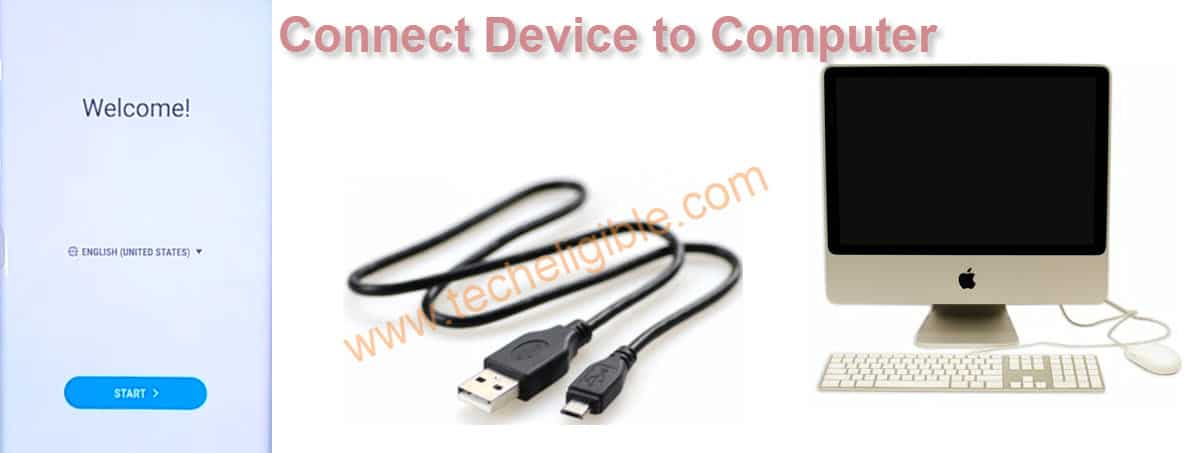
-Now “Press any key from computer” to start frp bypass process.
Note: You will have same below CMD window after you connect your device to computer.
-Now “Press any key to continue…“.

Remember: If you do not same window as shown above, so close your “CMD Window”, and again run as administrator, or also disconnect and connect your device to computer, and make sure you are allowing “USB Debugging” from your device.
-Congratulation, now you have successfully bypassed google verification.
-Complete initial setup to access your device home screen.
-This time you won’t be asked to enter previously synced Gmail ID.
FAQs
How to Perform Factory Reset or Hard Reset on Samsung J3 Prime?
For performing the soft reset on your phone from (Settings), just go to (General Management) option. After that, tap on (Reset) option. Finally, tap on (Factory data reset). If your device is locked or you are facing unresponsive screen, you can hard reset Samsung J3 Prime by going turning off the phone. After that, long press all keys Volume Up + Home + Power buttons. Keep holding the keys until you enter into the (Android Recovery) mode screen. From there, choose (Wipe data/factory reset) option. After that, choose (Yes) option.
How to Prevent from Facing the Google FRP lock?
Don't forget to write down your already synchronized Gmail account on Samsung J3 Prime phone before doing a hard reset or factory reset the phone.
Is it legal method to apply on J3 Prime for FRP Bypass?
Yeah, if you are legitimate device owner, then, this method is totally legal for you.
What is Talkback Function on Samsung J3 Prime?
This talkback function is used to assist blind guy to use Samsung J3 Prime device by listening. But, you can use this option on your J3 Prime FRP locked phone to remove frp.
Summary
In Method 1: We simply enabled the talkback function. After that, accessed over the Samsung internet browser to download frp bypass app. Then, we accessed to primary settings page of the phone and disable some functions. Finally, logged in with google account and completed the setup wizard steps.
In Method 2: We followed up below steps on our Samsung J3 Prime device to bypass frp account successfully with the help of PC software.
• Connect Wi-Fi.
• Enable Talkback.
• Access to Samsung Internet Browser.
• Download “Go Launcher Z”.
• Install & Open Go Launcher Z
• Enable “ADB Mode” by going to “Settings”.
• Reboot device & connect device to computer.
• Download “Samsung ADB-FRP Bypass” application in computer.
• Turn off antivirus, and extract the downloaded winrar file.
• Run file “frp-techeligible.bat” as administrator.
• Press any key to continue, after you press any key from your keyboard, this would remove frp lock.