Facing frp lock issue on your phone?, That happens because of factory reset the phone without remembering its logged in Gmail account. To fix this issue, you need to download & install FRP Bypass applications on your device. After that, we will be able to login with another Gmail account and complete bypass frp Samsung Galaxy M20 (Android 10,9, 8).
How FRP Feature Protect the Phone?
This FRP security feature will protect your device from being accessed by unauthorized individuals in any undesired scenarios. In instances where your device is misplaced or if your phone is taken or stolen, no one will be able to utilize your device merely by performing a factory reset. In fact, after executing a factory reset, access to the device will be completely restricted. It will be secured with FRP lock protection. Users will need to sign in again with the previously configured Google account to finish the Google verification procedure. This can solely be accomplished by the legitimate owner of the device.
List of FRP Function Benefits:
• Protect your device from unfamiliar individuals.
• Automatic FRP lock activation occurs upon logging in with a Google account.
• After performing a factory reset, only the owner is permitted to access the phone.
• It is simple to unlock FRP at any moment by deleting the Google account.
• FRP Lock is enabled immediately on a hard reset or factory reset phone.
Method 1: Bypass FRP Samsung Galaxy M20 (Android 10/9)
-Start the guide by switching on your Phone.
-Then, connect to WiFi network.
-After that, from the first (Let’s Go / Welcome) page, you have to take screen shot 3 times. We will show you step by step.
-Take 1st screen shot by pressing the keys (Volume Down + Power Key). From popup screen, tap to “Deny”.
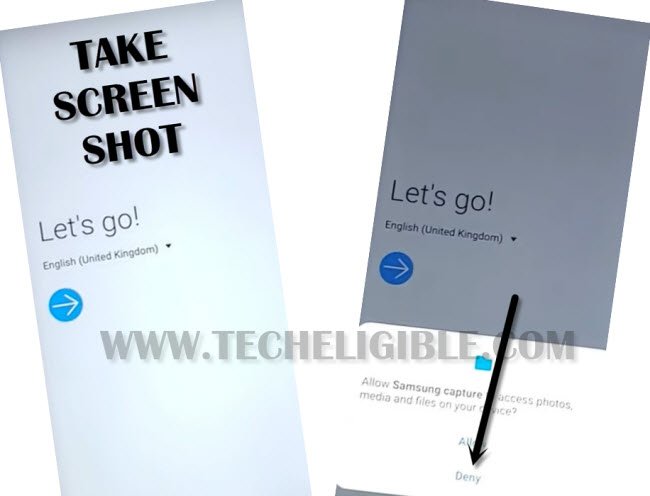
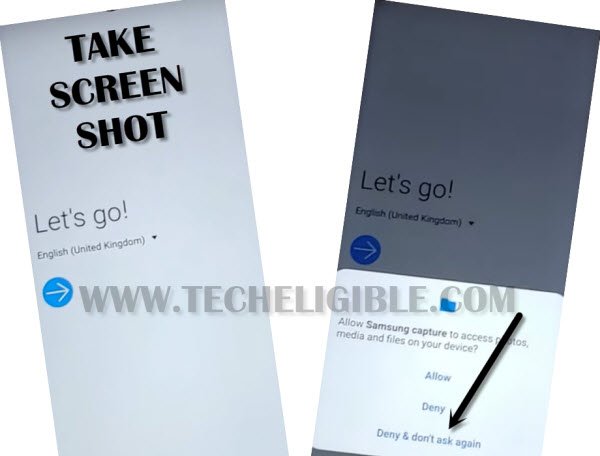
-Lets take 2nd screen shot by long press again the (Volume Down + Power key) at the same time. This time, from the popup screen, you just select the “Deny & Don’t ask again” option.
-You have to take the 3rd and final screen shot again, then, tap on the “Settings” option.
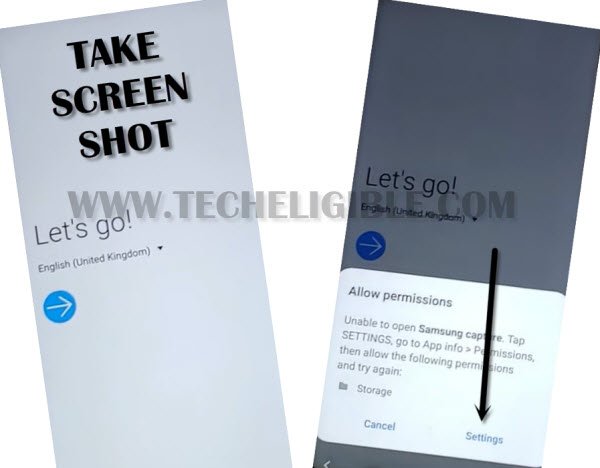
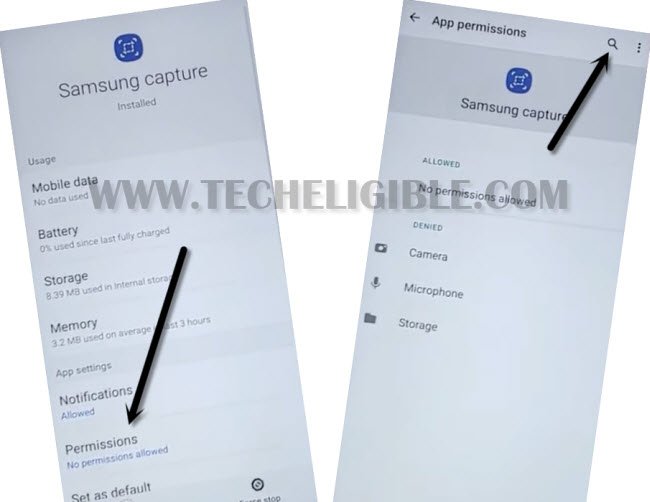
-Go to > Permission > Search icon
-You will be access over the (Samsung Capture) page, from there, simply, go to “Permission”.
-Then, hit over the “Magnifying glass” icon from upper corner.
-You just have to type “Google” in top search bar. Then, hit on the “Google app info” from the searched result.

-Simply, type these words “Set” and then, go to “Settings” gear icon from the searched result.

-From the settings page, just hit on the “Biometrics and security” option.

-Once you reach at the settings page, from there, we have to setup new PIN lock on this device, so that, we could easily setup our phone again without facing the google verification screen.
-Let’s tap at the > Fingerprints > Continue > PIN > Continue.
-After that, enter your any 4 digits PIN code and tap to “Continue” option.
-Re-enter same PIN and hit on “Ok”.

-Once the PIN lock is setup successfully, you will see same screen as shown in below image.
-To verify whether the PIN is setup or not, just press once the (Power) key to lock the phone. Then, press again (Power key) to unlock it, there, you will be asked to enter (PIN).
-You can restart the phone and setup it again.
Method 2: Bypass FRP Samsung Galaxy M20
Disclaimer: Do not try this frp method on a stolen phone, this is a serious crime, if you are trying to bypass frp on a stolen phone, you may also be jailed, this process is for device owner and for educational purpose only.
-First of all connect “Wi-Fi” to your Galaxy M20 device.
-Now go back to very first “START” screen by tapping on back key.
-Long tap with your 2 fingers until you get “Talkback Tutorial” screen.
Note: You may have to long tap with your 2 fingers for a minute, and you will surely get a popup window of “Talkback Tutorial”.
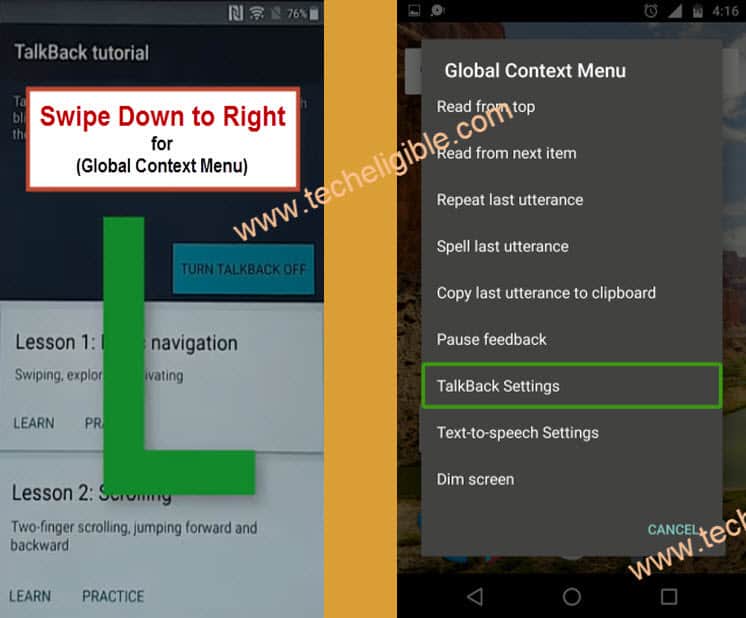
-Draw “L” by swiping down to right, and after drawing “L”, you will see another popup window of “Global Context Menu”.
-Double tap on “Talkback Settings”.
-After that, go down using your 2 fingers, and then double tap on “Talkback Tutorial”.
-Now double tap on “Turn Talkback Off”.
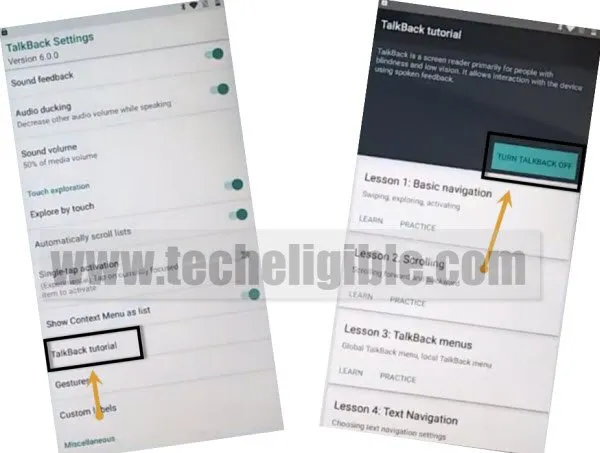
-After turning off talkback feature, you will be redirected back to “Talkback Settings”.
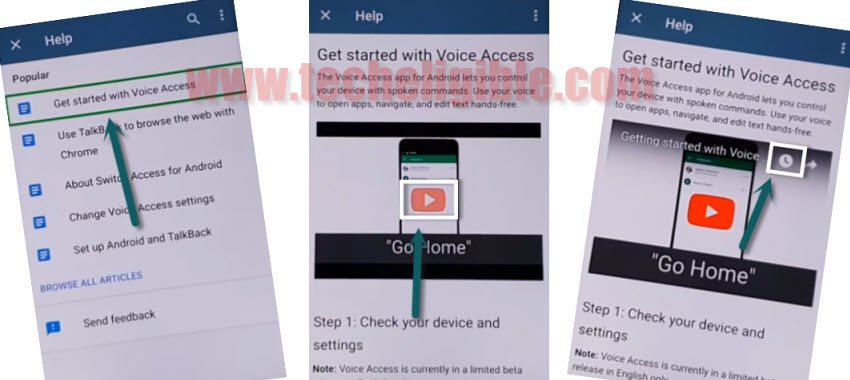
-Go down & tap on “Help & Feedback” option.
-Tap on “Get Started with voice access”.
-Tap on Youtube video “Play icon” and wait few seconds, after that you will get some more options on your youtube video.
-Just tap on “Clock icon” from the youtube top right corner.
-You will be taken to the “Welcome to Chrome” screen.
-Simply tap on > Accept & Continue > Next > No Thanks.
-Congrats, we have accessed to the chrome browser, and now we can easily Remove FRP Samsung Galaxy M20 just by downloading and installing frp bypass apk applications.
Download FRP Tools on Samsung M20:
-We have to download frp bypass applications on our android device.
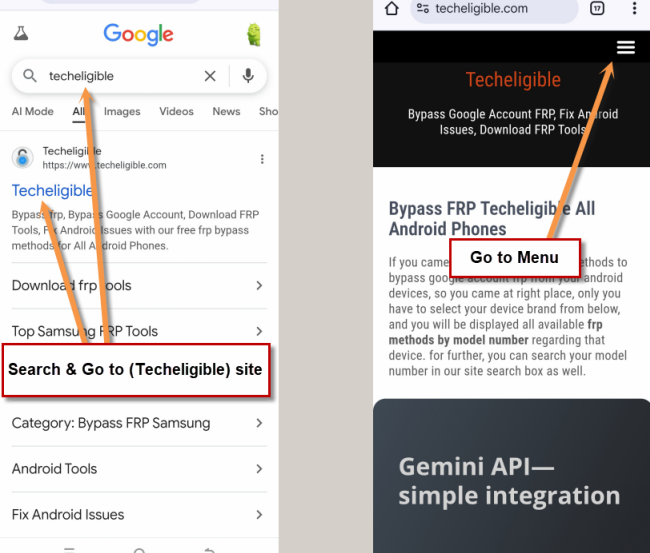
-Search in chrome browser “Techeligible“. Visit same searched result as mentioned in below screen shot.
-Tap to “Menu” option from upright corner of the site.
-Simply, go to “Other Free Tools” option from there. After that, tap to “Samsung FRP Tools”.
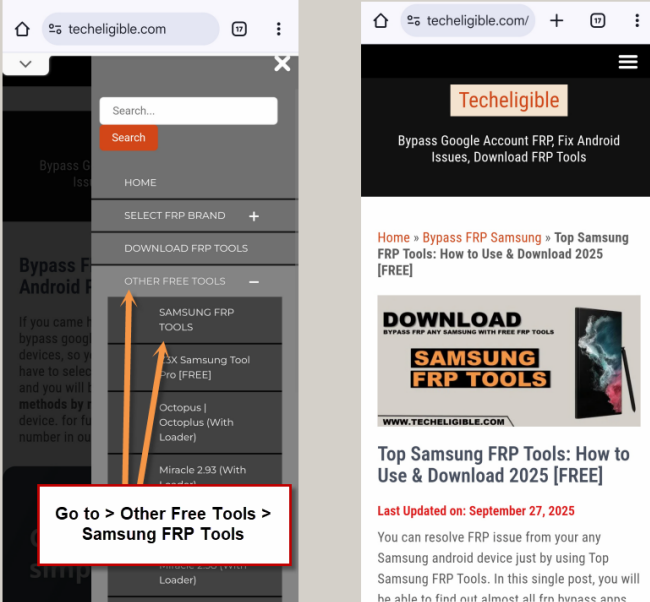
-Go down & download frp there “Apex Launcher 3.3.3” apk app.
-After downloading finish, you will see a popup window bottom of your browser, just tap on “OPEN”.
-After that, you will see chrome popup window, just tap on “Settings”.
-Enable the option of “Allow from this source”.
-Perfect, now tap on “Back Key” & tap on “Install” to install apex launcher 3.3.3.
-Once installation finish, just tap on “OPEN” to launch the apex launcher.
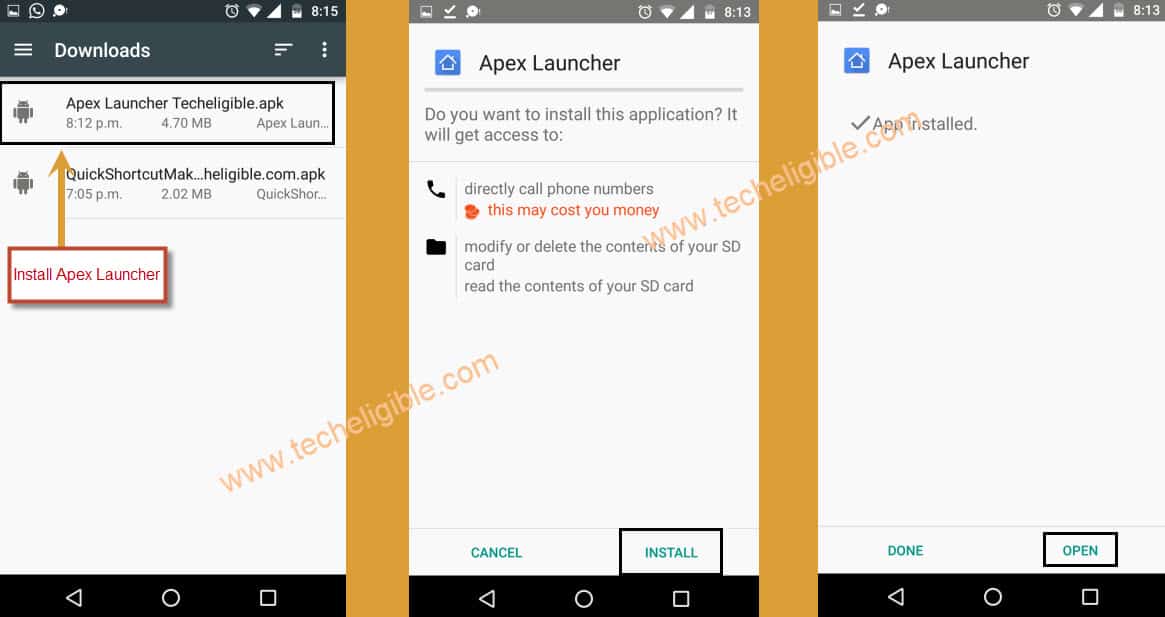
-Go to “MENU”, and from there open “Chrome Browser”.
-Type in search box “Google Account Manager Techeligible“.
-Visit first search result.
-Download from there “Google Account Manager 8.1“.
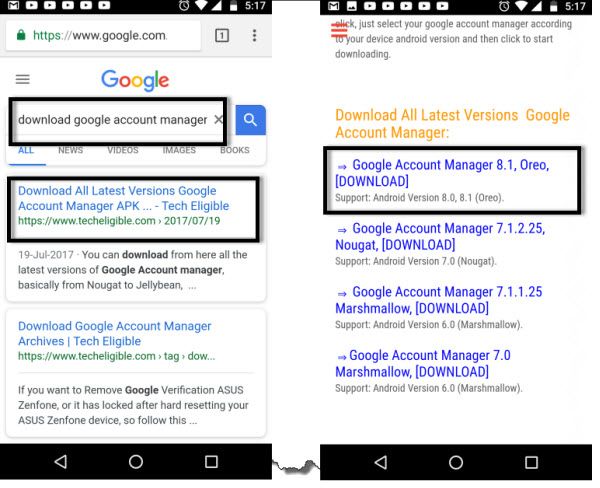
-Once downloading finish, you will see a popup window bottom of your browser, just tap on “OPEN”.
-Tap on “Install”, and after installation done, just tap on “DONE”.
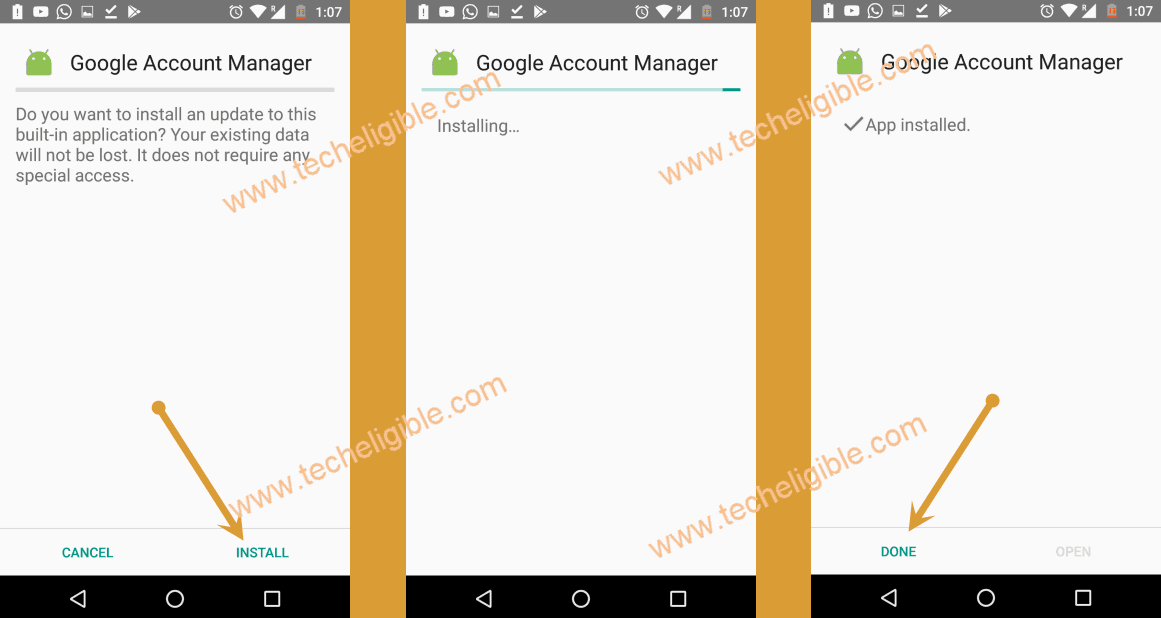
-Perfect, now we have successfully installed “Google Account Manager 8.1”.
-We need to download and install one more apk app, that will help us to Remove FRP Samsung Galaxy M20.
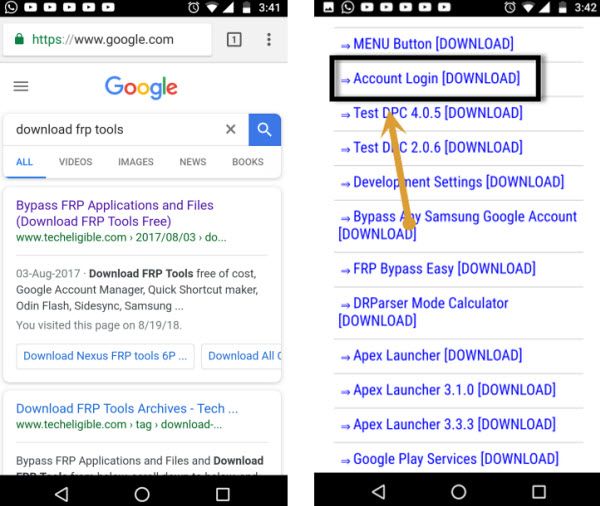
-Go to chrome search box, and type there “Download FRP Tools“.
-Visit first search result.
-Download from there “Account Login” apk app.
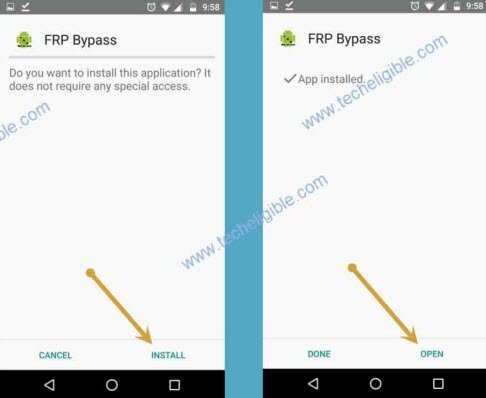
-After installation finish, just tap on “OPEN” from bottom popup bar.
-Install & OPEN “Account Login” app.
-here we go, we now you will be able to see “Retype Password” screen.
-Just tap on “3 dots” from top right corner & select “Browser Sign-in”.
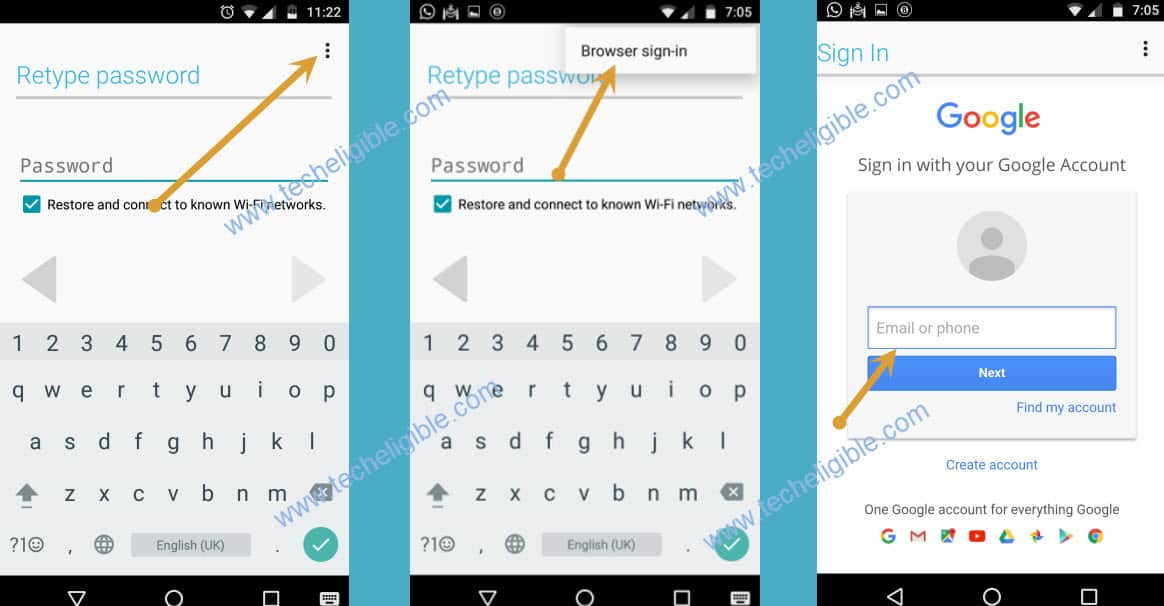
-Now enter there any valid Gmail account to bypass frp successfully.
-Once you signed in successfully, just restart your Samsung Galaxy M20 device & Complete initial setup.
-This time you will not be asked to enter any previously synced Gmail account, because you have already signed in your new Gmail account.
FAQs
How to setup google account on FRP Locked Samsung M20?
You will have to bypass the frp lock protection first. After that, access to main settings page of the device. From there, go to > Accounts & Backup > Add Account > Google.
How to Remove Google Account on Samsung M20?
Access to main (Settings) of the device. After that, scroll down from settings page and tap on (Accounts & Backup) option. Go to > Manage Accounts > Choose any account > Remove.
How FRP lock is triggered on Samsung M20?
After performing factory reset the device without knowing its logged in google account. You will face google verification screen while completing the setup wizard steps. FRP occurs when you forget your logged in account after hard reset the device.
What is the uses of FRP Bypass Account Login APK App?
Through the (Account Login) app, you will be able login with your any other Gmail account on a FRP locked Samsung M20 for bypassing frp.
Conclusion
For bypassing frp account, we followed up a simple and free frp unlocking steps from above. We just enabled the talkback on Samsung M20 phone. After that, we opened google chrome browser to download frp bypass applications. With the help of frp bypass app, we successfully logged in with another google account on the FRP locked Samsung m20 device.
Read More: Galaxy M30 FRP Bypass (Android 10)