
Have you found yourself unable to access your Samsung frp locked device due to FRP protection after performing a hard reset? If you are experiencing this issue, it is likely that you have forgotten the Google account details that were configured previously on this device. The FRP feature is directly linked to the Google account currently synced with your phone. To safeguard the device against unauthorized users, this function activates and prompts you to go through a verification process by logging back into your Google account. If you are one of those users, then, follow up guide here to Bypass FRP Samsung J3 (Android 9,8,7).
Disclaimer: We are creating this post to educate people about how to get back their lost device due to forgetting Google account. This method is only for device owner and for educational purpose only.
Method 1: Bypass FRP Samsung Galaxy J3 [Android 9]
If you have got frp protection on your own Samsung J3 Android 9 phone, then you are recommended to follow our this new process to unlock frp. We will use pin locked sim card, and by using some new steps we would easily access to chrome browser. Follow all steps with fully conscious.
Let’s Begin this FRP Removal Procedure
-Start this process by connecting WiFi first in your galaxy J3 device.
-Go back to “Let’s Go!” screen.
-From there tap on > Next Arrow > Next > Skip this for now > Next.
-You have access to the screen of “Choose a Wi-Fi Network”.
-Here, we will use our active 4 digits pin locked SIM Card, you can set 4 digits pin lock in your SIM using with any other android phone, so we have to follow below steps very quickly, otherwise you will fail to get top bar menu, you may have to try below steps multiple times, because at 1st try you wont succeed, repetition will bring perfection.
-Insert any active pin locked SIM Card on your device.
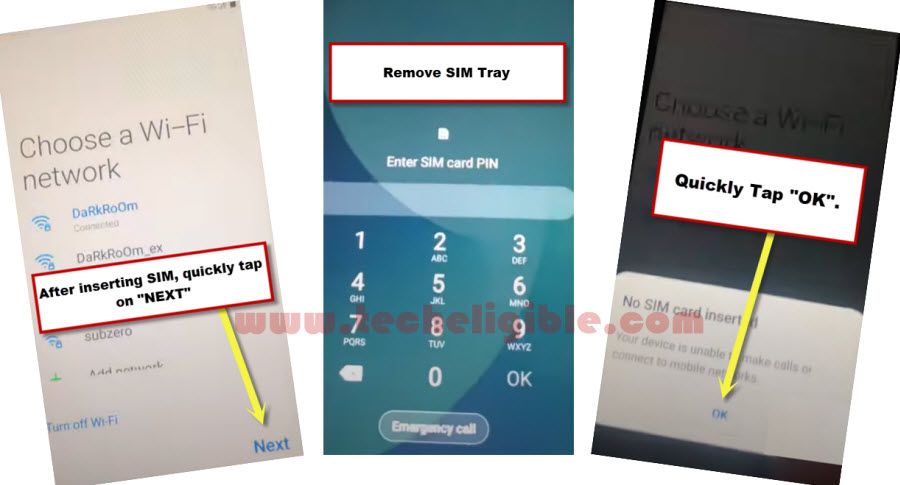
-After inserting sim card, quickly tap on “Next” option. (Don’t waste a second right after inserting sim card, just quickly press NEXT).
-Quickly remove SIM Tray after you see “Enter SIM Card Pin” screen.
-Quickly tap on “OK” from the popup window of (NO Sim card inserted).
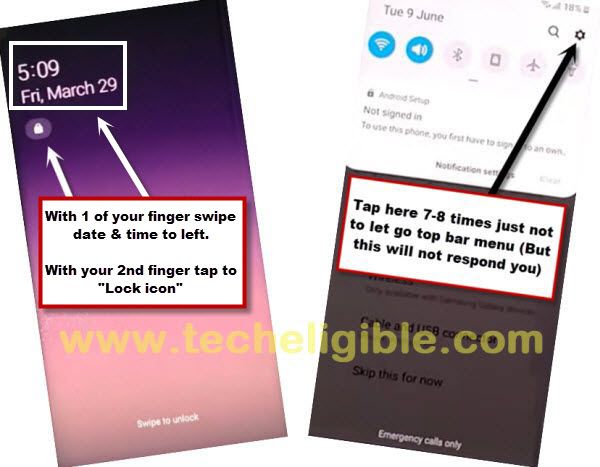
-Quickly Swipe the “TIME & Date” option to the left side & Quickly tap on “Lock icon”.
-By doing this it will bring Top Bar Menu.
-Now quickly start tapping on “Setting gear icon” from the top bar menu screen, by doing it will not allow top bar menu to be hidden.
-Now be relax, and tap on “Bluetooth icon”.
-Make pair with your any Pods or Bluetooth headphone.
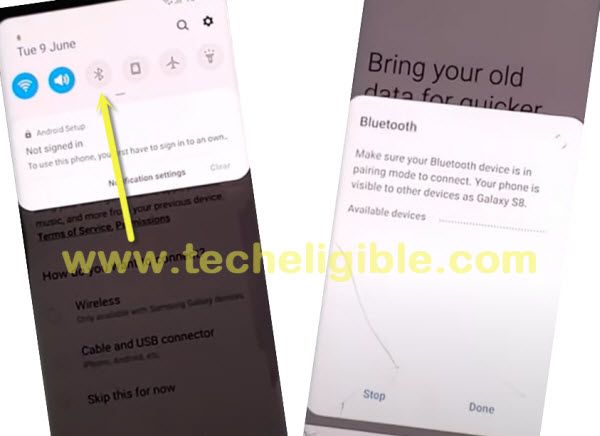
-After making pair successfully, just press power button 3 times from your Bluetooth pods or headphone.
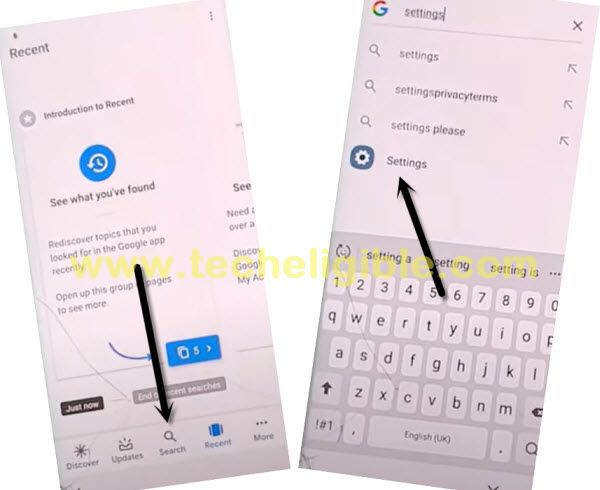
-This will open for you “Google app”.
-Type in search box “Settings”, and tap on “Setting gear icon” to get into your Galaxy J3 settings.
Enable Pin Windows
-To successfully Bypass frp, we need to enable pin windows.
-Go to > Security > Other Security Settings > Turn on “Pin Windows” option from there.
-Tap on “PIN Windows”, and from there, tap “Use screen lock type to unpin”.
-Now tap “PIN”, and then tap on “Continue” option.
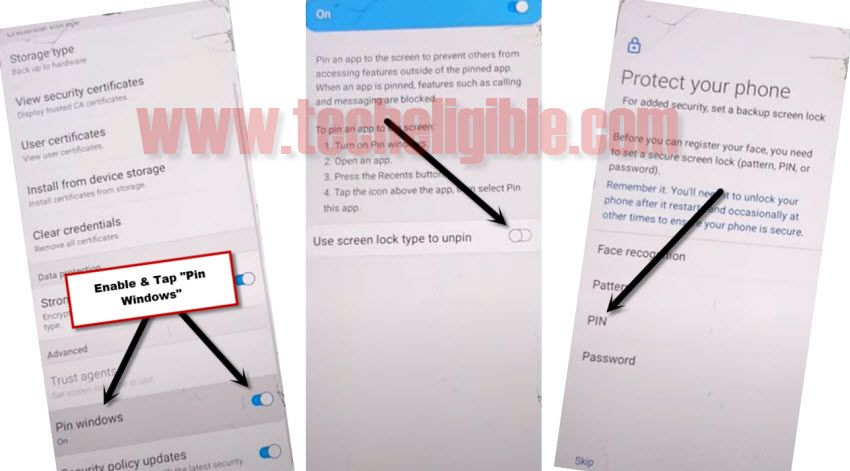
-Set your any desire 4 digits pin lock code, you can set “1234” pin lock code.
-After successfully setup pin code, just restart J3 phone.
-Remove your SIM Card & Complete Setup Wizard.
-After accessing to your phone, just go to > Settings > About Phone > Software info.
-Tap 7 times quickly on “Build Number” to enable developer options.
-Go back to “Settings”, and go all the way down, and then tap “Developer Options”.
-Enable option of “USB Debugging” from there.
While completing setup wizard, you will be asked for pin code, just give your already setup PIN, and when you see (Verify your Account) screen, from there just tap on “SKIP” option, do also connect WiFi while completing initial setup wizard, we hope this method worked for you very well, and do not forget to make comment below of this post.
Method 2: Bypass FRP Samsung Galaxy J3 [Android 8]
Insert any SIM card that has PIN locked, and then you can easily access to your device Home Screen, after that we will add new Gmail account to bypass google account, just follow all steps from below.
-Connect WiFi first & get back to first (Welcome / Start) page.
-Now insert any Active PIN Locked SIM card.
Note: If your SIM does not have pin lock, you can easily Set PIN Code using any other android device.
-Once you insert the SIM Card, you will see popup window of “Enter SIM Card Unlock PIN”.
-Lets enter your PIN code and tap to “Ok”. After that, quickly press the (Power) button to turn off your phone display.
Note: There should not be even mini seconds delay in pressing the “Power Key” after you tap on “OK”, so just quickly Hit on “OK”, and then quickly press “POWER KEY”.
-Again press “Power Key” to turn on screen, and you will see popup window of “Not Signed in”.
-Swipe the popup window to the left, and then tap on “Bell icon”.
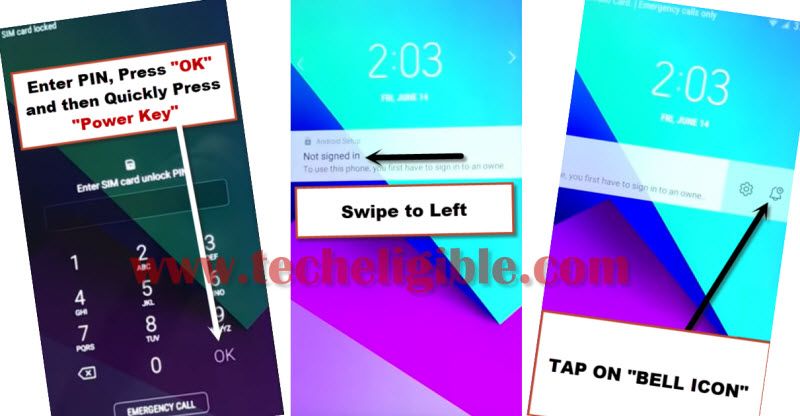
-Tap on “Notification Settings”.
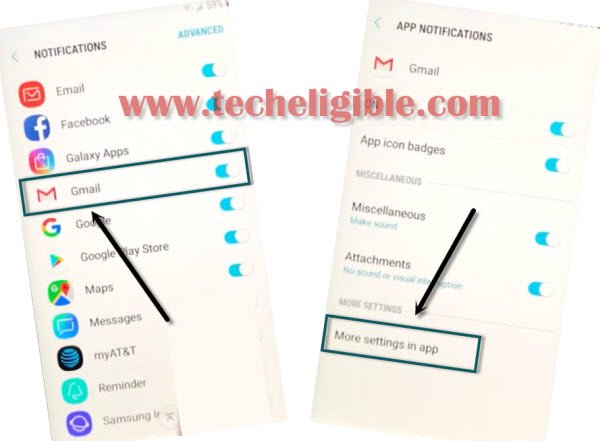
-Go down and tap on “Gmail”, and then tap on “More Settings in the app”.
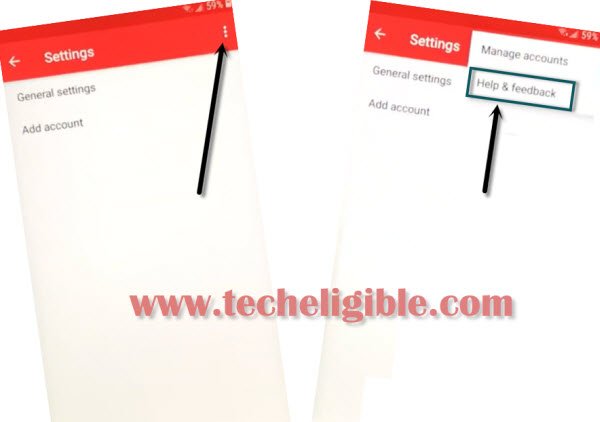
-Tap on “3 dots” from top right corner and select “Help & Feedback” option to bypass frp account.
-Tap on “Search icon”, and then type there “Use Morse code”, and then you will see the same search result, just tap on that.
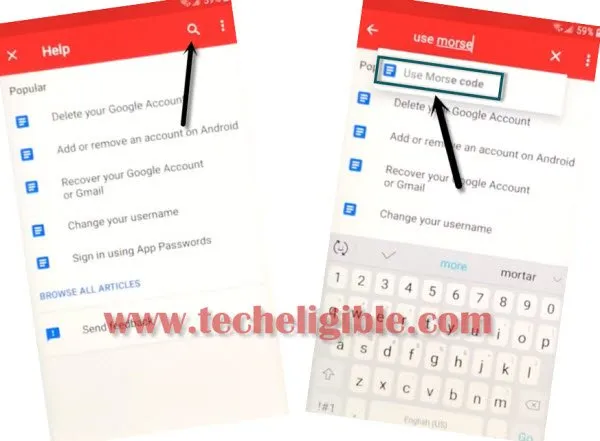
-After that, tap on “Video Play icon” and wait few seconds until you get some extra options on the video.
-Tap on “Share arrow”, and then tap on “3 Dots” to access youtube.com.
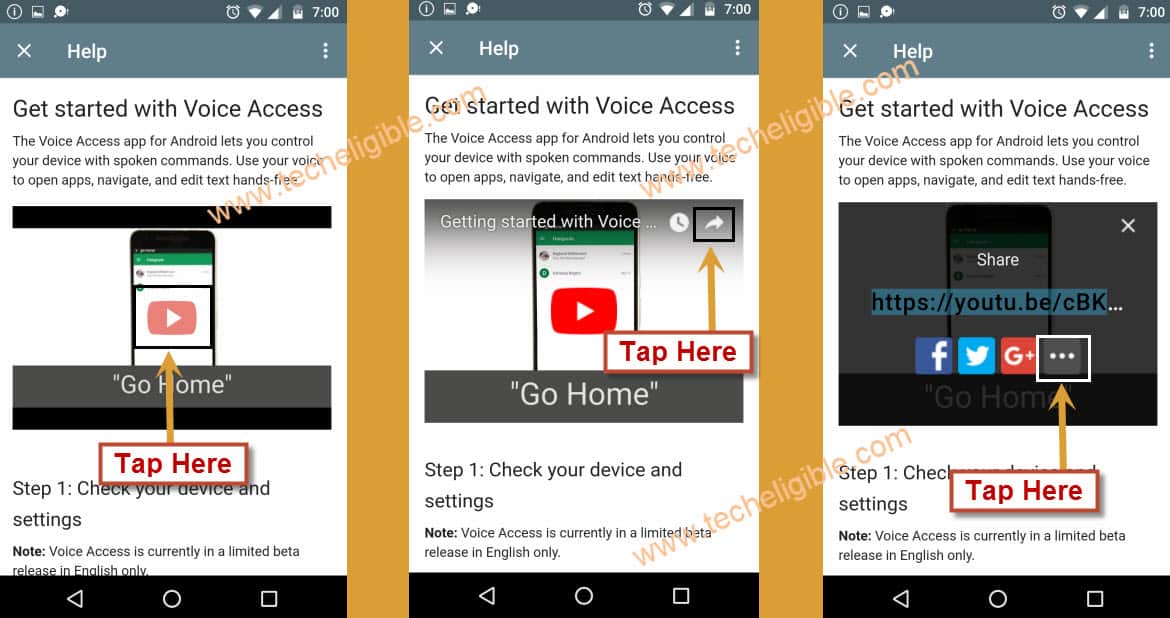
-If you update window, just tap on “Not Now”.
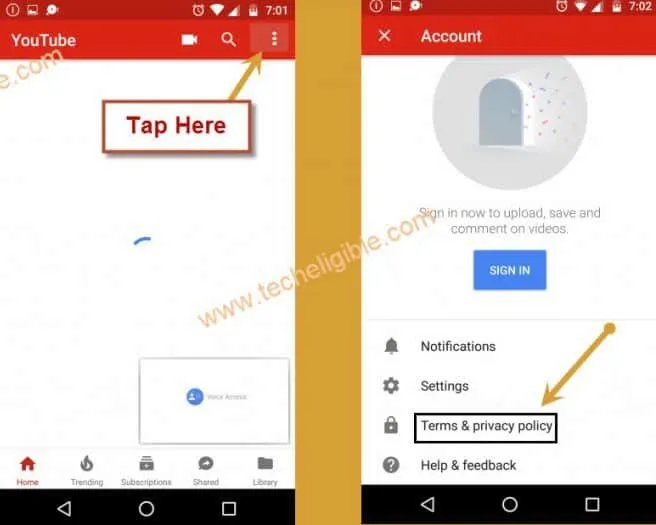
-Drag down the youtube video, and then tap on “3 Dots” from top right corner & select “Terms & Privacy Policy”.
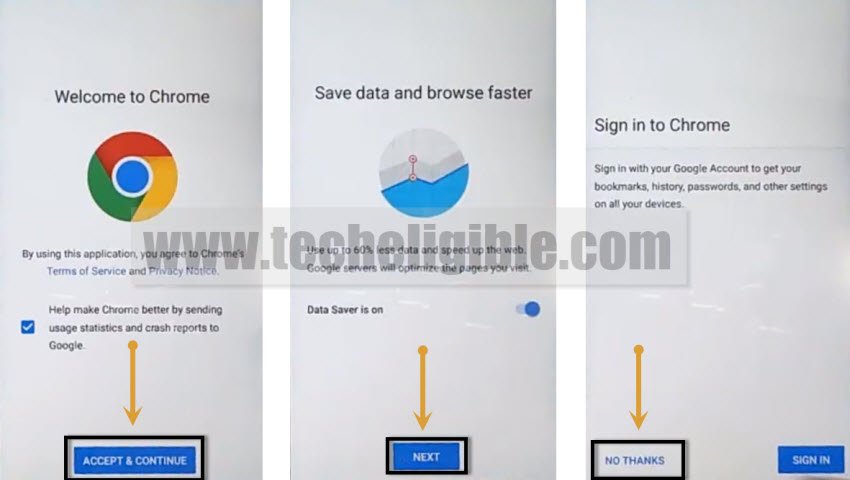
-You will see chrome window, just tap on > Accept & Continue > Next > No Thanks.
-Now we will download only 3 frp tools in free to perform frp bypass task.
Download FRP Bypass Apps
-You will see address bar top of your screen.
We have to download frp bypass applications on our android device.
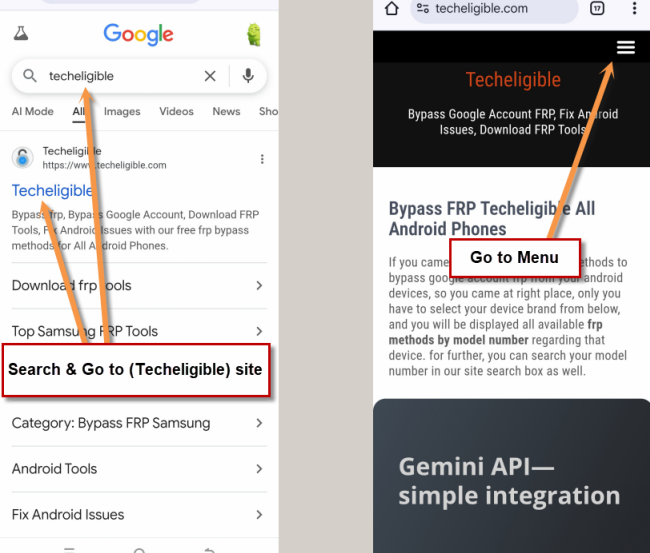
-Search in chrome browser “Techeligible“. Visit same searched result as mentioned in below screen shot.
-Tap to “Menu” option from upright corner of the site.
-Simply, go to “Other Free Tools” option from there. After that, tap to “Samsung FRP Tools”.
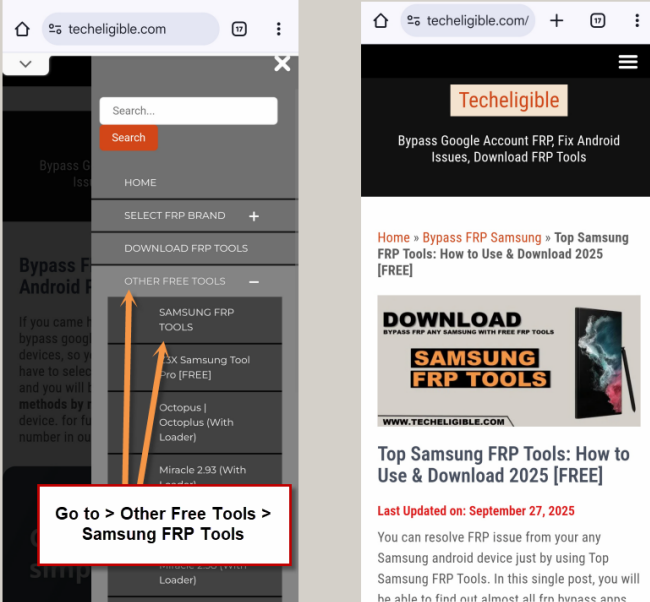
-Download from there below 3 frp apps.
1/Quick Shortcut Maker 2.4.0.
2/Google Account Manager 6.0
3/Account Login.
-Wait few minutes until downloading process done.
-Go to top & hit on “3 dots” from top right corner of the browser.
-After that, tap on “Downloads”.
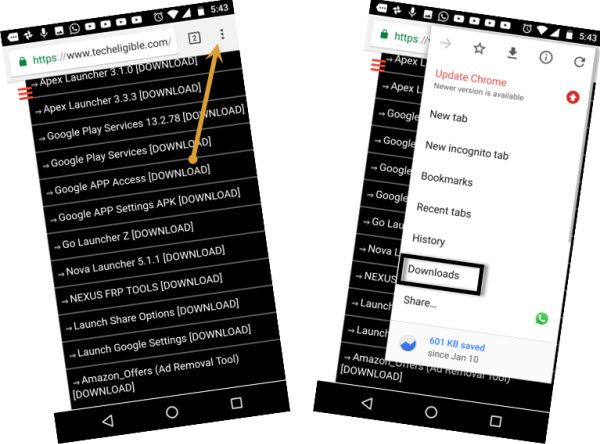
-You will access to download folder, where you will be able to see all downloaded applications.
-Tap on “Quick Shortcut Maker” to install, after that you will chrome popup window, just tap on “Settings”, and enable option of “Allow from this sources”.
-Tap on “BACK KEY”, and then tap on > Install > Open.
-Perfect, now we are inside quickshortcutmaker app.
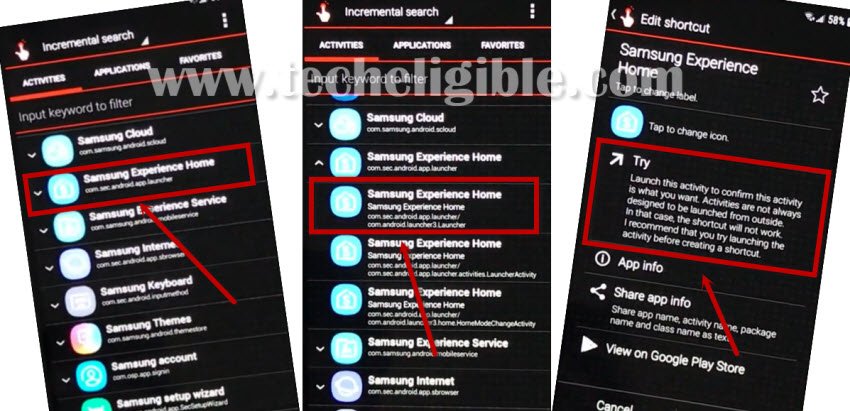
-Go down and find “Samsung Experience Home”.
-Tap on “”Samsung Experience Home” to expand result.
-After that, from the expended result, tap on very first “Samsung Experience Home”, after that, hit on “TRY”.
-Now we have to install 2 more apps to successfully Bypass Frp Galaxy J3 Android 8.
-Open “Chrome Browser” again.
-You will see download frp tools page, just tap on “3 dots” from top right corner of the browser & select “Downloads” to access downloaded folder again.
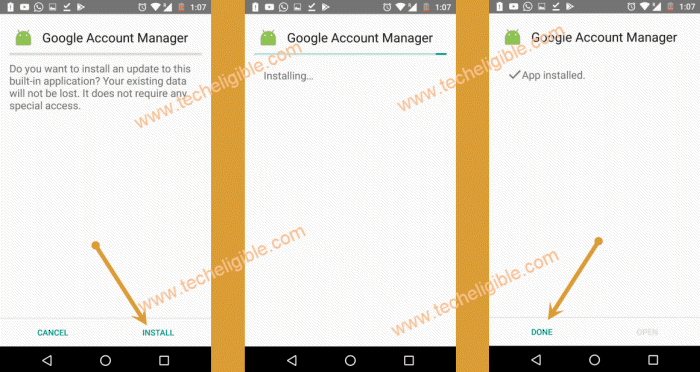
-Tap on “Google Account Manager > Install > Done”.
-Tap on “Account Login > Install > Open”.
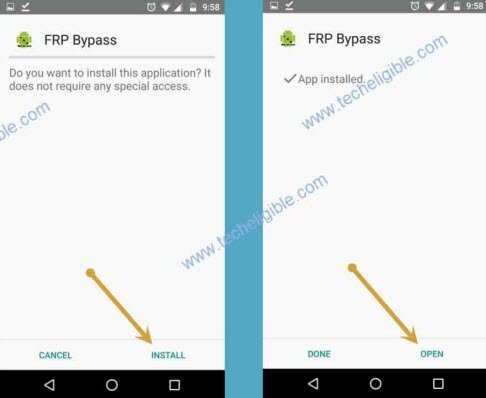
Note: If you see any blocking popup, just hit on “Settings”, and enable the option “Allow from this sources”, after that you will be able to install app.
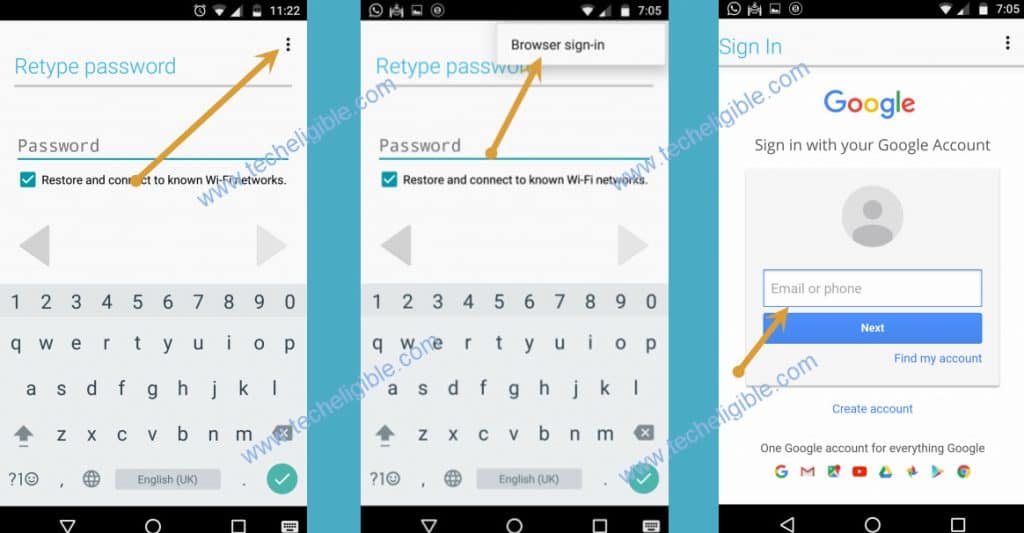
-After opening “Account Login” app, you will have first window of “Retype Password”.
-Just hit on “3 dots” from top right corner & select “Browser Sign-in”.
-Login with the valid gmail account.
Method 3: Unlock FRP Samsung J3 [Android 5]
-Connect Wi-Fi in your galaxy j3 device.
-Remove battery and insert active “SIM CARD”.
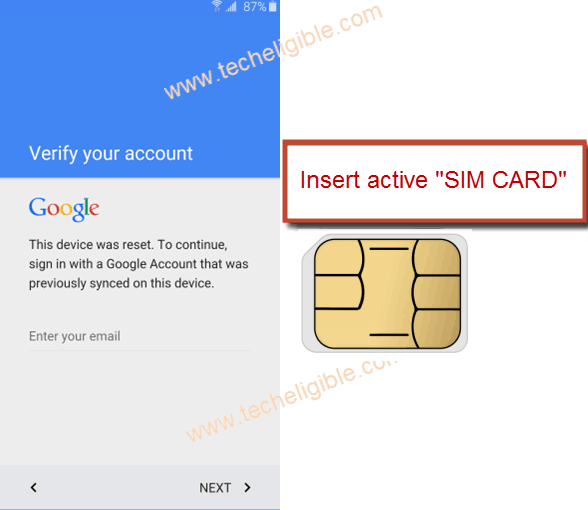
-Switch on your device, select your desire language, tap on “Yellow” icon from welcome screen.
-From “SIM Card unlock PIN” screen, drag up the “Phone Call” icon from corner to make emergency call.
-Dial any emergency number to make call, and wait until call is picked up.
Note: You may have to dial emergency number several time until call is picked up.
-Once call is picked up, “SWIPE LEFT” to go for further options, and tap on “Internet” to open google.
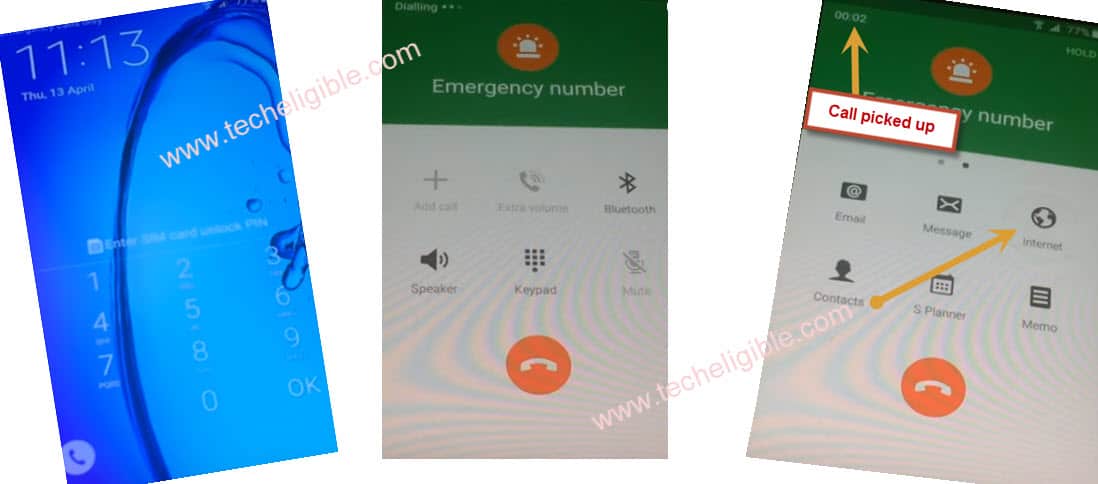
-Enter your “SIM Card unlock PIN” to unlock sim.
-Tap on “Internet”, then tap on “GOOGLE” to open google in your galaxy device, so that we could surf internet there.
Download FRP Bypass Apps
-Type there “Techeligible” and look for the 1st searched result of techeligible official website.
-From the techeligible site, go to “Menu” icon, and then, hit on “Download FRP Tools”.
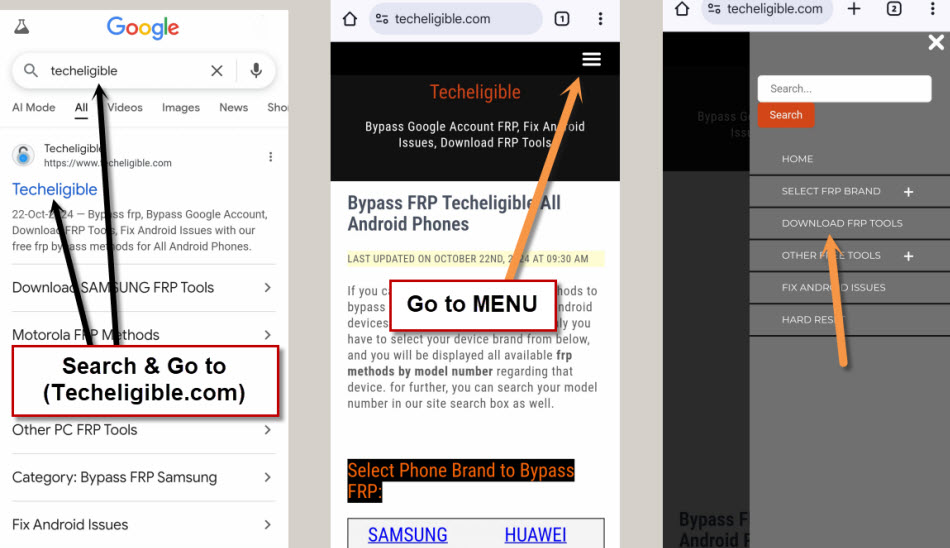
-Download from there below 3 apps
1-FRP BYPASS EASY.
2-Google Account Manager 6.
3-Goo Account Manager 5.
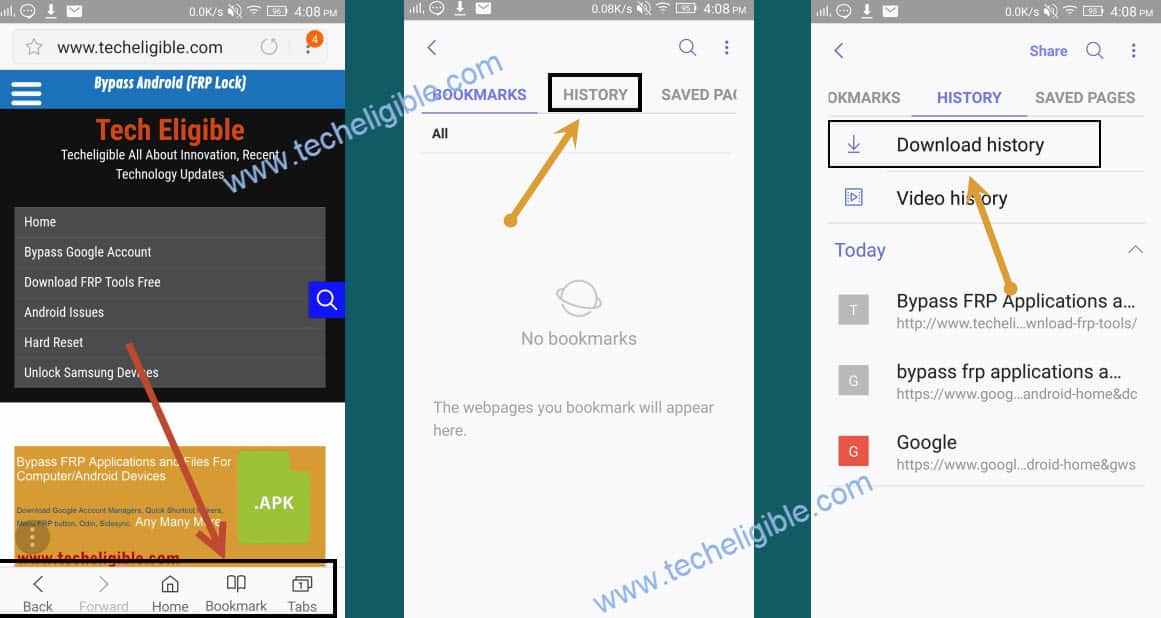
-Once download finish, go to top of the page by swiping up, so that bottom “Bookmarks, Home, Tabs” options display.
-Tap on “Bookmarks”, then tap on “History” and after that, tap on “Download History”.
-There you can see all your downloaded applications.
Install Google Account Manager
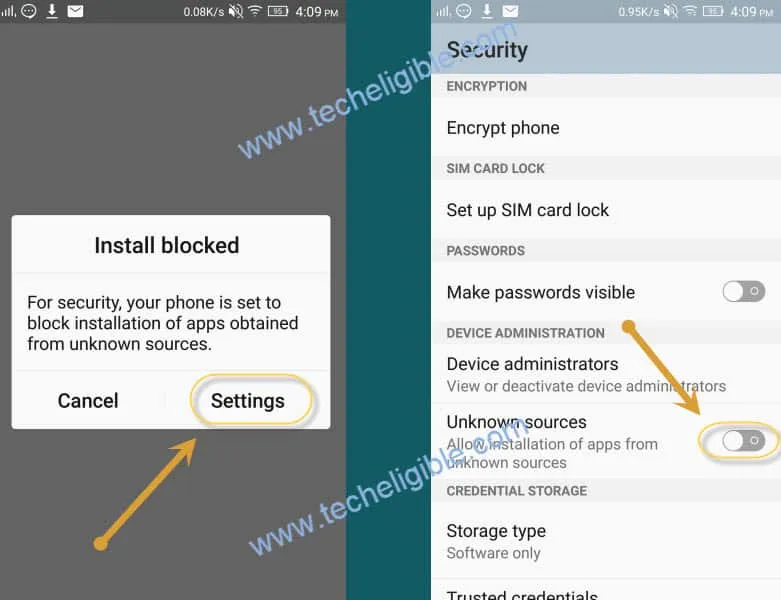
-Tap on “Google Account Manager“, then from “Installation Blocked” popup, tap on “Settings“, and enable “Unknown Sources“, now go back and again install “Google Account Manager” relevant your android version.
Remember: If you don’t know your android version, you can try to install both version of google account manager 5.x.x and 6.x.x.
Install “FRP BYPASS EASY” Application
-Once google account manager installation finish, tap on “Done”.
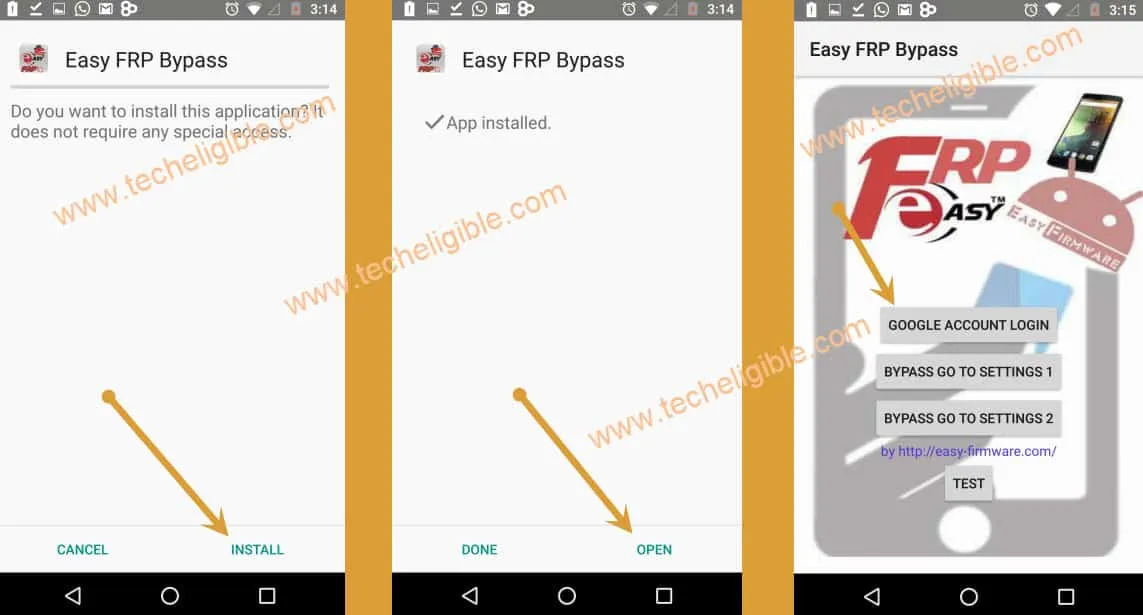
-Now tap on “FRP BYPASS EASY” Application, tap on “Install“, then tap on “Open“.
-Tap on “Google Account Login”.
-Tap on “3 dots” from top right corner.
-Then select “Browser Sign-in”, now add your valid gmail account there.
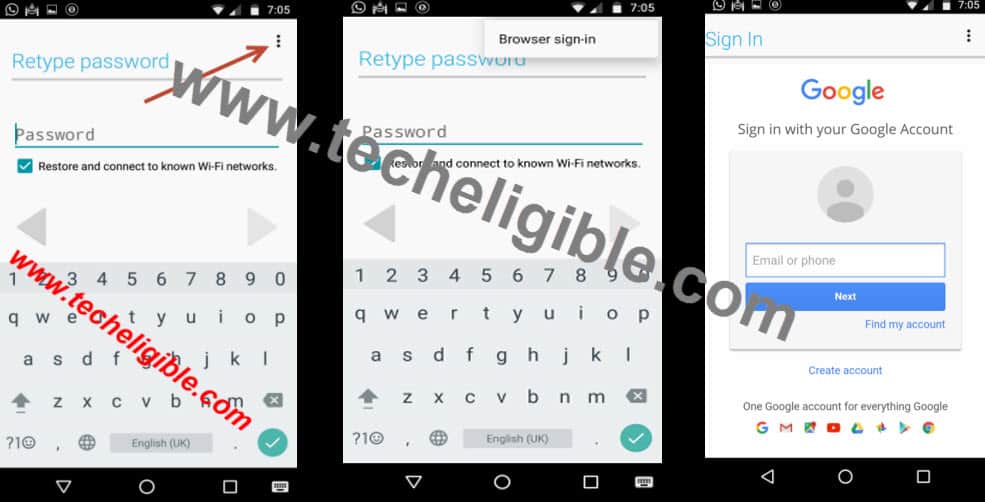
-Restart your device to accomplish Bypass Google Account on Galaxy J3 Android 5 Without PC.
Complete Initial Setup
-Tap on “Yellow icon” to go for next, enter your “SIM PIN”.
-Connect Wi-Fi.
-Tap on > NEXT > NEXT > AGREE > NEXT > NEXT > SKIP > SKIP ANYWAY > MORE > MORE > NEXT > SKIP > SKIP > FINISH.
-Now you have successfully accessed to your Galaxy J3 device menu, we will do data factory reset to completely Bypass Google Account on Galaxy J3 Android 5.
Factory Data Reset
-Tap on “Apps”, then go to “Settings”.
-Now tap on “Backup and reset”, after that, tap on “Factory Data Reset”.
-Tap on “Reset settings”, then “reset device”, and at the last tap on “reset everything”.
The Bottom Line
We followed top 3 frp bypass methods on different android version of Samsung J3 phone. You can follow up any single method according to your device android version.
In the 1st guide: we used pin locked sim card and accessed at the main settings page of the phone. After that, we just enabled (PIN Windows) and setup pin lock protection easily setup the phone again.
In 2nd guide: simply got the (Not signed in) message using pin locked sim card. After that, we accessed to the official youtube site. From there, launched the chrome browser and reached on the official techeligible frp tools page. Downloaded (Google Account Manager + Account login) apps. Then, installed apps and logged in another with Gmail Account.
In the 3rd guide: We used again a PIN lock setup sim card, inserted this SIM on the phone, form the first (PIN Locked Screen), we just opened up the dialer and dialed any emergency number and then, from the calling page, we just hit over the (Internet) browser icon to access the chrome webpage. From there, we installed apps and setup the google account.