
You can get back your device by Bypass FRP Realme X2 (Android 11) just by erasing all data from device main settings page. To reach your device settings page, you will have to follow up below guideline. After that, old forgotten google account will be deleted completely.
Disclaimer: We highly recommend you to apply this method only on your own device. If you are not owner of this device, or you found this phone from somewhere, you must return this phone to its real owner. This method is for educational purpose only to educate the device owner, how to get back their own device after forgetting google account.
Let’s Start to Bypass FRP Realme X2:
-Let’s turn on your Realme X2 phone & Connect WiFi.
-After that, get back to first (Select Language) startup page.
-Tap to > Next > Next > Next.
-You will reach to a (Connect to WiFi) screen. From there, hit on “Manually add a network”.

-From there, tap to “Mic” icon and hit on a “Deny” from popup window.
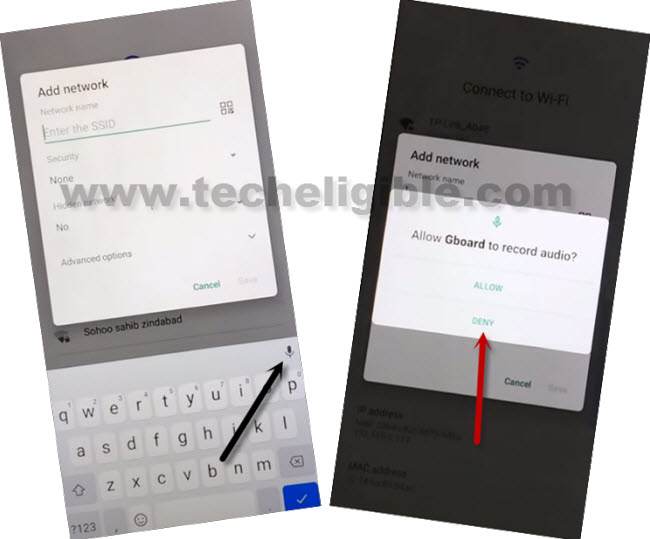
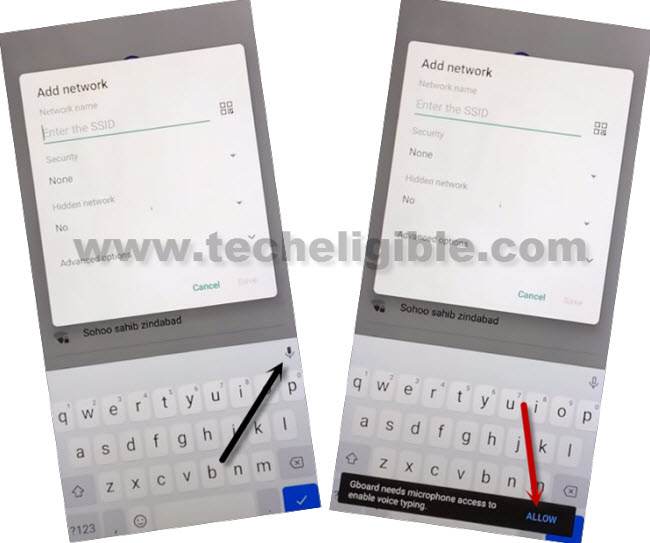
-Do same thing again, tap again on “Mic” icon and hit on a “Deny” from popup window.
-Tap again on “Mic” icon from there, after that, you will have a flash popup window. From there, hit on a “View” option.
-Let’s go to “Permissions” from Gboard page. Hit on a “Search” icon from top corner.
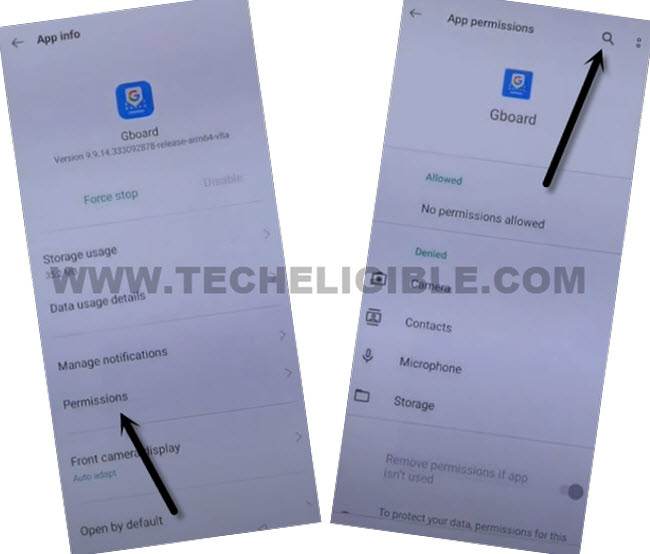
-You have to type “Settings” in top search bar.
-From searched result, just go to > Reset System Settings only > Erase all data > Erase data > Erase data.

-This will delete all your device data including old setup google account. You are all done now from Bypass FRP Realme X2.
-This erasing data may take a minute to be done. After that, you will be able to complete setup wizard steps on your own.