This is the best free PC tool to fix up multiple issues from android devices. You can easily Samfw Software V6.0.1, V5.4, V5.3 & V4.9 from below with single click. We will also show you some easy steps, how to download and install Samfw software.
Do you have a android devices with (FRP locked) and unable to bypass it? No worries; you can use Samfw Tool 6.0.1 on your device to resolve multiple issues with one click. This tool supports android devices (Samsung/Xiaomi/LG). Work perfectly only Mediatek and QUALCOMM processors. Check out some major updates on this tool from below.
Major Updates
Main Updates
-Fixed the solution of 2022 FRP
-Added block change CSC when change SIM.
-Added new function to “Optimize read information faster”.
-You might be facing (Return Fail) error on MTP Reboot, luckily, this issue has also been resolved and fixed up successfully by samfw team.
Samsung Updates
-Added new button under the (SAMSUNG) tab with the named of “Add FRP 2024 (USA models)”.
-Then function (Change CSC) now has been moved to the (MTB) tab. This will also Accept change without ADB.
Some other Updates
-Add auto write log to file.
-While running the application, you might be facing a certificate issue, like (X509 Certificate problem), this error has also been fixed.
-There were some bugs on this tool, those have been fixed successfully.
Download & Install Samfw Tool V6.0.1/V5.4/V5.3/V4.9
| Samfw Tool 6.0.1 (71MB) | [DOWNLOAD] |
| Samfw Tool 5.4 (46.48MB) | [DOWNLOAD] |
| Samfw Tool 5.3 | DOWNLOAD] |
| Samfw Tool 4.9 (56.3MB) | [DOWNLOAD] |
| Password: techeligible |
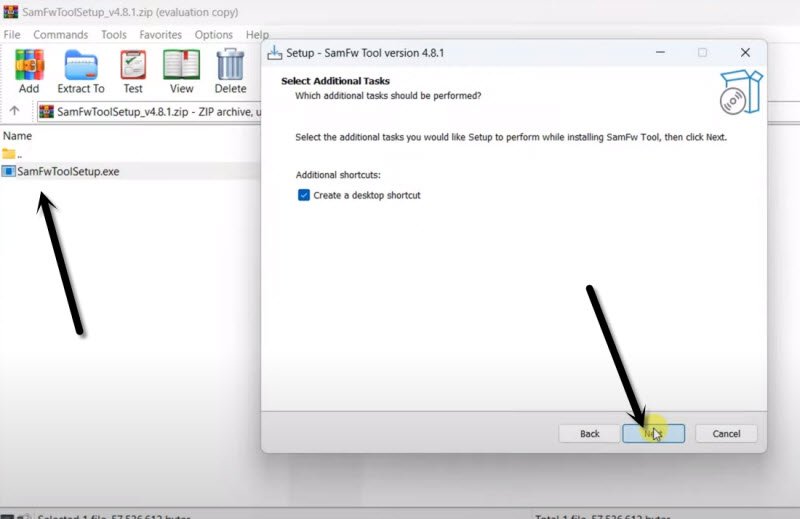
-Firstly, download Samfw Tool V5.3 by given above link. Once the downloading is completed, unzip the downloaded file and go to the folder.
-Let’s double the setup file to start installing process.
-Go back to your PC desktop and double click over the (Samfw Tool) icon to start this frp bypass tool.
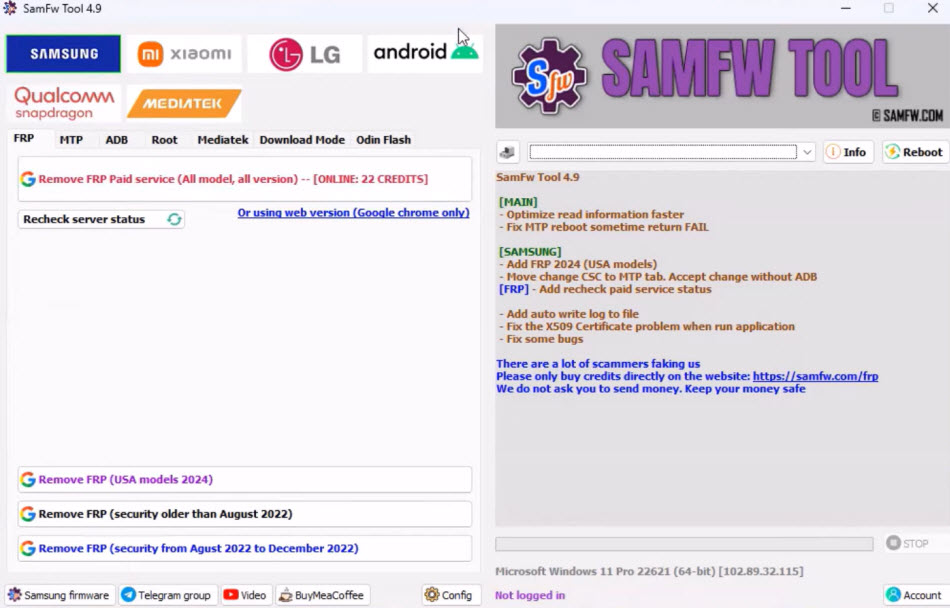
Many people are experiencing the problem of forgetting their own Google account on an Android device, and, they are unable to finish the setup wizard steps on your devices in order to create a new Google account and access the device’s main home screen. To resolve all these type of (FRP issues) from your devices, you can use SamFw Version 5.3 tool.
How to Use Samfw Tool to Bypass FRP on Samsung
You can easily bypass frp account from Samsung galaxy devices just by dialing “*#0*#” code. After that, allow usb debugging option and connect the device with PC using any USB Cable.
Once the device is detected by Samfw Tool, then, click on “Remove FRP” button from the tool. This will start bypassing frp account and will bypass frp within a minute. Detailed process of bypassing FRP on All Samsung 2025 is here.
List of Functions Available
MTP mode: This mode is used to factory reset and disable knox from Samsung phone. You can also Disable factory mode with one click. There is also (KG Unlock) option available. But, this is untested right now.
- Factory reset (Button): This button is used to perform factory reset task on your Samsung galaxy devices with one click.
- Enable secret code for Verizon: This option work only on Samsung (Verizon) devices to enable secret code.
ADB mode: In ADB Mode of Samsung tab, you can change your device CSC and SN (beta). There is another good function of (Remove Samsung Account). You can use this function to remove signed in Samsung account from settings easily. This work only on unlocked devices. You can also enable (Toggle Mobile Data). This function work only on some AT&T Samsung smartphones.
Download mode: In (Download Mode) function, that is available under the (Samsung) tab, you can use this to exit (Download Mode) from Samsung devices. Also, fixing Soft brick issue easily.
Odin Flash: is used to save your recent flash files, and auto detect file and select slot. This is also used to Auto-extract for ZIP file. Ignore MD5 checksum
Misc: From Misc option, you can check your Driver signature enforcement status, Disable and enable Driver signature enforcement. Install Samsung Drivers & VC++ 2015.
Xiaomi
ADB: Bypass Micloud Android 8.1 & Enable Dia [ROOT]/
Fastboot: [UNLOCKED] Remove FRP Account easily with one click on Xiaomi Smartphones.
Sideload & EDL 9008: This is the main option of Samfw tool V5.3 to bypass frp and Micloud, perform Factory reset on your Xiamoi smartphones. You can Read offline Micloud information as well.
LG
MTP: If you wanna factory reset your LG Smartphones, just go to (MTP) option, that is available under (LG) tab.
EDL: EDL option is used to factory reset and remove frp account from LG devices. This function Support LG G7, G8, G8X, G8S, V30, V40, V50, V50S, Q6, G5, G6, V20, V35, V60.
LG UP: is used to flash your LG KDZ
Android
ADB: Under this ADB option, you can check your android device battery information, Disable & Enable OTA Update. You can set your desire device language directly from Samfw Tool V5.3. You can also factory reset your android phone from here as well. If the developer options is enabled and visible in your android device settings options, so, you can hide that developer option as well.
FRP: In some android devices, its very challenging to enable talkback or access to chrome browser. Sometimes, this is very time consuming work, you have to follow up several steps to reach to chrome browser. With this Samfw Tool V5.3, you can (Open Browser) directly with one click & Remove FRP Account as well.
APP Manager
Manager applications, remove, disable, enable, clear data single app, multi apps, Install multi APK/xAPK, Install any app on Dual Messenger, Delete bloatware (For Korean, Japan, and US variants).
Qualcomm
EDL 9008 Partitions manager (Read/Write/Erase)
EDL 9008 Reset FRP, Factory reset, Erase userdata
Mediatek
If your device has (Mediatek) processor. Then, you can use this tab to perform multiple task on your device with one click. You can factory reset, format user data, remove frp protection, unlock & relock bootloader and bypass auth.
FAQs About Samfw FRP Tools
What is the purpose of Samfw Tool?
You can bypass frp account, flashing with firmware using odin flash option, and unbricking the device and managing partitions etc.
Can i also flash my Android Phone with this tool?
Yeah, you will have to download firmware file manually according to your device software info, after that, flash with using (Odin Flash) option.
Is this tool safe to use on Android phone?
Yeah, this tool is from a trusted (Samfw) official website. So, you can use this tool for multiple task.
Can i bypass frp as well by Samfw Tool?
You can also use this tool for bypassing frp account as well.