
Google’s Factory Reset Protection (FRP) feature was introduced in Android 5.1, and continuously being added on all upcoming latest android version devices because of the essential need from the aspect of security. This protects the data on your smartphone from unauthorized access by strangers on a stolen or misplaced phones.
When was introduced the FRP Feature on Itel City 100 Phone?
Itel City 100 smartphone was released on 27 April 2025 with updated android version 14. That means, this device has also a FRP protection when someone just sign-in google account after first purchase while set up the device.
If you are also facing FRP lock protection on Itel City 100 smartphone after doing a factory reset. Then, you won’t be able to reach back to your device again until you login back with the same previously logged in google account that was setup at the first time. Otherwise, you will have to follow up frp bypass guideline on your phone. There is complete Bypass FRP Itel City 100 guideline available. Let’s check this now.
What is the Bypass FRP Procedure of Itel City 100:
We will insert a PIN locked Setup SIM card on itel android device, after that, open chrome browser using the sim card and reach to (FRP Tools) screen. From there, we will open (Dialer) directly on our FRP locked itel city 100 phone.
After that, we’ve to use (Samfw) PC frp bypass software, this is totally free and can be used on itel City 100 phone to unlock frp without facing any challenges. You just need to download this tool on PC from below download link. After that install & run. Connect itel device to PC using any USB Cable. Once the itel city 100 is recognized by the tool, just click to “Remove FRP” button from the tool. Withing few seconds or a minute, the FRP will be bypassed automatically.
Bypass FRP Required Tools:
Do make sure, you have all these following tools available on your PC to successfully bypass frp.
| ⇒ WiFi (Internet Connectivity). ⇒ Computer/Laptop. ⇒ Samfw Tool V5.4 [Download] Pass: techeligible ⇒ PIN Locked SIM Card. ⇒ USB Cable |
Let’s Start How to Bypass FRP Itel City 100?
-You do need a PIN locked setup SIM Card.
Note: If you have a sim card and pin lock is not setup yet, you can follow this link to setup 4 Digits PIN Lock code: How to Setup PIN lock code on SIM.
-Connect WiFi first to your itel City 100 device. Go back on first (Select Language) startup screen.
-Pop up sim tray and insert PIN locked Setup SIM card on your itel smartphone.
-Once the sim is detected by your itel City 100 phone, you will see the screen of (Enter SIM PIN for card 1) etc.
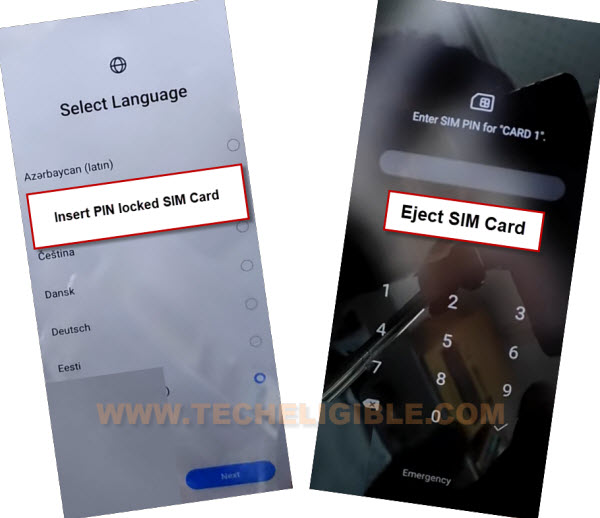
-Let’s remove SIM card now, after that, the SIM PIN screen will go away and you will have a (Not signed in) screen there.
-Swipe right the (Not signed in) message and hit on “Settings” gear icon.
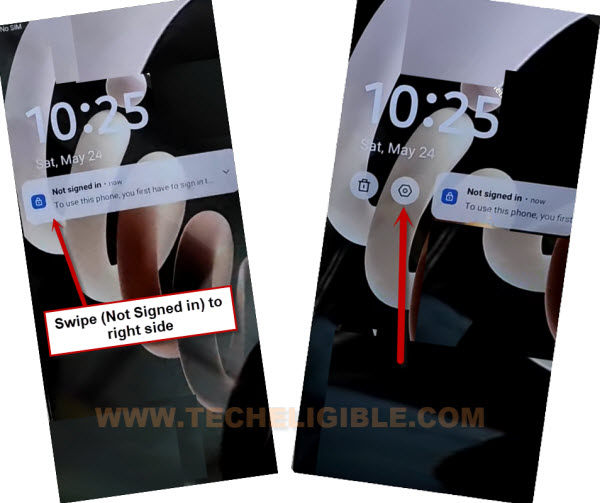
-After that, go to > Mute Notification > Mute Notification.
-Tap over the “Bell icon or Manage” option from top right of the (Not signed in) popup window. You will be taken on (Notification & Status Bar) screen.

Go to Youtube & Open Chrome Browser:
-You will access to (Notification & Status Bar) page. Go all the way down from there and tap on “Youtube” application.

-Turn on “Allow notifications”. After that, go down and tap to “Notification Style” option.
-Go down again from next page and tap on “Additional Settings in the app”.

-From next page, tap to > About > Youtube terms of service.
-You will have a (Make Chrome your own) page. From there, tap over the > Use without an account > No Thanks.

-Youtube website will be launched in google chrome browser, you will also have a search bar at the top.
Go to FRP Bypass Tools Page to Open Itel City 100 Dialer
-Search in top chrome browser search bar with “Techeligible”. Visit techeligible searched result same as shown in below image to be redirected on official site. From there, go to “Menu” option from top corner. After that, sidebar menu will be visible to you. Just tap over the “Download FRP Tools”.

-Open “Dialer Code” from frp tools page. This will take you on dialing number screen on your Itel City 100.

-Dial this code on screen *#85# to start Bypass FRP process on itel City 100 phone.
-After dialing the code, you will be displayed (Version Number) screen. We have to connect our itel phone with PC in order to bypass frp using Samfw Tool 4.9.

Connect itel City 100 to PC & Bypass FRP with Samfw Tool
-Download Samfw tool on your PC. The link has already been share above.
-Extract & install & Run “Samfw Tool V5.4” on your PC by giving the password below.
Pass: techeligible
Follow up this link: How to Download & Run Samfw Tool 5.4 on Windows.
-Firstly, install proper itel USB Drivers on PC. So that, you may not face any trouble in connecting and detecting connected itel city 100 device to PC.
| Download & Install Itel City 100 USB Drivers & SPD Drivers on PC: ADB Drivers [DOWNLOAD] SDP Drivers [DOWNLOAD] |
-Connect itel Phone with PC using USB Cable.
-Open “Samfw Tool” on PC and tap on “Android” option from top.

-After that, hit on > Remove FRP > New Method.

-The tool will start detecting ADB connection. If the itel phone has been detected by the PC successfully and properly connected to PC. Then, Samfw tool will auto detect your itel device Bypass FRP itel City 100 within few seconds.
-Once you see (FRP Removed Successfully) text on your Samfw Tool interface screen. That means, the frp has been removed completely from itel City 100 device.

-Disconnect the itel phone from PC once the itel phone restart is done and you reach to main home-screen.
-This is how, you can bypass frp from Itel City 100 phone with the help of free (Samfw Tool) and Pin locked Sim card.
FAQ’s about Itel City 100 Bypass FRP:
Samfw Tool is not working?
Try after turning off any active @ntivirus Software from PC. Try by running as administrator.
My Itel City 100 phone is not being recognized by the PC & Tool
You might have not installed SPD & USB drivers properly. Go to top of this post, download & install drivers on your PC. Try to change your USB Cable or Reconnect device with PC.
Is there any other FRP Bypass Method on Itel City 100 without PC?
Right now, we don't have any other method. This is the best and shortest way to fix up your device FRP locking issue with the help of using free (Samfw Tool & Pin locked SIM Card.