
Are you encountering a situation where you cannot access your Xmobile X8A Tablet because of FRP lock security? This situation likely arose from not remembering your previously signed-in Google account. Consequently, you find yourself on the (Google Verification) screen. For this issue, we present easy method that you can utilize sequentially to Bypass FRP Verification Xmobile X8A and establish a new Google account. After that, you will be able to complete setup wizard steps easily and access back to main home-screen of your tablet.
Disclaimer: Do not try this frp method on a stolen phone, this is a serious crime. If you are trying this method to bypass frp on a stolen phone, you may also be jailed. This process is for device owner and for educational purpose only.
How to Bypass FRP Xmobile X8A Without PC
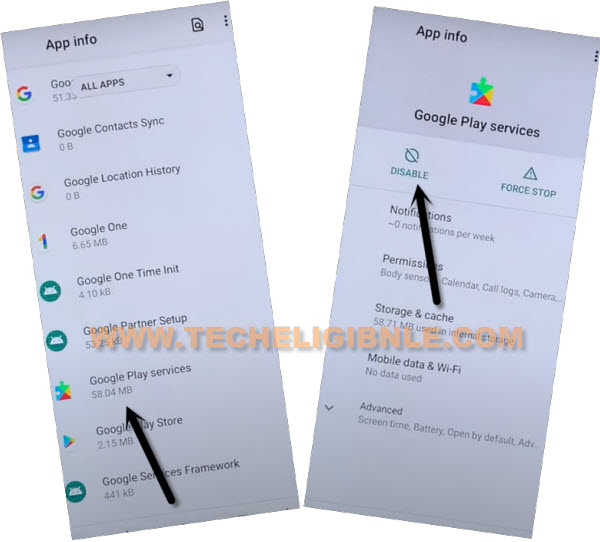
We will enable talkback function on our device first. After that, we will go to main (Settings) interface of the Xmobile X8A phone to bypass the FRP lock, disable android setup + google play services application. Because these both apps help in clearing the forgotten frp linked google account credential. You can continue step by step tutorial from below.
-Continue this method by turning on FRP locked Phone and Connect to proper WiFi network.
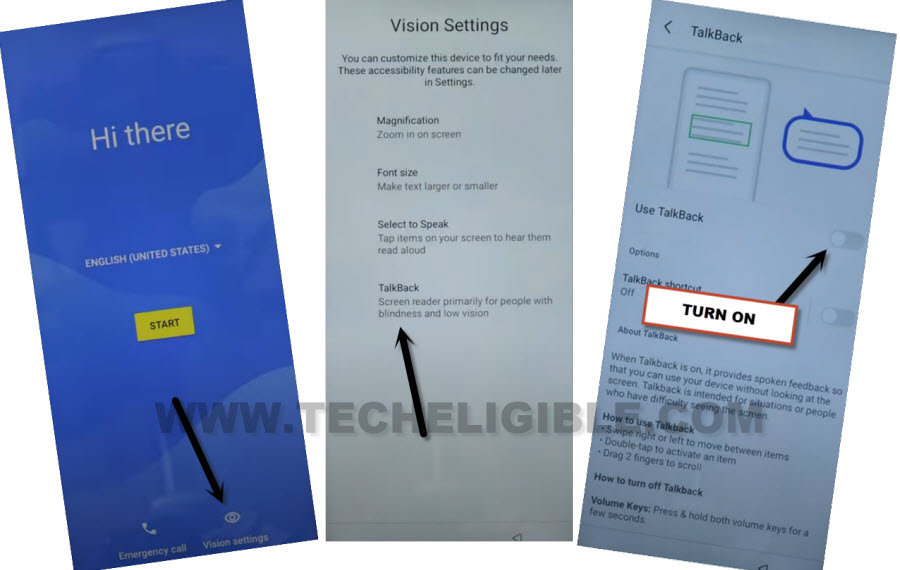
-Afterwards, get back on first startup screen, from there, we’re gonna turn on talkback function to access to brail keyboard option. For this, go to > Vision Settings > Talkback > Turn on (Use Talkback).
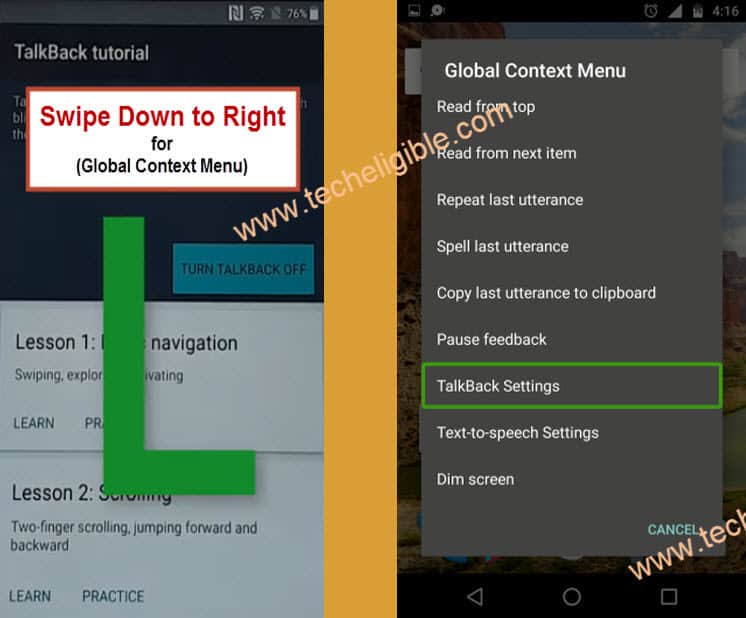
-You will be shown a (Talkback Tutorial) page, just draw “L” letter on screen through swiping down and swiping right.
-Once its drawn perfectly, you will see (Global Context Menu) notification, from there double hit over the “Talkback Settings”
-Long hold both buttons (Volume UP + Down) at the same time, keep holding until you have a notification of (Turn on Talkback?). Once this notification is displayed, release both keys.
-After that, Long hold again both buttons (Volume UP + Down), this time, it will turn off the enabled talkback function.
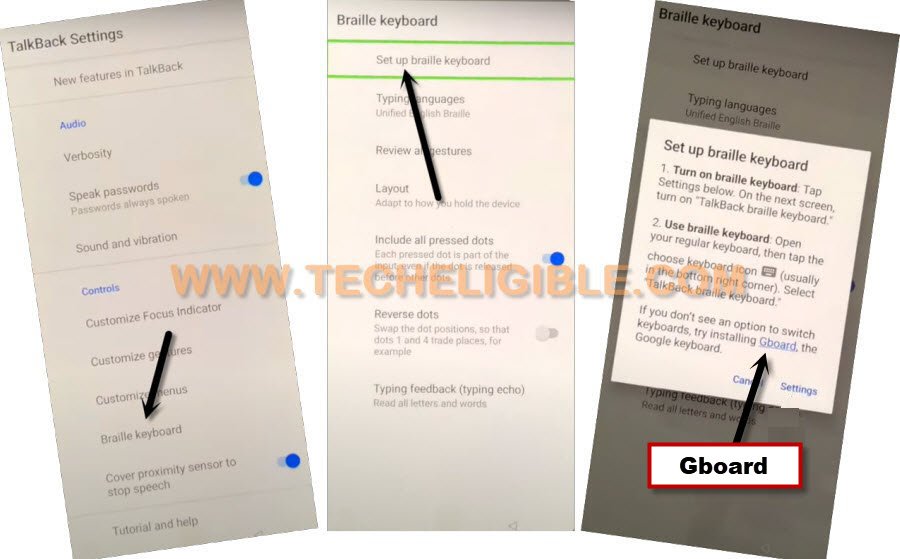
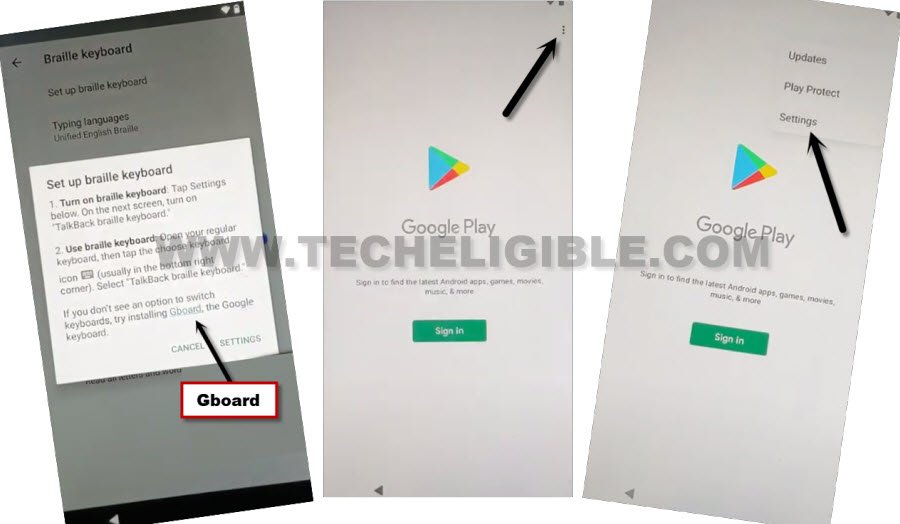
-Let’s access to google play store application by tapping on > Braille Keyboard > Set up braille keyboard. From popup window, hit over the link “Gboard”.
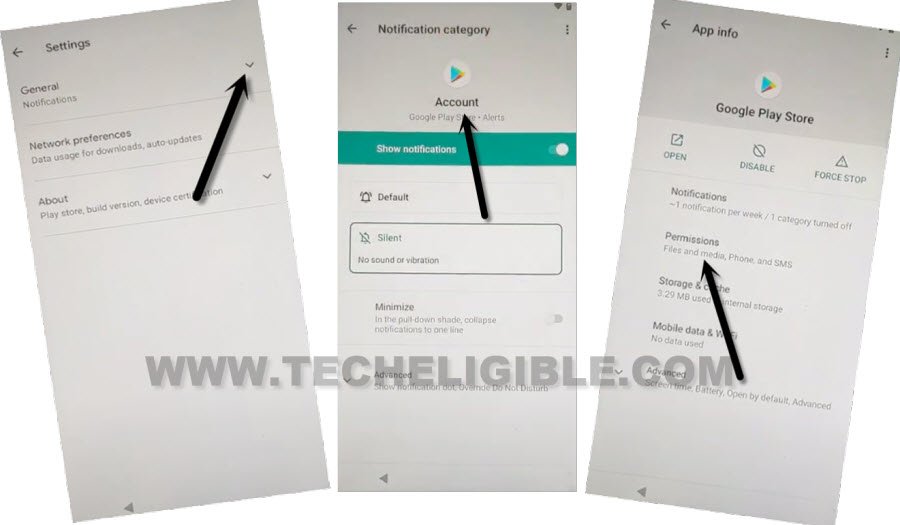
-After accessing at the play store screen, go to “3 dots kebab menu” from upright corner and tap on “Settings” option from the displayed options list.
-Hit on the drop down icon from (General) option, after that, go to “Notification”.
-Tap to “Play Store” icon and then go to “Permissions” option from there.
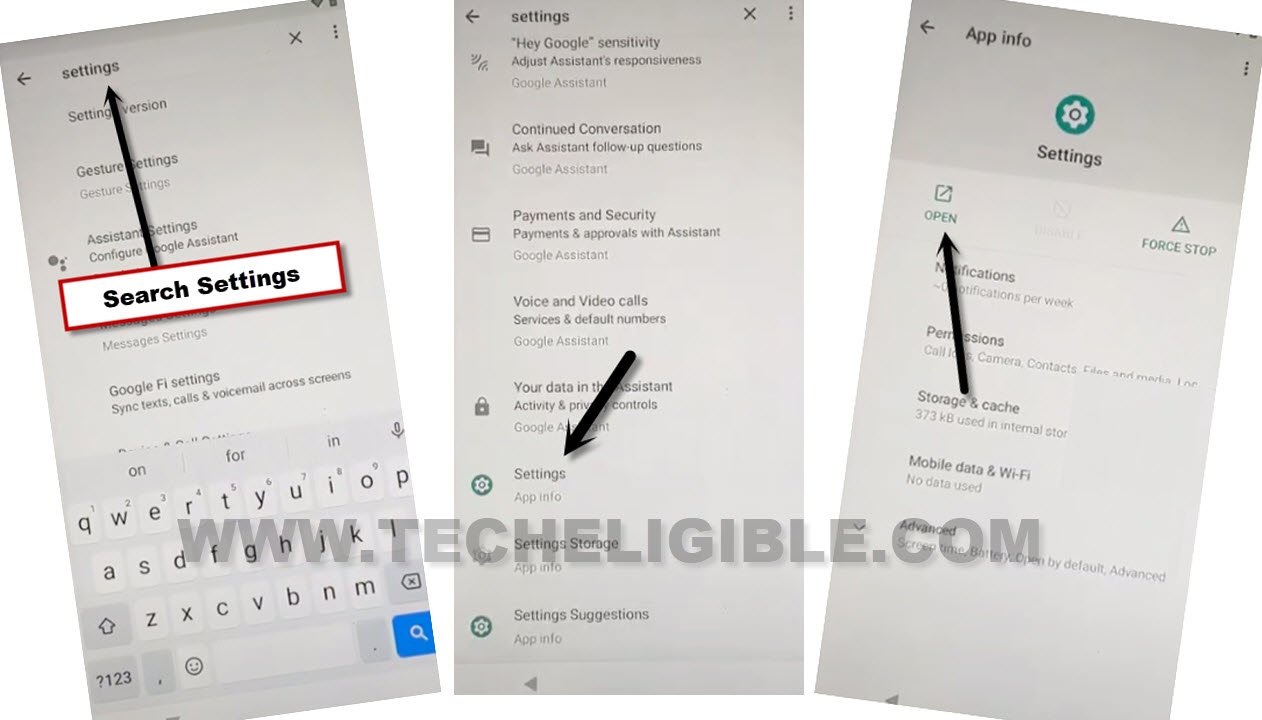
-Search “Settings” from top search bar and tap to “Settings app info” searched result same displayed in below image. After that, go to “Open” link to reach inside the main settings screen, from there, we can easily Bypass FRP Verification Xmobile X8A.
Turn on Accessibility Function:
-From main settings screen of the Xmobile X8A tablet, just go to “Accessibility” option.
-After that, tap to “Accessibility Menu”.
-Let’s turn on “Accessibility Menu Shortcut” option. After turning on this option successfully, you will start having a small “Human” icon on the bottom right corner of your tablet screen. We will use this option later while completing the setup wizard steps.
Force Stop and Disable 2 Apps:
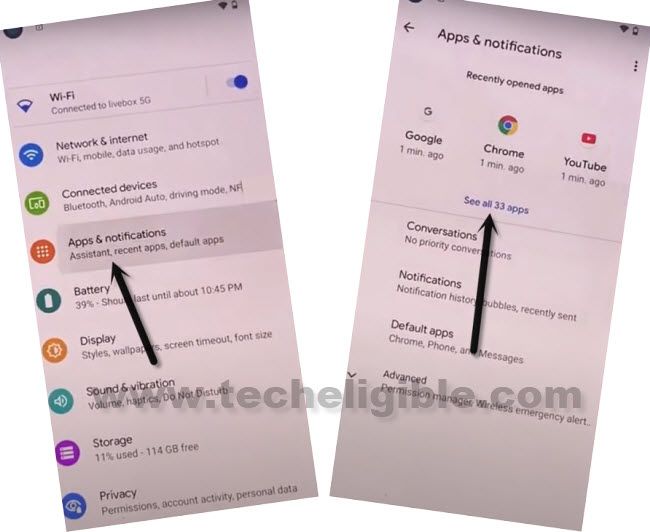
-Get into the app list page by tapping at “Apps & Notifications”. After that, hit on “See All Apps”.
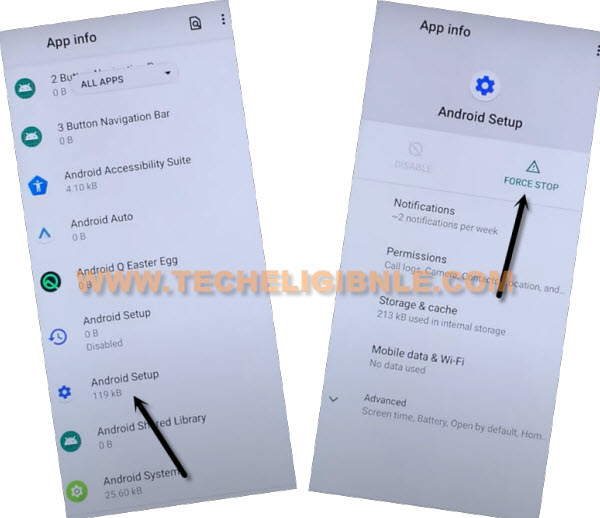
-Tap over the “Android Setup” application from app list page. After that, hit on > Force Stop > Ok.
-Go back to app list screen again by tapping once on the back arrow icon from bottom. After that, find and tap on “Google Play Services” app. Hit on > Disable > Disable App.
Go All the way back to (Hi there) Screen:
-Get back to first (Hi there) startup page by hitting several times on the back arrow option. After that, bring up the accessibility shortcut menu by tapping on “Human” icon from bottom corner. After that, go to “Assistant”.
-Tap to “Settings” option.

-Let’s enable google play services application again to complete the google verification process.

-By taping over the back arrow icon, just go back again on (Hi there) screen. After that, tap to > Start > Skip.
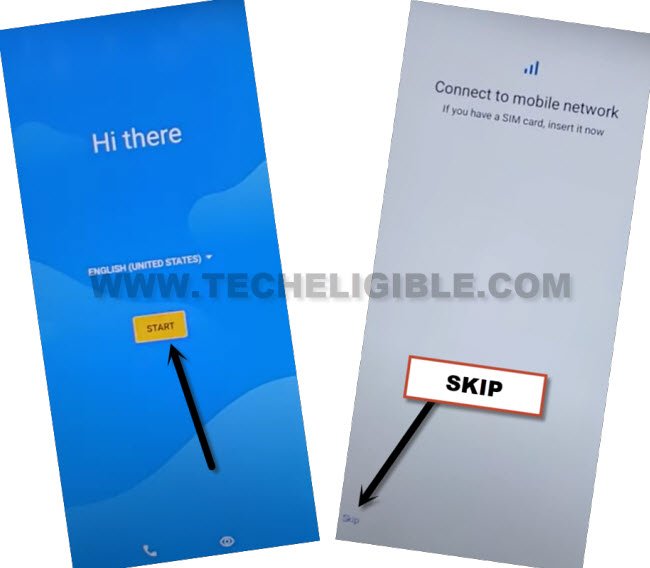
-Once you see (Getting your tablet ready) screen, hit on “Back Arrow” option from bottom.
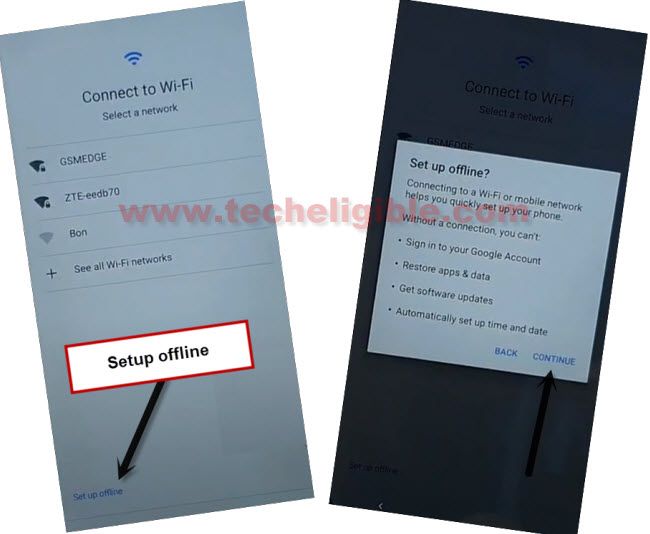
-You will see (Connect to WiFi) page. Just complete setup wizard steps now in offline mode by hitting on > Setup offline > Continue.
-You will be redirected to the next google services screen, from there, choose these options respectively to access the main home-screen. Choose options > More > More > Accept. From setup screen lock page, just hit on > Skip > Skip Anyway.
-Don’t forge to turn off your accessibility menu shortcut function from the tablet settings. FRP lock has been bypassed successfully. Thanks for visiting us.
FAQs About Xmobile X8A
Why i am stuck with FRP lock on my own Tablet?
After doing hard reset the Xmobile X8A tablet, you must verify yourself with previously signed-in Gmail account, otherwise, you will not be counted as the device owner.
How do i prevent facing FRP lock in future?
Don't forge to note down your logged in google account credential that is linked with FRP lock security measure.
Can i manually disable FRP Account from Settings?
.Yeah, you can simple go to main (Settings) page. From there, go to > Accounts > Google. Remove your logged google account to unlink with FRP lock protection.
Can i easily turn on accessibility menu Shortcut on FRP locked Tablet Xmobile X8A?
Yeah, but, on FRP locked Xmobile X8A tablet, its not easy, you will have to follow up some steps to reach to main (SETTINGS) of your device. From there, we will turn on this function to use this in bypassing FRP account.
The Bottom Line
In this FRP Bypass tutorial, we followed up above some easy steps on Xmobile X8A to bypass frp account. We simply turned on talkback functioned and used (Braille Keyboard) option to access on google play store application app info page. From there, we successfully reached inside the tablet main settings screen, after that, enabled accessibility menu shortcut option and disabled google play services application. With the help of these easy steps, we succeeded in unlocking this tablet.
Read Also: FRP Bypass on Xmobile X8MAX