
The aim of FRP is to safeguard your Itel A95 device from unauthorized access by an unknown person, who is attempting to unlock the device solely via a factory reset or hard reset. As you are aware, a factory reset is performed when your device becomes unresponsive or when you cannot recall your PIN or Pattern lock. In such situations, to bypass your security lock, you would typically opt for performing a factory reset on the phone. However, any Google account that was previously logged in will remain active and cannot be deleted by merely executing a factory reset on the device. If your device is frp locked and you are owner, then, follow up our easy method to Bypass FRP Itel A95 phone without any paid services.
Keep in mind: Do not attempt this FRP technique on a device that has been unlawfully taken. Engaging in efforts to remove FRP from a stolen device constitutes a grave offense. You could face imprisonment, as this approach is intended solely for the legitimate owner of the device and for learning purposes. It is designed to help the rightful owner understand how to regain access to their phone and establish a new account.
Let’s Begin Easy Steps to Bypass FRP Itel A95
Note: First of all, you have to setup 4 digits pin locked code on SIM card. If you are not aware of how to setup the Pin lock on SIM, just check it out here.
-Start this method by connecting to WiFi first. After that, go back on the (Select Language) startup page.
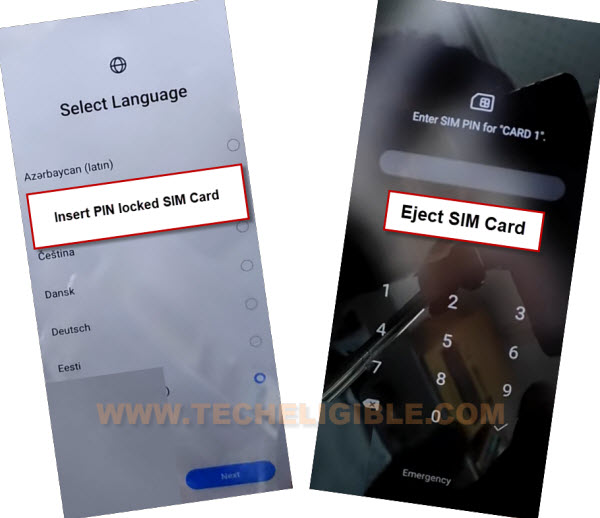
-Use your PIN locked SIM card, just inert the SIM card on FRP locked device. Once you see the (Enter SIM Pin) screen. Simply, eject the SIM card.
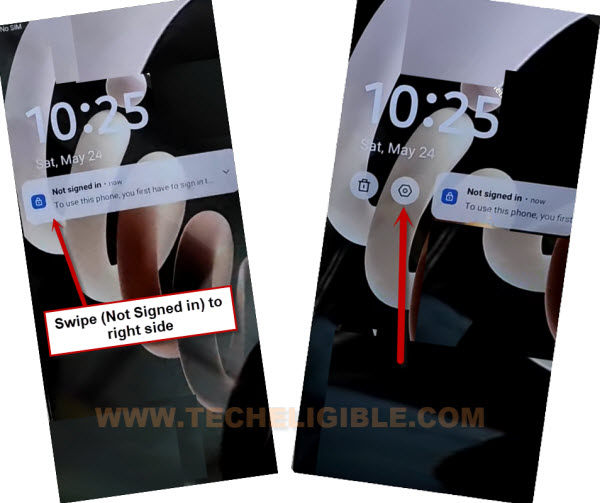
-If your phone screen goes black, just press once the (Power key) and there you will have a (Not signed-in) popup screen.
-Swipe the popup message to right and tap once on the “Settings” option.
Note: If it does not work, then, swipe it to left side and then, tap again on the “Settings” option.
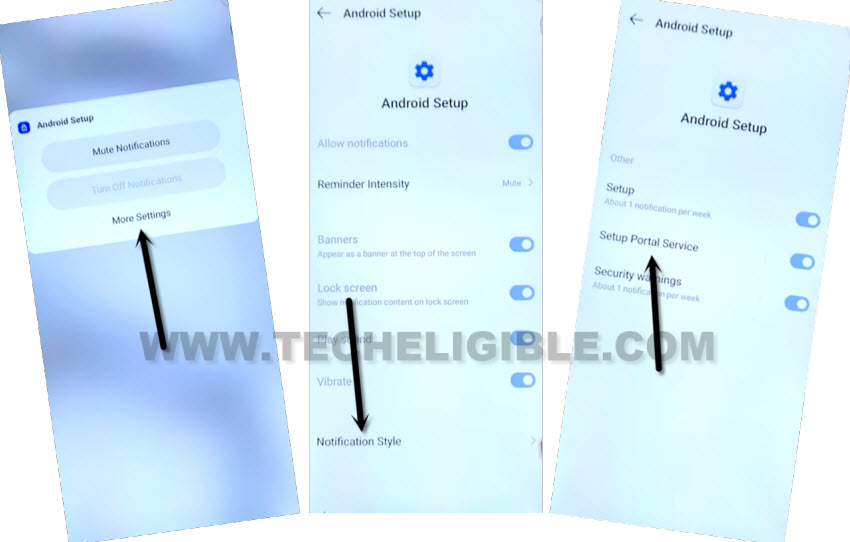
-After that, you will be displayed 3 options on screen, from there, choose the last one named “More Settings”.
-Finally, tap to > Notification Style > Setup Portal Service.
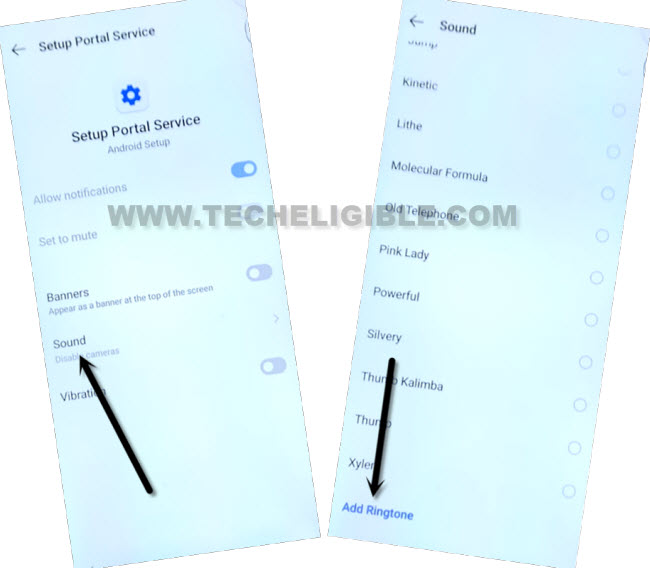
-Let’s hit over the “Sound” and then, go all the way down and tap on the “Add Notification / Ringtone”.
-Afterwards, you will be redirected on the next (Recent) page, from there, hit over the “Menu” icon and long hold on the “Drive” option.
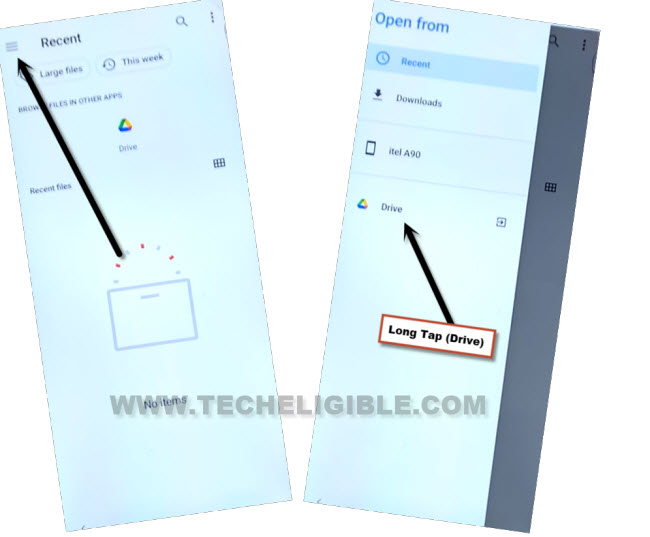
-Then, tap at “Screen Time” option.
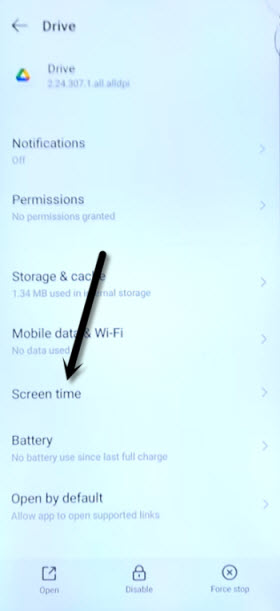
Go to Send Feedback Option
-On a (Drive) screen, you will notice 3 dots option on top corner, just hit on those (3 dots) icon.
-Then, go to > Send feedback > Legal help. (See below image).
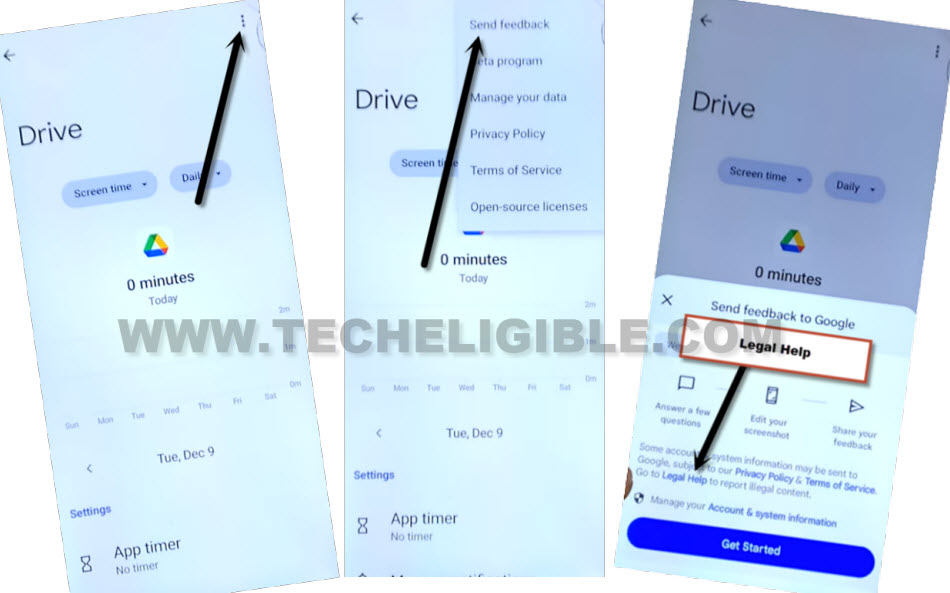
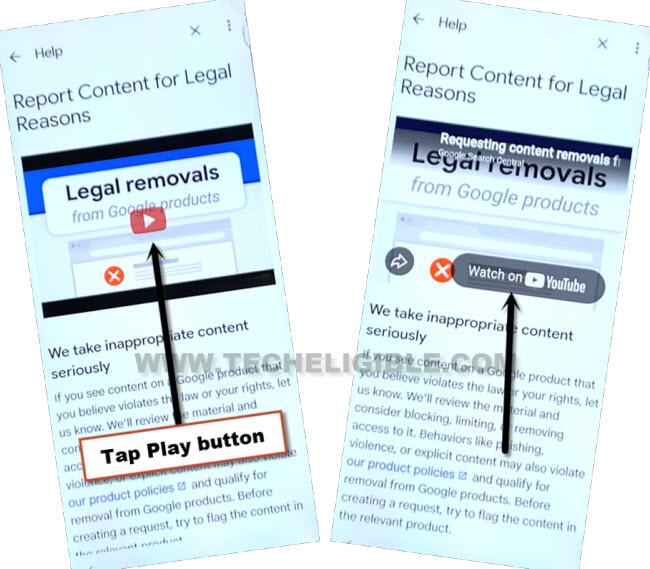
-From the next youtube video, tap on the (Play button) and then, hit on “Watch on Youutbe / Youtube”.
-You will be taken on the youtube webpage, just tap to “Allow” option from there.
Enable Accessibility by Accessing to Settings
-Let’s tap on the “Profile” icon from bottom right corner.
-Then, hit on “Settings” icon from top corner.

-For accessing to the main (Settings) page, you just have to tap over the “Accessibility” option. Then, toggle on “Accessibility player”. After toggling on this, you will see another option will come up on screen. Just tap on “Hide player controls”.
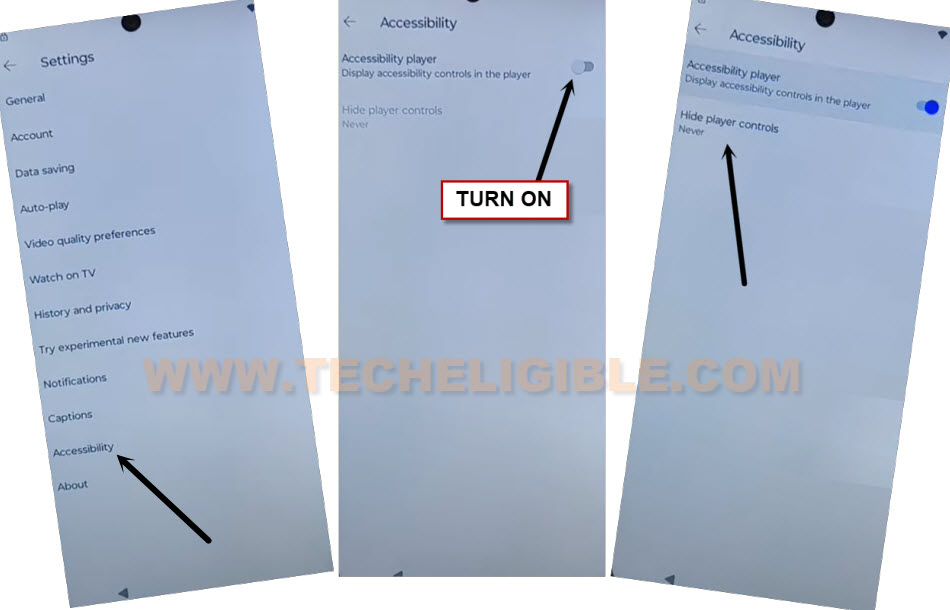
-The new hide player controls popup screen will come up, from there, hit on “Device Settings”.

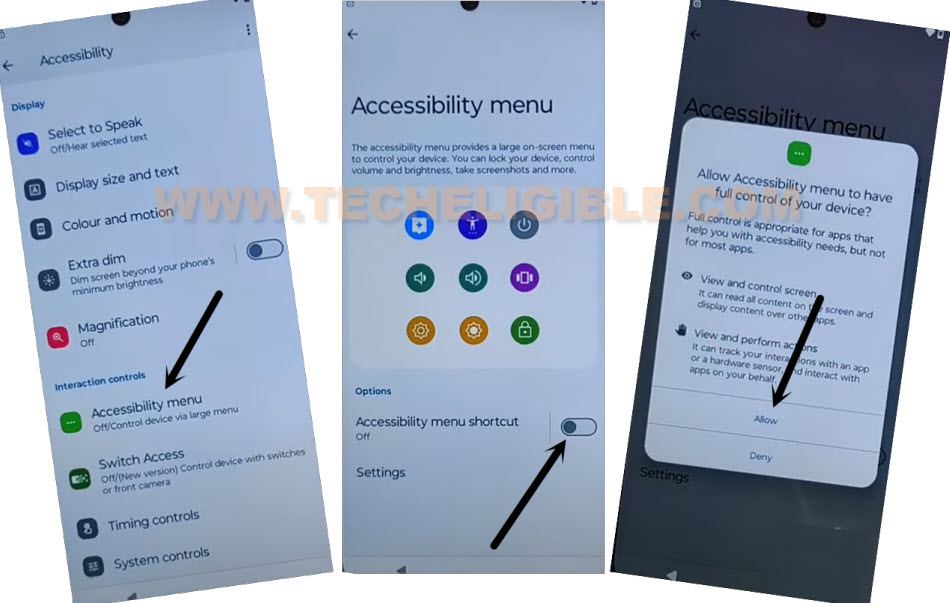
-From the next page, go on the “Accessibility menu”. Then, toggle on another option “Accessibility menu Shortcut”.
-From popup screen, tap at > Allow > Ok.
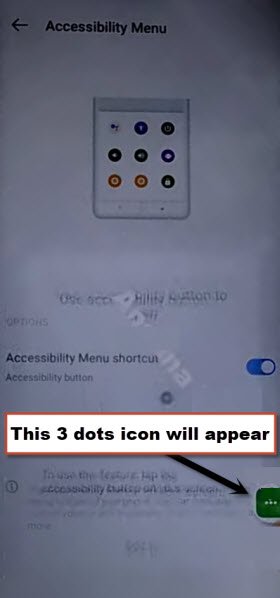
-As soon as, the accessibility functionality is fully activated, you will get the (3 dots) icon will stick on right edge of the phone display.
Disconnect WiFi By Going Back
-Keep tapping numerous time on back arrow icon for accessing back to (Select Language) page.
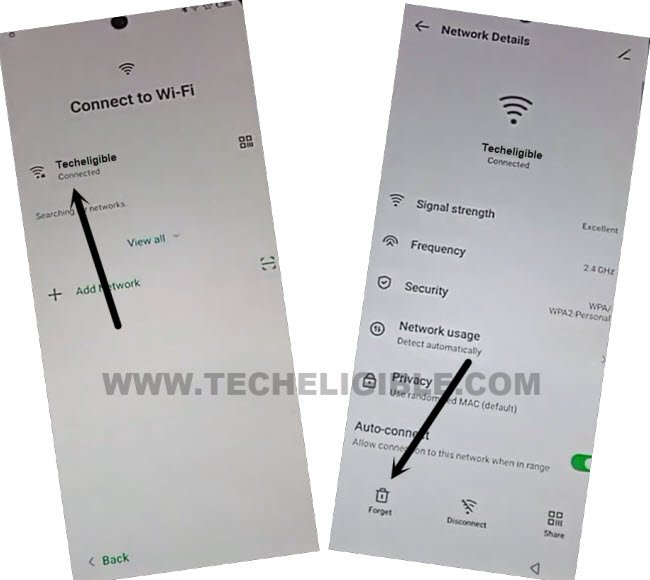
-By tapping on “Next and Skip” option, go to to (Connect to WiFi) screen. After that, long hold your connected WiFi and forget this network completely.
-After that, bring your another android device, and turn on hotspot connection on that phone.
Connect Phone on Hotspot WiFi
-Then, connect Itel A95 device with your other phone hotspot WiFi connection.
-Once the WiFi is connected, tap to “Next”.

-After reaching on the (User Agreement and Services) page, you just have to turn off hotspot connection from other phone and wait until WiFi signal disappear.

-Once the WiFi connection is gone from itel frp locked phone, just tap on “Next” option.

-Finally, you will reach on the (Google Services) startup page, from there, go to > More > More > Accept.

-Skip both (Unlock Method & Mobile Cloner) screen.
-From the (System navigation) screen, choose the “Button” option and go to “Next”.
-Now, we are on the (Itel Welcome) screen. On this page, we have to turn on again (Hotspot) connection from other android phone.

Use Accessibility Feature to Disable Apps
-Tap on “3 dots” icon and choose > Assistant > Google > Just once.

-After few seconds wait, the google assistant will open up, there, you will see the (Open Wi-Fi Settings), just tap on this option. You will reach on the WiFi page, within few seconds, the WiFi will connected automatically.

-Tap once on the (Back Arrow) icon from bottom to go back to (Itel Welcome) screen. From there, tap again on > 3 dots > Assistant > Google > Just once.
-Once you get the google assistant popup window, just hit on “Keyboard” icon and search there with “Open Settings”.
-Then, the itel A95 primary settings will be launched.

-Go to > Apps Management > App list.
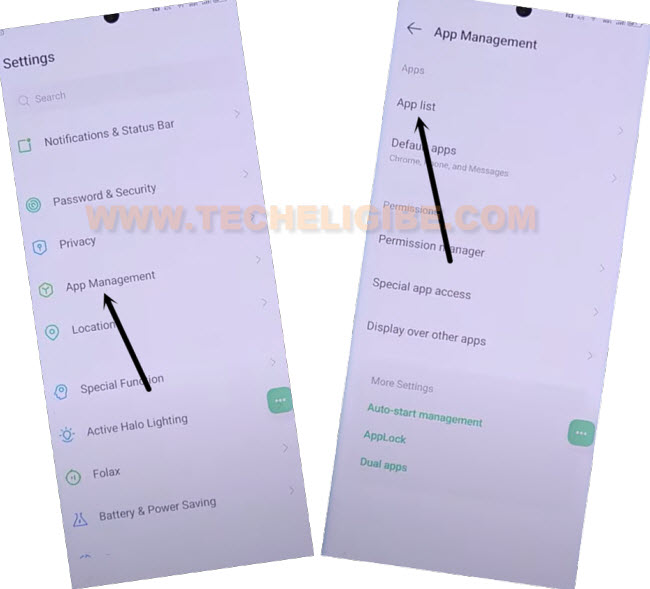
-Tap over the “3 dots” option form top corner and choose the “Show system”.
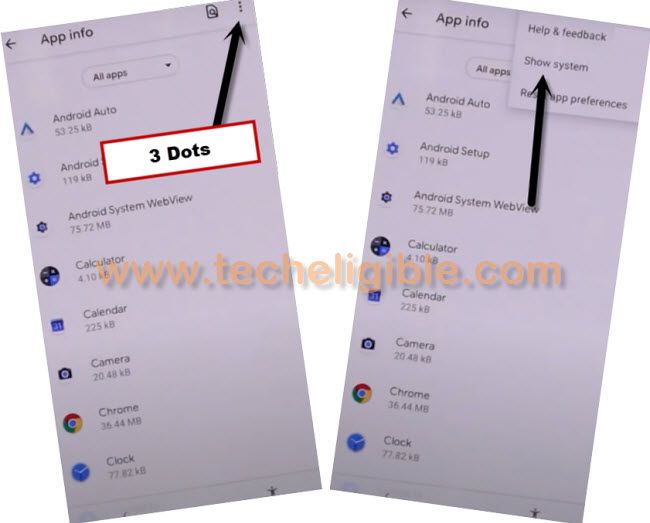
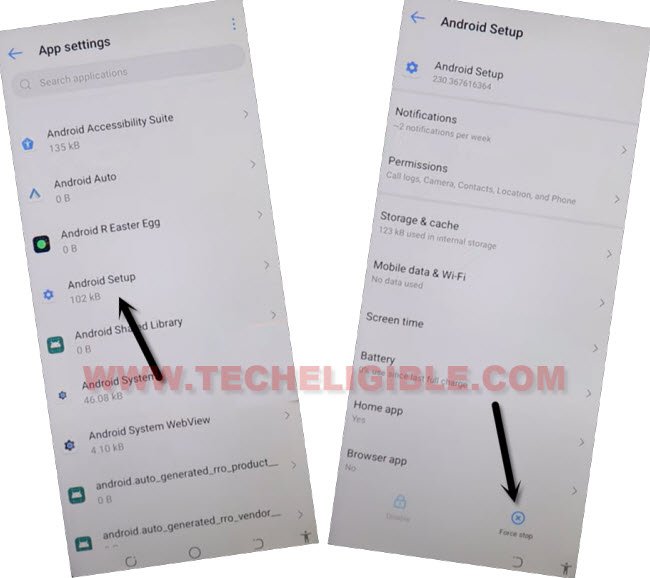
-From app list page, find and tap over the > Android Setup > Force Stop > Ok.
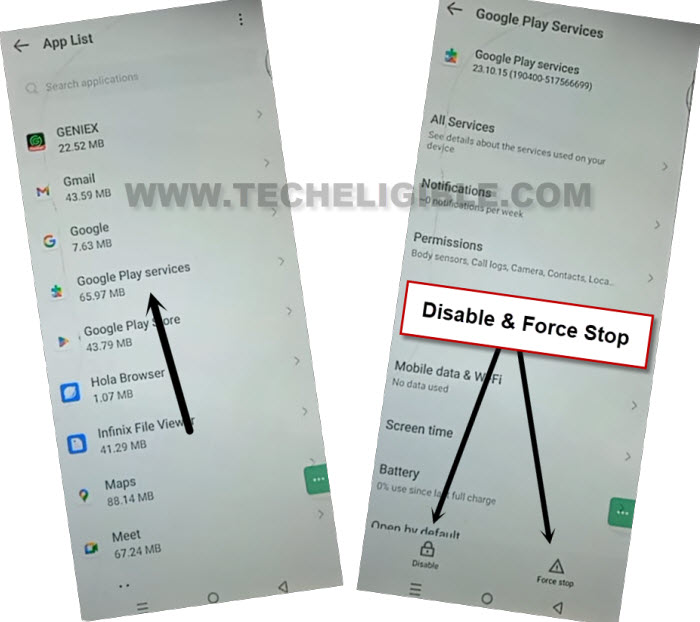
-Go back to app list page and find and go to > Google Play Services > Force Stop > Ok. Tap also on the > Disable > Disable App.
Go back to Itel Welcome Page
-After that, go back to (Itel Welcome) screen by tapping 2-3 times on back arrow option.
-Finally, hit on the “Next arrow” icon from itel page and your device will be opened completely without signing in with forgotten gmail account.

What to do, after accessing to Home-Screen?
-Firstly, go to “Settings” and enable back your recently disabled android + google play services applications. It’s very simple, just go to > Apps Management > App list.
-Tap over the “3 dots” icon and “Show system”.
-Find and tap to > Google Play Services > Enable.
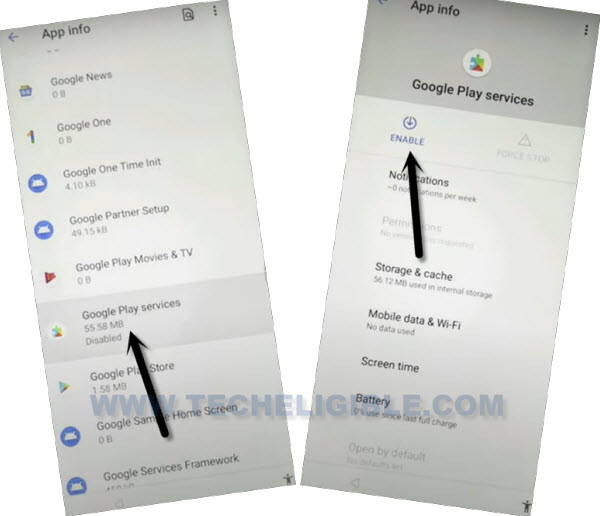
-After that, go back again on “Settings” and setup your new pattern lock and login with another Gmail account.
The Bottom Line
Used the PIN locked SIM card to get (Not Signed in) message. After that, through this message, we successfully accessed on the youtube webpage. Then, we just accessed to main settings page and enabled (Accessibility function). By hitting on back arrow icon several times, we reached back to (Connect to WiFi) page and forgot the WiFi network.
After that, we used another phone hotspot WiFi connection and connected our itel device to other phone hotspot WiFi. Just by turning on and off hotspot connection, we simply completed setup wizard steps and accessed to main home-screen successfully and bypassed the frp account.