Have you performed a factory reset on your smartphone to fix issues such as forgetting your unlock pattern or experiencing lag? Following that, you find yourself unable to access the device again, as it keeps prompting you to sign in with your Gmail account first. Even after numerous attempts to log in with your Gmail credentials, your account is still not recognized.
This indicates that the original Gmail account associated with this device is no longer accessible. You might have either completely forgotten the associated account or you could have acquired a second-hand phone that is linked to the previous owner’s Gmail account. To resolve this problem, follow the instructions to Unlock and Bypass FRP Samsung Galaxy S5 Neo (Android 7/6/5) versions and gain access to your phone through simple steps.
Disclaimer: We are creating this post to educate people about how to get back their lost device due to forgetting Google account. This method is only for device owner and for educational purpose only.
Method 1: Bypass FRP Samsung S5 Neo (Android 7)
-Turn on your phone and connect to WiFi network.
-Insert a working SIM card as well. Let’s put your phone on the (Welcome) screen.
-We have to use one more android phone in this method in order send youtube link through using a free app.
Install HushSMS App on Other Phone
-You have to install the (Hushsms) apk application on other phone. Because, we are going to send youtube link to our frp locked phone to gain on the youtube webpage.
Note: Do make sure, your both phones are on same WiFi network and SIM card inserted.
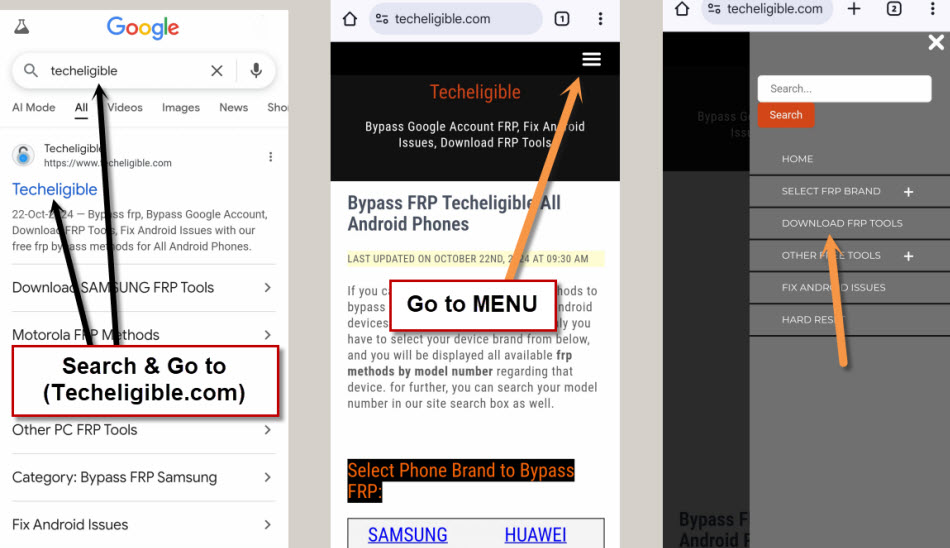
-Open up chrome browser/internet browser on your other android device. After that, just search there with “Techeligible” text.
-Visit the 1st searched result. From there, simply, open up the site menu by tapping “Menu” option from upper corner and then go to “Download FRP Tools”.
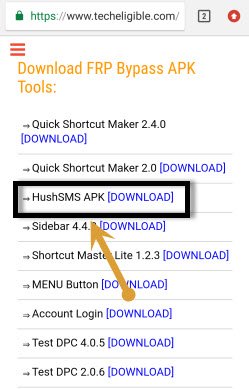
-Download & Install an app “HushSMS APK” on your other phone.
Note: Don’t forget to turn off your any active @ntivirus software from PC before downloading this (Hushsms) app. We don’t know, why @ntivirus is deleting this app, but, we have tried this app before, and also many tutorials available on youtube, they are showing guide how to use this app, so, you can use this app on your PC.
Send Youtube Link to FRP Locked Phone
-After installation is completed, lets launch this app.
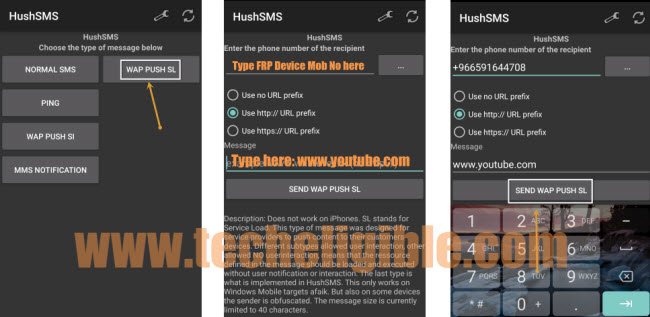
-Simply, go to “WAP PUSH SL” option from the hushsms application main interface.
-Then, type your FRP locked phone number and then, choose the 2nd option “Use http://URL prefix”.
-Enter the url “‘www.youtube.com” in the message field tab.
-Click over the button “SEND WAP PUSH SL”.
-Tap to “Ok” from the popup message on FRP locked device.

-You may see a youtube update page, just, tap to “Not Now”.
-Finally, you will be redirected on the official youtube webpage. From there, hit over the “3 dots” icon from upper corner and choose an option “Terms & Privacy Policy”.
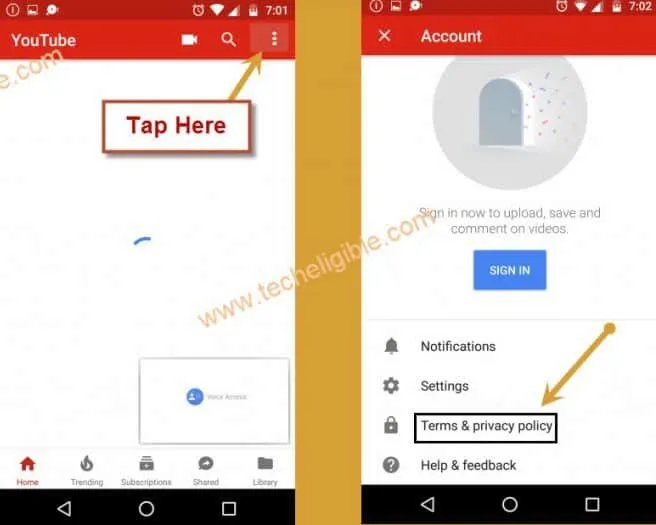
-If you get the (Update Samsung internet) popup, just hit over the “Cancel” option.
-Let’s tap on the top search bar, this will bring up some sharing applications, from there, tap on “Google” app.

Download & Install FRP Apps
-Search there our website again by typing with “Techeligible” and go to 1st searched result same as shown in the below image.
-Open up the site menu by tapping “Menu” option from upper corner and then go to “Download FRP Tools”.
-Let’s download below 2 mentioned applications.
1st: Google Play Services.
2nd: Apex Launcher.
-After downloading is done, you can easily access to the download history folder by tapping on the “Bookmarks” option from bottom of the Samsung browser.
-Then, hit over the > History > Download History.
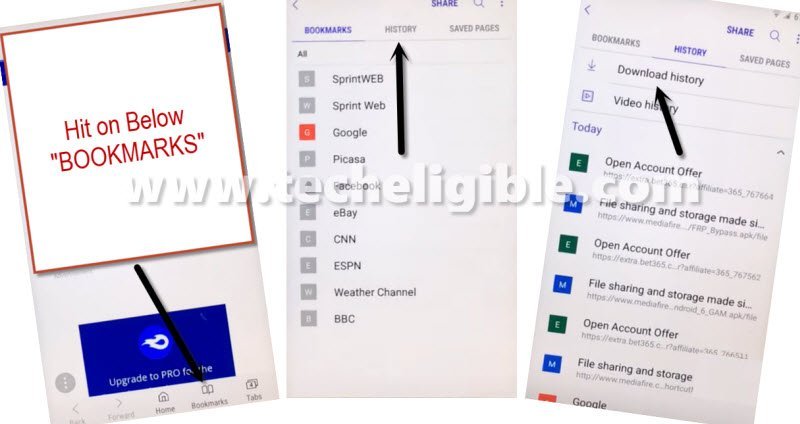
-You will have both recently downloaded apps there. Let’s tap on “Google Play Services” app.
-Before installing this app, you have to allow the phone to install apps manually. From the popup window, go to “Settings” and turn on “Unknown Sources” option.
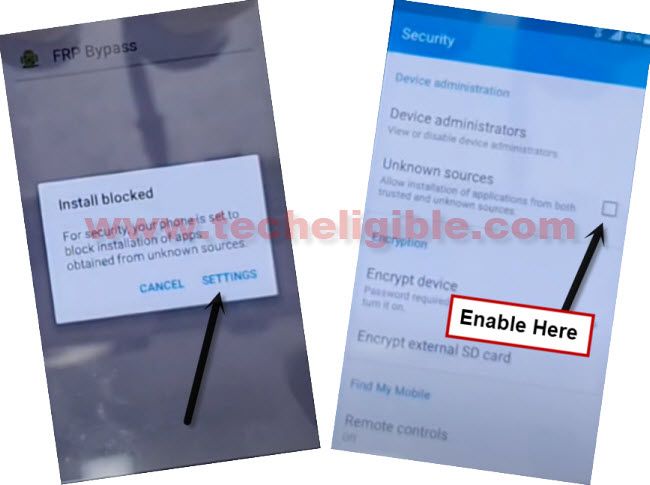
-After that, you will reach back to installation screen, from there, tap to > Next > Install > Done.
-Let’s install apex launcher app as well. This app will allow you to access your phone main home-scree & settings.
Use Apex Launcher to Access the Phone Main Home-Screen
-From the download history page, tap on > Apex Launcher > Install > Open.
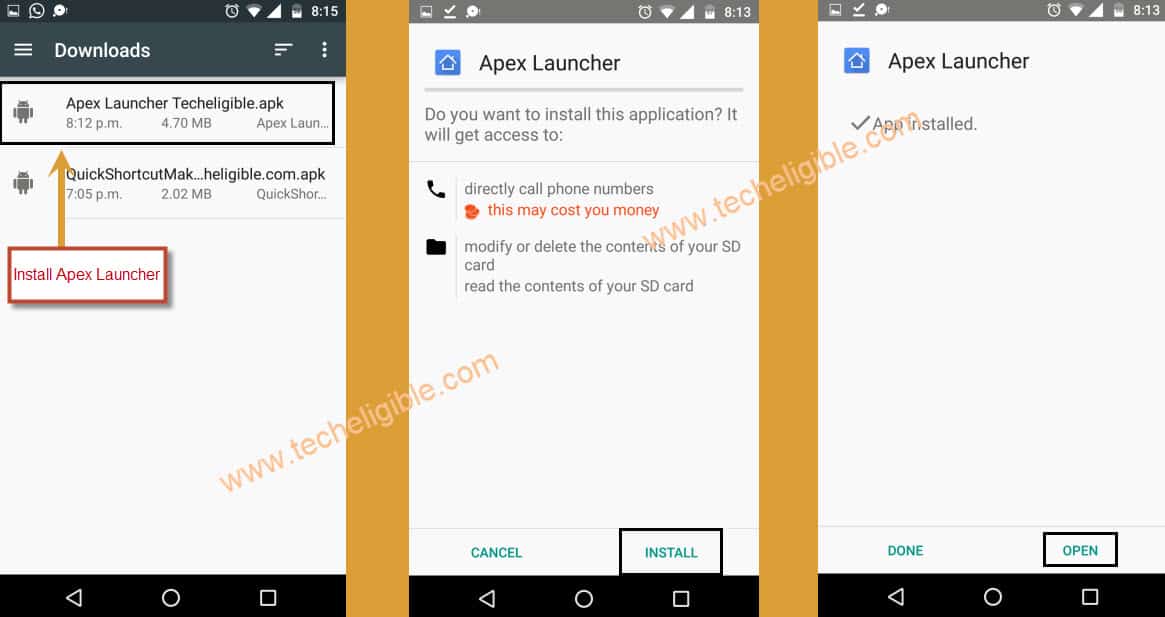
-You will be redirected on the main home-screen.
-Let’s go over the main settings page, from there, tap to > Lock Screen and Security > Other Security Settings.

-Afterwards, tap over the “Device administrators”.
-Simply, hit on the “Android Device Manager” and then, go to “Deactivate” option.
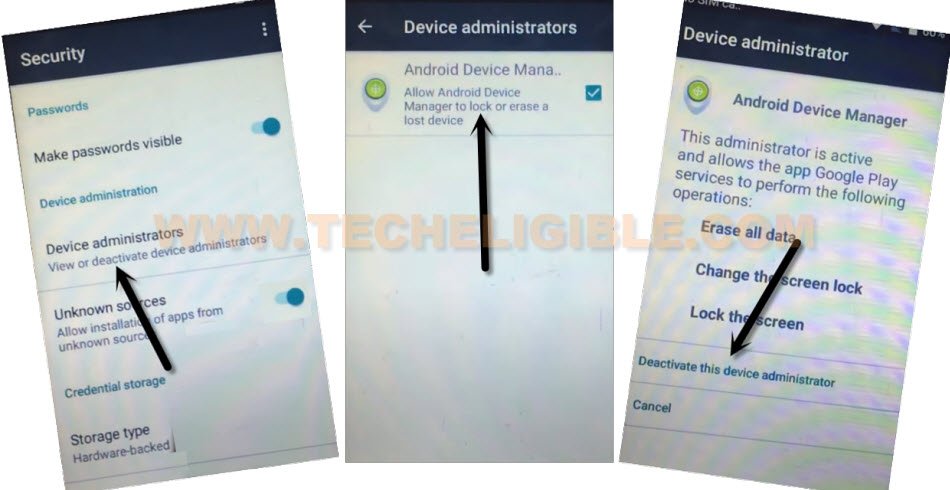
-Go back on the main (Settings) screen, from there, you just tap to “Apps”.

-Let’s hit on the “3 dots” icon from upper corner and then, choose the “Show system” option. This will display all the hidden applications of this phone.
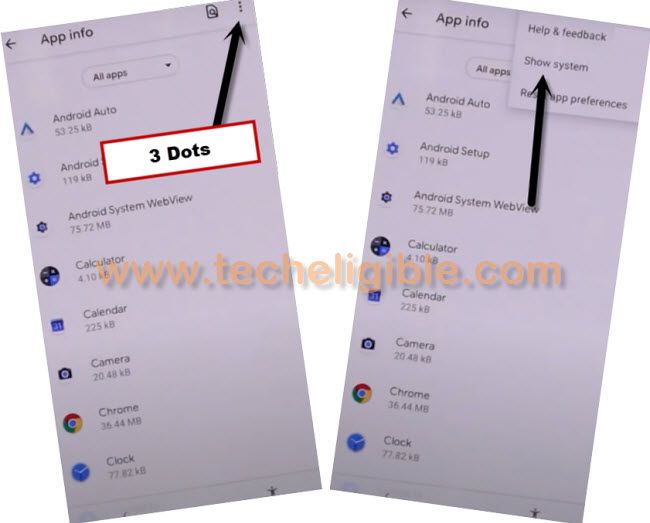
-Then, find and tap to “Google Play Services” app.
-Simply, force stop & disable this app completely.
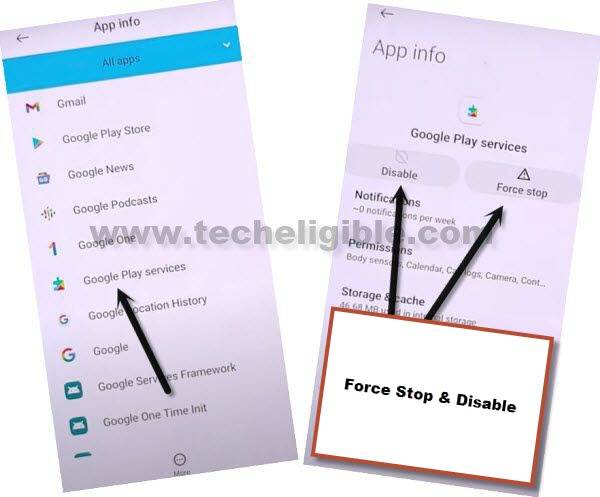
Add Google Account
-We need to get back on the main (Settings) page again. From there, go to “Clouds & Account”.
-You have to access to the > Accounts > Add Accounts.

-Login there with another account by tapping to “Google”.
-Sign in your any valid Gmail account.

Enable Recently Disabled Apps
-We need enable again the recently disabled apps. Because, we have added another google account successfully.
-Go back on the main settings screen, from there tap to “Apps”.
-Tap on the “All apps” and then, choose the “Disabled”.
-You will be shown your recently disabled google play services app.
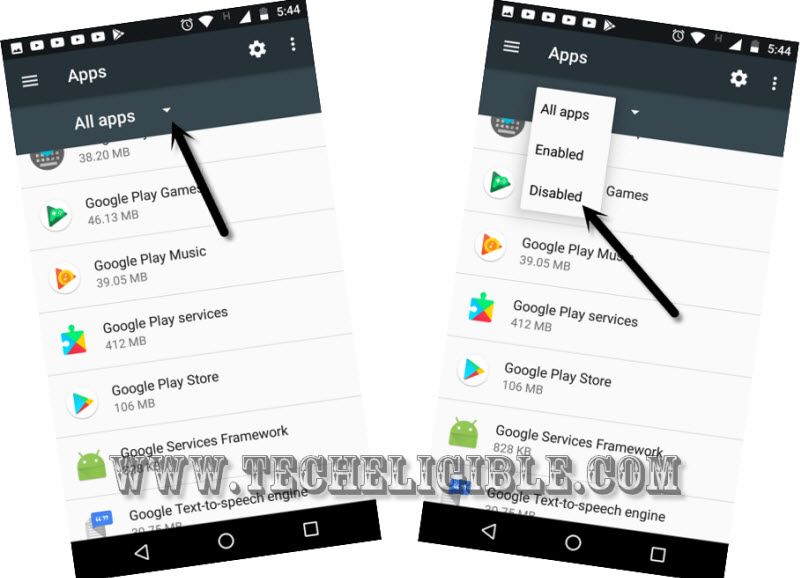
-Let’s tap to “Google Play Services” app. Then, hit on the “Enable” option.
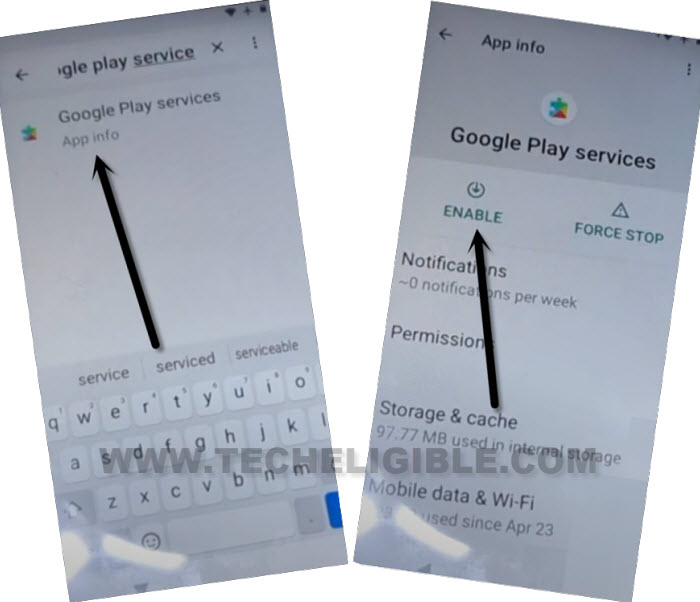
-Go back on the main settings screen. From there, tap to “Lock screen and security”.
-Tap on the “Device Administrator”.
-Now, hit on the > Android Device Manager > Activate.

-After that, we just have to restart the phone. From the first welcome page, go to > Start > Next > Next > Agree.

-Wait on the loading screen until its done. This may take several minutes to be done.
-Complete all the setup wizard to access back to main home-screen.
Perform Factory Reset
-Firstly, we have to remove the recently added Gmail account. For this, just, go to > Clouds and Accounts > Accounts > Google.
-There, you will be able to see your recently logged in google account. Just remove this account now by tapping on “3 dots” icon and tap to “Remove Account”.
-Then, return to main settings page. From there, tap to > General Management > Reset > Factory Data Reset > Reset.

-Tap on the button “Delete All”. The device will auto restart and may take several minutes to be done.
Method 2: Bypass FRP Samsung S5 Neo (Android 6)
-Turn on the phone and go to WiFi page. From there, connect WiFi to your device first.
-After that, from the Same WiFi screen, hit over the “More” option and then, go to “Add network”.
-Type any random text and long hold on that text, after that, choose the “Assist” option.
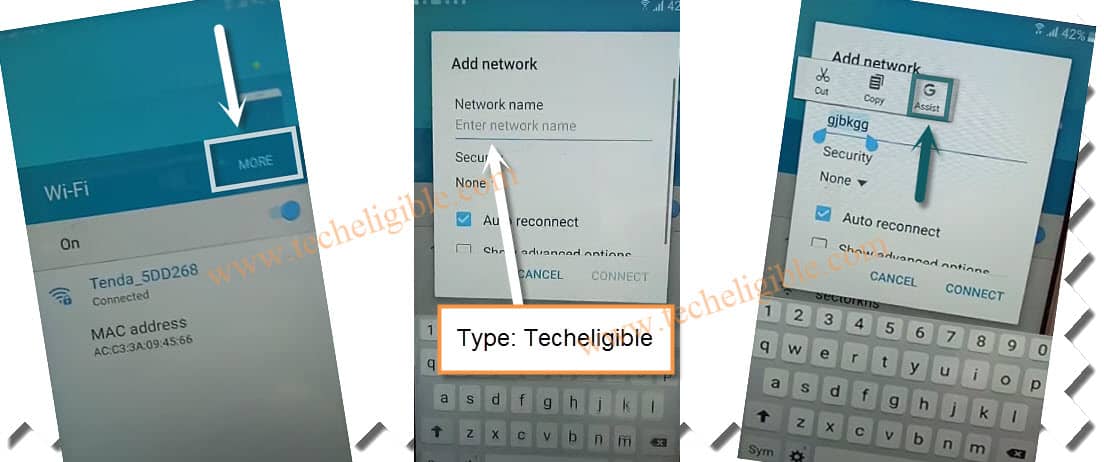
Go to Chrome Browser to Download Apps
-You will gain access on the google chrome browser page. Search there “Ch” and hit on “Chrome” icon from searched result.
-Then, from the (Welcome to Chrome) screen, hit on the > Accept & Continue > No Thanks.
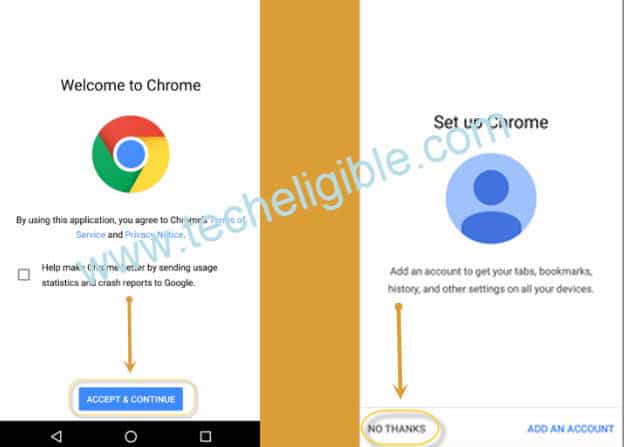
-Finally, we are inside the chrome browser application. Let’s make search the official frp tools page.
-Search there with “Techeligible” and go to 1st searched result.
-Afterwards, from the official techeligible site, go to “Menu” option from top corner and tap to “Download FRP Tools”.

-Download from there “Google Account Manager 6” application.
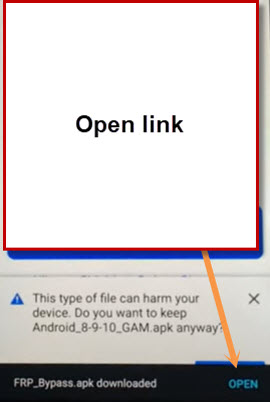
-Wait until downloading is done, after that, you must have a notification with (Open) link, just tap on that “Open” link to start installing this app.
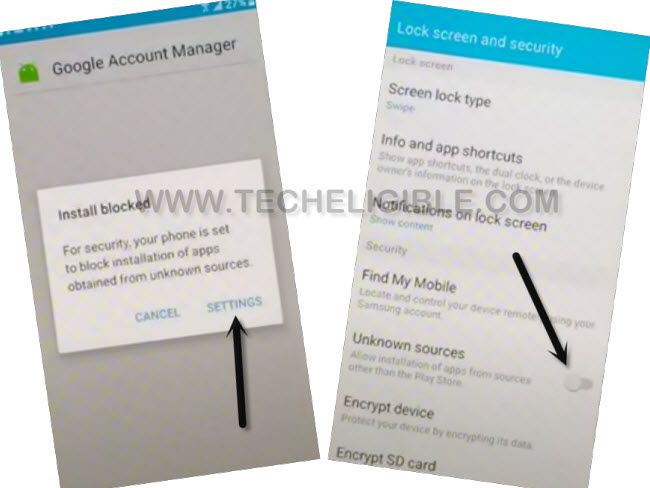
-You may see an installation blocked popup screen, from there, hit on “Settings” and turn on “Unknown Sources” option.
Install Downloaded Apps
-Go back to frp tools page, download again the same app “Google Account Manager 6” application.
-After downloading is done, you will receive notification on the bottom, from there, tap on “Open” link.
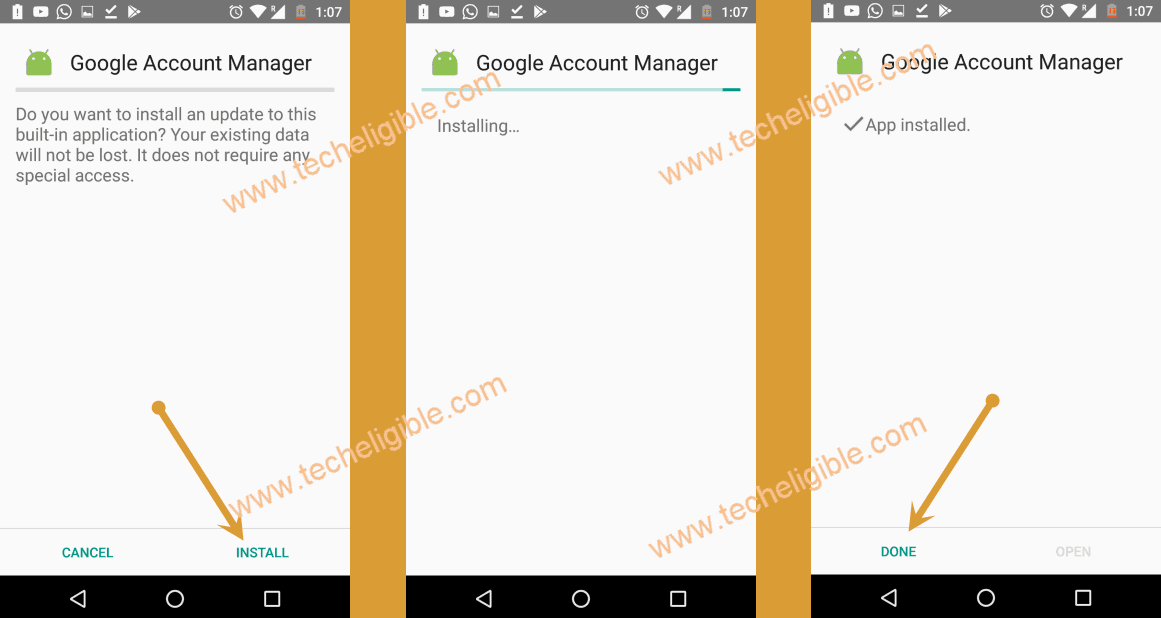
-Let’s install this app by tapping on > Install > Done.
-From the same frp tools screen, download one more application “Account Login” app.
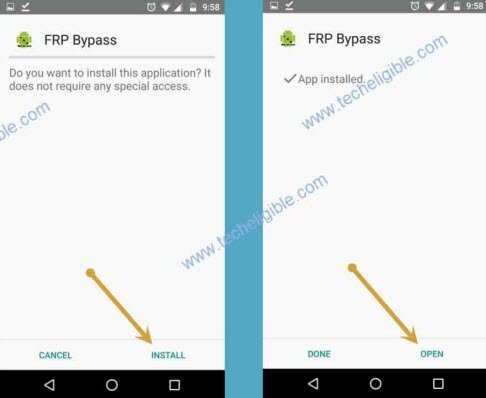
-Once the downloading is done, tap on “Open” link to install this app.
-From the next screen, go to > Install > Open.
Setup Gmail Account
-Congrats, you’ve accessed on the (Retype Password) page.
-Let’s tap over the “3 dots” option upper corner and then, go to “Browser Sign-in”.
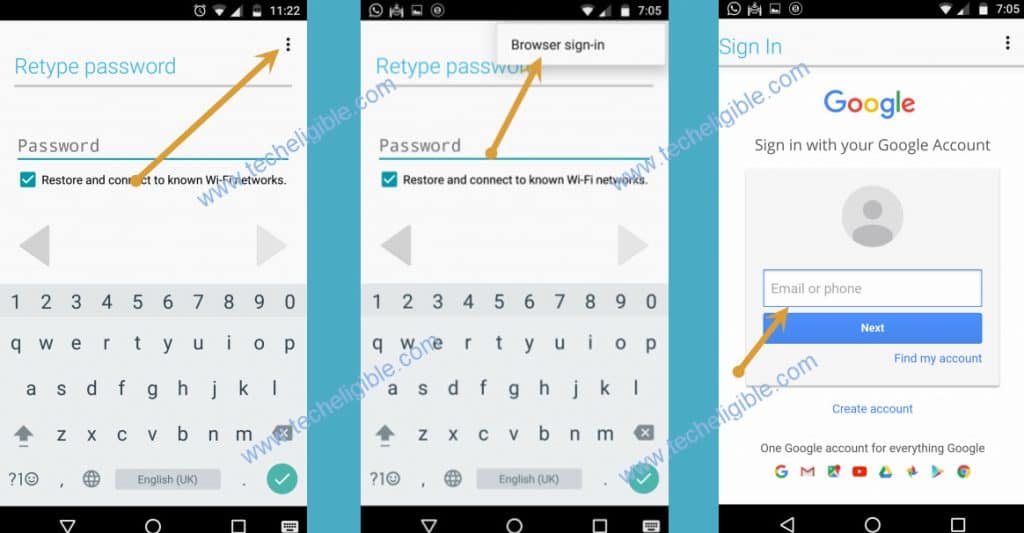
-Tap to “Ok” option from the popup screen.
-You will reach over the google sign-in screen. Let’s login there with your any valid Gmail account.
-You can easily restart your phone now by long holding (Power) key.
-From the very first (Welcome!) page, hit on > Start > Next > Next > Agree.
-You may have to wait for several minutes on loading (Just a sec….) screen. After few minutes waiting, the loading page will go away.
-Complete all the remaining steps on your own. Finally, you will reach on the main home-screen of the phone.

Method 3: Bypass FRP Samsung S5 Neo (Android 5)
Required Tools
♦ Computer/Laptop.
♦ Micro USB Cable.
♦ Wi-Fi (Internet).
Continue Steps
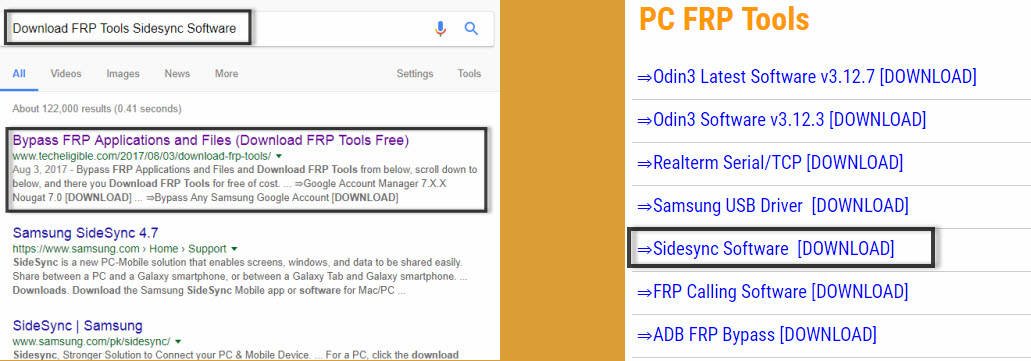
-Type in your desktop internet browser “Download FRP Tools Techeligible“.
-Go to (Download FRP Tools) option from searched result that relevant to our techeligible site.
-Once downloaded “Sidesync Software“, just install & Open in your computer.
Connect the Phone to PC
-Switch on the phone.
-Connect “Wi-Fi” in your device.
-Open “Sidesync” Software in your computer.
-After that connect the device with PC using usb cable
Note: Make sure “Sidesync Software” is running in your computer and then you connect S5 Neo device to computer.
Open Chrome Browser
-After that you will get popup window on your device to open with some browser.
-Tap on “Chrome” browser icon to open with.
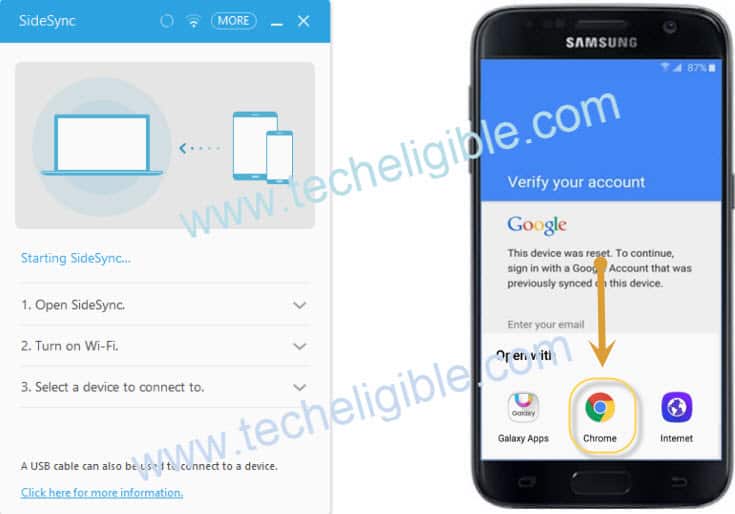
-After that, tap on “Accept & Continue”, and then tap on “No Thanks”.
-Once chrome browser opened, then just disconnect your device from computer.
Download FRP Apk File & Install It:
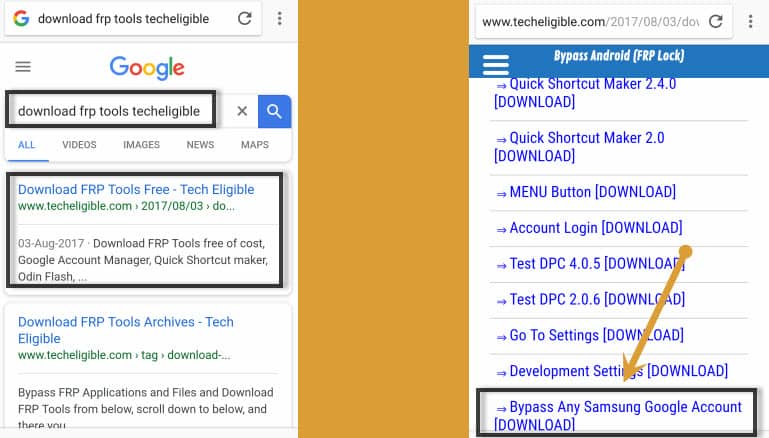
-Let’s go to techeligible site by searching in browser with “Techeligible“. After that, visit first searched result same as shown in below image.
-Afterwards, you have to hit over the “Menu” icon from top corner. Tap to “Download FRP Tools”.
-Download from there “Bypass Any Samsung Google Account” app.
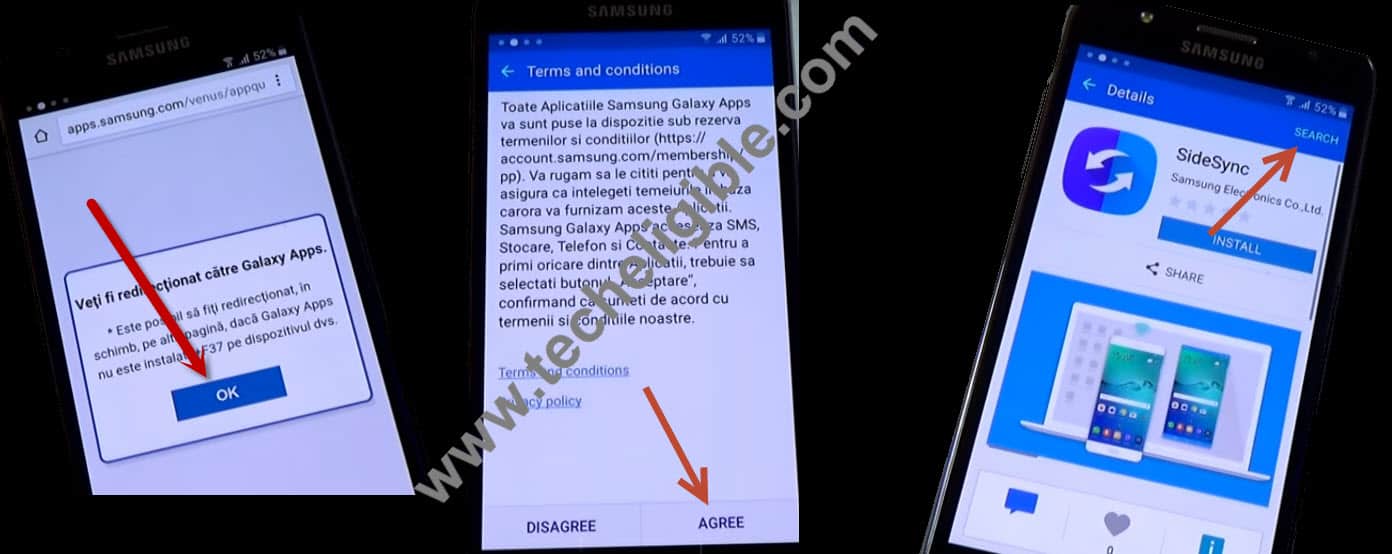
-Once downloading finished, just tap on “Back Key” from your device, until you reach back to “Popup Screen” where “OK” is written. (See Below Image)
-Tap on “OK” from popup, and then you will be redirected to “Terms and Conditions” screen.
-Tap on “AGREE”, if you get “error” popup, just tap on “OK” from that as well.
-Now Tap on top right corner “Search”, and type there “ES FILE EXPLORER“.
Download Es File Explorer & Install It
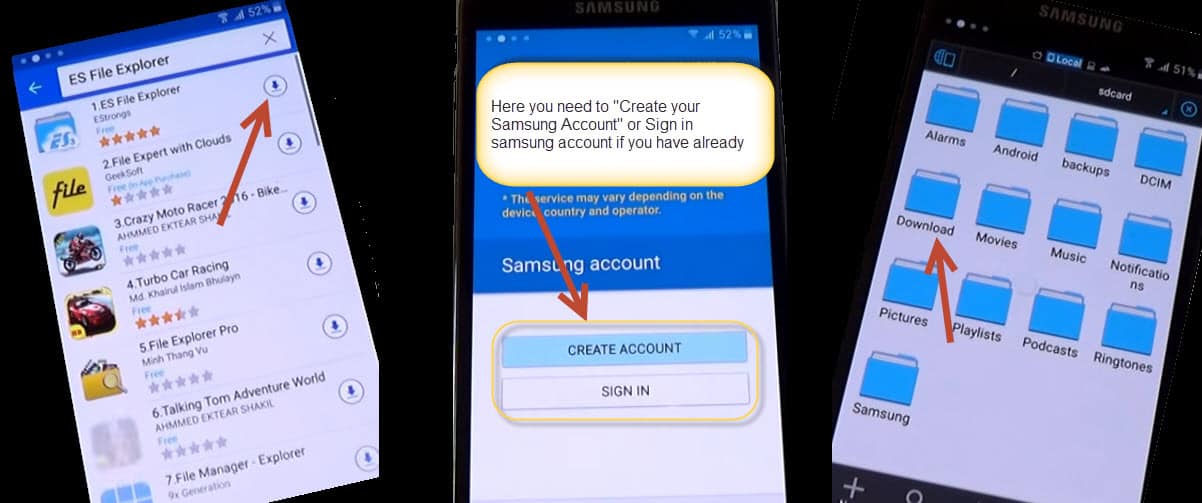
We have to download and open “ES FILE EXPLORER” to access download folder, so that we could install our downloaded apk file to Bypass Google Verification Galaxy S5 Neo.
-Download “ES FILE EXPLORER”.
-Enter your “Samsung Account“, if you don’t have tap on “Create Account” and after that “Sign In” with your Samsung Account.
Note: Samsung account can be created in free, just give mandatory information there and create it.
-Once you successfully signed-in, you will get popup screen, tap on “Accept & Download“, and then downloading will start of “ES FILE EXPLORER”.
-Tap on “Play Icon” to open it, and then tap on “Download” folder.
Install & Open APK File
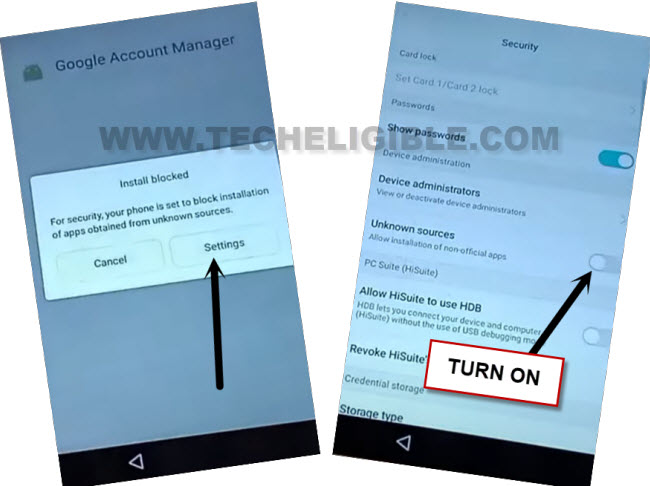
-Tap on “Bypass Any Samsung Google Account” apk file, then you will get “Installation Blocked” popup, just tap on “Settings“, and enable “Unknown Sources“, from there.
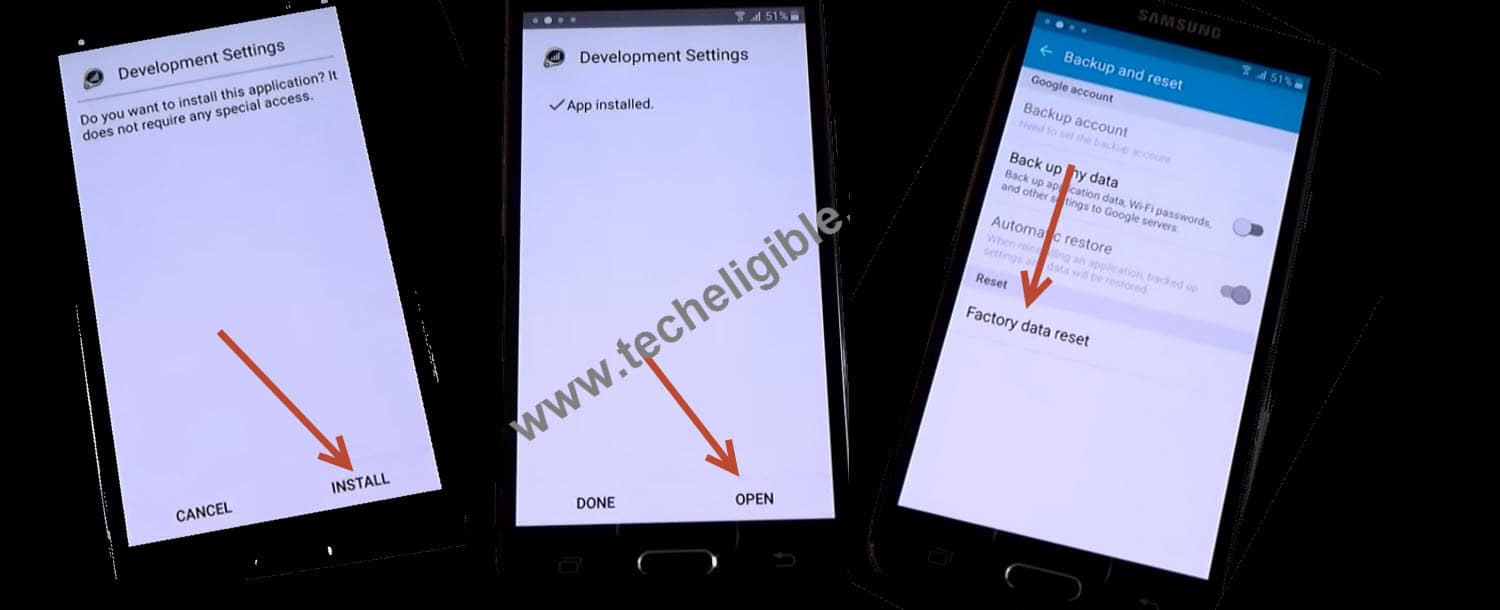
-Then tap on “Install” after that, tap on “OPEN”.
-Now you will be taken in “Settings”, and then tap on “Backup & Reset” from there.
-Now tap on “Factory Data Reset” and then tap on “Reset Device”, after that “Delete All”.
-Your device will auto restart. After that, finish up setup wizard steps accordingly without connecting to WiFi network.
Note: Make sure, do not “Connect Wi-Fi” while completing the initial setup steps.
How FRP Lock Works?
FRP is one of the security lock feature to protect android phone right after someone factory reset the phone to break security locks. This is the specialty of this feature to lock your device by asking to login back with previously synced Gmail account. There, no one can login with your previously synced google account. Only owner has the right to use their device back by signing-in again with the FRP linked gmail account.
If you the device owner facing FRP lock protection on your own device, then, you have rights to follow up FRP Bypass steps from here on your device to setup another google account.
Conclusion
In the 1st guide, we simply downloaded & installed (HushSMS APK) application on other phone and then, sent a message to the Galaxy S5 Neo device with youtube link. Then, with 1 tap on the “Ok” option, we reached over the youtube webpage. From there, we just accessed to Samsung browser and then, downloaded frp apps. After that, installed those frp apps and bypassed the frp account easily.
In the 2nd guide, we just applied the google assist method, means, from the (Add network) tab, we just typed random text long hold on it. Then, tapped on the “Assist” option to reach on the google app directly. Afte