Are you facing frp lock on your device? and unable to access your device because of forgotten Gmail account. That means, you have to Remove FRP Galaxy S7, S7 Edge with the help of 6 frp bypass methods from here. As you know, Samsung Galaxy S7, S7 edge device came with (Android 8,7,6). That is the reason, there are 6 different methods available on single on this phone. All methods are varied because of android version is changed. Check out now and fix your issues on your own without any expert help.
What is FRP on Samsung S7/S7 Edge:
This is a security feature to keep S7 edge device data safe and secure from any type of illegal approach. No one can use your Samsung S7 phone even if he factory reset the phone deliberately to delete security locks. This is the importance of FRP feature that, PIN lock and Face lock can be removed just through factory reset. But, FRP can’t be.
Factory reset protection can also lock out the device owner, if they forget their own logged in Gmail account after hard reset the phone. To bypass this type of FRP locking protection, you have 6 frp bypass methods here. Check out them now.
Disclaimer: We highly recommend you to apply this method only on your own device. If you are not owner of this device, or you found this from some where, you must return to its real owner. This FRP bypass guideline is just for educational purpose.
| ⇒ Method 1: FRP Bypass Galaxy S7, Galaxy S7 Edge [Android 8] |
| ⇒ Method 2: FRP Bypass Galaxy S7, Galaxy S7 Edge [Android 8] By Bluetooth Air Pads |
| ⇒ Method 3: FRP Bypass Galaxy S7, S7 edge [All Android Version] New |
| ⇒ Method 4: FRP Bypass Galaxy S7, S7 edge [by Hushsms App] |
| ⇒ Method 5: FRP Bypass Galaxy S7, Galaxy S7 Edge [By SIM Card] |
| ⇒ Method 6: Remove FRP Galaxy S7 | S7 Edge [By PC & Calling Method] |
Method 1: Remove FRP Galaxy S7, S7 Edge By Sim Card [Android 8]
-Connect Wifi in your phone first.
-Insert pin locked “SIM Card” in your phone and wait for “Enter SIM Unlock Pin” popup message.
-You can set pin lock code in your sim easily using any other phone.
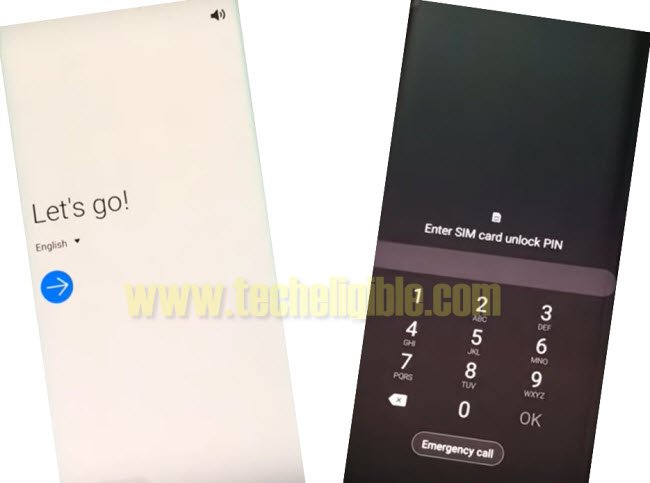
-Now remove your SIM card, and quickly press “Powe Key” one time.
-Press power key again to wakeup device, and there you will see “Not Signed in” dialogue box.
Note: If you do not see “Not Signed in” message, that means you are failed, try again, re-insert sim card, and then remove sim tray, after that quickly press “Power key”.
-Swipe right “Not Sign in” message, and then tap on “Bell icon”.
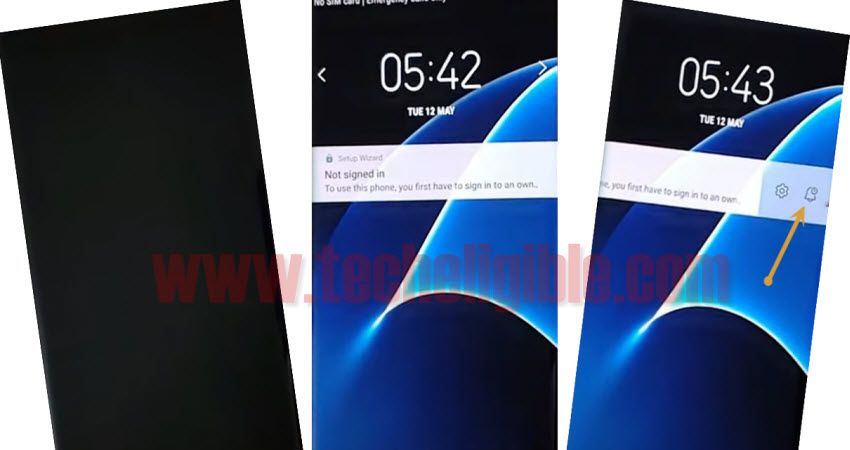
-Tap once on the “Settings” icon.
-After that, Tap on “Bluetooth” icon, and then tap on “Stop” from the popup window.
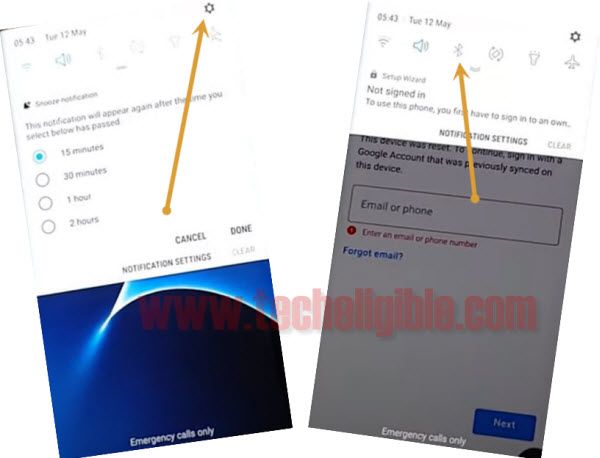
-Now tap on “Contact us” hyperlink.
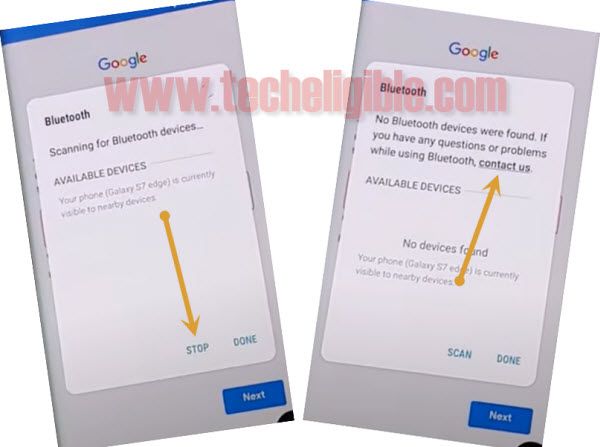
-After that, tap on > Next > OK > OK.
-Tap on “Back Arrow” one time to get back to “Bluetooth popup window” again.
-From there again tap on > Contact us > Next > OK.
-It will show you updating screen, just keep tapping on “Search icon” from top right corner, keep tapping on several times until you do not get “Search box”, don’t be tired, because you may have to tap on “search icon” continuously for a minute.
-Once you get “Search box”.
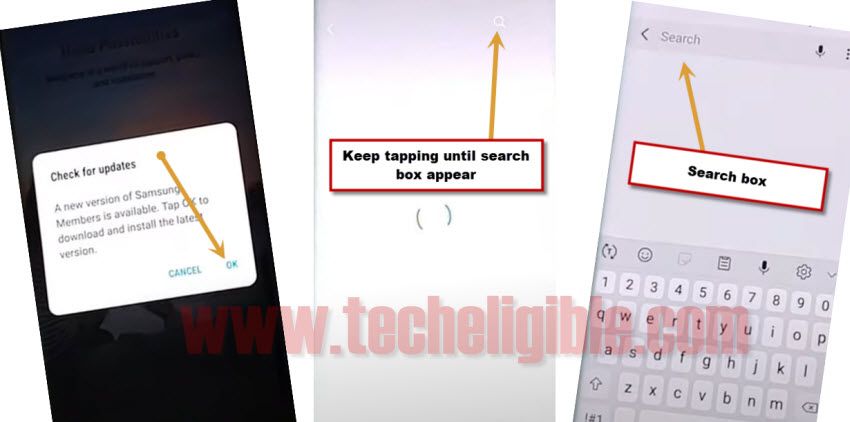
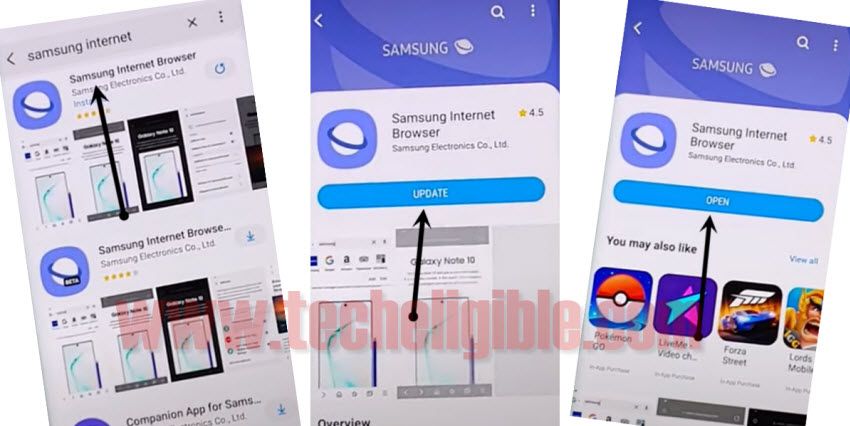
-Search there “Samsung Internet”, and then tap on 1st searched result of Samsung internet browser.
-Now hit on “Update”.
-Once updating process finish, you will surely get a button “OPEN”, just tap on that.
-From popup window of default browser, just tap on “Not Now”.
-Tap on “Google icon”.
-Now we are going to download Samsung frp apps.
Download Samsung frp tools on Galaxy S7 Edge:
-Make search there with “Techeligible“. After that, go to techeligible site.
-Navigate to “Menu” option from top corner.
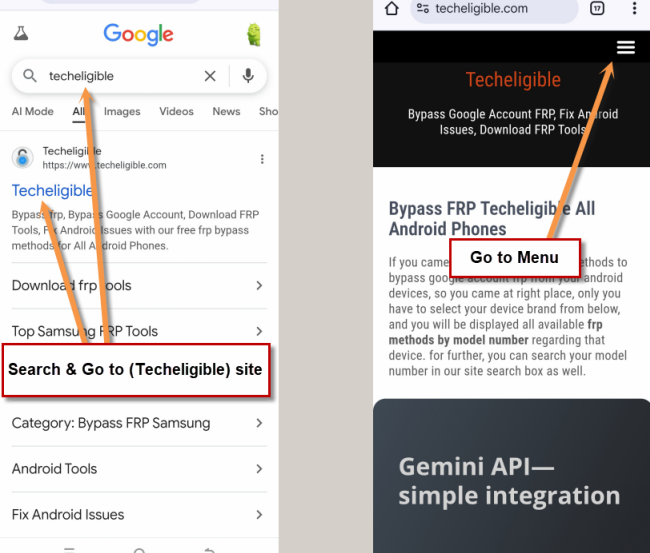
-After that, simply, hit on > Other Free Tools > Samsung FRP Tools.
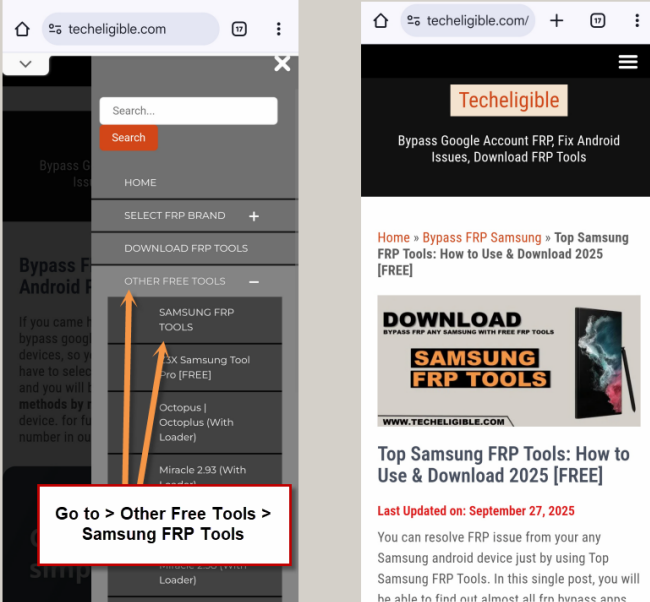
-Download below 2 apps.
1-Google Play Services.
2-Apex Launcher 3.3.3.
-Wait until downloading process finish.
-Tap on “MENU” icon from bottom right corner, and then select “Downloads”.
-There you will see both downloaded Samsung frp bypass applications.
-Tap on “Apex Launcher”.
-Tap on “Settings”, and enable option “Allow from this source”.
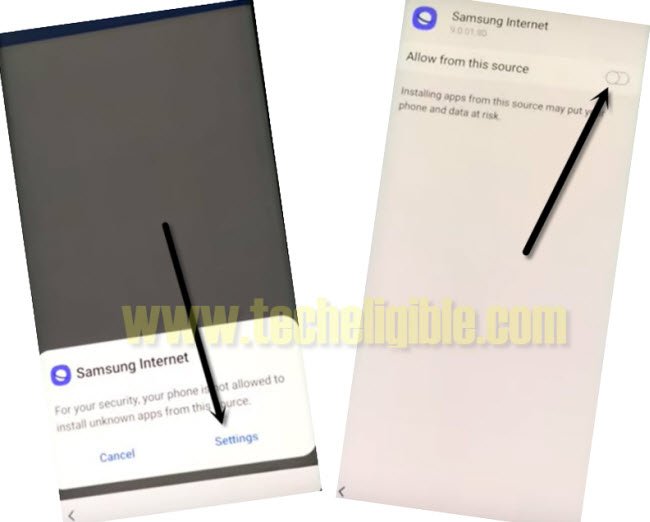
-Tap on “Back”, and then tap on “Install”, after that tap on “Open”.
Install final FRP APPs to Bypass FRP:
-We have to install one more app to successfully Bypass Google Account.
-Go to “MENU”, and from there tap on “Internet” browser.
-Once the Samsung internet browser open, just hit on “Menu” icon from bottom right corner same as you did before.
-Tap on “Downloads”, and from there just hit on downloaded app “Google play service”.
-Just tap on > Next > Install > Done.
-Finally, we have installed both frp apps in our Samsung Galaxy S7 and S7 edge device.
-Close all samsung internet browser opened “Tabs”.
-Now go back to device “MENU” by tapping on back arrow.
-From there just go to > Settings > Lock screen & Security > Other Security settings > Device admin apps > Find my Device > Deactivate.

-Go back to “Settings”.
-From there, tap on “Apps”.
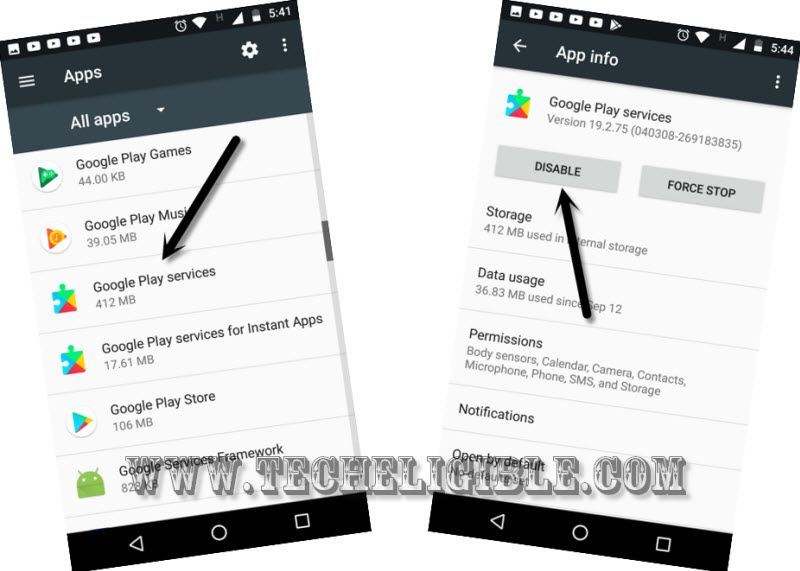
-Scroll down and find “Google Play Services”.
-Tap on > Google Play Services > Disable > Disable.
-Go back to “Settings”.
-Final step to setup new FRP protection.
-Go to > Cloud & Accounts > Accounts > Add Account > Google.
-Add your any Gmail account there to sign in successfully.
-After that, just restart your device.
Method 2: Bypass FRP Galaxy S7 Edge, S7 By Bluetooth Headphones
Latest way to bypass frp without PC. Access to YouTube by using Samsung Bluetooth or any other Bluetooth pods, from there open chrome browser and install frp tools to bypass frp from your Samsung phone.
-Switch on S7 Edge, S7 device & Connect WiFi.
-Go back to “Welcome” screen, use any PIN Locked SIM card now, you can setup 4 digits pin lock in your any SIM card with any other phone, after that, insert that sim card in Samsung S7 Edge, S7 device.
-You will be shown a popup message of “Enter SIM Card Unlock PIN”.
-At the same time, popup sim tray, press “Power button”.
Note: You have to do this at the same time, means eject your SIM, and while removing SIM, just press “Power Button” once to turn off your phone screen only.
-Now press “Power Button” again to wake up the screen, and there you will see “Not Signed in” popup message, this means you followed above steps correctly, if you do not see this message, you can retry all above steps, don’t worry.
-Swipe “Not Signed in” to the left side, and tap on “Bell icon”.
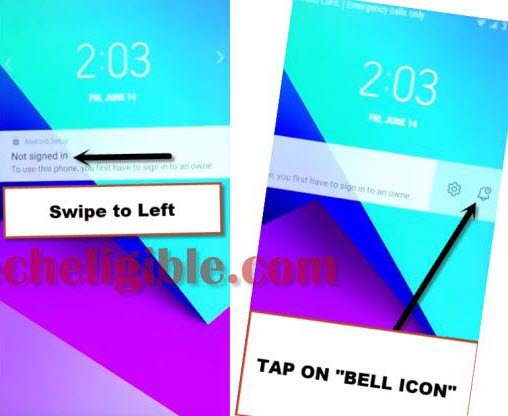
-From top bar menu, tap on “Bluetooth icon” 2-3 times, this will start scanning all available Bluetooth devices.
-Hire any Bluetooth pods, because we have to connect our phone with Bluetooth pods.
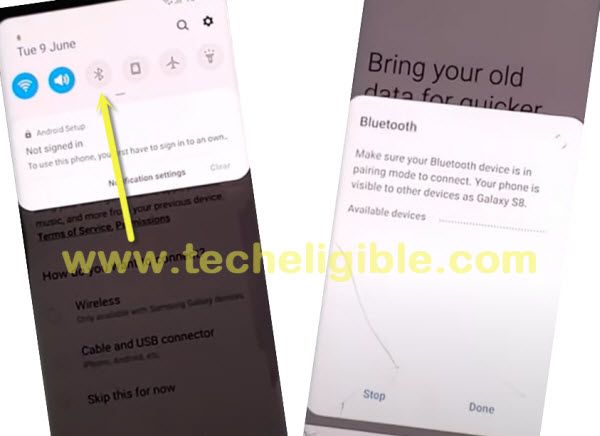
-Pair with your Bluetooth pods, and then press or touch “Power button” 3 times from your Bluetooth pods, this will open a popup window in your Samsung S7 Edge, S7 device. through that we will be able to Remove FRP.
-Tap on “Google” from popup window.
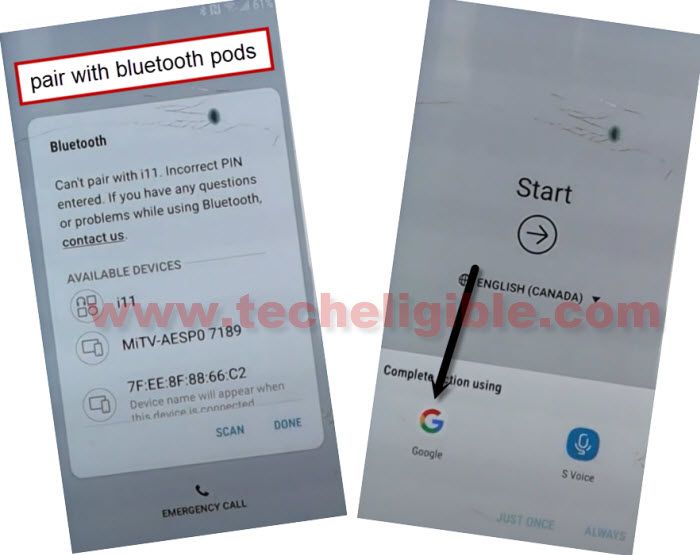
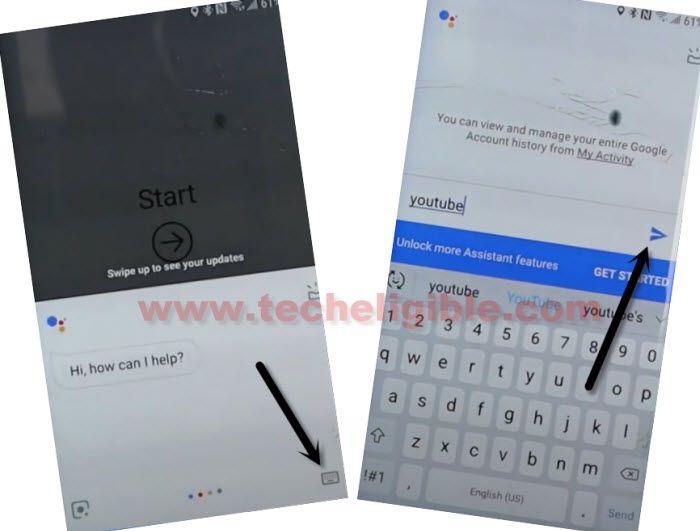
-Tap on “Keyboard icon”.
-Type and Send “Youtube”, after that YouTube official website will be launched for you.
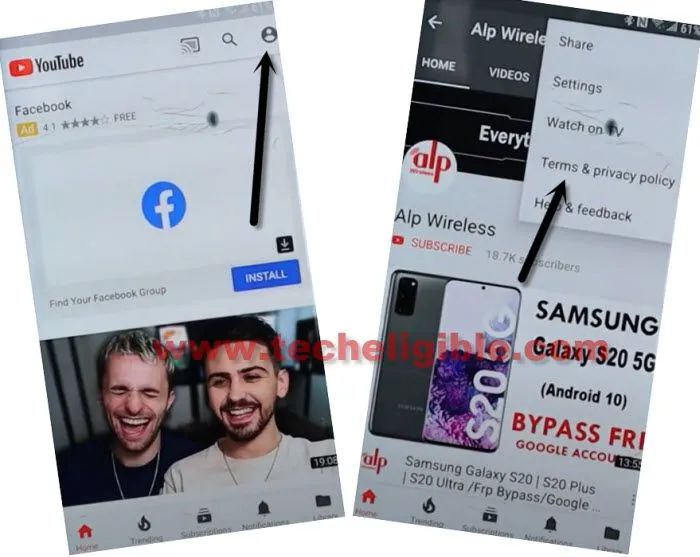
-Hit on “3 dots or Profile icon” from top right corner, and then tap on “Terms and Privacy Policy” to be redirected to chrome Samsung browser.
Download Samsung FRP Tools:
-Search there “Top Samsung Frp tools Techeligible“, and go to our website searched result same as shown in below image.
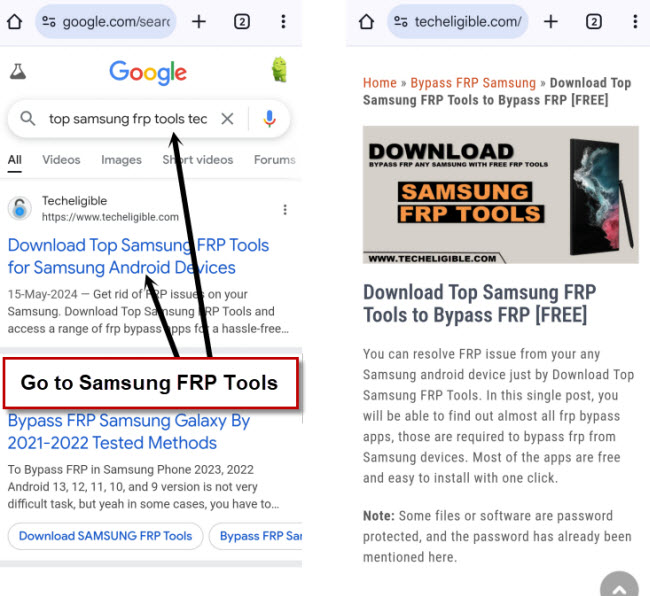
-Download an app from there “Google Play Services“.
-Once downloading finish, you will see popup message at the bottom of your browser, from there, hit on “OPEN File”.
-From popup box, hit on “Settings”, and then turn on option of (Allow from this source).
-Tap to “Back Arrow”.
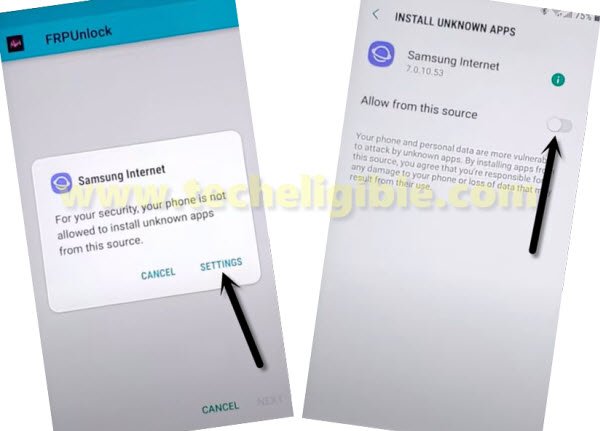
-Tap to > Next > Install > Done.
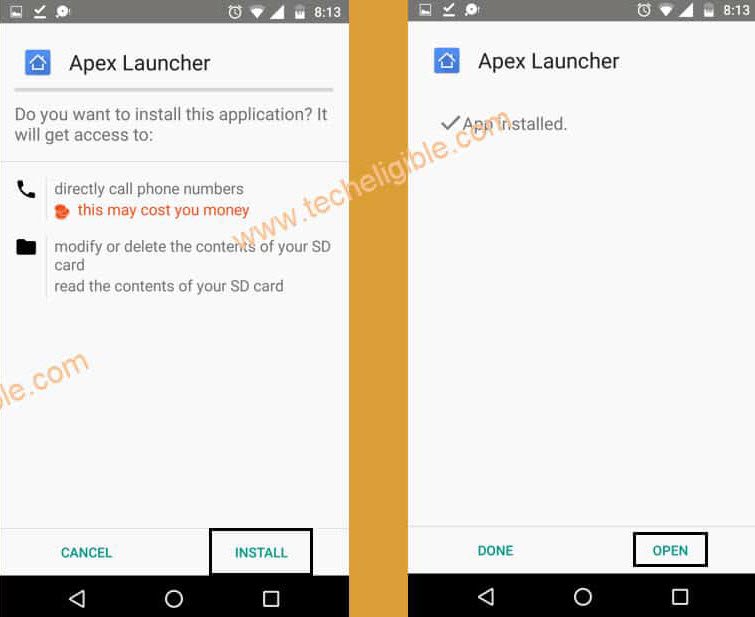
-From the same downloading frp tools page, download from there an app “Apex Launcher“.
-After downloading finish, you will get an option “OPEN File”, just tap on that.
-Hit on > Install > Open.
-After accessing to our SAMSUNG Galaxy S7 Edge, S7 device, we have to open Settings.
-Tap on > Settings > Lock Screen and Security > Other Security Settings > Device Admin App.
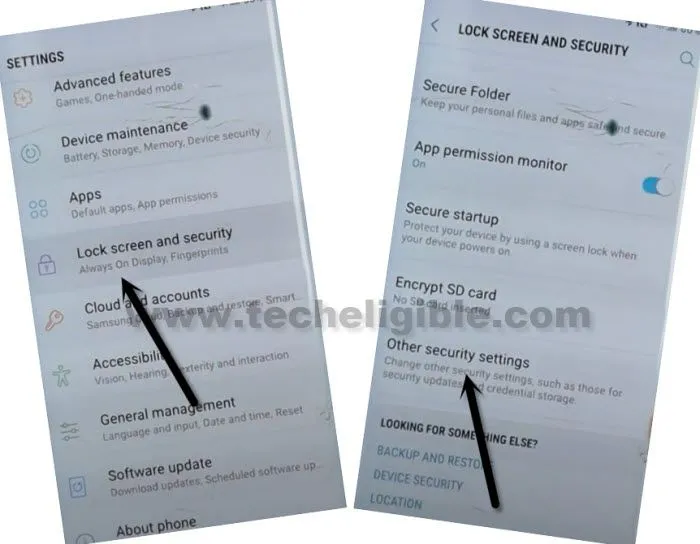
-Now go to > Find My Device > Deactivate.
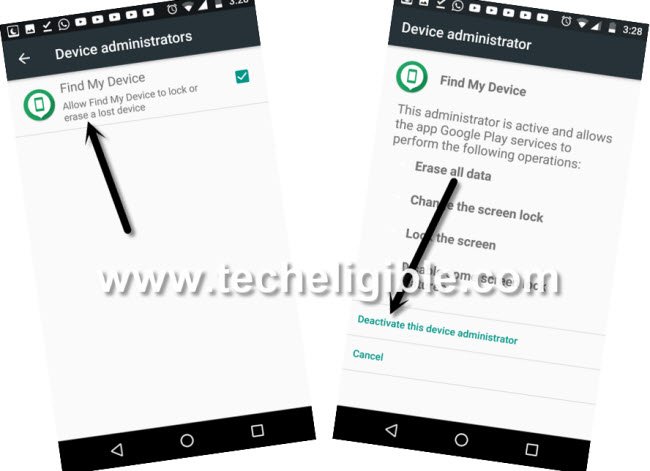
Access to Apps List Page for Disabling Google Play Services:
-Go back to “Settings”, now tap to “Apps”, Find and Tap on “Google Play Services”.
-Now hit on > Disable > Disable.
-Lets add new Google Account.
-Go back to “Settings”.
-From there tap on > Cloud and Accounts > Account > Add Account > Google.
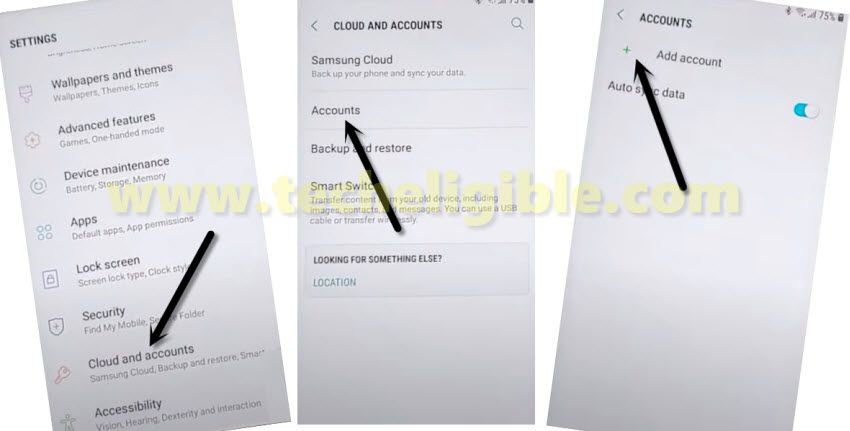
-You will see (Sign in) screen there, so you have to enter your valid and remembered Gmail account there, which will help you to bypass frp.
-After signing in successfully, go back to > Settings > Apps > All Apps > Disabled.
-Hit on > Google Play Services > Enable.
-To confirm, whether your new Google Account has been added successfully or not, you can check that again by going to > Settings > Clouds & Account > Account, there you will be able to see your already logged in account. Now you can restart your device to complete initial setup wizard.
Method 3: Remove FRP Galaxy S7, S7 Edge, S7 edge [Android 8,7,6]
-Connect WiFi, and go all the way back to first homescreen.
-Download & Install below PC tool in your computer using a browser, this is a small size tool which will remove frp easily with one click.
⇒ Amazing FRP Tool 2022 [DOWNLOAD]
Pass: techeligible.com
Note: Turn off all active @ntivirus for a while till you finish using this tool and remove frp completely.
-Extract the tool from WinRAR archive using 7-Zip or WinRAR software.
-Afterwards, go inside the tool folder, and from there right click on “Samsung FRP Tool“, and run as administrator.
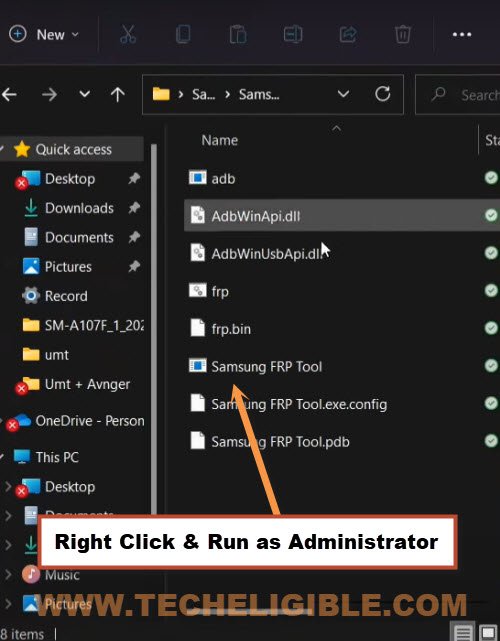
Note: Do make sure, you have installed all relevant USB drivers in your PC, so that you may not face any connectivity issue with your device.
-Connect device with computer using USB Cable.
-From the software, click to drop down arrow, and select your Samsung device com port, after that click on “RUN” button.
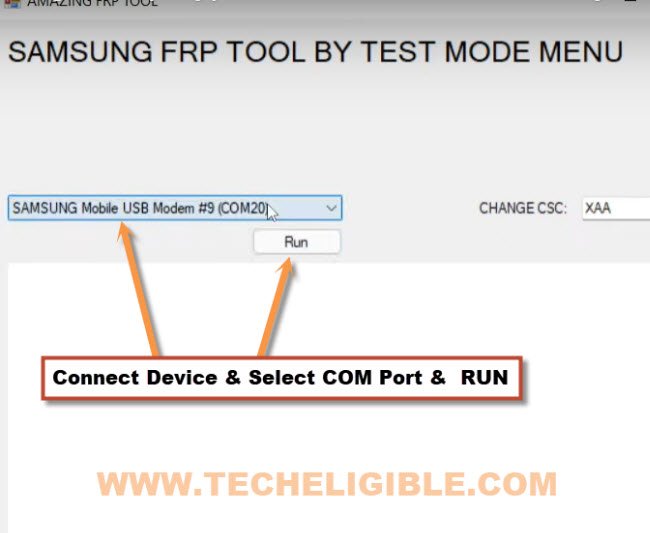
-You will receive a popup window in the software, there are some instructions to dial a code in Samsung device.
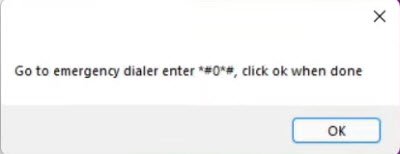
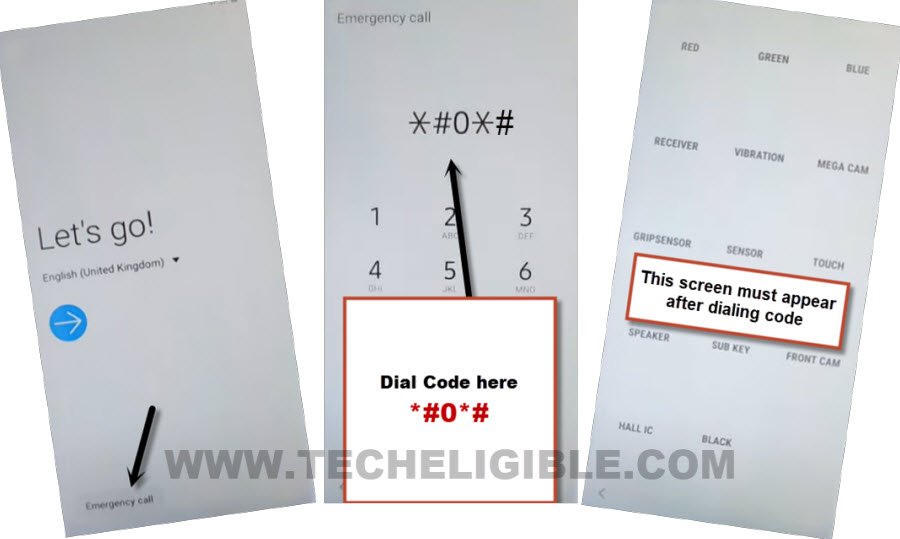
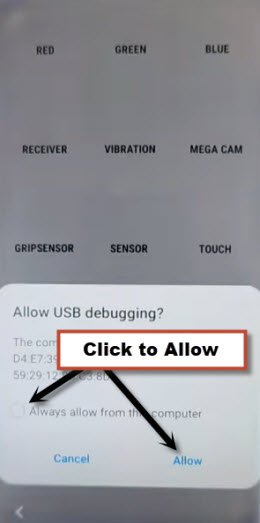
-So tap on “Emergency” option from your Galaxy S7 edge device, and the dial code *#0*#, After dialing this code, you will get there a screen with some small white boxes same as shown in below image, if this screen appeared on your device as well, that means this tool will work perfectly.
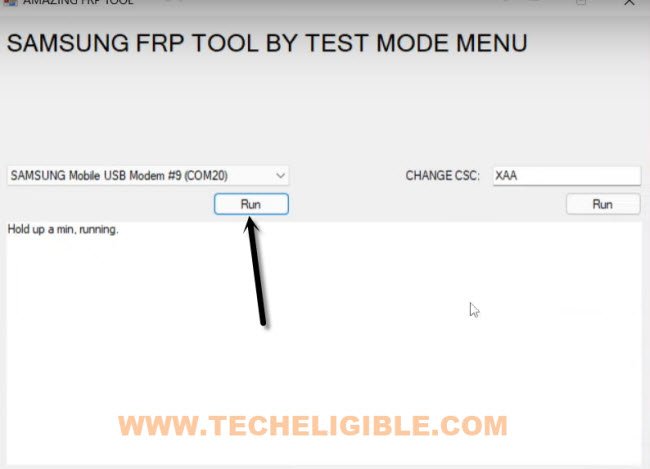
-Get back to software, and click on “RUN” button again.
-You will get a (USB Debugging) popup message in your Galaxy S7 edge device screen, just check mark option (Always Allow from this computer), and then click to “Allow” button again
-You will see same screen on your computer as can be seen below, and let all the process finish, after that you are all done from remove frp Galaxy S7, S7 edge.
Note: If you see a message of (Press any key to continue…), just press any key from keyboard to continue this process.
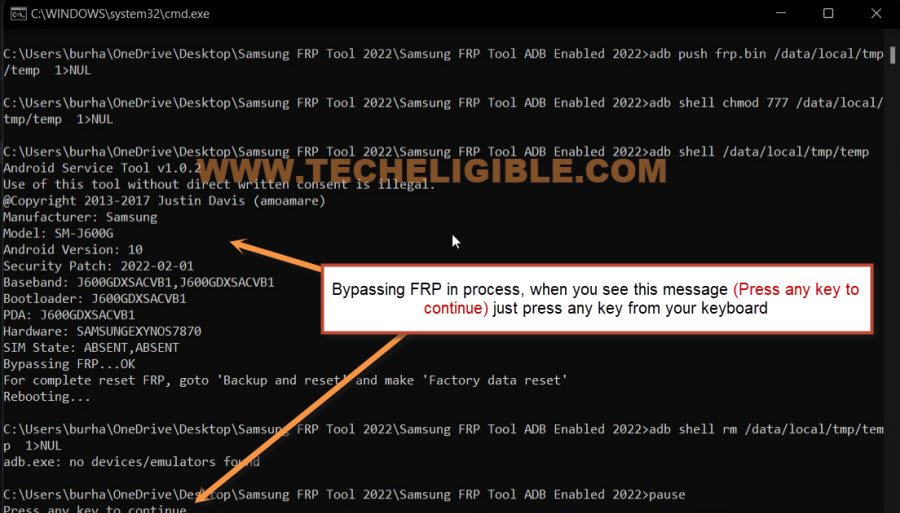
-This is how, you can easily remove frp using this free and really amazing frp tool, we hope, this method worked for you, don’t forget to post comment below of this post, thank you.
Method 4: FRP Bypass Samsung Galaxy S7, S7 Edge by Hushsms App
-For this method you need 1 more android device, so make sure you have another android device nearby you.
-Connect Wi-Fi to Galaxy S7 device first.
-Now go back to very first “Welcome Screen”.
-Now we have to download one apk app on your other android device to easily Remove FRP.
Download Hushsms App in Other Android Phone:
-Open chrome browser in your Other Android device.
-Type in search bar “Download FRP Tools Techeligible“.
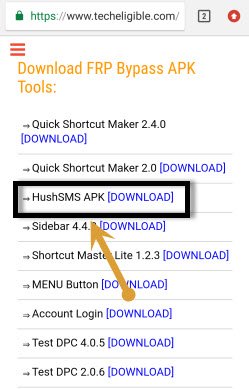
-Go to first search result as shown in below image.

-Go down, and download from there “HusmSMS APK” app.
-Now install this (HushSMS) app in your other android device and open this app.
-Insert SIM Card in your Galaxy S7, S7 edge device.
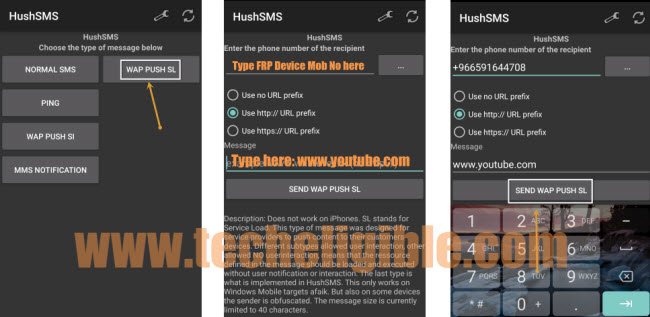
-Now from your other android device, tap on “WAP PUSH SL”.
-Type mobile number of your frp locked Galaxy S7 device.
-In below field, type “www.youtube.com”.
-Now tap on “Send SMS” button, see below image.
-Wait few second, you will see popup notification on your S7 device.
-Once you get popup message, just tap on “OK”.
-You will be redirected to the youtube website.
-If you see “Update” window, just tap on “Not Now”.
-After that, from youtube website, just tap on “3 dots” from top right corner & select “Terms & Privacy Policy”.
-Now you will see “Update Samsung Internet” popup, just tap on “Cancel”.
Download Samsung FRP Tools:
-We have to download some apk apps to Remove FRP Galaxy S7/S7 edge.
-Tap on “Search bar” from top of your internet browser.
-Type in search bar “Download FRP Tools Techeligible“.
-Go to first search result from there.
-Go down, and download from there “GO LAUNCHER Z” application in your Galaxy S7 device.
-Wait few minutes until downloading finish.
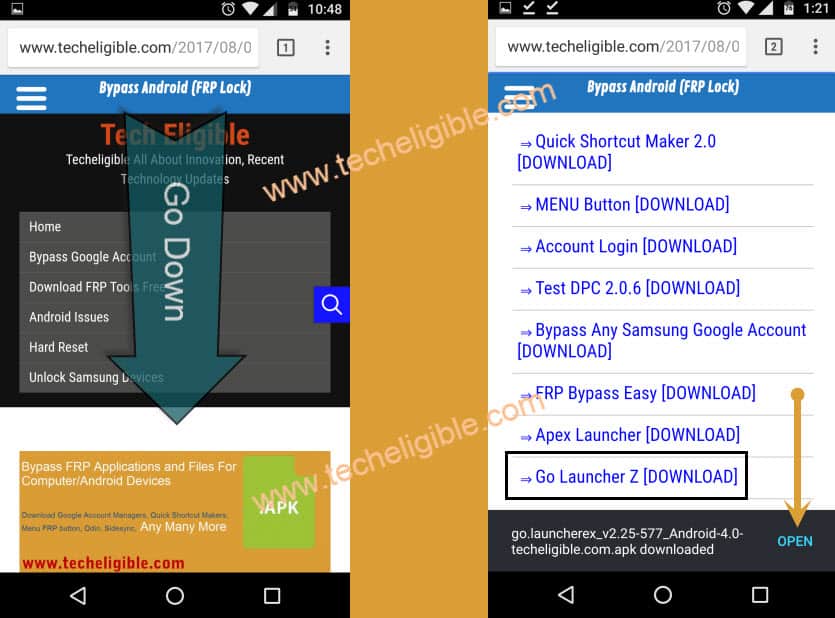
-From bottom of your browser, simply tap on “Bookmarks > History > Download History”.
-Now you will be able to see there your downloaded “GO LAUNCHER Z” app.
-Tap on that app to install.
-You will get a “Samsung Internet” popup, just tap on “Settings”.
-Enable “Allow from this source” option.
-Tap on “Back Key”.
-Now tap on > Next > Install > Open.
-Perfect, now we have successfully installed Go Launcher and opened it.
Disable Some Applications:
-Go to MENU.
-After that, go to > Settings > Lock Screen and Security > Other Security Settings > Device Admin Apps > Find My Device > Deactivate.
-Perfect, now we have successfully deactivated “Device Admin Apps”.
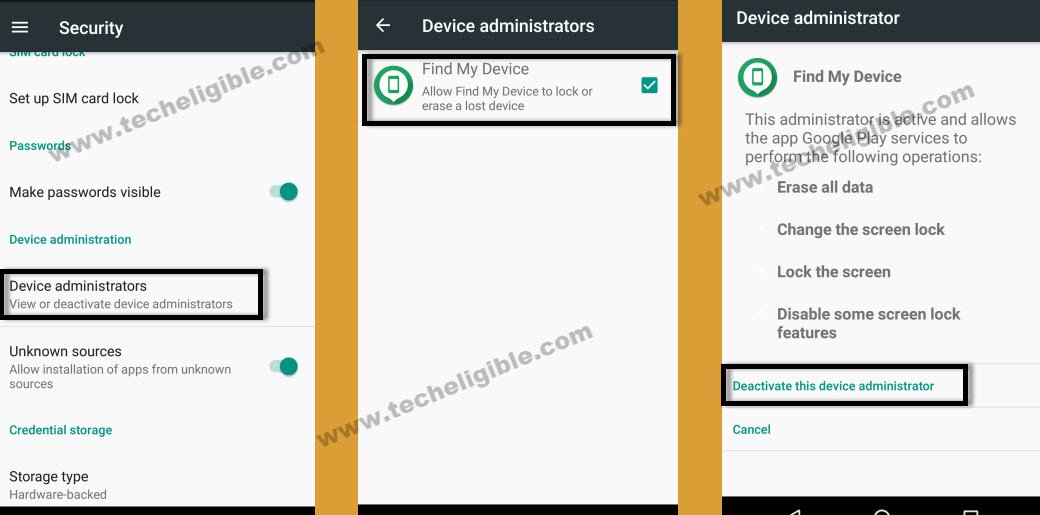
-Get back to “Settings” by tapping multiple times on “Back Key”.
-Now from “Settings”, just tap on “APPS”, and then tap on “3 dots” from top right corner and select “Show System Apps”.
-From Apps, we have to find out “Google Play Services”.
-Tap no > Google Play Services > Disable > Disable.
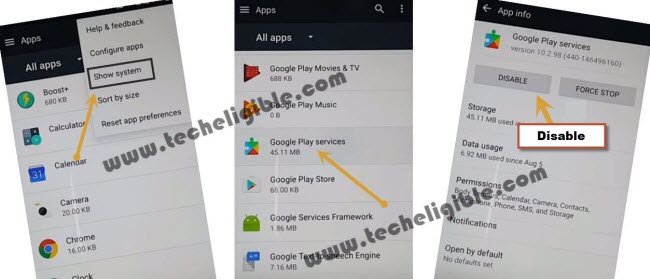
Download & Install Google Play Services for FRP Bypass:
-Open internet browser in your Galaxy S7 device.
-Type in search bar “Top Samsung FRP Tools Techeligible“.
-Go to first search result as shown in below image.
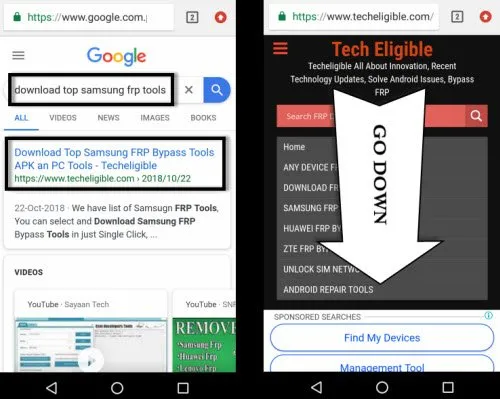
Note: If you are unable to find same search result as shown in above image, you can go directly by typing url in your browser techeligible.com/samsung-frp-bypass-tools
-Download from there “Google Play Services” app.
-Once downloading finish, just tap on “Bookmarks” from bottom bar of your browser.
-Now go to “History”, after that tap on “Download History”.
-Tap on “Google Play Services” app to install it.
Note: if you get a security popup window, just tap on “Settings” from that popup and then enable the option of “Allow From this source”.
-Now go back, and then tap on > Next > Install > Done.
-Congrats, now you can easily Remove FRP just by adding your new google account.
-Go to > Settings > Clouds and Accounts > Accounts > +Add Account > Google.
-After that, you will see a google “Sign in” screen, now you can easily enter your any valid Gmail account in your Samsung Galaxy S7 device to bypass google account verification.
-Once you signed there with your Gmail ID, congrats now you have accomplished this frp removal method.
Method 5: Remove FRP Galaxy S7, Galaxy S7 Edge [By SIM Card]
There are several methods available to bypass google account on Samsung S7 edge, S7. As you know, in all those previous methods, we unlocked frp using talkback or sometimes with the help of Hushsms apk app or calling option to access chrome browser etc. In this guideline, you don’t need to use any Talkback, Hushsms, Add Call.
-Connect “Wi-Fi” first in your galaxy S7 & S7 edge device.
-Go back to first “Start” screen by tapping on back key multiple times.
-Insert any working 4 digits pin locked “SIM CARD”.
-Right after inserting SIM CARD, you will get a popup window of “Enter SIM card Unlock PIN”.
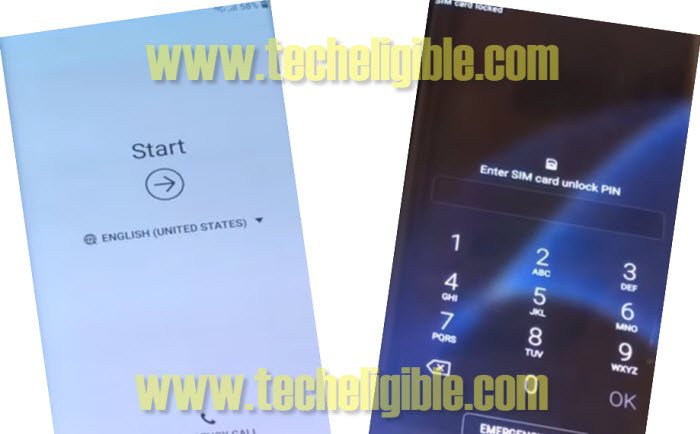
-Now “Remove Card Tray’, after removing sim tray, you will get another pop window of “CHECK SIM/SD card Tray”.
-Quickly press “Power Key” as soon as you get the popup up of “CHECK SIM/SD card Tray”.
-Now remove sim card tray completely to bypass frp.
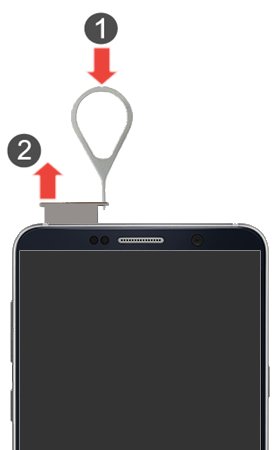
-As you have already pressed “Power Key” to lock your device screen, so the current state on your device will be the “Black Screen”.
-That means you are going very well so far.
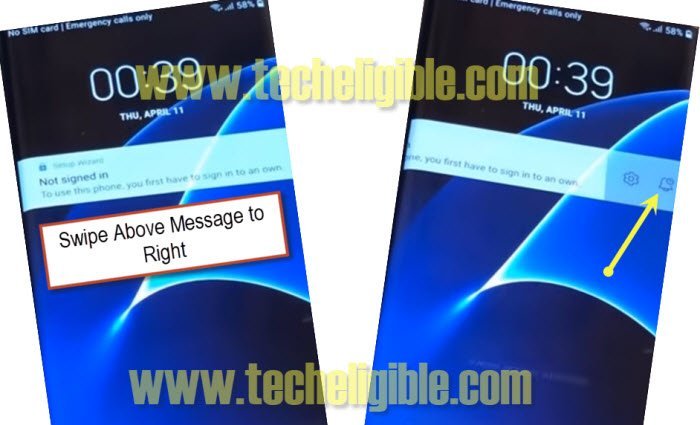
-Now Again press “Power Key”, and now you will see screen of “Not Signed in”.
-Swipe “Not Signed in” screen to the left, by doing that, you will get 2 more options, 1- Setting gear icon, 2- Notification bell icon.
-Tap on “Notification Bell icon” to bypass frp.
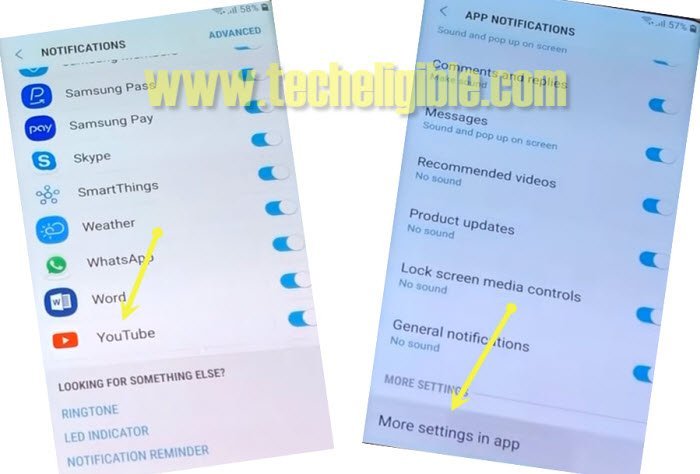
-After that, tap on “Notification Settings”.
-Go down and tap on > Youtube > More Settings in App > About > Google Privacy Policy.
-Boom, you have accessed to the internet browser successfully, now we can easily bypass google account without Talkback.
-We have to download Samsung FRP Bypass tools to unlock frp.
Note: If you get “Update Samsung Internet” popup message, just tap on “CANCEL”.
Download FRP Removal Tools:
-Type in address bar “Top Samsung FRP Tools Techeligible“.
-Visit first search result from there.
-Download from there below 2 frp bypass tool.
1-Account Login.
2-Google Account Manager 8
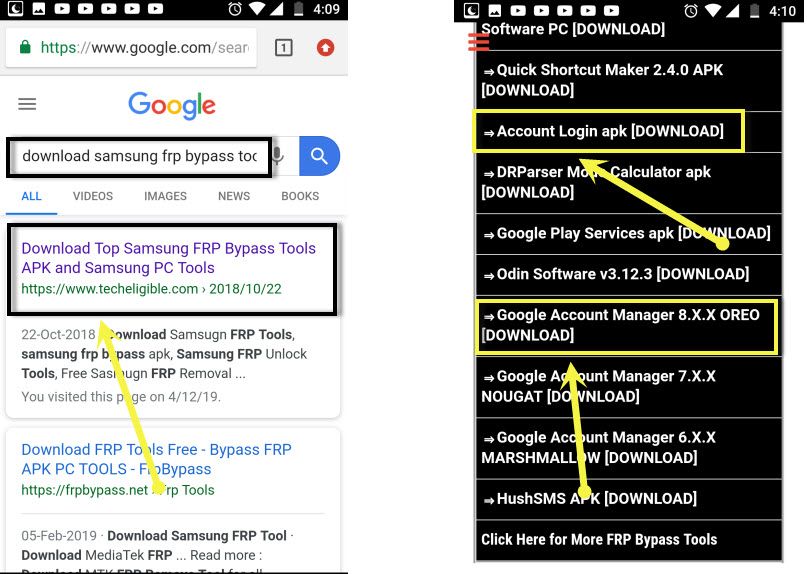
Note: you can download google account manager according to your device android version.
-Wait until downloading finish.
-After that, tap on “Bookmarks” from bottom of your internet browser.
-Tap on “History”, and then tap on “Download History”.
-There you can see your both downloaded Samsung frp bypass apps.
-Tap on “Google Account Manager”, after that you will receive a popup, just tap on “Settings”, and then enable of option “Allow from this sources”.
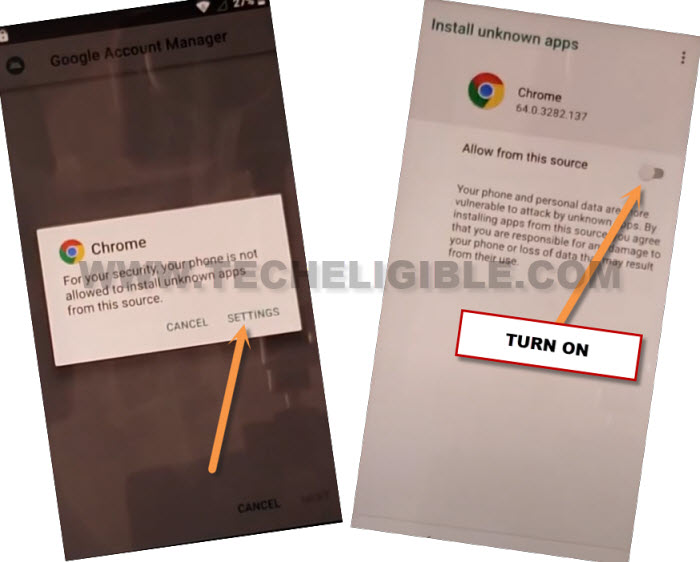
-Go back, and then tap on “Next > Next > Install > Done”. Perfect now we have installed google account manager successfully.
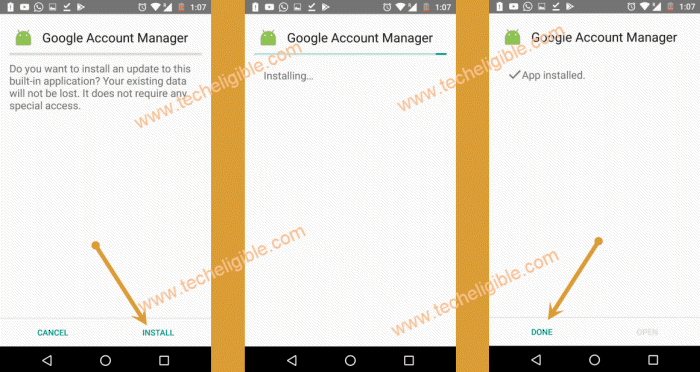
-Now we have to install our last frp bypass app “Account Login” to bypass frp account.
-Tap on “Account Login > Install > Open”.
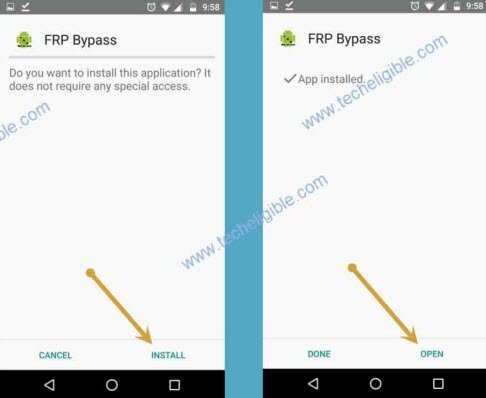
-After that you will see screen of “Retype Password”.
-Tap on “3 dots” from the top right corner & select “Browser Sign-in” option.
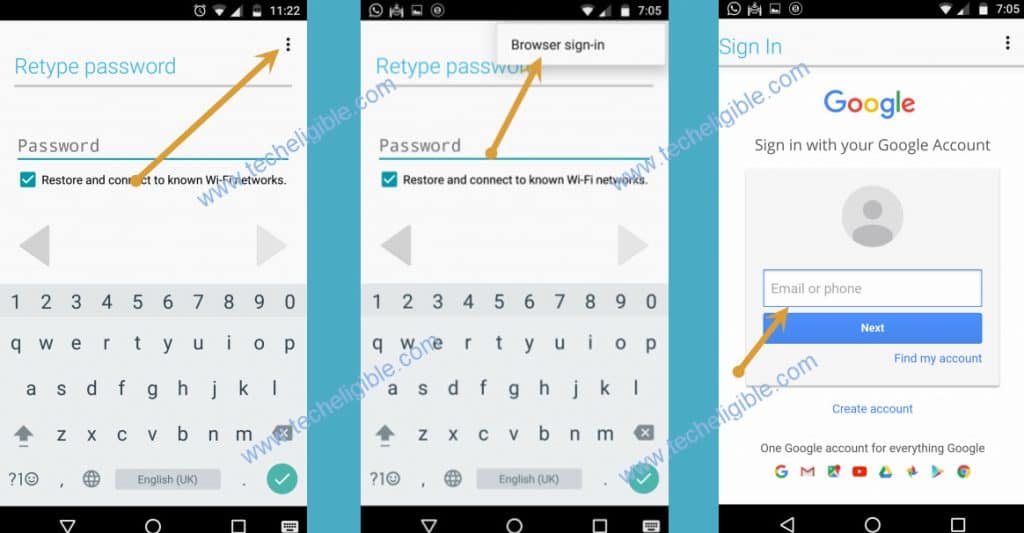
-You will be redirected to the sign in screen, just sign-in there with your any valid Gmail Account.
-Once you signed in successfully, that means your device now free of frp lock, and you have successfully removed old Gmail account.
-Restart device & complete initial setup.
FAQs About Samsung Galaxy S7/S7 Edge:
How to Remove FRP from Galaxy S7/S7 Edge from Settings?
FRP works with Gmail account, you only have to remove your logged in google account by going to > Settings > Accounts > Google > Remove Account.
Can i bypass the FRP lock Protection After Forgetting Google Account?
In this matter, there are several frp bypass methods available. You can bypass frp using (Amazing FRP Tools) and PIN locked SIM Card. You will have to check out our FRP Bypass methods from here.
How to Arrange PIN Locked Setup SIM Card?
That is very easy, you can use your any active sim card and setup PIN lock code on your own. Go to (Settings). After that, go to (Security) option and setup your any desire 4 digits code.
Is it legal to Bypass FRP Account from Samsung S7/S7 Edge device?
If you are a device owner, then, its totally legal for you to regain access to your device with the help of FRP Bypass process.
Conclusion on How FRP is unlocked:
We used PIN locked SIM card and accessed to galaxy store. From there, we installed and launched (Samsung internet browser). After that, accessed to frp tools page and downloaded and used FRP apk application in bypassing frp account.
Further more, we used another method, in which, you need to make pair of your FRP locked S7 phone with any Bluetooth headphone. After that, download & install (Apex Launcher) application to bypass frp.
Check out 6 frp bypass ways from here and get your Samsung device free from FRP protection. Once the FRP is bypassed successfully, you are required to sign-in again with another Gmail account to setup new FRP protection.
Related Method: