After first set up Samsung Galaxy S21 phone, you are required to sign in with google account. Once the login process is done, FRP will be activated on its own without any further steps to apply. To bypass FRP Samsung Galaxy S21/S21 Plus/S21 Ultra Android 13/12/11 with 3 guides.
These devices were launched in the year of (2021, January 29) with Android 11 (Up to 4 major updates). All these devices are of same series with some specs variation as per the device model. Samsung S21 series phones were launched with android version 11, that means, the FRP security feature is already added.
Disclaimer: We highly recommend you to apply this method only on your own device, if you are not owner of this device, or you found this from somewhere, you must return to its real owner. This process is just for educational purpose to assist device owner, how to approach on their own FRP locked Samsung S21.
What is FRP Lock?
This is a security feature that actually secure android device owner data from unwanted access by an unknown person. If you are the one facing FRP lock on your own device after factory reset. Then, you will have to follow up frp bypass steps to reach back to your device again.
Bypass FRP Samsung S21, S21 Plus, S21 ultra devices by following up 3 frp bypass methods from here. You can use 3 PC Software (Android Service | Samfirm | Samfw) on Samsung S21 device to easily bypass frp. We just have to enable ADB from our device after that, connect phone to PC and click to (FR Bypass) button from the PC tool.
Method 1: Bypass FRP Samsung S21/S21 Plus/S21 Ultra By Android Service Tool [Android 13/12]
If you are stuck on google verification screen, and unable to bypass google account. You can follow up this way to Bypass FRP Account on Samsung S21 series Android 13, 12 with the help of free PC tool (Android Service tool). Firstly, you have to download and install PC tool on your PC, and launch that tool. After that, we will dial code on screen from Samsung galaxy to turn on ADB mode. Everything has been explicitly described below. Just follow steps to bypass google verification screen.
-First of all, download below tool on PC.
| ⇒ Android Service Tool V1.2 [DOWNLOAD] ⇒ Winrar Pass: techeligible.com |
Note: Don’t forget to turn off your @ntivirus software before extracting and running this tool, otherwise you won’t be able to use this tool freely, once you used this software, you can enable back your @ntivirus software.
-Once downloading is done, just extract this tool from winrar using above given password, and then run this tool.
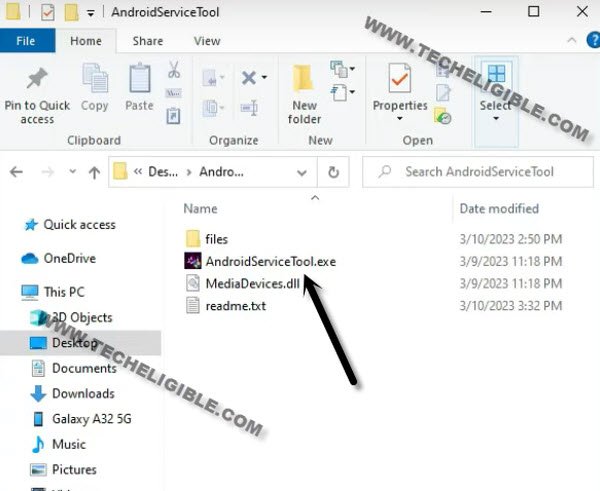
-Lets begin step to bypass frp from Samsung S21, turn on phone & Connect WiFi.
-Connect Samsung device with PC.
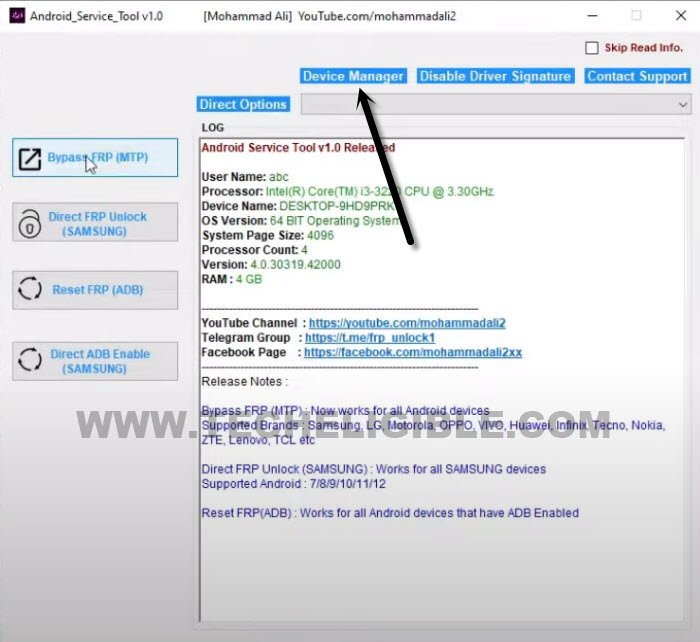
-We’ve to make sure that, our device has been detected by PC successfully, so open “Device Manager” in your computer, you can open this directly from Android service tool, just hit on “Device Manager” from your android service tool.
-Do make sure, the device has been detected by your PC successfully, you can easily check that from your computer device manager same as shown in below image.
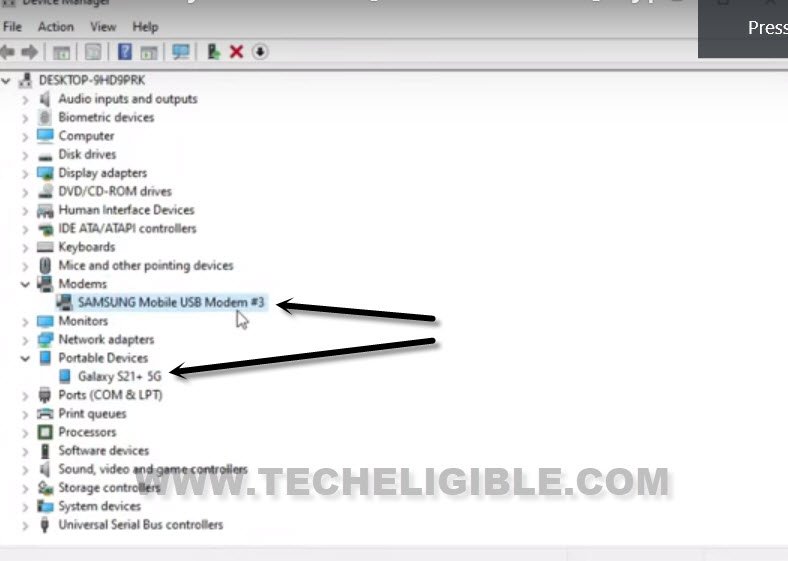
-If your device is not detected, that means, your computer does not have any Samsung driver installed.
-The Samsung drivers are already attached in your downloaded android service tool folder.
-Just go to “File” folder, from there run “Driver.exe”.
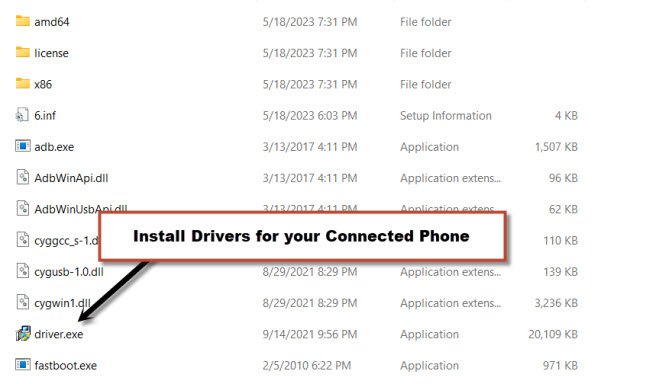
-Reconnect Samsung S21 after you install drivers successfully, and check now from device manager.
-Do make sure, WiFi is also connected to bypass google account on Samsung S21/S21 Ultra.
Remove FRP with Android Service Tool:
-Click over “Direct FRP Unlock (Samsung)” button to Bypass FRP from Samsung Galaxy S21, S21 Ultra.
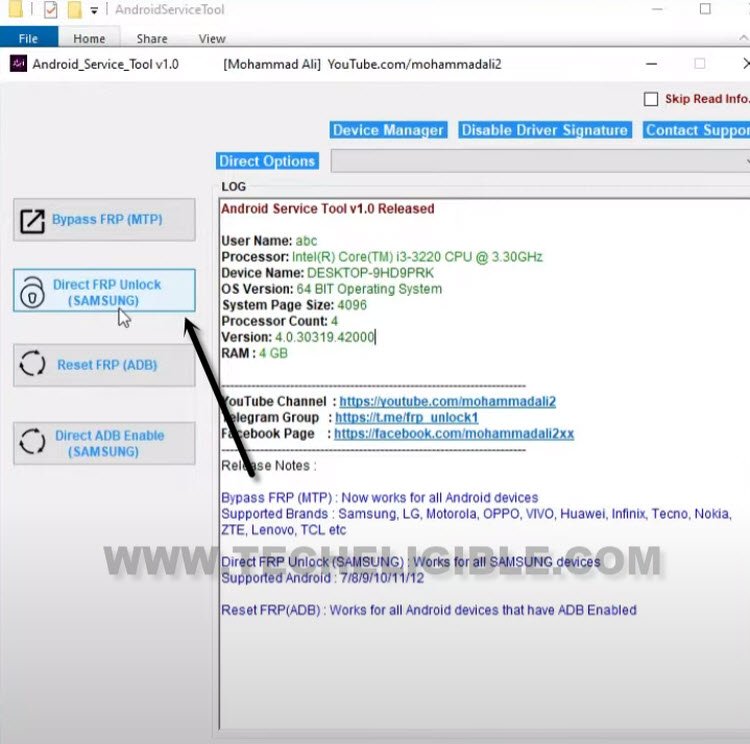
-Android tool will display you a POPUP box to dial code on your Samsung device.
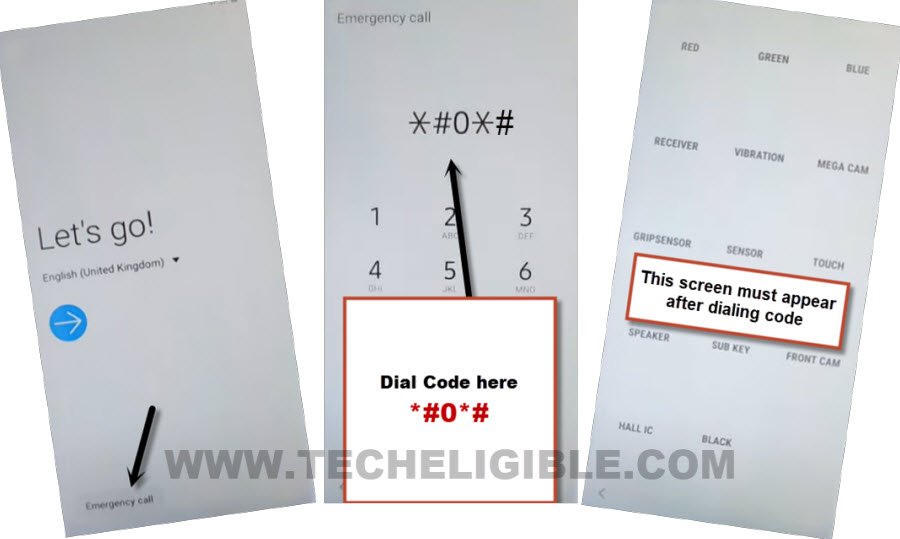
-You will informed to dial code, just dial this code *#0*# from Galaxy S21 device.
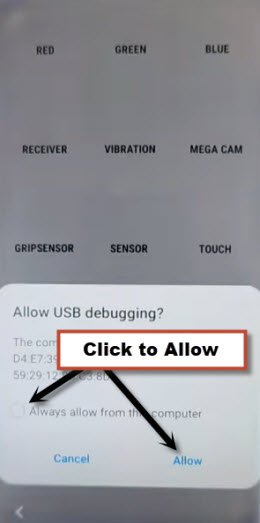
-Check mark option (Always allow from this computer), and then hit on “Allow”.
-Just wait till FRP bypassing process is done.
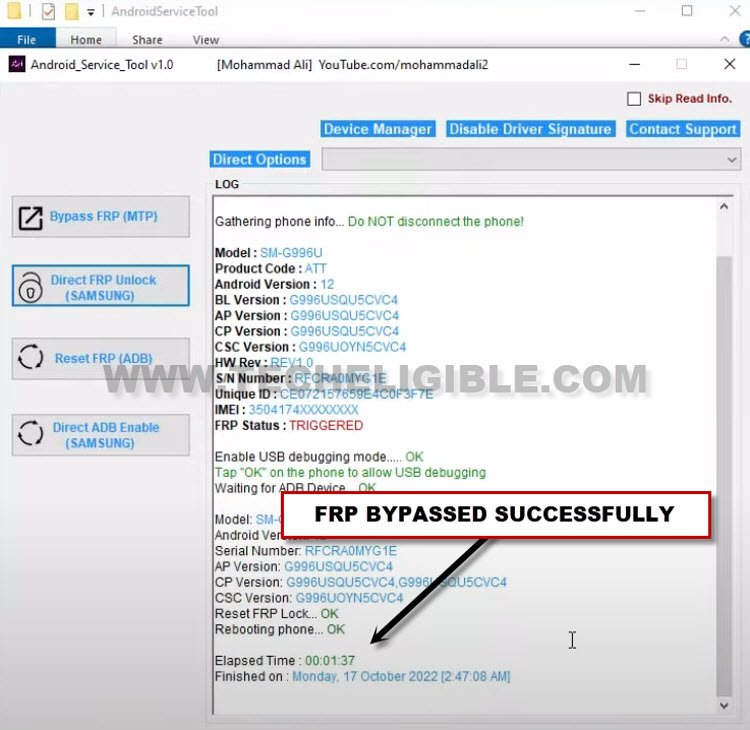
-The phone will auto restart, and you will be inside your device screen.
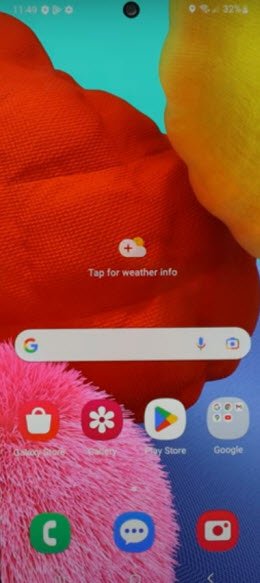
-We have to reset this device completely, so go to > Settings > General Management > Reset > Factory Data Reset.
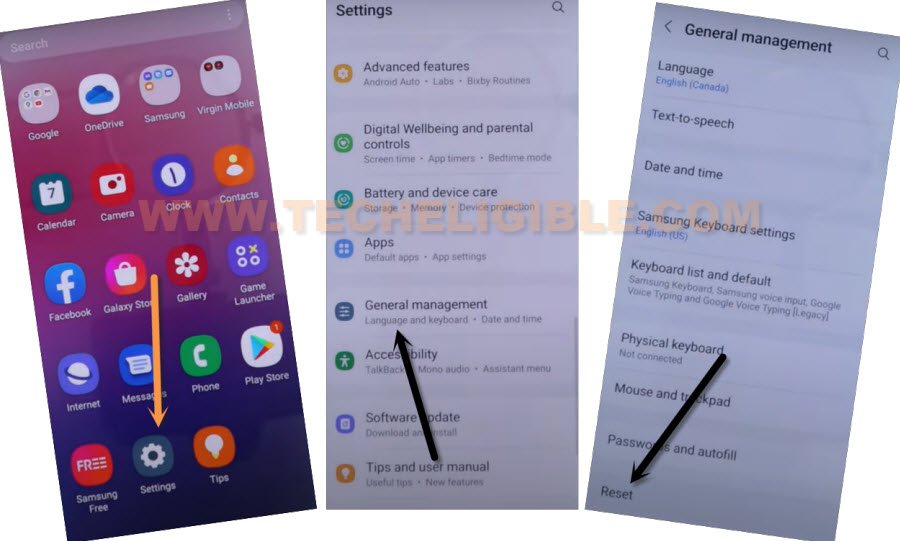
-Tap to > Reset > Delete All. After factory data reset process is done, your device will back on first initial setup screen. You can now easily finnish initial setup wizard without stuck on google sign in screen.
Method 2: Remove FRP Account Samsung S21 Ultra/S21 (5G) Without Smart Switch
Use easy PC software (Samfirm) to launch google chrome browser with one click on your Samsung S21 device. We will click on (Auto Bypass frp) button from the PC tool. After that, this will show you a popup screen on your Samsung Galaxy S21. Check out step by step guideline from below.
List of Required Tool?
⇒ SamFirm Tool V1.6.4 [Download]
⇒ Latest Samsung USB Driver [Download]
⇒ Any other Samsung Phone
⇒ OTG + USB Cable.
Note: Above 2 tools (Driver + Samsung FRP Tools) will be used for PC.
Let’s Start FRP Bypass Steps:
-Firstly, Install (Samsung USB Driver) in your PC, this will help you to connect phone easily with PC.
-Secondly, Install & Open (Samfirm Tool) in PC as well.
-Go to “Android Tools”.
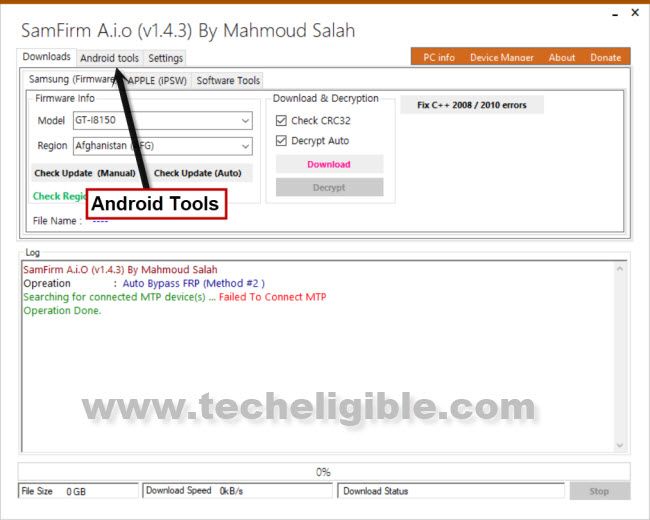
-Connect WiFi in Galaxy S21 Ultra & connect device to PC using USB Cable.
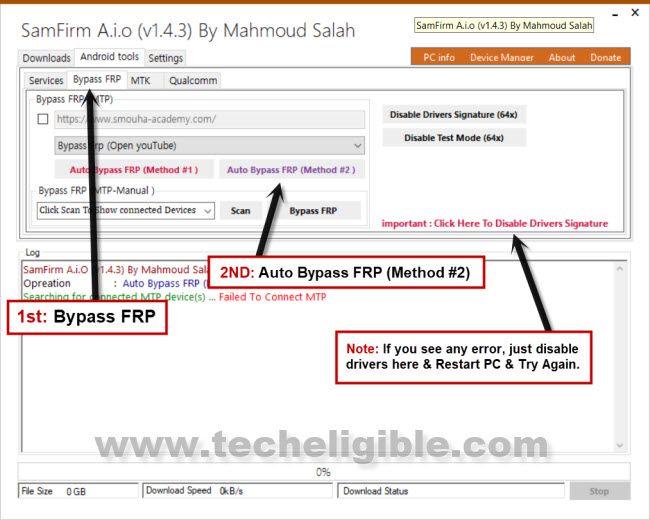
-Now from SamFirm tool, just tap to > Bypass FRP > Auto Bypass FRP (Method #2).
Note: If you see any error, please click to “Disable Driver Signature” button, and then restart PC, and try again.
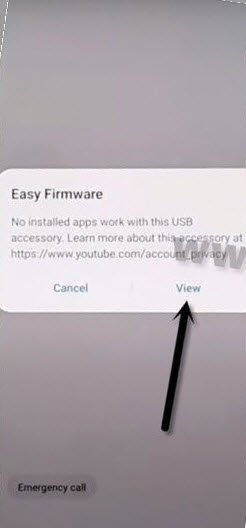
–This software will open youtube successfully in your device at 2-3 attempts, so if you failed at first attempt, just try again.
-Tap on “View” from Galaxy S21 Ultra phone, this will show you chrome window, so go to > Accept & Continue > Next > No Thanks.
Access to S9 Launcher Screen:
–From the Chrome screen, tap to > Accept & Continue > Next > No Thanks.
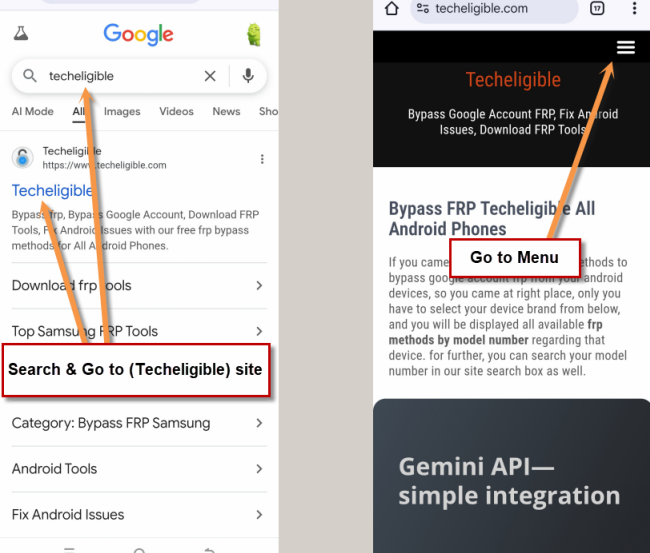
-Visit official techeligible site from google chrome search bar. Search in browser with “Techeligible” and the official site. (See below image).
-Open up the site menu by tapping on “Menu” option from top right corner.
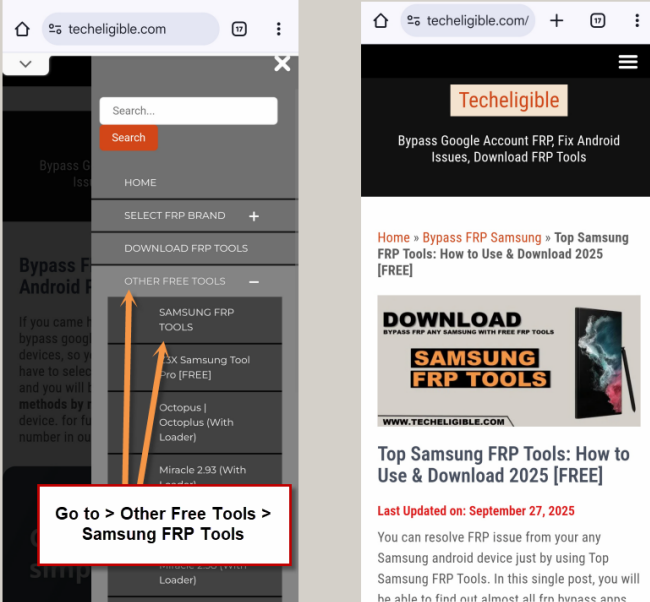
-Reach to downloading frp apps page by tapping on > Other Free Tools > Samsung FRP Tools.
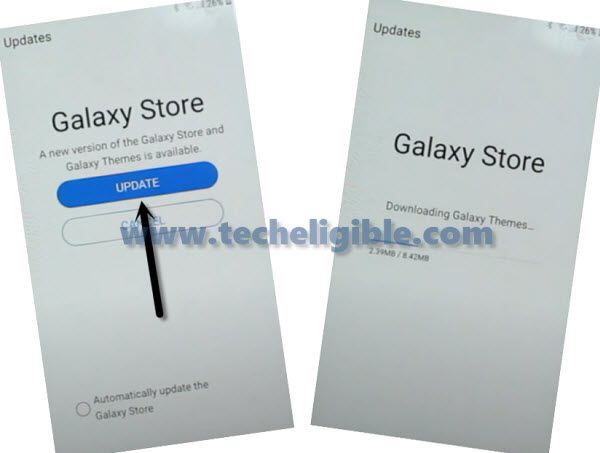
-Go down and tap on > Install S9 Launcher > Agree > Update.
-From the galaxy store screen, tap to > Agree > Update.
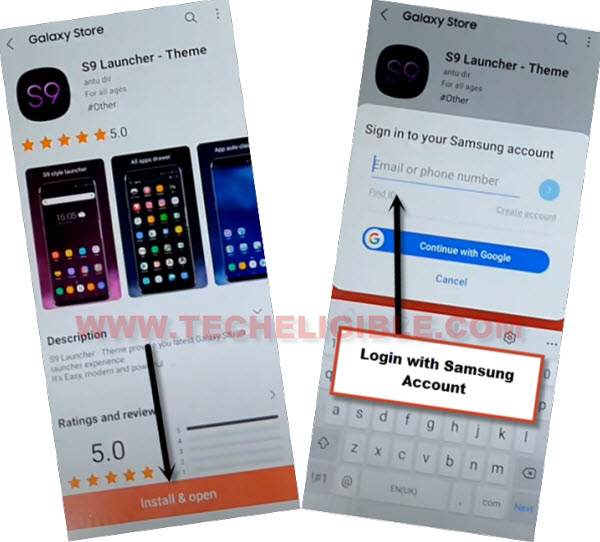
-Tap on “Install & OPEN” button from the S9 Launcher installation screen.
-You will be asked to sign in with (Samsung Account), so just enter your Samsung account there.
-After signing with Samsung account successfully, you will be redirected into your Galaxy S21 Home-Screen.
-Arrange other android device, because we will download (Alliance Shield X) app in other phone to Bypass FRP Samsung Galaxy S21, S21 Ultra.
Follow Steps in Other Samsung Device:
-We need another (Samsung Device) to make cloud backup, after that, we will restore this backup in FRP locked phone to easily bypass frp.
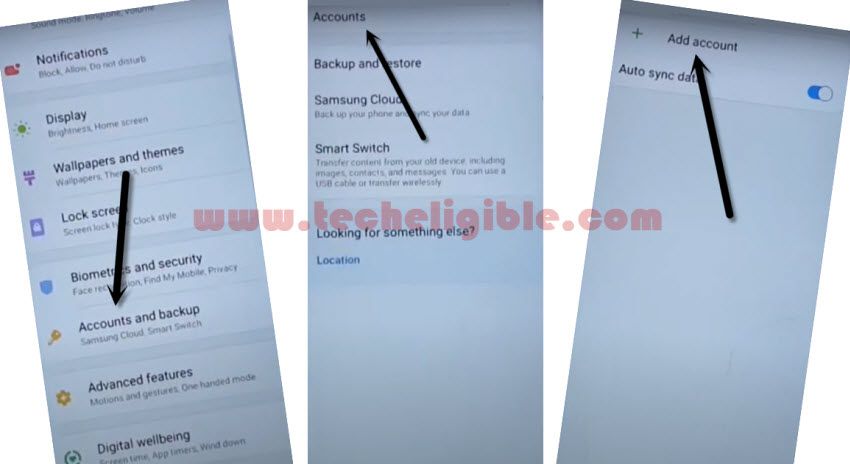
-Go to > Settings > Accounts & Backup > Accounts.
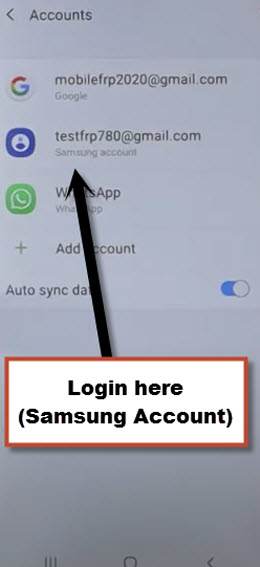
-Sign in with the same (Samsung Account) which is already added in Galaxy S21 (FRP LOCKED) device.
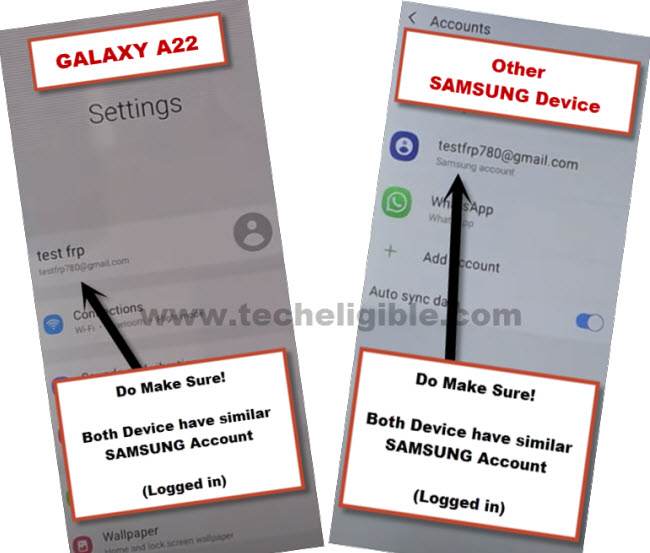
Note: Both devices should be connected on Same Samsung Account.
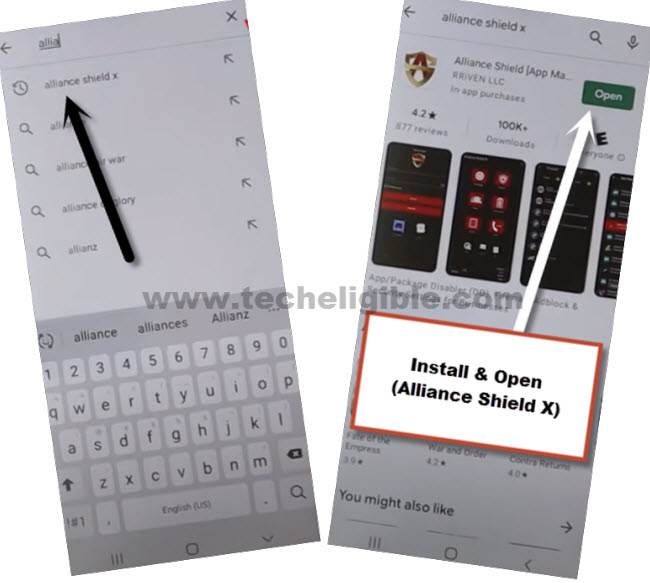
-Install & open “Alliance Shield X” app through Playstore.
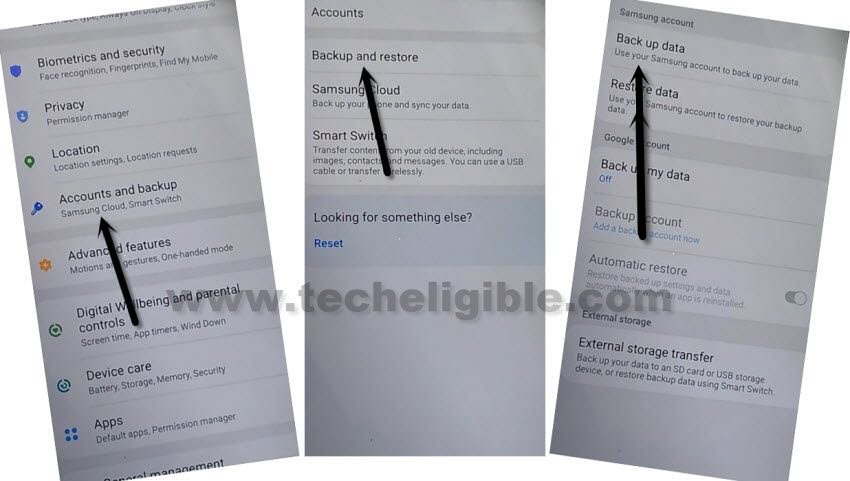
-Hit on > Settings > Accounts and Backup > Backup And Restore > Back up data.
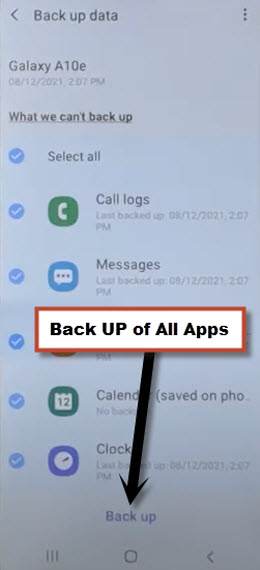
-Tap on “Back Up” button to add all apps in Samsung Account.
Follow Steps in Galaxy S21/S21+/S21 ultra Phone to Remove FRP:
Note: Do make sure Galaxy S21 & Other Samsung Android phone are successfully signed in with the same Samsung Account.
-Go to “Settings”, and there at the top, you will see your signed in Samsung account detail in Galaxy S21.
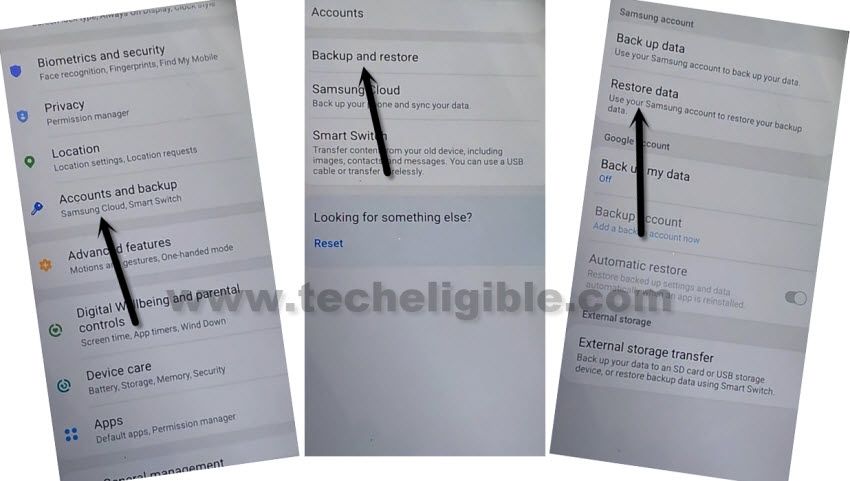
-From Galaxy S21 (Settings), just go to > Accounts & Backup > Backup and Restore > Restore Data.
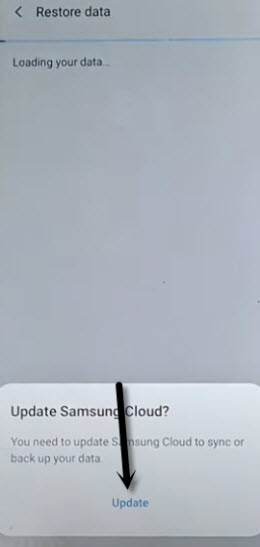
Note: You may have a (Update Samsung Cloud) popup window, just hit on “Update” button, after that tap to “Restore” and wait until this updating process done.
-After few minutes waiting, tap again on “Restore Data” option.
-Now you will see (Choose a verification Method) screen, just select “Email” and this email you a verification code to your Gmail account.
-Click to “Verification” button from the Gmail account to verify that it is you.
-Now tap to “Get Started” button and this will start restoring data.
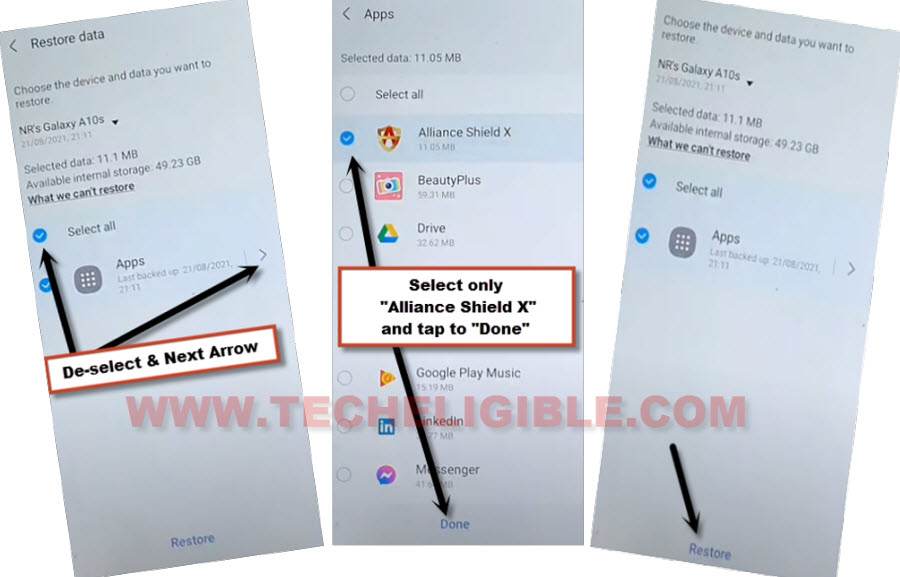
-De-select the “Select All” option, and the tap to “Next Arrow” which is right next to the (Apps).
-Select only “Alliance Shield X” app, and tap to “Done.
-Tap to > Restore > Install.
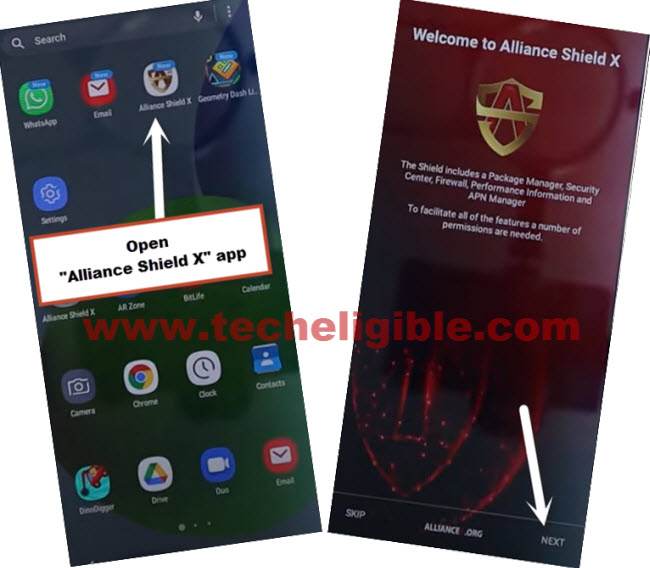
-Go to > MENU > Alliance Shield X.
-From the (Alliance Shield X) app, tap to > Next > Next > Next > Got it.
-Register your new account in (Alliance Shield X) .
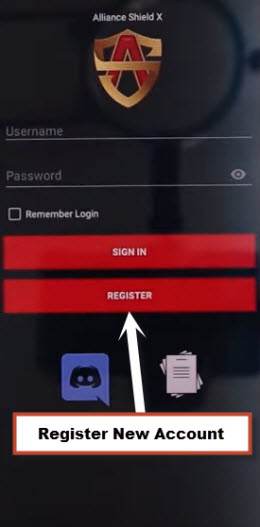
-Sign-in with your registered account in (Alliance Shield X) app.
-Type any “Device Name”, and then tap to “Next”.
-Turn on “Device Admin”, and hit on > Activate > Next.
-Turn on “Knox”, and select option (i have read and agree…), and tap to > Confirm > Next > Finish.
-Tap on “App Manager”, and tap to “Close” from popup box.
-Hit on “Search icon” from top corner, and search there “Mode”, and tap to “Service Mode”.
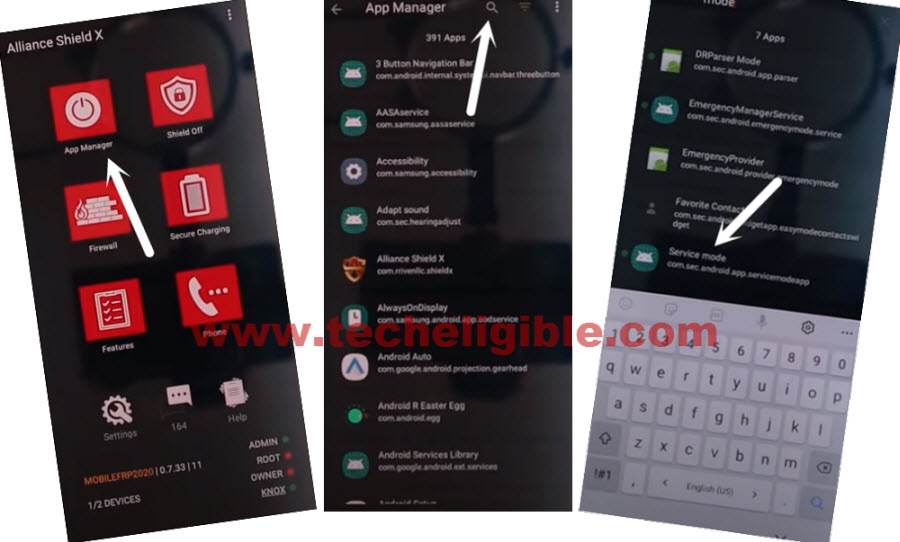
-Tap to “Activities”.
-Go all the way down, and tap on option (com.sec.android.app.modemui.activities.usb.settings).
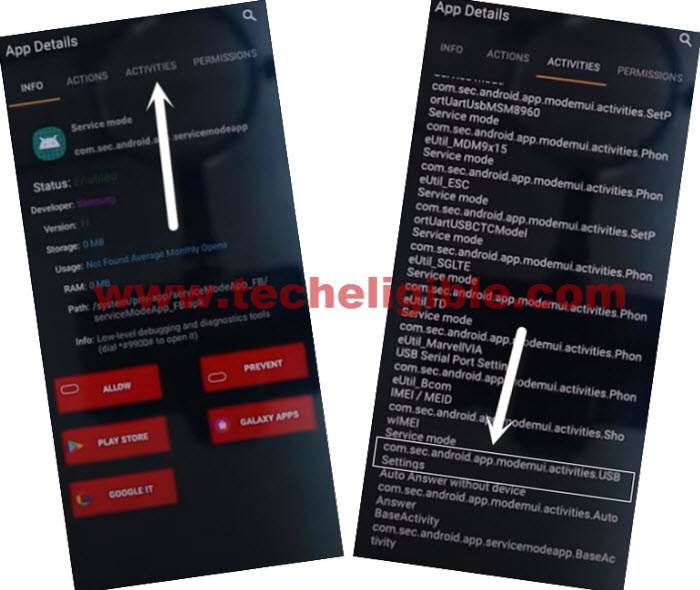
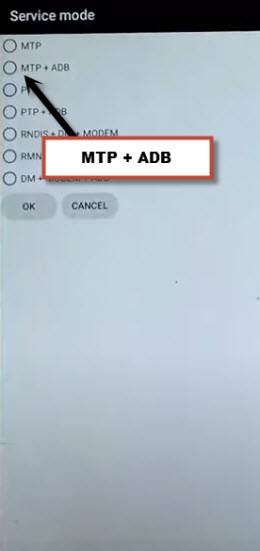
-Tap again on (com.sec.android.app.modemui.activities.usb.settings), and again hit on “OPEN”, and then select (MTP+ADB).
Final Step to Remove FRP on Galaxy S21/S21 Plus/S21 Ultra:
-Open “SamFirm tool” again in your PC.
-Connect Galaxy S21 again to your PC.
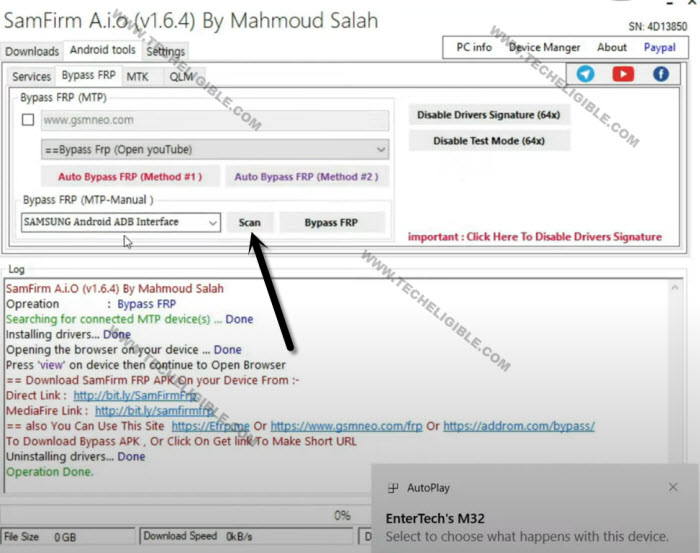
-From (Samfirm tool), tap to > Android Tool > Bypass FRP > Scan.
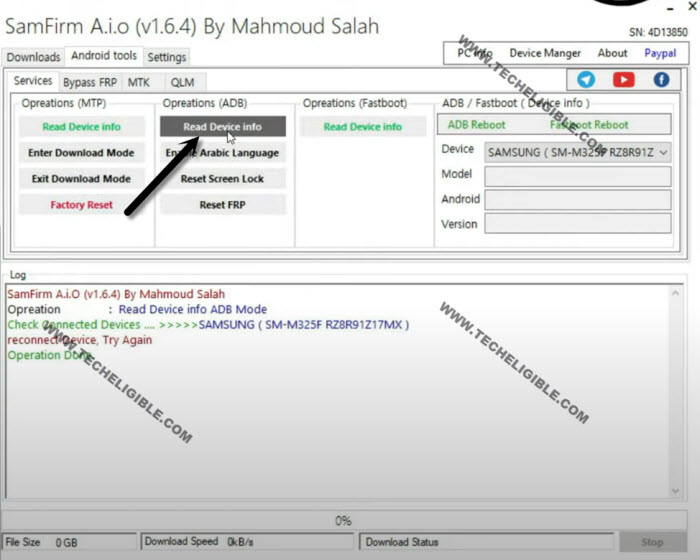
-Go to > Services > Read Device info.
-Once the info reading process completes, just hit on “Reset FRP” button from there.
Note: You will also receive a popup window (Allow USB Debugging) in your Galaxy S21, just tap to “Allow”.
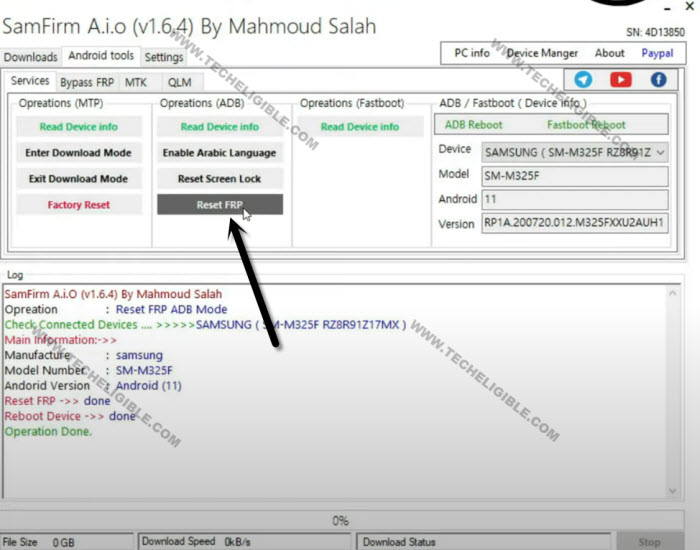
-After that, the device will be reboot, now the frp lock has been removed successfully.
Method 3: Bypass FRP Samsung S21/S21 Plus/S21 Ultra With Smart Switch App
We are going to use a PC tool which is (Samfirm), through this free tool, you can Bypass FRP, access to youtube website, once we got there, there will be search box, through that, we will reach to our device settings, and afterwards, we can easily add new Gmail Account.
Importantly, you are also required other android phone along with OTG Cable, i have mention all tools you do need to successfully achieve this frp bypass process on your device Samsung Galaxy S21 Ultra, S21.
Required FRP Bypass Tools?
| ⇒ SamFirm Tool V1.6.4 [Download] ⇒ Latest Samsung USB Driver [Download] ⇒ Any other Samsung Phone ⇒ OTG + USB Cable. Note: Above 2 tools (Driver + Samsung FRP Tools) will be used for PC. |
-Firstly, Install (Samsung USB Driver) in your PC, this will help you to connect phone easily with PC, so that you can easily perform frp bypass task on SAMSUNG S21 Ultra, S21 Android 11.
-Secondly, Install & Open (Samfirm Tool) in PC as well.
-Go to “Android Tools”.
-Connect WiFi in Galaxy S21 Ultra & connect device to PC using USB Cable.
-Now from SamFirm tool, just tap to > Bypass FRP > Auto Bypass FRP (Method #2).
Note: If you see any error, please click to “Disable Driver Signature” button, and then restart PC, and try again.
–This software will open youtube successfully in your device at 2-3 attempts, so if you failed at first attempt, just try again.
-Tap on “View” from Galaxy S21 Ultra phone, this will show you chrome window, so go to > Accept & Continue > Next > No Thanks.
Download FRP Tools on Galaxy S21:
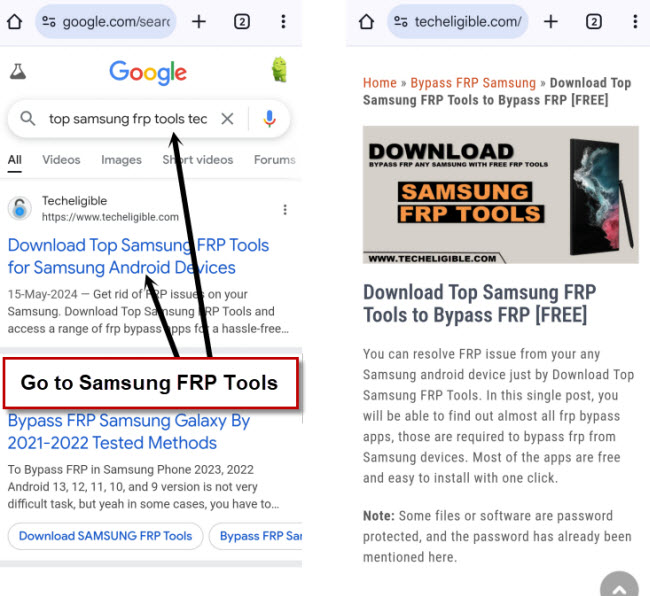
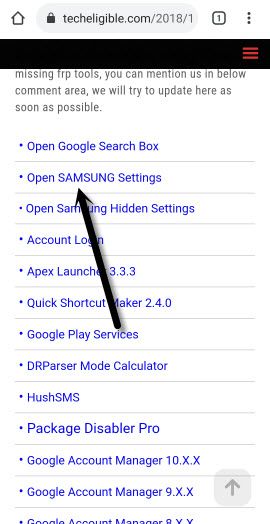
-Download frp removal tools, for that search in top search area “Top Samsung FRP Tools Techeligible“, and go to techeligible official website searched result. (For help, see below image).
-Scroll down and tap on “Open Samsung Settings” to be redirected in Samsung S21 Ultra Settings.
Transfer Gmail Account by Smart Switch App:
-Go to > Accounts & Backup > Bring Data from old device > Download > AGREE.
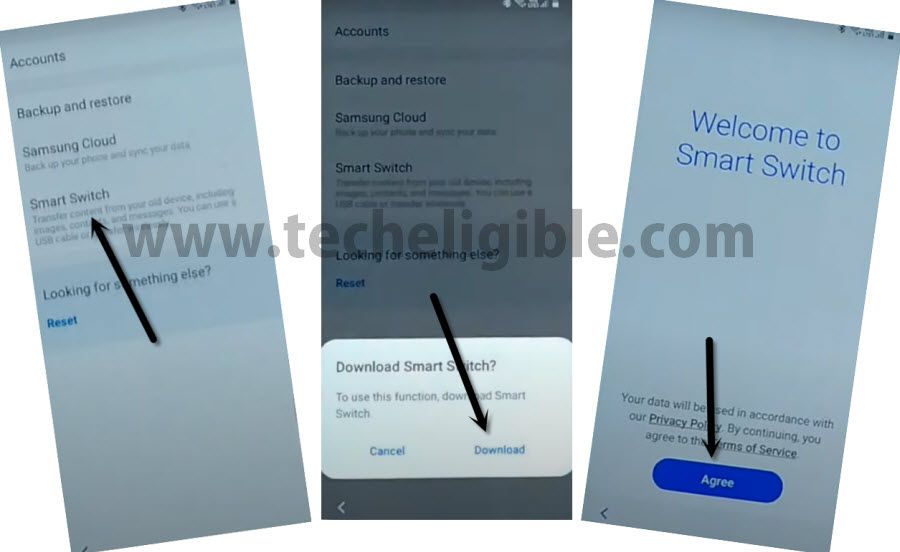
-Go to > Agree > Allow > Receive Data > Cable.
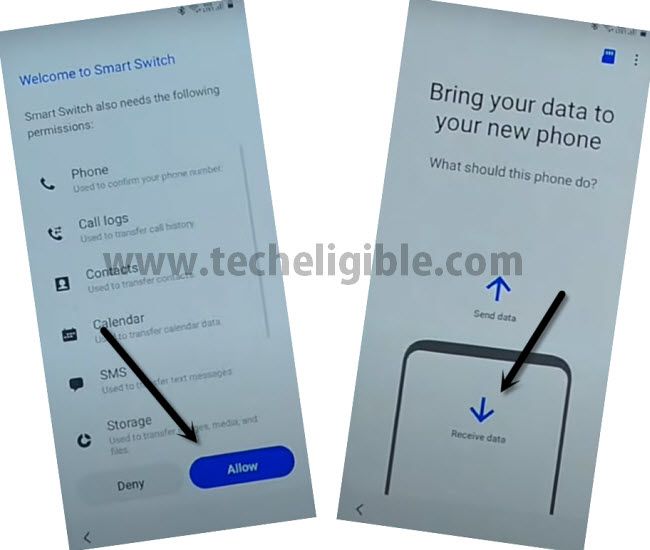
Open Smart Switch in Other Smartphone:
-Install & Open (Smart Switch) App in other phone through google play store, to do this, just Open “Galaxy Store”, download & open “Smart Switch” app from there.
Note: If your other smartphone is of Samsung Brand, so you don’t need to install this app, you can open this app directly by going to > Settings > Accounts & Backup.
-From Other Smartphone, Tap on > Send Data > Cable.
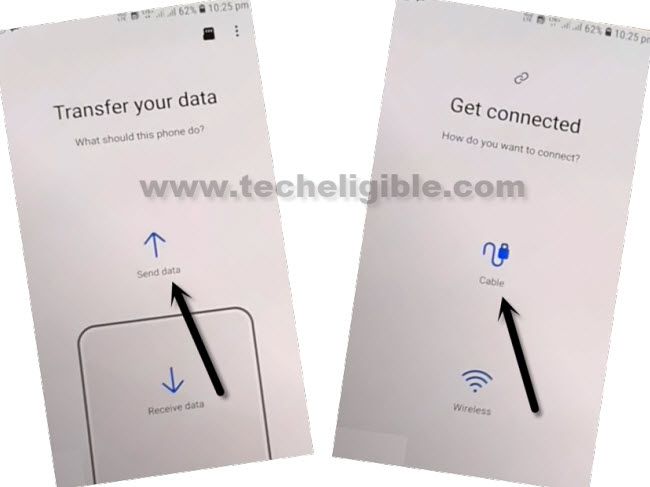
Connect OTG to Samsung Galaxy S21/S21 Plus/S21 Ultra:
-Use OTG to transfer and receiving data, OTG should be connect to your “Galaxy S21 Ultra” device, and normal USB end will be inserted to other Smartphone.
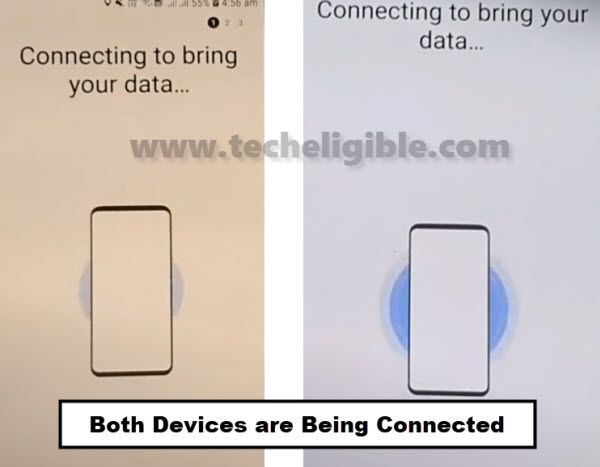
-Hit “Allow” on both smartphones.
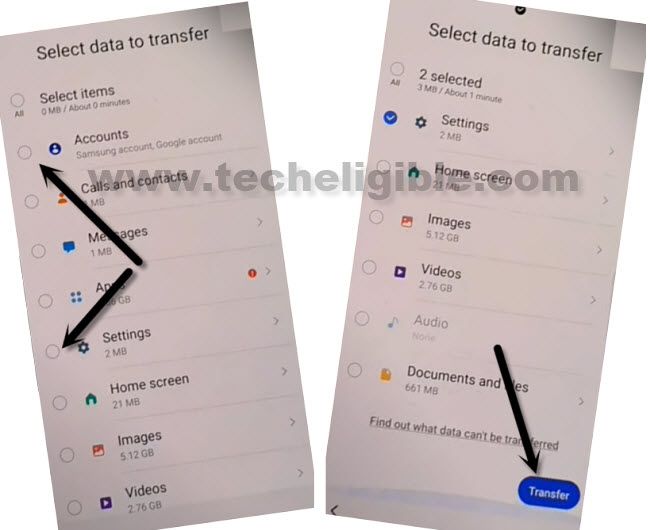
-Select only (Accounts and Settings), and then tap to “Transfer”.
-Tap on “COPY” from other Smartphone.
-You will be asked for verify identity in your other android phone, after that this will start transferring its (Account & Settings) to the Samsung Galaxy S21 Ultra.
-You will see google sign in screen on your S21 Ultra phone screen, so you should enter password of your signed in Gmail account in other other smartphone, once you entered the password and hit on “Sign in” button, this will signed in Gmail account in Galaxy S21 Ultra as well.
-Congrats, you are all done from Bypass Samsung S21 Ultra/S21, now get back to first (Welcome) homescreen by tapping on back arrow several times, after that, complete initial setup to access the device without having any google verification screen.
FAQs on Samsung S21/S21+/S21 ultra
How to Bypass Google FRP on Samsung Galaxy S21/S21 Plus/S21 ultra?
You can follow up 3 frp methods on your Samsung S21 series devices to bypass frp account. We just download free PC Tool (Android Services Tool / Samfw / Samfrim) on PC. After that, connect Samsung phone to PC and hit over the button of (FRP Bypass) from the PC tool to bypass frp automatically.
Why i am facing FRP lock on Samsung Galaxy S21/S21 Plus/S21 ultra?
You must have forgotten your previously setup google account after factory reset the device. Because (FRP) work with previously logged in google account.
Can i also bypass frp from S21 ultra (Android 14) version devices?
You can try these 3 available frp bypass methods on your upgrade version Samsung S21 ultra android 14 device. Right now, we are not confirmed about this.