
If you are failed to verify your device ownership through Gmail account. And, you are a real device owner. So, you can get back your LG phone just through Remove FRP Account LG Q9 Android 9, Android 8 without using any paid tool and apk apps. We will just use a simple method here. Just through turn on & off wifi, you can access to setup new pattern lock screen. After that, the google verification screen can be skipped easily. Follow steps from below to get back your device.
Warning: Do not try this frp method on a stolen phone, this is a serious crime, if you are trying to bypass frp on a stolen phone, you may also be jailed, this process is for device owner and for educational purpose only.
Let’s Start to Remove FRP Account LG Q9:
-Turn on device & Connect WiFi to your LG Q9 device.
-Now, we are on a (Set internet connection) screen.
-Here is the most tricky step, you have to do this very fast and carefully. If you followed up below step correctly, the FRP will be removed and you will be able to complete setup wizard easily.
Tricky Step: Turn off “WiFi” and Tap to “Next” option at the same time using your 2 hand finger. If you did this correctly, you will be redirected to the (Date & Time) page.
Note: You may have to try above step multiple times. Because, at first few attempts, you may not be able to hit both options at the same time. Keep trying until you successfully hit both options, (Turn off WiFi & Tap to “Next”) at the same time.
-Once you reach on (Date & Time) page, from there, tap over > Next > Next > Next.

-Setup new security lock by choosing “Pattern” option, after that, check mark option (i acknowledge all phone data….). After that, tap to “Next”.
-Draw your any desire pattern lock on screen, and hit on “Next”.

-Draw again same pattern lock, and hit on “Confirm” option.
-After that, tap over > Skip > Skip Anyway.
-From google services page, just go all the way down, and tap to “Accept”.
-Turn on “WiFi” option, the WiFi will be connected to your already added WiFi network. After that, tap to “Next”.
-Wait on (Checking for update) screen, after that, tap to “Setup as new”
-You will be asked to verify your ownership through pattern lock.
-Draw your already setup pattern lock on screen to complete your verification.
-Wait 1-2 minutes on (Checking info…) loading screen until its done. After that, you will be on a (Google Sign in) page.

-As, you have already verified yourself through pattern lock, so, you will be able to skip this google sign in page just by tapping on > Skip > Skip to remove frp account LG Q9.
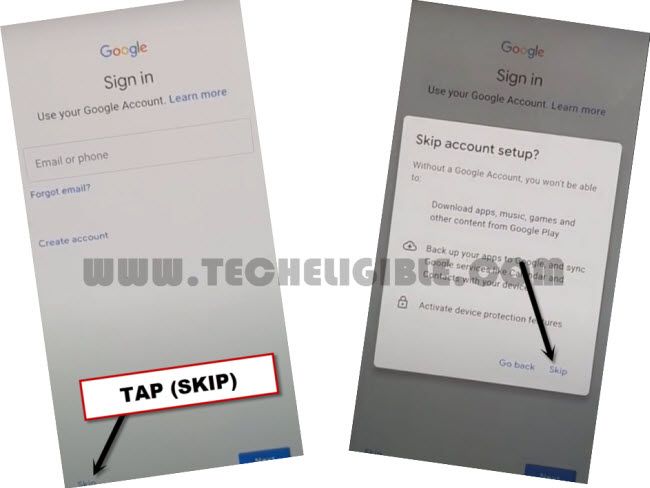
-You can now easily finish up all remaining steps on your own. Don’t need to setup new pattern lock again. If you see any pattern lock setup screen, just skip or choose (No Thanks) option from there.