
We can apply this single method on all Moto Android 14 device. If you have forgotten your recently setup google account after hard reset your Moto phone. That means, your device FRP protection is ON and you can’t access to your phone until you sign in again with same account. To get this issue resolved, follow up this way for Bypass FRP All Moto Android 14.
Disclaimer: We highly recommend you to apply this method only on your own device, if you are not owner of this device, or you found this from some where, you must return to its real owner.
[Method 1]: Let’s Start to Bypass FRP All Moto Android 14
-You can start this process by turning on your phone and connect WiFi. After that, go back (Hello) page.
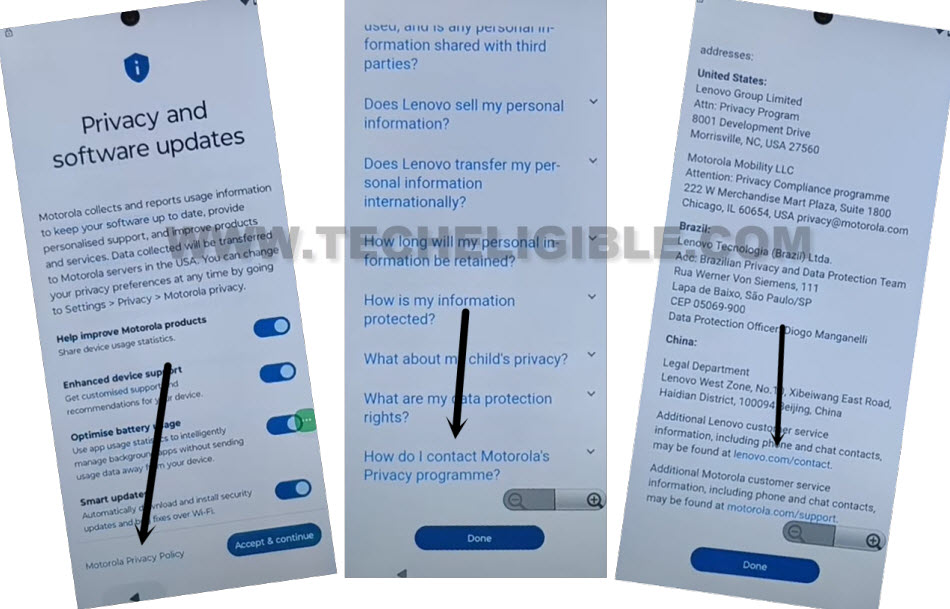
-Tap to > Start > Skip > Motorola Privacy Policy.
-Scroll down and tap to “How do i contact Motorola’s Privacy Program?”.
-Afterwards, from text page, just go down little bit and tap to blue link “Lenovo.com/contact”.
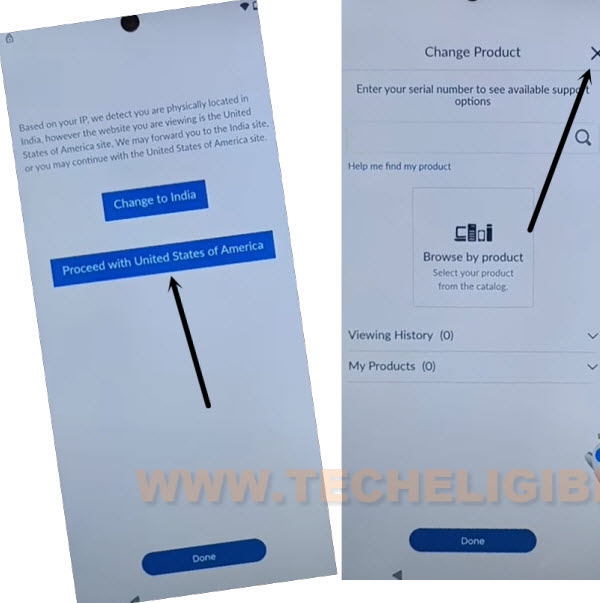
-Go to option “Proceed with United States of America”, afterwards, tap over “Cross icon” from upright corner.
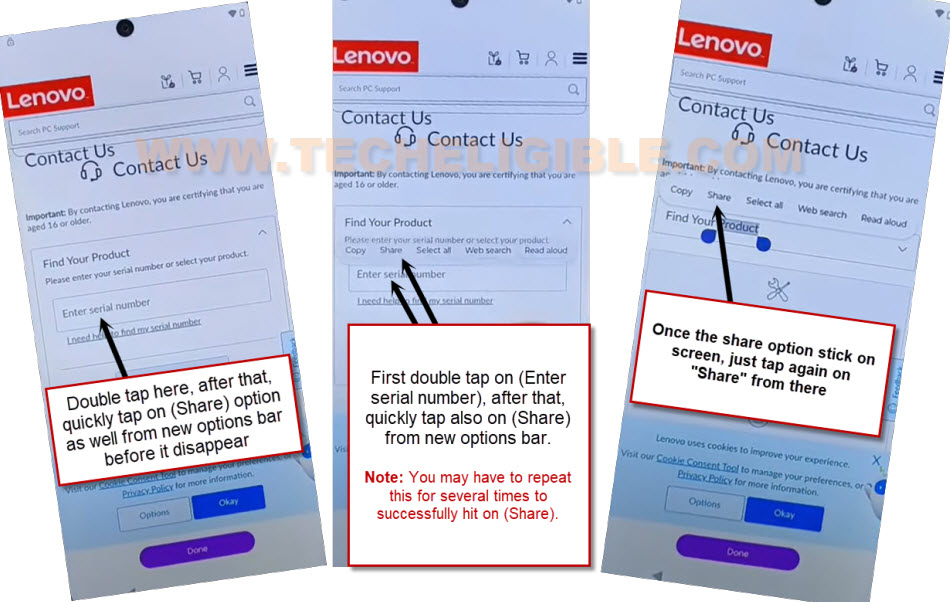
-Quickly double tap on “Enter Serial number”, after that, you will see some more options will popup there, just quickly tap on “Share” option from there before they disappear. If those options disappear, just try again. keep doing this as quick as possible..
-Once the new popup option bar stop disappearing and displaying properly, just tap again on “Share” option.
| Trick to Hit on Share Option ⇒ Quickly tap two times on (Enter Serial Number), after that tap one more above (Enter Serial Number) whether you see popup options or not. Just tap over that. By doing this, you will tap 3 times in row. Means, 2 tap on (Enter serial number) and 1 tap above (Enter enter serial) number. After that, you will be able to see (Copy, Share, Select all….) options over there. |
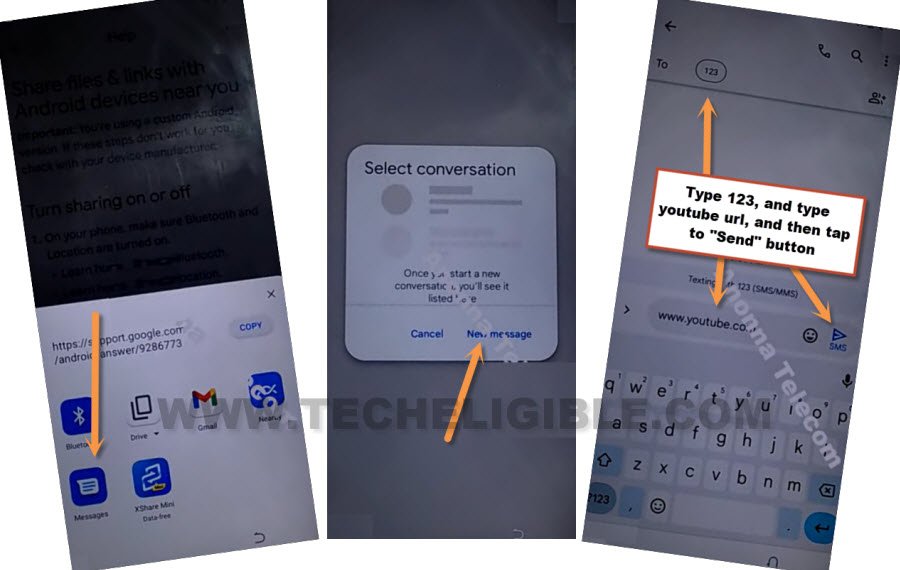
-You will see some share option bottom of your device screen, just tap to > Message > New Message.
-You have to type youtube url “www.youtube.com” and send this url to any random number as a text message. After that, you will see your url will convert to a hyper link.
-Go to “Tap to load preview” from your already sent youtube url.
-After that, tap to “Youtube” image.
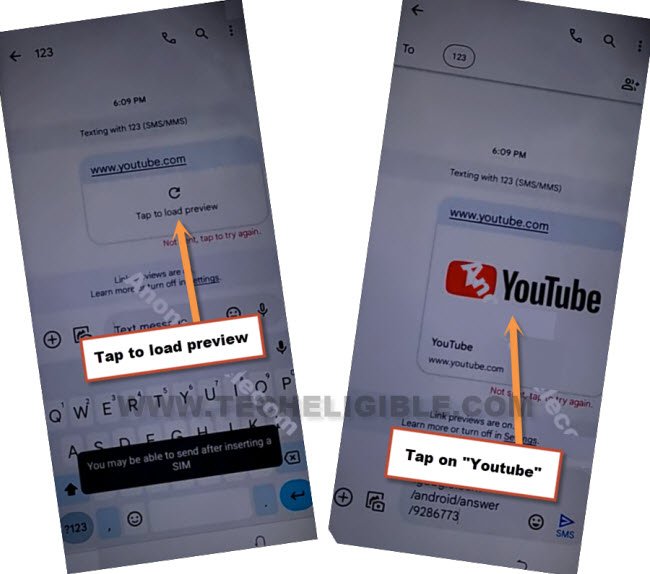
-Tap to “Allow” option, if you see in popup window. After that, you will be taken inside youtube page.
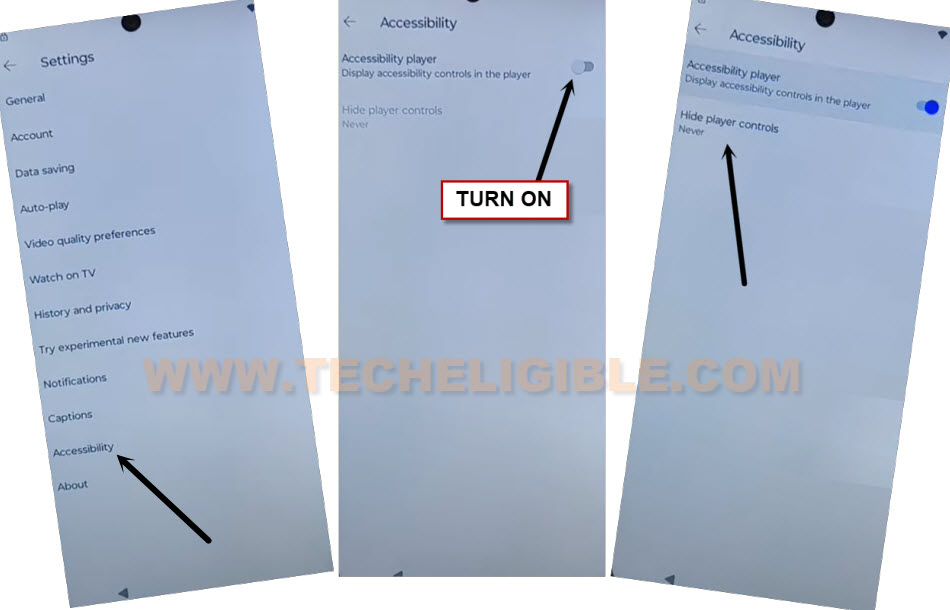
-Hit on a “Profile” icon from youtube corner side and tap to “Settings” icon.

-Go to > Accessibility > Turn on (Accessibility player).
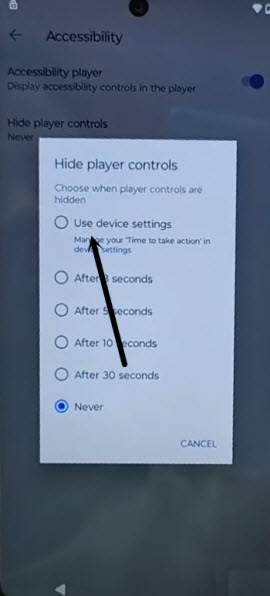
-You will be highlighted “Hide Player Controls” option, just tap over that.
-We can easily access to our device settings page by tapping at “Use device settings” option.
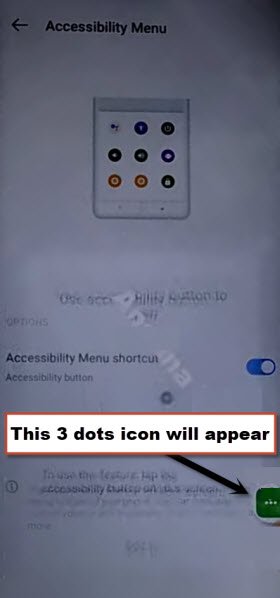
-From settings page, just > Accessibility menu > toggle on (Accessibility menu shortcut) > Allow > Ok.
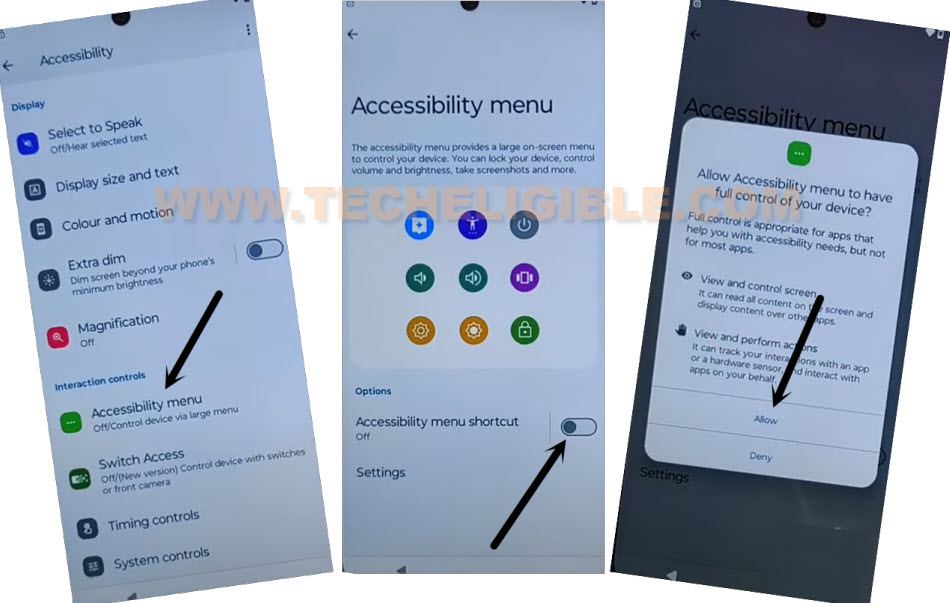
-After successfully enabling (Accessibility menu shortcut), you will have 3 dots icon on your right side screen.
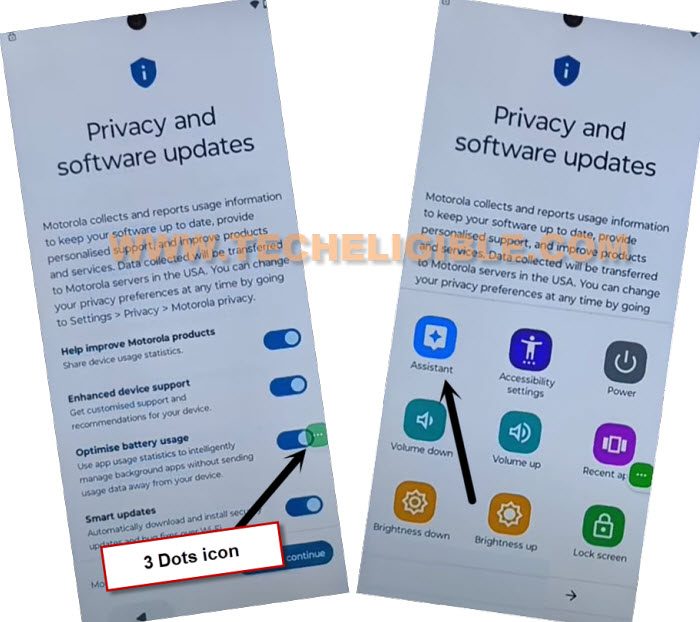
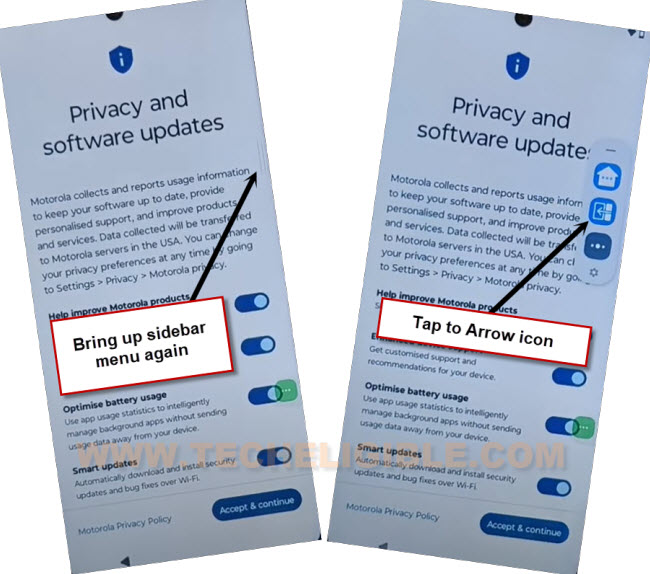
-Get back to your device (Privacy and Software updates) screen.
-After that, use your 3 dots icon to access to assistant page by tapping on > 3 dots icon > Assistant.
-Tap over a “Keyboard” icon from bottom, and search there with “Moto Secure” text.
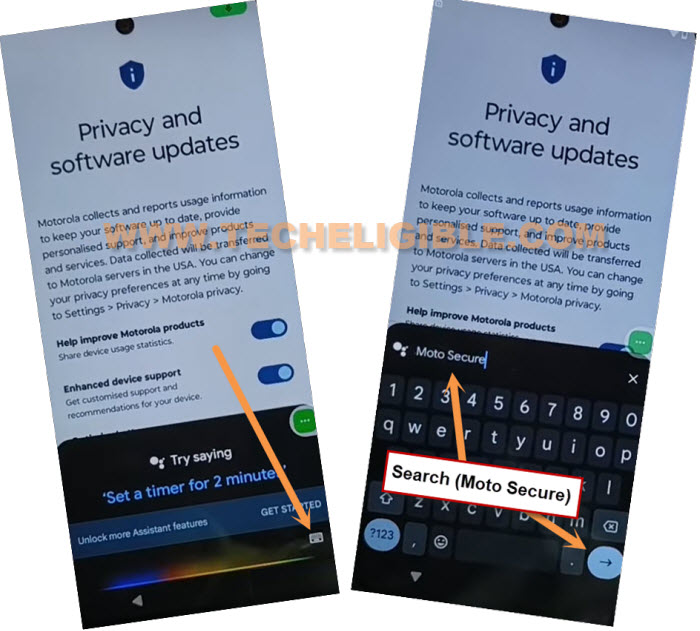
-You will be taken to the (Moto secure) screen. Tap over the screen anywhere. After that, tap on > Continue > Next > Next > Ok.

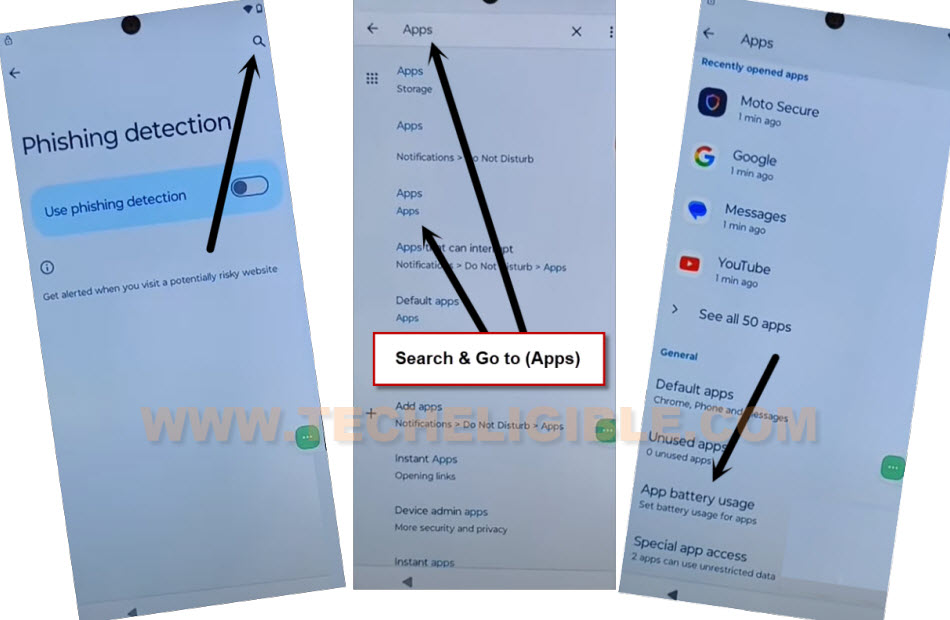
-You have to hit on “Phishing detection”.

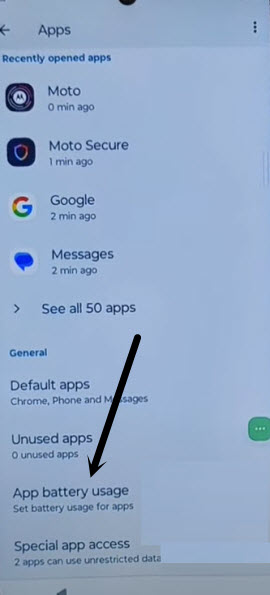
-Firstly, hit on a “Search icon” from top corner. Make search there with “Apps” and go to “Apps” searched result same as shown in below screen shot.
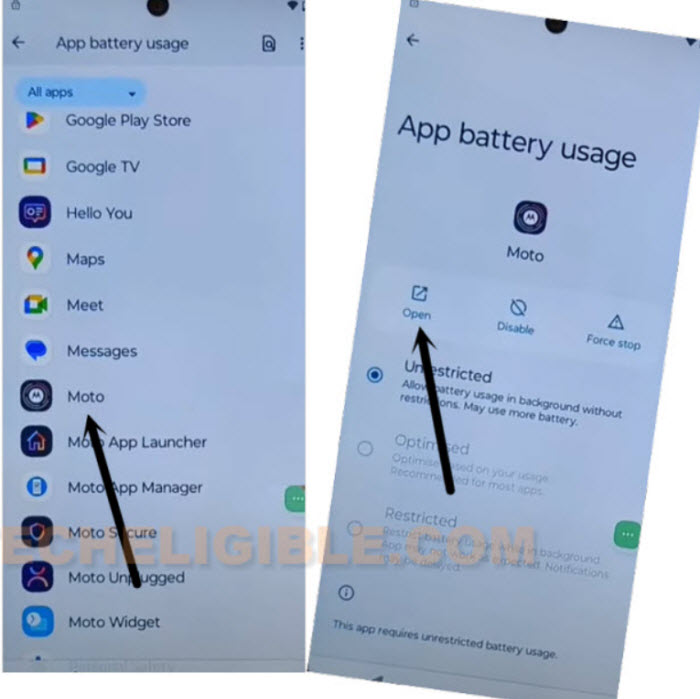
-Afterwards, go to “App battery usage “.
-Tap on > Moto > Open.
Add apps in Sidebar Menu to Access back to HOME:
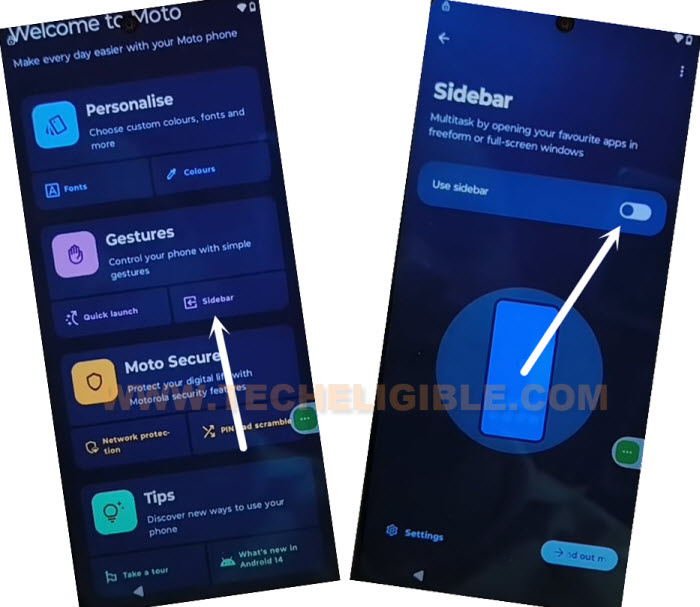
-After reaching inside the (Welcome to Moto) page, just tap to “Sidebar” option same as shown in below screen shot. After that, turn on “Use sidebar” to easily Bypass FRP All Moto Android 14.
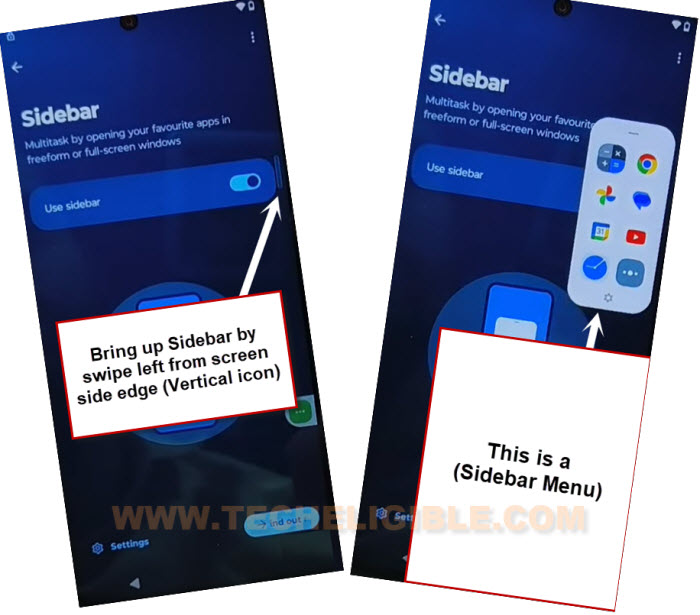
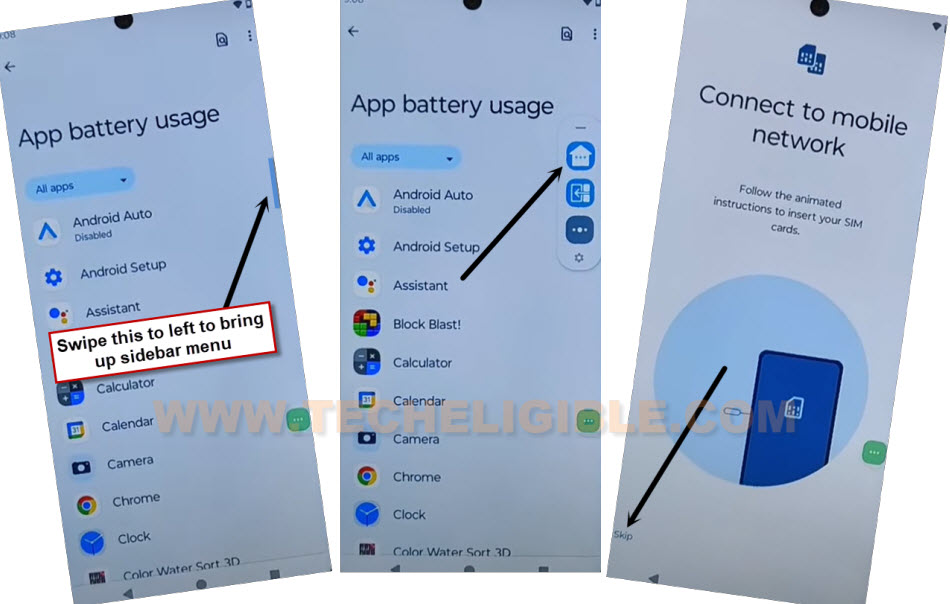
-You will start having a small (Vertical line) icon at the right edge of your device screen. Just long tap on that vertical icon and swipe to left side to open up this sidebar menu.
-Tap to few times on (Next > Next > Ok).
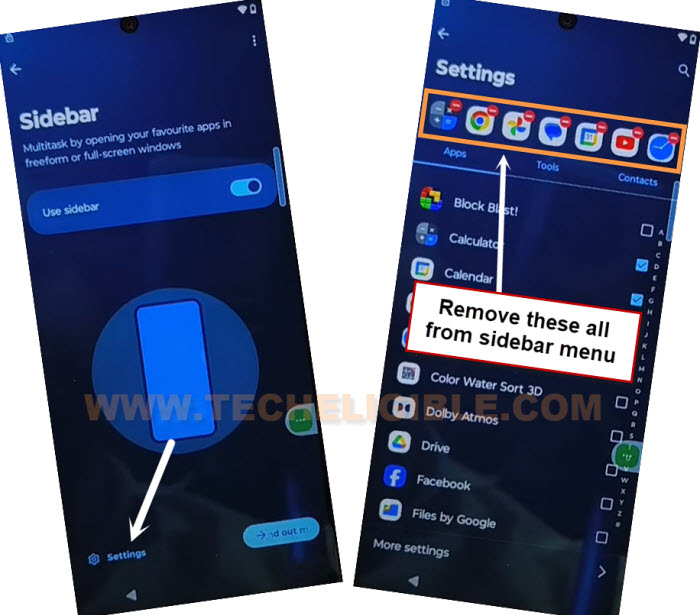
-Let’s access to sidebar menu settings page by tapping on “Settings” option from bottom.
-Remove all added apps from sidebar menu by tapping on a (red minus) sign from the app.
-Afterwards, tap over a “Tools” option and check two apps from there.
1st: Back to home.
2nd: Switch to the last app.
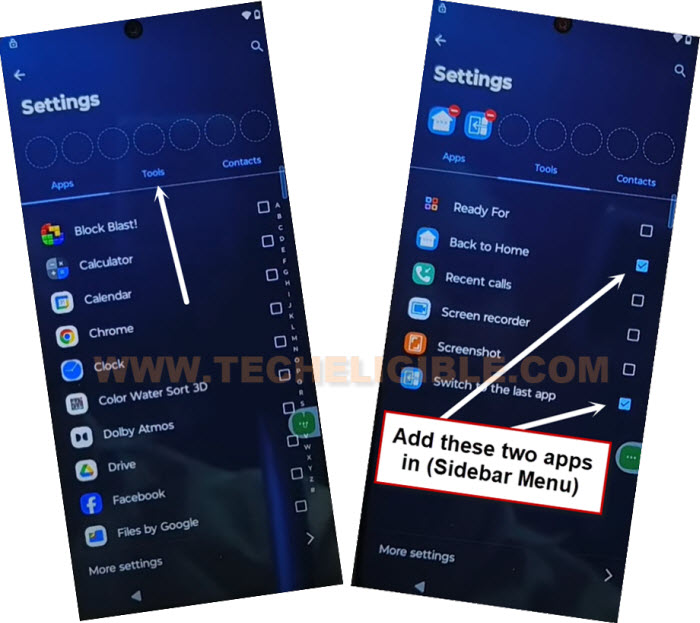
-Tap once on the “Back Arrow” icon from bottom. After that, verify your sidebar penal added apps by bring up side bar menu.
-You will see both same apps there in the sidebar menu same as shown in below image.
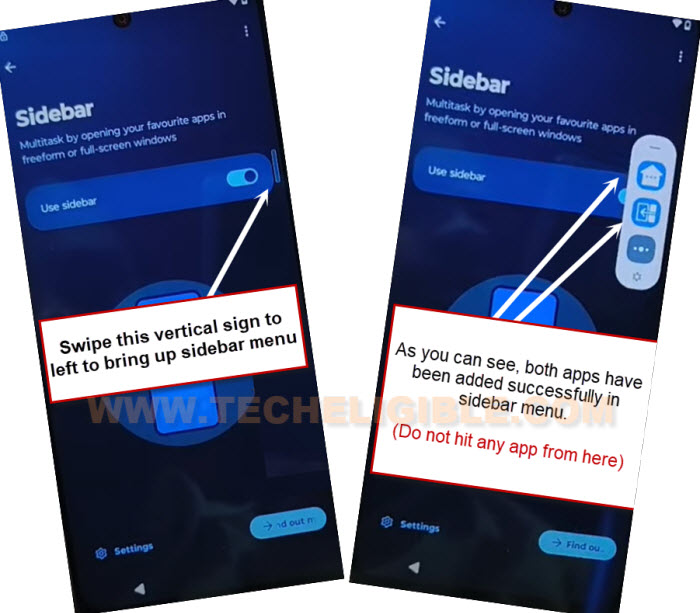
-We don’t need to do anything here, just tap anywhere on screen to close the sidebar menu. After that, tap 3-4 times on “‘Back Arrow” icon from bottom to reach back to previous (Apps) page same as shown below. After that, go to “App battery usage” option.
Disable Some Apps from App list Page:
-Go to “Android Auto” app. After that, disable and force stop this app respectively.
-Tap once on the back arrow to get back to app list page. From there, go to > Android Setup > Force Stop > Ok.
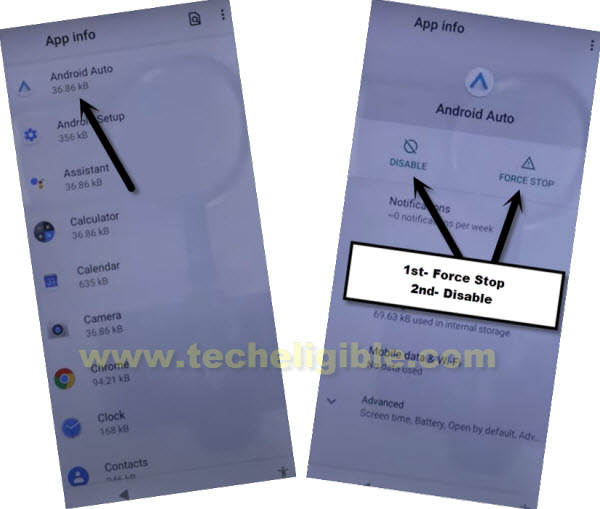
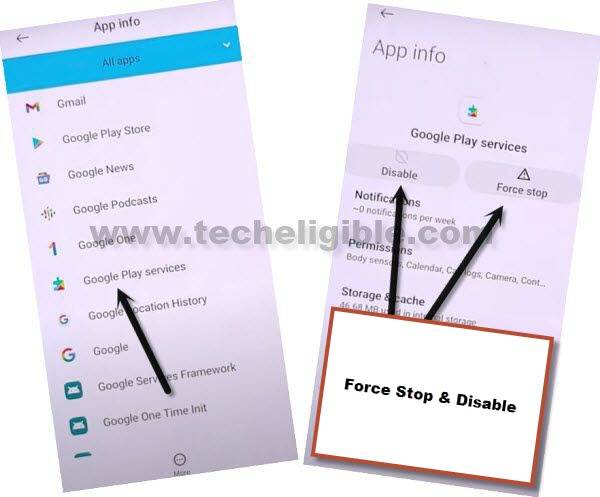
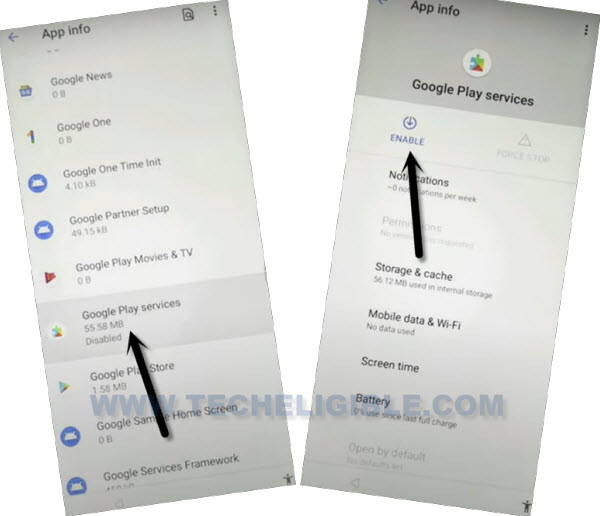
-Tap once on the back arrow to get back to app list page. From there, go to “Google Play Services” app.
-Disable & Force stop (Google Play Services) application as well to Bypass FRP All Moto Android 14.
-Reach back to (Connect to mobile network) page by bringing up sidebar menu and tap to “Home” icon from there.
-After that, tap to “Skip”.
-Wait on loading screen and tap to “Accept & Continue”.
-Wait again on loading screen and tap to “Don’t Copy” option.
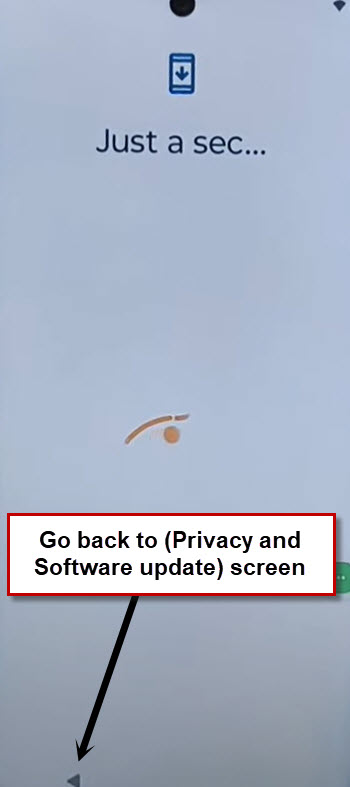
-After that, the Moto Android 14 device will stuck on a loading page. To get this done, we have to enable back google play service app.
Enable Google Play Services:
-Open your device (Sidebar menu). From there, tap on a “Arrow” icon app.
-From your device app list page, just find and go to Google Play Services > Enable. After that, tap on > Force Stop > Ok.
-Open Sidebar menu and tap to “Home” icon from there to reach back on (Connect to Mobile network).
-Tap to “Skip” option.
-If you see any loading screen, just hit on “Back Arrow” icon.
-You will get back to (Connect to WiFi) screen page. Let’s tap to > Setup offline > Continue to Bypass FRP All Moto Android 14.
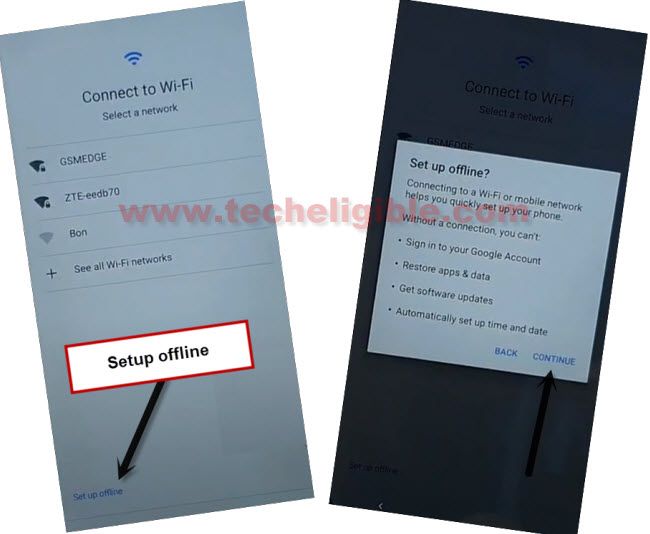
-Its all done now. You can easily complete your device setup wizard to access to the device main home-screen.
[Method 2]: Bypass FRP All Moto Android 14 By Sprint USA SIM
– Prior to commencing this procedure, it is essential to review key information provided above.
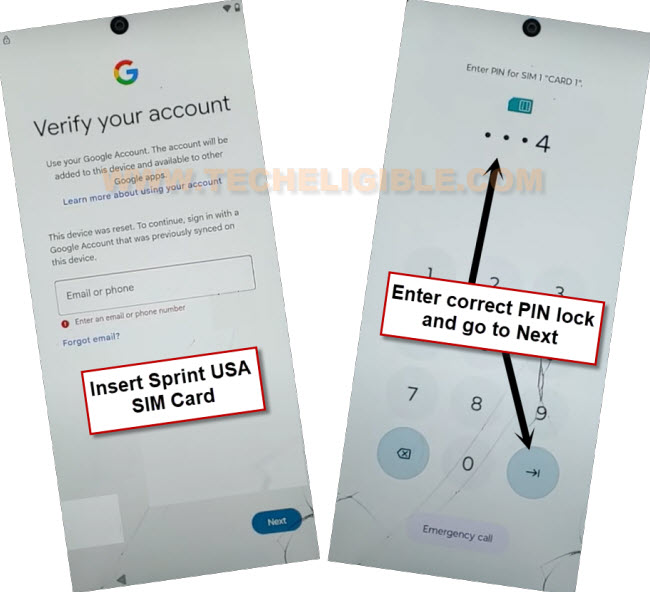
– Set a 4-digit PIN lock code on your Sprint USA SIM card by utilizing another Android device. You may search for instructions online or refer to our article on establishing a PIN lock code.
– Power on your Motorola Android 15 and connect it to a WiFi network.
– Next, we will insert the SIM card that has the PIN lock configured (Sprint USA SIM card). This will bring up a (Lock Screen). Simply input your accurate 4-digit PIN to gain access.
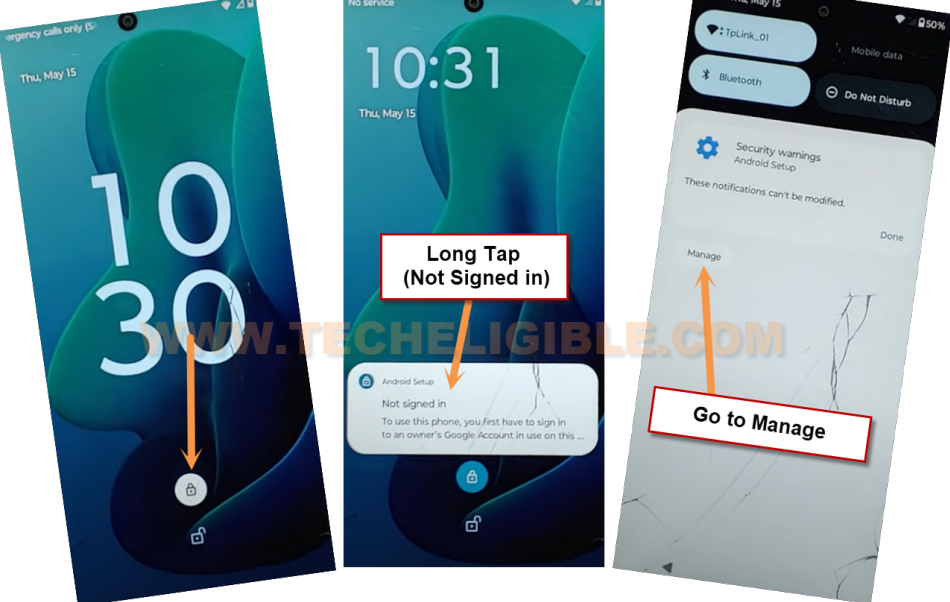
– A lock screen will appear, tap the “Lock icon,” and then press and hold the “Not signed in” notification. After that, select the “Manage” option.
Note: If the screen does not match the one displayed below, remove the SIM card and try once more.
– On the (Notifications) screen, proceed by tapping > Do not disturb > People > Calls.
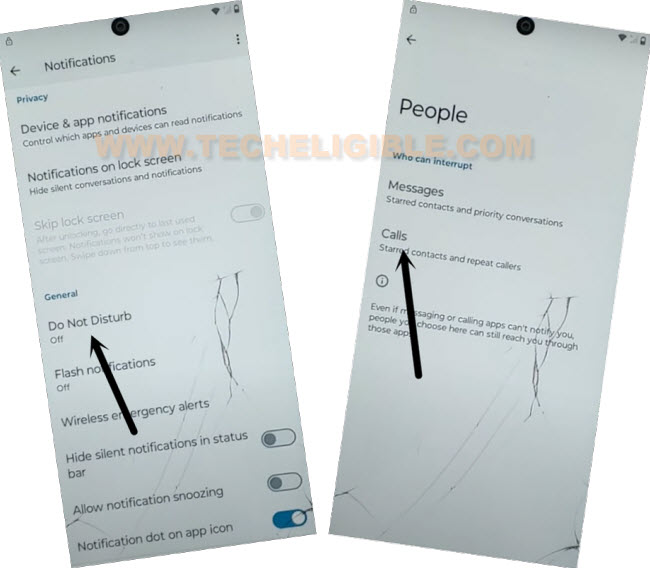
– Check the “Contacts” option, then select the “Settings” gear icon as depicted in the image below.
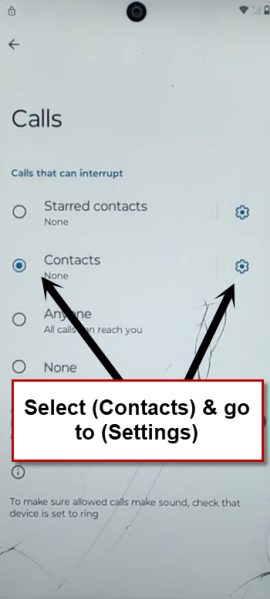
– From the pop-up window, choose “Allow.”
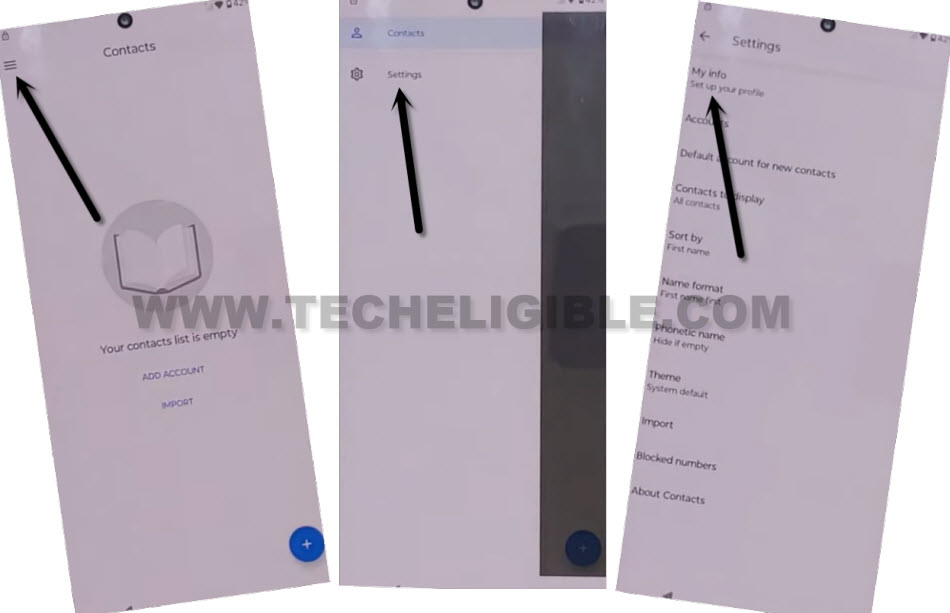
– Navigate to > Menu > Settings > My Info.
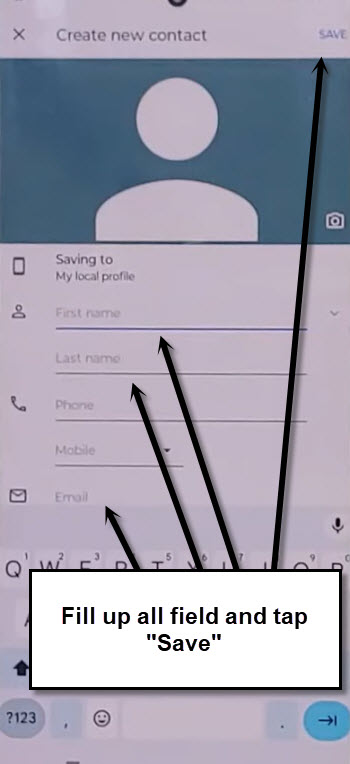
– Create a new contact by filling in the details (First Name, Last Name, Email address). Once finished, simply click on “Save” in the upper corner.
– Click the “Email” icon, which will bring up the Gmail screen, then select “Skip.”
– Tap the “Learn More” link.
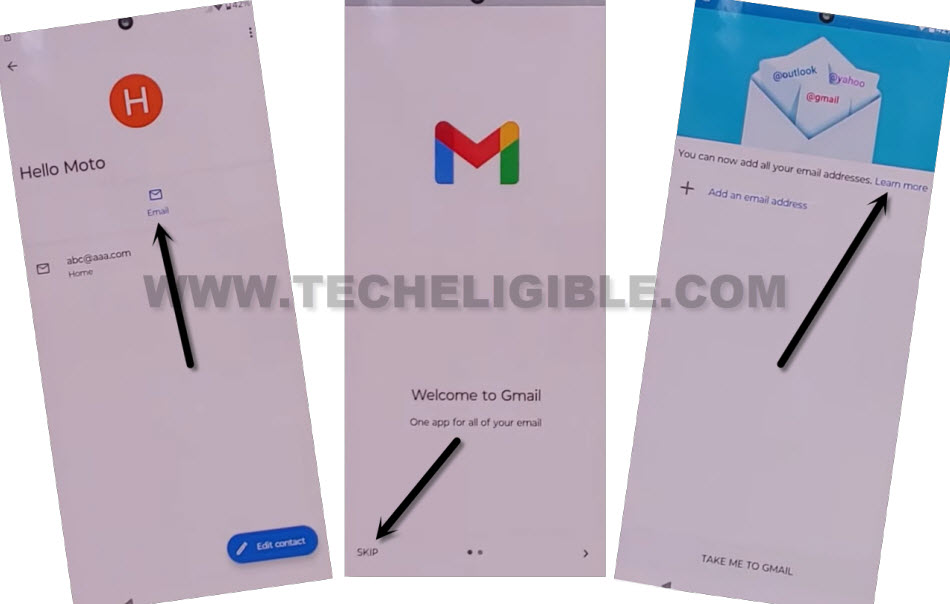
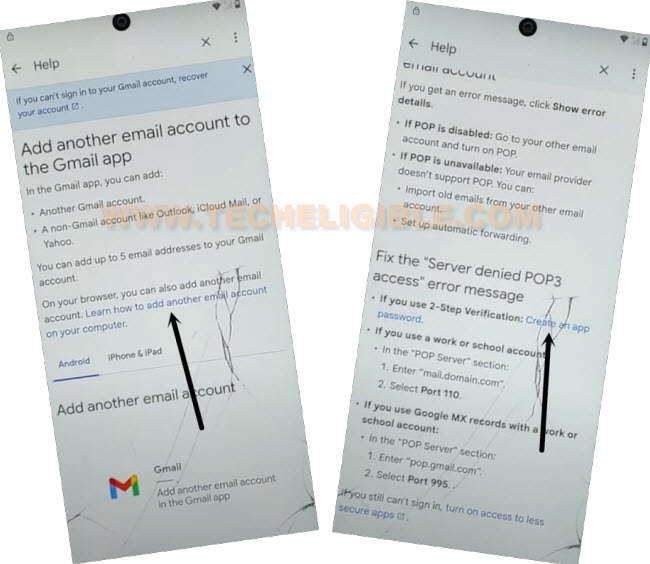
– Select the subsequent links titled > Learn how to add another email on your computer > Create an app password > 2-step verification > Change this default setting within your account preferences.
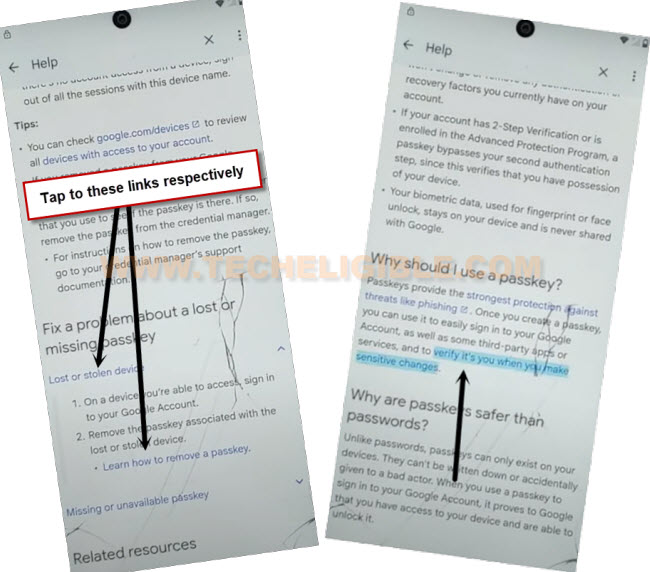
-From the following screen, scroll down slightly and select another blue link labeled > Lost or stolen device > Learn how to remove a passkey. Subsequently, also click on this link “Verify it’s you when you make sensitive changes.”
-You will arrive at the Google Chrome browser interface. From this point, click on > Use without an account > No Thanks.
Reset the Moto Android 14 By RTN Menu:
– Conduct a browser search for “Techeligible“, and then choose the first result from our website.
– Expand the sidebar (Menu) and navigate to “Download FRP Tools”

– Scroll down a bit and select the “Open Dial Code” option. Finally, enter the code ##786#.
Note: This code is functioning on a US carrier devices (like Sprint). May be not working on other carrier support devices.
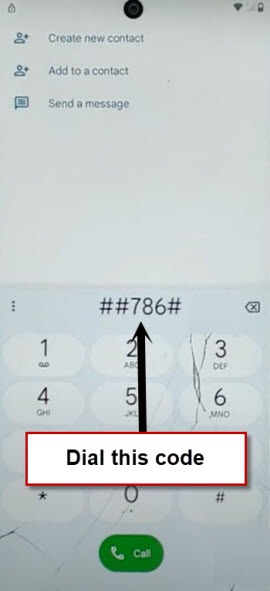
– If you have a Sprint USA SIM card, the (Sprint RTN Reset Menu) will appear on your display.
– We can perform a soft reset of the device easily by choosing the “Reset” option.
– Enter the SIM number as 0 digits on the screen (000000). Then, press the “Verify” button.
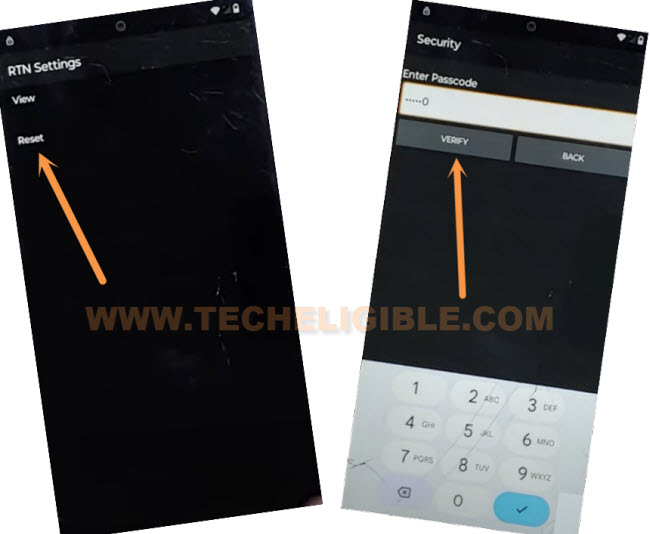
– Remain patient until the factory reset process is finished, and you see a (Hello) startup screen after inputting the pin lock code once again.
– Click on the “Start” option.
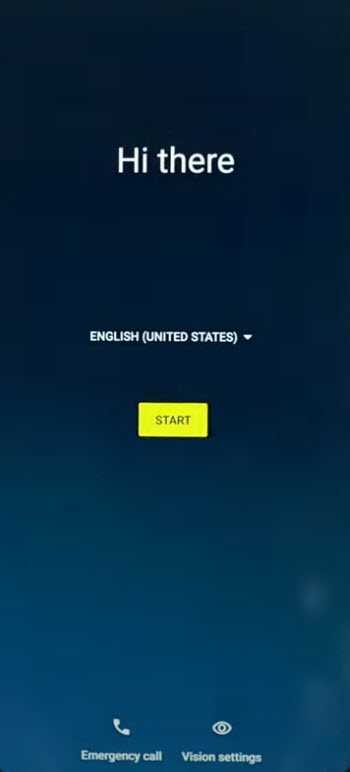
– After selecting some (Next/Start/Skip) prompts, you will arrive at the (Connect to WiFi) screen. From there, tap > Setup offline > Continue.
– You have successfully bypassed FRP on the Motorola Android 15; let’s complete the remaining startup procedures independently without being halted by the Google verification screen. Your previous Gmail account has been entirely removed through the factory reset.
Frequently Asked Question
How to do login back with my forgotten google account on Moto Android 14?
You will have to use recovery options to recover your lost google account, then, sing in back with your google id to bypass the google verification screen.
Why i am stuck on google sign in screen?
You have performed hard reset your phone and after that, forgotten already logged in gmail account.
I am not getting (Share) option on Contact US page?
Your device is on updated security patch. If your Moto phone belong to US provider and you have (Sprint USA SIM), then, go to (2nd method).