We have updated another method on (Android 10) to Bypass frp LG G7 ThinQ Android 10, Android 9. You can follow up any method according to your device android version to get back your LG phone with new google account. If you can’t remember recently setup google account and unable to recover it. You have this method to follow up and get back your LG phone with updated google account.
Note: We highly recommend you to apply this method only on your own device, if you are not owner of LG G7 thinQ device, or you found this from some where, you must return this device to its real owner. This method is just for educational purpose only for device owner.
| Method 1: Remove FRP LG G7 ThinQ Android 10 [New] |
| Method 2: Remove FRP LG G7 ThinQ Android 10 |
| Method 3: Remove FRP LG G7 ThinQ Android 9 |
Method 1: Bypass frp LG G7 ThinQ Android 10 [New]
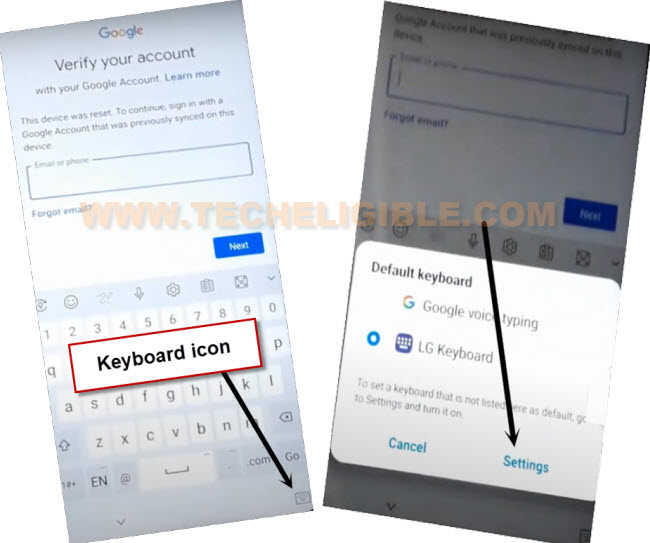
-Turn on device & Connect WIFI first. After that, go to your (Verify your account) screen, tap on “Email or phone” field tab, this will popup keyboard of your device.
-Tap to “Keyboard” icon from bottom corner and hit on “Settings” from popup screen.
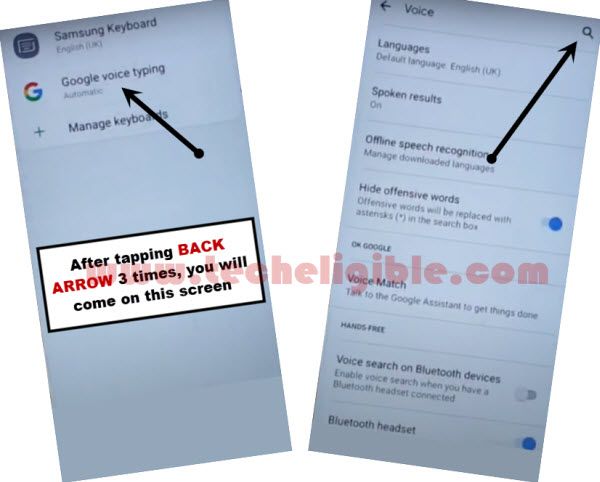
-You will access to (Manage Keyboards) screen, from there, just tap on “Google Voice Typing”.
-After that, tap to “Search” icon from top right corner.
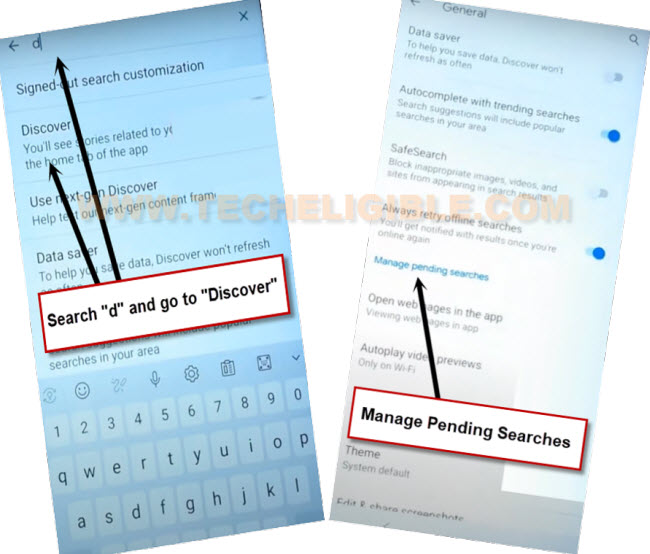
-Type “d” in search bar, and tap to “Discover” option.
-Hit on a “Manage pending searches” blue link
-Tap to “Discover” option from bottom.
-Search “Ch”, and tap to “Chrome” icon from searched result.
-You will be taken to the google chrome browser app.
| Note: if you see any popup screen such (welcome to chrome), you may have to tap these options as well > Accept & Continue > Next > No Thanks. |
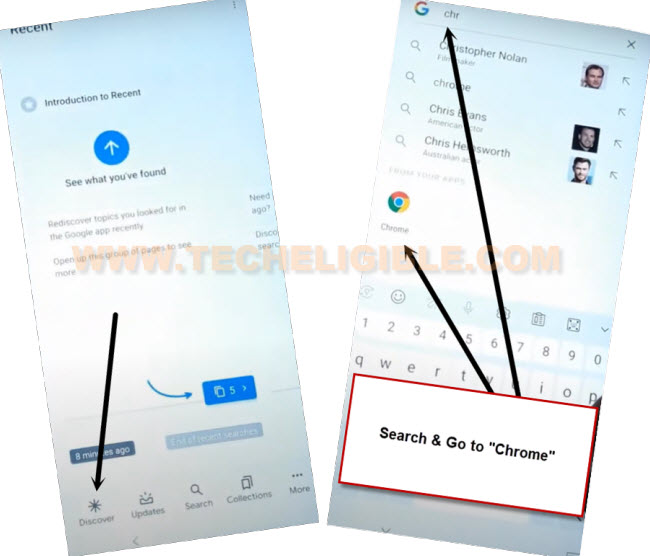
-After successfully reaching to google chrome browser, we have to download frp bypass application from there. Follow up steps from below.
Download FRP Bypass App:
-Search with “Quick Shortcut Maker Techeligible“.
-Go same searched result as shown in below screen shot. After that, download “Quick Shortcut Maker 2.4.0” application.
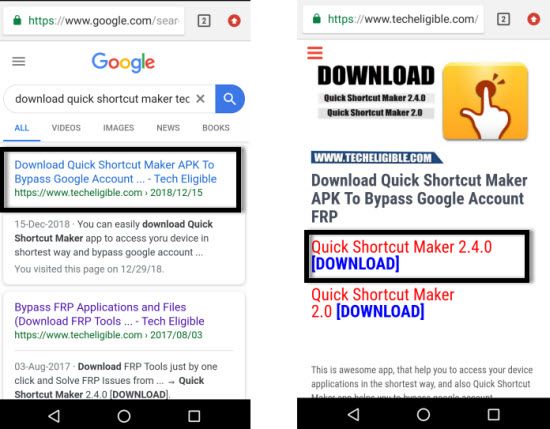
-After downloading completes, you must see a popup window with (Open) link at the bottom of your browser, just tap to “Open” from there.
-You will be shown chrome popup window, just go to “Settings” option from there and turn on “Allow from this source” option. This will allow you to install your app easily.
-Tap to “Back Arrow” icon from bottom.
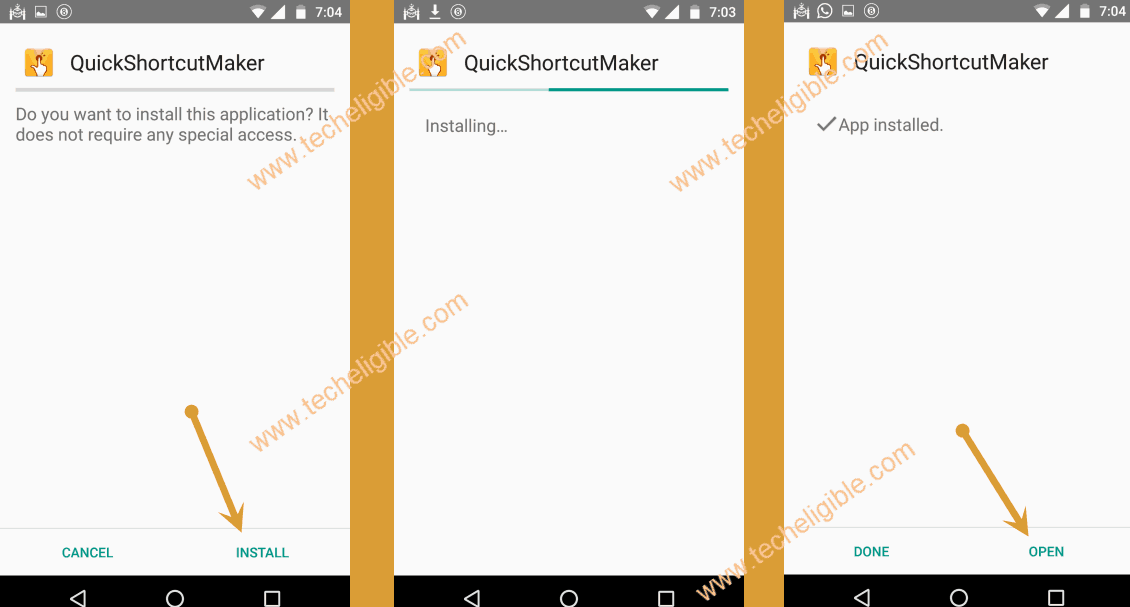
-You can easily install (Quick Shortcut Maker) app, from popup window, simply tap to > Install > Open.
-Let’s access to our device main settings page directly and perform factory data reset to delete previously setup google account.
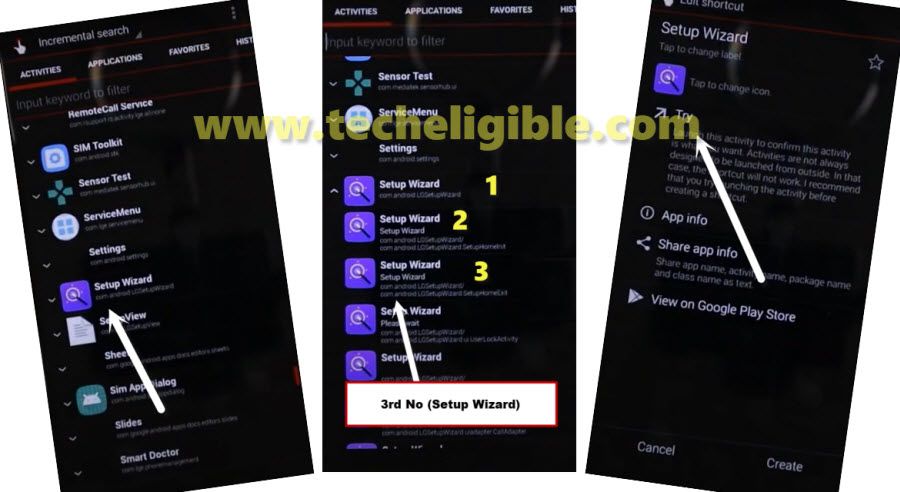
-Firstly, find and tap on “Setup wizard” app, which is in purple color.
-After hitting on “Setup wizard”, this will collapse down further, and you will see list of too many (Setup wizard) app over there.
-Tap over the 3rd number “Setup Wizard”.
-Tap to “Try” next screen to access your device main home-screen without finishing up setup wizard steps.
-Congrats on successfully access to your device main home-screen.
Factory Data Reset from Settings:
-Let’s factory reset our device to bypass frp LG G7 ThinQ.
-Open your device settings by hitting on “Settings” gear icon. After that, hit on “System”.

-Go to > Restart & Reset > Factory Data Reset.
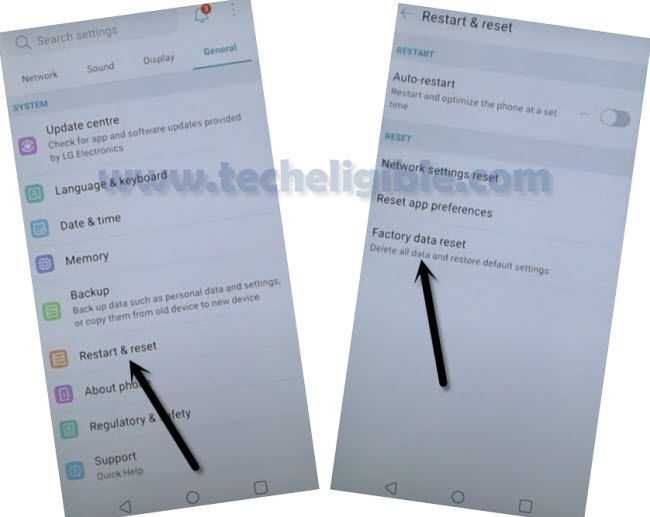
–Tap to > Reset Phone > Delete all > Reset.
-After that, your device will auto restart, after that, you will be able to complete setup wizard steps without stuck on google sign in page
Method 2: Bypass FRP LG G7 ThinQ Android 10
Step 1: Connect WiFi first.
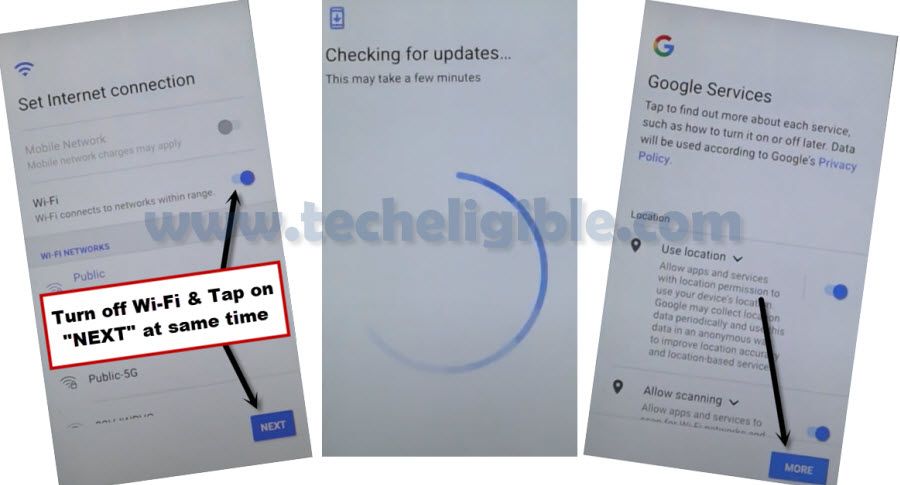
Step 2: Go to (Set Internet Connection) screen same as shown in below image.
Step 3: At the same time, turn off WiFi & Tap on “Next” option using your both fingers, i repeat, you have to hit both option at very same time.
Note: If you failed, don’t worry, keep trying until you succeed to hit both option at same, if you did that correctly, you will see (checking for update….) screen.
Step 4: Afterwards, you will receive a (Google Services) screen, just hit on > More > Accept.
Create New Patter/PIN code:
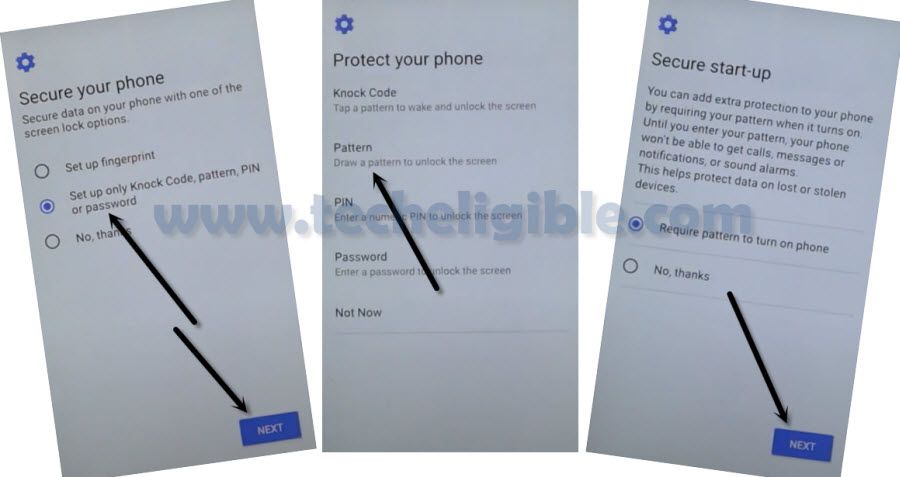
Step 5: Select (Setup only Knock Code, Pattern, PIN or Password), and then hit on > Next > Pattern > Next.
Step 6: You will see there a screen of (Place Your Finger on Power key), just hit on > Skip > Skip Anyway.
Step 7: Turn on > WiFi > Next > Don’t Copy.
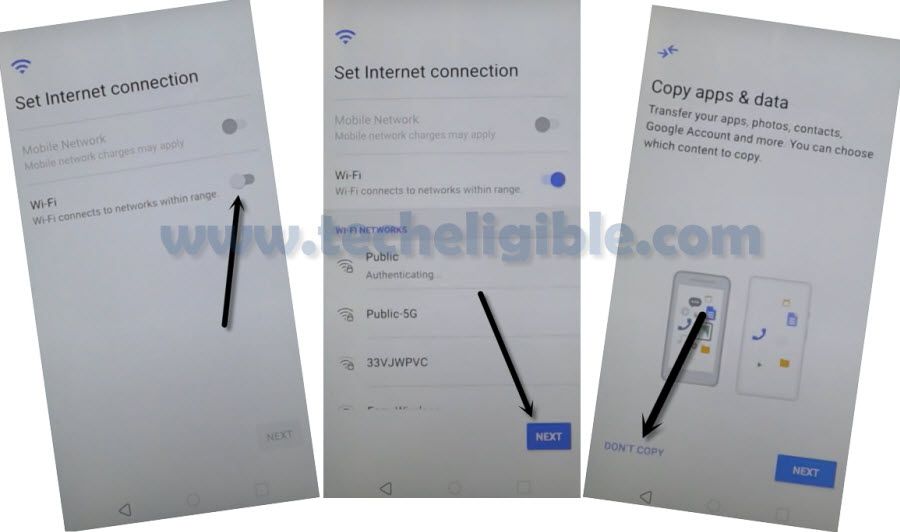
Step 8: Draw your already setup Pattern there, and hit on > Skip > Skip.
Note: If you don’t see any “SKIP” on google sign in, and also you don’t see any pattern lock asking screen, so in this scenario we will have to hard reset our device, if you have already received (SKIP) on google sign in screen, so in this case, you don’t need to hard reset device, just finish setup wizard accordingly.
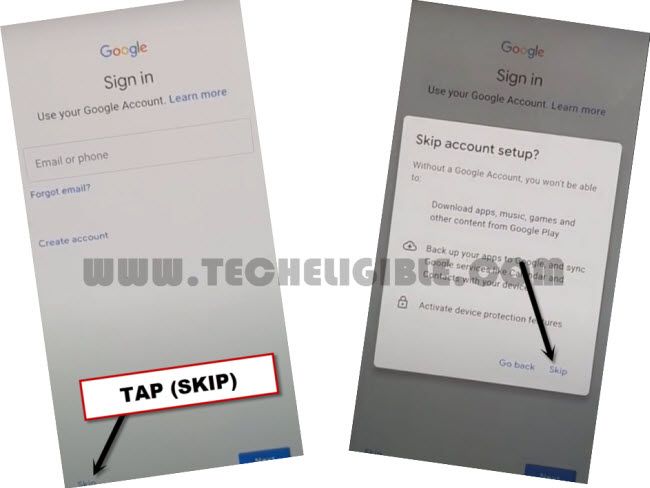
Step 9: You may see (Loading)…. screen while completing setup wizard, just don’t worry, restart your device, and finish setup wizard again.
Step 10: Once you reached inside device MENU, just follow below steps to perform factory data reset task, this will bypass frp LG G7 ThinQ Android 10 completely.
Step 11: Go to > Settings > General > Restart & Reset > Factory Data Reset.
Step 12: Tap to > Reset Phone > Draw Pattern > Delete all > Reset.
Now complete setup wizard again, and you are all done, thank you for visiting us.
Method 3: Bypass FRP LG G7 ThinQ Android 9:
Another, one of the latest method amongst LG frp methods, so you guys can Bypass frp LG G7 ThinQ Android 9 without any talkback and PC, you are required only one “SD CARD”, which is not difficult to find for sure :), you can access your device after adding new Gmail account, and that is very, just follow steps.
-Firstly, connect WiFi in your phone.
-After connecting wifi, just go back to “Welcome Screen”, which is very first screen appears right after device turn on.
-Now insert “SD CARD” in your phone.
-Go to > Accessibility > Settings > Select-to-speak > Settings.
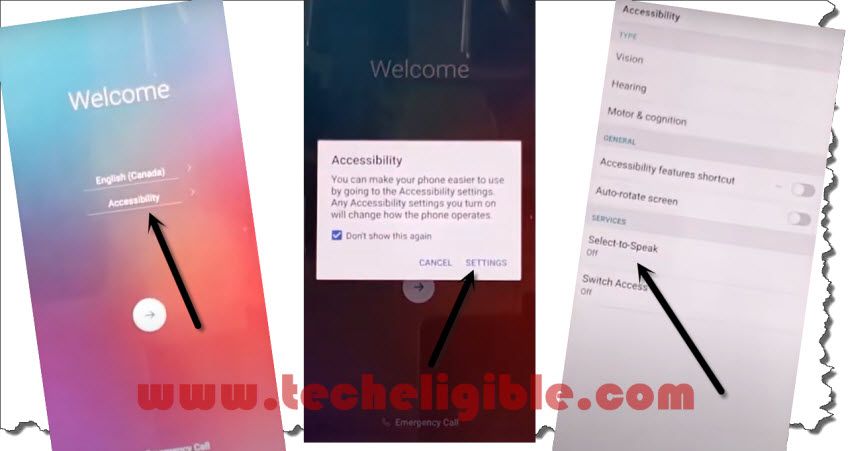
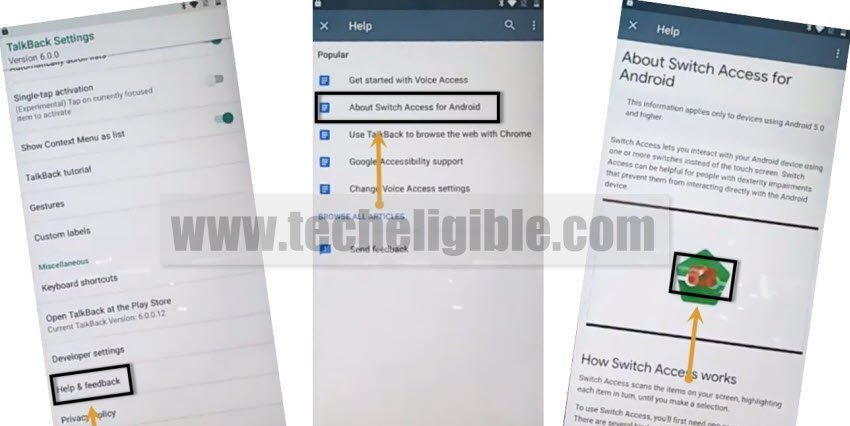
-Tap on > Help & Feedback > About switch access for android.
-Now tap on “Play icon” on youtube video.
-Aafter that tap on “Clock icon” from youtube video option.
-Tap on “Accept & Continue”, and then hit on “No Thanks”.
-Congrats, you have accessed to chrome browser, now we have to download one LGbackup tool in our SD CARD, lets do that to Bypass frp LG G7 ThinQ.
Download LGbackup tool:
-You need to type “Techeligible” in the google chrome browser search bar. Go to same searched result as instructed in below screen shot.
-After that, tap over the “3 Parallel lines” icon from top corner and go to “Download FRP Tools” option from there to reach the official frp tools page.

-Go down, and download from there “LGbackup Tool“.
-After downloading finish, you will surely receive a bottom popup window, just tap on “OPEN” from there.
-There you will be able to see your downloaded app, but you wont be able to install that app.
-Go back to “Chrome browser” just by hitting on back arrow 1 time.
-Type in chrome search box “Google“.
-Tap on “MAPS” from underneath google box.
-After that, just tap on “SKIP” from top right corner.
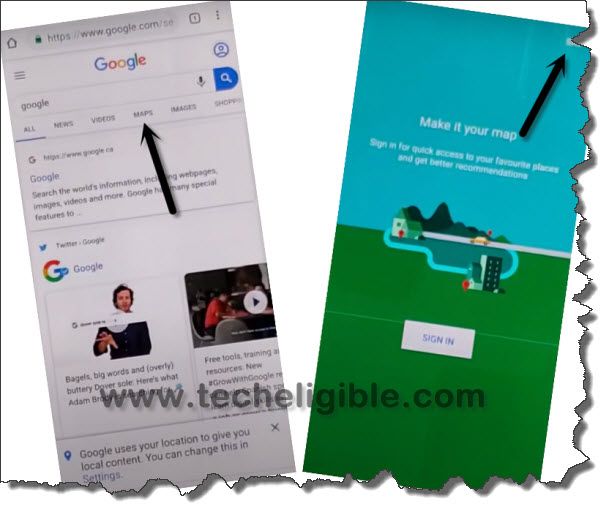
-Now hit on “Back arrow” from top left corner.
-Tap on “MENU ICON” from top left corner, and select “Start driving”, and then “Got it”.
-Hit on “MIC icon” from top right corner, and speak loudly “Open Google”.
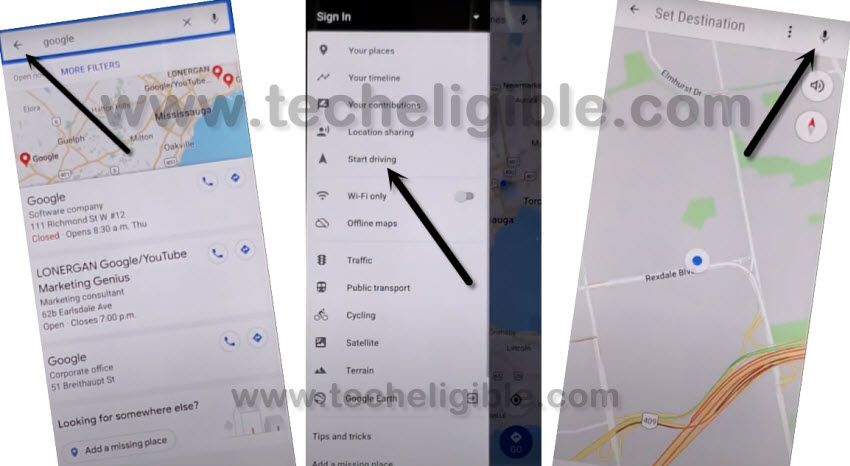
-You will be redirected to the “Google App”, just tap on “No Thanks” from bottom popup window of sign in.
-Type in search box “File”, and then tap on “File Manager” icon from there.
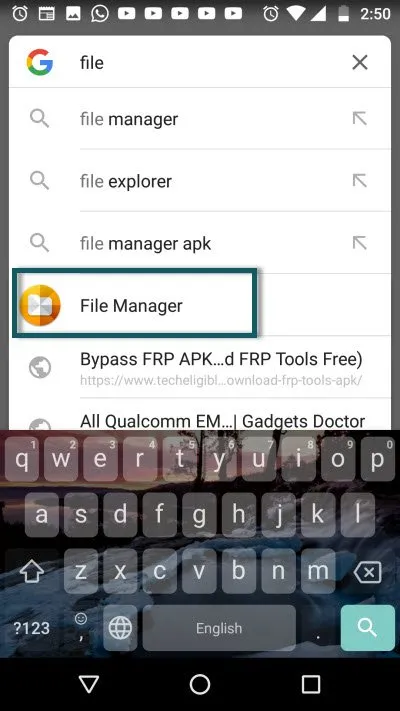
-Go to “Download” folder.
-Tap on “3 dots” from top right corner, and select “MOVE”, and then select your “LGbakcup” app to move.
-Tap on “MOVE” from bottom right corner.
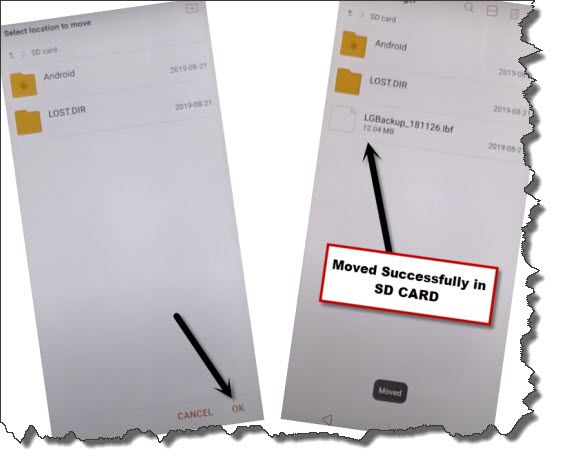
-After that, tap on “SD CARD”, and then “OK”.
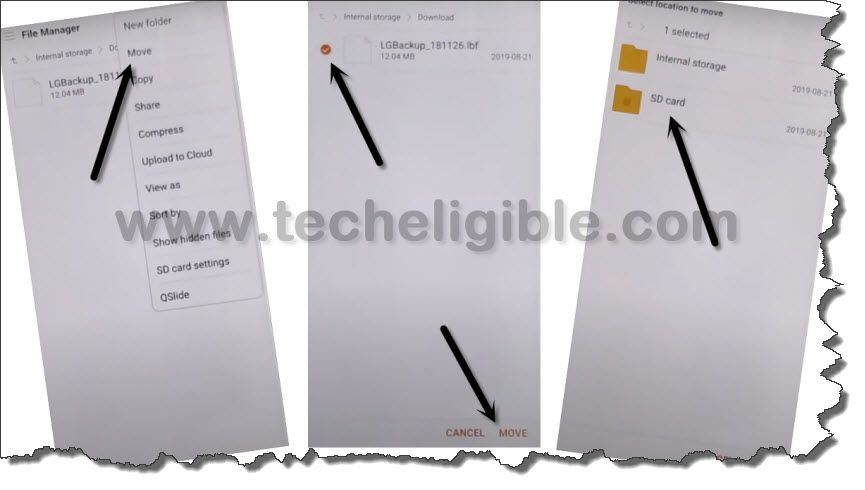
-The LGbackup app will be moved to SD CARD successfully.
-Now tap on “Back Arrow” for only 1 time, and there you will have google search box again.
-Type in search box “LG”, and then tap on “LG Mobile Switch” icon from search result.
-Hit on > AGREE > SD CARD > RESTORE > (Select LGbackup app).
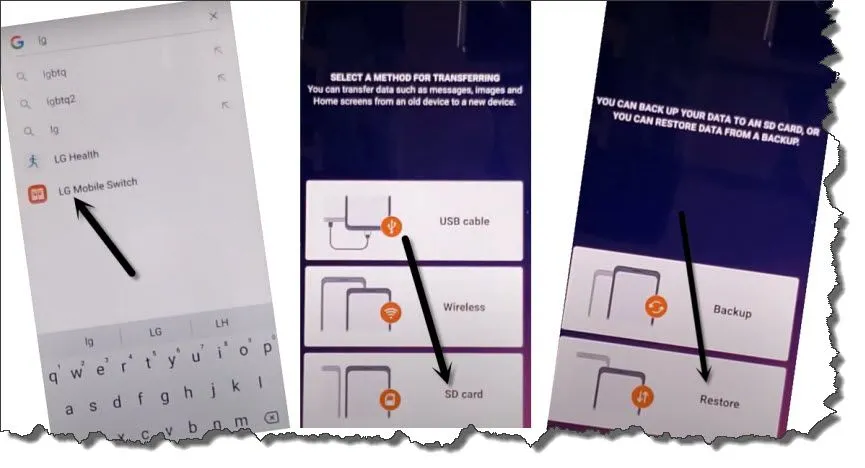
-Select only “Downloaded Apps” option, and un-check others all, after that tap on > Next > Restore.
-Once the restoration process finish, you will be asked to “RESTART PHONE”, just go for that, and tap on “RESTART PHONE”.
-So after restarting phone finish, it will show you again “WELCOM SCREE” as usual, nothing new :).
-We have to get back to google app again to Bypass frp LG G7 ThinQ.
Let’s Get back to Google App:
-Go to > Accessibility > Settings > Select-to-speak > Settings > Help & Feedback > About switch access for android.
-Tap on “Play icon” on Youtube video, after that tap on “Clock icon”.
-Tap on “Accept & Continue”, and then hit on “No Thanks”.
-Search there “Google”.
-Now hit on > MAPS > SKIP > Back Arrow > MENU icon > Start driving > Got it.
-Now tap on “MIC icon” from top right corner, and speak loudly “Open Google”.
-Again, you will be redirected to the “Google App”, from there tap on “No Thanks”.
-Type “Quick” in search box, and then tap on “Quick Shortcut Maker” icon from searched result.
-Go down and tap on “SETUP WIZARD”, this will expand all setup wizard list.
-Select 3rd number “Setup Wizard” from list.
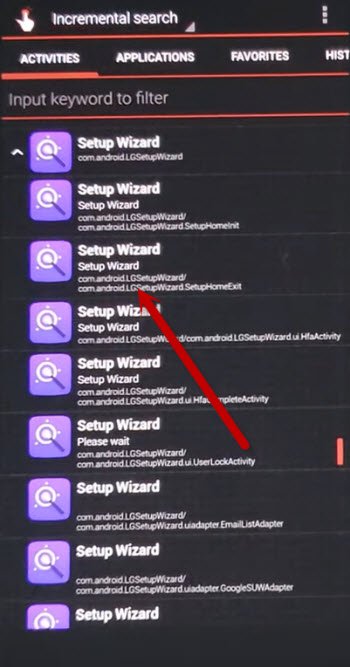
-After that, tap on “TRY”.
-Wait, until your device restart and you see “Welcome Screen” again.
-Now just complete setup wizard by following below steps carefully, we will not connect WiFi this time.
-Tap on > Next Arrow > Next > Skip > Next (Do not connect Wifi) > Skip Anyway.
-Now tap on > Next > More > Accept > Select (No Thanks) > Next > Skip Anyway > Not Now > Skip anyway >
-Tap on “More”, and then select all option as “i agree”. after that just tap on “DONE”.
-Now you have entered in your device successfully, and you are all done to Bypass frp LG G7 ThinQ.