
You will be able to reach back to your device easily just by applying these easy steps on your ulefone device to Reset Google FRP Account Ulefone Note 7. We will share contact detail to get (Gmail) app. After that, go to Gmail application and setup new pattern lock on this device. This pattern lock setup method will allow you to complete setup wizard steps.
Disclaimer: We highly recommend you to apply this method only on your own device, if you are not owner of this device, or you found this from some where, you must return to its real owner.
| 1st Way: Remove FRP Ulefone Note 7 [By Gmail App] |
| 2nd Way: Remove FRP Ulefone Note 7 [By PIN lock Setup] |
Method 1: Reset Google FRP Account Ulefone Note 7 By Gmail App:
-Insert a working sim card on your device before starting this process.
-Turn on the phone and connect WiFi.
-Put your device back on first (Hi there) screen. From there, go to “Emergency Call” option. After that, double hit on a “Emergency information” button from top center.
-Go to “Edit” option from top corner same as shown in below screen shot.
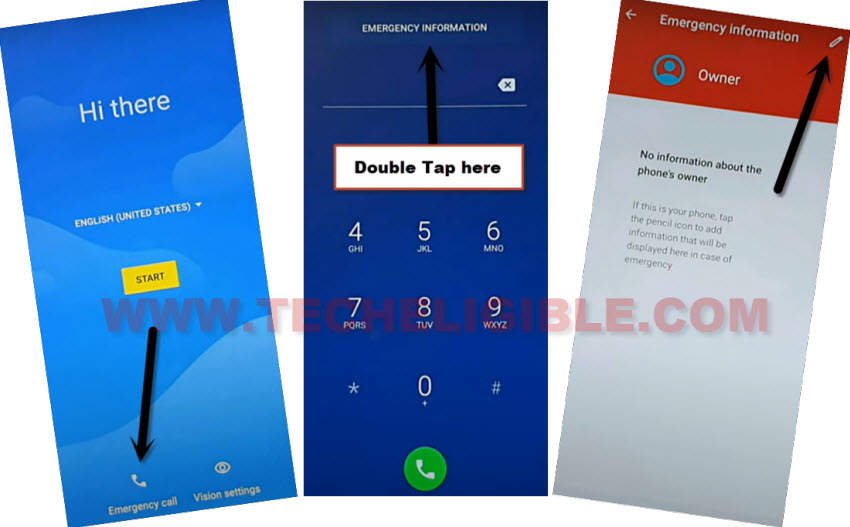
-Let’s go to your sim contact list page by tapping on “Add contact”.
-Tap on any random contact name from the contact list page.
-Tap again on same contact name from next screen.
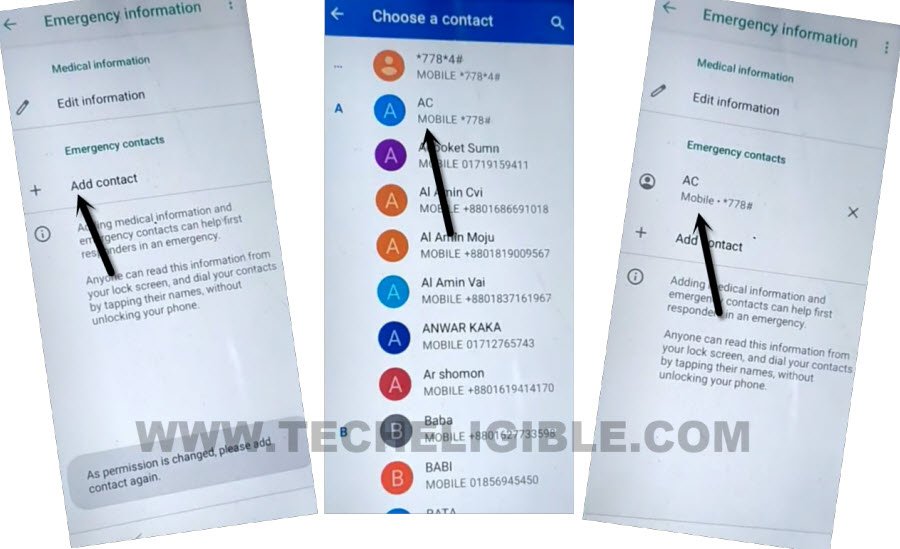
-Let’s get Gmail application by tapping on “Share” option.
-From popup window, tap to “Gmail” app.

-You will be redirected to the (Welcome to Gmail) screen. From there, hit on “Next” icon. After that, hit on “Done” option.
-Hit over the > Add an email address > Other.

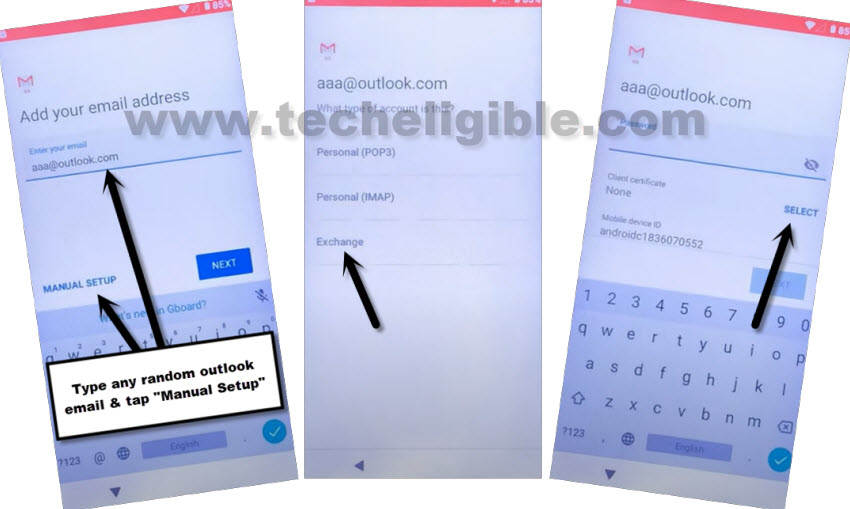
-Enter any random Gmail id there, such as ([email protected]). After that, you will be highlighted (Manual Setup) option.
-Just tap on “Manual Setup”.
-Go to “Select” option as well.
-Tap to “Ok” from popup screen.
Setup Pattern Lock on Ulefone Device:
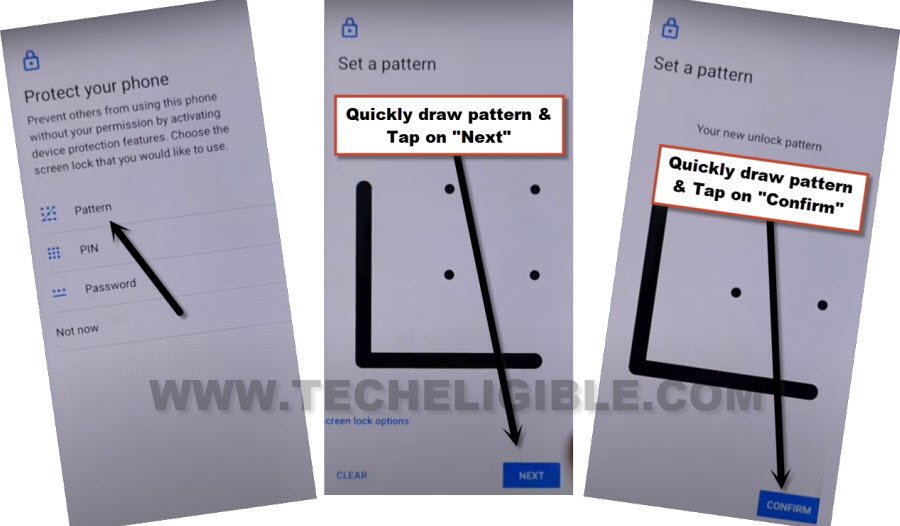
-Hit on “Pattern” option. After that, tap to “Yes”.
-You can setup your new pattern lock from this screen to Reset Google FRP Account Ulefone Note 7.
-Let’s choose any desire pattern and tap to “Next”.
-Draw again same pattern and tap to “Confirm” option.
-You will be shown another popup screen of (No certificate found). Just, tap anywhere on the screen to close this popup window.
-Its all done now. You have setup new pattern lock protection on your ulefone phone.
-Let’s get back on first (Hi there) screen. From there, tap on “Start” option.
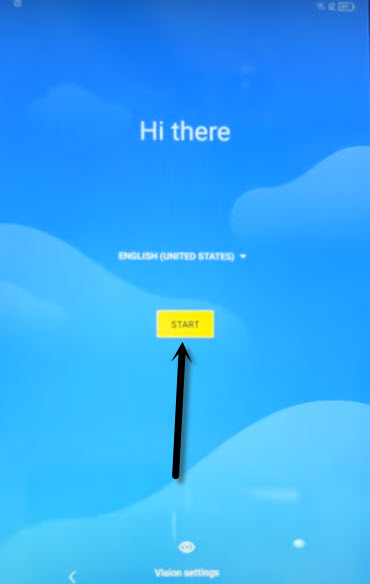
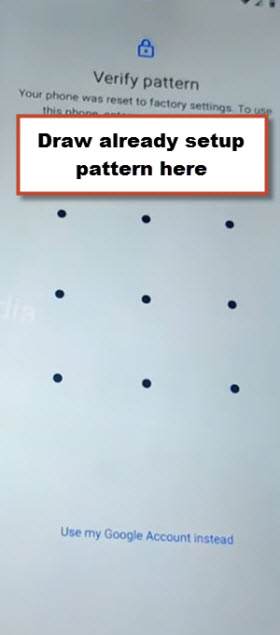
-Complete setup wizard steps on your own. If you see a (Verify pattern) lock page. Simply, draw your recently setup pattern lock to bypass this page.
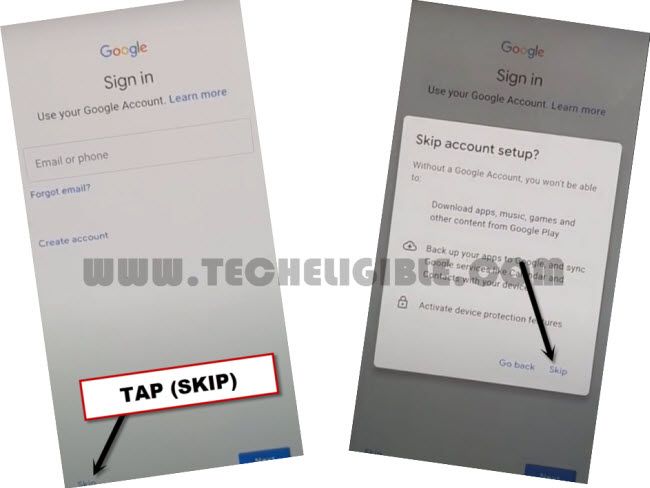
-You may also have a (Google Sing in) page. you can skip this screen without signing in with google account. Just tap to > Skip > Skip.
Method 2: Bypass Google Account Ulefone Note 7 [By PIN Setup]
Are you tired of remembering and searching a way to get through google sign in page without signing with already synced Gmail account? We will assist you to get back your phone just by Reset Google FRP Account Ulefone Note 7 without using any paid tool. We will simple use an emergency option to access latest PIN lock setup page. Follow steps from below.
-First of all, insert any working SIM card in your Ulefone device.
-Turn on phone and connect WiFi first.
-Go back to (Hi there) page, from there, go to > Emergency Call > Emergency Information.
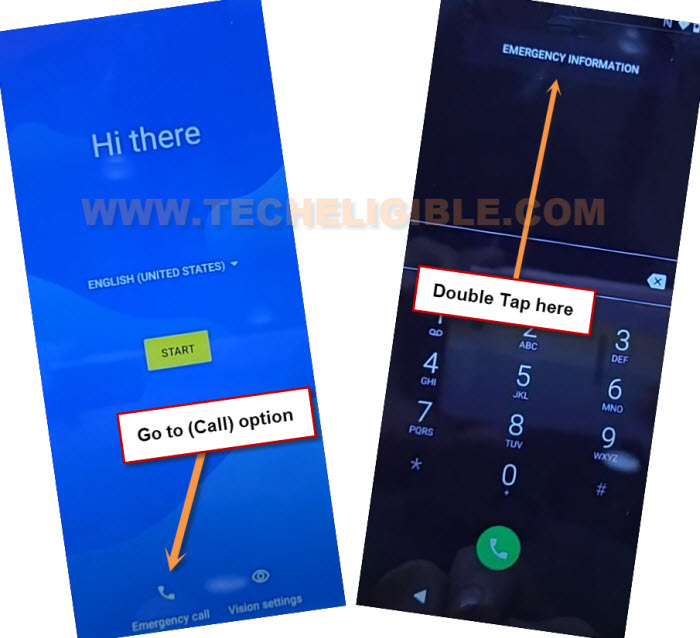
-Tap to “Edit” icon from top corner, afterwards, go to “Add contact” option.
-Tap at any 1 contact name from your sim contact list page.
-Tap again on same “Contact Name” from next screen.
-Just hit on “Share” option from contact detail page to Reset Google FRP Account Ulefone Note 7.
-After that, tap to “Gmail” icon from sharing options.

-You will be displayed Gmail app there, just hit on “Skip” option.
-After that, tap to “Add an email address”, and go to “Other”.
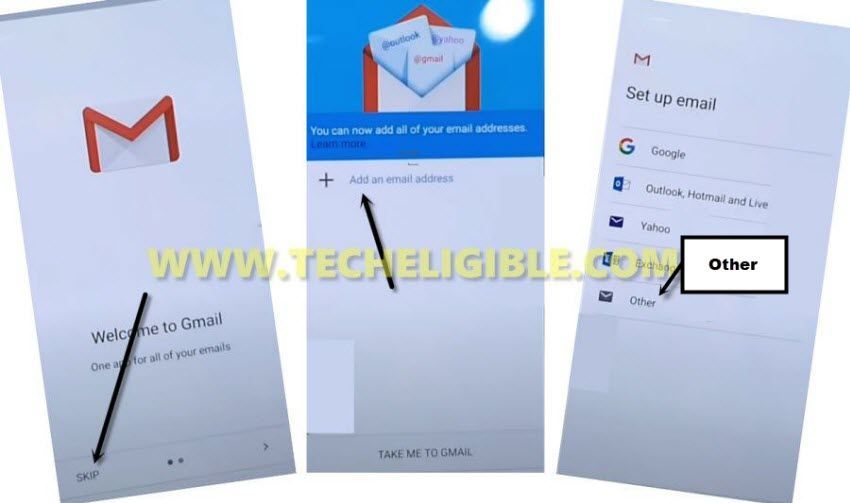
-Give any random or wrong email address in email field tab. Once the (Manual Setup) is highlighted, just tap on that.
-Tap to > Exchange > Select > Ok.
Create New Security Lock:
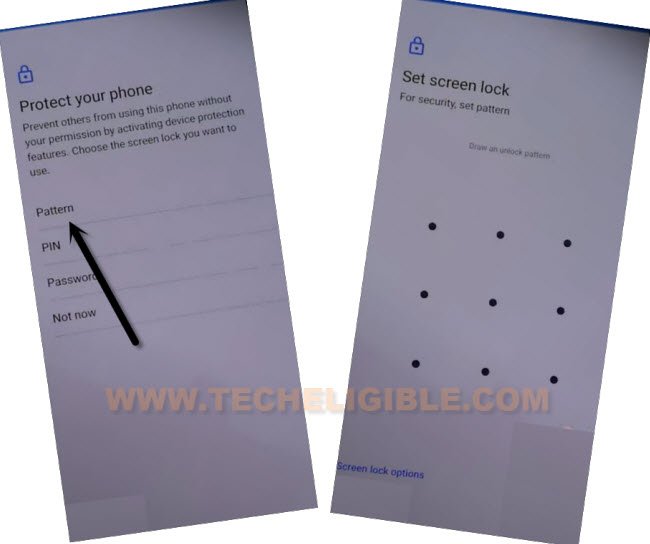
-You will be taken to a (Protect your phone) screen, from this page, we can easily setup any pattern or pin lock code on our device to successfully bypass frp.
-Let’s tap over “Pattern” option. Draw any your desire pattern lock, after that, tap to “Next”.
-Draw same pattern lock again and tap to “Confirm” option.
-After the pattern lock is setup successfully, you will get back to Gmail page. From there, tap to “‘Cancel” from popup window.
-By hitting back arrow several times, just get back to first (Hi there) page. From there, tap over > Start > Don’t Copy.
-You will be asked to draw pattern lock first, just draw already setup pattern lock complete your device verification process.
-You will see (Google Sign in) screen, just skip this page by hitting on > Skip > Skip.
-After that, tap to > More > More > Accept from next google services screen.
-You will be inside your device main home-screen within few seconds. Its all done from Reset Google FRP Account Ulefone Note 7. Don’t forget to login also with your other active and remembered Gmail account.