No additional procedures are necessary to activate the frp lock feature other than signing in with your Google account. If you perform a hard reset on your device, it is essential to recall your Google account and log in using the same account that was configured prior to the hard reset. Failing to do so will result in losing access to your device if the account information is forgotten. If you are experiencing a similar issue with your device and encountering frp lock protection, proceed with the following steps to Bypass FRP Infinix Note 50s 5G.
Disclaimer: Do not attempt this frp method on a device that has been stolen, as it is a severe offense. Engaging in frp bypass procedures on stolen phones may result in imprisonment. This process is intended solely for the device’s rightful owner and for educational purposes.
Bypass FRP Infinix Note 50s 5G:
-Turn on phone and connect to WiFi. Afterwards, go to (Verify your account) screen.
-Long hold the screen with two fingers together. Keep holding until you see (Quick Access to Smart Touch) page. From there, hit on “Privacy Policy” link.

-Let’s long hold any text and tap to “Arrow” symbol.
-Then, tap on “Translate”. After that, hit on “Agree”.
-Tap to “Related Translations Tools”. Then, hit on “Agree” option.

-After that, tap to > Camera icon > While using the app > Image icon.

-From popup window, long hold on “Photos”.
-Tap on “Open” link from bottom.

-You will see a (Get Started with google photos), just tap anywhere on the screen to close this popup. After that, you will see (No Photos) screen, let’s take a screen shot here by long pressing (Power + Volume Down) buttons together.
-After that, tap on > Screen Shot Image > 3 dots.

-Go to “Search” option (See below image).
-You will reach on the (Google Lens) screen, simply swipe up on that screen to go down, find and tap on any image that is being displayed from youtube source.

Launch Youtube
-Go to > Visit > Allow > Home.

-You’re on youtube webpage. Hit over the “Profile icon” from top of the corner and go to “Settings”.

-Tap > About > Youtube terms of services.
Go to FRP Tools Page and Open Dialer
-Search from top search bar with “Techeligible” text and go to our site relevant searched result.
-After the site is fully launched, just tap to “Menu” option and go to “Download FRP Tools”.
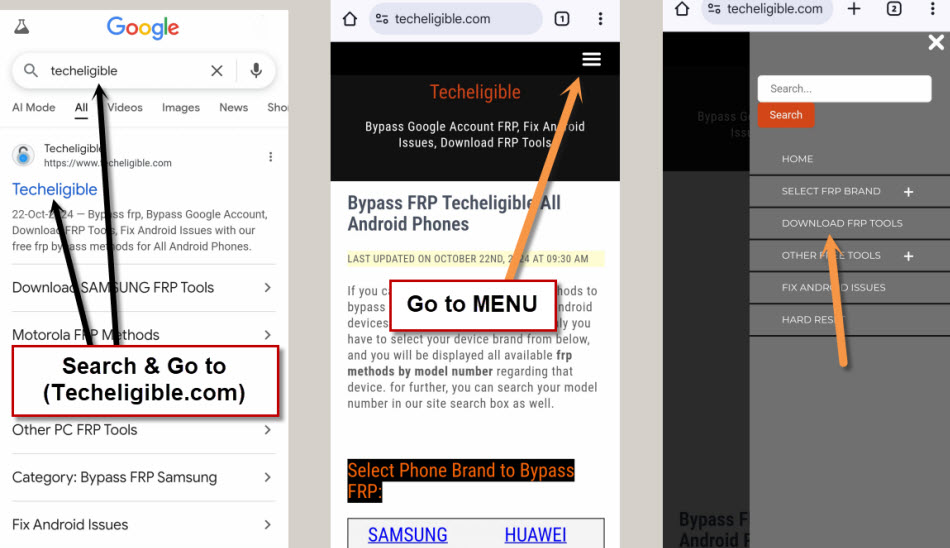
-Simply, tap to “Open Dialer Code” option to launch dialer of the phone directly.

Note: If you see popup window, just choose the “Call number” option.
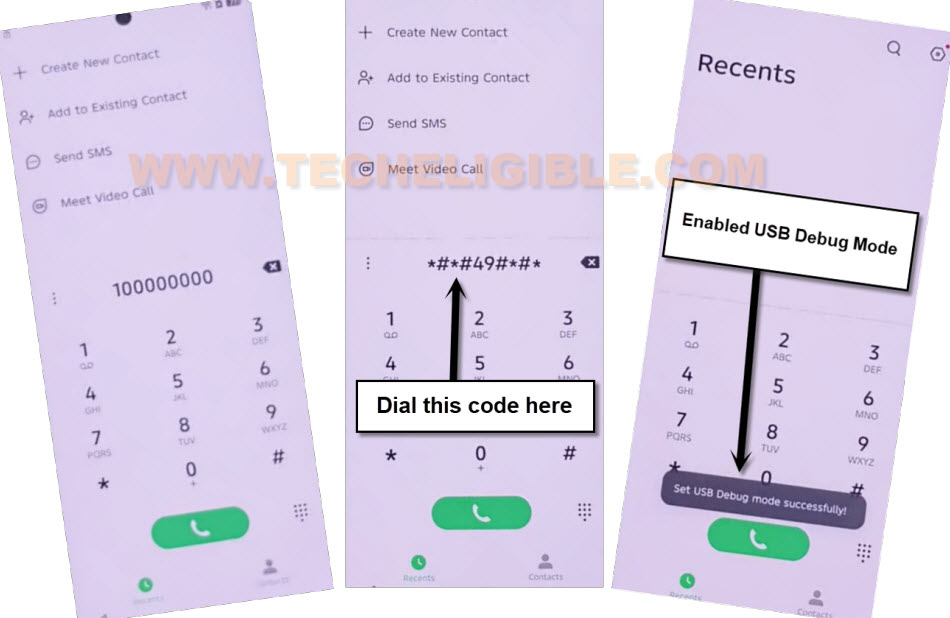
-Dial the code there *#*#49#*#*. After that, you will see a flash message of (Set USB Debug Mode Successfully!).
Use Samfirm PC Software
-Download any one version on your PC from below given link. If you face any trouble in downloading the (Samfirm V1.4.3), you can try with new version (Samfirm V3.1).
| ⇒ Samfirm Tool 1.4.3 | Samfirm V3.1 |
-Install and launch this tool on PC. After that, click on “Android Tools” option from the software interface.
-Connect infinix hot 50s phone with PC using proper USB Cable.
-Install also proper USB Drivers, so that, you may not face any difficulty in connecting the phone with PC.
-Finally, click to “Read Device info” option from the tool. After that, this will fetch all detail of your device phone including model number and android version.
Note: On Samfirm V3.1 tool, you will have a different options, all you have to do is, first go to (Read device info) option. After that, go to (Reset FRP) option.

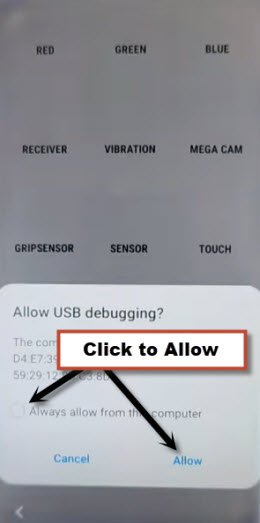
Note: You may face popup window of (Allow USB Debugging?), check mark the option “Always Allow from this computer”, then, hit on “Allow” option.
-After the device is detected by the tool, simply, tap to “Reset FRP” button to bypass frp infinix note 50s 5G.
-Once the frp bypassing process is completed. You can disconnect the phone and complete setup wizard steps easily.

The Bottom Line:
We accessed to youtube webpage through using the google search image option. After that, opened up the frp tools page and launched dial screen. Then, enabled the USB debugging option just dialing the code *#*#49#*#*. After that, we downloaded and installed the (Samfirm) software on our PC. Finally, connected the phone with PC and clicked on the (Reset FRP) button to complete frp bypass process.