We have total 3 methods here in thins single post on different android version to help you to Bypass Google Account Oppo A57 (Android 14 | 12 | 11) without using any PC. If you have latest android version 14 device, you can follow up our method (Method 1). You can follow up any method from below according to your device android version to setup new another google account and use your device again.
Note: We highly recommend you to apply this method only on your own device, if you are not owner of OPPO A57, or you found this from some where, you must return this device to its real owner.
| Method 1: FRP BYPASS OPPO A57 [Android 14] New |
| Method 2: FRP BYPASS OPPO A57 [Android 12] |
| Method 3: FRP BYPASS OPPO A57 [OLD] |
Method 1: Bypass Google Account OPPO A57 (Android 14)
-Turn on your FRP protected device and connect WiFi. After that, from same WiFi screen, tap on a “Exclamation icon” which is right next to your connected WiFi name.
-Tap to “Share” option from next screen.
-Afterwards, you have to go to “Quick Share” option.

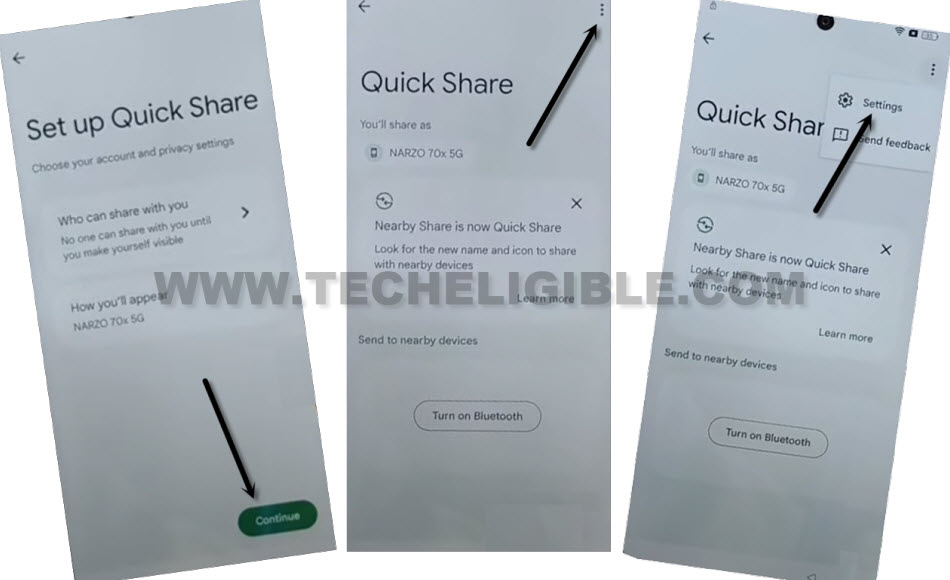
-You will be taken on a (Set up Quick Share) page. From there, we are gonna tap on > Continue > 3 dots > Settings.
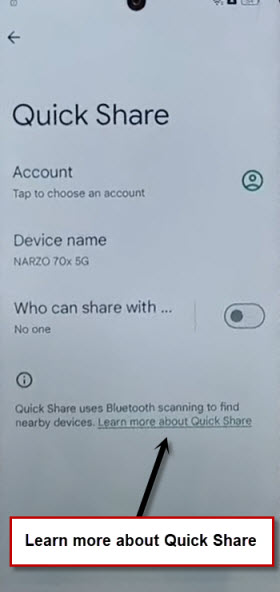
-There is a blue link named “Learn more about Quick Share”. Just tap on this link.
-After hitting on same link as we mentioned, you will be taken on a page of (Use Quick Share on your android device). From there, tap to “3 dots” icon from top corner and tap to “Send Feedback”.
-After that, new popup will come up from bottom, just tap to “Legal Help” link from there.

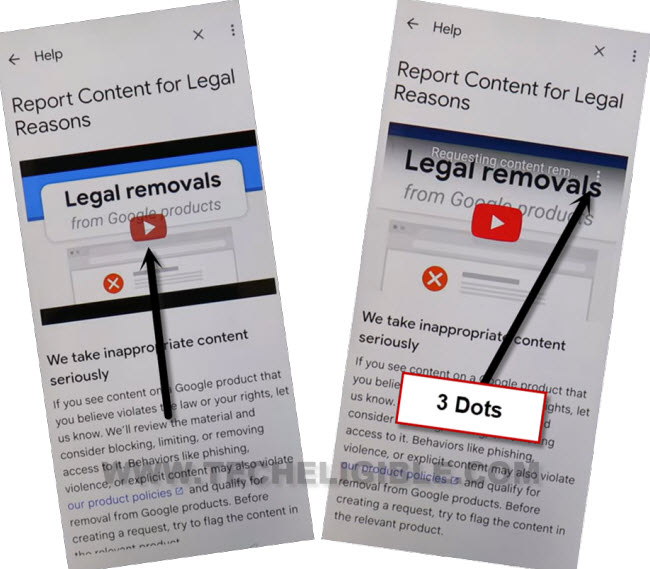
-Tap on “Play button” from youtube video to play this. After that, from same youtube video, just hit on “3 dots” icon.
-Hit on a “Share” option.
-After that, tap to “3 dots” icon those right next of (Twitter) icon. After that, you will be redirected on youtube official site.
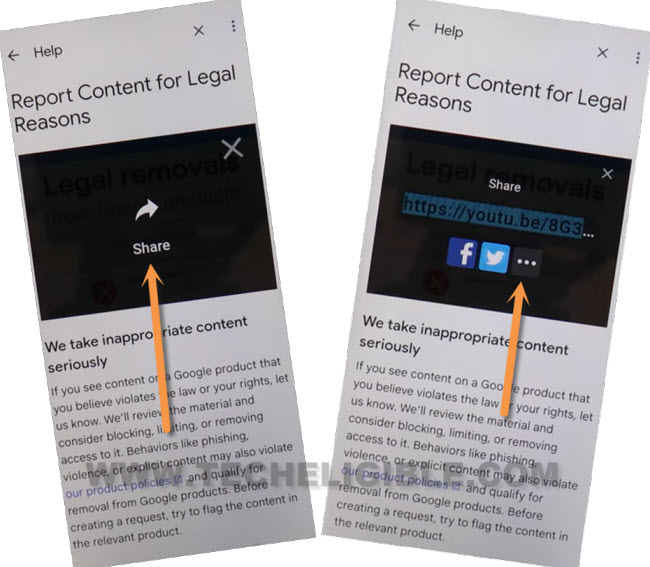
-From there, tap to “Allow” from popup window.
-From yotuube screen, hit on “3 dots” and go to “Settings”.
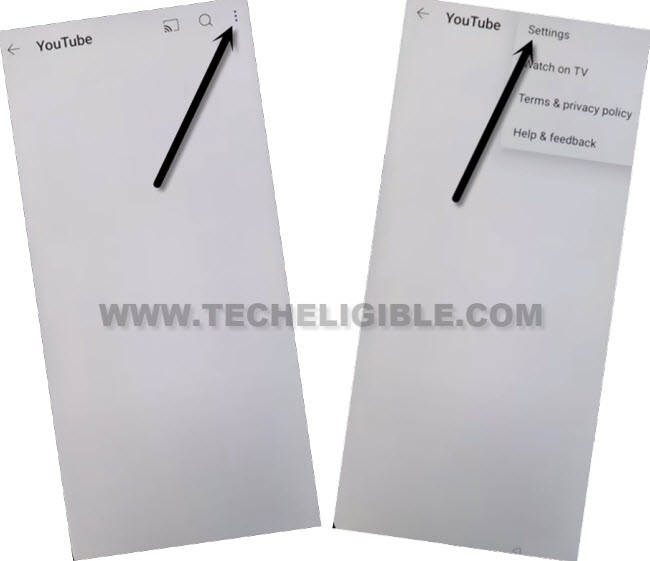
-Go to > History & Privacy > Youtube Terms of service.
-After that, you will be on a chrome browser page, just tap to “Use without an account” and hit on “No Thanks”.
-We are on a google chrome browser page. From there, we can easily search out our official frp tools page and access to main settings page of our device directly with single tap.
Go to Main Settings of OPPO A57:
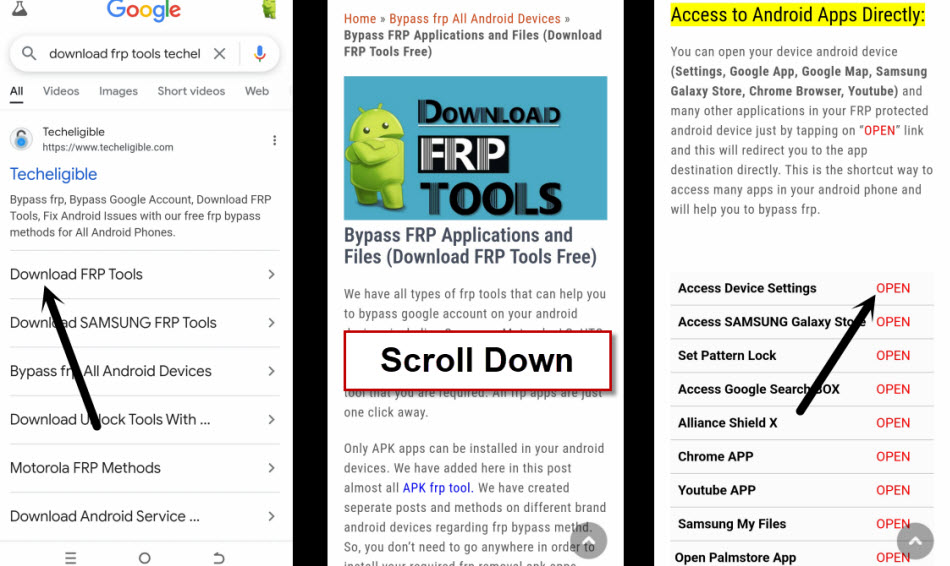
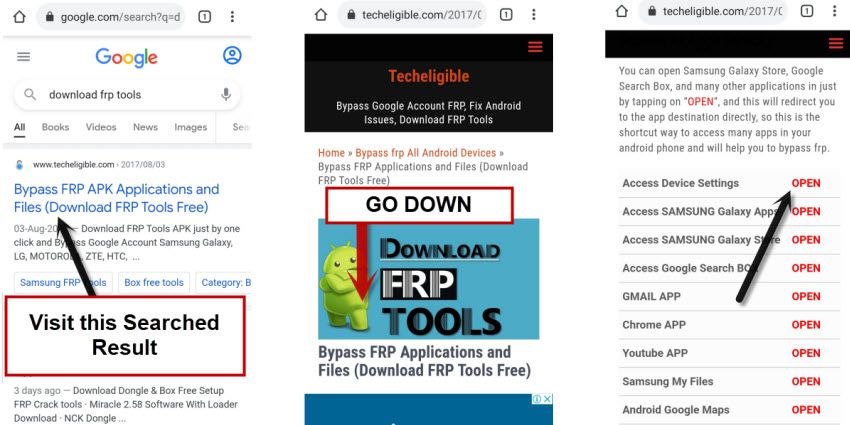
-After reaching to chrome browser, just search with “Techeligible“. Go to our site searched result (See below image).
-From top right corner, hit on “Menu” to bring sidebar menu of the site and then, tap to “Download FRP Tools” option from there.

-After accessing to techeligible frp tools page, just hit on “Access Device Settings” option.
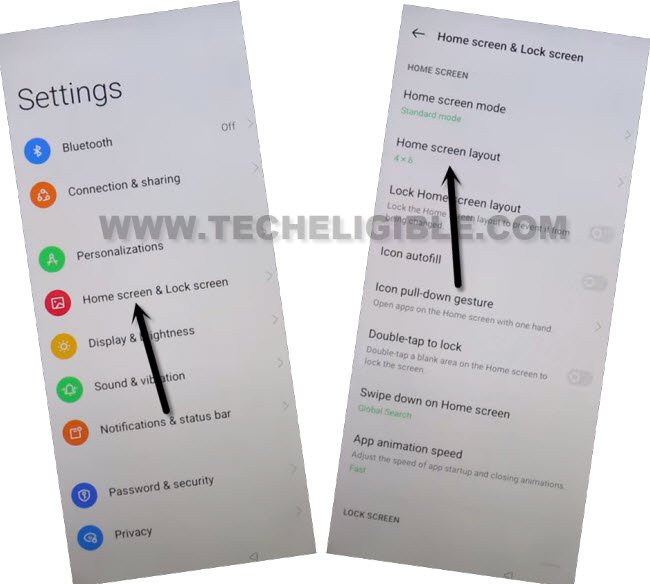
-Tap to > Home screen & Lock Screen > Home Screen Layout.
-Open up your device main menu and tap on a “Clone Phone” application from there.
-Choose this option “This is the new device”.
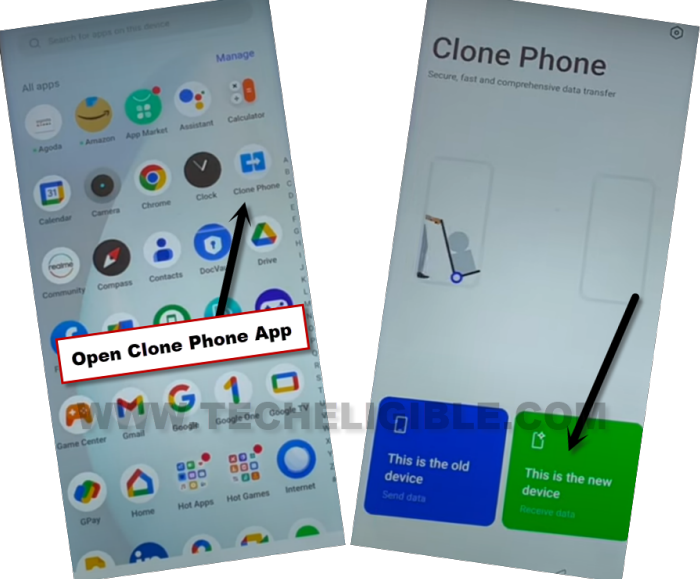
-Tap few times on “Allow”. After that, tap to “Other Android” option.
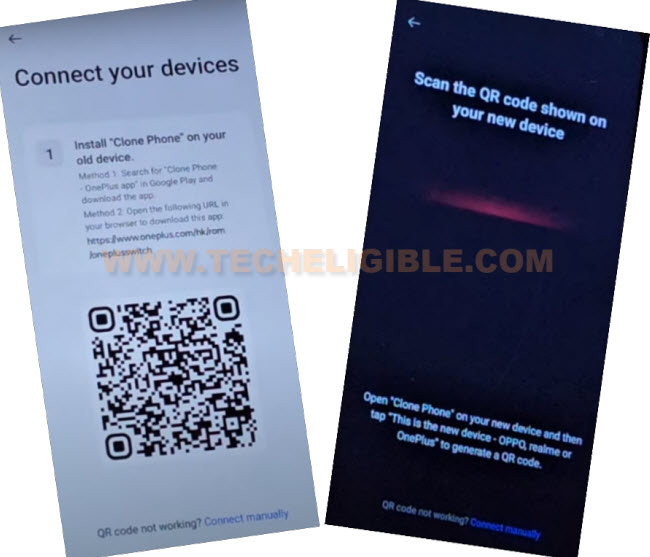
-You will be shown a (QR Code) page.
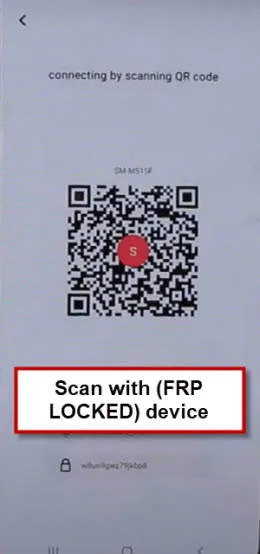
Apply Below Steps in Any Other Android Device:
-You are required one more any other android phone to connect with OPPO A57 to Bypass Google Account OPPO A57 Android 14.
-In your other android phone, open google play store application.
-Search & Install & Open (OPPO Clone Phone) application.
| Note: If you are unable to find (OPPO Clone Phone) app from google play store, open browser in other android phone, visit this page, Click here to download OPPO Clone Phone app from here. |
| Note: You can also use this (Oneplus Clone Phone) application as well. If you get this one on google play store, just install and open this app. |
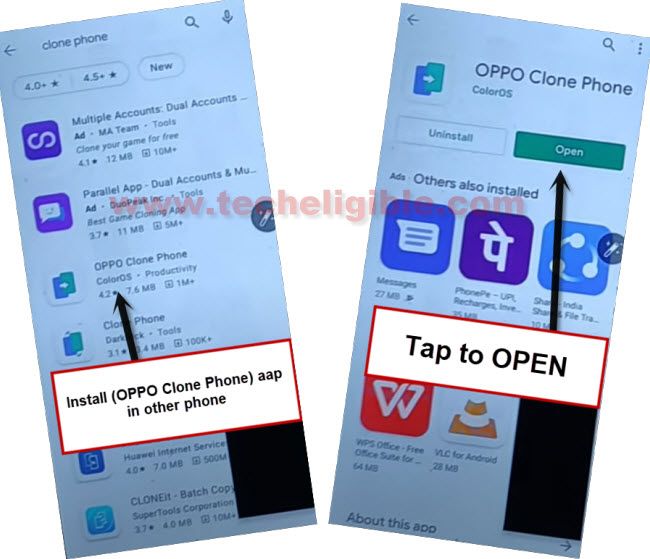
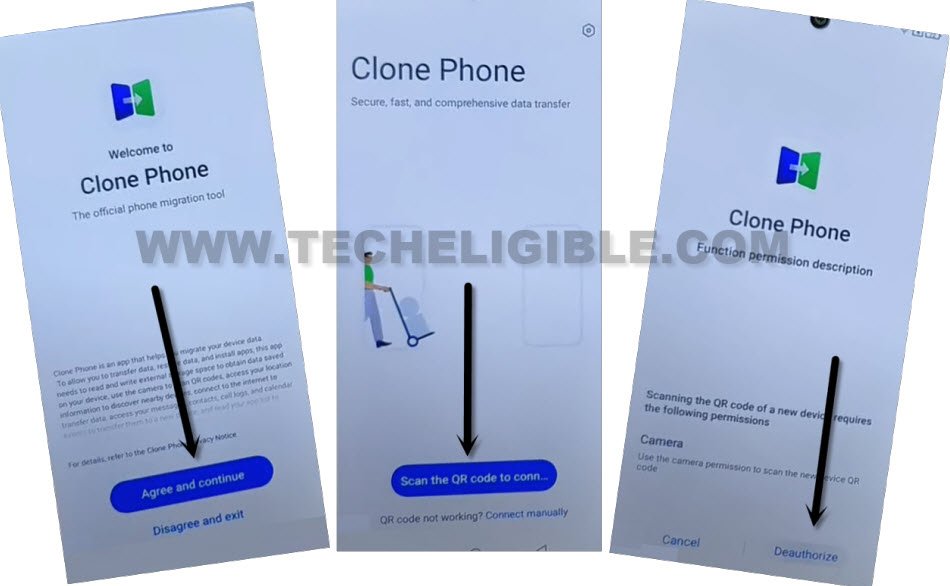
-Once the app installed and opened successfully. Let’s give some permission first before using this app.
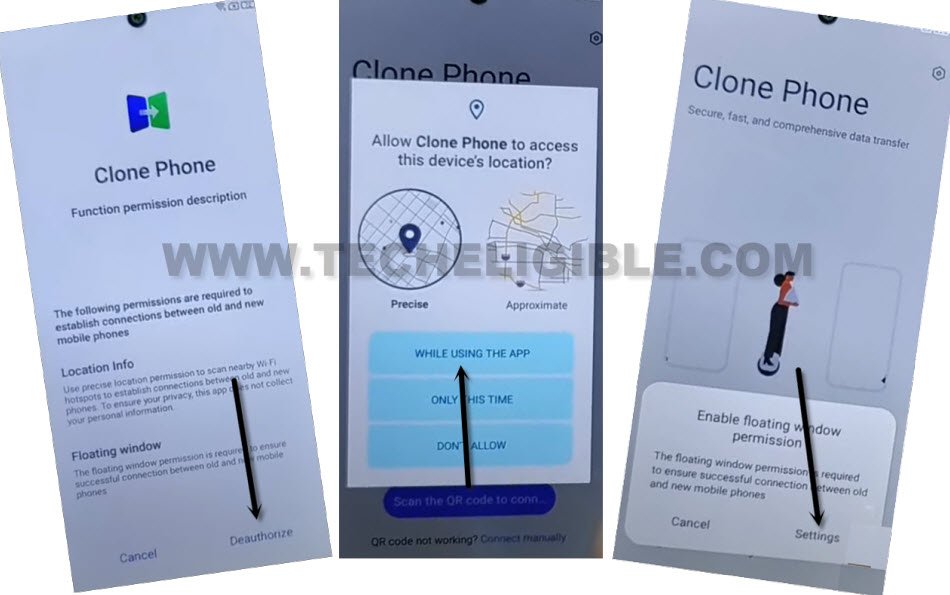
-Tap to > Agree & Continue > Scan the QR Code… > Ok > Deauthorize > While using the app.
-Finally, you will get a (QR Scanner) screen. We are going to scan with our (OPPO A57) to connect both devices together.
-You may have to give some permissions. In your cases, permissions to be allowed could be different. You just get help with below screen shot, how to give permissions to your app in order to use this app successfully.
-Just give permissions and go back to main clone phone screen.
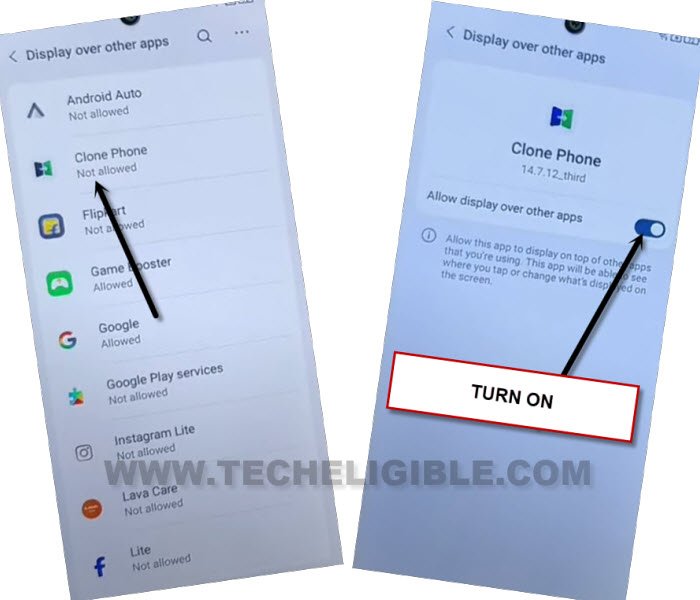
-You may also have to allow clone phone app from app list page.
-Keep dong this, give permissions and hit on “Back Arrow” icon until its done.
-You may need to allow access to manage all files to your clone phone same as shown in below image.
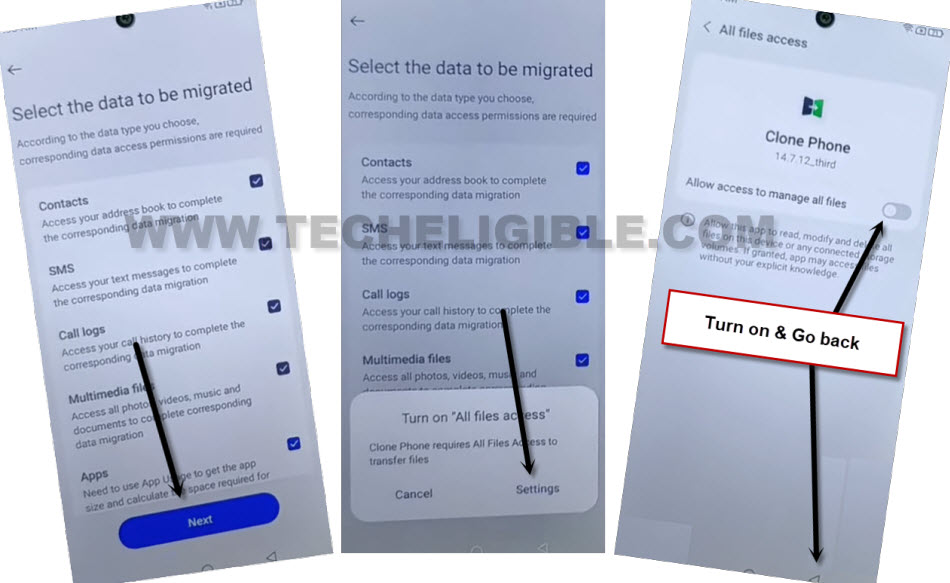
-After giving all permissions successfully, you will be displayed an (App list) page same as shown below.
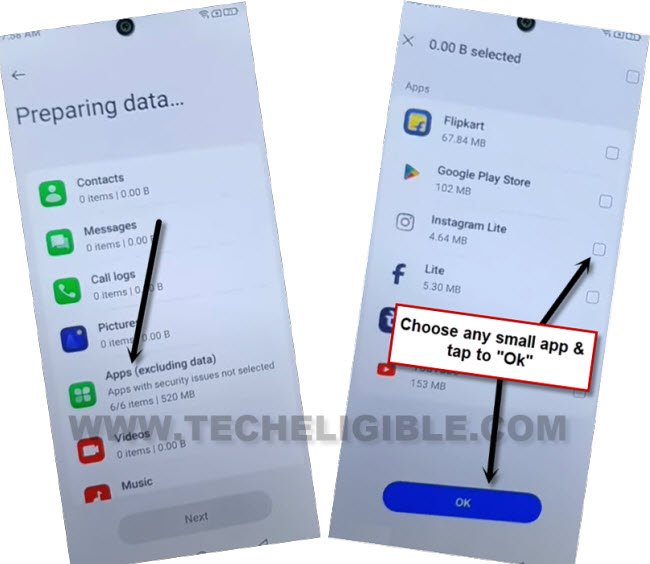
-From there, de-select all apps. Go to only “Apps (Excluding data)”.
-Choose any one small sized app from there and tap to > Ok > Next > Deauthorize > Allow.
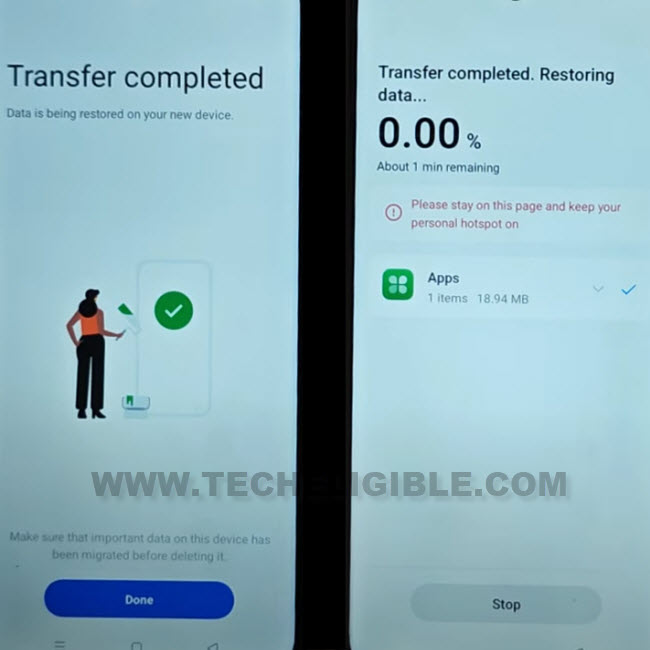
-Finally tap to “Start Migration” button from there to transfer your selected app to your OPPO A57 device.
-After the transferring process is completed. Just tap to > Resume > Done.
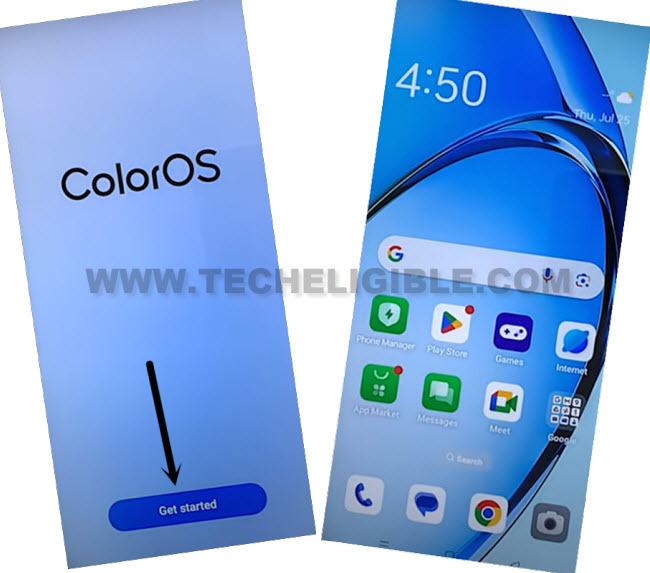
-Hit on a > Skip > Done > Get Started.
-Congrats, you’re now inside your device main home-screen. Its all done from Bypass Google Account OPPO A57 Android 14 without using any paid tool. Thanks for visiting us.
Method 2: Bypass Google Account OPPO A57 (Android 12)
-Start this process by connecting WiFi first.
-Go all the way back to first “Select to Language” home-screen.
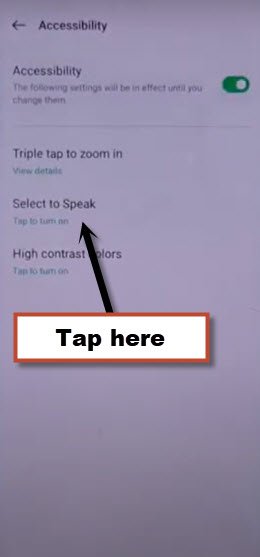
-From there, hit on “Human” icon from top right corner, and turn on “Accessibility”.
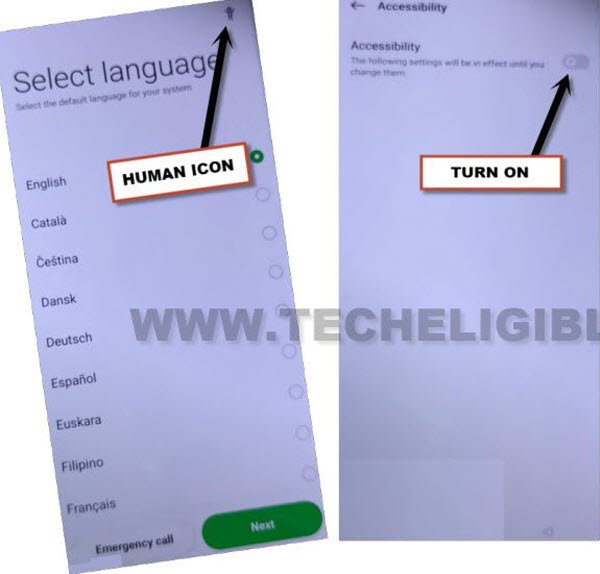
-Tap on “Select to Speak”, and this will turn on (Talkback feature) for you, and you will also be redirected inside talkback screen.
-Draw a reverse “L” shape by swipe right and then swipe up, now double tap on “Use Voice Command”.
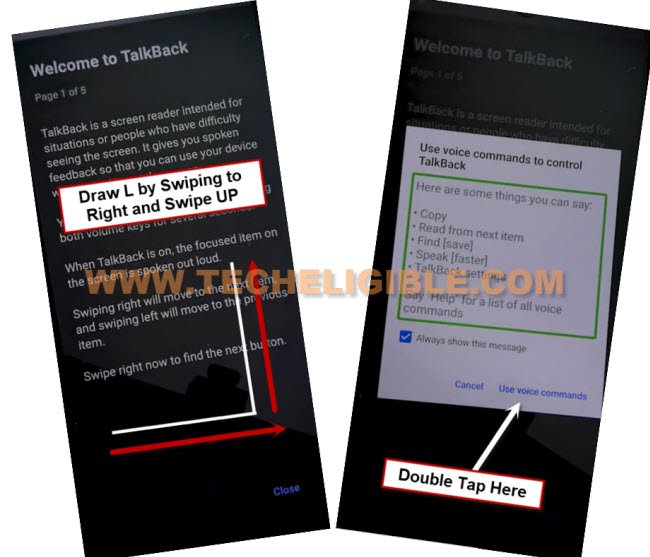
-There you will have a popup window, just double tap to “Allow”, and then double tap on “Use voice Command”.
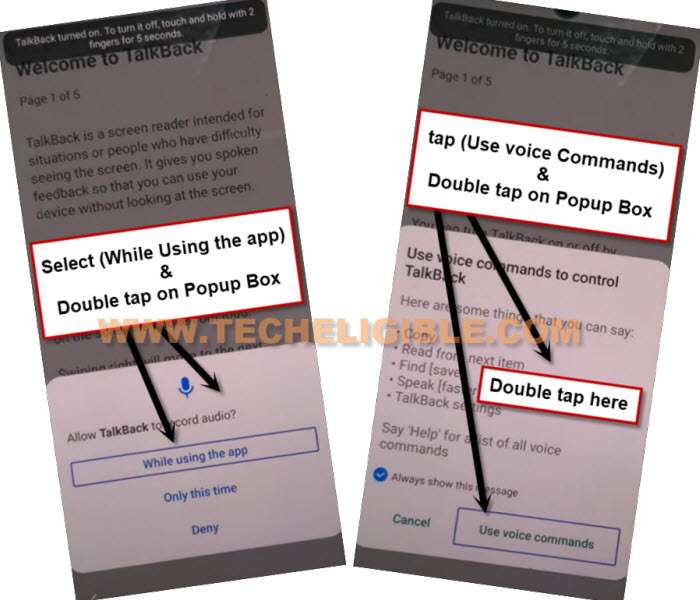
-Now you need to say loudly “Open Google Assistant” as soon as you see green border.
-Go to “Keyboard icon” same as shown in below image.
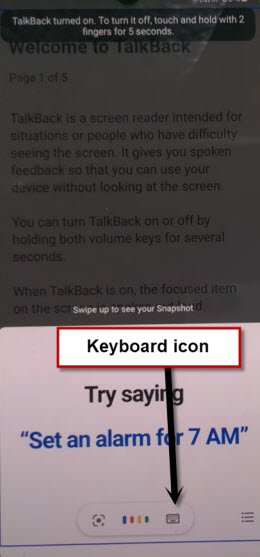
-Lets just turn off talkback by long press both (Volume UP/DOWN) keys.
-Type there “Youtube”, and hit on “Send icon” from bottom keyboard right corner, after that, the youtube website will automatically be launched.
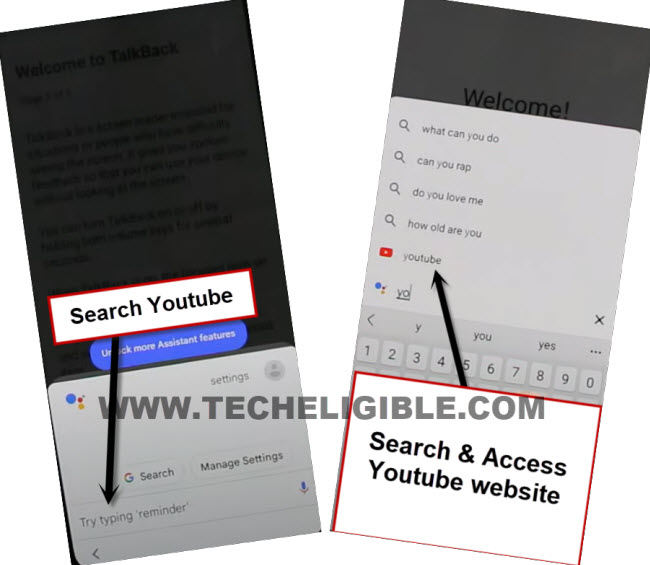
-Tap “Profile icon” from top corner, and go to “Settings”.

-Go to > About > Youtube Terms of services, once you see chrome window, go to > Accept & Continue > No Thanks.
Let’s Reset Device FRP Completely:
-We will reach inside device settings to perform a factory reset task, that will help you to easily bypass frp account.
-Search in top search bar “Download FRP Tools“, and visit our website searched result, from there tap to “Access device settings” option.
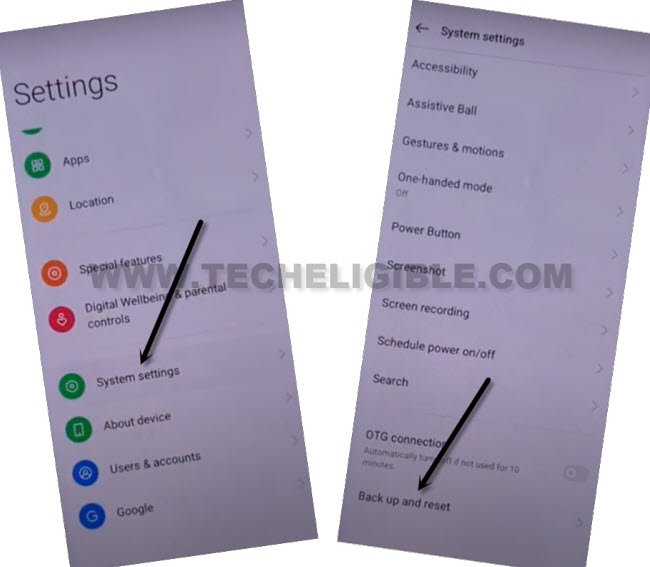
-Hit on > System Settings > Backup & Reset.
-Now hit on “Reset Phone”, and tap 3 times on “Reset all settings”.
-Wait until the restoring… process is done.
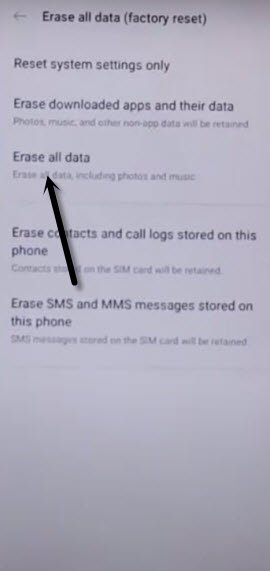
-Afterwards, go to “Erase all data”.
-Now tap 2 times on “erase data” from popup window, the device will be restart automatically.
-Once the restarting process is done, you are all done from bypass google account, now you just have to finish setup wizard to reach the device homescreen and setup new google account.
Method 3: Bypass Google Account OPPO A57 (Without PC)
-Switch on Oppo A57.
-Connect “Wi-Fi” to your device first.
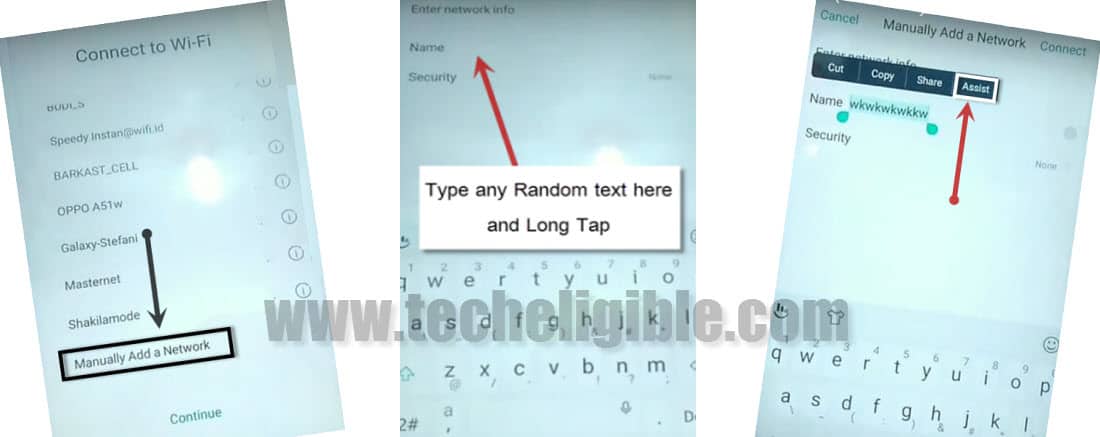
-From same “Wi-Fi” screen, go down, and tap on “Manually Add a Network”.
-Type there any random text e,g “Techeligible”.
-Long tap on your typed text, so that (Cut, Copy, Share, Assist) options appear there.
-Tap on “ASSIST” option, and wait few second, this would popup “GOOGLE”.
-Now tap on “NO THANKS.
Manually Reset the Device from Settings:
-We need to “Soft Reset” device.
-Tap on “Settings icon” to go to settings.
-Tap on “Additional Settings”.
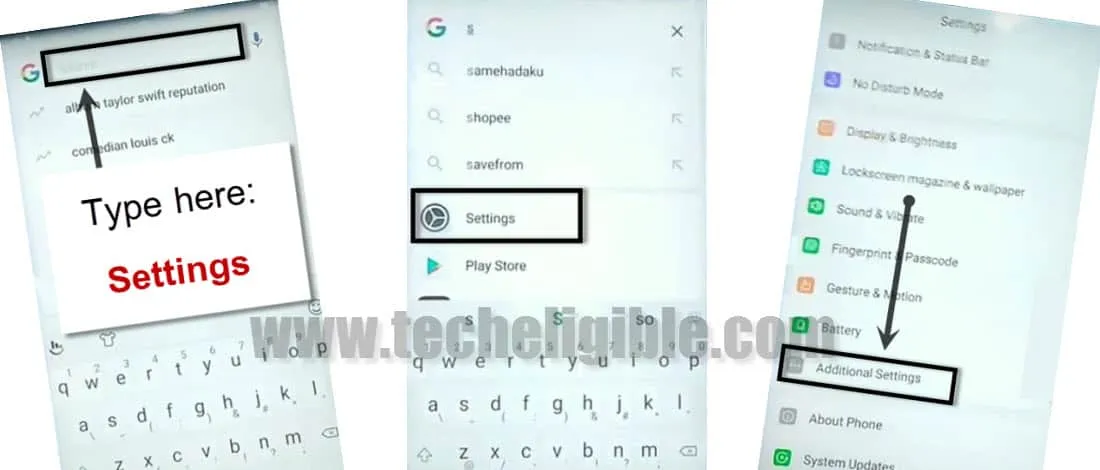
-After that, tap on “Backup & Reset”.
-Select > Backup & Reset > Factory Data Reset.
-Now tap on “Erase All Content and Settings”, after that tap on “Delete Data” to Bypass Google Account OPPO A57.
-After soft reset finish, complete initial setup.
Note: Do not connect “Wi-Fi” while completing initial setup to avoid having frp lock again.
-Once you access your device “Home Screen”, add new Gmail account by going to your device settings.
Note: If you are unable to remove frp, you can try this method (Click here).
Read More:
Bypass Google FRP OPPO A74 (Android 11)
Bypass Google FRP All OPP Android 11