
Do you know, FRP security lock feature is activated already on all Samsung Android 9,8,7 versions phones. As soon as, you login with Gmail account on your device, the FRP will be activated automatically with your logged in account.
This feature will protect you device right after someone try to access the device by doing a factory reset. They will be required to login back with previously setup google account to complete the verification step. Otherwise, they won’t be able to complete the startup steps.
If you have forgotten your Gmail account after hard reset or factory reset your phone, then, you can follow up steps here to delete frp all Samsung Android 9, Android 8, Android 7 devices without using any paid services or paid tool.
Note: Visit this, if you are looking for Samsung 2025 FRP Solution on Android 14/13/12/11/10.
Method 1: FRP Bypass All Samsung Android 9 By in-Active SIM Card
In this method, we are going to use any in-active sim card, we just have to setup 4 digits pin lock code in our sim card with other phone, and after that we will enter wrong sim pin lock and also will enter wrong PUK Code 10 times, by doing this we will be able to bypass frp, rest steps can be followed from below to Bypass FRP.
Continue Steps:
-First of all, connect WiFi on Samsung Android 9 phone. After that, turn off your device.
-Insert any pin locked in-active SIM Card.
Note: You can setup PIN LOCK in your sim using any other android phone.
-After inserting the pin locked sim card, just turn on device.
-You will see popup message of “Enter SIM Card Pin”.
-Enter 3 times wrong PIN Lock.
-After entering wrong pin lock 3 times, you will be asked to enter PUK Code.
-Now again enter 10 times wrong 8 Digits PUK Code.
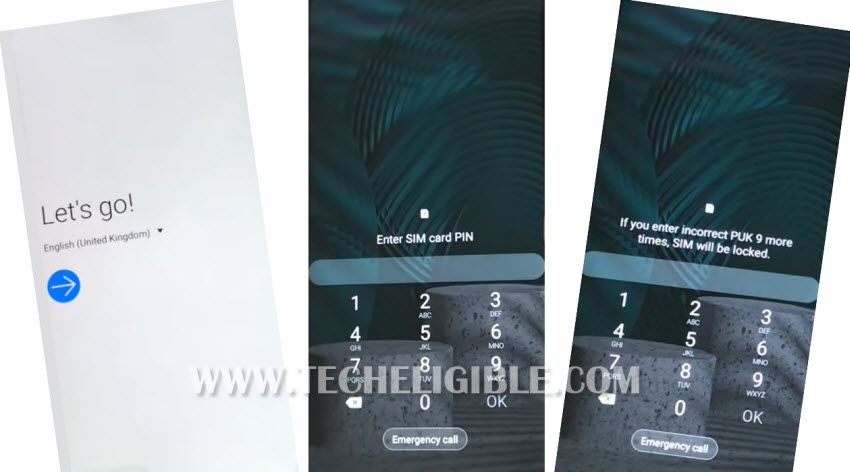
-After entering 10 times wrong PUK Code, you will see (Sim card is puck locked).
-Now you will be asked again to enter new sim card pin.
-Just enter any new sim card pin twice times, and boom you will see “Lock icon” on your screen.
-Tap on > Lock icon > Search icon > Chrome Browser icon.
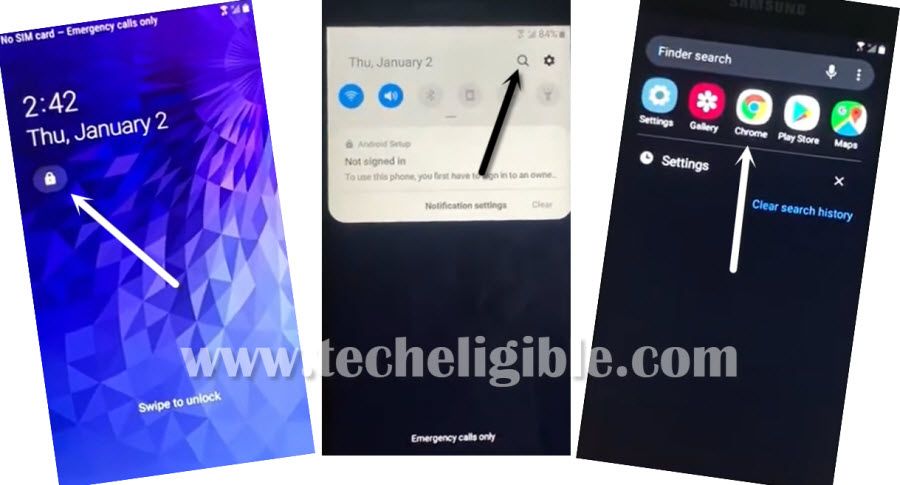
-After that, tap on > Accept & Continue > Next > No Thanks.
Hey! If this method did not work, try this method.
Download FRP Apps:
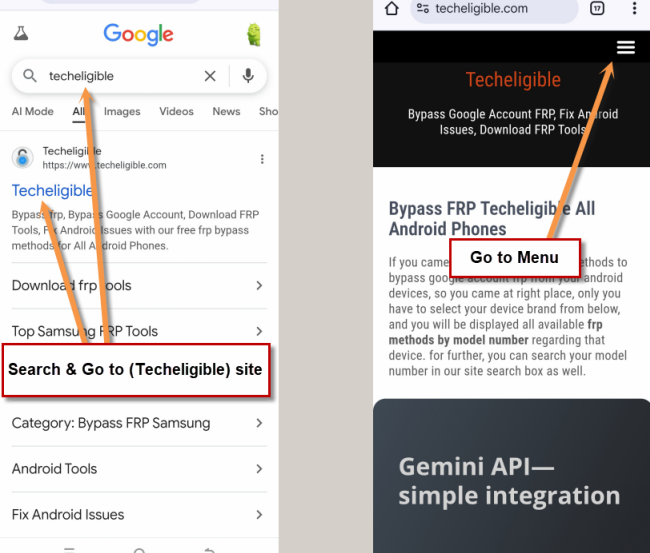
-Search in chrome browser “Techeligible“. Visit same searched result as mentioned in below screen shot.
-Tap to “Menu” option from upright corner of the site.
-Simply, go to “Other Free Tools” option from there. After that, tap to “Samsung FRP Tools”.
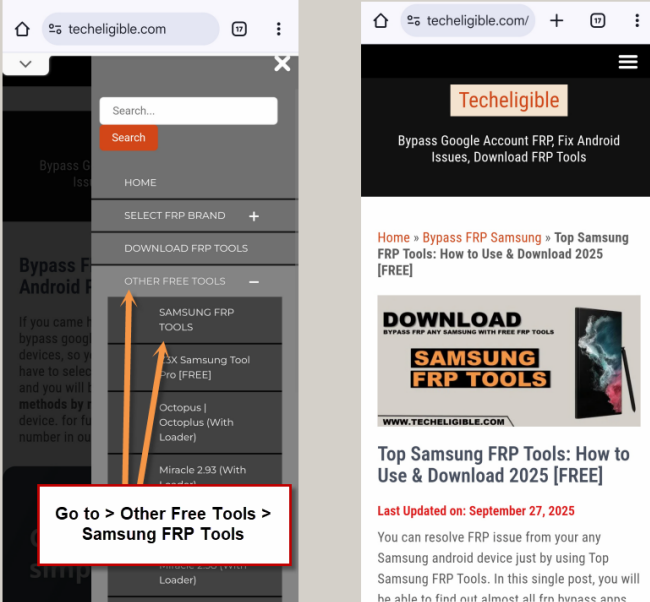
-We are going to Download from there below 2 applications.
1- Quick Shortcut Maker 6.0.
2- Account Login.
-Alright, wait until downloading process complete.
-After that, just tap on “3 dots” from top right corner & tap on “Downloads”.
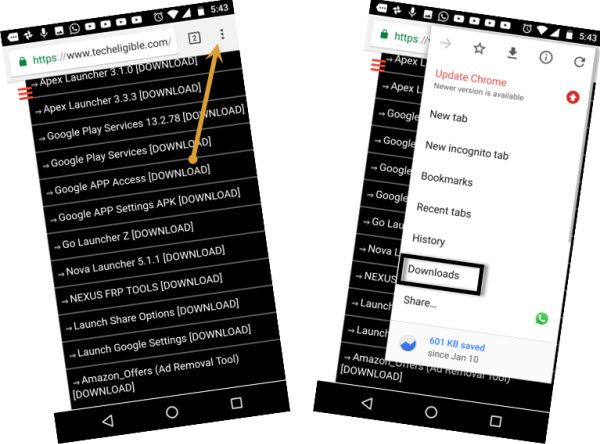
-There you will be able to see both downloaded applications.
-Tap on “Google Account Manager 6.0”, after that tap on “Settings” from the popup window and then enable option of “Allow from this sources”.
-Now just tap on “Install”, and then tap on “Done”.
-Perfect, you have successfully installed google account manager.
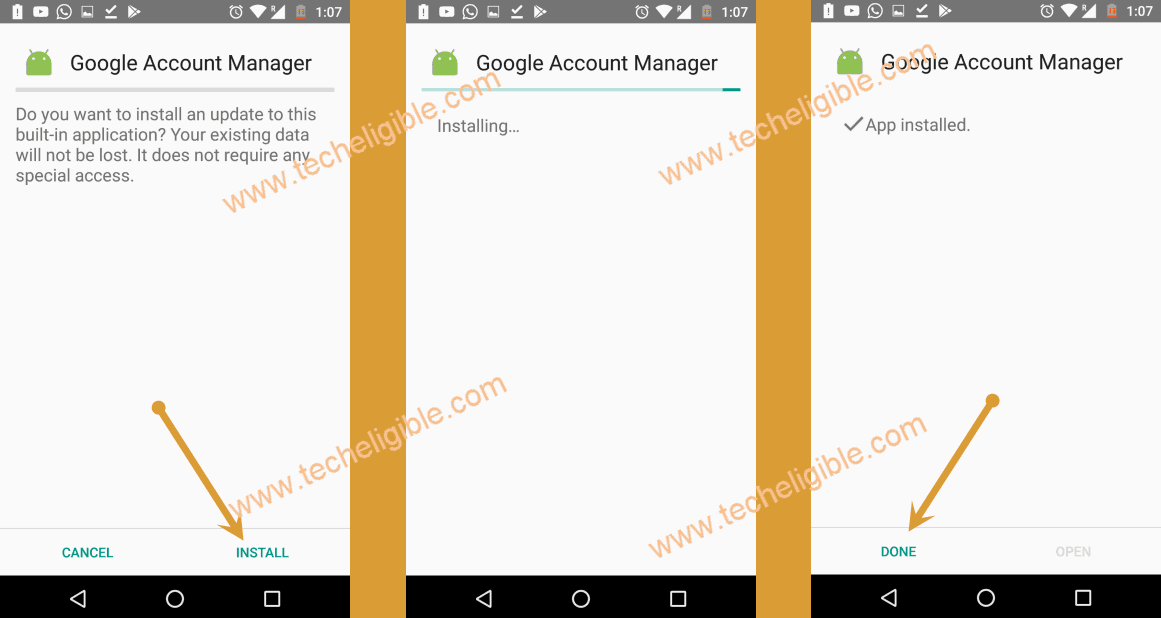
-We have to install only account login app to delete frp account on Samsung Android 9.
-Now, Tap on “Account Login > Install > Open”.
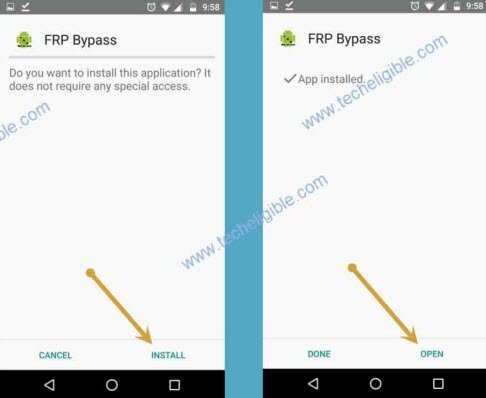
-You will see “Retype Password” screen.
-Long tap on “Back Arrow” button from your device and after that, you will see “Browser Sign-in” option bottom of your screen.
-Tap on “Browser Sign-in”.
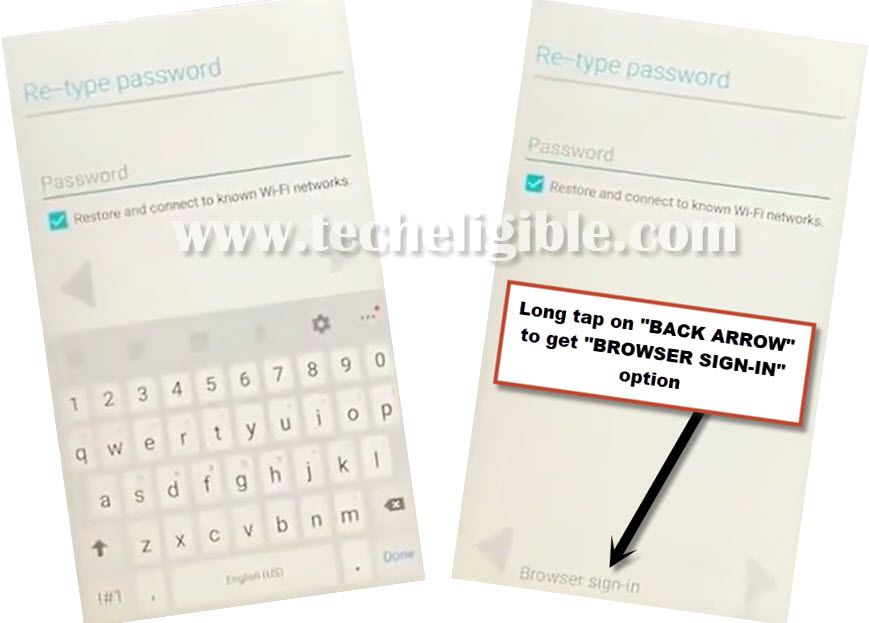
-Enter any valid gmail account to sign in successfully. Restart your device. From starting screen, just enter correct PUK Code.
-After that, enter 1234 pin code twice time & complete setup wizard to access your phone normally.
Method 2: Remove FRP on Samsung Android 9 (With PC)
-Turn on Samsung Galaxy Android 9 phone. After that, tap to “Start” option.
-Long tap on screen with your 2 fingers until you see popup message of “Voice Assistant turned on…”.
-Double tap on “EMERGENCY CALL”.
-Type “911” and then double tap on “Call” button to make call on 911.
-After that you will see “Emergency Number” screen, just quickly double tap on “Add Call” option.
Note: If you are unable to tap on “Add Call” option, then try another method to access add call option.
I just wanted to let you know, there is another way to access your phone call Dialpad screen. From the welcome screen, turn on talk back. (make sure your WiFi is connected) draw an L on the screen and select “talk back settings”. Once there, hold the vol up and vol down at the same time quickly to turn talk back off. Scroll down to “help and feedback”. Select the first option on the list for “voice”. Double tap on the small video screen in the upper right corner until it pulls up Youtube. Once in Youtube, there should be a menu bar in the top right corner or options at the bottom for a menu. You are looking for “privacy policies”. Click on it and it will take you to the Internet. Click on the address bar and select a search engine… Google, Yahoo, Bing… and type in a company name. I use the pizza place up the road. It should give you options for “call” “directions” and so on. Click on “call” and it will take you to your phone’s dial pad. Helped by our user “Katline”. |
2nd Method to Access “Add Call” option:
-Open “Chrome Browser” or any other browser in your computer or laptop.
-Search there “Techeligible“. After that, go to “Download FRP Tools” option same as shown in below image.

-Download from there “Calling FRP Tools“.
-Once downloading, just double click on Calling FRP Tools Software and launch that.
-Connect Samsung Galaxy device to the computer or laptop using good micro USB cable.
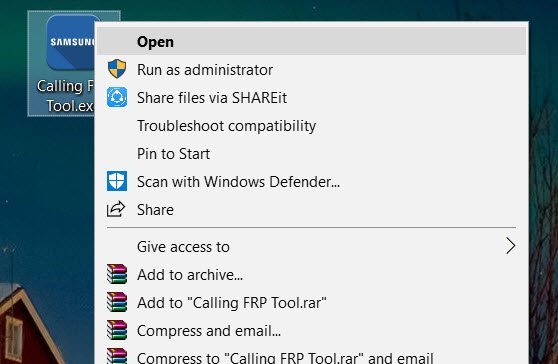
-Make sure your Samsung Galaxy device has voice assistant turned on.
-After turning on voice assistant successfully, lets get back to the computer, and click on “Scan” button from the software.
-Now you have to know what is your Samsung Galaxy device COM Port.
Get Your Device COM PORT:
-To successfully Bypass FRP Samsung Android 9, we need to verify that our device has been detected by computer or not.
-To know the COM PORT Number, you have to right click on “MY COMPUTER”, and then select “Manage”.
-Now click on “Device Manager”, and there you will be able to your device “Samsung Mobile USB Modem”.
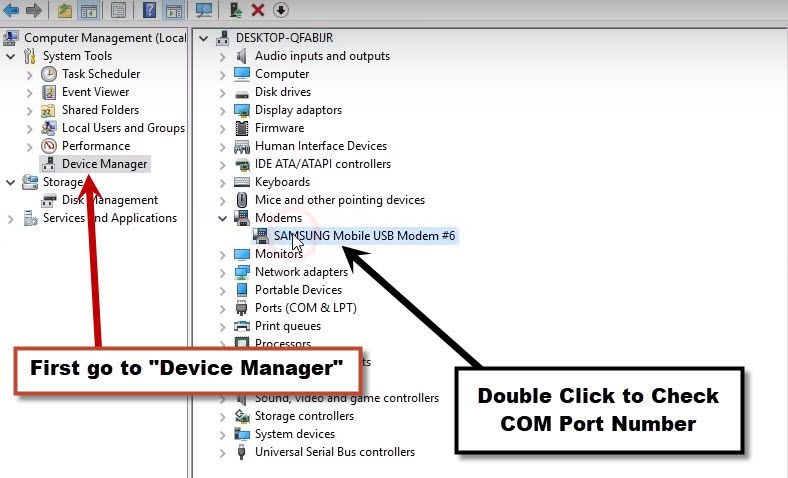
-Double click on “Samsung Mobile USB Modem”, and then click on “MODEM”.
-There you will be able to see your device “COM PORT No”, in my case, you can my COM Port no is “COMM11“.
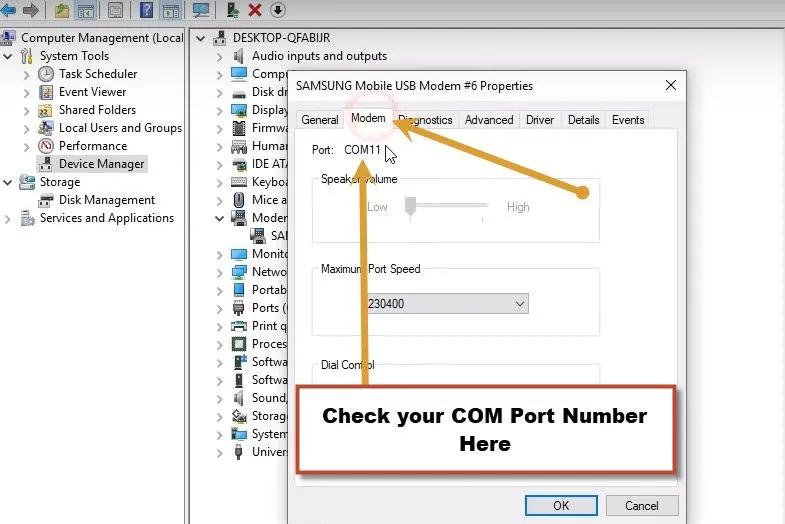
-So i am gonna select “COMM11” in the Calling FRP Tools Software.
-In “PORT Field”, set your device “COMM Port No”.
-In “Speed Failed”, set “9600”, and then click on “OPEN” button,
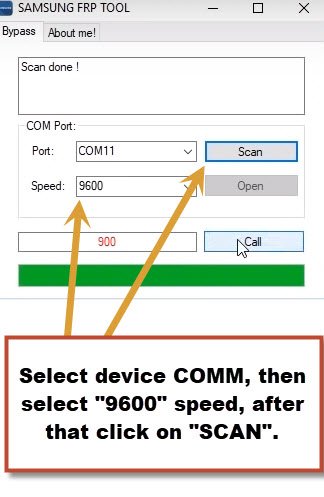
-Now Click on “CALL” button to make call in your Samsung Galaxy device.
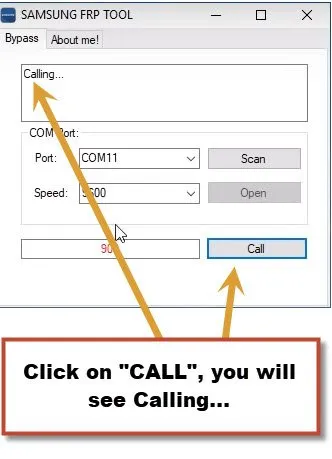
-You will see “900” is being called from your device, just double tap on “ADD CALL” option.
-After tapping on “ADD CALL” option, you will have Dial Pad screen.
-Disconnect device from computer or laptop.
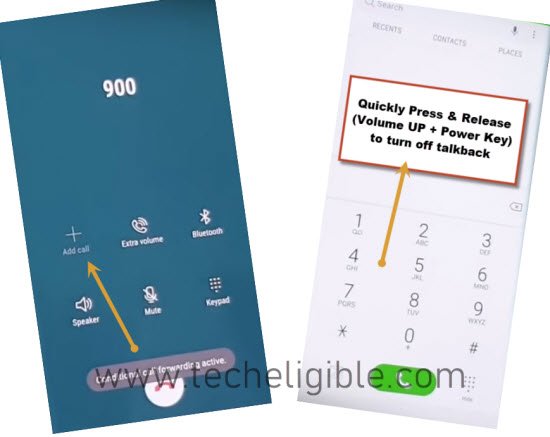
-Now we have to turn off “Voice Assistant” by quickly press & release “Volume UP + Power Key“.
Hey! If this method did not work, try 2nd method.
Note: Make sure you are quickly pressing and releasing both keys (Volume UP + Power Key), means in a second you have to release keys after pressing, don’t press keys for long time, otherwise you wont be able to turn off voice assistant.
-After successfully turned off voice assistant, you will see top bar popup message will disappear, that means you have successfully turned off the voice assistant feature.
Create New Contact & Access Chrome Browser:
-Tap on “Contacts”.
-After that, tap on “Create Contact”, and then from the popup message, just tap on “PHONE” and then tap on “SELECT” option.
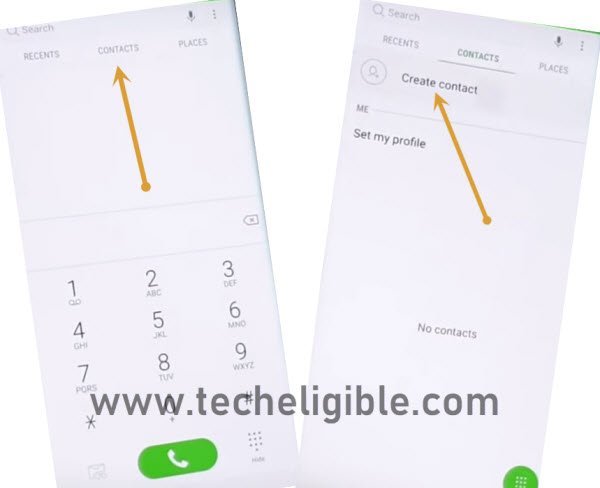
-In the “NAME FIELD”, type “Techeligible”.
-In the “Phone Field”, type any random numbers, like “99999999”.
-Now tap on “SAVE” from top right corner.

-After that, you will be able to see your saved mobile number, right after mobile number, you will see a “Message icon”, just tap on that. (See Below image).
-Type in message box “youtube.com“, and then tap on “SEND” button to send message.
-After sending message, you will see that your typed url will turn to hyper link, so just tap on that hyper link “youtube.com” to access youtube official website to easily Bypass FRP Samsung Android 9.
-You will see youtube update screen, just tap on “Not Now”.
-Tap on “3 dots or Profile icon” from top right corner of youtube
-Tap on > Settings > About > Google Privacy Policy > Cancel.
-Perfect, now we have reached to chrome browser successfully in our frp locked Samsung device.
Download & Install Apex Launcher:
-Type in search bar “Techeligible“.
-Visit first search result same as you visited before.
-Simply, go to “Other Free Tools” option from there. After that, tap to “Samsung FRP Tools”.
-Go down & download from there “Apex Launcher 3.3.3” app.
-Wait until downloading finish.
-Tap on “Bookmarks” from bottom bar of Samsung Browser.
Note: if you get sign in popup, just tap on “Cancel”.
-Tap on “History”, and then tap on “Download History”.
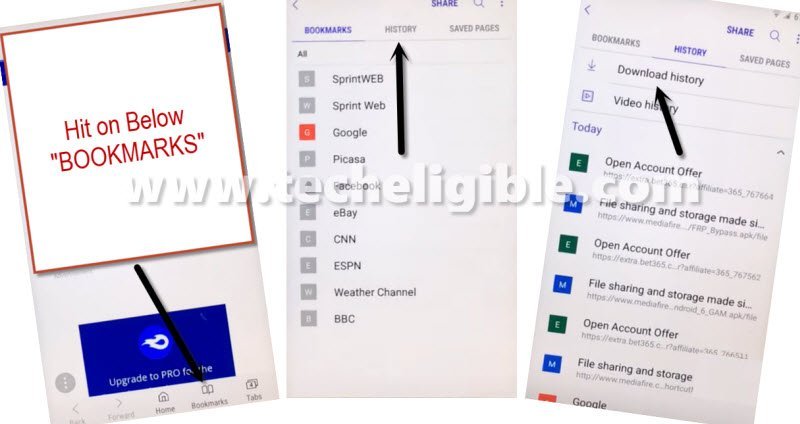
-There you will be able see the downloaded app “Apex Launcher 3.3.3“.
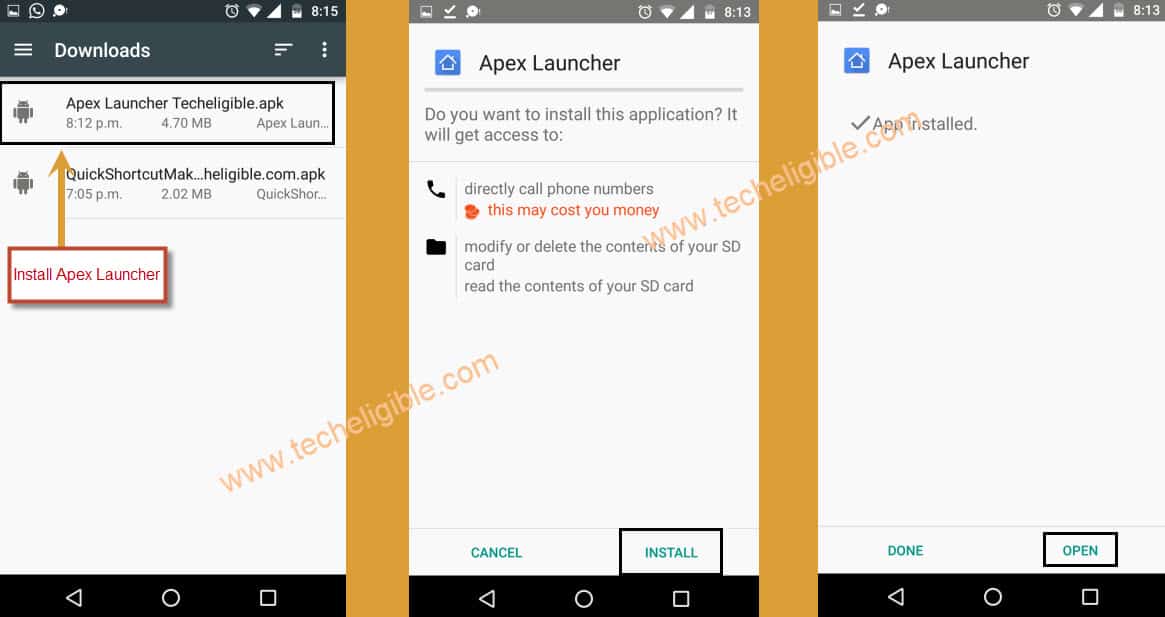
-Tap on “Apex Launcher” to install.
-You will see popup message, just tap on “Settings”.
-Enable the option of “Allow from this source”.
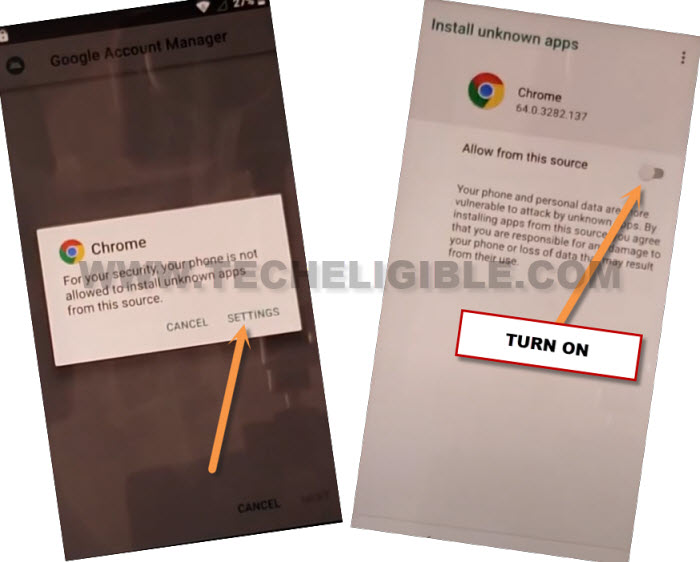
-Go back & tap on “Install”, after installation finish, just tap on “OPEN”.
-Boom, we have accessed to HOME SCREEN, but still we have to continue further frp bypass steps.
Download FRP Bypass Tools:
-Go to MENU.
-Open “Chrome Browser”.
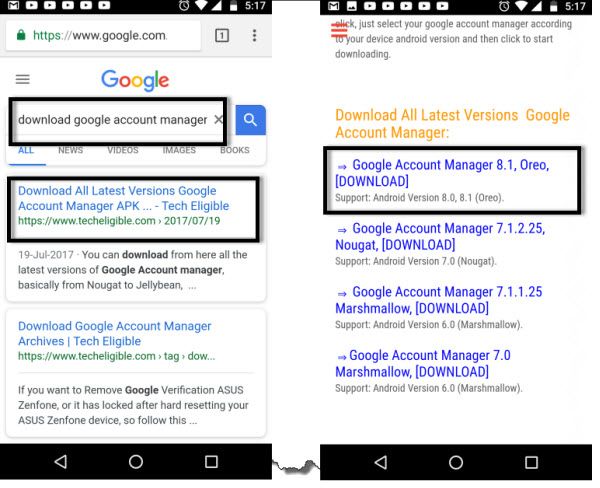
-Type in search box “Google Account Manager Techeligible” & Visit first search result of techeligible.com
-Download from there “Google Account Manager 8.1“.
-Wait until downloading finish.
-After that, you will get a popup window bottom of your screen, just tap on “OPEN” from there to access downloaded app.
-You will see “Chrome Popup”, just tap on “Settings”, and then enable the option of “Allow from this source”.
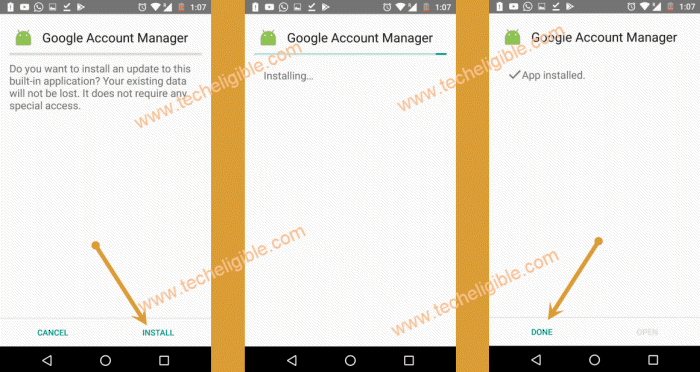
-Tap on “Back arrow” to go back & then tap on “Install”, once installation finish, just tap on “DONE”.
-Perfect, now we have successfully installed “Google Account Manager 8.1”.
-Open “Chrome Browser” again.
-Search in chrome browser “Techeligible“. Visit same searched result as mentioned in below screen shot.
-Tap to “Menu” option from upright corner of the site.
-Simply, go to “Other Free Tools” option from there. After that, tap to “Samsung FRP Tools”.
-Download from there “Account Login” apk app.
-After downloading finish, you will get popup window bottom of your browser, just tap on “OPEN”.
-Now Tap on “Account Login” app, then tap on “Install”, after installation done, just tap on “OPEN”.
-Now you will see a “Retype Password” screen, just tap on “3 dots” from top right corner & select “Browser Sign-in”.
-Enter your valid Gmail Account for FRP Bypass on Galaxy Android 9.
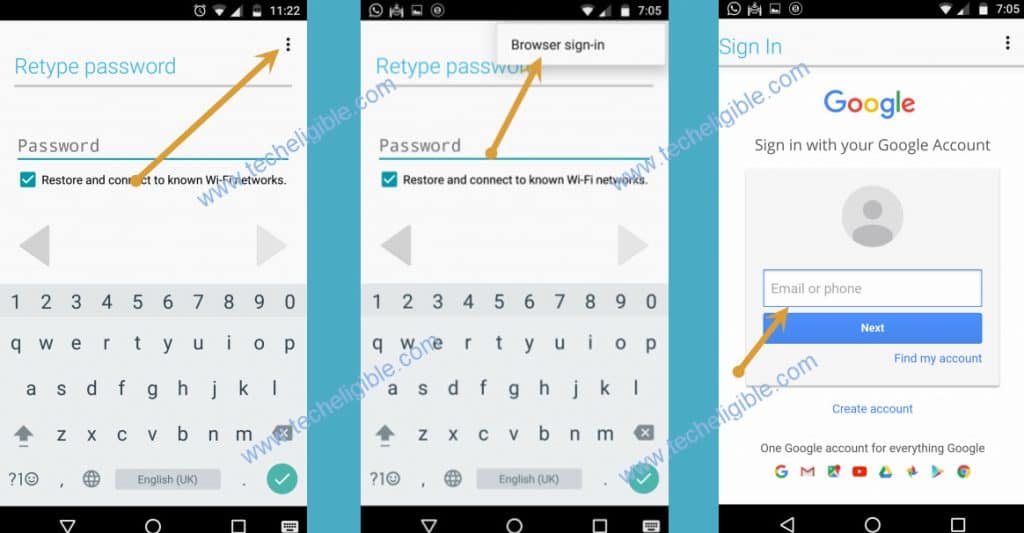
-Go back to device HOME SCREEN by tapping on back key multiple times.
-Go to > Settings > Clouds AND Accounts > Accounts.
-Boom, there you can see your successfully singed in Google Account.
-Restart your Galaxy Android 9 device & Complete initial setup.
Method 3: All Samsung Android 9 FRP Bypass (By Active Pin Locked SIM)
Before starting this method, you are required 1 sim card having pin locked code, you can setup 4 digits PIN lock code on your SIM with other phone easily, there is no rocket science.
-Lets begin step with Remove your SIM Card first.
-Turn on your frp locked phone & connect WiFi first.
-After that Go to the screen of “Verify your Account”.
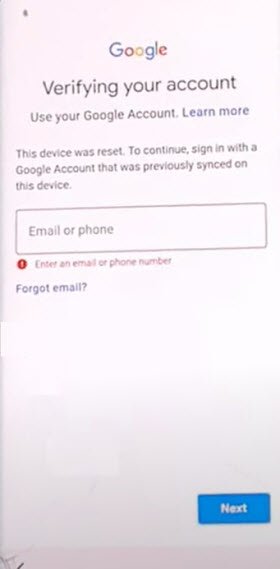
-Tap on “Back Arrow” 3 times, until you get back to the screen of “Check out some info to get Started”.
Follow 4 steps Very Quickly & Carefully:
-We are going to follow very important steps, do this very carefully and very quickly.
-While keep tapping on “Next”, just insert SIM Card back into the phone. (You have to do this at the same time, means while tapping on NEXT, you have to insert sim card, do this simultaneously).
-When you see message of “Enter sim card unlock pin”, just quickly remove your SIM card.
–Quickly tap on “OK” from “Check SIM/SD Card tray” popup window.
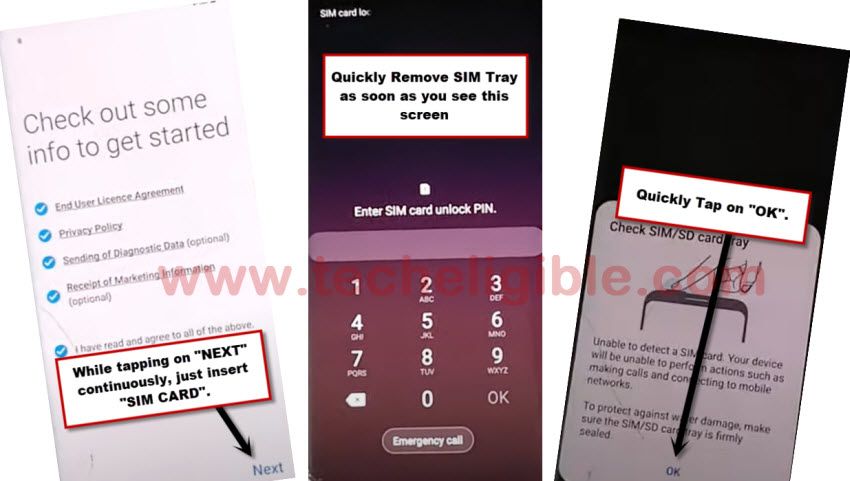
–Quickly tap on “Lock icon“.
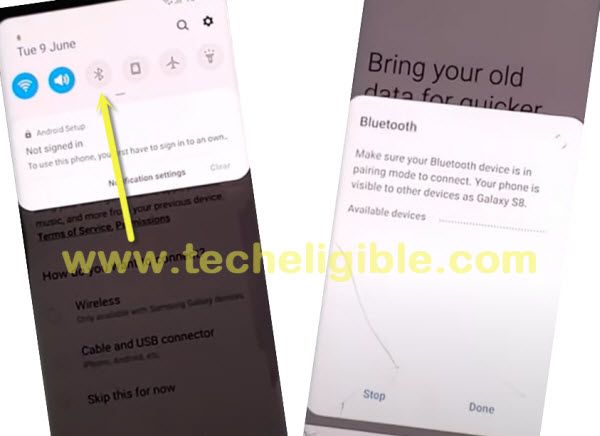
–Quickly start tapping 6-8 times on “Setting gear icon” from the top bar menu, but top bar menu will not respond you, don’t worry about that, what we want is just to get top bar menu here.
Note: You have to follow above all 4 steps very quickly, otherwise you won’t be able to get succeeded in frp bypass process.
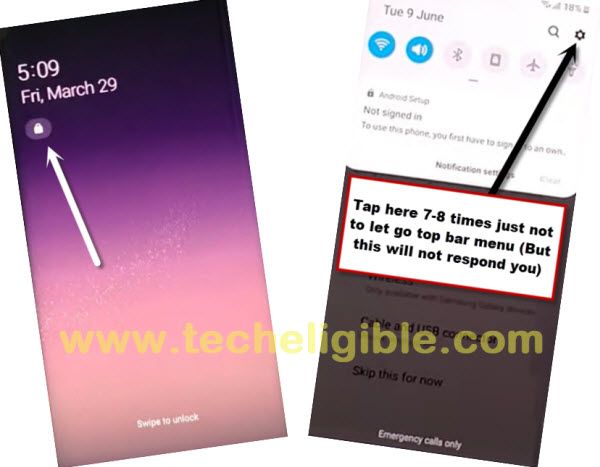
-Tap on “Bluetooth icon”.
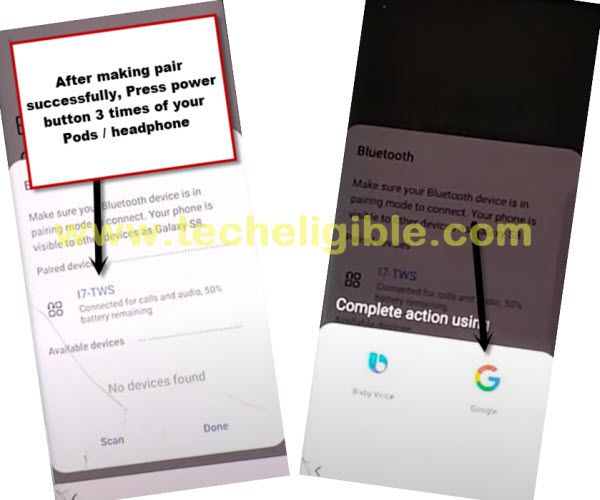
-Use your any newer generation (Bluetooth Pods / Bluetooth headphones) for making pair with.
-After making pair successfully, just press your Bluetooth pods/headphone power button 3 times quickly.
-By doing this, new popup window will appear, and then tap on “Google” icon from there.
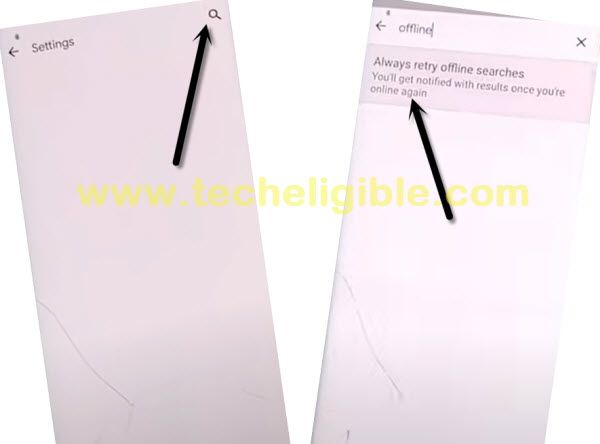
-From there, just go to > Notification > in-app notification settings.
-Tap on “search icon” from top right corner, and search there “Offline”. After that, hit on “Always retry offline searches”.
-Go down and tap on “Manage pending searches”, and hit on “No Thanks” from bottom popup window.
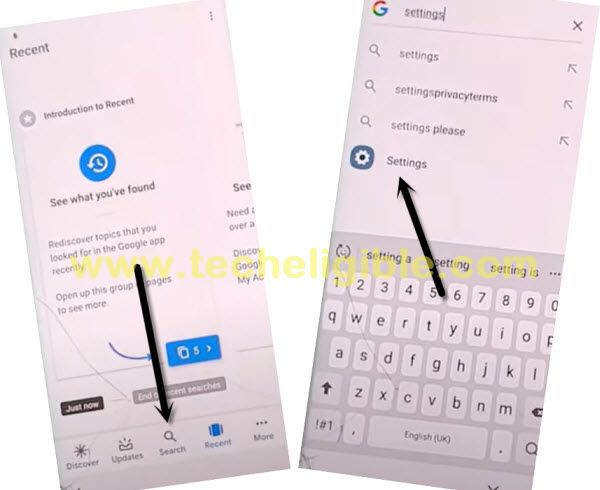
-Now tap on “search” from bottom bar.
-search “Settings”, and tap on “Setting gear icon” from searched result.
Set 4 digits Pin Lock:
-Go to > Biometrics and Security > Other Security Settings > Pin Windows > Turn it ON.
-Now we are required to setup pin lock to Remove FRP Galaxy Android 9.
-Let’s go to > Use screen lock type to unpin >Pin.
-Select option “Require pin when device power on”, and then hit on “Continue”.
-Set up pin code there “1234”.
-After setting up pin code 2nd time “1234”, just tap on “OK”.
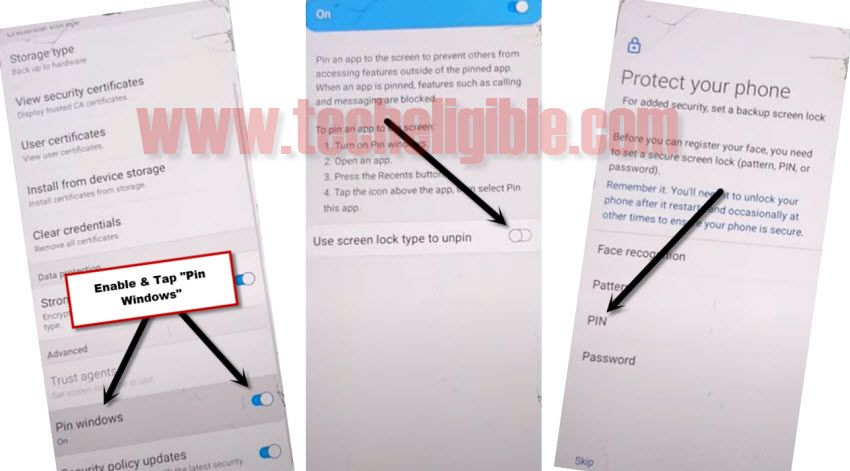
-Now get back to “Settings” by tapping on back arrow several times.
-To verify that, you have successfully set pin code or not, just hit on “Lock Screen”, and there you will be able to see “PIN” underneath (Screen Lock Type), so that means we have successfully set our 4 digits pin code, and we can restart our phone.
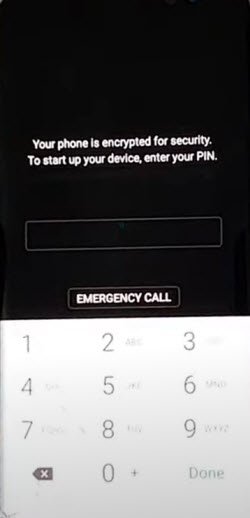
-Restart phone, and complete setup wizard, use your already setup pin code when you are asked to enter. connect Wi-Fi also while completing initial setup.
Method 4: Any Samsung Android 8 FRP Remove (By Hushsms App)
We will use free (HushSMS) application to send popup notification on our FRP Locked Samsung Android 8 device. You have to download this app on your any other android phone. Follow up steps here.
Install Hushsms Apk App on Other Android Device:
-To successfully bypass frp lock, you will have to download and install “Hushsms” app in your any other android device.
-You can use any other android device, such as your Mom, Dad, Bro, or sis mobile, but should be android one.
-We have to download frp bypass applications on our android device.
-Search in chrome browser “Techeligible“. Visit same searched result as mentioned in below screen shot.
-Tap to “Menu” option from upright corner of the site.
-Simply, go to “Other Free Tools” option from there. After that, tap to “Samsung FRP Tools”.
-Download from there “HushSms Apk” app in your other android device.
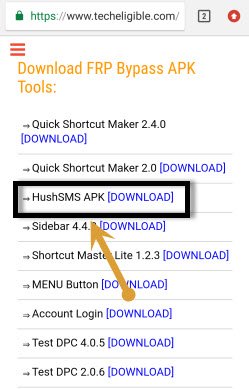
-Once downloading finish, just install hushsms apk app.
-After installation done, open Hushsms apk app in your other android device.
-Insert working SIM CARD on FRP locked Samsung phone.
-Turn on device, and connect “WiFi”.
-Now tap on “WAP PUSH SL”.
-Type Samsung Galaxy device SIM Card Number in first search box.
-Type “www.youtube.com” in 2nd search box.
-Tap on “SEND WAP PUSH SL” button to send popup message in your frp lock Samsung Galaxy device to Bypass Google Account Galaxy Android 8, 7 (See Below image).
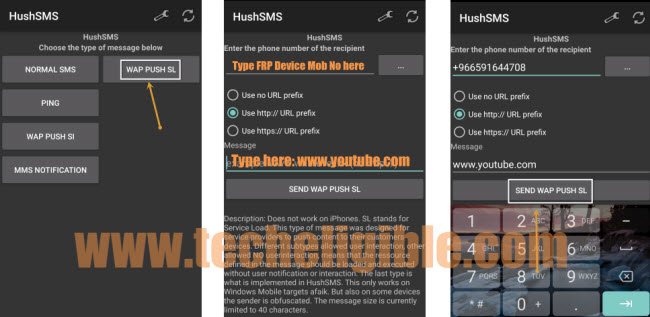
-Wait few second, after that you will see a popup message on your Samsung Galaxy device.
-Once see popup message, just tap on “OK”.
-You will be redirected to the youtube.com official website.
-Once you accessed successfully to youtube.com official webpage. From there, drag down the youtube video. After that, tap over the “3 dots” from top right corner & select “Terms & Privacy Policy”.
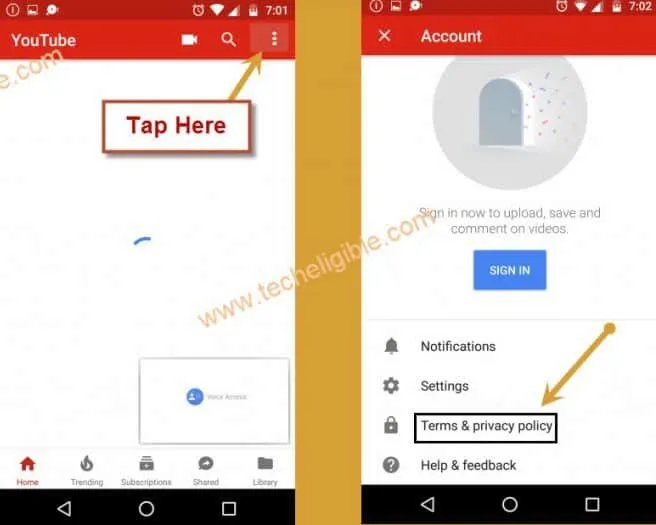
-After that, you will see “Welcome to Chrome” screen.
-Tap on “Accept & Continue > Next > No Thanks.
Download & Install Google Account Manager:
-Type in search bar “Download Google Account Manager Techeligible“.
-Visit 1st search result
-Download from there “Google Account Manager” according to your android version.
-Wait until downloading finish, you get a popup bottom of your screen, from that popup, just tap on “OPEN”.
-After that, yo will see another “Chrome Popup Window”, just tap on “Settings”.
-Enable the option of “Allow from this sources”, now you will be able to install google account manager to Bypass Google Account Galaxy Android 8.
-Tap on “Back Key”, and then install “Google Account Manager” in your Samsung Galaxy device.
-Once installation finish, just tap on “Done”.
Download & Install Account Login:
-Go back to “Chrome Browser”.
-Search in chrome browser “Techeligible“. Visit same searched result as mentioned in below screen shot.
-Tap to “Menu” option from upright corner of the site.
-Simply, go to “Other Free Tools” option from there. After that, tap to “Samsung FRP Tools”.
-Go down & download from there “Account Login” apk app.
-Once installation finish, you will get “Open” option bottom of your browser, just tap on that.
-Install & Open “Account Login” app.
-Tap on “3 dots” from top right corner & select “Browser Sign in”.
-Sign in there with your any Valid Gmail ID to Bypass Google Account Galaxy Android 8.
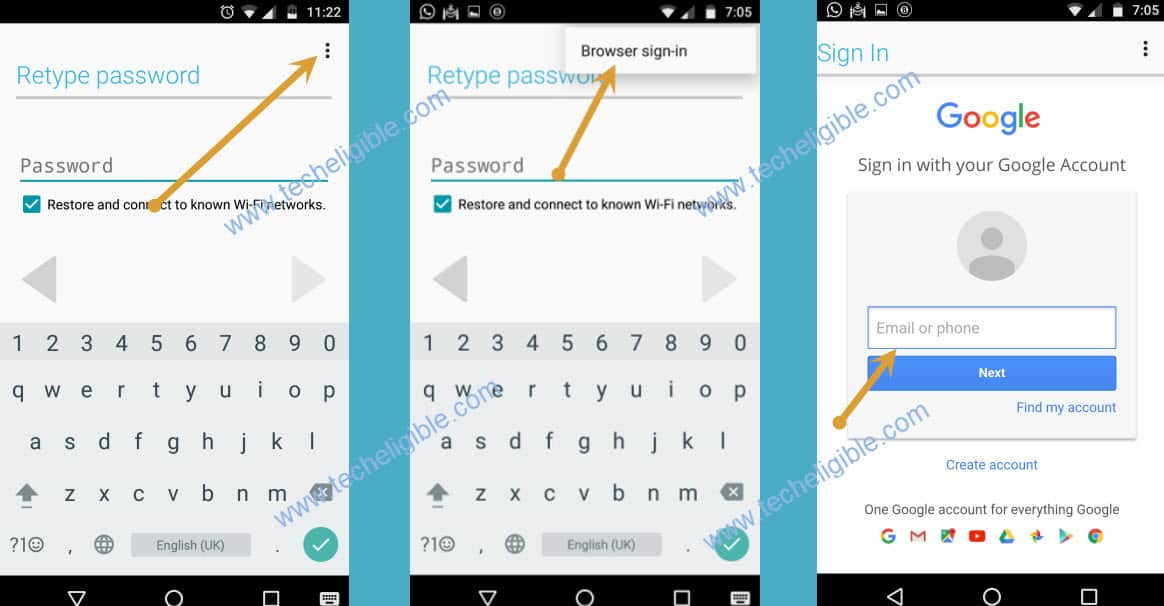
-Restart Samsung Galaxy device by long press “Power Key”, and select “Restart” option.
Method 5: Delete FRP All Galaxy Android 8 By Pin Locked SIM Card
Good news for all of you, if your device is Samsung Galaxy and Android version 8, then this method is for your device, this is one of best and latest method for FRP Bypass 2019 All Samsung Galaxy, you don’t need anything in this method except wifi connection, no need PC & Flashing device with firmware, just follow our this method and bypass google account all Samsung galaxy android 8.
Continue Steps Here:
-Remove SIM card, if your device has.
-Connect WiFi connection first to your device.
-Go back to very first “Welcome or Start” screen.
-Insert SIM Card.
-After inserting SIM card, you will see screen of “Enter SIM Card Unlock Pin”.
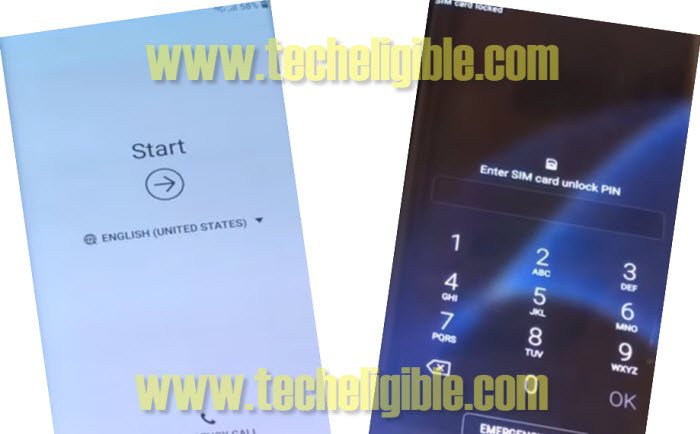
-Now Remove SIM Tray.
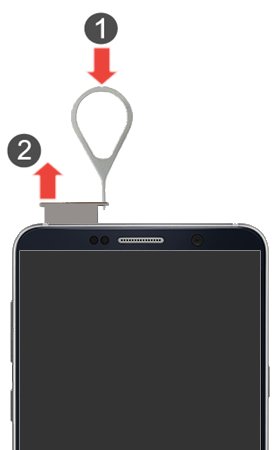
-Press “Power Key” immediately after you see message of “CHECK SIM/SD card Tray”.
Note: You have to press power key as soon as you receive popup window of “CHECK SIM/SD card Tray”, and this message will appear only after you remove SIM Tray.
-Now you will have only black lock screen.
-Insert Blank “SIM Tray” without sim card.
-Just press “Power Key” again, after that you will see popup message of “Not Signed in” same as shown in below image.
-Swipe that message to right, and then tap on “Notification icon”.
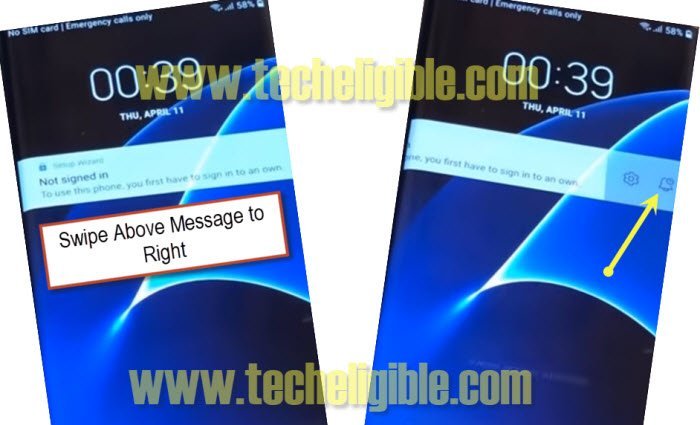
-Tap on “Notification Settings”.
-Now Go down and then tap on > Youtube > More Settings in App > About > Google Privacy Policy.
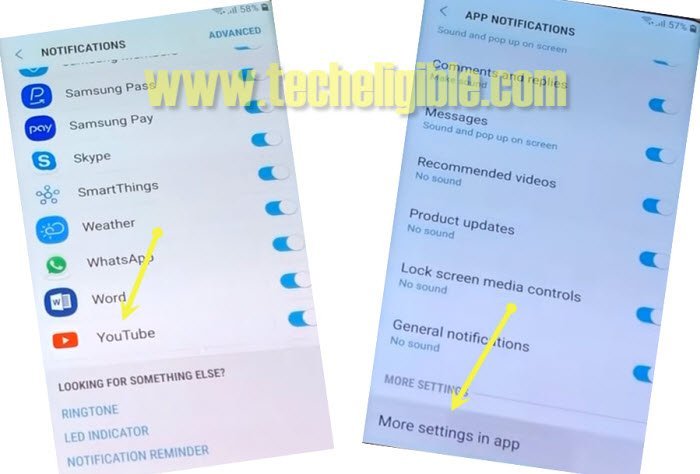
Note: If you see popup message of “Update SAMSUNG Internet”, just tap on “CANCEL”.
Download Samsung Android 8 FRP Bypass Tools:
-Type in address bar “Download Top Samsung FRP Tools“.
-Visit search result that belong to “techeligible.com”, see below image.
-Download from there 2 below applications.
1st: Account Login.
2nd: Google Account Manager 8.
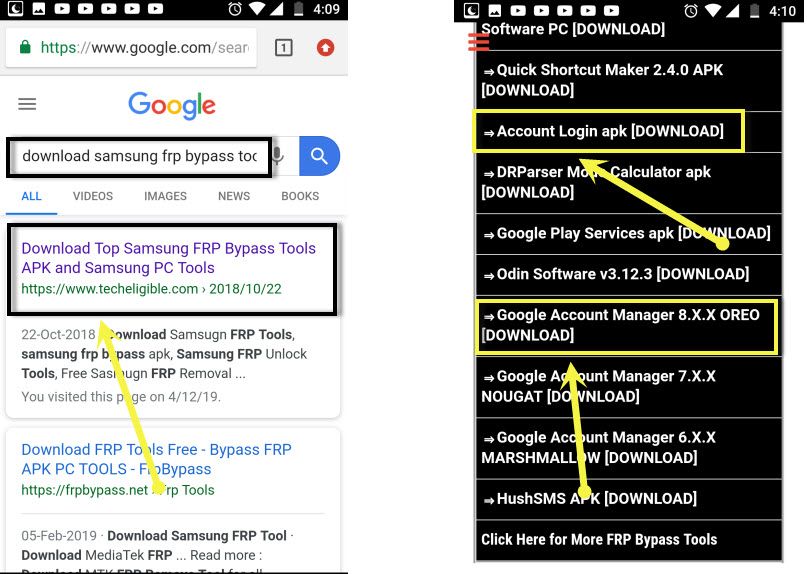
-Wait until downloading finish.
-After that, tap on “Bookmarks” from your internet browser.
-If you see popup window of “Samsung Sign in”, just tap on “Cancel”.
-After that, tap on “History”, and then tap on “Download History”.
-There you can see both downloaded applications. We’re gonna install both apps to remove frp Samsung Android 8.
Install the Downloaded Samsung Android 8 Tools:
-Tap on “Google Account Manager 8”.
-Wait few seconds until you receive “Samsung Internet” popup window.
-Tap on “Settings”, and then enable the option of “Allow from this source”.
-Now tap on “Back key”.
-Tap on > Next > Next >Install > Done.
-Congrats, we have installed google account manager successfully.
-Tap on “Account Login” app to install it.
-Tap to > Install > Open.
-Now you will “Retype Password” screen, simply tap on “3 dots” from top right corner & select “Browser Sign-in”.
-Sign in there with your any valid Gmail account to bypass google account on Samsung Android 8. Once signing-in process is completed, simply, restart your device.
Method 6: All Samsung Phone Running on Android 7 FRP Bypass (Without PC By Talkback)
Bypass the FRP lock from Samsung Galaxy Android 7 smartphone without using any PC. You don’t need to enable ADB Mode anymore, or flashing your device with Odin tool. We will use a free Apex Launcher on our FRP locked Samsung Android 7 device to login with another Gmail account.
Let’s Start FRP Steps Here:
-Connect WiFi first and go back on “Welcome Screen” from your Samsung phone.
-Press “Home Button” 3 times quickly to enable “Talkback Feature”.
-If your device does not have “Home Button”, then long tap with your two fingers on “Welcome Screen” until talkback feature enable.
-Once talkback feature enabled, you will get a screen of “Talkback Tutorial”.
-Draw “L” on your screen or Swipe down to right to bring “Global Context Menu”.
-Double tap on “Talkback Settings”.
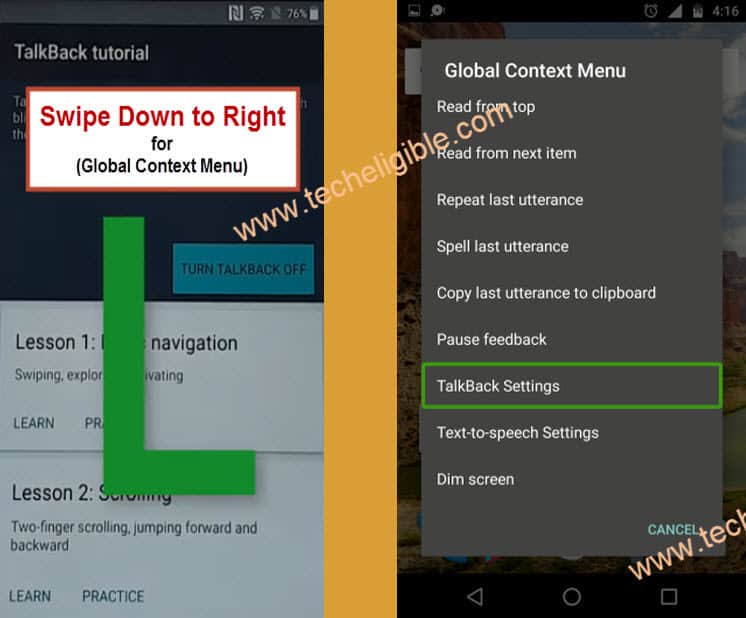
-Now our Talkback work has finished, we need to disable talkback feature.
-Press “Home Button” 3 times to disable talkback feature.
-If your device does not have “Home Button” then press and hold both (Volume UP + Down) keys together to disable talkback.
-Go to “Help & Feedback > Get Started With Voice Access > Tap on Youtube Video.
-Tap on youtube video top right corner “Clock icon”.
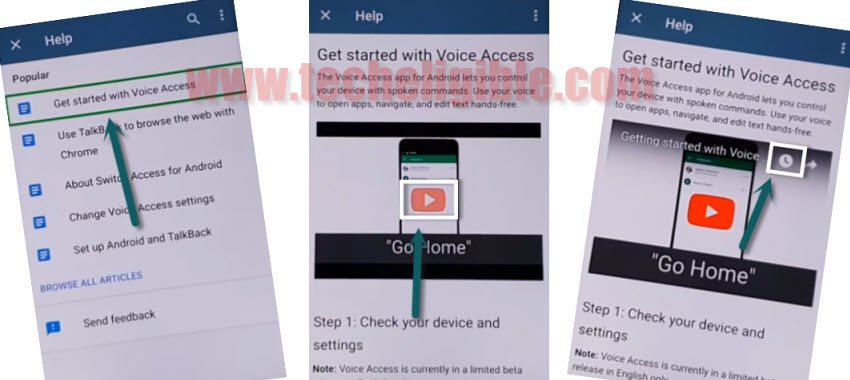
-You will be redirected to the “Google”.
Download & Install Sasmung Android 8 FRP Tools:
-We have to download frp bypass applications on our android device.
-Search in chrome browser “Techeligible“. Visit same searched result as mentioned in below screen shot.
-Tap to “Menu” option from upright corner of the site.
-Simply, go to “Other Free Tools” option from there. After that, tap to “Samsung FRP Tools”.
-Download from there “Apex Launcher 3.3.3” and also download “Google Play Services” app.
-Wait until downloading finish.
-Now go to download folder by tapping on > Bookmarks > History > Download History.
-Tap on “Appex Launcher 3.3.3”, and then you will get “Installation Blocked” popup on your screen.
-Tap on “Settings” and then enable “Unknown Sources” from there.
-Now install & open “Appex Launcher.
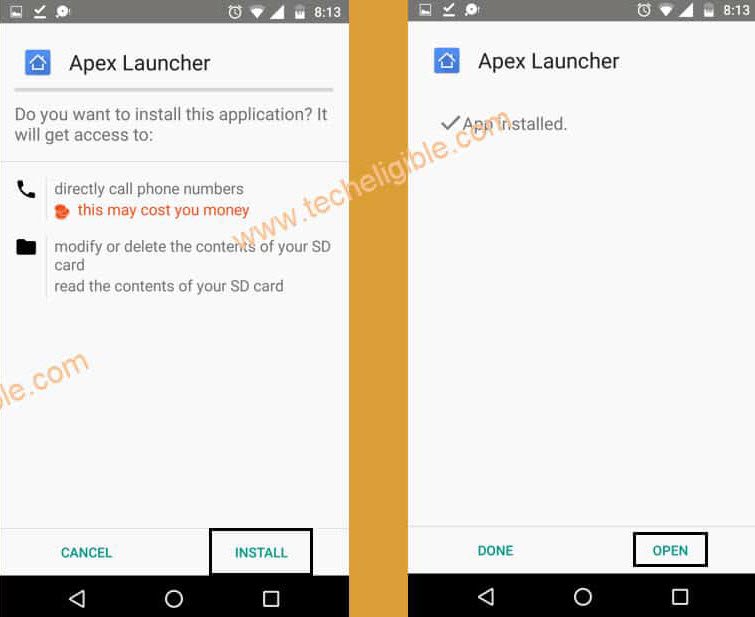
-Congrats, now you have successfully accessed to your Samsung Galaxy home screen.
Disable Some Applications:
-Go to > Settings > Lock Screen and Security > Other Security Settings > Device Administrators > Find My Device > Deactivate.
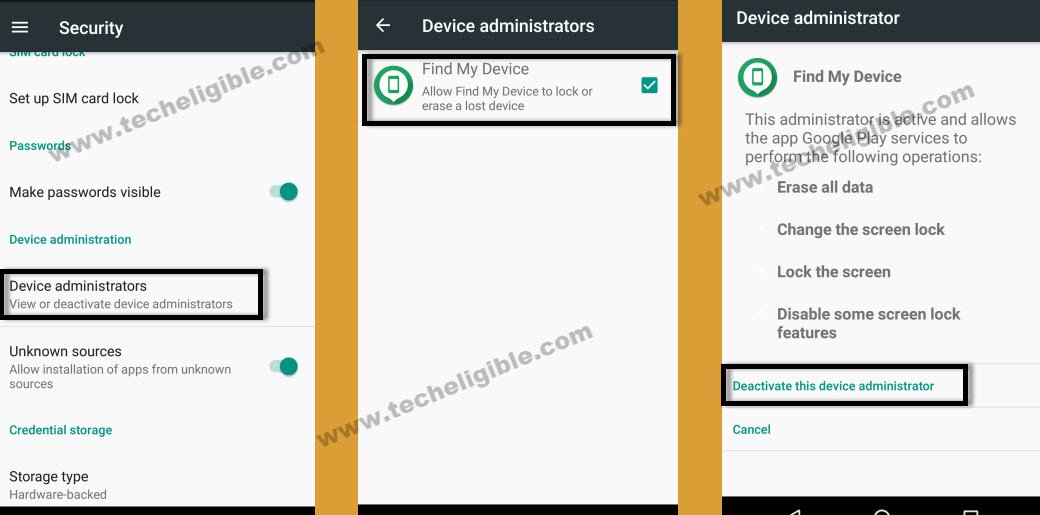
-Go back to “Settings”, and then go to “Apps”, after that, tap on “3 dots” from top right corner, and then select “Show Systems Apps”.
-Now from “Apps”, we need to disable some applications.
-Go to > Google Account Manager > Storage > Clear Cache > Delete >“.
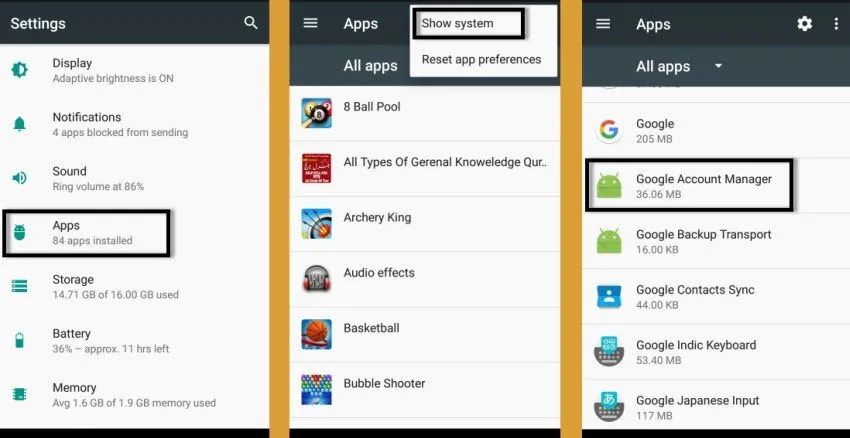
-After that, tap on “Disable” button to disable google account manager.
-Go back to “Apps”.
-Go to > Google Play Services > Storage > Clear Cache > Manage Storage > Clear All Data > OK.
-Tap on “Back Key”, and then tap on “Disable” to disable google play services.
-Now you have successfully disabled “Google Account Manager” and “Google Play Services”.
-Go back to “Home Screen”.
-Now go to “Download” folder to install “Google Play Services” app.
Add Valid Gmail ID:
-Go to Settings > Security > Cloud & Accounts > Add Account > Google.
-Login with your gmail account.
-Now we need to “Enable” the apps those we disabled recently.
-Go to > Settings > Apps >, now tap on “3 Dots” from top right corner, and then select “Show System”.
-Now search “Google Play Services”, and then “Enable” that app.
-Go back to “Settings”.
-From settings, go to > Lock Scree & Security > Other Security Settings > Device Administrators > Find My Device > Activate.
-Now again go back to “Settings”, after that, tap on “Connection”, and then turn off “Location” from there.
-Congrats, now you have succeeded in this method to Bypass google account verification on Samsung Galaxy Android 7.
-Restart Samsung Galaxy device.
-Now Complete initial setup to access your Samsung Galaxy device home screen.
Method 7: Bypass FRP All Galaxy Android 7 By PC Tool [Free]
-Firstly, we need to enable “Talkback Feature” on a frp locked Samsung Android 7.
-Press “Home Button” 3 times to enable talkback feature.
-If your device does not have “Home Button”, then long tap with your two fingers on screen until talkback enable.
-Once “Talkback Feature” enable, you will see “Talkback Tutorial” screen.
-Double tap on “Talkback Settings”.
-Press “Home Button” key 3 times to disable talkback feature or press & hold (Volume UP + Down) keys together.
-Now go to “Help & Feedback” option.
-After that go to “Get Started with Voice Access”.
-Tap on youtube video “Play icon”, after that tap on “Clock icon”.
-You will be redirected to “Google”, you will be able to see “Google Search Bar” there.
Download & Install Dparser Mode Calculator:
-We have to download frp bypass applications on our android device.
-Search in chrome browser “Techeligible“. Visit same searched result as mentioned in below screen shot.
-Tap to “Menu” option from upright corner of the site.
-Simply, go to “Other Free Tools” option from there. After that, tap to “Samsung FRP Tools”.
-Download from there “Dparser Mode Calculator“.
-Once downloading finish, tap on “Bookmarks > History > Download History”.
-Tap on “Samsung Dparser Mode” apk app to install it.
-You will see a popup error of “Installation Blocked”, just tap on “Settings”.
-Enable “Unknown Sources” from there.
-Now install & open apk app.
-You will see “Calculator” on your screen.
-Long tap on “Code” and copy that code”.
-After that, tap on “LAUNCH CALCULATOR”.
-Calculator will be launched, now past copied code there.
-Remove “+” sign and then add again “+” sign.
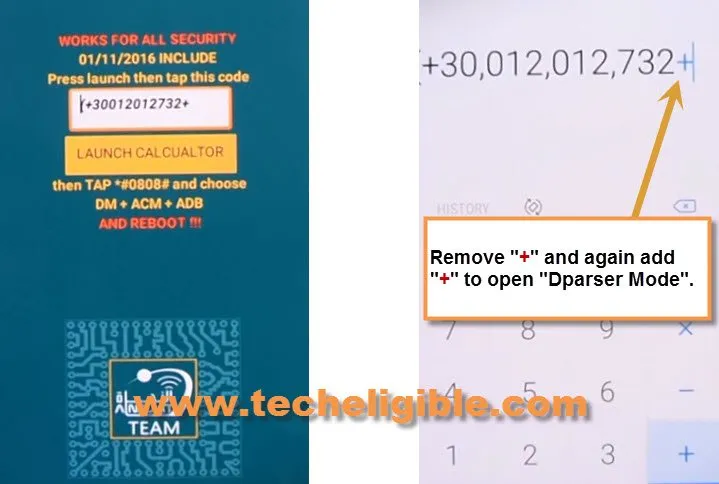
-You will be redirected to the “DRParser Mode”.
-Type code there “*#0808#“.
-Select option “DM + ACM + ADB”, and then tap on “REBOOT”.
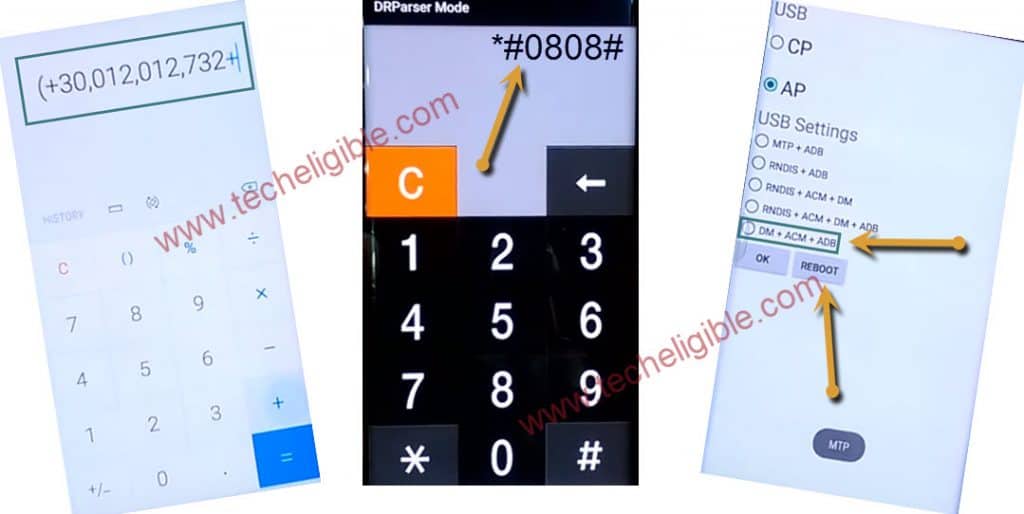
-Go to your “Computer Browser”.
-Search in chrome browser “Techeligible“. Visit same searched result as mentioned in below screen shot.
-Tap to “Menu” option from upright corner of the site.
-Simply, go to “Other Free Tools” option from there. After that, tap to “Samsung FRP Tools”.
-Download from there “Samsung FRP Helper V0.2” as well as “SAMSUNG USB Driver“.
-Once downloading finish, install “Samsung USB Driver”.
-Turn off “Antivirus” Software.
-Extract and open “Samsung FRP Helper” to Bypass FRP Samsung Android 7.
Connect Samsung Galaxy to Computer:
-Make sure device is turned on.
-Connect device to computer by micro USB Cable.
-Now you will get popup on your device screen of “Allow USB Debugging” just tap on “OK”.
-Click on “SCAN”, and select correct “COM Port” of your device.
Note: COM Port you can verify by going to your device manager.
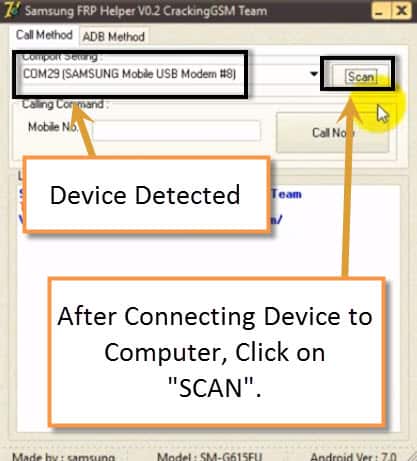
-Click on “ADB Method”, and then click on “REMOVE FRP” button.
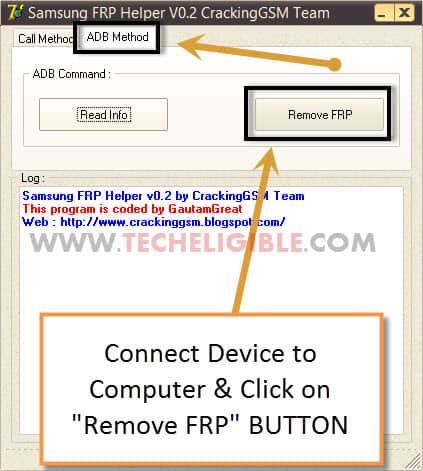
-Wait until frp unlocking process finish.
-After that restart your device, and complete initial setup.
FAQs About All Samsung Phone Running on Android 9/8/7
Why do i need to use in-active SIM card for bypass frp on Samsung Android 9?
This is the part of the frp bypass process, we will deliberately enter wrong PUK code 10 times to get lock screen. After that, we will be able to continue further frp bypass steps.
How to Disable FRP lock protection on Samsung android phones?
You have to go to main (Settings) screen of the device, from there, tap to > Accounts & Backup > Google Add account. Remove your all already synced Gmail account to disable FRP lock protection.
How do i prevent facing FRP lock screen when i need to perform factory reset on my Samsung android device?
You must know your logged in Gmail account or remove your already signed-in account from Samsung Android 9/8/7 versions devices.
Using PC FRP Unlocking tools are safe for bypass frp on Samsung FRP Locked phones?
Yeah, you can use PC frp unlocker tools to remove frp from Samsung android devices safely.
The Bottom Line
Bypassing frp account is not impossible, you can do that with the right selection of your FRP removal guide from here. If you have Samsung android 9 version device with FRP lock protection, then, there are 3 guides available. We used PIN locked SIM card and (Samsung FRP Calling) tool to bypass the frp easily. If you have Samsung android 8 or 7 version devices, for these version phones, we used (Hushsms Apk) app and PC Frp unlocking tool.